I'm much more interested in actual benchmarks. AMD has mostly capped their APU performance because DDR4 just can't keep the GPU fed (why the last 2 generations of consoles went with very wide GDDR5/6). Their solution is obviously Infinity Cache where they add a bunch of cache on-die to reduce the need to go off-chip. At just 16B transistors, Apple obviously didn't do this (at 6 transistors per SRAM cell, there's around 3.2B transistors in just 64MB of cache).
For reference: https://en.m.wikipedia.org/wiki/Transistor_count lists all the largest cpu as of 2019 amd's epyc Rome at 39.54 billion MOSFETs, so even if you replaced the entire chip with Sram you wouldn't even quite reach 1GB!
Dram would be enticing, but the details matter.
DRAM is denser, but difficult to build on the same process as logic.
That said, with chiplets and package integration becoming more common, who knows... One die of DRAM as large cache combined with a logic die may start to make more sense. It's certainly something people have tried before, it just didn't really catch on.
What makes it so difficult to have on the same chip?
so ram is your 1gb cache
Would you mind elaborating a bit? I'm not following how this would significantly close the gap between SRAM and DRAM at 1GB. Since an SRAM cell itself is generally faster than a DRAM cell, and I understand that circuitry beyond an SRAM cell itself is far simpler than DRAM. Am I missing something?
So what's the problem? Well, your desk is the fastest place you can get books from but you clearly can't make your desk the size of the entire library, as that would defeat the purpose. You also can't move all of the books to the innermost ring of shelves, since they won't fit. The closer you are to the central atrium, the smaller the bookshelves. Conversely, the farther away, the larger the bookshelves.
Circuits don't follow this ideal model of concentric rings, but I think it's a nice rough approximation for what's happening here. It's a problem of geometry, not a problem of physics, and so the limitation is even more fundamental than the laws of physics. You could improve things by going to 3 dimensions, but then you would have to think about how to navigate a spherical library, and so the analogy gets stretched a bit.
Look at a Zen-based EPYC core- 32KB of L1 with 4 cycle latency, 512KB of L2 with 12 cycle latency, 8MB of L3 with 37 cycle latency.
L1 to L2 is 3x slower for 8x more memory, L2 to L3 is 3x slower for 16x more memory.
You can reach 9x more area in 3x more cycles, so you can see how the cache scaling is basically quadratic (there's a lot more execution machinery competing for area with L1/L2, so it's not exact).
We regularly use chips with an L3 latency around 10 nanoseconds, going distances of about 1.5 centimeters. You can only blame a small fraction of a nanosecond on the propagation delays there. And let's say we wanted to expand sideways, with only a 1 or 2 nanosecond budget for propagation delays. With a relatively pessimistic assumption of signals going half the speed of light, that's a diameter of 15cm or 30cm to fit our SRAM into. That's enormous.
when i started with computers, they had a few KB of L2 cache, L3 did not exist. Main Memory was a few MB.
[1] https://www.anandtech.com/show/16226/apple-silicon-m1-a14-de...
Until you use some concept so frequently you need to label it to compress information for discussion purposes, you often don't have names for them. Chances are if you solve or attempt to solve a wide variety problems, you'll see patterns and processes that overlap.
It’s often valuable to use jargon from another discipline in discussions. It sort of kicks discussions out of ruts. Many different disciplines use different terminology for similar basic principles. How those other disciplines extend these principles may lead to entirely different approaches and major (orders of magnitude) improvements. I’ve done it myself a few times.
On another note, the issue of “jargon” as an impediment to communication has led the US Military culture to develop the idea of “terms of art”. The areas of responsibility of a senior officer are so broad that they enter into practically every professional discipline. The officer has to know when they hear an unfamiliar term that they are being thrown off by terminology rather than lack of understanding. Hence the phrase “terms of art”. It flags everyone that this is the way these other professionals describe this, so don’t get thrown or feel dumb.
No one expects the officer to use (although they could) a “term of art”, but rather to understand and address the underlying principle.
It’s also a way to grease the skids of discussion ahead of time. “No, General, we won’t think you’re dumb if you don’t use the jargon, but what do you think of the underlying idea...”
Might be a good phrase to use in other professional cultures. In particular in IT, because of the recursion of the phrase “term of art” being itself be a term of art until it’s generally accepted. GNU and all that...
Fascinating. Would you happen to have any example off the top of your head?
My favorite is the idea of "let's expand functions over a set of Gaussians". That is variously known as a Gabor wavelet frame, a coherent state basis [sic], an Gaussian wave packet expansion, and no doubt some others I haven't found. Worse still, the people who use each term don't know about any of the work down by people who use the other terms.
I took me a solid half hour to at last understand this pie-thingy was Python... in my head I had always pronounced it the French way. Somewhat like "pee-ton", I don't know how to transcribe that "on" nasal sound... (googling "python prononciation en francais" should yield a soundtrack for the curious non-French speakers).
it shouldn't be, it should be a badge of honor of some sorts - it points to somebody reading to expand their knowledge that is not available in oral form around them, so kudos to them !
I hope my reply didn’t come out as gatekeeping, it was genuinely just to help put a name to a thing.
I think what you are trying to refer to is frequency binning.
For example, AMD sells 12 and 16 core CPUs. The 12 core parts have 2 cores lasered out due to defects. If a particular node is low-yield, then it's not super uncommon to double-up on some parts of the chip and use either the non-defective or best performing one. You'll expect to see a combination of lasering and binning to adjust yields higher.
That said, TSMC N5 has a very good defect rate according to their slides on the subject[0]
[0] https://www.anandtech.com/show/16028/better-yield-on-5nm-tha...
https://www.apple.com/mac/compare/
I assume the addition of a fan on the Pro gives it better performance under load, but there doesn't seem to be a hugely compelling reason to not just get the Air.
It's possible to set the default touch bar display to only ever show the expanded control strip (System Preferences > Keyboard > Keyboard > Touch Bar shows: Expanded Control Strip). In that mode you tap volume up and down instead of using a volume slider.
Again, I know you're looking for physical keys (aren't we all) but it's better than nothing.
I've been using the MacBook Pro 16 (with a physical esc key plus a touch bar) and I think it's a pretty good compromise between me who wants physical keys and apple who wants to push the touch bar.
The other thing that kept happening to me: I would accidentally tap the brightness button when reaching for ESC. For that, you can "Customize Control Strip..." and remove individual buttons, so that there's a big gap on the touch bar near the ESC key so that stray taps near ESC don't change the brightness.
It's often unused, yes, but when I fire up Rider for my day job it automatically flicks to the row of function keys and back depending on which app has focus and it fits quite nicely for me between work and entertainment (I like having the video progress bar if I'm watching something on the laptop). Maybe I'm just strange but the non-tactile function keys didn't really bother me much either.
In any case, I could live without it, which is probably not a roaring endorsement in any case, but I'd rather have it than not.
There's a lot of things to complain about with Apple products, but if you ask me there's been enough touch bar bashing by now and people should just get over it. It's pretty useful in some situations, and IMO no real downsides, especially now that the esc key is a real physical key again. Why all the hate?
Adding an extra row of physical keys that do the same thing as the row of virtual function keys, at the expense of trackpad size and possibly ergonomic (harder to reach the touch bar) doesn't make a lot of sense IMO.
The touchbar is the second worst thing Apple has ever done in the history of the Mac, following closely on that abomination of a “keyboard” they used from 2016-2019.
I’ve opted to buy a 2015 Mac Book Pro this year, it might be easier to get over apple than the touch bar even...
I've been holding out on upgrading my 2013 MBP (mostly out of frugality) to a newer version, mostly due to the butterfly keys and the TouchBar.
I will not remove that safety key until they make the touch bar pressure sensitive so that "buttons" on it only activate with a similar amount of force that was required to activate the tactile buttons they replaced. Until then, I consider it a failed design improvement.
I've also found the touchbar pretty useful in zoom calls, because my zoom client shows keys for common actions.
All in all, I think a physical escape key plus the touchbar is a slight win. I would not pay more for it, but I have reversed my previous opinion that I'd pay more not to have it.
I suspect these new machines are going to be quite nice, although I won't buy one for a while since I purchased a mbp a few months ago.
https://community.folivora.ai/t/goldenchaos-btt-the-complete...
Fully customizable while being much better for muscle memory by giving you exactly what you want where you want it, gives you icon-shortcuts to script, and still allows you to have as much dynamic functionality / information as you like. So, for example, mine looks roughly like this:
- Fullscreen
- Bck/[play|pause]/Fwd
- CURRENTLY_PLAYING_SONG
- AirDrop
- ConfigMenu
- Emoticons
- (Un)Caffeinate
- (Dis)connectBluetoothHeadphones
- (Dis)connectMicrophone
- (Un)muteVol
- VolDown
- VolUp
- ScreenDim
- ScreenBright
- Date
- Time
- Weather
- Battery%
CURRENTLY_PLAYING_SONG playing shows the album cover, song name, and artist, but only shows up if there IS something playing. Same with AirDrop, which shows up only if there's something that I could AirDrop to, and then gives me a set of options of who to AirDrop to. The Emoticon menu opens an emoticon submenu on the TouchBar with most-recently-used first.
That all fits fine into the main touchbar, with other dynamic touchbars available modally (ie, holding CMD shows touchable icons of all the stuff in my Dock (my Dock is entirely turned off)), CTRL shows LOCK AIRPLAY DO_NOT_DISTURB FLUX KEYBOARD_DIM/BRIGHT, etc. ALT shows me various window snap locations.
Edit: BetterTouchTool also replaced a bunch of other tools for me. Gives you the same kind of tools for scripting eg Keyboard macros, Mouse macros, remote-control via iPhone/Watch etc with a lot of reasonable defaults.
The people who complain about the touchbar functionality must not be putting any effort at all into it. I customize so many other things on my system, regardless of the OS. Why would a new hardware feature be any different?
I didn't know about this GoldenChaos thing though, thanks for that.
I would say that people who complain about uselessness of F-keys must not have put any at all effort into using them.
Upon getting my MBP 2016, I spent numerous months trying to make the TouchBar useful; from customizing the contents where apps allowed it, to BTT.
What it came down to is that things worthy a keyboard shortcut are things I want to be able to do fast, reliably, and instinctively. I don't want to search for the button on the TouchBar – I'm using the keyboard, it needs to be as natural as typing, without the need to look down at it. I have a screen already, I don't need another one on my keyboard.
I firmly believe TouchBar can't even come close to the same realm of usefulness as F-keys, much less being worth the price hike it imposes. Function keys are twelve, tactile, solid, free, reliable(1) buttons for keyboard shortcuts; TouchBar is a touchscreen that sometimes(2) works.
> a button to "toggle mic in zoom" actually solves a real problem
I haven't used Zoom, but if it's a decent-ish Mac app, it either already has a keyboard shortcut to toggle microphone, or you can set one in Keyboard Shortcuts, in System Preferences.
(1) as far as anything is reliable on the butterfly keyboards.
(2) same story as butterfly keyboard – if it's even slightly sporadic, it is a shitty input device.
In exchange, I get to add other buttons which can also display customizable state. Yes, zoom has a global shortcut to toggle the mic. The problem is, the mic state is not visible on your screen unless the zoom window is visible. This is a frustrating design flaw IMO, which really should be addressed in some consistent way across every phone/video app. But, it's not, and so I need to pay attention to my mic state. My touchbar button toggles the mic, and displays the current mic status. I would imagine that every phone/video chat app is similar.
I use this app alongside BTT; it attempts to supplement haptic feedback via the trackpad haptics. It's no where near as good as a real haptic solution would be but does provide some tactile feedback when pressing buttons https://www.haptictouchbar.com/
I would assume that macOS sends at least some basic usage data for the touch bar back to Apple HQ. I wonder how often it is actually used... and I would love the hear the responsible product manager defend it.
I continue to be disappointed about the lack of haptics though. It's such a strange thing to not have when they've proven to know how to make very convincing haptic feedback. It works very well in both the Apple Watch and the MacBook's trackpad.
I love it.
Also I think every device which makes sound should have a physical mute control. The worst is when I want to mute, and the touchbar freezes, and I have to go turn the volume down with the mouse.
The main exception being things like controlling a progress bar (mouse works fine for me, though it's a neat demo), or changing system brightness/volume with a flick or drag (which is the one thing I find truly better... but I'd happily trade it back for a fn toggle and F keys). But that's so rarely useful.
I just hated the lack of ESC key (which they brought back, though my Mac is older). I have no muscle memory for any other key in that row.
I'd probably pay a little extra to get one on future non-Mac laptops, but not too much extra.
With the physical media keys, if they want to mute, it's always the same button. Pause music, always the same button. They're great in a way that the touchbar completely destroys.
(and yes, I know you can change this setting, but if we're assuming non-techy-users we also generally have to assume default settings.)
I'm sure someone somewhere finds it amazing, but I have no time for it.
To me it's no different than volume controls in a car. I've been in a cadillac with a touchbar for volume, and a new ram truck with a volume knob - there's absolutely no room for debate in my opinion. One of these allows me to instantly change the volume 100% up or down without taking my eyes off the road. The other requires hoping I get my finger in just the right spot from muscle memory and swipe enough times since there's 0 tactile feedback.
If it was more customisable I wouldn't mind it, but the apparant inability to force it to show me the things I actually want is annoying.
I can imagine there are some people for whom the application specific buttons are useful, but for me they are not worth it for what they displace.
I did this on like day 2 of having my MBP for what sounds like the same reason you want to. The setting I have turned on is "Expanded control strip" and I never see any application-specific controls, only volume, brightness, etc.
I had the exact same frustrations as you. Took me 10 mins digging into settings to figure it out. Now I have my touchbar constantly displaying all of the controls that are buttons on the Air (ie a completely over-engineered solution to get the same result)
If you are doing lightweight stuff where the cores don't really need to spin up, then they'll probably be about the same. Otherwise, you'll be stuck at a much lower base clock.
To me the fact that the Air is fanless and the pro has a fan would indicate to me that they have different clock rates on the high end. I am sure the Air is capped lower than the Pro in order to make sure it doesn't overheat. It is probably a firmware lock, and the hardware is identical. But once we do benchmarks I would expect that the pro outperforms the air by a good margin. They added a fan in the pro so that it can reach higher speeds.
Surely the Air is capped so that users don't ruin their computers by running a process that overheats the computer.
But of course Apple doesn't want to reveal clock speeds. The best they can give us is "5x faster than the best selling PC in its class". What does that mean? The $250 computer at Walmart that sells like hotcakes for elementary age kids that need a zoom computer or the Lenovo Thinkpad Pro that business buy by the pallet? Who the hell knows.
The MBP and Mini are there for people who want maximum sustained performance.
Aside from the loud fan and slow performance which should be fixed in this release, my biggest complaint is that they only have the usbc plugs on one side of the laptop.
Really obnoxious when the outlet is in a difficult spot.
Unclear whether the new MBP13 also has this problem...
Edit: the new M1 MBP13 has both usbc ports on the same side. No option for 4 (yet). Ugh.
There's no more core i7 for Macbook 13. You have to go to Macbook 16. I'd rather get a Dell XPS or other Core i7/Ryzen 7 ultrabooks.
So now, spec-wise, Macbook Air and Macbook Pro are too close.
Along with the MBP16 refresh (which will use the "M1X", the higher-end chip), we'll probably see the higher-end MBP13s refreshed with said chip as well, but rebranded somehow, e.g. as the "MacBook Pro 14-inch" or something (as the rumors go: same size, but less screen bezel, and so more screen.)
And then, next year, you'll see MBP14 and MBP16 refreshes, while the MBP13 fades out.
> "Need a powerful tool for your business that’s compatible with your existing systems? Let’s talk. We’ll help you compare models and find the right Mac for you and your team."
That's a corporate-focused legacy-model refresh if I've ever seen one.
The MBP should be built with better thermals to avoid throttling since you might be running simulations or movie encoding all day. The air should throttle after a certain amount of time.
There's no more core i7 for Macbook 13
So, the sustained performance might make quite a difference for pro use.
My Macbook from 2014, is still excellent but it started throttling to 1ghz with video encoding.
After going to a repair shop and telling them about the problem they put high quality thermal paste in it for about 100 usd and the problem disappeared. Now i get 100% CPU no matter what i throw at it, pretty incredible with a computer from 2014!
Just fyi..
And on hot day, that boost might last 30 seconds and then that's it.
The GPU parts might be the tightest silicon and highest rate of failure so this approach reduces waste.
Air is clearly the better value option, if you really want to get one of these.
I expect it would work the other way, too. Improve the cooling and performance under load would improve.
This is a video from Linus Tech Tips that demonstrates that no matter how much you cool it, they've physically prevented the chip from taking advantage of it.
And if it could be fixed with software, they would have worked out how, they're into that kinda tweaking.
These new M1 laptops are the first laptops that have complete thermal solutions designed by a single company.
As an example, there is the potential to design a computer with no throttling at all if you are able to control the entire thermal design.
This is not true. A laptop needs to work in a cold room, in a hot room, when its radiator is dusty, etc. If your CPU is not willing to throttle itself then a company with Apple's scale will have machines overheating and dying left and right.
For a computer to never _need_ to throttle, either (1)the cooling system has to be good enough to keep up with the max TDP of the CPU, or (2) you "pre-throttle" your CPU by never delivering it more power than the cooling system could handle. Apple refuses to accept solution 1, so they went with solution 2. If you watch the video I posted, it shows that even when there is adequate cooling, the new macbooks will not deliver more power to the CPU. In effect, the CPU is always throttled below its limit.
No, not in the sense that the cooling lockout would make him unable to fix MacBooks - he clearly has the industry connections to get whatever tools he needs to break that lockout. Yes, in the sense that many Apple laptops have inadequate cooling. Apple has been dangerously redlining Intel chips for a while now - they even install firmware profiles designed to peg the laptop at 90C+ under load. The last Intel MBA had a fan pointed nowhere near the heatsink, probably because they crammed it into the hypothetical fanless Mac they wanted to make.
Apple actually trying to lock the heatsink to the board would indicate that Apple is actually taking cooling seriously for once and probably is engineering less-fragile hardware, at least in one aspect.
Not too far-fetched when you see the direction MacOS is headed, UI-wise. And it sounds nice, but if it means that repairability suffers then we'll just end up with a whole wave of disposable laptops.
Like the Ship of Theseus thought experiment, at what point does a thing no longer have sufficient continuity to its past to be called the same thing? [1]
Regardless, I have a hard time believing a 20 year old computer is "working like a champ". I've found the most people who say their <insert really old phone or computer> works perfectly have just gotten used to the slowness. Once they upgrade and try to go back for a day, they realize how wrong they were. Like how a 4k monitor looks "pretty good" to someone that uses a 1080p monitor everyday, but a 1080p monitor looks like "absolute unusable garbage" to someone who uses a 4k monitor everyday.
A typical "Upgradable" PC is in a box 10 times the size of the mini. If you upgrade the GPU on a PC, you toss out an older GPU because it has pretty much zero resale value. Typical Apple hardware is used for 10-15 years, often passing between multiple owners.
This is particularly true on the lower end where a 10 year old part is even interesting.
With RAM and SSD already soldered to the motherboard, repairability can't really get much worse than it already is.
As I recall, consumers didn’t care or wouldn’t live with the awful designs that they initially brought out. I don’t remember. I remember thinking I wouldn’t touch one after seeing a bunch of engineering samples.
It's been years since Apple did away with this stuff, and nobody expected them to suddenly allow after-market upgrades.
Mostly because, its doubtful if state level actors (or even organized crime) aren't going to pay off an employee somewhere to lose the reprogramming device/etc. Meaning its only really secure against your average user.
Perhaps instead, it might be a better idea to directly regulate the actions which cause the environmental impact? i.e. the disposal of those items themselves?
Engineers tend to get frustrated with laws that micromanage specific design choices, because engineering practices change over time. Many of the laws that attempt to do so, backfire with unintended consequences.
It is quite possible that your solution might be just that -- many industries with high security needs are already very concerned with hardware tampering. A common current solution for this is "burner" hardware. It is not uncommon for the Fortune 500 to give employees laptops that are used for a single trip to China, and then thrown away. Tech that can give the user assurance that the device hasn't been compromised decreases the chance that these devices will be disposed of.
As a side note, I don't think serialized components is even one of the top 25 factors that does(/would) contribute to unnecessary electronics disposal.
This isn't some new. Since day 1, the iPhone has always been a tiny computer with a forked version of OS X.
> but if it means that repairability suffers then we'll just end up with a whole wave of disposable laptops.
Laptops have been largely "Disposable" for some time. In the case of the Mac, that generally means the laptop lasts for 10-15 years unless there is some catastrophic issue. Generally after that long, when a failure happens even a moderate repair bill is likely to trigger a new purchase.
The M1's memory is LPDDR4X-4266 or LPDDR5-5500 (depending on the model, I guess?) which is about double the frequency of the memory in the Intel Macs.
Apparently, this alone seems to account for a lot of the M1's perf wins — see e.g. the explanation under "Geekbench, Single-Core" here: https://www.cpu-monkey.com/en/cpu-apple_m1-1804
Bleeding-edge-clocked DRAM is a lot more costly per GB to produce than middle-of-the-pack-fast DRAM. (Which is weird, given that process shrinks should make things cheaper; but there's a DRAM cartel, so maybe they've been lazy about process shrinks.)
Apparently DRAM and NAND do not shrink as well because in addition to transistors in both cases you need to store some kind of charge in a way that is measurable later on - and the less material present, the less charge you are able to store, and the harder it is to measure.
That's a high frequency, but having two LPDDR chips means at most you have 64 bits being transmitted at a time, right? Intel macs (at least the one I checked), along with most x86 laptops and desktops, transfer 128 bits at a time.
> Apparently, this alone seems to account for a lot of the M1's perf wins — see e.g. the explanation under "Geekbench, Single-Core" here
That's a vague and general statement that site always says, so I wouldn't put much stock into it.
Am I missing something?
Mind you with 16Gb, Docker won’t be that useful.
Then again I would have expected them to have discussed it as much as the video editing.
I am guessing that they’d need a M2 type chipset for accessing more RAM for that. Or maybe they’ve got a new way to do virtualisation since that is such a key thing these days.
Edit: thanks for pointing that out though, that’s why I mentioned it
https://developer.apple.com/documentation/virtualization
https://news.ycombinator.com/item?id=23922846
And the mentioned Virtio here:
http://www.linux-kvm.org/page/Virtio
How well this fits in with current virtualisation would be interesting to find out; I guess this will be for a later version of Big Sur, with a new beefier M2 chip.
On iOS they can get away with less RAM than the rest of the market by killing apps, relaunching them fast, and having severely restricted background processes. On Mac they won't have that luxury. At least they have fast SSDs to help with big pagefiles.
With the heterogeneous memory, your 8GB computer doesn't even have its whole 8GB of main system memory.
When the touchbar MBP launched in 2016 people were already complaining that it couldn't spec up to 32GB like the competition. Four years later, and it's still capped at 16GB.
Hopefully they can grow this for next year's models.
The difference was incredible
Have you looked at Activity Monitor to see what is butchering your memory?!
Second: web browsers, which can easily grab 5-10GB by themselves or even more if RAM is available.
So in other words: everything.
For example Chrome will scale the amount of RAM it reserves based on how much you have available.
Cache is excluded from just about any tool that shows RAM use, at least on desktops. If the ram shows as in use, the default assumption should be that it's in active use and/or wasted, not cache/preloading.
> For example Chrome will scale the amount of RAM it reserves based on how much you have available.
Which features are you thinking about that reserve ram, specifically? The only thing I can think of offhand that looks at your system memory is tab killing, and that feature is very bad at letting go of memory until it's already causing problems.
I'm not a mac user but that seems ridiculous. I'd be investigating what's hogging it all.
I have chrome, Firefox, photoshop, vs code, docker and a few other things running. As a kid I had to manage RAM. As an adult, I buy enough RAM to not need to think about it.
I was committed to buying an M1 on day one. I won’t buy a machine with only 16gb of RAM.
I'm betting this is due to Thunderbolt controller and PCIe lane capacity. They couldn't do four Thunderbolt ports with the M1 SoC, so they dropped the ports. Having four USB-C ports but only two supporting Thunderbolt would be a more obvious step back from the previous MacBook Pro. This way people can just blame it on Apple doing Apple things, instead of seeing a technical limitation.
Yes, it seems crazy, yes it's a lot of ram, but I like to be able to run VMs locally and not have to boot up instances on AWS (insert provider of choice), I like to keep tabs open in my browsers, I like not to have to close apps when I'm using them and I like my computer to be snappy. 64 GB allows that 16 doesn't, 32 barely does.
I thought with the last update they'd finally seen the light and moved to 512/1tb, now we're back with the silly 256gb.
If you factor in having to upgrade ram to 16gb and ssd to 512 it's only £100 shy of the old price. Good, but not as good as it looked to begin with.
Shocked they're still selling the two port machine, it's been nothing but hassle for me as someone who has to use one.
I'm hoping it can wait for v2 of the MacBook Pro 16"
Apple's second version of everything is always worth the wait.
And they will have significantly upgraded CPU/GPUs to match the memory.
Think web developers, photographers, bloggers etc.
And while I understand that many people are stuck on photoshop, I bet it would be easy to beat 800MB by a whole lot. But so I can grasp the situation better, how many non-adjustment layers do those professional photographer use? And of those layers, how many have pixel data that covers more than 10% of the image?
For a model photo shoot retouch, you'd usually have copy layers with fine skin details (to be overlaid on top) and below that you have layers with more rough skin texture which you blur.
Also, quite a lot of them have rim lighting pointed on by using a copy of the image with remapped colors.
Then there's fake bokeh, local glow for warmth, liquify, etc.
So I would assume that the final file has 10 layers, all of which are roughly 8000x6000px, stored in RGB as float (cause you need negative values) and blended together with alpha masks. And I'd estimate that the average layer affects 80%+ of all pixels. So you effectively need to keep all of that in memory, because once you modify one of the lower layers (e.g. blur a wrinkle out of the skin) you'll need all the higher layers for compositing the final visible pixel value.
Still, an 8k by 6k layer with 16 bit floats (which are plenty), stored in full, is less than 400MB. You can fit at least eleven into 4GB of memory.
I'll easily believe that those huge amounts of RAM make things go more smoothly, but it's probably more of a "photoshop doesn't try very hard to optimize memory use" problem than something inherent to photo editing.
Also, your "could be stored in a compact way" is meaningless. Unless your name is Richard and you've designed middle out compression, we are where we are as end users. I'd be happy if someone with your genius insights into editing of photo/video data would go to work for Adobe and revolutionize the way computers handle all of that data. Clearly, they have been at this too long and cannot learn a new trick. Better yet, form your own startup and compete directly with the behemoth that Adobe is and unburden all of us that are suffering life with monthly rental software with underspec'd hardware. Please, we're begging.
> Also, your "could be stored in a compact way" is meaningless. [...]
That's getting way too personal. What the heck?
I'm not suggesting anything complex, either. If someone copies a layer 5 times and applies a low-cpu-cost filter to each copy, you don't have to store the result, just the original data and the filter parameters. You might be able to get something like this already, but it doesn't happen automatically. There are valid tradeoffs in simplicity vs. speed vs. memory.
"Could be done differently" is not me insulting everyone that doesn't do it that way!
It was surprising to see essentially the same form factor, the same operating system and not much to distinguish the three machines presented (lots of repetition like "faster compiles with XCode").
BTW, what's the size and weight of the new Air compared to the MacBook (which I liked, but which was killed before I could get one)?
Seeing two machines that are nearly identical reminds me of countries with two mainstream political parties - neither discriminates clearly what their USP is...
They have a ton of fantastic consumer-level computing devices, and one ridiculously-priced mega-computer.
But there are many of us that want something in the upper-middle: a fast computer that is upgradable, but maybe $2k and not $6k (and up).
(The iMac Pro is a dud. People that want a powerful desktop generally don't want a non-upgradable all-in-one.)
Seems absurd.
I use MacStadium for compiling and testing iOS apps. I was wondering if the ARM machines would be worth a look, but they are disappointing. If I was still using Macs as my daily driver, I would buy the new MBA for a personal machine.
I was just window shopping a new gaming rig, and 32gb is affordable (100 bucks), 64gb (200 bucks). Cheap as shit, what’s the hold up?
Can you please provide the link to 64GB DDR5-5500 for $200? I'd love to buy some too!
I guess DDR 500 runs you 350. It looks like Apple charges you 600 for ddr 400 32gb. I don’t know, what am I missing here?
I bet they’re only upgrading it because it was essentially free. They already developed it for the developer transition kit.
I commend the idea of a small enthusiast mini desktop like a NUC but I don’t think the market is really there, or if they are, they’re not interested in a Mac.
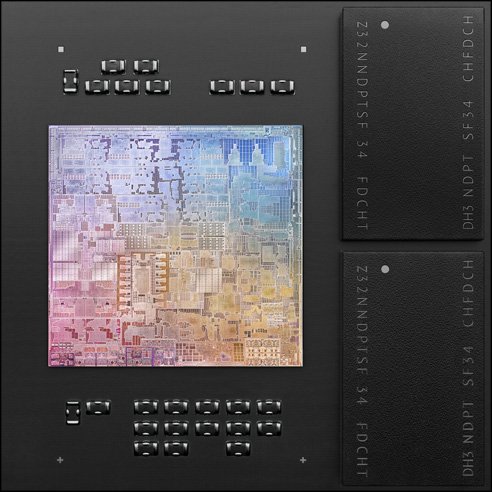
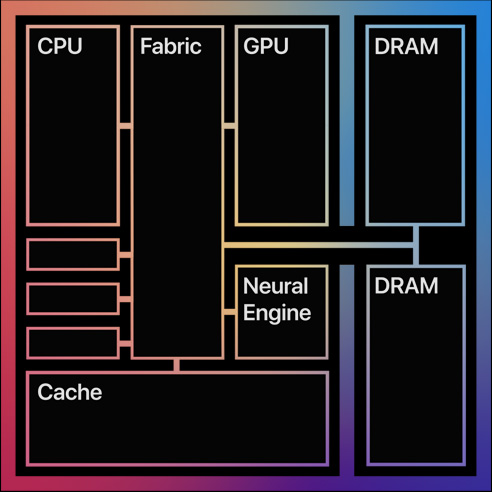
or perhaps it's not 'paging', and just dumb luck I hit and see beachballs on multiple new higher-end macbook pros regularly.
And one tip is to use the right hand side USBC ports for charging, not the left hand ones as for some reason or other they tend to cause the machine to heat up more...
thx for tip.
On my machine it is true that charging on the right is better. Charging on the left spins up the fan.
Most likely this is why the CPUs are all limited to 16GB. It's likely when they unwrap the 16 inch MacBook Pro, it will open up more configurations (more RAM in particular!) for the 13" MacBook Pro and hopefully the mini.
1. "Wow" the audience given the anticipation without a full overhaul of the range. 2. Deliver some solid products that enable the transition while being effective for non-enthusiasts.
From my viewing they hit both. I expect they'll fill in the range next fall with bigger upgrades to the form factor.
I wonder if they use 2 4GB chips or 1 8GB chip in the low-end SKU?
There are no 32 or 64 GB models because Apple isn't making a CPU with 32 or 64GB of RAM yet.
https://images.anandtech.com/doci/16226/2020-11-10%2019_08_4...
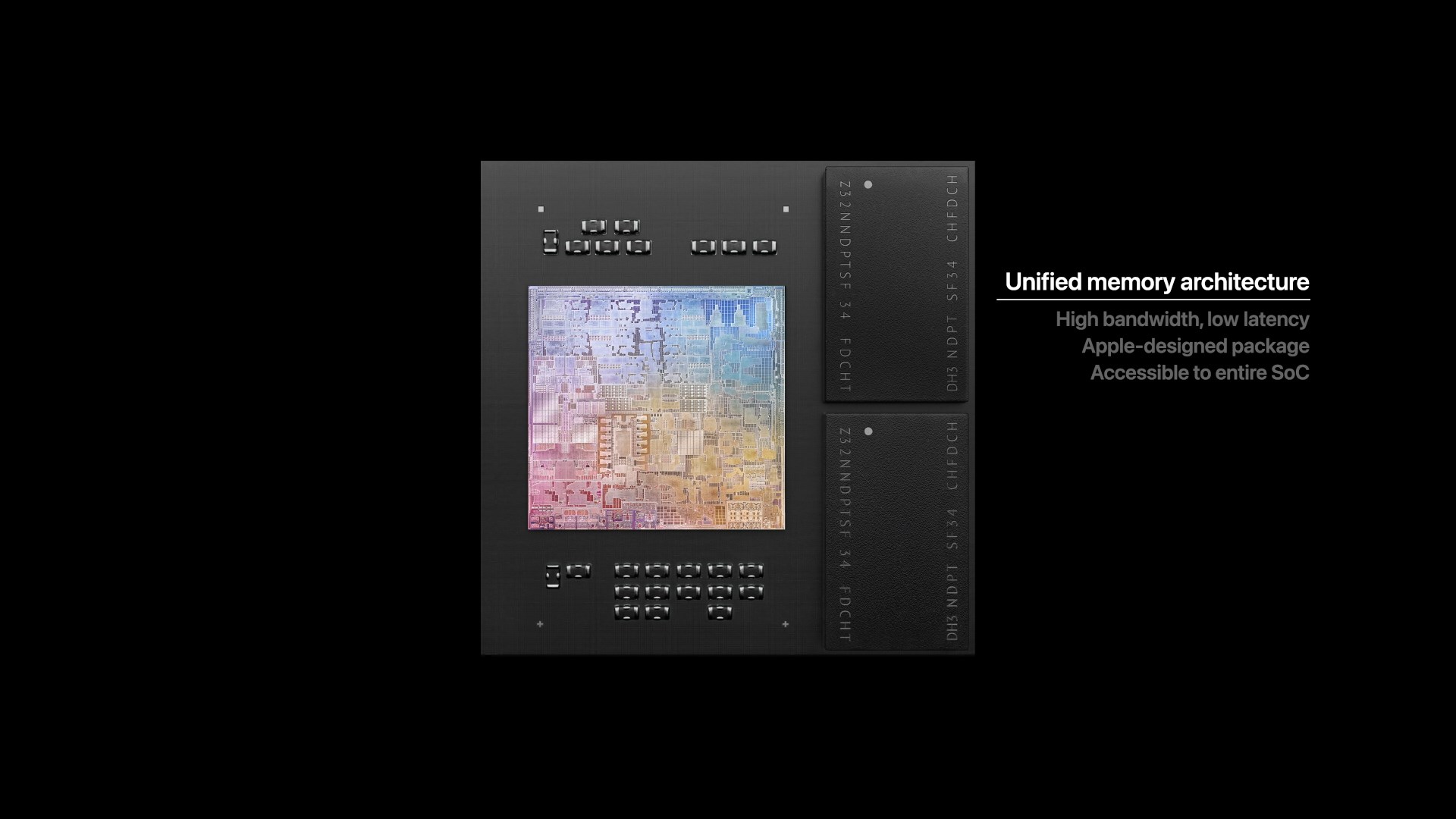
When comparing the mini to other SFF computers be sure to note that the mini has the power supply built in though where most of the others have it external.
[1] https://ark.intel.com/content/www/us/en/ark/products/196596/...
For example, the $1,249 air is very similar to the $1,299 pro. The MBA has a bigger SSD, but the MBP has a bigger battery, isn't throttled (i.e. has a fan), and also has the touchbar (which may be controversial, but for the sake of comparison, remember that it comes with a manufacturing cost).
It seems reasonable that these are priced similarly. Of course, the machine I want is the MBP with the bigger SSD and no touchbar :)
That left me wondering if there are different variants of the M1 with different core counts.
(Note: It always said 8 CPU cores)
But my point here is that the fact they are both the same supports the theory that the logic board is the same on both models.
There's a solid chance that the logic board is exactly the same on all of the Macs announced today and the only difference is the cooling solution. If you play around with the Apple Store configurator, the specs are all suspiciously similar between every new Mac.
https://www.apple.com/shop/buy-mac/macbook-air
https://www.apple.com/shop/buy-mac/macbook-pro/13-inch
https://www.apple.com/shop/buy-mac/mac-mini