Even so, a program for processing a switch or dial can be really short and simple. You can print it out on a sheet and check and double check every line of code for to make sure it's correct and all possibilities are accounted for.
A program handling a touchscreen will be complicated. Millions of lines of code. Maybe even billions. The best you can hope for is empirically verifying it's mostly correct most of the time.
I do some. And the last device we built, we still fight with a simple rotary switch. You have to do things like debounce inputs that seem like obvious binary switches. Getting the debounce windowing right can be just as "guessy". And guess what the highest point of failure on said device is. That selector switch. Had similar experience with buttons. I think the software part is just two forms of the Law of Conservation of Ugly.
I do like tactile better, but more for affordance/discoverability (e.g. ergonomic) issues than what you're driving at above.
"It’s surprising how many of those derelicts hanging out at the waterfront bars pick an almost random time constant. “The boys ‘n me, we jest figger sumpin like 5 msec”. Shortchanging a real analysis starts even a clean-cut engineer down the slippery slope to the wastrel vagabond’s life."
I'm not sure I buy touchscreens ever being simpler to handle. (or even in the similar range - they're strictly harder)
It's a very common (and lazy) way of programming games (and other more mission-critical apps): naively polling the input device state in the main simulation or rendering loop, instead of actually responding to each and every queued operating system event like mouse clicks.
It's entirely possible to get multiple mouse down/move/up/click events per render frame, if the system has frozen or stalled for any reason (which happens all the time in the real world). But polling just can't deal with that, so it sometimes ignores legitimate user input (often at a critical time, when other things are happening).
So it's still unfortunately quite common for many apps to sometimes miss quick mouse clicks or screen touches, just because the system freezes up for an instant or lags behind (like when the CPU overheats and the fan turns on madly and SpeedStep clocks the CPU waaaay down, or even the web browser opens up another tab, or anything else blocks the user interface thread), and it just doesn't notice the quick down/up mouse button transition that it would have known about if it were actually tracking operating system events instead of polling.
Hardware debouncing works well for most applications but may not be financially rewarding at scale. With time and effort software debouncing can render sometimes better/good or good enough results as hardware..
Remember the saying, "When all you have is a hammer, everything starts to look like a nail..."
I can 100% tell from your comment that you've never had to work with one.
It's less science than black magic to avoid double presses or missed presses.
It's the kinda problem that will tend to bite you in the butt if you aren't aware of all the gotchas. Difficulty is they are application specific. But I wouldn't describe the code as particularly complicated.
Most of this stuff a crusty old neckbeard embedded programmer can do half drunk on Friday afternoon.
OP was saying that mechanical switches could be deterministic, which is something that I haven't experienced.
I do agree that there is less to go wrong than a complicated touchscreen interface however.
Are there any programs that approach a billion lines of code?
a quick search brought up https://www.freecodecamp.org/news/the-biggest-codebases-in-h... which reports google's codebase is around 2 billion LOC. MS Office comes in close to 50 million, for example.
Not sure how accurate these are, but seem to give some rough comparisons, and yeah, not too many things are billions of LOC.
I think you're off by a few orders of magnitude.
I would expect a car to have tons of code.
Think of all the functions...
Engine management, Engine monitoring, Powertrain control, Emissions, Diagnostics, Infotainment, Satnav, Climate Control, Traction Control, ABS, Anti-collision radar, Cruise control, Lane keeping, Backup camera, Parking sensors...
Now keep in mind that these hundreds of components exist in many many possible configurations so the system needs to handle having certain hardware available or not, and also handle a multitude of failure modes gracefully.
With cars, there are certainly many things where it did improve things: satnav, reverse camera, traction control etc, but also some where it made a perfectly working system worse (ie the “fixed” something that wasn’t broken): touchscreen dashboards.
Each service handles data from a handful of physical of physical knobs.
At least that way you don't have the UI as a single point of failure.
They are, by very definition, an additional point of failure as you're always adding an additional interface. They're good for scaling, not for redundancy, and even that's wishful thinking for most applications.
EDIT: You could argue that microservices might free up the UI thread from locking mistakes, but if your team is going to make locking mistakes, you're also going to make mistakes in the microservice interfaces, so what's the point?
It's pretty much the only empirical thing we have in software engineering, more code = more bugs.
Lots of little microservices means lots of extra code means lots of extra bugs.
Plus you've got to manage how they all interact. Which microservice has priotity? Did you even think of that? The breaking microservice? Or the volume microservice? Did you even think of that or try and test that? Your breaks get disabled every time you turn up the volume?
Whoops, you just killed a thousand people with your "redundant" microservices.
A modern touch screen is superbly reliable because it has no moving parts, and it can be tested. The (consumer grade) iPad touchscreen is very reliable.
I don't remember any physical light switch that ever switch on or off by itself.
In an aircraft flying through turbulences I'd feel a lot more comfortable knowing that all switches are pyhsical. Try to use your smartphone while jogging...
Yeah they’re both switches, but size is incredibly important, and small mechanical devices are finicky and don’t produce nice clean digital output (that’s a lie that electronic engineers tell software engineers to keep things simple).
So yeah I’m sure you’ve never seen a light switch fail, but I bet you’ve seen a keyboard fail (especially if you’ve spent any time around a recent MacBook).
But I do agree with your point on using a touchscreen in turbulence. A counter point is that there are probably hundreds of controls or settings on a plane that you never touch during turbulence, possibly that you never touch in flight (like telling the flight computer how much cargo you’re carrying). Stuff like that is ideal for a touchscreen.
Not if it is in an airplane. Think of all the QC steps required to track the production, storage, shipping, installation, testing, etcetera for the replacement of a single switch. If a switch has failed it needs to be inspected to understand the reason for failure (no switch should fail; tracked to understand if it is a batch failure, plus other steps). I am only making an educated guess here.
> A switch can usually be cleaned easily, to restore its function.
Ummm, you think they put known failed parts back in planes? I think not. They do fix major parts, but the QC for that would be insane. You would make a switch to be hermetic and add anti-tampering - a manufacturer of any safety related device doesn’t want it to be “fixed”. Items are designed to be maintained (with proper schedules), or replaced.
> And proper quality switches can be actuated millions of times before failure.
On average? Or does it have a bathtub curve? Yes, quality switches are insanely reliable, but so are touchscreens.
If you have a variety of 50 switches and knobs, then the reliability is worse than 50x worse, because every item has it’s own reliability curve, and it only takes one failure to muck up your day.
Even less so if it's on the space station. Or on a Mars rover. But we're talking about cars. Something a lot of people like to mend for themselves.
I can say that an intermittent switch failure is hard to diagnose and potentially costly. The dash on a 2007 Ford I got cheaply had an intermittent fault where the whole dash would shutdown, and headlights would go off, while driving. Switching ignition off and on would fix it, so I presumed it just needed a reset. It was actually the barrel switch of the key - intermittent enough to cause a lot of dangerous trouble but hard to diagnose.
A cheap phone or tablet hardly represent best of breed for the technology as a whole.
In airplanes it's different. Here, outside of takeoff and landing, it's OK to look at a screen for 10 seconds while interacting with it with a hand.
Not really. Pilots are supposed to be visually looking for traffic 90% of the time, and the rest scanning instruments.
So to be heads-down for 10 seconds, the non-flying pilot would have to arrange that with the flying pilot.
It would be madness if pilots had to rely solely on their eyes to locate other planes nearby. There is thankfully instruments which do this as well.
Radar coverage has become ubiquitous in most places, but there's not universal coverage. Heads-up time is very important unless you're flying in actual IMC.
Worth noting that a significant amount of the information pilots use in the cockpit (at major US carriers, at least), things like flight plans, are on an iPad.
In critical systems, you want to make sure inputs are easy to use in the worst case scenario.
Even the best of touchscreens can't compare to physical controls in tough times.
Just because it's on a touchscreen doesn't mean it has to be tiny and hard to touch. A 17" touchscreen could have fewer controls than the same hardware panel. And the controls could be bigger on the touchscreen.
This raises a question: how many times do an average pilot actually flip a switch over their carrier?
Worth mentioning that these days GPS units seem to be getting touchscreens but usually still aren't losing the physical buttons.
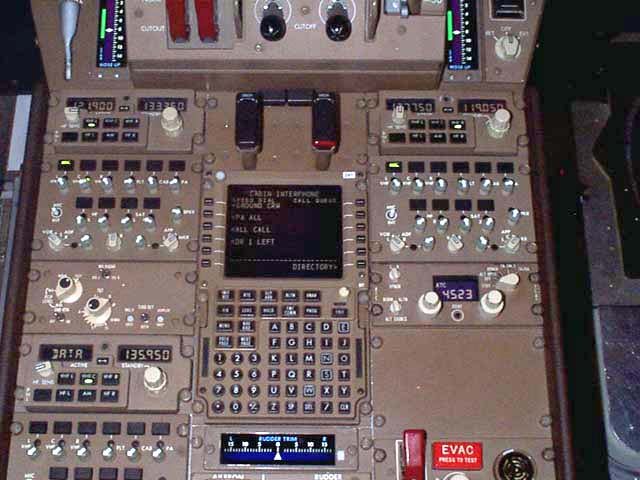
Imagine trying to find the right switch on this by feel, without hitting the wrong one by accident.
https://live.staticflickr.com/6150/5990351987_fb9c159ea5_b.j...

That said, usually you make a short look at the panel to benefit from that hardcoded visual-motion coordination hw in your head.
Part of pilot training (at least in my dad's day in the AF) was blindfolding the pilot and the instructor names a control, and the student must put his hands on it. Or he flunks.
Back to the topic - in car, unless specifically intended for other passengers, driver should never stare on some stupid screen in a place way off the line of sight for driving. Whenever I do that even for a split second in my 15-year old bmw (checking if that knob is really for what I want), there can be an atomic blast in front of me and I wouldn't see it.
Deaths and injuries per mile traveled supports the idea that flying is MUCH MUCH safer.
A car is very often fractions of a second away from a serious accident.
A plane at cruise altitude is rarely less than minutes away (unless, in some planes, you are actively trying to crash the plane/make the wings fall off)
Unless you're flying a Boeing 737 MAX that is.
Well designed physical UI allows pilots to use touch and haptic feedback independent of sight. Whether the switch/dial/whatever is analog behind the scenes or is a digital input to the control infra is not the important thing.
"The US Navy will replace its touchscreen controls with mechanical ones on its destroyers
After a deadly 2017 crash between a destroyer and an oil tanker"
https://www.theverge.com/2019/8/11/20800111/us-navy-uss-john...
Not saying it's right or wrong but your original post is 100% incorrect.
Many recreational pilots fly with uncertified gear (GPS in particular), and even regular smartphone/tablet apps. They also have the required paper documentation and certified instrument but that's just to cover themselves, and as a backup.
Also, some airlines now have officially certified iPads as EFBs, meaning pilots no longer need to carry paper backups.
I also imagine that there are other reasons for both airliners and cars to replace buttons with touchscreens, namely that of cost instead of prioritizing safety and stability, and in general I am not a fan of that trade-off. But I'm also not claiming to be representative of the automobile market in general.
It's not just Boeing, who you accused of being backwards who are doing this, Airbus is too, along with every other manufacturer. Garmin and BendixKing now offer touch screens and it's clearly the future of GA as well not just commercial aviation.
Everyone believes that this will increase safety. That showing only the relevant information in a tunable and interactive way will decrease distractions and help focus on what matters.
The idea that this is to save money is totally absurd! A 777X is $350 million dollars. Any accident would cost an astronomical amount compared to the cost of switches. Even leaving that aside. The touchscreens are actually far more expensive than the old instruments.
This is just a way for Honda to cover up the fact that they can't write software, can't design a reasonable UX, don't want to spend money on it, and want to live as if it's 1999 forever.
Furthermore, tactile feedback is safety. The fact that each switch has a feel, a size, a position - that let's your brain know what you are doing without having to take eyes off the road.
Still, if you’re borrowing your wife’s car it’s easy to realize you don’t have great blindspot visibility at which point looking at a touch screen is very distracting.
Touch screen looks awesome on Star Trek, but in actual use it's an inaccurate, attention-magnet, nightmare.
Those are “most” of the controls... none of which require touchscreens.
What controls are you referring to specifically?
Airplanes have keypads that control complex functions on a screen, going from that kind of keypad to a touchscreen is logical.
In the case of cars, a touchpad is overkill for controlling the cabin temperature, stereo volume, etc.
I can imagine people would need to tune a radio panel more often, so at least basic functionality would be good to have as physical inputs. But even then basic radio functions are usually accessible via steering wheel buttons.
New isn't always better.
Flight plans is one thing but controls are all together a different sort of thing.
Why ask for trouble?
The theory I thought was reasonable for why the OP had troubles, was that Mac touch pads are sensitive enough to treat the separate pads of the paws as multitouch.
Testable: try with individual pad of paw on a Mac touchpad.
Usable inputs save lives.
(That's not to say that OP is wrong, of course, just that their argument isn't really a valid one. My belief is that touch screens would suck for flying a plane, but I'm not a pilot.)
You can say the civilian oversight groups that seek to regulate the industry are risk averse, but the companies that build the planes themselves, if they had their say, we'd be flying mach 3 upside down all day.
Re-designing systems introduces risk and uncertainty. Being able to leverage existing pilot training reduces risk (because crashes have resulted from pilots forgetting they were flying X and applied training for Y). Buying new equipment introduces risk of manufacturing defects that wasn't present in the working one.
That's not most people on most subjects. If someone appeals to authority and says "climate change is real, here's 100 scientists with PhDs who agree" I accept that. I am not willing to become an expert on the subject to be able to spend the time to review the facts for myself. Citing sources in a paper is essentially appealing to authority (I understand I could read those papers and the ones they cite, all the way down, but for most things, I'm not going to do that).
I mean, the other point of a dynamic interface is that you can now have more controls than would fit on a static interface. Touchscreen fit-to-purpose controls might suck more than hardware fit-to-purpose controls, but either option is better than a single set of generic controls that control multiple systems that "should" have different control paradigms, translating to the generic controls being a compromised bad fit for any use-case.
E.g. a hardware English-language keyboard is probably better than a touchscreen English-language keyboard (though people with modern Blackberries might dispute this); but both are better than entering English text through T9 on a dial pad. And the touchscreen has the benefit of allowing you to have more keyboards (for e.g. the multiple native languages you type that use different alphabets), which wouldn't even fit on the phone as hardware keyboards.
I bring this up, because eventually you run out of space to stuff additional controls. As airplanes become ever-more advanced, their cockpits will approach that point. At that point, dynamic affordances may be necessary, just so you can have some kind of "pagination" allowing you to squeeze more controls in. (Hopefully it'd just be for the non-time-critical switches to flip.)
It's the best or worst of both worlds depending on your perspective, but they do offer superior hands-free operation over a pure touch device, but at the sacrifice of interface flexibility.
MFDs were pioneered in fighter jets, where the cockpit physical space is extremely limited while the amount of information the pilot has to deal with is far beyond any civilian pilot workload.
MFDs combine the durability of physical controls with the configurability and flexibility of screens, and it's completely beyond me why they are not standard equipment in all cars.
BMW's iDrive is, I think, the canonical early example of this in the automotive world.
I think this point is lost sometimes, but is also useful. My car has a lot of physical controls. Some of the ones that are useful during driving are tucked inconveniently below my left knee!
Moving some less frequently used controls to a touch screen might actually benefit some of these designs.
Personally, I think information display can and should use touch interface, but actions should be tied to physical switches or buttons.
Underrated comment!
Information - the user is already looking at the screen, so they can touch virtual buttons. And that is probably the best approach, as they are manipulating information that is being displayed and they can see.
For actions, you won't necessarily have your attention on the screen. The information may not even be displayed in the screen yet, so now you have to divert attention and manipulate the system to get it to a state you can then change(eg, moving to the climate control screen).
You could argue that an onscreen keyboard is significantly less mental load for the pilot than having to scroll letter by letter on a "dumb" interface.
Where do accidents happen? It's fairly rare for a plane to just break. And even then, if your electronics fail there are usually mechanical backups for the critical instruments. It's much more common for pilots to reach task saturation and make mistakes.
I don't buy that argument. What kind of keyboard? QWERTY or something else? What language? English is the language of aviation, but if you're not a native speaker who uses keyboards all the time then chances are you're going to have a LOT of mental load using a keyboard. Even something like the French or German keyboards, which use mostly the same letters, may be different enough to cause frustration -- and when you have an engine on fire you don't need to be struggling with those details.
https://www.simpits.org/articles/Boeing_simtour/simtour30.jp...
And English because anything you'd need to enter, like waypoints or airport IDs use roman/latin letters or numbers.
The keyboard is mainly used for planning ahead where you have more data to input. Both are equipped with mouse as well.
[1]: https://www.boeing.com/777x/reveal/touchscreens-come-to-777x...
> I just hope these are thoroughly tested and actually solve real world problems
Changing from a legacy style to a new one is not cheap, and aerospace companies are not the type to spend money on useless, less reliable technology.
If you're trying to say, lower the landing gear, and the button malfunctions, you can probably smack the button a few times until it works, failing that, rip the switch out and short the wires inside the switch and get the plane landed.
With a touch screen? What if the glass breaks and the capacitive layer fails? Or the software running the screen crashes? Or a bug prevents you from switching from the "Climate control" tab to the "Landing gear" tab?
It is even totally possible to gravity drop landing gear on nearly all commercial airliners, I would expect, though I can only speak on the types I’ve rated on. I don’t see you asking “what happens if the landing gear lever fails?” which is actually a totally reasonable question, and one manufacturers have thought of. Touchscreens aren’t magic devices, they’re just another type of input to build redundancy behind.
It sounds like a horrible idea because you probably haven’t flown an aircraft and don’t know this. That isn’t an indictment of you, just a request to not judge so soon. I like the idea of screens that adjust to phase of flight so what I need is where I need it, because pilot workload is a real problem that automation has addressed for decades.
Thanks for the explanation -- This makes me feel much safer as a passenger if the touch screen is provided to you as a convenience instead of a replacement. Yep, I haven't flown an aircraft. I was thinking that it was like a car where they are getting rid of physical knobs and replacing them with touchscreen-only interfaces which I hate.
If you're trying to lower the landing gear, and the button malfunctions, you use the gravity gear extension handle, which is a completely independent system. You can also land without the landing gear in the worst case.
> What if the glass breaks and the capacitive layer fails? Or the software running the screen crashes? [...]
You use the other screen, which is controlled by the other computer. There are also knobs to switch which computer controls each screen. In the worst case, there are the standby instruments.
Airplanes have a lot of redundancy.
After a deadly 2017 crash between a destroyer and an oil tanker"
https://www.theverge.com/2019/8/11/20800111/us-navy-uss-john...
Touch screens in the cockpit seem like madness to me. Cockpits sometimes fill with smoke and the pilot has to be able to find and operate the controls.
Ever notice that the flap levers have little flaps on top of them? The nosewheel steering control has a little tire on the top? That's so the pilot knows without looking what his hands are on. These designs were not the result of some study group following fashion, but were the result of accidents.
Critical functions will (hopefully) always remain on tactile controls for these and other reasons.
CarPlay and Android Auto make this problem worse, IMO. Now you have app publishers writing arbitrarily complex UIs for cars. Spotify is a bitch to use while driving and because of Apple's reluctance to enable Siri support for third party apps, it's not very controllable by voice.
Been available for a little bit now.
https://www.tomsguide.com/how-to/how-to-use-siri-to-control-...
If you want, you might think of radio, climate controls, etc as having negative values on the safety axis. You still want to shift them to the right as far as you can.
I can’t think of a car I’ve driven where the climate control was not physical though, that seems pretty insane.
Yes, the basic controls do not change. But more advanced functionality is easier presented through menus and screens which guide you through a process -- instead of adding tons of switches for every possible function.
You are right that they are flaky. Here's Martin Pauly (great YouTube channel!) using his touchscreen transponder and it just stops working: https://youtu.be/bopcQSJKcD8?t=732
> The US Navy is replacing touch screen controls on destroyers, after the displays were implicated in collisions.
Unfamiliarity with the touch screens contributed to two accidents that caused the deaths of 17 sailors, said incident reports.
Poor training meant sailors did not know how to use the complex systems in emergencies, they said.
Sailors "overwhelmingly" preferred to control ships with wheels and throttles, surveys of crew found.
Otherwise I agree. You need the use of the interface to be as automatic as possible, and exploiting muscle memory & tactile feedback are very important for that. Touch screens fail there.
They also enable the completion of hardware design before the interface design is completed. While the plastic molds and mechanical designs are worked out, the interface and software development can continue.
I'm reminded as well of web "app" interfaces. In the early days, with relatively fixed controls, one could often navigate sites more easily since there just weren't that many ways they could work. Now, with a blizzard of JS UI kits and an oh-so-wonderful variety of ways of doing everything, each site works differently. And it's not an improvement.
So it's hard to tell which parts of he design stem from being conservative and which parts actually enhance safety.
(I get your overall point. But your argument isn't really a good one for the point.)
We went for a few iterations where the button would light up when the laser was on. There were tons of issues--the state of the laser was not stored in the hardware, so every time the button would disconnect briefly, the state would get reset and lost. After months of back and forth dealing with algorithms to save the state and deal with spurious button presses when the device disconnected, we ended up with a completely useless button, as disconnects would happen very often inside helicopters, rendering the button useless due to the spurious presses near disconnect/reconnect.
Finally, we decided to go with a hardware switch (which I wanted from the start). In about one day the whole thing blew over.
For one, you're too late, touchscreens are prevalent in modern avionics, and unlabeled buttons on the border of a screen that change function depending on what screen you're viewing are the second most common. The more relevant part to the Honda discussion is that there are different considerations for a car and airplane interfaces, and they are so different it's not a good argument to say "planes don't/shouldn't do this so cars shouldn't either."
The issue with a car isn't the interface, it's the fact that people look inside their vehicle for too long to fiddle with the radio. Even if the buttons/knobs could be operated entirely without looking, most people would still stare at their radio while they are doing it. Pilots learning to fly are trained to look outside after pretty much any action, they shouldn't ever stare inside the plane. They do a quick instrument scan and look outside. They glance at their chart and look outside. If they need to change frequency they do it and then look back outside. It's kind of hard to break the habit of looking outside when you start instrument training.
But most car drivers don't have the same amount of training and fixate on things inside the car, like the radio or climate controls. TBH, pilots still get fixated on things, it's just that they usually snap out of it and regain situational awareness before anything bad happens because the skies are pretty spacious. But car drivers don't have spacious roads. There's another car right next to you going 75 mph and if you drift out of your lane you'll cause an accident.
The issue isn't the design of the buttons at all. That matters to a fighter pilot, but the issue for a car driver is the fact that the screen is even on and the radio is accessible while driving down the road. The real critical safety feature would be disabling the screen while driving, and either locking out controls or only allowing voice control. But people would never buy a car that doesn't let them fiddle with the radio or stare at their little screen, so the actual safety feature that needs to be implemented won't happen.
Edit: When I say "fiddle with the radio" I'm including all activities that take place in a car's center stack- audio, navigation, climate control, etc. I'm also a pilot, have designed tests for avionics upgrades for multiple fighter jets, and own my own plane. I have lamented the introduction of touchscreens into modern avionics at a professional level and the personal level. I own three cars with varying levels of touchscreen invasion. So I've thought about the issues surrounding touchscreen quite a bit, and have concluded that the interfaces in a car are so simple that the issue isn't whether you can operate it without looking, it's the fact that people aren't trained to do so.
I’m still glad for what Honda is actually doing, which is not unilaterally removing touch screen controls but instead moving climate control back to physical buttons. These are things a driver ought to be able to operate safely while in motion, and touch controls only ever made them more complicated I think.
The F-35 Fighter Jet has basically only touch-screens (apart from Hands-on-throttle-and-stick controls for when you are busy pulling Gs)
Depends on your definition of "critical" but I don't think this is a great example.
The result is terribly designed software that looks like it's from 2000.
My friends and I decided to try out a (new to us) game which required Microsoft Store / Xbox PC Game Console or whatever the shit it is. 4 of us cannot figure out how to add someone as a friend. It's not in any menu anywhere. I can follow, I can favorite.. I have no idea how to "friend".. which means we can't figure out how to invite people to games.
I'm convinced if Silicon Valley were to design car interfaces I'd be stuck in some sort of pay per action dark pattern captivity hell.
And as a student pilot nothing scares me more than touch screen controls. Maybe I spend too much time down low in the thermals but it's so much easier to hold on to a knob and turn it, while counting clicks, than trying to press a touch screen and hope you hit the right finger sized button the right number of times to change radio frequencies. Different story on heavy planes since they don't bounce around as much as GA planes but it sucks to fight the fight while trying to maintain control/coordination.
Microsoft, Apple, Facebook, Google, etc. all have some of the best user designs created for technology. They have teams of researchers, psychologists, and designers working together to do this.
Have you heard of the auto industry doing anything remotely similar on this scale? Instead, they push away much better alternatives offered by Apple and Google for their own proprietary solution no customers asked for.
The arrogance of your comment is almost greater than your ignorance.
In cars we're mainly talking about the volume and fan speed. Personally I much prefer knobs for those. But I wouldn't call those critical safety systems.
https://youtu.be/wfOD2y_AD_w?t=190
https://www.dynonavionics.com/SkyView-HDX/
Just a few examples.
Aviation very much uses touch screens quite extensively. The difference usually is that more thought is put into when and how to use them; you're not just replacing all the buttons with a touchscreen and letting some underpaid intern design the interface for it.
BUT - touch screens can be used if people are trained, the layout is rational, the device is responsive.
There are two underlying things:
1) Tactile. As you spelled out.
2) Changing interfaces. This is the real killer. 100 screens, don't know what's what, supposed to be driving.
These UIs need some thinking but I suggest that the 'knobs and buttons' can possibly be mapped to different functions depending on.
You might want to take a look at garmin's general aviation product lineup. They're pretty popular.
Touch screens will hopefully never make it into any critical pilot systems, because safety and stability matters to airline manufacturers, current ongoing scandals notwithstanding. I only wish automobile manufacturers took their job equally seriously.