Maybe some people benefit from this but I’ve always found it distracting and in some cases a bit annoying. I’ve always preferred simply having multiple desktops and switching between them instantly with a keystroke which is great in most Linux DEs/WMs but a terrible experience in Windows. It’s gotten to a point where even though I have 2 displays, I just turn one off 99% of the time.
Example for my desktops setup for web application development over the last couple of years:
1. Browser with the product I'm currently working on, nothing else
2. Shells for all sorts of small tasks like tailing a log to REPLs for quick experimentations
3. Application IDE(s)
4. SQL IDE
5. Music player
6. Communication (Mail, slack, etc.) and secondary browser for miscellaneous things
The greatest thing for me is, that what I'm currently doing is in full focus and everything else basically doesn't exist. No notifications dinging in peripheral vision or other distractions. Also it is nice, that when I switch to laptop only, the workflows are exactly the same just with more limited screen space = less tiles I can use.
If for a given tasks it is beneficial to have things side by side, it is just a couple of key strokes to re-arrange windows and or create an ad-hoc desktop until the task is finished.
Of course I could use multiple desktops and tiled windows on multiple screens, but from my experiments it added more complexity that benefits.
I would rather go for a bigger, higher quality screen than adding another.
So, you could use a 27 inch 4k display at 16:9 aspect ratio (which is 3840 by 2160 pixels) in a way that gets you the native resolution which results in much more usable space but the displayed quality isn't all that great. You can run them at 2560x1440 rendering which sacrifices some pace for much improved quality. Works well when you don't sit super close to your screen. Or, if you like more space but still have a little better quality than the jagged mess that is the native resolution, you could run it at 3008x1692. Close to fully usable space but still way better in terms of quality.
The scale of your computer rendered interface and text versus the actual pixel size and density on your display gives you a balance to choose from for space vs. quality. Which one works best is a combination between physical distance to the screen and personal preference (which mostly forms based on cognitive load).
I kinda regret not getting 2x 1440p monitors with similar picture quality for less money.
Meanwhile it makes using Linux a giant pain in the ass, unless you go all-in on a major desktop on a major distro, and then also get lucky. Possibly I'd have a better opinion of it if I were using it with macOS rather than Win10 and Linux.
[EDIT] and OMG lacking auto-temp-control based on surrounding light has me really wishing I'd just put the monitor cash toward an iMac. Way more eye strain.
Everyone seems to prefer it. They don't have to stop what they are doing at exactly 10am, and they can re-read things that are relevant and skip things that are not easily. There is also a bit more personal accountability because everyone can see what was said in previous days.
With every recurring meeting no matter the frequency you have to be quite careful in my opinion and constantly re-evaluate and tweak to keep it useful most of the time, instead it being a dogmatic ritual that has to be done a specific way because somebody learned it as such from an "Agile" book, certificate, course, video.
People rarely understand the point of agile and, specifically, standups. Using it as a daily check in, especially as status updates, is contrary to agile's intentions. The real purpose is to make sure that people on the team frequently expose problems. If people are already doing that consistently, then standup as a practice is fairly moot.
I think there is an useful status update component to standups. Not to your boss, to have a shared view among the team what the state of the product is. But this has to be aligned with how fast to product is meaningfully changing. Some times this might indeed be daily, but otherwise it quickly becomes just noise.
Of course some managers think the product has to or can meaningfully change every day.
I agree, that if you do them you should make them about exposing problems.
One monitor for code, one for the browser (and devtools window) and a third for everything else (an API document, or a spec, a control for the music I'm streaming or a chat window etc.)
I've found the same setup works really well for any workflow that involves making a small change and immediately seeing the result.
sloppy focus is way more helpful than multiple monitors. You can have your editor largely obscured by documentation (or the other way around) and still type. This is especially nice with modern UIs which seem to think wasting screen real estate with white space and ribbons is an important recent innovation.
Then I upgraded to 3 displays, it's much better. Because I have an explicit main display.
So a viable way is, even with two displays, don't try to utilize them. Put the main one in the center, and pretend the other doesn't exist. Once you really want to use the other display, instead of for the sake of utilizing them only, you'll know it.
Main task in the main display, docs and other references on the left display and email/messages on the right. Works wonderfully.
I’m so used to this setup that when I go to my real job and am constrained to a single monitor I feel like I’m looking through a periscope at my work.
I did that before switching to single display after having multiples from the first day of my career onwards. But I didn't even had to try. By the end, because of how my work and setup has evolved, the second display was switched off 99% of the time.
So when I have the choice I put the entire budget into an ever better single monitor, rather than splitting it.
With that being said, I ended up with 3 monitors in my apartment because I bought them incrementally across 3 years(though they're the same model). And also I play video games from time to time, for most of the games, it's better to have 3 monitors instead of an ultrawide one.
Though when a task only needs one screen for more than a couple of minutes to stay focused shutting off the other screens does help.
I agree with the grandparent poster that the Windows situation is very bad compared to something like i3.
I highly recommend using multiple desktops with dedicated hotkeys over alt+tab to switch between applications. Much much faster to press fn+cmd+<h, j , k, l> and immediately bring up the application you want than to tab until you find the application you are looking for.
Also very useful: the windows-key shortcut overview that the PowerToys added (keep the windows-keypressed for a second or two to bring it up).
I only use W10 as a secondary OS and never used windows as main since XP/2000. So far never got to dig deeper into this. It seems to me that out of the box a lot of the functionality is there, but there are also a lot of related third party (often paid) tools.
What are some good combination of tools (third party, paid or not) and settings for a more keyboard centric i guess you could call it, setup of Windows? At the moment to me it feels a bit like, that I could do everything with just keyboard but I'm not meant to.
I used to believe this but not anymore. Way back in 2007, I spent $2500 for 2 Samsung 30" 2560x1600 monitors ($1250 each). I envisioned a massive productivity increase with scenarios such as:
- email inbox one screen with main "task" window on another screen
- video tutorial (e.g. Photoshop training) on one screen while following along on Photoshop on the main screen
- debugger on one window with the code output on another screen
Eliminating all the Alt-Tab window switching would be supposedly be gone. That was the theory. The problem is that I didn't realize that my eyes hated having these giant lightbulbs in my peripheral vision. It was uncomfortable enough that I often powered off 1 monitor which negated the point of multiple monitors. The other thing I didn't like was the extra heat 2 monitors would add to the room.
I went back to 1 monitor and Alt-Tab is minimized if the single monitor is big enough (at least 27") to have multiple windows of reasonable size. For me to go back to multiple monitors, I'd need the "wing" screens to be color e-ink panels[0] so that they don't act as bright flashlights in my peripheral vision.
I recognize the productivity benefits of multiple monitors -- especially for "dashboard" and monitoring[1] such as stock trading, devops IT corporate/cloud systems monitoring, SpaceX rocket launch monitoring, etc. Having your peripheral vision notice an abnormal activity is useful in those scenarios.
[0] https://www.google.com/search?q=e-ink+panel+&tbm=isch
[1] https://www.google.com/search?q=multiple+monitors+trading&tb...
On macOS, a utility called HazeOver makes working with three monitors much nicer.
I use tiling window managers to help make this work. (Currently, xmonad on personal laptop, and trying out i3 on my work laptop to see if I can get is as productive for me as xmonad.)
When docked, the laptop's screen usually displays my first virtual desktop, which is for email, chat, misc monitoring. All the other desktops are for Web and tasks.
There are two many tools, setups, and conventions to get into here, but I'd just like to say I'm currently a fan of the approach that all I need is my laptop and Internet to do all my work.
(Well, sometimes I need other specialized hardware. But I don't need to be at my desk for the big monitors.)
I'm using 3 monitors - the two main are right in front of me, the one on top of the other, and the 3rd is on the side, rotated vertically. I tried several arrangements and I found this one working great for me.
> The other thing I didn't like was the extra heat 2 monitors would add to the room.
This has probably changed with modern monitors. I don't think I've ever felt that a non-CRT monitor was hot, but even it might have been true a long time ago, it definitely hasn't been the case since at least 2015.
However, keep in mind that the 16:9 aspect ratio is better suited for movie watching and somehow the whole industry (except for Apple, and Dell also seems to have picked that up in its latest XPS line) uses that, even in professional settings. 16:10 is way better. 1920x1200 displays do exist and I recommend that. Used ones are a bit more expensive than used 1920x1080.
I'll forever miss the 1400x1050 display that I had on my ThinkPad T42. It was awesome for displaying content vertically (think code and/or documents).
I wish there were more options for ratios in the stand-alone display market. Rumor has it, Microsoft will be creating a line of Surface displays. [2]
In my opinion 16:9 is unappealing for productive work.
[1] https://en.wikipedia.org/wiki/Microsoft_Surface#Model_compar...
[2] https://www.theverge.com/2018/11/29/18117584/microsoft-surfa...
Maybe it is becouse widescreens have more inches diagonaly for the same area as 4:3 that there was a push for consumer TVs with widescreen?
Think about it: when you're writing code or working in a shell or reviewing a configuration file or working on a word document you'll probably use vertical space more than horizontal space.
16:9
16:10
16:10.66 (almost 3:2)
16:12 (4:3)
I'm sure you can tell the difference between 16:12 (old TV) and 16:9 (widescreen).
On linux I like using a 4k display at 100%. I don't really care about window chrome, icons, etc. I care about text and mainly use a text editor, terminal and browser. They all allow me to set the text size. This way I get the best of both worlds: unobtrusive window chrome and legible text. This works great on a 24" display.
I am a runner and a weight lifter and a former Sergeant in the army. Dehydration is overwhelmingly more frequent than electrolyte depletion. Even when there's no physical exertion involved.
A lot of doctors and health professionals will say that this is bad advice and that it encourages people to obsessively flush electrolytes and minerals out of their bodies.
Which doctors, specifically?
https://duckduckgo.com/?q=too+much+water+electrolytes
These results seem to indicate one has to drink a lot - not just enough for clear pee
But it's not hard to find warnings:
https://www.mayoclinic.org/diseases-conditions/hyponatremia/...
> Drinking water is vital for your health, so make sure you drink enough fluids. But don't overdo it. Thirst and the color of your urine are usually the best indications of how much water you need. If you're not thirsty and your urine is pale yellow, you are likely getting enough water.
You see it all the time - young people drinking eight litres of water over an hour or something stupid like that during arduous physical activity because they think they should 'drink until their pee is clear', then wondering they their legs don't work anymore.
What does that even mean? If your body contained toxins that you needed to « detox », you’d be having a pretty bad day and kidney failure.
Detox is meaningless. It’s not like your body is « polluted » and and you can only clean it by « detoxing ».
Healthy skepticism that this makes a difference in day to day human health may be warranted, but skepticism that the claim is even meaningful in the first place is not. Your body does routinely contain a lot of toxins, and it has mechanisms to clean them out. “Polluted” is not a binary yes/no attribute anywhere else in the world and it hits not binary in your body either; it gets more or less polluted as it excretes less or more waste.
See https://duckduckgo.com/?q=detox+fallacy for more in depth explanations.
All good advice. You missed one though: get your ass into shape. You need to be doing strenuous exercise. The difference this will make in life can not be explained, it can only be experienced... just like The Matrix if you will.
Also, with 1 set of exercise you won't really start to sweat and you can do it every day.
The issue with three sets is muscle soreness. I want a fully functioning body every day.
I appreciate the fact that we all can't be athletes: having said that; there was a time in my life when I would open my eyes Every Morning to blinding pain from my workouts. But now, 30 years later, the benefit (I believe partly from having been in such awesome shape and I do still workout strenuously, but not to that level) is that even at 60 years of age I still have stunning reaction times, I can still do things most 35 year olds can not and my driving is still freaking crisp!
PS: I can still do over 60 consecutive pushups and planck for 4:30 minutes. Sure somedays I'm sore as hell but fuck that old age shit... ;)
Currently I am on a quest to like exercise for its own sake, and I am coming from a place where I strongly disliked it. I am surprised that I have found a way to like it at all.
I’ll be blogging about it in a month from now as I would be on month 3 then :)
Cheers!
I also liked the lectures on convex optimization by Stephen Boyd a lot.
Steve Brunton on Fourier analysis.
It's all very subjective of course. Andrew Ng would be mentioned by most and I've watch the series as well, but I find that suddenly I'm intrigued by a mathematical field via some connection I didn't make before.
For example, I experiment with auto-encoders, then I read some papers on using the Wasserstein distance as a metric. Subsequently, I'm watching clips and lectures on optimal transport.
The nice thing about math is that it's so self-motivating to me. The more I learn, the more I want to know. I don't know, maybe it's a type of addiction.
It’s now my default thing to do if I am struggling with a problem or just feeling slightly unfocused, even if it’s raining - I’m fortunate that my office pre-lockdown was on the ground floor, and my apartment has a large enough balcony that now I tend to pace up and down there rather than mess around locking up and going downstairs etc. I can see how having a lift to wait for etc. might make me less keen to do this all the time, but seriously, try it! (It’s good for you too :))
Personally, I'm in the preferring-two-monitors camp. If I can't have two, I'll have three, please. And large ones. Particularly when I'm doing web work, the convenience of having an editor with ample space to open many source files at once on a main screen, an auto-reloading browser with accompanying dev tools on one side monitor, and multiple pages of documentation on the other side is a huge win.
I know other people who are also in this camp, and others still who for similar reasons to others commenting here aren't a fan of lots of monitors. They typically have very consistent patterns in how they set up their working environments and often multiple desktops that they switch between frequently.
I suppose the conclusion is not so much "have multiple monitors" but rather "invest a bit of time and if necessary money in customising your work environment to work well for you".
Now if it would be possible to get a 27" 5k screen like the new imacs, that would be absolutely great. Same "actual resolution" as the older 27" but with much sharper text.
When I’m thinking really hard about something, I _have_ to pace back and forth.
I’m not sure that walking will make me think harder, but I’m sure it can’t hurt.
Do people not use social networks on their computers? It's as easy for me (easier actually) to subconsciously open HN on a computer, unless it's blocked somehow.
Take Facebook as an example. Your phone will ding on FB updates or incoming messages on Messenger, even when the phone isn't actively being used. On a computer you need to have a browser open and have Facebook opened in a tab for it to give you any notifications.
So it's easier to avoid on your desktop than on your phone.
If this is your cup of tea, I recommend checking out VR Desktop style workflows (arguably a good way to experience "working in The Future™", with infinite screens, customizable environments, etc). Here is one for Linux that we've been working on for a few years: https://github.com/SimulaVR/Simula
Here is how my partner and I ate for the last five months of working from home:
* Eat more veggies and salad, more beans and legumes, some fruit.
* Eat much less bread and pasta. Cut out most sugar and fruit juice.
* Make 1/3 of your dinners vegetarian, and split the other 2/3 between chicken/turkey and fish. Eat little red meat. * Have dessert as a treat twice a week.
* Evaluate portion sizes. You probably will be perfectly happy only eating 2/3 as much for your evening meal.
* Realize that most snacking between meals is because you really want a small break from work, not because you are actually hungry.
In combination with regular running, I have never felt fitter or been in better shape.
Why do I ask for some reputable sources? My attempt to build a plan according to my “common sense” (similar to your advice actually: dropping most of red meat, eating more legumes etc) lead to me developing hypotension and iron-deficiency; of course I can adjust the diet now I know this, but I’d rather do it the proper way this time.
No. My productivity is much better with just one monitor.
More monitors just mean some workspaces are switched between by moving my head instead of switching what’s on screen. For some tasks it’s easier for others it’s not.
I do find a larger higher resolution monitor more useful than having two or three small ones, especially for my IDE where I have splits and such. I use a 34” 1440p currently but would love to go larger/higher resolution (but 4K at those sizes is out of my budget right now)
Pretty much what I do with my single screen. Probably down to being a contractor for a long time and never knowing from one day to the next if I even had a desk to sit at, never mind a monitor or two.
I'd rather flick my eyes over to the browser window documenting function signatures, error cases, etc. than alt+tab through potentially several windows to find said docs window, then alt+tab ing back to my coding window to use said information.
But apparently some people prefer to do that, than to spam a few win+arrow key combinations, to spread their windows out for initial setup.
However, if I have ~10-12 windows I regularly need to switch between (2-3 related projects in the code editor, 2 browser windows - 1 browsing/docs, 1 the actual app I'm working on, terminal, db mgmt tool, Figma, Slack, email, Calc for some of the data, file manager), a tiling manager or multiple desktop on just one physical screen make things significantly harder for me...I might be missing something obvious in how it's supposed to be used.
- Exercise, even if just 10min daily
- Sleep in a colder room
- Maybe is a lot of noise around you, and night is the time for your brain to work cleanly. Reduce it (I find this recently)
- Stop being worry about not get sleep. The more you worry, the less you get.
- If can, sleep when you feel it, get up when not. Not force to get sleep if you know you can't. I think this help to reset the clock. After a while things start to settle.
- Substances amplify what is wrong, maybe. I think is better to fix the macro stuff, the routine, and then maybe use something.
- Temperature control. I sleep with the AC set at 65, a fan and a BedJet device.
- Blue light control. I wear blue light blocking glasses at night time
- Wind down routine. I am careful not to exercise, watch exciting shows or do anything that raises my hearth rate at least an hour before bed.
- No alarm clock. I have found that when using an alarm clock I invariably get anxious about it going off.
Hope some of that helps.
What really helps is silicon earplugs (they warm up to body temperature and mold to fit, so comfortable I've forgotten to take them out until I'm half way to work) - a lot of my issues are I require silence to sleep and stay asleep and the modern world just isn't conducive to that at all.
Do you have a thick blanket then? Or are you just covered with a thin bed sheet while the air around you is 65 degrees F (18 degrees C)? That sounds like it would be freezing.
2) I can't sleep with few or no blankets anyway. I mean I could probably adjust to it over time, or if I'd hiked 20 miles that day I bet I could, but I certainly can't right now under ordinary circumstances.
I don't start to think a room's too cold for comfortable sleeping until it's under like 60F. My sleep gets worse if it's over about 68.
... so yeah, as a married guy with kids and a job, falling asleep is hell basically every night.
I also started taking 1mg melatonin an hour before I want to sleep. That works wonders for me.
https://slatestarcodex.com/2018/07/10/melatonin-much-more-th...
... and, umm, mindfulness, I guess.
It's worth noting that many allergy meds (like diphenhydramine) are anticholinergic, but only ones which pass the blood-brain barrier are linked to cognitive decline. So newer allergy meds like cetirizine and loratadine are better.
(I am not a doctor)
If you are following a coding tutorial; you need to alt-tab back and forth from browser, terminal, and editor. If you an have an issue you may do it ten times before finding an issue which breaks flow.
Much better use of your time to stay focus and just glance at the second monitor. Same with research and an office suite.
You really want one monitor, properly positioned forward of you. You should have a keyboard at the appropriate height with a wrist rest to support and angle your wrists (also make it warm - not cold plastic or metal). Your seating should allow you to sit up or slightly reclined. Your head should be balanced on top of your neck, you shouldn't be hunched or twisted.
laptops - well, let's just say NO laptop is osha approved.
bed, right?
If you are coding in bed, well... I just don't know the ergonomics of that situation. I don't know if this requires further study or a prompt curtailment of that line of thought.
This would give my GCSE Chemistry teacher apoplexy.
Clear is not a colour.
If your urine stream has much color, you are dehydrated or perhaps sick:
https://media.healthdirect.org.au/images/inline/original/uri...
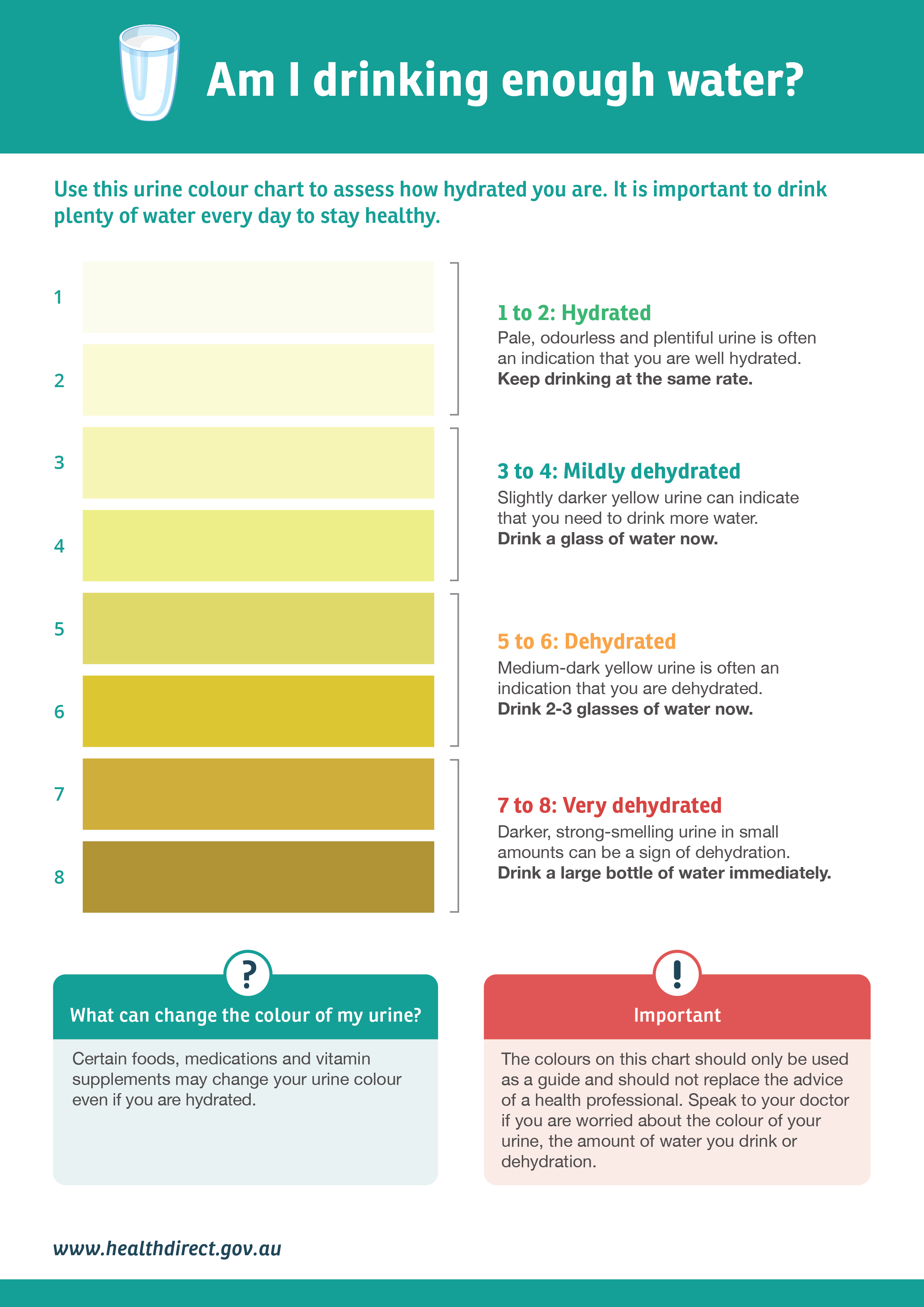
Pretty clearly talks about colour.
Yes, there's plenty of confusion, given "clear" is not a colour. Your urine can be perfectly clear while still being yellow.
Most workflows can benefit from multiple monitors. it's a silly thing to be bottlenecked by screen area on a fancy computer when used 1080p monitors are nearly free in 2020.
Take regular walks and use that time to think. There is something about a steady walk that seems to improve problem solving, especially for more abstract/creative things.
When working, put the cell phone out of view and out of reach. It's too easy to subconsciously pick it up and start scrolling a feed before realizing focus had been broken.