News for hackers. Stuff that matters.
Re:Apple announces iOS 10 by andrewla on Monday June 13, 2016 @03:31PM (#11896693)
Looks like Apple is doubling down on at least two features that really seem like duds -- 3D Touch (which as far as I can tell nobody even knows exists), and Siri (which everyone raves about but nobody uses for anything).

I'd love to see UX improvements around minor inconveniences of the iOS experience:

- what the hell the volume button does in different contexts (sometimes it changes the ringer, other times the in-app volume, other times it just seems to go into a black hole)

- easier access to app settings for the app you're using (things like privacy settings and notification settings and revoking/re-allowing privileges (like camera access, etc.); maybe context-sensitive pull-up or pull-down things? I like that OS controls this, not the app, just need a better way to navigate to it.

- turn off buzzing and booping when I plug in a charger, and maybe some sort of wireless charging thing if the technology is where it needs to be yet

- stop showing album art on the lock screen (or make it optional)

- more uniformity on how lock screen notifications are acknowledged and dismissed -- sometimes there's an 'x' in the swipe-over, sometimes actions, sometimes just pressing the notification does something

The only feature that seems interesting to me is the voicemail transcription; previous services I've used for this have been pretty terrible, but hopefully this is better.

With Marshmallow's security model (of run-time grantable and revokable permissions) Android has become a lot more attractive to me -- my biggest pain point in using Android devices has always been the nightmare of looking at what an app wants in order to install.

Re:Apple announces iOS 10 by jedanbik on Monday June 13, 2016 @04:34PM (#11897364)
3D Touch is to iOS as the Option key is to macOS.

Hold down the Option key and click on Airport or volume control to see what I mean in macOS. It gives you more information, and the information it provides is information you didn't necessarily need to have without holding down the Option key.

In airport, with the option key held, you see options to generate a wireless diagnostics report. Without the option key held, you can just switch networks. In the volume control, with the option key held, you can see options to change speaker outputs and mic inputs. Without the option key held, you just see the volume controls.

On iOS, with regular touch on the camera you get the camera. 3D touch - you get the ability to specify the camera you want before loading the app.

3D Touch is for iOS power users. Option key is for macOS power users.

Re:Apple announces iOS 10 by erikpukinskis on Monday June 13, 2016 @04:54PM (#11897552)
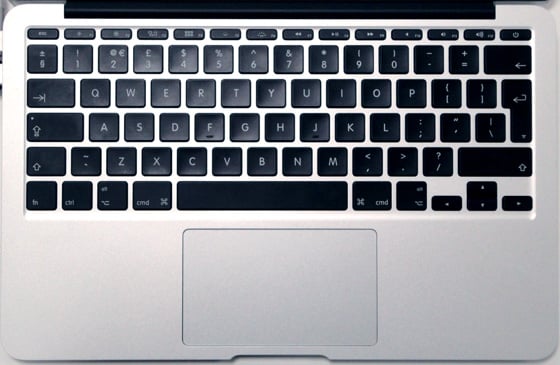
I've been using macs for I guess a decade or so now and I still have no idea what the option key is for. When a keyboard shortcut is like ^+⌥+F6 I just mash buttons until it works. Why do they use a different symbol on the button than in the UI? I really have no desire to learn the seven different buttons in Mac OS and I wish application authors would stop using them so they could someday simplify the keyboard.

I don't understand why we tolerative having shift, fn, control, alt, option, and command, not to mention ⌘ whatever that is. Is it really necessary? Do I need to be an Apple historian to be able to understand the primary input device on a Mac?

Command makes sense. And we need shift for capital letters. Let's just leave it at that.

Re:Apple announces iOS 10 by JonathonW on Monday June 13, 2016 @05:25PM (#11897795)
Useless fact of the day: the special characters Apple uses to represent keyboard shortcuts in the menu bar, with the exception of Ctrl (^)[1], are all part of an ISO standard [2]. I've never really understood why they stopped printing them on the keyboard, though-- it turns figuring out shortcuts like ⌥⌘⎋ into a game of trial and error for new users, rather than something that's relatively self-explanatory.

A few of the symbols are still printed on Apple's keyboards in a few locales, but it looks like the confusing ones (option, escape) are gone in all locales on their most recent keyboards.

[1] Apple follows the popular convention from *nix here, rather than the ISO standard, which is a sort of a dharma wheel thing that I can't find in Unicode.

[2] https://commons.wikimedia.org/wiki/Category:ISO_9995-7_symbo...

Re:Apple announces iOS 10 by duskwuff on Monday June 13, 2016 @06:02PM (#11898091)
For what it's worth, European Mac keyboards have a lot more of the symbols on them, e.g.

https://support.apple.com/en-us/HT201794

Re:Apple announces iOS 10 by f_allwein on Monday June 13, 2016 @06:54PM (#11898422)
Interesting facts in Wikipedia:

"The "⌘" symbol (the "looped square") was chosen by Susan Kare after Steve Jobs decided that the use of the Apple logo in the menu system (where the keyboard shortcuts are displayed) would be an over-use of the logo. Apple's adaptation of the symbol — encoded in Unicode (and HTML) at U+2318 ⌘ (HTML ⌘) — was derived in part from its use in Scandinavian countries to denote places of interest. The symbol is known by various other names, including "Saint John's Arms" and "Bowen knot"."

https://en.wikipedia.org/wiki/Command_key

Re:Apple announces iOS 10 by wingerlang on Tuesday June 14, 2016 @12:00AM (#11899671)
Funny, I just realised where I had seen the icon before while reading your first sentence. Then later it was confirmed in the same paragraph.

Thinking back, I can only remember once instance of the sign and it happens to be just around the corner from where I grew up.

And just for kicks, if someone wants to see it in action: https://www.google.co.th/maps/place/Guml%C3%B6sa+Kyrka,+288+...

Re:Apple announces iOS 10 by VeryVito on Tuesday June 14, 2016 @09:27AM (#11901860)
Sweet Volvo 240.
Re:Apple announces iOS 10 by visarga on Tuesday June 14, 2016 @12:59AM (#11899884)
Looks like a beautiful place.
Re:Apple announces iOS 10 by nevster on Monday June 13, 2016 @10:16PM (#11899308)
And Apple II's used the Apple logo. There was an Open Apple and a Closed Apple
Re:Apple announces iOS 10 by throwanem on Monday June 13, 2016 @05:24PM (#11897790)
> I still have no idea what the option key is for

It's for "⌥".

Yes, that's not ideal, and it's a striking UX failure on Apple's part that the keycap says "option" while the menu says ⌥ - all the more striking given Apple's generally well deserved reputation for getting that kind of thing right.

Same goes for control and ^ - granted, Unices have represented Control as ^ since forever, but part of the appeal of a Mac is supposed to be that you don't have to be a grizzled hacker to understand it.

That said, how does it take (more than) a decade to learn these correspondences? Not that I don't understand your complaint here, and I agree it should be fixed, but...I mean, this stuff doesn't seem all that hard.

Re:Apple announces iOS 10 by emehrkay on Monday June 13, 2016 @07:11PM (#11898524)
After reading your message, it just clicked to me that the option symbol could be a fork in the road.
Re:Apple announces iOS 10 by cookiemonsta on Tuesday June 14, 2016 @06:14AM (#11900926)
It is meant to be like a switch (schematic symbol for a SPDT switch), i thought?

https://qph.is.quoracdn.net/main-qimg-6f64cb39bfdaae2f7e097f...

Re:Apple announces iOS 10 by AOsborn on Monday June 13, 2016 @10:33PM (#11899374)
Had exactly the same thought. Was never aware - and now I'll recognize the symbol going forwards!
Re:Apple announces iOS 10 by RotsiserMho on Tuesday June 14, 2016 @01:51AM (#11900061)
The low road at that. Nice catch.
Re:Apple announces iOS 10 by mynameislegion on Monday June 13, 2016 @09:23PM (#11899124)
I use option and control all the time for muscle memory keybindings, but every time I see "⌥" or "^" as a shortcut in a menu, I need to check which is which. After all the time I've spent on cli, you'd think I'd have "^" memorized by now, but for some reason it doesn't stick.
Re:Apple announces iOS 10 by selectodude on Monday June 13, 2016 @08:28PM (#11898911)
The key has had the word option on it for several years now.
Re:Apple announces iOS 10 by zeta0134 on Monday June 13, 2016 @09:12PM (#11899090)
Aye, but on newer mac keyboards it lacks the symbol. So you have that funny symbol in the menus, and you're supposed to divine (you're a new user, remember) that it means "option" with no visual similarity.
Re:Apple announces iOS 10 by sampo on Tuesday June 14, 2016 @01:43AM (#11900028)
> on newer mac keyboards it lacks the symbol.

Only on American keyboards, apparently.

Re:Apple announces iOS 10 by speleding on Tuesday June 14, 2016 @08:06AM (#11901441)
How odd! But I believe you are right [1], all two dozen Apple keyboards have the option (aka "alt") key, including the "British" one, but not the "English" one... (Who's the imperialist now ;-)) Perhaps the idea is that the average user only needs the option key for non-ascii characters like £, so Americans won't need it.

[1] https://support.apple.com/en-us/HT201794

Re:Apple announces iOS 10 by zeta0134 on Tuesday June 14, 2016 @12:11PM (#11902985)
Oh wow! I stand corrected, mostly. I was not aware that was an American thing. How very strange.
Re:Apple announces iOS 10 by vsl on Wednesday June 15, 2016 @05:01AM (#11907991)
It's in flux. International English keyboards (a bit different layout from US and not the UK one either) used to have the symbols. The most recent iteration has the command symbol, but not the others, it says "control" and "alt option" on them. Still has a symbol on the return, delete and tab keys instead of US-style labels.
Re:Apple announces iOS 10 by erikpukinskis on Tuesday June 14, 2016 @03:01PM (#11904436)
> how does it take (more than) a decade to learn these correspondences?

Because it only comes up maybe once every two months and by the time I need the knowledge it has fallen back out of my brain.

Re:Apple announces iOS 10 by Raphmedia on Monday June 13, 2016 @04:59PM (#11897588)
Why? It's no different than pressing "Windows + D" to display the desktop on a PC.

As for the characters ⌘, ⌥, etc. they are printed on the key themselves...

Edit: Also, ⌘ historically denotes a place of interest. ⌥ is visually taking an alternative path... it's a straight line which goes parallel. It's the key for alternative functions... alt on pc.

Re:Apple announces iOS 10 by low_battery on Monday June 13, 2016 @05:07PM (#11897659)
⌥ is not printed on any key on the Mac I am using, and I am sure ^ on top of 6 is not the ^ parent mentioned. I agree with parent, these are ridiculous.
Re:Apple announces iOS 10 by fred256 on Monday June 13, 2016 @05:17PM (#11897730)
They are on non-US apple keyboards, the US keyboards use the text "alt" and "option" and so on.

I've always wondered why they don't put the symbols on the US keyboards yet use them in the UI anyway.
Re:Apple announces iOS 10 by riobard on Tuesday June 14, 2016 @12:30AM (#11899782)
Could be that it's difficult to describe over the phone which keys are alt/option/command/control? "The one with four loops" vs "the one with forking road" would be funny :D
Re:Apple announces iOS 10 by vsl on Wednesday June 15, 2016 @05:01AM (#11907995)
I'm typing this on a (2015/2016) non-US keyboard without them.
Re:Apple announces iOS 10 by 0x0 on Monday June 13, 2016 @11:01PM (#11899468)
Re:Apple announces iOS 10 by aaroninsf on Monday June 13, 2016 @05:38PM (#11897911)
Thought: _hmm there's a business opportunity of lemonade stand scale here_.

Sure enough: https://www.amazon.com/WhatKeys-Keyboard-Shortcut-Stickers-W...

$8 would have been instant click. I program for a living on a Mac and still can't remember the damn 'option' symbol in shortcuts.

$20...? Hmmm. Not so much. Where's that silver sharpie...

Re:Apple announces iOS 10 by karlshea on Monday June 13, 2016 @05:01PM (#11897607)
I feel like your complaint is a little silly. ⌘ is Command and is printed right on the keyboard, Shift is an up arrow, and ^ is instantly recognizable as Control if you've used a Unix ever.

The only one that's really strange is ⌥, which by elimination is Option.

Re:Apple announces iOS 10 by Someone on Monday June 13, 2016 @05:35PM (#11897887)
See it as a switch in a railway track: something that gives you an option as to where to go.

That is way easier to remember than "Swedish Campground", which we only got because there otherwise would be too many apples on the screen (http://www.folklore.org/StoryView.py?story=Swedish_Campgroun... the Apple 2 had 'closed Apple' and 'open Apple'. See http://www.macworld.com/article/2867994/think-retro-open-app...)

Re:Apple announces iOS 10 by FireBeyond on Monday June 13, 2016 @05:24PM (#11897786)
UX by elimination - mystery meat navigation (https://en.wikipedia.org/wiki/Mystery_meat_navigation) for your keyboard.
Re:Apple announces iOS 10 by coldtea on Monday June 13, 2016 @06:23PM (#11898226)
Mystery meat doesn't really apply here, as keyboards are not supposed to be obvious -- they are supposed to be "learn once and then remember forever".

You don't want to be looking "where's the key with the Alt sign" or whatever key you want to find every time you need to hit it.

Ideally a keyboard could even be totally black -- and fancy touch-typing key-switching keyboards are.

Re:Apple announces iOS 10 by Matthias247 on Tuesday June 14, 2016 @05:52AM (#11900858)
I found ^ the difficult thing. Although working with PCs for more then 20 years (although mostly Windows, only some Linux) I had no idea that it could mean Control. And therefore I needed to google what it means as an OSX keyboard shortcut. ⌥ was obvious, as it is printed on my keycaps, ^ not.
Re:Apple announces iOS 10 by jrockway on Tuesday June 14, 2016 @03:22AM (#11900349)
I miss open-apple and closed-apple. I guess I didn't realize that Apple took those away at some point, and that the command and option symbols aren't printed on the keyboard anymore. Weird.

I am still not sure why PC keyboards have a context menu key. I've only ever pressed it by accident.

Re:Apple announces iOS 10 by smnscu on Monday June 13, 2016 @07:13PM (#11898531)
Well, then you haven't been using macs for a decade, but for a year, times ten (and that's totally fine, unless you're leaving arrogant comments on HN about "why we tolerate this or that"). I've been using macs for about 5 years and I still learn new useful features and shortcuts, and having 3 modifier keys is so useful (e.g. emacs + iterm2 + spectacle) that I can't see myself going back to linux/similar. ETA: also, brew is lovely for people who want a stupid simple package manager
Re:Apple announces iOS 10 by mintplant on Monday June 13, 2016 @08:34PM (#11898934)
>and having 3 modifier keys is so useful (e.g. emacs + iterm2 + spectacle) that I can't see myself going back to linux/similar

Linux has control, alt, and meta (aka "super" or "the Windows key").

Re:Apple announces iOS 10 by __d on Monday June 13, 2016 @09:04PM (#11899062)
gotta love X. super is not meta, and you forgot hyper too. also, shift (although most people just use it for the obvious).
Re:Apple announces iOS 10 by TazeTSchnitzel on Monday June 13, 2016 @04:58PM (#11897578)
Seven? What?

There's Control, Option/Alt, Command, and Shift. Four modifier keys. This is the same set you have on other OSes, except there, Command is called Windows Key or Super.

Yes, Apple has symbols as abbreviations for Control, Command, Option, and Shift. Yes, Option is also called Alt. But it's not really all that complicated.

Re:Apple announces iOS 10 by dragonwriter on Monday June 13, 2016 @07:09PM (#11898512)
The problem isn't the number of modifiers, the problem is that Apple uses symbols for them in the UI that over time it has progressively removed from keyboards, and which have no obvious connection to the names on the keyboards (except for Ctrl sometimes getting the same ^ treatment on other platforms, this just isn't the case outside of Apple.)
Re:Apple announces iOS 10 by linkregister on Monday June 13, 2016 @05:04PM (#11897625)
The vast majority of Windows desktop keyboards do not have a fn key.
Re:Apple announces iOS 10 by yoz-y on Monday June 13, 2016 @05:38PM (#11897918)
But all laptops do.
Re:Apple announces iOS 10 by milesward on Monday June 13, 2016 @06:44PM (#11898359)
I'm on a Chromebook Pixel 2, and it doesn't have this key. So, no.
Re:Apple announces iOS 10 by yoz-y on Tuesday June 14, 2016 @12:09AM (#11899713)
What I really meant was Windows laptops as the parent was expressly mentioning Windows desktops. I did not know about the Chromebook though. I am curious though does it have F keys which are usually the ones that are used with the Fn key on Windows?
Re:Apple announces iOS 10 by TazeTSchnitzel on Monday June 13, 2016 @05:48PM (#11897989)
Older Apple keyboards didn't have them either. I'm using one right now.
Re:Apple announces iOS 10 by WildUtah on Tuesday June 14, 2016 @12:55AM (#11899871)
Option, Escape, Meta, Alt, Control, Shift: ŒMACS
Re:Apple announces iOS 10 by Swizec on Monday June 13, 2016 @06:44PM (#11898357)
> Hold down the Option key and click on Airport or volume control to see what I mean in macOS. It gives you more information, and the information it provides is information you didn't necessarily need to have without holding down the Option key.

You just blew my mind. I've been using Macs for nigh on 10 years and this is the first time I've heard of this. This is going to make so many common tasks (choosing sound output) so much easier!

Until I forget it exists 2 hours from now.

Re:Apple announces iOS 10 by melvinmt on Monday June 13, 2016 @11:14PM (#11899512)
> On iOS, with regular touch on the camera you get the camera. 3D touch - you get the ability to specify the camera you want before loading the app.

Every time there's a thread about 3D Touch on HN, I learn new things. Which tells a lot about the discoverability of the 3D Touch features...

Re:Apple announces iOS 10 by intoverflow2 on Tuesday June 14, 2016 @06:56AM (#11901111)
Tap and hold was already the option key for iOS. 3D Touch is a technology in search for a use.
Re:Apple announces iOS 10 by 7Z7 on Tuesday June 14, 2016 @02:03PM (#11903960)
Tap and hold does other things.
Re:Apple announces iOS 10 by middleq on Monday June 13, 2016 @05:48PM (#11897987)
I've found 3D touch to be useful. Looking forward to the increased support.
Re:Apple announces iOS 10 by zavulon on Tuesday June 14, 2016 @10:02AM (#11902057)
Thank you for this. For years, I've been going into Settings -> Sound to change output and input settings - this is so much easier!
Re:Apple announces iOS 10 by 2461001642 on Tuesday June 14, 2016 @11:27AM (#11902588)
a: mind blown b: isn't this a terrible UX? I mean, these features are GREAT but unless I randomly caught this comment in an HN thread, I would never have known about them. And when I option-click an icon, I have no idea what's going to happen before I do it. (Incidentally, I have the same problems with 3D Touch).
Re:Apple announces iOS 10 by throwanem on Monday June 13, 2016 @03:58PM (#11896999)
> what the hell the volume button does in different contexts

If the app you're using right now has a handle for audio playback, it changes the speaker volume. If not, it changes the ringer volume. As far as I can tell, that's all, and in a half decade of using iPhones and iPods, I've never actually seen it misbehave.

Re:Apple announces iOS 10 by martin-adams on Monday June 13, 2016 @04:24PM (#11897262)
This bugs me like mad on Android. When I know the app is going to blast out, I have to let it before I can turn it down. I'm forever having to hop through menu after menu to turn the volume down.

My phone is permanently on vibrate (have young kids in the house and don't want to wake them), so changing the ringer is frustrating at most.

Re:Apple announces iOS 10 by wlesieutre on Monday June 13, 2016 @04:30PM (#11897326)
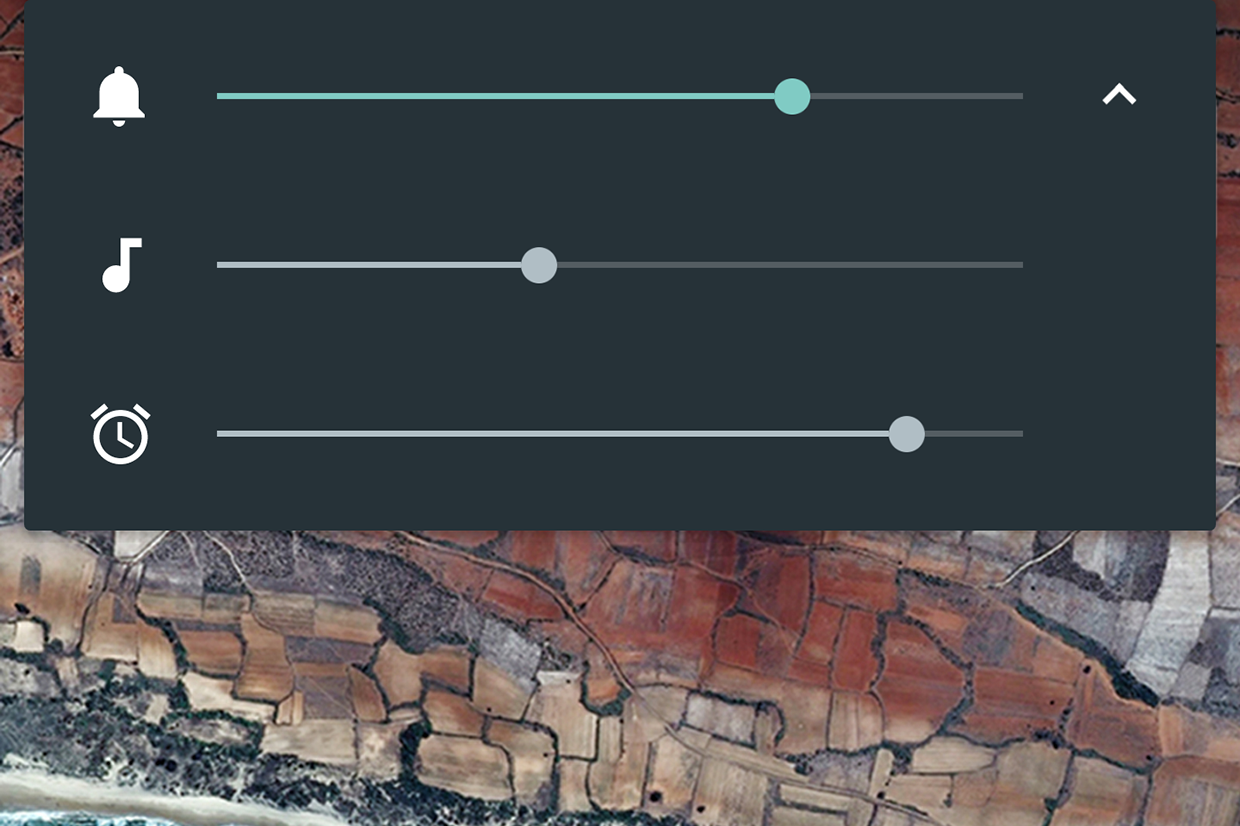
On Android 6:

1) Press volume button to bring up volume controls

2) Tap the arrow on the right to expand

3) Adjust ring/music/alarm volumes as needed: http://core0.staticworld.net/images/article/2015/05/android_...
Re:Apple announces iOS 10 by swiley on Monday June 13, 2016 @04:49PM (#11897500)
Just like he said, that involves touching the screen and opening a menu. There's no predictable way to immediately silence your phone.
Re:Apple announces iOS 10 by badlucklottery on Monday June 13, 2016 @05:08PM (#11897668)
You can predictably silence it before it happens with the above method. Just drag the "music" volume to zero.
Re:Apple announces iOS 10 by wlesieutre on Monday June 13, 2016 @05:33PM (#11897878)
I'm not sure what solution they're looking for. A single universal volume control where if you turn up a video it means your ringer is now on full blast? 6 volume buttons on the side of your phone to adjust them each individually?

Android's system of adjusting media volume when media is playing and ringer volume when it isn't seems like a reasonably clean solution. It takes a single tap to expand to the three sliders.

Maybe a shortcut where where pressing volume up/down simultaneously mutes everything?

Re:Apple announces iOS 10 by ZeroGravitas on Monday June 13, 2016 @06:49PM (#11898388)
It's not that exotic, you've got a child or a sleeping partner or a boss in the same room and you want to watch a mostly visual video without any unnecessary jingles or other audio cues from disturbing them.

So you reduce the volume, but it only reduced the ringer for calls, which isn't what you want.

As the sibling answer says, newer Androids can do this. One click to display the volume, a touch to see the individual controls and then slide.

Re:Apple announces iOS 10 by mintplant on Monday June 13, 2016 @08:38PM (#11898953)
Or swipe down the top drawer and tap the Sound setting to Mute.
Re:Apple announces iOS 10 by pbuzbee on Monday June 13, 2016 @09:50PM (#11899212)
> A single universal volume control

This is exactly what I want.

Re:Apple announces iOS 10 by julianz on Monday June 13, 2016 @11:27PM (#11899539)
Press the volume once, the display has an options "cog" on the right, tapping that shows all the volumes on the device and you can set them to your heart's content.
Re:Apple announces iOS 10 by untog on Monday June 13, 2016 @04:33PM (#11897358)
If you're on a newer version of Android you can actually open up a three-slider volume control that has alert volume, media volume and alarm volume separately.
Re:Apple announces iOS 10 by JustSomeNobody on Monday June 13, 2016 @04:34PM (#11897366)
So, on Android, if you know it's going to blast out, you can't go into settings from the notifications shade and change the volume for Music, video, etc. to a reasonable level? I can on mine...
Re:Apple announces iOS 10 by martin-adams on Monday June 13, 2016 @04:40PM (#11897430)
Yes, this is what I do. It would be nice to use the volume rocker to do that.
Re:Apple announces iOS 10 by throwanem on Monday June 13, 2016 @04:47PM (#11897483)
How do you expect it to know which volume setting you want to adjust?
Re:Apple announces iOS 10 by leohutson on Monday June 13, 2016 @05:22PM (#11897770)
It just needs to be smarter about the context. If a video is loading in chrome, 90% of the time the intent is to turn down the volume of the video, it's broken that it waits for it to start playing.

Honestly, the most intuitive option for me would the audio controls should never touch the ringer, bury that behind a menu, rather than switching based on context.

Re:Apple announces iOS 10 by other_herbert on Tuesday June 14, 2016 @12:12AM (#11899721)
I haven't used Android in a while but that used to be a setting... "Volume controls:" with a selector for what it did... Volume, ringer or both
Re:Apple announces iOS 10 by coldtea on Monday June 13, 2016 @06:26PM (#11898248)
How about having them not ever adjusting the ringer?

You can always adjust the ringer (something people rarely do -- for quite times there's the "silent" mode anyway) from the UI, and always use the volume buttons for the system's (music, video etc) audio volume.

Re:Apple announces iOS 10 by pritambaral on Monday June 13, 2016 @05:19PM (#11897740)
There's just two buttons. Both have specific purposes.

You can touch the screen to drop the selector, click on which volume you want, and go ahead with using the rocker for that volume selector.

To silence app-audio, I use just: volume-rocker, click on down arrow, click on music icon to mute. That's it.

Re:Apple announces iOS 10 by dskhatri on Monday June 13, 2016 @04:34PM (#11897361)
Just tap the pull-down menu button in the volume dialog and change the appropriate volume slider.
Re:Apple announces iOS 10 by TheOneTrueKyle on Monday June 13, 2016 @04:54PM (#11897549)
It is even a bigger nightmare if you have chromecast streaming to a TV. Now you have another volume control (which chromecast usually takes priority in this situation). This have been the biggest usability issues I've had with Android.
Re:Apple announces iOS 10 by joecool1029 on Monday June 13, 2016 @05:51PM (#11898020)
It is still impossible to change audio volume for headphones before the app begins playing.

Consider this scenario:

- Use iphone at max volume to power speakers (pseudo line-out)

- Switch to sensitive IEM's later, attempt to change volume before starting... can't. Just changes notification volume.

- Begin playing music, rupture eardrum if IEM's in.

Fortunately iphone doesn't push enough current to damage the hardware (which can be replaced), but it is plenty enough to damage hearing (which can't be replaced).

I have yet to find a way to change headphone volume without initiating playback.

Android's volume control is a mess but at least it is possible to change these volumes.

Blackberry 10 handles the situation best: It remembers the volume for line-out usage and remembers the headphone volume used last. If Apple can detect headphones are unplugged they can detect line impedance vs. headphone impedance.

Re:Apple announces iOS 10 by arrrg on Monday June 13, 2016 @06:33PM (#11898294)
(There is a setting in Settings that will turn off ringer volume changes with the buttons. That way you will always adjust the volume and never the ringer, no matter whether anything is playing or not. As such you can then adjust the volume of headphones without playing anything with the buttons. Works like a charm. I find that I personally never need to adjust the ringer volume once I have set it to an appropriate level. I just care about turning the ringer off and on, not adjusting the volume.)

I also think Apple already does remember headphone volume? It seems to for me?!

Re:Apple announces iOS 10 by joecool1029 on Tuesday June 14, 2016 @01:27AM (#11899978)
They don't remember headphone and line out separately from the same 3.5mm port. Blackberry does, that's the point I was making.

Thanks for the tip about ringer volume though. Creates a new problem but at least it's not a problem that involves hearing damage.

Re:Apple announces iOS 10 by aggie on Monday June 13, 2016 @06:02PM (#11898089)
You can plug in the headphones then adjust volume from the control center. I do this habitually after experiencing several near eardrum blowouts as your describe.
Re:Apple announces iOS 10 by NamTaf on Monday June 13, 2016 @08:33PM (#11898928)
You can also set the volume limiter in the settings if you want, so that 'full' volume doesn't rupture your eardrums.

Including the sibling replies, there's several solutions to this problem if you dig.

Re:Apple announces iOS 10 by rhinoceraptor on Tuesday June 14, 2016 @08:59AM (#11901706)
What I do is slide up the tray from the bottom, and then very carefully, turn down the volume slider, making sure not to accidentally hit the play button.
Re:Apple announces iOS 10 by snailmailman on Monday June 13, 2016 @04:19PM (#11897236)
I think there are a few other edge cases. Siri has its own volume controls while you are using siri. I think phone calls have their own volume too. And while you are in the camera volume buttons become 'take photo' buttons.
Re:Apple announces iOS 10 by throwanem on Monday June 13, 2016 @04:32PM (#11897345)
In Siri and a phone call, you're still adjusting the speaker volume. The current setting appears to be independent of random apps that make noise, but it's still speaker volume vs. ringer volume.
Re:Apple announces iOS 10 by jedberg on Monday June 13, 2016 @04:05PM (#11897086)
That's true but how do I turn the volume down before a video starts. As far as I can tell there is no way to do that. In Youtube, even if my phone is muted, as soon as the video plays it will be 70% volume and I have to rush to turn it down.
Re:Apple announces iOS 10 by mikeash on Monday June 13, 2016 @04:38PM (#11897408)
If you're like me and never want to change the ringer volume, then go into Settings, Sounds, Ringer and Alerts, and set Change with Buttons to off. Then the volume buttons change the playback volume all the time.
Re:Apple announces iOS 10 by city41 on Monday June 13, 2016 @06:25PM (#11898245)
Thank you, this is fantastic. Fixes something about iOS that has bugged me for a long time.
Re:Apple announces iOS 10 by throwanem on Monday June 13, 2016 @04:53PM (#11897533)
Oh neat, I had no idea that existed. Thanks!
Re:Apple announces iOS 10 by mikeash on Monday June 13, 2016 @05:08PM (#11897669)
Glad to help!
Re:Apple announces iOS 10 by maxwindiff on Monday June 13, 2016 @04:13PM (#11897169)
Open the control center (slide up from bottom of screen) and adjust the slider.
Re:Apple announces iOS 10 by goatforce5 on Monday June 13, 2016 @04:10PM (#11897137)
Swipe up from the bottom of the screen to access the short cut controls?
Re:Apple announces iOS 10 by ninkendo on Monday June 13, 2016 @07:52PM (#11898735)
That's confusing as hell though. How do I know whether the app I'm using has a handle for audio playback? It makes it rather a guessing game what's going to happen when you use the volume button.
Re:Apple announces iOS 10 by rxm on Monday June 13, 2016 @04:36PM (#11897392)
The ringer volume will change depending on the Settings > Sound toggle button's position.
Re:Apple announces iOS 10 by mgkimsal on Monday June 13, 2016 @04:02PM (#11897044)
If you're in the camera, and listening to music, or on a call, using the volume buttons just take a bunch of pictures.
Re:Apple announces iOS 10 by throwanem on Monday June 13, 2016 @04:15PM (#11897187)
I've never actually run into that case, but in informal testing, it looks like the camera overrides whatever else you happen to be doing at the same time, even if that's music or a call.

That's a design choice, and there're arguments to be made for and against, but it seems hardly likely to surprise anyone more than once or twice.

Re:Apple announces iOS 10 by philwelch on Monday June 13, 2016 @10:57PM (#11899455)
If you turn your phone sideways, you can use the up-volume button as a shutter button in the Camera app.
Re:Apple announces iOS 10 by filereaper on Monday June 13, 2016 @03:36PM (#11896751)
Anecdotal, but I've found Siri to be quite helpful with Car Play, along with Google's equivalent (can't remember its marketing name) in Android Auto.

Just drive along, push to issue command, and "Siri navigate me to <address> in <city>" and boom. This might have existed in luxury cars for years, but its coming down into the mainstream ~$30k cars recently and I'm loving it.

I'm thankful for technologies like Siri in the context of driving at least.

Re:Apple announces iOS 10 by newjersey on Monday June 13, 2016 @03:41PM (#11896787)
Anecdotal counterpoint: Siri is horrible at recognizing my speech if it is anything that it doesn't expect. I can ask it to define a word all day long but I doubt it will get any better. It just keeps giving me the same (incorrect) response repeatedly. Google Now does a very good job at recognizing voice including words I may mispronounce when I say "define X"

I can sort of imagine why. Google "knows" me better. What is awesome/scary is that I have tried this on other people's iPhones and Google Now still does better than Siri.

Re:Apple announces iOS 10 by punjabisingh on Monday June 13, 2016 @03:48PM (#11896856)
Google Now's dictation is so much better for people with accents.

My family's English pronunciations have a very strong Indian/Punjabi accent. For people with accents, Siri works very unreliably to the point that we've given up on it, whereas Google Now "magically" works all the time.

Re:Apple announces iOS 10 by filereaper on Monday June 13, 2016 @03:47PM (#11896849)
Indeed, I have noticed the gap in comprehension between Siri and Google Now. I'd attribute that to Google having a much deeper expertise of ML than Apple. I wouldn't entirely discount things like Siri though, they'll get better with time.
Re:Apple announces iOS 10 by skygazer on Monday June 13, 2016 @05:02PM (#11897608)
Google built their own voice recognition using neural nets. Apple licenses theirs from Nuance, the makers of Dragon Naturally Speaking. I don't know what technology Nuance uses now, but historically it was Markov Models, I believe. The founder of what-would-become Nuance, and early pioneer in voice recognition, Ray Kurzweil, was hired a few years ago by Google to "to bring natural language understanding to Google."
Re:Apple announces iOS 10 by marvin on Monday June 13, 2016 @05:25PM (#11897799)
I speak a weird hybrid of four Norwegian accents, and Siri + iOS dictation is indispensable in both using my phone faster, and operating it when my hands are occupied with other things. So there's clearly a variety of experiences here.
Re:Apple announces iOS 10 by tyfon on Tuesday June 14, 2016 @06:48AM (#11901064)
English with Norwegian accent is generally very clear and pronounced though. I never have problem with google now either, and I use it several times a day. As you I speak a Norwegian that is called "lett blanding" or "light blend" in English, composed of western, southern and eastern dialects :)

Well there are some problems.. If I have it set to English, I can't really get it to grasp Norwegian names for streets etc. I wish it could have a mix of some sort.

Re:Apple announces iOS 10 by marvin on Friday June 17, 2016 @04:40PM (#11925409)
I talk to Siri in Norwegian, actually =)
Re:Apple announces iOS 10 by rahoulb on Tuesday June 14, 2016 @11:35AM (#11902679)
One thing that always worked for me on iOS but never on Android was triggering Siri from a standard bluetooth head unit.

I could hit the "call" button and it would launch Siri and I could say "message my wife" or a plain "read me my messages".

Despite loads of mucking about, installing and buying 3rd-party utilities, I could never get Android to do the same (and Google Now would never "read me my texts" and often "text my wife" would say it had sent but would never arrive).

I'm sure it's easy with Android Auto, but I have old cars and I'm not shelling out for a head unit that costs almost as much as the car itself.

Re:Apple announces iOS 10 by bduerst on Tuesday June 14, 2016 @12:13AM (#11899725)
>along with Google's equivalent (can't remember its marketing name)

This is kind of hilarious, because there have been complaints that Google didn't name it's voice recognition assistant (it's just "Ok Google").

Re:Apple announces iOS 10 by chipx86 on Tuesday June 14, 2016 @02:37AM (#11900187)
I've heard this sentiment with 3D Touch and Siri before. I'm probably an outlier, but I use each about a dozen times or so a day.

3D Touch is one of the reasons I upgraded to the 6S. Lack of 3D Touch was the one thing that disappointed me the most about the new iPad Pro. I wasn't sure at first if it was something I'd end up using long-term, but it didn't take long for me to develop a lot of habits around it. Here are some of my daily actions through 3D Touch:

* When I go to Starbucks, I use 3D Touch to get to the app's Pay option. * I use it on the Phone app to quickly dial the people I call the most. * Same with iMessage. * I use it on Sleep Cycle to quickly start my morning alarm. * On Intercom to speed up launching/getting to the part of the UI I want (People vs. different support mailboxes). * Day One to quickly record a journal entry. * Drafts to jot down a quick bit of info (someone's name or something, or a thought) to later process/organize somewhere. * Pandora to quickly get to my most-used stations (I only really have a few I often use, so it's perfect)

When I need to place a call and am in the middle of something (getting ready in the morning, looking something up, making dinner, etc.), I use Siri. Actually, I'd say most of my calls are placed with Siri unless I have the phone in my hand.

"Hey Siri, call <person> on speakerphone" is pretty common here.

I also use Siri to start timers for laundry or to remind me of something I need to think about later. "Hey Siri, in 4 hours, remind me to do <blah>".

I hate naps, but sometimes I need them. "Hey Siri, wake me in 30 minutes."

I ask her every day in the morning what the weather's going to be like. Even though I live in Palo Alto and it's not exactly hard to guess. Super handy when I'm going to go somewhere else though.

I also use her as an app launcher pretty frequently. Mostly in the morning when I want to kick off some music at home. I'll wake up, start getting dressed, and say "Hey Siri, launch Harmony." Since that takes a few seconds to launch sometimes, I do that while I'm otherwise occupied. Then when I can get to the phone, I just have to tap the item on the screen to get music going.

My car will let me know when I have incoming texts, but I can't respond through it, so Siri's also my dictation if I'm stopped at a red and need to fire off a message to someone saying I'm late.

So that's how I use 3D Touch and Siri. Consider me a data point :)

Re:Apple announces iOS 10 by theshrike79 on Wednesday June 15, 2016 @05:50AM (#11908176)
Same here. I use Siri for everything that would be slower to do by hand, or my hands are busy.

"Wake me up in X minutes" "Call <person>" "Remind me to ... [in X hours, in the evening, when I get home]" "What's the weather like today", when I'm getting ready in the morning "What's on my agenda today?", while driving to work

I rarely use Siri to query for specific data, which seems to be the thing Google Now does well. Siri for me is just a way to operate the phone faster.

Re:Apple announces iOS 10 by kylec on Monday June 13, 2016 @03:47PM (#11896852)
I am really curious how the features they said were activated by 3D Touch will work on a non-3D Touch iPhone. I'm guessing that, like iOS 9, you won't get the menus on the home screen, but what about the notifications on the lock screen? There's no semantic meaning for a long press, so maybe they'll make a long press activate the menu as well?
Re:Apple announces iOS 10 by criley2 on Monday June 13, 2016 @06:18PM (#11898203)
Is Siri really not used for anything? As an Android user I find myself using "Ok Google" daily now for all kinds of things.
Re:Apple announces iOS 10 by jdhawk on Monday June 13, 2016 @06:33PM (#11898300)
I use it all the time, and have been praying for the ability to do more with it. I spend a ton of time in the car, and its really useful in that context.

Also, its faster to tell Siri to remind me __________ or, create an appointment for ____ on ____ than to (unlock, find icon, tap +....)

Re:Apple announces iOS 10 by joombaga on Monday June 13, 2016 @10:44PM (#11899419)
I use it all day.

First thing in the morning: How's the weather?

In the car: Navigate to work. Play NOFX shuffled.

At work: Remind me to fix Monit on the Kafka cluster.

Before bed: Wake me up at 7am.

Re:Apple announces iOS 10 by mentando on Tuesday June 14, 2016 @05:51AM (#11900854)
I guess talking to my phone is just weird for me, since I am not used to it, but I do all those things manually.

I check the weather with one touch on the home screen.

I don't need to navigate to work, because the trip is short enough and there won't be any heavy traffic.

The alarm is set to 6.30 anyways, I don't have to change it daily, so I just left the standard weekday setting.

Not hating on your use case, but I am always around people and I think I would get several odd glances, when talking to my phone like that.

Re:Apple announces iOS 10 by baddox on Monday June 13, 2016 @05:30PM (#11897849)
> 3D Touch (which as far as I can tell nobody even knows exists)

I think people know it exists. The problem is that it doesn't do anything remotely useful, except for the iPhone keyboard cursor thing.

> Siri (which everyone raves about but nobody uses for anything).

I use it all the time (at least once a day) to add a reminder, set a timer, set an alarm, check sports scores (I don't really follow sports, so this will probably end after the Warriors' run), call someone (I do this rarely enough that I'm incredibly slow trying to figure out the Phone/Contact apps), or do a Google search. I would love some basic improvements to Siri UI, like sending my Google search straight to google.com instead of reading my entire query back to me first.

> what the hell the volume button does in different contexts

I've never had a problem with this. Another commenter already covered it, but it's extremely predictable and fairly obvious.

> turn off buzzing and booping when I plug in a charger, and maybe some sort of wireless charging thing if the technology is where it needs to be yet

Charging cues have never bothered me in the slightest, but I see no reason not to have a setting for it. Wireless charging would be absolutely huge. It's probably my number one feature request. I'd probably pay for a brand new 6s if all they added was wireless charging. Heck, I don't even need it to be fast, just let me set my phone down at my office desk and bedside table and I'll be happy.

> stop showing album art on the lock screen (or make it optional)

Again, this is something I've never even thought about, but it's hard to argue against making it optional.

> more uniformity on how lock screen notifications are acknowledged and dismissed -- sometimes there's an 'x' in the swipe-over, sometimes actions, sometimes just pressing the notification does something

There's no reason not to fix this.

Re:Apple announces iOS 10 by weinzierl on Monday June 13, 2016 @05:42PM (#11897946)
> except for the iPhone keyboard cursor thing.

That's enough for me to never want to miss 3D touch again.

>I use it all the time (at least once a day)

I use it almost daily too, you get used to that things so quickly. The thing that annoys me with Siri is that it is slow. I want to say: "Hey Siri, how is the weather today?" and not "Hey Siri" wait, wait, wait, bling, bling, wait, wait, wait, "How is the weather today?".

Re:Apple announces iOS 10 by baddox on Monday June 13, 2016 @06:09PM (#11898137)
I don't actually use Hey Siri much, because it is so unreliable. I mostly press the home button and hold for the entire duration of my voice command (because that allows you to pause in the middle of your voice command without Siri thinking you're done speaking).
Re:Apple announces iOS 10 by weinzierl on Tuesday June 14, 2016 @05:44PM (#11905575)
I didn't know you could do that, maybe it could be useful sometime. Currently I use Siri only when I can't use my hands to interact with the phone (cooking, clothing the child, etc.).
Re:Apple announces iOS 10 by spost on Monday June 13, 2016 @08:00PM (#11898774)
Can you not do that? In my experience (including a test just now), speaking that phrase in a natural cadence (no weird pauses) is recognized perfectly.
Re:Apple announces iOS 10 by weinzierl on Tuesday June 14, 2016 @05:38PM (#11905524)
That's interesting. For me, after saying "Hey Siri" it takes maybe half a second to a second for Siri to "wake up". I use it in German, maybe that's the difference.
Re:Apple announces iOS 10 by zimpenfish on Tuesday June 14, 2016 @03:28AM (#11900365)
> The problem is that it doesn't do anything remotely useful

I've used 3D Touch about 20 times today in the 4 hours I've been awake. None of those have been the keyboard cursor either.

(Workflow, LINE, Messenger, Buffer, Camera, ...)

Re:Apple announces iOS 10 by baddox on Tuesday June 14, 2016 @02:15PM (#11904052)
I don't use any of those apps except Camera. Out of curiosity, how do you use 3d Touch in Camera?
Re:Apple announces iOS 10 by zimpenfish on Wednesday June 15, 2016 @03:24AM (#11907684)
Just the shortcut menu for "Take Video"/"Take Slo-Mo"/"Take Photo". Not the greatest of use cases, I'll grant you, but it does remove that small hump of "launch camera, swipe left" when you're wanting to capture something quickly.
Re:Apple announces iOS 10 by Steko on Monday June 13, 2016 @05:42PM (#11897942)
Can't speak to 3D touch as I'm on an older phone but I use Siri all the time, mostly for timers and dialing.
Re:Apple announces iOS 10 by mrfusion on Monday June 13, 2016 @05:04PM (#11897627)
How about this one. If I tell Siri to call someone and the phone is t up to my ear put the call on speaker.
Re:Apple announces iOS 10 by franciscojgo on Monday June 13, 2016 @05:28PM (#11897826)
You can actually say "Hey Siri call Jennifer with the speaker on" or "...call Jennifer on speaker".

Buy yes, it makes total sense to do it automatically if not on the ear. The logic seems simple enough to program.

Re:Apple announces iOS 10 by mrfusion on Monday June 13, 2016 @06:08PM (#11898132)
Wow I didn't know that! Thanks
Re:Apple announces iOS 10 by afarrell on Tuesday June 14, 2016 @01:47AM (#11900042)
> turn off buzzing and booping when I plug in the charger

This is super helpful because I don't need to look at the screen to check that it is charging. I hope it stays.

Re:Apple announces iOS 10 by Frank2312 on Monday June 13, 2016 @03:37PM (#11896755)
Just addressing your last point in this comment :

­>looking at what an app wants in order to install.

I believe they request the same things in iOS as they do in Android in the case of multi-Platform apps like Facebook, but Google decided to show them in a different way that looks like it is worse than how Apple does it.

Re:Apple announces iOS 10 by andrewla on Monday June 13, 2016 @05:00PM (#11897600)
I haven't actually used Marshmallow yet; only read about the security model.

But historically, apps on iOS can only ask for permissions at run time, not at installation time, and you can refuse any permission if you choose (and restore it later if you want). So if an app wants to use a camera, it can either (terribly) ask you the first time you run it, or (nicely) ask you when you do something that uses the camera, and app store guidelines say the app has to not break horribly when it is told no.

In Android (historically) at installation time you get a list of requested permissions, and you either accept them all ("can access the microphone", "can access your contacts", "can access your browser history", "can control your phone", "can implant thoughts into your mind") or you can opt out by not installing the app. That's the scary thing; you go to install a todo app that wants to access your contacts -- what do you do? Is it malware? Will it be changed to be malware in the future?

From what I can tell, the interface in Marshmallow is still annoying in that the app tells you what it is going to ask for at install time, but doesn't get granted those permissions until it asks explicitly and you say yes.

Re:Apple announces iOS 10 by khc on Monday June 13, 2016 @05:20PM (#11897752)
In marshmallow, apps that are built for marshmallow behave like iOS, in that they will install without asking for permissions. For old apps, they will behave like previous versions of Android and pop up a list at install time. Those permissions are granted at install. You can go into settings and disable granted permissions in both cases (with a warning that things can break for old apps)
Re:Apple announces iOS 10 by JadeNB on Monday June 13, 2016 @04:57PM (#11897570)
> - turn off buzzing and booping when I plug in a charger, and maybe some sort of wireless charging thing if the technology is where it needs to be yet

Does setting it to mute not work? My iPad 3 makes the noise on plug and unplug exactly when it is not muted.

Re:Apple announces iOS 10 by andrewla on Monday June 13, 2016 @05:03PM (#11897618)
Still buzzes when it's on mute; in a quiet room at night that's still more than I want. If they just made it configurable like other device sounds I would be more than satisfied.
Re:Apple announces iOS 10 by JadeNB on Monday June 13, 2016 @05:36PM (#11897899)
Huh—my iPad doesn't buzz. I guess it's (a) an iPhone thing, (b) a new thing, or (c) a bug with which I am lucky to be afflicted.
Re:Apple announces iOS 10 by lepht on Monday June 13, 2016 @07:56PM (#11898758)
"Buzzing" here meaning vibrating -- the iPads don't have vibrating notifications at all, or the required vibrating mechanism.
Re:Apple announces iOS 10 by ultramancool on Monday June 13, 2016 @04:06PM (#11897092)
> 3D Touch (which as far as I can tell nobody even knows exists)

Is this feature that bad? I'm an Android guy and it's probably the most appealing thing I've seen on the Apple side in a long time. At least as a replacement for the long press.

Re:Apple announces iOS 10 by overcast on Monday June 13, 2016 @04:10PM (#11897132)
The real issue with 3D Touch, is that there is nothing contextually there to say a button has 3D touch on it. It's just a let's try it, which means you don't even think about it.
Re:Apple announces iOS 10 by k-mcgrady on Monday June 13, 2016 @04:08PM (#11897115)
It just isn't incredibly useful. Looks like they're refining how it's used (glanceable info instead of just shortcuts on a force touch on a home screen icon). I don't know what the parent expected them to do (throw out years of development?) but looks like it's heading in the right direction to me.
Re:Apple announces iOS 10 by jmelloy on Monday June 13, 2016 @06:24PM (#11898236)
They should just replace the long press with it. The problem is it's only on the 6S models, and the difference between 3d touch and a long press is a delicate balance.

Replace the long press, and the experience degrades nicely on older hardware.

Re:Apple announces iOS 10 by DigitalJack on Monday June 13, 2016 @05:18PM (#11897733)
I love 3d touch, and use it extensively. I used a moto x 2015 for a year, and switched back to iphone just recently... couldn't be happier.

The most extensive place I use 3d touch is when browsing... don't use it elsewhere much.

Re:Apple announces iOS 10 by stormbrew on Monday June 13, 2016 @04:08PM (#11897116)
It's not a replacement for long-press. It's in addition to long-press.
Re:Apple announces iOS 10 by skrowl on Monday June 13, 2016 @04:27PM (#11897297)
Android has had 3D touch (aka pressure sensitive touch events) since API Level 5 that shipped with Android 2.0 (Eclair) in 2009 - https://developer.android.com/reference/android/view/MotionE... . Feel free to install https://play.google.com/store/apps/details?id=com.casual_dev... on the oldest Android device you have and it will work.

It just flopped on Android like it's now doing on iOS. Push-hold / long-click / whatever you want to call it is just easier / more intuitive, I suppose. I believe the only big hit pressure sensitivity had on Android was on the Samsung Note type devices (which used it as pressure sensitivity on their pen) as well as the various Wacom-style drawing tablet things.

The things you see in the news about "X new Android smartphone will come with an Android version 3D touch!" are basically just marketing hype / PR. Provably, and beyond a doubt, Android has had 3D touch for 7 years now.

Re:Apple announces iOS 10 by yoz-y on Monday June 13, 2016 @05:48PM (#11897980)
On what devices? The problem with these kind of features (e.g.: huawei's knuckle touch) is that unless you have a large enough device support, the developers can not rely on it. 3D Touch will have a massive support in a few iPhone generations.
Re:Apple announces iOS 10 by uriah on Monday June 13, 2016 @08:03PM (#11898791)
My main use of 3d touch is switching apps. That combined with swiping from left eliminates having to reach down to the home button or up to the back button when using the phone one handed.
Re:Apple announces iOS 10 by wener on Monday June 13, 2016 @09:09PM (#11899082)
Seems all these inconveniences is already got over in android.

- volume button can control all in all context with a same ui

- long press the app title

- I don't have a buzzing yet

- never get into this

- just swipe to dismisse or slide down to get more info or action