News for hackers. Stuff that matters.
Re:Apple announces iOS 10 by jedanbik on Monday June 13, 2016 @04:34PM (#11897364)
3D Touch is to iOS as the Option key is to macOS.

Hold down the Option key and click on Airport or volume control to see what I mean in macOS. It gives you more information, and the information it provides is information you didn't necessarily need to have without holding down the Option key.

In airport, with the option key held, you see options to generate a wireless diagnostics report. Without the option key held, you can just switch networks. In the volume control, with the option key held, you can see options to change speaker outputs and mic inputs. Without the option key held, you just see the volume controls.

On iOS, with regular touch on the camera you get the camera. 3D touch - you get the ability to specify the camera you want before loading the app.

3D Touch is for iOS power users. Option key is for macOS power users.

Re:Apple announces iOS 10 by erikpukinskis on Monday June 13, 2016 @04:54PM (#11897552)
I've been using macs for I guess a decade or so now and I still have no idea what the option key is for. When a keyboard shortcut is like ^+⌥+F6 I just mash buttons until it works. Why do they use a different symbol on the button than in the UI? I really have no desire to learn the seven different buttons in Mac OS and I wish application authors would stop using them so they could someday simplify the keyboard.

I don't understand why we tolerative having shift, fn, control, alt, option, and command, not to mention ⌘ whatever that is. Is it really necessary? Do I need to be an Apple historian to be able to understand the primary input device on a Mac?

Command makes sense. And we need shift for capital letters. Let's just leave it at that.

Re:Apple announces iOS 10 by JonathonW on Monday June 13, 2016 @05:25PM (#11897795)
Useless fact of the day: the special characters Apple uses to represent keyboard shortcuts in the menu bar, with the exception of Ctrl (^)[1], are all part of an ISO standard [2]. I've never really understood why they stopped printing them on the keyboard, though-- it turns figuring out shortcuts like ⌥⌘⎋ into a game of trial and error for new users, rather than something that's relatively self-explanatory.

A few of the symbols are still printed on Apple's keyboards in a few locales, but it looks like the confusing ones (option, escape) are gone in all locales on their most recent keyboards.

[1] Apple follows the popular convention from *nix here, rather than the ISO standard, which is a sort of a dharma wheel thing that I can't find in Unicode.

[2] https://commons.wikimedia.org/wiki/Category:ISO_9995-7_symbo...

Re:Apple announces iOS 10 by duskwuff on Monday June 13, 2016 @06:02PM (#11898091)
For what it's worth, European Mac keyboards have a lot more of the symbols on them, e.g.

https://support.apple.com/en-us/HT201794

Re:Apple announces iOS 10 by f_allwein on Monday June 13, 2016 @06:54PM (#11898422)
Interesting facts in Wikipedia:

"The "⌘" symbol (the "looped square") was chosen by Susan Kare after Steve Jobs decided that the use of the Apple logo in the menu system (where the keyboard shortcuts are displayed) would be an over-use of the logo. Apple's adaptation of the symbol — encoded in Unicode (and HTML) at U+2318 ⌘ (HTML ⌘) — was derived in part from its use in Scandinavian countries to denote places of interest. The symbol is known by various other names, including "Saint John's Arms" and "Bowen knot"."

https://en.wikipedia.org/wiki/Command_key

Re:Apple announces iOS 10 by wingerlang on Tuesday June 14, 2016 @12:00AM (#11899671)
Funny, I just realised where I had seen the icon before while reading your first sentence. Then later it was confirmed in the same paragraph.

Thinking back, I can only remember once instance of the sign and it happens to be just around the corner from where I grew up.

And just for kicks, if someone wants to see it in action: https://www.google.co.th/maps/place/Guml%C3%B6sa+Kyrka,+288+...

Re:Apple announces iOS 10 by VeryVito on Tuesday June 14, 2016 @09:27AM (#11901860)
Sweet Volvo 240.
Re:Apple announces iOS 10 by visarga on Tuesday June 14, 2016 @12:59AM (#11899884)
Looks like a beautiful place.
Re:Apple announces iOS 10 by nevster on Monday June 13, 2016 @10:16PM (#11899308)
And Apple II's used the Apple logo. There was an Open Apple and a Closed Apple
Re:Apple announces iOS 10 by throwanem on Monday June 13, 2016 @05:24PM (#11897790)
> I still have no idea what the option key is for

It's for "⌥".

Yes, that's not ideal, and it's a striking UX failure on Apple's part that the keycap says "option" while the menu says ⌥ - all the more striking given Apple's generally well deserved reputation for getting that kind of thing right.

Same goes for control and ^ - granted, Unices have represented Control as ^ since forever, but part of the appeal of a Mac is supposed to be that you don't have to be a grizzled hacker to understand it.

That said, how does it take (more than) a decade to learn these correspondences? Not that I don't understand your complaint here, and I agree it should be fixed, but...I mean, this stuff doesn't seem all that hard.

Re:Apple announces iOS 10 by emehrkay on Monday June 13, 2016 @07:11PM (#11898524)
After reading your message, it just clicked to me that the option symbol could be a fork in the road.
Re:Apple announces iOS 10 by cookiemonsta on Tuesday June 14, 2016 @06:14AM (#11900926)
It is meant to be like a switch (schematic symbol for a SPDT switch), i thought?

https://qph.is.quoracdn.net/main-qimg-6f64cb39bfdaae2f7e097f...

Re:Apple announces iOS 10 by AOsborn on Monday June 13, 2016 @10:33PM (#11899374)
Had exactly the same thought. Was never aware - and now I'll recognize the symbol going forwards!
Re:Apple announces iOS 10 by RotsiserMho on Tuesday June 14, 2016 @01:51AM (#11900061)
The low road at that. Nice catch.
Re:Apple announces iOS 10 by mynameislegion on Monday June 13, 2016 @09:23PM (#11899124)
I use option and control all the time for muscle memory keybindings, but every time I see "⌥" or "^" as a shortcut in a menu, I need to check which is which. After all the time I've spent on cli, you'd think I'd have "^" memorized by now, but for some reason it doesn't stick.
Re:Apple announces iOS 10 by selectodude on Monday June 13, 2016 @08:28PM (#11898911)
The key has had the word option on it for several years now.
Re:Apple announces iOS 10 by zeta0134 on Monday June 13, 2016 @09:12PM (#11899090)
Aye, but on newer mac keyboards it lacks the symbol. So you have that funny symbol in the menus, and you're supposed to divine (you're a new user, remember) that it means "option" with no visual similarity.
Re:Apple announces iOS 10 by sampo on Tuesday June 14, 2016 @01:43AM (#11900028)
> on newer mac keyboards it lacks the symbol.

Only on American keyboards, apparently.

Re:Apple announces iOS 10 by speleding on Tuesday June 14, 2016 @08:06AM (#11901441)
How odd! But I believe you are right [1], all two dozen Apple keyboards have the option (aka "alt") key, including the "British" one, but not the "English" one... (Who's the imperialist now ;-)) Perhaps the idea is that the average user only needs the option key for non-ascii characters like £, so Americans won't need it.

[1] https://support.apple.com/en-us/HT201794

Re:Apple announces iOS 10 by zeta0134 on Tuesday June 14, 2016 @12:11PM (#11902985)
Oh wow! I stand corrected, mostly. I was not aware that was an American thing. How very strange.
Re:Apple announces iOS 10 by vsl on Wednesday June 15, 2016 @05:01AM (#11907991)
It's in flux. International English keyboards (a bit different layout from US and not the UK one either) used to have the symbols. The most recent iteration has the command symbol, but not the others, it says "control" and "alt option" on them. Still has a symbol on the return, delete and tab keys instead of US-style labels.
Re:Apple announces iOS 10 by erikpukinskis on Tuesday June 14, 2016 @03:01PM (#11904436)
> how does it take (more than) a decade to learn these correspondences?

Because it only comes up maybe once every two months and by the time I need the knowledge it has fallen back out of my brain.

Re:Apple announces iOS 10 by Raphmedia on Monday June 13, 2016 @04:59PM (#11897588)
Why? It's no different than pressing "Windows + D" to display the desktop on a PC.

As for the characters ⌘, ⌥, etc. they are printed on the key themselves...

Edit: Also, ⌘ historically denotes a place of interest. ⌥ is visually taking an alternative path... it's a straight line which goes parallel. It's the key for alternative functions... alt on pc.

Re:Apple announces iOS 10 by low_battery on Monday June 13, 2016 @05:07PM (#11897659)
⌥ is not printed on any key on the Mac I am using, and I am sure ^ on top of 6 is not the ^ parent mentioned. I agree with parent, these are ridiculous.
Re:Apple announces iOS 10 by fred256 on Monday June 13, 2016 @05:17PM (#11897730)
They are on non-US apple keyboards, the US keyboards use the text "alt" and "option" and so on.

I've always wondered why they don't put the symbols on the US keyboards yet use them in the UI anyway.
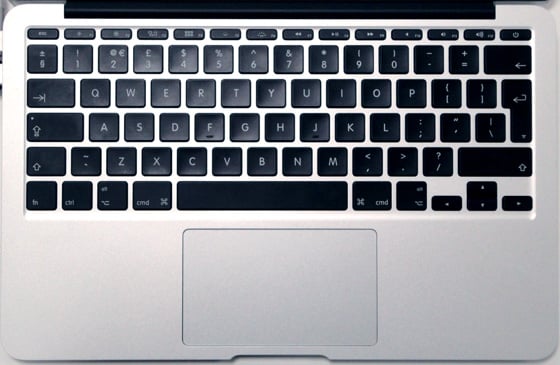
Re:Apple announces iOS 10 by riobard on Tuesday June 14, 2016 @12:30AM (#11899782)
Could be that it's difficult to describe over the phone which keys are alt/option/command/control? "The one with four loops" vs "the one with forking road" would be funny :D
Re:Apple announces iOS 10 by vsl on Wednesday June 15, 2016 @05:01AM (#11907995)
I'm typing this on a (2015/2016) non-US keyboard without them.
Re:Apple announces iOS 10 by 0x0 on Monday June 13, 2016 @11:01PM (#11899468)
Re:Apple announces iOS 10 by aaroninsf on Monday June 13, 2016 @05:38PM (#11897911)
Thought: _hmm there's a business opportunity of lemonade stand scale here_.

Sure enough: https://www.amazon.com/WhatKeys-Keyboard-Shortcut-Stickers-W...

$8 would have been instant click. I program for a living on a Mac and still can't remember the damn 'option' symbol in shortcuts.

$20...? Hmmm. Not so much. Where's that silver sharpie...

Re:Apple announces iOS 10 by karlshea on Monday June 13, 2016 @05:01PM (#11897607)
I feel like your complaint is a little silly. ⌘ is Command and is printed right on the keyboard, Shift is an up arrow, and ^ is instantly recognizable as Control if you've used a Unix ever.

The only one that's really strange is ⌥, which by elimination is Option.

Re:Apple announces iOS 10 by Someone on Monday June 13, 2016 @05:35PM (#11897887)
See it as a switch in a railway track: something that gives you an option as to where to go.

That is way easier to remember than "Swedish Campground", which we only got because there otherwise would be too many apples on the screen (http://www.folklore.org/StoryView.py?story=Swedish_Campgroun... the Apple 2 had 'closed Apple' and 'open Apple'. See http://www.macworld.com/article/2867994/think-retro-open-app...)

Re:Apple announces iOS 10 by FireBeyond on Monday June 13, 2016 @05:24PM (#11897786)
UX by elimination - mystery meat navigation (https://en.wikipedia.org/wiki/Mystery_meat_navigation) for your keyboard.
Re:Apple announces iOS 10 by coldtea on Monday June 13, 2016 @06:23PM (#11898226)
Mystery meat doesn't really apply here, as keyboards are not supposed to be obvious -- they are supposed to be "learn once and then remember forever".

You don't want to be looking "where's the key with the Alt sign" or whatever key you want to find every time you need to hit it.

Ideally a keyboard could even be totally black -- and fancy touch-typing key-switching keyboards are.

Re:Apple announces iOS 10 by Matthias247 on Tuesday June 14, 2016 @05:52AM (#11900858)
I found ^ the difficult thing. Although working with PCs for more then 20 years (although mostly Windows, only some Linux) I had no idea that it could mean Control. And therefore I needed to google what it means as an OSX keyboard shortcut. ⌥ was obvious, as it is printed on my keycaps, ^ not.
Re:Apple announces iOS 10 by jrockway on Tuesday June 14, 2016 @03:22AM (#11900349)
I miss open-apple and closed-apple. I guess I didn't realize that Apple took those away at some point, and that the command and option symbols aren't printed on the keyboard anymore. Weird.

I am still not sure why PC keyboards have a context menu key. I've only ever pressed it by accident.

Re:Apple announces iOS 10 by smnscu on Monday June 13, 2016 @07:13PM (#11898531)
Well, then you haven't been using macs for a decade, but for a year, times ten (and that's totally fine, unless you're leaving arrogant comments on HN about "why we tolerate this or that"). I've been using macs for about 5 years and I still learn new useful features and shortcuts, and having 3 modifier keys is so useful (e.g. emacs + iterm2 + spectacle) that I can't see myself going back to linux/similar. ETA: also, brew is lovely for people who want a stupid simple package manager
Re:Apple announces iOS 10 by mintplant on Monday June 13, 2016 @08:34PM (#11898934)
>and having 3 modifier keys is so useful (e.g. emacs + iterm2 + spectacle) that I can't see myself going back to linux/similar

Linux has control, alt, and meta (aka "super" or "the Windows key").

Re:Apple announces iOS 10 by __d on Monday June 13, 2016 @09:04PM (#11899062)
gotta love X. super is not meta, and you forgot hyper too. also, shift (although most people just use it for the obvious).
Re:Apple announces iOS 10 by TazeTSchnitzel on Monday June 13, 2016 @04:58PM (#11897578)
Seven? What?

There's Control, Option/Alt, Command, and Shift. Four modifier keys. This is the same set you have on other OSes, except there, Command is called Windows Key or Super.

Yes, Apple has symbols as abbreviations for Control, Command, Option, and Shift. Yes, Option is also called Alt. But it's not really all that complicated.

Re:Apple announces iOS 10 by dragonwriter on Monday June 13, 2016 @07:09PM (#11898512)
The problem isn't the number of modifiers, the problem is that Apple uses symbols for them in the UI that over time it has progressively removed from keyboards, and which have no obvious connection to the names on the keyboards (except for Ctrl sometimes getting the same ^ treatment on other platforms, this just isn't the case outside of Apple.)
Re:Apple announces iOS 10 by linkregister on Monday June 13, 2016 @05:04PM (#11897625)
The vast majority of Windows desktop keyboards do not have a fn key.
Re:Apple announces iOS 10 by yoz-y on Monday June 13, 2016 @05:38PM (#11897918)
But all laptops do.
Re:Apple announces iOS 10 by milesward on Monday June 13, 2016 @06:44PM (#11898359)
I'm on a Chromebook Pixel 2, and it doesn't have this key. So, no.
Re:Apple announces iOS 10 by yoz-y on Tuesday June 14, 2016 @12:09AM (#11899713)
What I really meant was Windows laptops as the parent was expressly mentioning Windows desktops. I did not know about the Chromebook though. I am curious though does it have F keys which are usually the ones that are used with the Fn key on Windows?
Re:Apple announces iOS 10 by TazeTSchnitzel on Monday June 13, 2016 @05:48PM (#11897989)
Older Apple keyboards didn't have them either. I'm using one right now.
Re:Apple announces iOS 10 by WildUtah on Tuesday June 14, 2016 @12:55AM (#11899871)
Option, Escape, Meta, Alt, Control, Shift: ŒMACS
Re:Apple announces iOS 10 by Swizec on Monday June 13, 2016 @06:44PM (#11898357)
> Hold down the Option key and click on Airport or volume control to see what I mean in macOS. It gives you more information, and the information it provides is information you didn't necessarily need to have without holding down the Option key.

You just blew my mind. I've been using Macs for nigh on 10 years and this is the first time I've heard of this. This is going to make so many common tasks (choosing sound output) so much easier!

Until I forget it exists 2 hours from now.

Re:Apple announces iOS 10 by melvinmt on Monday June 13, 2016 @11:14PM (#11899512)
> On iOS, with regular touch on the camera you get the camera. 3D touch - you get the ability to specify the camera you want before loading the app.

Every time there's a thread about 3D Touch on HN, I learn new things. Which tells a lot about the discoverability of the 3D Touch features...

Re:Apple announces iOS 10 by intoverflow2 on Tuesday June 14, 2016 @06:56AM (#11901111)
Tap and hold was already the option key for iOS. 3D Touch is a technology in search for a use.
Re:Apple announces iOS 10 by 7Z7 on Tuesday June 14, 2016 @02:03PM (#11903960)
Tap and hold does other things.
Re:Apple announces iOS 10 by middleq on Monday June 13, 2016 @05:48PM (#11897987)
I've found 3D touch to be useful. Looking forward to the increased support.
Re:Apple announces iOS 10 by zavulon on Tuesday June 14, 2016 @10:02AM (#11902057)
Thank you for this. For years, I've been going into Settings -> Sound to change output and input settings - this is so much easier!
Re:Apple announces iOS 10 by 2461001642 on Tuesday June 14, 2016 @11:27AM (#11902588)
a: mind blown b: isn't this a terrible UX? I mean, these features are GREAT but unless I randomly caught this comment in an HN thread, I would never have known about them. And when I option-click an icon, I have no idea what's going to happen before I do it. (Incidentally, I have the same problems with 3D Touch).