News for hackers. Stuff that matters.
Re:Apple announces iOS 10 by throwanem on Monday June 13, 2016 @03:58PM (#11896999)
> what the hell the volume button does in different contexts

If the app you're using right now has a handle for audio playback, it changes the speaker volume. If not, it changes the ringer volume. As far as I can tell, that's all, and in a half decade of using iPhones and iPods, I've never actually seen it misbehave.

Re:Apple announces iOS 10 by martin-adams on Monday June 13, 2016 @04:24PM (#11897262)
This bugs me like mad on Android. When I know the app is going to blast out, I have to let it before I can turn it down. I'm forever having to hop through menu after menu to turn the volume down.

My phone is permanently on vibrate (have young kids in the house and don't want to wake them), so changing the ringer is frustrating at most.

Re:Apple announces iOS 10 by wlesieutre on Monday June 13, 2016 @04:30PM (#11897326)
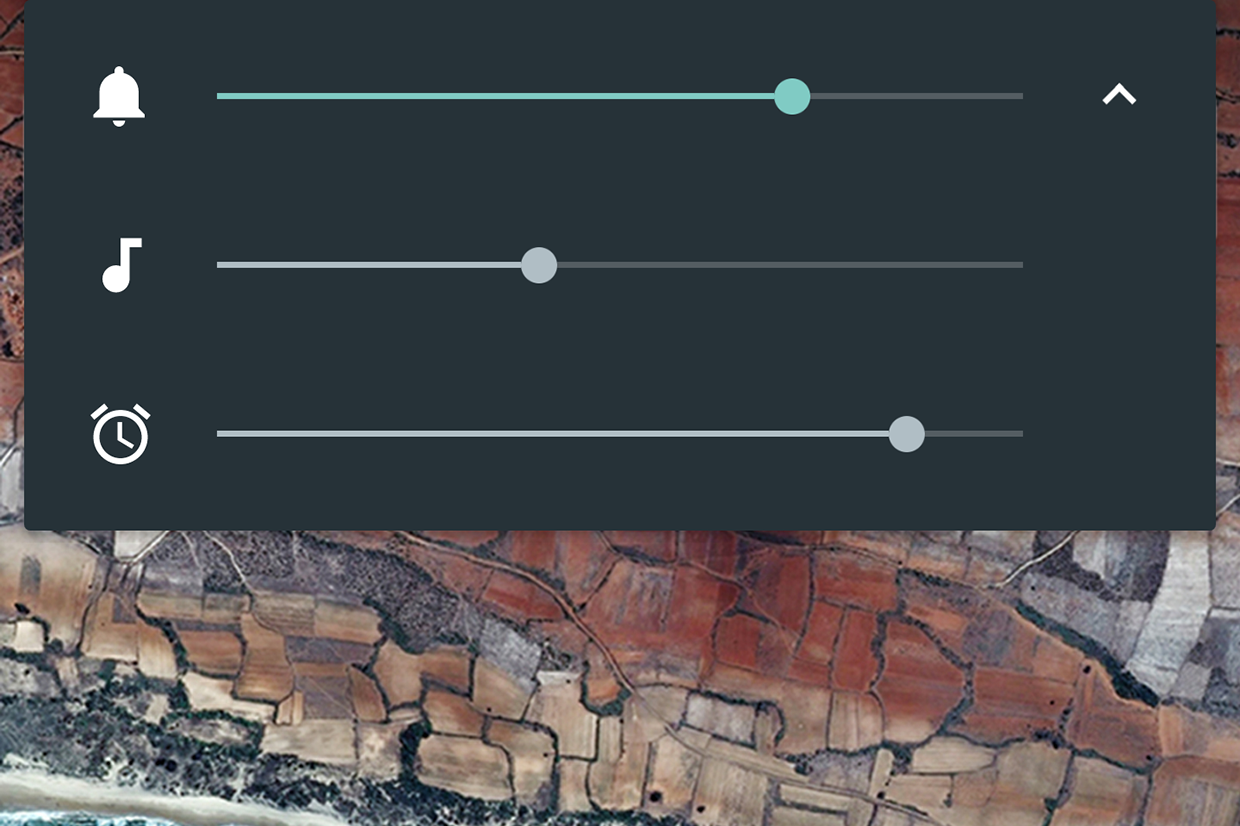
On Android 6:

1) Press volume button to bring up volume controls

2) Tap the arrow on the right to expand

3) Adjust ring/music/alarm volumes as needed: http://core0.staticworld.net/images/article/2015/05/android_...
Re:Apple announces iOS 10 by swiley on Monday June 13, 2016 @04:49PM (#11897500)
Just like he said, that involves touching the screen and opening a menu. There's no predictable way to immediately silence your phone.
Re:Apple announces iOS 10 by badlucklottery on Monday June 13, 2016 @05:08PM (#11897668)
You can predictably silence it before it happens with the above method. Just drag the "music" volume to zero.
Re:Apple announces iOS 10 by wlesieutre on Monday June 13, 2016 @05:33PM (#11897878)
I'm not sure what solution they're looking for. A single universal volume control where if you turn up a video it means your ringer is now on full blast? 6 volume buttons on the side of your phone to adjust them each individually?

Android's system of adjusting media volume when media is playing and ringer volume when it isn't seems like a reasonably clean solution. It takes a single tap to expand to the three sliders.

Maybe a shortcut where where pressing volume up/down simultaneously mutes everything?

Re:Apple announces iOS 10 by ZeroGravitas on Monday June 13, 2016 @06:49PM (#11898388)
It's not that exotic, you've got a child or a sleeping partner or a boss in the same room and you want to watch a mostly visual video without any unnecessary jingles or other audio cues from disturbing them.

So you reduce the volume, but it only reduced the ringer for calls, which isn't what you want.

As the sibling answer says, newer Androids can do this. One click to display the volume, a touch to see the individual controls and then slide.

Re:Apple announces iOS 10 by mintplant on Monday June 13, 2016 @08:38PM (#11898953)
Or swipe down the top drawer and tap the Sound setting to Mute.
Re:Apple announces iOS 10 by pbuzbee on Monday June 13, 2016 @09:50PM (#11899212)
> A single universal volume control

This is exactly what I want.

Re:Apple announces iOS 10 by julianz on Monday June 13, 2016 @11:27PM (#11899539)
Press the volume once, the display has an options "cog" on the right, tapping that shows all the volumes on the device and you can set them to your heart's content.
Re:Apple announces iOS 10 by untog on Monday June 13, 2016 @04:33PM (#11897358)
If you're on a newer version of Android you can actually open up a three-slider volume control that has alert volume, media volume and alarm volume separately.
Re:Apple announces iOS 10 by JustSomeNobody on Monday June 13, 2016 @04:34PM (#11897366)
So, on Android, if you know it's going to blast out, you can't go into settings from the notifications shade and change the volume for Music, video, etc. to a reasonable level? I can on mine...
Re:Apple announces iOS 10 by martin-adams on Monday June 13, 2016 @04:40PM (#11897430)
Yes, this is what I do. It would be nice to use the volume rocker to do that.
Re:Apple announces iOS 10 by throwanem on Monday June 13, 2016 @04:47PM (#11897483)
How do you expect it to know which volume setting you want to adjust?
Re:Apple announces iOS 10 by leohutson on Monday June 13, 2016 @05:22PM (#11897770)
It just needs to be smarter about the context. If a video is loading in chrome, 90% of the time the intent is to turn down the volume of the video, it's broken that it waits for it to start playing.

Honestly, the most intuitive option for me would the audio controls should never touch the ringer, bury that behind a menu, rather than switching based on context.

Re:Apple announces iOS 10 by other_herbert on Tuesday June 14, 2016 @12:12AM (#11899721)
I haven't used Android in a while but that used to be a setting... "Volume controls:" with a selector for what it did... Volume, ringer or both
Re:Apple announces iOS 10 by coldtea on Monday June 13, 2016 @06:26PM (#11898248)
How about having them not ever adjusting the ringer?

You can always adjust the ringer (something people rarely do -- for quite times there's the "silent" mode anyway) from the UI, and always use the volume buttons for the system's (music, video etc) audio volume.

Re:Apple announces iOS 10 by pritambaral on Monday June 13, 2016 @05:19PM (#11897740)
There's just two buttons. Both have specific purposes.

You can touch the screen to drop the selector, click on which volume you want, and go ahead with using the rocker for that volume selector.

To silence app-audio, I use just: volume-rocker, click on down arrow, click on music icon to mute. That's it.

Re:Apple announces iOS 10 by dskhatri on Monday June 13, 2016 @04:34PM (#11897361)
Just tap the pull-down menu button in the volume dialog and change the appropriate volume slider.
Re:Apple announces iOS 10 by TheOneTrueKyle on Monday June 13, 2016 @04:54PM (#11897549)
It is even a bigger nightmare if you have chromecast streaming to a TV. Now you have another volume control (which chromecast usually takes priority in this situation). This have been the biggest usability issues I've had with Android.
Re:Apple announces iOS 10 by joecool1029 on Monday June 13, 2016 @05:51PM (#11898020)
It is still impossible to change audio volume for headphones before the app begins playing.

Consider this scenario:

- Use iphone at max volume to power speakers (pseudo line-out)

- Switch to sensitive IEM's later, attempt to change volume before starting... can't. Just changes notification volume.

- Begin playing music, rupture eardrum if IEM's in.

Fortunately iphone doesn't push enough current to damage the hardware (which can be replaced), but it is plenty enough to damage hearing (which can't be replaced).

I have yet to find a way to change headphone volume without initiating playback.

Android's volume control is a mess but at least it is possible to change these volumes.

Blackberry 10 handles the situation best: It remembers the volume for line-out usage and remembers the headphone volume used last. If Apple can detect headphones are unplugged they can detect line impedance vs. headphone impedance.

Re:Apple announces iOS 10 by arrrg on Monday June 13, 2016 @06:33PM (#11898294)
(There is a setting in Settings that will turn off ringer volume changes with the buttons. That way you will always adjust the volume and never the ringer, no matter whether anything is playing or not. As such you can then adjust the volume of headphones without playing anything with the buttons. Works like a charm. I find that I personally never need to adjust the ringer volume once I have set it to an appropriate level. I just care about turning the ringer off and on, not adjusting the volume.)

I also think Apple already does remember headphone volume? It seems to for me?!

Re:Apple announces iOS 10 by joecool1029 on Tuesday June 14, 2016 @01:27AM (#11899978)
They don't remember headphone and line out separately from the same 3.5mm port. Blackberry does, that's the point I was making.

Thanks for the tip about ringer volume though. Creates a new problem but at least it's not a problem that involves hearing damage.

Re:Apple announces iOS 10 by aggie on Monday June 13, 2016 @06:02PM (#11898089)
You can plug in the headphones then adjust volume from the control center. I do this habitually after experiencing several near eardrum blowouts as your describe.
Re:Apple announces iOS 10 by NamTaf on Monday June 13, 2016 @08:33PM (#11898928)
You can also set the volume limiter in the settings if you want, so that 'full' volume doesn't rupture your eardrums.

Including the sibling replies, there's several solutions to this problem if you dig.

Re:Apple announces iOS 10 by rhinoceraptor on Tuesday June 14, 2016 @08:59AM (#11901706)
What I do is slide up the tray from the bottom, and then very carefully, turn down the volume slider, making sure not to accidentally hit the play button.
Re:Apple announces iOS 10 by snailmailman on Monday June 13, 2016 @04:19PM (#11897236)
I think there are a few other edge cases. Siri has its own volume controls while you are using siri. I think phone calls have their own volume too. And while you are in the camera volume buttons become 'take photo' buttons.
Re:Apple announces iOS 10 by throwanem on Monday June 13, 2016 @04:32PM (#11897345)
In Siri and a phone call, you're still adjusting the speaker volume. The current setting appears to be independent of random apps that make noise, but it's still speaker volume vs. ringer volume.
Re:Apple announces iOS 10 by jedberg on Monday June 13, 2016 @04:05PM (#11897086)
That's true but how do I turn the volume down before a video starts. As far as I can tell there is no way to do that. In Youtube, even if my phone is muted, as soon as the video plays it will be 70% volume and I have to rush to turn it down.
Re:Apple announces iOS 10 by mikeash on Monday June 13, 2016 @04:38PM (#11897408)
If you're like me and never want to change the ringer volume, then go into Settings, Sounds, Ringer and Alerts, and set Change with Buttons to off. Then the volume buttons change the playback volume all the time.
Re:Apple announces iOS 10 by city41 on Monday June 13, 2016 @06:25PM (#11898245)
Thank you, this is fantastic. Fixes something about iOS that has bugged me for a long time.
Re:Apple announces iOS 10 by throwanem on Monday June 13, 2016 @04:53PM (#11897533)
Oh neat, I had no idea that existed. Thanks!
Re:Apple announces iOS 10 by mikeash on Monday June 13, 2016 @05:08PM (#11897669)
Glad to help!
Re:Apple announces iOS 10 by maxwindiff on Monday June 13, 2016 @04:13PM (#11897169)
Open the control center (slide up from bottom of screen) and adjust the slider.
Re:Apple announces iOS 10 by goatforce5 on Monday June 13, 2016 @04:10PM (#11897137)
Swipe up from the bottom of the screen to access the short cut controls?
Re:Apple announces iOS 10 by ninkendo on Monday June 13, 2016 @07:52PM (#11898735)
That's confusing as hell though. How do I know whether the app I'm using has a handle for audio playback? It makes it rather a guessing game what's going to happen when you use the volume button.
Re:Apple announces iOS 10 by rxm on Monday June 13, 2016 @04:36PM (#11897392)
The ringer volume will change depending on the Settings > Sound toggle button's position.
Re:Apple announces iOS 10 by mgkimsal on Monday June 13, 2016 @04:02PM (#11897044)
If you're in the camera, and listening to music, or on a call, using the volume buttons just take a bunch of pictures.
Re:Apple announces iOS 10 by throwanem on Monday June 13, 2016 @04:15PM (#11897187)
I've never actually run into that case, but in informal testing, it looks like the camera overrides whatever else you happen to be doing at the same time, even if that's music or a call.

That's a design choice, and there're arguments to be made for and against, but it seems hardly likely to surprise anyone more than once or twice.

Re:Apple announces iOS 10 by philwelch on Monday June 13, 2016 @10:57PM (#11899455)
If you turn your phone sideways, you can use the up-volume button as a shutter button in the Camera app.