On the tv side, the benefits of displayport are less important since most users are not watching 4k 144hz content and hdmi is now capable of playing 4k at 60hz. So hdmi is not only pushed by the corporations but is also the most convenient option the users want since all of their other hardware uses hdmi and it works fine.
Honestly I think GPUs should drop the hdmi port entirely and ship with a displayport to hdmi cable which works fine because displayport gpus also support hdmi and dvi over the dp port.
For most consumers, plugging in just one cable that does everything is a lot more convenient.
Edit: sorry, didn't know DP can also stream audio, my bad
HDMI adding audio and DRM was the core of the proposal, plus a connector that was more consumer friendly.
Source: using DisplayPort with audio.
I also thought DisplayPort was for Video Only.
I really don't. Would anyone care to share their experience? Currently, I'm thinking that a vertical monitor would be an improvement for me, but I don't see a reason to get a screen that's several times denser.
* More pixels -> more characters on screen.
* More characters on screen -> easier to glance between different parts of your code , open manuals, etc.
A 4K screen has 3840x2160 pixels. You could see that as either fitting 4 regular 1080p screens in a rectangular pattern, or just over 3 regular screens in vertical orientation (which is what you were considering).
Of course, if your current HD screen is only barely comfortable to you (likely), you will end up needing to buy a screen with larger dimensions (findable) to actually be able to utilize the screen to that extent.
Alternately, you could still go for that higher pixel density; in which case you end up with more readable characters. This does alleviate eye-strain!
Given enough pixels at your disposal (and a large enough screen), you can have the luxury of determining your own favorite trade-off between pixel density and amount-of-code-on-screen. You can do so on the fly, as tasks/whims/fatigue demand.
This is why -at least for now- I'd say you can never have enough pixels.
I'm sure there's a point of diminishing returns somewhere, but I think we have a long way to go before we reach it.
Now, an ultrawide. That was truly a game changer in productivity for me.
Ditto. At one point I had 2x34'' Ultrawide side-by-side, but recently replaced with a single 49'' UW w/QHD.
Now, perhaps people are unwilling to wear glasses or contacts for very small vision distortions (understandable), but I do have poor vision, and I want even higher pixel density, because my glasses/contacts get me great vision (I get headaches if I don't correct to 40/20 or something).
We are reading paper books printed at 600 or 1200 dpi (though that often uses similar tricks to subpixel rendering), and nobody complains. As a matter of fact, people can tell a difference between 300 and 600 dpi, yet books are kept at, at most, an arms distance, so usually closer than most big displays today.
Depends on the UI you use. Gnome and tiling window managers should do it just fine. I prefer the macOS keybinds (including where full screen becomes a new desktop, combined with the "Magic Touchpad" gestures).
With regards to keybindings, one thing you can do is get ctrl/meta/alt in the same order as your Mac. Personally, I've swapped ctrl and meta on my MBP while I am using VirtualBox (with Kali) because that way when I'm in the VM I get local consistency. I usually SSH into the Kali machine from the MBP anyway.
With two 1920x1080 displays you can fit even more (or better 1920x1200). Also, what is the benefit of an ultrawide 2560x1440 compared to 2560x1440 or 2560x1600?
If you're used to 24" 1080P, going to 32" 4K gets you 1.5x the DPI and 1.77x the screen area. For what's now a $300 monitor, that is a pretty significant improvement overall.
The DPI means my characters go from 9x18 pixels to 13x27, which is a big difference in text rendering fidelity and just feels a little nicer. And the additional screen real estate speaks for itself.
Though if you have the space (a very deep empty desk) to put your display like 6 feet away from your face, then the 32" might be a decent way to reduce eye strain.
I’m using a 27" screen with 4K which is ok. But I would definitely upgrade to 5k to get 200% scaling once display standards properly support it (Thunderbolt 3 will not be a permanent solution) and screens are affordable
I had gotten the vague impression that Thunderbolt 3 is in line to be adopted more-or-less whole-cloth as USB4. Is that not accurate?
I haven't followed USB4 too much. I expect it to again have multiple "levels" like USB had before. And whether some or all of those will be high definition video capable it to be seen. For USB-C video was just a mere alternate mode which switched the meaning of the wires inside the cables to displayport. Doing video over the PCI Express subsystem of thunderbolt is a different story.
If 8k is supported, so is 5k, which is kinda getting mainstream.
From reading this[0] it looks like USB4 and TB3 will be broadly compatible, modulo the usual sort of tiresome licensing and compatibility BS our industry loves to burden us with. Pity.
I'll buy a 32" with no bezel when I can get it with a Thunderbolt 4 port, and my desk will be right about maxed out.
Some of the $300 ones are VA, though, which is OK.
There's quite a few choices at that price point, though.
I've been using this one. (Typing on it right now) Has a display port I wire my mac into when coding for work and run a Linux box on it when I'm playing. It is a nice panel, for what I paid. 32" @ 2650x1440 IPS. I've got it next to an older 30" 16:10 (2650x1600) and it is comparable.
I do wish I could get my hands on cheap 16:10 monitors. My old 24" dell is vertical, which really makes for a nice way to view the web.
The Linux desktop is dead.
Arch running Gnome on Wayland just freaking works. Input is miles better. Output is miles better.
I run two 4k displays and the internal display is 1920x1080. Even dragging windows between the external and internal monitor, with different scaling factors works SO much better.
I'm on Linux, and as long as I have screen composition on in the NVidia Settings Panel and software vsync off, 4k60 is as smooth as butter and as sharp as 4k, much like OSX. It's nicer than Windows.
EDIT:
https://wiki.archlinux.org/index.php/NVIDIA/Troubleshooting#...
That's helpful! :)
Each and every of these applications is blurry as hell. My eyes hurt. True that the multi-monitor experience with mixed scaling factors per display under Wayland is better, that's why I am still suffering of that stockholm syndrom.
Gnome does better, I acknowledge that, but their opinionated UI decisions make me feel like a retard.
I'm running 3x 28" 4k@60 driven from nVidia using prop driver with an Openbox at the Window manager. It is working great. Super fast, super snappy, fonts look fantastic. Same goes for video. I have one monitor dedicated to code, one monitor monitor dedicated to logs ( 6-10 tmux windows ) and one monitor used as a general workspace.
Pity it seems to top out at 4 cores and 16GB RAM though. I might have to take a hard look at that series once it refreshes to i9...
How do you feel about the touchpad?
I still have 1 1080p screen attached (just for NVR viewing) and if I drag my IDEA (code editor) window from a vertical monitor to my 1080 then it takes up over 3/4ths of the width. Just to restate that a different way: I gave up less than 1/4th of my screen width but got ~3x the height (just for the 2 vertical screens).
My current setup looks like this with 1 & 3 being vertical, 2 being horizontal, and 4 being my old 1080p horizontal.
    |   | | 4 | |   |
    | 1 ||  2  || 3 |
    |   |       |   |
I don’t use the full screen for editing (it’s too wide for that), but the edit window is in the middle and stuff that happens in the background (compiling etc.) sits in the virtual background, showing up in the border around the wait window. So I see immediately when things have stopped scrolling.
After using this configuration at work, I upgraded all my home setups as well.
The controller for this one isn't the best and is picky about inputs (I can't get the original Apple HDMI adaptor to work well even at 30hz, so use DisplayPort instead), but it does well enough for the price.
I use 1:1 pixel ratio and a tiling manager to manage the screen 720p subdivisions (3x3 = 9 of these) and will have editors or documentation arranged vertically in 2-3 of these subdivisions, terminals in individual subdivisions, and screen shares or video in 2x2 spaces (1440p) depending on what I'm up to. I have configured hotkeys which place windows in predefined positions in the grid and gotten pretty quick with the muscle memory of them. I aggressively organize windows into spaces, and use the Apple track pad + gestures to move spaces, this acts as a stack of second monitors that I don't have to move my head to see (but can change attention to with similar speed).
32" at arms length seems to be just right in terms of not feeling like I have to turn my head to change my area of attention, and the pixel density isn't too hard on my eyes without any scaling, but both of these are just on the edge (I wish I had slightly larger UI elements, and slightly less FOV occupied) but with these being at direct odds with each other, this device (and a more expensive one with the same resolution and dimensions I purchased for home use before this one at this price point was released) occupies a sweet spot (for me personally).
The other benefit is that I can sit farther away from the screen (I make the font larger to compensate). Feels like it's better for the eyes not to have to focus up-close.
Though the 4K monitor is sharper, specifically for the task of writing code, I actually prefer my home monitor.
What's less pleasant is how unsharp all of the icons and images in apps that haven't provided high density images look.
I recently bought a new monitor for my office and explicitly avoided a 4K monitor for this reason, it turns out there aren't that many 27" 1440p monitors nowadays. I ended up getting a Lenovo P27h (comes with USB-C) and it works great.
Huh? 1440p is the third most popular resolution on the Steam hardware survey[1], after 1080p and 1366x768.
[1] https://store.steampowered.com/hwsurvey/Steam-Hardware-Softw...
Most computers do not have dedicated graphics, let alone 74% of them using NVIDIA GPUs
The real issue is with DEs and not Linux per-se. Gnome handles 4K (Hi-DPI) better than most other DEs I've tried but it's still pretty horrid with Hi-DPI and non Hi-DPI displays mixed.
My rule of thumb has been to try keep all displays at the same resolution. For desktop that's easy, for laptop; buy a laptop that's 4K (not always cost/battery effective), or turn off its display when using external (loss of screen real estate) or change the external monitor to 1080p (not ideal, loss of resolution).
In addition there are now several monitors offering usb-c connection for video+power+usb hub functionality (e.g. see the wirecutter recommended 4k monitors), which seems convenient.
Also, it's very interesting that things are so different in France with regard to display cables. I would've assumed that, since it's mostly the same manufacturers making everything around the world, they'd have more or less standard models across regions.
It’s just a question whether or not the GPU can generate that kind of signal and whether the monitor scaler chip is willing to deal with it.
When using Windows or Linux I don't find much benefit in text rendering on a 4k display.
But as Mac OS X has no sub pixel rendering or grid fitting text looks terrible without a high ppi display.
https://news.ycombinator.com/item?id=17476873
Also, apple has a tendency to support fancy features ONLY on its own hardware. I know apple retina displays allowed display scaling, but non-apple displays only let you set the absolute display resolution.
On my displays I could only get the list of resolutions for my monitor, even holding down alt with preferences.
Meanwhile apple displays showed this dialog:
https://support.apple.com/library/content/dam/edam/applecare...
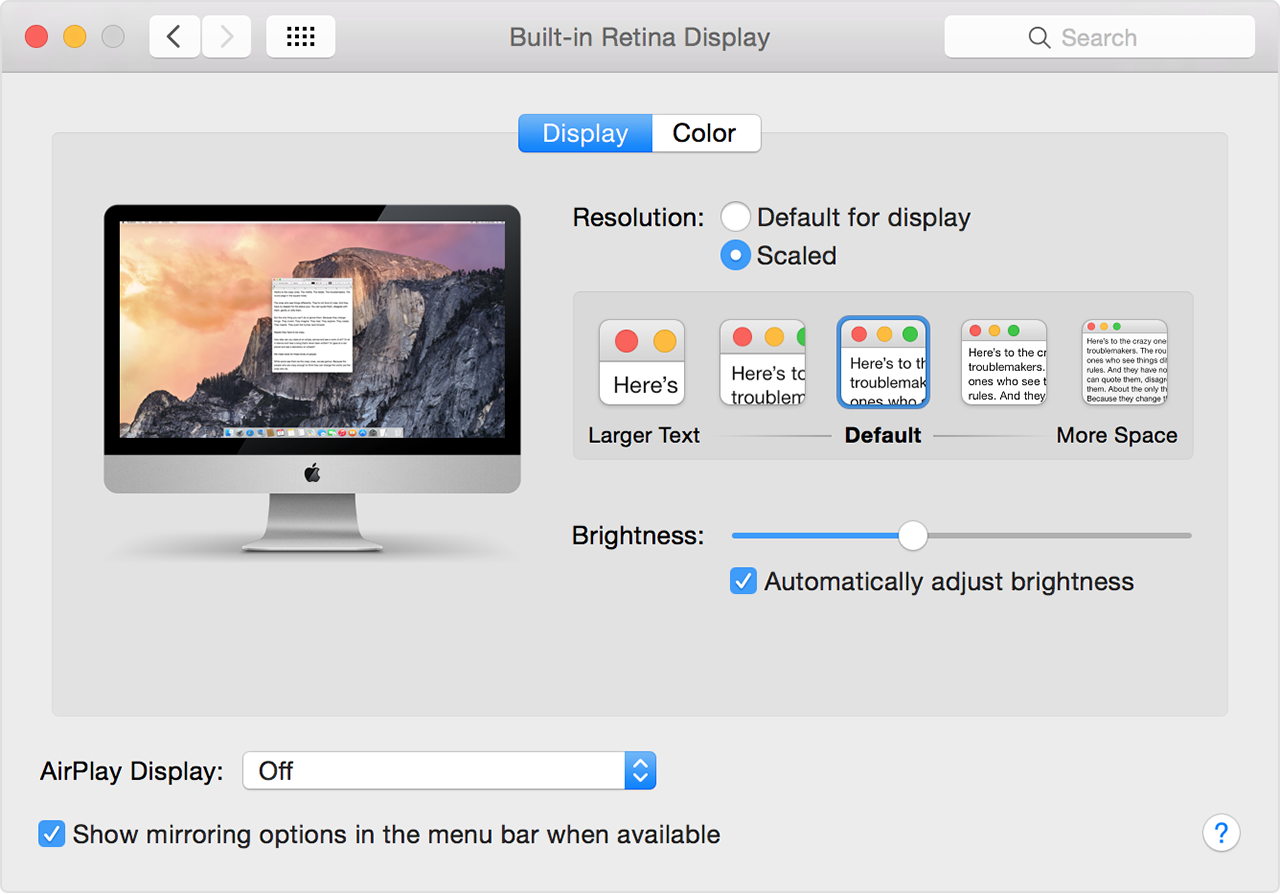
Maybe the latest OS allows it?
I've found that on cheap laptops it helps to set the refresh to 40Hz in the name of stability- it makes the recover from suspend process more reliable for some reason.
60Hz is a good sweet spot, but as people say 120Hz is noticeably better. At least at 60Hz I can type at full speed, scroll at full speed, and my mouse accuracy when clicking on buttons is good enough.
There — there it is suggested that laggy console may slow down the entire main loop of our consciousness. Interesting!
60Hz is quite usable but if you are used to 120 or 144Hz you will notice it immediately.
Brb, finding out what my screen maxes out at.
I'm currently fighting this. The trouble is I guess they move people around a lot and I noticed everyone has the same monitor...
I am on 4k60 on 43". I spend most of my day in terminal (ubuntu, i3-regolith) - it's nice, but don't think I would be missing out much without it.
For example, on one of those, one can have a side-by-side diff with 120+ character lines and still have half of the screen width remaining for documentation or terminals.
I also think there are just such economies of scale around 4k as well.
I’m looking forward to see more 5k+ screens once those standards evolve
Two main issues for me: I run Linux (4k support is simply _not_ there) and the input lag was very distracting. I tried a couple different 4k monitors, HP Z27 and LG 27UK850-W, and while the LG was slightly better, after a couple months I just couldn't bear it any longer.
I'm a full-time dev writing code mostly in Jetbrains IDEs. Hope this can spare somebody else the cost of trying 4k.
In 2015 I was in CLion day in and day out and my gpu was only a laptop gpu with 2gb of vram, so it definitely maxed out my gpu then, but still was as smooth as butter. I had to worry about my computer heating up at the time.
Today I'm on a desktop with a 980. I'm sure it's inefficient, but doing anything in the desktop, like watching youtube in 4k60fps uses about 15% of the gpu according to nvidia-smi. With all my apps running, when I'm not training neural networks, my desktop + firefox takes between 1gb and 1.5gb of vram.
I run two HP Z32 4k monitors side by side in portrait mode. Running Debian Linux Buster. Connected to NUC8i7hvk. LXDE, sometimes KDE. Text is clear. Moving windows around is smooth as silk.
27" would be too small. 30" is about the right size for the resolution.
Plus I have five or six virtual desktops to task switch between various development projects.
If you aren't able to configure it, you get just get microscopic text (unless you're using something like a 55" tv as your monitor)
The only mess is if you have mixed displays - and even that is mostly still problem only on Linux.
I could set the resoluion to something lower like 1080p, but what I wanted a high native resolution and then scaling of the icons and fonts.
If you option-click on the resolution options you may be able to manually override it.
The only problem with this approach is the mouse cursor stays tiny, and it doesn't have the OSX shake option to find it, though I rarely lose it so it isn't much of a problem.
1440p monitors are usually better at the same price point in some way. Maybe refresh rates... Maybe image quality... Well specced 4k displays still cost a decent amount.
Still I would say now is a decent type to leap into the ecosystem. The era of 1080p/1440p has already peaked.
4K adds a lot of screen-estate. Having a "normal" 27" 4k screen, I recently worked on a ultra-wide curved screen. It blew me away. I can so much recommend curved screens over regular 4k screens. All you applications can fit next to each other on eye height.
Back in the days, many moons ago, both displays and software typically had a fixed DPI (96 for Windows) and so a larger resolution was basically the same thing as a larger display. The two were interchangeable.
In the photography and print world (and everywhere else) the resolution is just the "level of detail" or "sharpness", completely independent of the size.
With Windows 10, Windows Server 2016, and recent-ish OSX the display resolution is finally decoupled from the display size. This is especially true at nice even resolutions such as precisely double or triple the legacy 96 DPI (200% or 300% scaling).
I've been using 4K monitors for over a decade, basically since they've been available and it always cracks me up to see some people run them at "100%" scaling with miniscule text. That's not the point. The point is that at 200% scaling text looks razor sharp, but is exactly the same size as it would be at 1920x1080.. You can clearly distinguish fonts that look virtually identical at 1920x1080. It's amazing, you have to try it yourself.
Caveat: If you need (or nearly need) prescription glasses, 4K or higher resolutions may not make much of a difference for you. In this case, you're likely better off having a bigger screen and/or a very big screen further away from you.
You can select your own trade-off.
Personally I won't be happy until we have a lot more pixels to provide a larger desktop surface. And then more pixels to make fonts razor-sharp.
For my use case, at some point a very high resolution VR viewer might actually be more practical (to be able to view a very large virtual desktop)
the only caveat is that it doesn't work properly if a program is on two monitors which have a different scaling factor (i.e. the scaling from one monitor is applied for the whole program)
Important caveat: the display needs to actually be big enough for this to matter. I've got the 4k Dell XPS 13, but I run at a lower resolution, since I simply cannot perceive any difference.
Edit: code & text is 100% better on a 4K moknitor with proper scaling.
My sense is that the 4K monitor is a bit nicer than the 1920x440, but nowhere near enough nicer for me to have ever felt motivated to replace the 10 year old monitor I already have at home. The real difference is between 2 monitors vs just the one.
I also briefly had a 15" laptop with a 4K monitor, and UGH NO CRANK THAT RESOLUTION DOWN RIGHT NOW. My take-away: Ignore the marketing fluff that focuses overmuch on resolutions; the resolution is not an end in and of itself. Pick a screen size, and then pick a resolution that gives you an appropriate DPI for that size.
Running a 4k monitor at 1920x1080 looks like crap. Running a 4k monitor with 200% UI scaling gets you the same dimensions but glorious smooth fonts.
So, I have a game I want to run hitting the following properties:
- The game should only render 1920x1080. This keeps fps around 30.
- The game should cover my whole screen.
- Running the game should not resize all my other open windows.
All of these seem like stupid-obvious goals, but there doesn't seem to be a way to get them all. The game itself offers fullscreen (which automatically resizes my other open windows, when the game resolution is lower than the desktop resolution -- I don't understand this ridiculous anti-feature, but it doesn't seem to be configurable), and windowed mode where the window occupies a range of pixels equal to the game resolution (which is a really small window, and really hurts enjoyment of the game). I've tried sending win32 messages [well, SetWindowLong; I think "messages" are something different] to a 1920x1080 game window to expand its rectangle, but the game just starts rendering higher-resolution images for the bigger window -- even though it's configured for 1920x1080 -- dropping the frame rate.
Are you saying there's a way for me to scale this window to get the behavior I want? (Render a 1920x1080 image, then paint it over the 3840x2160 desktop.) What is it?
In that case, instead of physically changing your monitor's resolution when entering (true) fullscreen mode, the GPU should simply rescale the game output as required to match your regular resolution.
ehhhhhh.....
> It works pretty well in Linux, but given the mess that is Linux UI toolkits, not all applications will scale properly.
Yep, exactly.
I'm so confused. Just missing a 1 and 1920x1440 is an actual monitor resolution I've never heard of? 1920x1080? 1920x1200? 2560x1440?
That means about 4K for 15 inches.
https://www.dell.com/en-us/work/shop/dell-ultrasharp-32-8k-m...
Back then display port ran at 60fps, and hdmi ran at 30fps. My hardware has changed and moved on, but I still default to using a display port cable. It's rare to not find a graphics card without display port, and it's rare to find a monitor without one, so I've never had a reason to try HDMI. As far as I can tell it's a stubborn format that continue to fight to live on. Frankly, I don't really get why we still have HDMI today.