I would say the author clearly knows very little computer specs:
"The MacBook Pro had options with 2.4 gigahertz dual-core processors back in 2010. Anything new in 2016? Not really, well… nope."
Because a 2010 2.4ghz dual core is identical to a 2016 2.4 ghz dual core.... I thought we got over comparing processors purely by their clock speed a long time ago. (I will agree that theyve been going with lower and lower power to allow for better battery life, this is a terrible way to make the comparison. Id much rather see a processor comparison graph here).
Personally I think this is a terrible decision, but then again, I think using a laptop keyboard for programming is a terrible decision too. I need multiple monitors and an external keyboard to get anything done, so I typically use a desktop, and then use a lightweight laptop (basically a chromebook) to remote into the desktop if I absolutely need to be mobile.
Also, "What other people are saying" and then listing 4 anecdotal quotes seems pretty uncompelling.
I imagine this is not a great developer's laptop. But apple fanboys will keep buying it and either stop using vim just so they can keep using apple or buy an external keyboard. And Im really not sure what else you could really want out of a laptop then.
I can tell you that I haven't used Esc in ages. I have Caps Lock mapped to Ctrl (as it is a vastly more useful a key than Esc and Caps Lock is a much better position for it and is just as an extraneous as Esc is). I use Ctrl-C or Ctrl-[ to exit insert mode and it works just fine. In fact I understand that most experienced VIm users do this.
Esc is, by and large a useless key. Even if it wasn't you can remap keys as you like so feel free to map Esc to Caps Lock if you want. Taken alone the lack of Esc and Fn keys is not an argument against the design of the new MBP for developers.
I'm not a Mac User, but I use THE ESC key extensively to cancel out of dialogs.
Even if mac apps come mapped to other keys, many peaplo still runs windows with bootcamp, virtual box etc and wine programs in apple computers, making things even harder.
And about external keyboards? Apple keyboards comes with F keys... they are going to be uselles now?
I'm not even a power emacs user or something (IntelliJ is my preferred IDE). YMMV of course, but I find the hotkeys super useful.
I don't know why everyone is unnecessarily freaking out over this non-issue that has so many alternative solutions, some of which will be superior.
I'm a heavy vim user and use the ESC key all the time. If I get the new MacBook Pro I'll probably see how the touch key works, and then rebind if it's necessary. It's not the end of the world.
But seriously I use esc all the time to come in and out of modes in VIM.
I also use it in VIM mode in RStudio, VS Code and many other text editors.
FUNCTION KEYS - I use them all day with my IDEs. F2 is my go to help files.
That's pretty uncommon to imply it's generalizable. Most vim users, I feel comfortable in saying, actually use 'Esc', or a key mapped to the same. Speaking for myself, I can't see why I'd want to use two keys when one would do.
So whether you map it directly to Esc or to a modifier, the parent's point stands: Vim users don't need the Esc key and are probably better off without it.
- can you give me some details on your remap setup on macOS? if you have dotfiles somewhere that'd be great.
- as a vim user who only uses vim as an editor, I challenge the assumption that touch Esc is a horrible thing. Esc is a very special key and it may turn out to be ok for it to _be_ different, and _feel_ different.
When did you switch to the Caps Lock mapping? How long did it take you to get use to it?
Personally I think people make way too big a deal about the escape key being difficult to hit. It's right there in the corner, never been a problem for me.
Many people already map capslock to ctrl. You could map ctrl to ESC, but then it gets uncomfortable when switching computers, and it goes against 10+ years of muscle memory.
I tried remapping capslock once, but it got too confusing when switching computers.
I used this software to do this https://pqrs.org/osx/karabiner/
I don't even know what commands would use the ESC key?
The other anecdote is I've been using vim for about 15 years, and use esc daily. I am constantly in multiple vim environments - different servers, different clients, different OS, etc. I don't have the luxury of saying "I'm going to install all my default vim keybindings and plugins on every vim installation I ever use". Walking someone else over the phone who has to do vim - I need to count on some standard defaults being there, and 'esc' is one.
So yeah - some of you "power users" - fine - you've never touched ESC in 20 years - good for you. You're in the minority.
Vim users that use escape to leave insert mode are not exactly a majority of Mac users. Also, many people have been complaining about the location of Escape for such an important command. http://stackoverflow.com/questions/4416512/why-use-esc-in-vi...
Having said that, I use Escape myself in Vim - you know what? I'll adapt.
This has nothing to do with the new MBP being unsuitable for developers. This is about power users being forced to abandon ingrained habits.
I'm not even a power user, & after 25 years, I just know the basic few commands that you need to do anything - insert, delete, search/replace, save, & quit.
I feel like I'm taking crazy pills!
See, for example: https://en.wikipedia.org/wiki/Vi#Interface
End insert or Replace mode, go back to Normal mode. Finish abbreviation.
Note: If your <Esc> key is hard to hit on your keyboard, train yourself to use CTRL-[.
  There are commands that switch you into input mode.
  There is only one key that takes you out of input mode,
  and that is the <escape> key. (Key names are written
  using less-than and greater-than signs, e.g. <escape>
  means the ``escape'' key, usually labeled ``esc'' on
  your terminal's keyboard.)  If you're	ever confused
  as to which mode you're in, keep entering the <escape>
  key until vi beeps at you.
I'm a happy user of http://ex-vi.sf.net/ and can confirm that, since it's the exact same key code, it works -fine-.
EDIT: Thanks for the replies, other people. I personally use ^C, I was curious what 'mozumder specifically used. :)
I will, however, never forgive Excel for Esc being "abandon edit".
I was expecting more commands to use the ESC key?
I was expecting commands to be anything you did after the typing in colon.
The escape key issue doesn't bother me as much, but I'm not a Vim user and I already have Caps Lock mapped to escape or control depending on whether it's a modifier or not. I do use the function keys occasionally in cross-platform development tools like gitk, but I'm sure that other keybindings can be substituted and I'd be able to deal with that.
But the lack of RAM beyond 16 GB pretty much means there's no reason for me to upgrade from my 3 year old laptop. I would have considered upgrading this cycle if they offered more RAM, but as it is I'll probably hold off. Maybe if they release another in a year or so with more RAM I'll upgrade; if not, I may just switch to a Lenovo or other laptop that has more expansion room.
3 years without a bump in RAM capacity seems like an awful lot. I realize that Moore's Law is flattening out, but stagnating for 3 years like this seems like a long time.
That said, I don't like rotating my hand or remove my fingers from the home row.
It's really a non-issue because you can rebind keys so easily, it's not even funny. Everyone seems to be making a mountain out of a molehill.
It gives an opportunity to relax the hand. For the same reason I'm not a fan of hjkl and often use the arrow keys.
macOS Sierra allows you to rebind Caps to the Esc key, which seems like a good compromise to me. As a non-vim user, I just wish I could bind Caps to other keys as well :(
Which, interestingly, is where ESC was on the computer that vim was first written for.
Bill Joy's keyboard had escape where caps lock is today.
You can remap your key bindings to exactly this layout using Karabiner-Elements.
https://github.com/tekezo/Karabiner-Elements/pull/247
You could build from the latest update and get that functionality.
Also, I work about 50/50 from a USB keyboard. With this keyboard layout, I would need to remember which keyboard I'm using - awful for productivity.
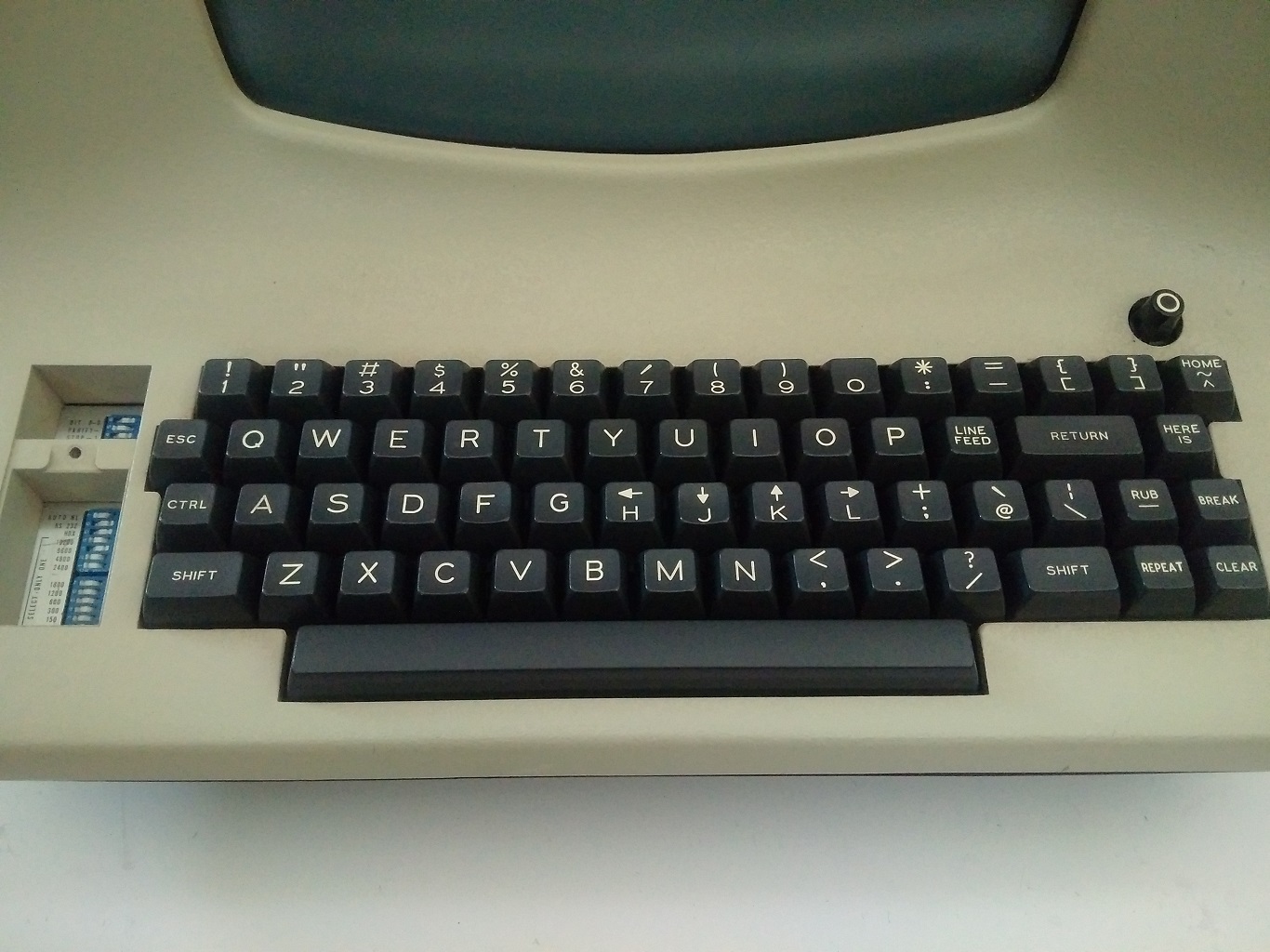
So then wouldn't the esc be present on Touch Bar? It's not like it's the "useless stuff" bar.
How is that a reasonable response? To me, the reasonable response would be, "I remap/whatever, but maybe it's best if you look at a different platform where this isn't a concern." Or, "I can see how that's a problem, here's what I do."
We do have some responses in the 'reasonable' category, by we also have replies like "Esc is, by and large a useless key." and "It's really a non-issue because you can rebind keys so easily, it's not even funny" and "the ESC key in vim can lead to RSI" and "Only if you're too lazy to rebind it to any of the many more finger friendly options". All of them saying, "You're doing it wrong" - even if not in so many words.
Telling someone they're wrong to dislike a specific change because a workaround happens to exist says to me that you're making a whole lot of assumptions about other people based on what works for you at best, and being patronizing at worst.
Would it not be possible to map the dynamic touchbar keys to Esc when one is using vim?
As long as the Escape keys exist when required, why worry about when they don't?
I've been touch typing for years now, and the idea that I have to look down at the keyboard to see if a key exists (a key that that has existed for the entirety of my computing history) is ludicrous.
I fail to see the issue here.
Personally, I don't see how you can quickly modify the volume from the ribbon if the application you are using has repurposed that space for some other functionality it thinks you are more likely to want
But apple fanboys will keep buying it
That said, most of the other stuff you say is true.
You don't find people who are dedicated to buy only Dell laptops even if something negative happens. There are no Dell fanboys (that I've ever encountered). If Dell does something stupid, people will buy ASUS, HP, Samsung, Toshiba, Lenovo, etc and get basically the same experience.
The point was less that ONLY fanboys buy macbook pros, but moreso that Apple has a large enough loyal fanbase that they can basically do whatever, and people will defend the decision.
You will hear people say that 16gb of RAM is a non-issue and if you need more than that you are doing it wrong. That is a fanboy response. A logical response is "I don't need 16gb of RAM, but I'm not everyone, so I'm not going to start a debate over this"
I am pretty sure that when you open a terminal, esc and function keys will be up there. It'll not be a mechanical key, but I'm sure it'll still work.
It seems like a non-issue to me unless people simply don't like the touch bar not being physical keys, which is fine, because they can just get the other Pro without it.
The bar's function varies according to the application being used. It should be trivial to make, say, iTerm, which is immensely popular (I use it myself) have Esc and function keys available by default.
I imagine Cathode (http://www.secretgeometry.com/apps/cathode/), another favorite of mine, will have beautiful function keys.
> because they can just get the other Pro without it.
Plus, it's cheaper.
So no, by default, you will not get the F keys when you open Terminal.

Maybe by the time I'm 70 I'll be talking to my computers, but still: why wreck my wrists?
However, that is a preference; when traveling I have no issues doing work while using a laptop keyboard.
Maybe my hands are too big, but I am just not really comfortable typing on a laptop keyboard. It's not as bad as trying to do anything on a miniscule on-screen keyboard on a phone, but I still tend to hit at least two or three keys at once far too often.
If you're a Vim user and have escape as one of the keys farthest away from you, they did you a favour. I don't mean that as a defence of the MacBook Pro. At the very least, switch caps lock and escape if you're not using caps lock for something else.
The ESC key in vim can lead to RSI:
http://stackoverflow.com/questions/11443012/how-to-remap-key...
This has made my life so much better.
For actually writing a finished production-ready product, a desktop with several monitors and a real keyboard is preferred. But being able to switch between the two modes -- research and creative, focused and technical -- gets the best results.
Only if you're too lazy to rebind it to any of the many more finger friendly options.
Devs are a huge market for Apple, but Apple is ignoring them.
This isn't about ESC, it's about whether Apple has any interest in acknowledging the dev market and keeping devs on board.
The answer is "no."
Apple is making no concessions to developers or professional power users who need performance. Instead, Apple is producing vanilla-grade laptops with a touch of gimmicky brand frosting to justify the high price.
The real heuristic is skimping on performance and connectivity to maintain margins. The cost to users is significant lost productivity.
This is the MacBook Pro Intern Edition. It could have been more, but that's where Apple is now.
Wait till the EMACS crowd gets a whiff of how Apple refuses to sell pedals for their keybindings, then Apple is truly in trouble.
Look, I know VIM is popular, but so is XCode, so is Sublime, so is Atom, so is TextMate, so is a multitude of other text editors for God's sake, that to claim that Apple is somehow "abandoning the entire software development community", as if VIM users somehow speak for all of them, is pretty whiny and unrealistic.
Do you think Apple really worries that a bunch of what, Open Source "hackers" producing yet another Ruby testing framework are now going to abandon their platform? Seriously? Get off your high horse, man.
There's thousands of Visual Studio developers in the Windows world and thousands of XCode developers in the OS X world who don't give two shits about your 1970's vintage terminal mode text editor. Apple will be fine. Software developers (again, a much larger group than you obviously think) are also going to be fine.
And aren't you guys always bragging what power users you are? So now that one (remappable!!!!) key is gone your entire world is crashing around you?
If you're such a fossil that you can't adapt to the absence of this one key, that already is of extremely limited use for 99.9% of people, how did you cope with the disappearance of the floppy disk, the caps lock key, the parallel port, VGA, optical disc drives? How did you ever adjust from storing backups of your code on floppy disks once that went away?
What happens when Windows laptops one day follow suit and remove the Escape key and the (just as useless) Caps Lock key? If VIM users can't adapt to a simple change such as this, maybe you deserve to fade to irrelevancy? Just keep buying 2008-era laptops off Ebay well into the 2030's, I guess?
Truly pathetic rants, truly.
IMO what is really pathetic is people tying the hardware to the software, I don't buy "Windows Laptop", I buy a Laptop with the hardware that suits my needs and install Linux on it if it's not already installed, but I guess my opinion is irrelevant as I'm an emacs core user and use VIM as a text editor. Let me give you a tip here, If you buy a Laptop and chose to have it without Windows pre installed you will get a discount ( The windows License fees)
And guess What I will never pay a license fee for an IDE (from M$ or Apple) that do not match half what I get from my open source "vintage editor", but that just only me!!!
If you're using vim and reaching for the escape key you are doing it wrong imho. Rebind esc to something else (like capslock) or learn another pattern that has more ergonomic value.
If for some reason you "can't" add a .vimrc file to a user account then you probably shouldn't be manually logging into that user account.
So generations of Vim users are doing it wrong but you have the right answer?
So yes, rebinding Escape is the right answer if you heavily use it. The normal positioning for Escape is very inconvenient for touch typing.
nobody does that because it was unnecessary. Of course, now developers need to ADAPT the Macbook instead of the Macbook ADAPTING developer's workflow. That's not the definition of a developer friendly machine. The touchbar is a gimmick and even then it doesn't justify the removal of an entire row of keys. It was purely an aesthetic decision. But I forgot, developers like to work with "beautiful" computers instead of functional ones /s
I'm more of an Emacs guy, but still frequently hit Escape (I use it as the Meta key in Emacs). I've bound Escape to the Caps Lock key for as long as I can remember. Like I said, the normal location of Escape is way too far from the home row, and quite bad for touch typing.
In fact, the entire function row is too far for me to conveniently use while touch typing, and I have long fingers. I probably won't miss the function key row at all.
I haven't used or seen the actual touch bar, so cannot really make a strong statement whether it's a useless gimmick or actually useful. I have my doubts, but it could turn out to be useful in some applications.
Completely dishonest and backed by no fact at all, you can make up some data, I can too, I didn't. You call them "useless keys" but there are here for a reason. There are so useless than the touchbar can emulate this "useless" row, except that now users have to look at the keyboard to type since there is no physical feedback to guide them. this isn't innovation, this is a step back.
And no I'm not a fan of the Touch Pad at all, using a 2013MBP as a daily driver. I don't understand all the fuss.
But what if you're not a touch typist? I'm not, and I use the ESC key all the time when using vi/vim, So much so, that it is almost a mindless reflex. I have no choice but to adapt, I know, but my most likely response to this will be to use my Linux laptop more frequently. I still have to use the Mac for OS X and iPhone development, but for other server side stuff, I guess I have to switch to Linux.
Apparently it was where the Tab key was[1] as metafunctor pointed out.
...So? You know where you spend most of your time in Vim? the home row. It's called that for a reason...
I grew up with `esc` way up in the corner, and as soon as I started learning Vim I googled for common workarounds to reaching so far. Refuse to believe it, but it's true.
I've never been able to touch-type a function key on any keyboard, ever. Replacing them with a dynamic interface like the TouchBar seems fine for a row I have to look down at every time, anyway. Even on my 2015 MBP I have to make sure I'm hitting a volume button and not the power button.
I've had Caps Lock remapped to Esc for years now.
As for some recommendations others have had... I have Caps Lock mapped to Ctrl and Ctrl-[ remapped for tmux so those are out.
This is the same across several machines (MBP and multiples ThinkPads) so the more feasible solution for me is to simply stop using the Mac.
And no, I don't think remapping it is a great idea.
If I had to use this for work I would protest.

I used to do it without looking at my phone, now with touchscreen I lost that ability, I have to check every word, some keyboards help with that correcting my words if I moved my fingers a little to the side, but it's not the same, with physical buttons I was sure I pressed the correct buttons. Physical buttons give touch feedback and that's important when you're focused on something important in your screen. I don't want to switch my focus from my screen to my keyboard every time I need to use a function key.
I almost always text on my phone without looking because the visual effect where the selected letter appears above your finger actually makes me slow down. I was never able to use physical phone keyboards as easily as the adaptive software ones on modern phones.
Also I use vi mostly so I only use function keys rarely, in which case I look up.
edit: wrong year
Because programmers are at least as fond of hyperbole as the reality television programming they all claim to hate.
I haven't used it yet, so I can't judge it too much, but I imagine Escape actually works well since it's the top corner of the keyboard and easy to feel, if escape were anywhere else it would really suck.
I've got a keyboard with clicky button-type Esc and F keys, which might be a fair approximation to the new F key strip. (Pressing them isn't a million miles away from clicking on the Force Touch trackpad.)
It's bearable, but not really very nice.
Confirmed correct:
http://live.arstechnica.com/hello-again-apples-october-2016-...
And you can use ctrl [ instead which is closer to the home row anyway.
The nice thing is with this touch bar thingy that's possible.
As long as it's supported by the program, of course.
What if you wanted to use mc (The Midnight Commander), which relies heavily on F keys? wait for the update?
I can't express quite how wonderful it is on the occasions I don't have a bag with me to still be able to have a proper keyboard+mouse setup when something goes sideways.
Well, the base Macbook Pro model does exactly that. There is also an option (cheaper!) to keep the function keys.
http://arstechnica.com/apple/2016/10/no-new-macbook-airs-as-...
I might be getting old and grumpy, but more than anything else it boggles my mind when apparently everyone believes they should be the target user Apple (or Microsoft, or Google,or...) design their product for, and they consider a personal insult when that is not the case.
I don't think there was ever a time where the laptop market had so many options, at all price levels, many of those of such a high quality.
You don't like that a particular manufacturer is offering ? Vote with your wallet and choose another option, don't whine.
ESC usage just off the top of my head: cancelling any dropdown (e.g. IDE autocomplete, browser autocomplete, Spotlight, quick file search in Atom/Sublime), cancelling any OK/cancel dialog (e.g. save as), the ESC + '.' sequence in Bash to get the last word of the last command.
I could map ESC to the caps lock key I suppose.
http://www.apple.com/macbook-pro/
I don't think it would be very hard for terminal.app (or other apps targeted at developers) to show esc f1 etc along the top when it is open, and it can strictly have better function keys because instead of f4 etc they can be customised to say what they'd actually do.
I agree the fuss over the touch bar is overplayed.
I gave up on Mac as a development platform back in 2012 when they removed expose and replaced it with that terrible Mission Control garbage. Then I went back to Linux and discovered tiling window managers and haven't looked back. (and yes, I realize there are some good ones for mac now).
But I will say on this post that the escape key is a good point. I use it all the time. Sure you can rebind it, but it's not a useless, SysReq/ScrollLock type key. Most developers will have to rebind it if it doesn't appear on that touch bar thingy.
It's also no wonder that newer carbon models came back to regular fn keys.
I actually bought/buy macbooks for their build quality, and generally only install linux on them. Looks like this particular model marks the end of this path.
The 13" model has a version that keeps that row anyway. And the Touch Bar does still have a function key row/view? with ESC. MacVim and iTerm could probably add the functionality that the whole row is an ESC key when they are the active apps.
For me though, Apple got it wrong by releasing a gimmick (touch bar) which may be useful for some groups of Pro users (designers/film editors?) but I can't see adding much value to what I think is their largest group - software developers.
For me my ideal developer laptop is small, light and powerful. So while it's great the Pro is now the same size and weight as the air (13" model), I think they could have gone even smaller - see the Dell XPS 13. A 13" full powered (i7, 16GB ram) in a 12" body (by having an edge to edge 'infinity' screen). Basically they should have released a MacBook that can run an i7 and 16GB ram.
Yeah, you need some different cables. You might need to rebind some hotkeys. It might take a while for some pieces of software to support the touch bar properly.
If you don't want to be an early adopter or you can't get over your Vim muscle memory, pick up a refurbished 2015 model and the rest of us can buy a few new USB cables and move on with our lives.
With both the headphone jack removal on the iPhone and the function keys here, Apple has used "but they're old" as part of the justification. Playing a slideshow showing me a keyboard from 1970 that had function keys is not itself any form of argument against function keys. Sure, the touch bar can serve the purpose of the escape key. Crucially however, so could the escape key. The demos look neat enough, but it's hard to envision a 0.5" strip of touch screen being all that broadly useful outside a few niche cases where a long linear control is just what you need (e.g., audio scrubbing).
It's not that I think these laptops are bad necessarily. It's more that I think they're gimmicky. Apple seems to do an awful lot of things these days that remind me of Samsung circa 2012 or so -- "press this button to send your heartbeat to your spouse" kind of stuff. Meanwhile, Microsoft looks to be absolutely on fire.
I know in Windows there are actual actions on the f-keys (F1 for help, F2 for rename, F5 for reload, etc.), but the Mac has no such equivalents. They're used for hardware and music control, and have this whole secondary mode of fn+F_ chords that hardly anyone touches.
The touch bar will be useful in nearly every app. I wasn't about to set up and memorize custom F-key bindings in every piece of software I use, so it's going to be more useful. And it allows for types of input that buttons couldn't offer to begin with.
With the headphone jack, it was "it's old and we have something better," which I'm not thrilled by (but I wasn't planning on getting a new phone anyway). The USB-C and removal of F-keys I'm totally on board with.
Maybe a Windows thing but I use Function keys everyday, F3 for incremental search, F5, F9, F10, F11 for debugging. Not having these keys would be handicapping.
The function keys are also not commonly used by apps because the system maps them to brightness control, volume, play/pause etc. by default and you need to use the Fn key to produce the actual function key keystrokes.
The convention for incremental search is: cmd+F to open the find dialog, cmd+G for "Find Next" (which is great because it's right next to cmd+F), and cmd+E cmd+G for "search for selection". Every macOS app works that way and the F3 key will not be missed.
It's really not that bad. The only key I miss on Mac keyboards is forward delete (Del).
Chrome, IntelliJ, VSC all use Fn keys for debugging, and also at least I have mapped most of function keys to some tasks, like F5 for open symbol etc.
Touchbar is only good for some slider like things where continuous strip will help. It is also good for novice users like MSOffice ribbon, they can see a lot of things on screen now and they don't have to hunt in menu or remember shortcuts.
But for a real pro user spending whole day in few softwares, it makes no sense. I have seen pro photoshop users using 3-4 keys long shortcut like second nature, they need access to tonnes of features and variants so more keys the merrier.
Honestly, I haven't seen any real use cases of the touchbar, smileys and photo slider is cute but not something on top of my list to optimise.
And then the lackluster specs. That alone leaves me no real reason to upgrade.
Saying the new MacBook doesn't have an escape key is like saying the iPhone doesn't have an "L" key. It does when you need it to.
Then I'll wager your knowledge of the capabilities of the apps you use is limited and if you are developing UIs I'll bet that while you consider them slick and sophisticated, they are in reality limited and inefficient.
To use the functions keys in the touch bar in the new MacBook Pro, you have to chord with the "fn" key as well.
So where is the difference...
All of which can be rebound.
But it's on a proper mechanical keyboard because prolonged use of builtin keyboards hurts my hands.
While my primary isn't a Mac, my default left hand resting position on my keyboard is index finger on ESC and thumb on ALT.
I have a 2013 15" MacBook Pro, the diference with the top of the line that came out yesterday comes down a slight bump in the dedicated Graphics Card (which I don't appreciate since I use CUDA a lot and as such I actually prefer the GTX 750M to a only slightly better AMD card in the new model), and a 0.1 GHz bump in the processor (back from the 2.3 GHz i7 my MacBook Pro has).
I do understand that taking out the Esc and F* keys and replace it for a smart bar can be seen as a valid design option, but I can't see how shipping a Laptop 3 years later with, lets face it, basically the same specs and ask for the same price can be something positive.
I consider myself a developer, and I almost never use the Fn and ESC keys on my Mac. Everybody uses the computer differently, but I'm pretty sure this is not a deal-breaker for most. One could also argue that the touch bar might lead to innovative developer tools, such as timeline interfaces for Replay Debugging. There are already a lot of applications in the content creation (Photoshop, Illustrator, Maya) space, which developers frequently use to create assets.