When Linux works for you it's so damn great but I cannot fully enjoy a UI that is so inconsistent and ugly so often.
From installing applications to changing my background.
One terrible experience I had was when Windows did something to the Linux bootloader and I had to try work out how to fix that, but I can't really blame Linux for that.
Honestly I am so much more productive on Pop than on Windows. I can spend more time actually doing my job and less time manually creating PATH variables for every package I install. As a Web developer Windows is a disaster.
I don't see how this is a Windows issue. Windows, just like Linux, provides the capability to update the PATH both per-user and per-computer; many tools use it and work. NodeJS is a popular such tool that adds its bin folder to the PATH. If a tool isn't updating its path, then it's on the tool's installer.
This is all from my own past experience using video editing, audio editing, and image editing utilities where you usually just get a binary and have to do the legwork yourself.
Node is the exception, not the rule.
If you're prepared to give up whizzy animations etc, do try it when you have a bit of spare time.
I can't speak for the UI but Aptitude vomits broken dependencies every time you have to upgrade your distro. It made me absolutely despise package management (I'm a Windows guy) until I switched to Arch and realized a package manager that is a pleasure to work with is not an inherent oxymoron. Obviously UI is another story but at least this one works.
There are official editions for XFCE, KDE, and Gnome and there's community editions for i3, openbox, LXQT, and so on.
You still have access to the AUR and the official repos mirror the official Arch repos but lag behind by a week or two.
IN fact installing linux takes at most 20 min and I am done. Drivers and everything are all automatic.
Windows on the other hand can take hours to install from scratch. God forbid you need a service pack or to find a driver that's not easily found anymore.
People have a cognitive dissonance about what it takes to run Linux. It's by far much easier than people lead on. Yes if you need to get into the underneath of things then maybe it becomes more difficult. But I don't think that's been part of the story for average users for a long time.
IMO Windows is even more difficult when you want to get into underneath of things. Fiddle with registry settings, services and at times deleting AppData\App folder to get something fixed. At least in case of Linux you get good set of answers to your Google queries, but that is not as good in case of Windows. Also, Windows and the ecosystem of software around it has a huge reliability and performance problem still unsolved. Freezing, crashing are still rampant with Windows 10. If I boot my laptop after a week Windows Update holds me up for at least half an hour. Every update restarts the OS several times.
You're right in that a Thinkpad will mostly work out of the box long as you don't want that Nvidia GPU to work, but everyone else? Good luck. My XPS 15 was a lost cause, losing three quarters of it's battery life under Linux and with countless video problems.
And on a desktop? Hah! Roll the dice baby, and keep rolling them with every update, because sooner or later something's going to break. It always does.
It's a bit of a double standard. If you want a pain free workhorse, go with something that's supported out of the box. Don't buy that Nvidia GPU if you intend to use it for a Linux desktop, where it is unlikely to be of much use anyway (unless you are one of those CAD people in which case you use what your vendor supports).
Personally I settled for Thinkpads many years ago (the T- and X-series, not non-Thinkpads that Lenovo tries to peddle under that brand name) and they haven't given me any trouble yet. Seeing how Windows laptops sometimes doesn't wake from sleep properly makes me suspect that that's not much better tested either. If it boots, ship it.
Installation is quicker.
No bloatware/scareware to uninstall (bundled McAfee etc).
I've spent more time hunting for drivers on Windows than on Linux the 10 last years.
Linux is also significantly faster for some of my workflows (git commits, anything with maven or node).
For me (partially colorblind, never cared much about fonts, everything is an improvement from what I grew up with) I also find certain Linux DEs a lot nicer and easier to use than Windows and even MacOS. Again this is my personal opinion, but I have used Windows for years before I switched to Linux and I've also been enthusiastic about Mac and Apple and have used it for years, I just happen prefer KDE or a well tuned Gnome, Cinnamon or elementary
The downsides? In my experience Linux is slightly less stable. And there exist stuff that is only supported on Windows (an old scanner I have. Although I should add it is not great under Windows either.)
Edit: I actually looked it up now on the VueScan website and here is what is says: "VueScan is compatible with the <my scanner model> on Windows x86, Windows x64 and Mac OS X."
The big issue is thus. If you intend to run linux don't buy random hardware and hope it supports linux then complain linux is hard to make work. This is a natural course because people have all sorts of existing hardware and no real desire to buy new. It's also reasonable to try because linux does support a lot of hardware. Try it and if you like how the environment but not how works with your machine buy your next machine with linux in mind.
Sometimes it just refuses to wake from sleep, and I don't understand why. I used Linux on an Apple laptop for years and didn't have this problem.
The last time I had 'sleep' issues was with MySQL crashing when it woke up, and it found the os time changed without its internal clock moving forward. IIRC that was over ten years ago.
My i3 setup is not tweaked to auto-sleep on lid close. I'm sure it would have been easy to set up when I installed i3 back in 2015, since the sleep-on-close worked with Ubuntu's Unity desktop. Instead, when I installed i3 I attached sleep function to a hotkey, so before I close the lid I press the hotkey (if I want system to sleep). It is totally not a big deal. The system does autoresume when I open lid, which it also did in Unity environment. But if it didn't that would also not be a big deal.
To me the idea that someone would reject a superior system if it didn't auto-sleep (or auto-resume) on lid close/open is bizarre. I actually prefer to manually control with a hotkey.
Also connecting two HDMI monitors is wonky, monitor 2 flickers once every other minute or so (it's worth it) and sometimes isn't detected.
So far hardware support seems pretty good. Not sure my Ubuntu 18.10 install is getting the most out of the GPU but everything works including Bluetooth audio and suspend.
The only issues I have are with the trackpad and the silly keyboard layout.
Trackpad: it’s small, a bit twitchy and not sensitive at the edges when moving inwards but is moving outwards. Driver issue I think.
Keyboard: who thought it was a good idea to split the left and right keys with PgUp and PgDown? Someone who doesn’t touch type would be my bet. The old layout was better.
I think of it as a replacement for an 11” MacBook Air as it’s about the same size but with a 13” screen and a quad-core i7.
Oh also, I got a 4K display and that was a mistake. Raw terminal text is tiny and Gnome currently doesn’t mix monitor resolutions very well. So dual screening with a 1440 monitor is not easy. Ordering again I’d get FHD instead.
Only problem I've encountered so far is that if I unplug my usb/hdmi/ethernet hub while it's in standby then X crashes as soon as I wake it.
Out of interest what trackpad driver does xinput report running for you?
Mine is a Dell07E6. I’ve wondered about switching to the older Synaptic one.
Curiously after you asked me this I also tested my trackpad a bit more and it turns out that if I go slowly from off the trackpad onto the trackpad it doesn't register the touch at all.
Not sure if that's some kind of feature intended to prevent accidental touches or a bug. Never noticed it before in my ~7 months of use.
So there’s hope at least it can be fixed.
Up-to-date screenshot (still with the "old" theme Mint-X, but actually Mint-Y (based on arc) is the default as of the latest version): https://linuxmint.com/pictures/screenshots/serena/gallery/5....
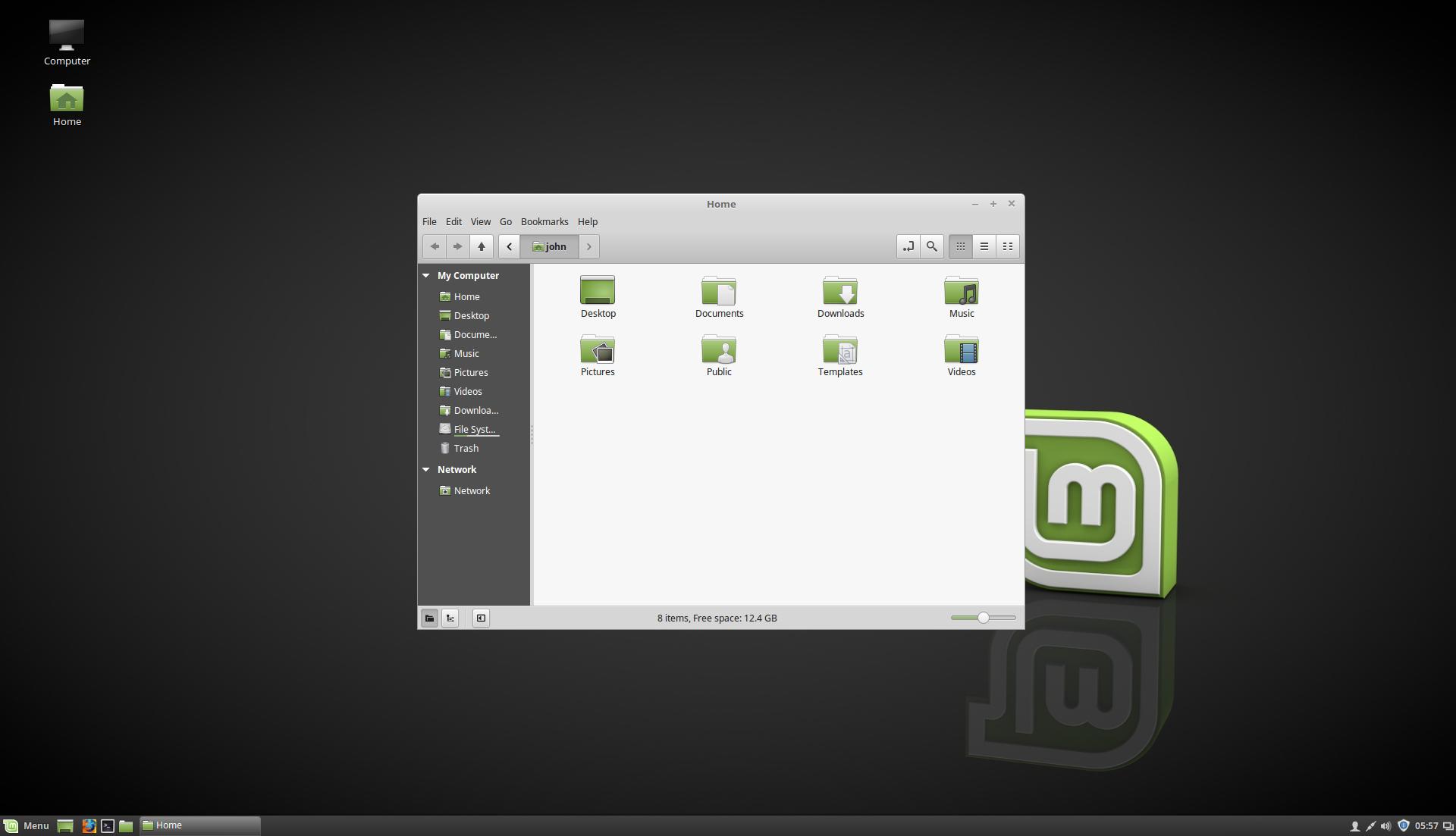
The choice isn't between ugly and Elementary. It's a false dillema. E.g. Cinnamon, which is pretty and functional.
- icons on task bar too low
- icons on task bar vertically not aligned
- task icons different size than pinned icons on task bar
- task text vertically aligned too high
- icons stylistically not matched
- system icons unreadable (badly designed, all look the same, don't convey purpose adequately)
- task bar icons on right are vertically all over the place
- task bar mini icons sizing on right is not consistent
- file manager icon sizes all over the place
- file manager bottom bar icons are too low and lack 'breathing room' at bottom compared to top bar with buttons
- file manager top/bottom bar size is mismatched
- horizontal alignment/margin of icons on file manager's top and bottom bars is inconsistent
I could go on and on. People who don't care about these things don't see them. Their vision is not trained for it. But for a polished experience, even to UI laypersons, they make all the difference.
That means you need a team to:
- Come up with a detailed set of UI principles and guidelines
- Test that they're sane
- Enforce them across the entire system
Steps one and two require user interface experts, who're probably already getting paid good money to do principle UI design at Apple or Microsoft.
Open source without a backing company will have a particularly hard time with step three, because these projects tend to be communal and at least a little fragmented/disjoint by nature.
Mainly you just need money.
Mind you, I say that as a macOS user (although I did run Linux full-time for a good six years in a past life), and I'm sure many a Linux user will call the macOS interface toy-like to their eyes.
Even though all I see, whether in the old screenshots are the current, are misaligned and seemingly randomly-sized icons, ugly text rendering, and an unclear design vision, I'll still say that the typical defaults still do a pretty good job considering that no Linux distro with mass appeal has yet shipped with a forced theme to make everything just right because, after all, such a distro would never gain mass appeal to start with.
Not with the Linux users who know they're running Linux, at least. I think this is what Ubuntu and elementaryOS are trying to establish: Linuxes for people who don't know what Linux is. That gives some freedom for forcing good, consistent design — but not until there's enough "first party" software to make the rest of the Linux application ecosystem irrelevant.
I don't think that'll happen until Ubuntu or elementaryOS bring about killer apps, something like iLife for Linux. Beautiful, works exceedingly well, and designed for ordinary people rather than fellow developers. A reason to develop for that one distro rather than the whole Linux ecosystem, so far not yet forthcoming.
Fascinating. I consider systems like Android, Windoze and MacOS to be like toys for the same reason: superficially beautiful, but not actually a good tool for work.
Suppose you have a document open. You want to attach it to an email you started writing. In MacOS, you drag the icon from the window's title bar into the email. That's it. No need to browse to the same thing you already have on the screen, because your desktop is a set of objects you interact with... Not a window manager.
If you want to open a file browser, you can right click the title bar on any document, and it will give you a breadcrumb of all the parent directories.
If you move a document you have open in an application, the application will notice, and save further changes to that new location too when you go back to it and press cmd-S.
These are just a few little things in one aspect of the OS. But macOS is full of them. Like consistent keyboard shortcuts.
Or multi touch gestures that act while you perform them, not just trigger an action after. There is a commitment to making the computer work like it should, instead of making the human adapt.
Meanwhile in Windows land, even the official apps can't figure out how they want to look or how they want to work. And this is what Linux desktops based themselves on.
There are of course signs that Apple has also lost its magic, and that a new generation raised on touch and web and cloud has no idea how this stuff works. The idea that you can e.g. scroll casually through a decade worth of emails with one flick, offline, is a pipe dream in Gmail land. It boggles my mind that basic conveniences like sortable, resizable and customizable tables are now a luxury in many apps.
But there still is an insane amount of design thought that went into macOS, and everyone else is years behind. That's just a fact.
And two things OSX is absolutely unmatched in: spotlight and preview.
Even if the poster was kidding, it's symptomatic of the Linux ecosystem — never strive for better, what we've had for years is just fine, and be sure to mockingly put down any idea that dares to lift things up.
Better than last year I tried it where I couldn't even get past the timezone selection.
It's somewhat like a wine aficionado discussing the 7 delicate flavors that or an audiophile considering the virtue of using a slightly more expensive cable.
So when I ask how it makes a difference I wasn't looking for a trivial redefinition of the word I was asking rather what difference it makes. Do you believe more people will use it if its pretty? Do you believe more people will enjoy using it if its pretty? To what degree and why?
Anyways anyone that has trained their eyes (which allows extremely technical visual skills to be developed, not just "art") to actually see what their eye is transmitting to them and not just interpreting it will immediately notice these kinds of things. It's like saying to them stop looking at letters if you're trying to read.
If this sounds like gibberish try this exercise. https://www.allaboutdrawings.com/upside-down-drawing.html
I'm not sure what posts like yours are trying to achieve. Are you just complaining about how nobody has managed to make something that is free and perfectly well "designed"? If so, why not try to do something about it rather than complain? You'd probably make a lot of people happy if you did. To me it seems more like you are saying that your priorities are with superficial design rather than anything actually relating to work, hence my original comment.
as a full time developer and someone who does notice these little things, i care a lot about good design and visual polish. in order to get my work done, i have to use these interfaces for hours on end, after all. if it doesn't particularly bother you, hey that's great. even if not intentional, this and your original comment come off as a bit disparaging, so that reply isn't terribly off base.
Then you have macOS, perfectly round, so shiny you can see your face, including the insides... the nicest looking trumpet money can buy. But it comes in one piece, only the shop can re-tune it, and has only one button, and sounds exactly the same as the other apple trumpets.
And Windows... average looking a trumpet, which everyone recognises, operated like a kazoo. Sometimes it plays the wrong note, or stop during a performance. You can retune it, but it will de-tune itself randomly. Sometimes it will recommend the shop's other instruments, and report back to the shop what you've been playing. But the shop now wants to rent studios, instead.
You can break elementaryOS' nice graphics just by putting it into sleep mode and waking it up again - say hi to at least 2 different kinds of graphics glitches and possibly a randomly appearing bug in the file manager. And I'm not sure if it was a bug or a feature, but last time I used eOS I didn't enjoy the default video player's "fullscreen mode" in which it still didn't overlap the lower part of the desktop with the dock.
But keep in mind I haven't tried the most recent version which came out not long ago, I'd be surprised if some of the problems weren't fixed yet.
I think elementaryOS is on the right track, but it's definitely not more stable than the average distro, including the ones with rolling-release update models.
Definitely this, unfortunately. elementaryOS 0.4.1 Loki was fairly stable for me, but then I installed 5 / Juno, and now the machine often locks up with a completely black screen, except for a handful of items visible where the top menu bar usually is. It seems to occur when it wakes from a sleep mode (though this is on a Parallels virtual machine). The only solution is to reboot and lose whatever you were working on.
elementaryOS is great and the first Linux I've really enjoyed using (I'm normally a Mac user, the kind who uses software by Panic). But it still has so far to go. It's also worrying that you can't upgrade from 0.4.1 to 5. Even with all of Microsoft's disasters with updates, they've still managed to let you upgrade from one version of Windows to the next one.
(Did anyone else have these issues?)
The UI is damn good. Way more polished and consistent than what passes for the three way mess that the Windows 10 UI is these days. Straight out of the box you get a polished, Windows 7 type layout, complete with a start menu better than Windows, consistent fonts and smooth animations. And unlike every other desktop, the dark theme actually works as advertised.
The only time I go back to windows is when is need Corel Draw for my graphics design work. And I immediately feel the difference in polish and consistency. If I could get without Corel Draw, I would definitely banish Windows from my laptop.
That being said, GNOME is a clusterfk. It's what we all accused Windows 8 of beign. A wannabe tablet desktop in a world without any actual tablets. What is possessing them to remove functionality available in ALL other desktops? When this is pointed out they point to extensions written in a leaky javascript implementation, which can be broken the next gnome update because why not?
If you want a modern desktop on Linux, Kde is what you want these days.
GNOME gets out of your way and lets you get on with your work. Customising every last detail isn't necessary to be productive, and if it is a DE isn't for you anyway.
The default settings are very sensible, I only change one or two things myself, most noticably focus follows mouse, which requires a silly gconf tweak and is considered "broken" by the devs.
I'm not too deep into GNOME's architecture, but I don't see that at all.
KDE is the KF5 Frameworks on top of Qt on top of QML and C++. Desktop widgets, panel widgets etc. are all architecturally the same thing, "Plasmoids". Settings screens are all isolated and also architecturally the same thing, "KCMs".
On the other hand, GNOME is GTK on top of GObject on top of C, Vala, JS, Python, Rust and a few other languages still, because they still haven't really decided what they want to go with. The extensions are written in JavaScript, but run in the same process as the entire Shell, meaning that if anything locks up or just takes longer in an extension, then your Shell does the same.
I don't want to argue that GNOME is horrible in this aspect, but in my opinion KDE is better at it.
If I could just get terminal shortcuts like ctrl-w for delete word or Ctrl-m for return to work in Firefox text fields it would be perfect for me.
It does work as expected in Chrom(e|ium) and most other apps. In Chrome you can still close tabs with ctrl-w, you just have tab out of a text box first.
It puts less stress on my right wrist, which suffers RSI a bit and is consistent with terminals on every (unix-like) OS.
On macOS I get this behaviour via Karabiner Elements; on Gnome I mostly get it via Tweaks. Except in Firefox, as mentioned, where I put up with ctrl-backspace and curse.
KDE on the other hand is somewhat fine, if you don't touch anything. Customizing opens hell. UI Inconsistencies, weird bugs, stuff drawn off screen, almost guaranteed... Horrible IMO.
I'm on KDE Neon now, after having used Mint for a while. KDE is simply a joy to use. Everything works, and the visuals are consistent and well-proportioned.
That said steps to achieve a relatively consistent look.
Open your configuration app and configure your gtk theme to something that looks nice. If you don't have one you can install lxappearance which is from lxde and has minimal deps so you can easily install it in a minimal environment.
Install qt4-config if you have any old qt4 apps. Set it to use gtk+ style for qt4 aps.
If you use newer qt apps install qt5ct and select gtk style.
In 5 minutes you will have a relatively consistent look.
A few notes.
- Its increasingly likely you have zero qt4 apps and could probably skip that part and not care
- qt5ct actually lets you set a custom stylesheet and or colors if you want more manual control but this is hardly required.
- firefox is really stupid about drawing website elements with dark text on a dark background when run with a dark theme. You can run individual gtk apps with a different theme like so
env GTK_THEME=Adwaita:light firefox
you can copy your firefox desktop file to ~/.local/share/applications and edit the command to ensure that this works properly automatically.
Chrome somehow figures out that a dark theme doesn't mean you want to draw webpages differently so I consider this a firefox bug that mozilla wontfix.
In a perfect world someone would create a single useful gui to configure qt4 plasma gtk2 gtk3 apps which only had settings that would effect all of the above consistently and required no tweaking.
In reality land most people don't care including those shipping distros can probably ship with or arrange a reasonable look with minimal fuss.
It was a decade ago. The world has moved on since then and the expectations are much higher nowadays. For example, see software landing pages today vs. 2008. Even modern Instagram photos look like they were professionally edited for a magazine.
Some GTK themes are really good nowadays. See Materia.
And if you mean some (many) non-DE applications have really bad UI, then that's true on Windows too.
My mother was a long time windows user. Kept getting viruses. She was converted to Ubuntu and has used it for over a decade now without issue.
Linux is far easier for people than you think. My mother is a senior citizen now and this is her second computer.
The UI concerns you bring up are just silly, They are about the same as you buying a new hammer and it having an inconsistent wood grain or a metal burr.
With a kitchen if there were a few mm difference in height between wall unit cupboards, or wall sockets, it would not affect your use of the kitchen one iota. Yet everyone would likely notice such an amateur and slapdash job and employ a different contractor for their own home. Same with the difference between a table made by assembling a flat pack and something craftsman made.
There's a reason Apple put so much score into the user interface guides and specifications for icons, interface and such.
Over all that may not be a big thing but it does illustrate one of the rough edges.
(macOS has its own warts too of course. Such as not having keyboard shortcuts for split view or weird little pop up windows you can’t close without a mouse.)
I think the original comment was talking about ugly UI rather than "Linux works just fine".
The key point I believe was, if Linux came with better UX design like what Elementary OS did, then it will be "Good" instead of "Just fine".
It's about an upgrade, bring Linux to a better level, not "Linux UI looks ugly, it's bad and unusable".
On Ubuntu you can just change the font size and it changes everywhere without having to decrease your resolution so you take advantage of what your hardware provides.
When they need to edit a MS Excel file, or use their digital signature (mandatory for companies in my country), or use some accounting software... or anything like this, you understand that Linux isn't as ready for the mainstream desktop as we think it is.
How easy is it to use for someone that thinks their browser IS the internet to install and use?
Linux is only going to be smooth for very basic stuff or if you have de knowledge to troubleshoot it.
Personally by far prefer the Mint paradigm: it is clear what is running and what is a launch icon without studying icon shading/overlays/dots..etc.
https://www.linuxmint.com/pictures/screenshots/tara/cinnamon...
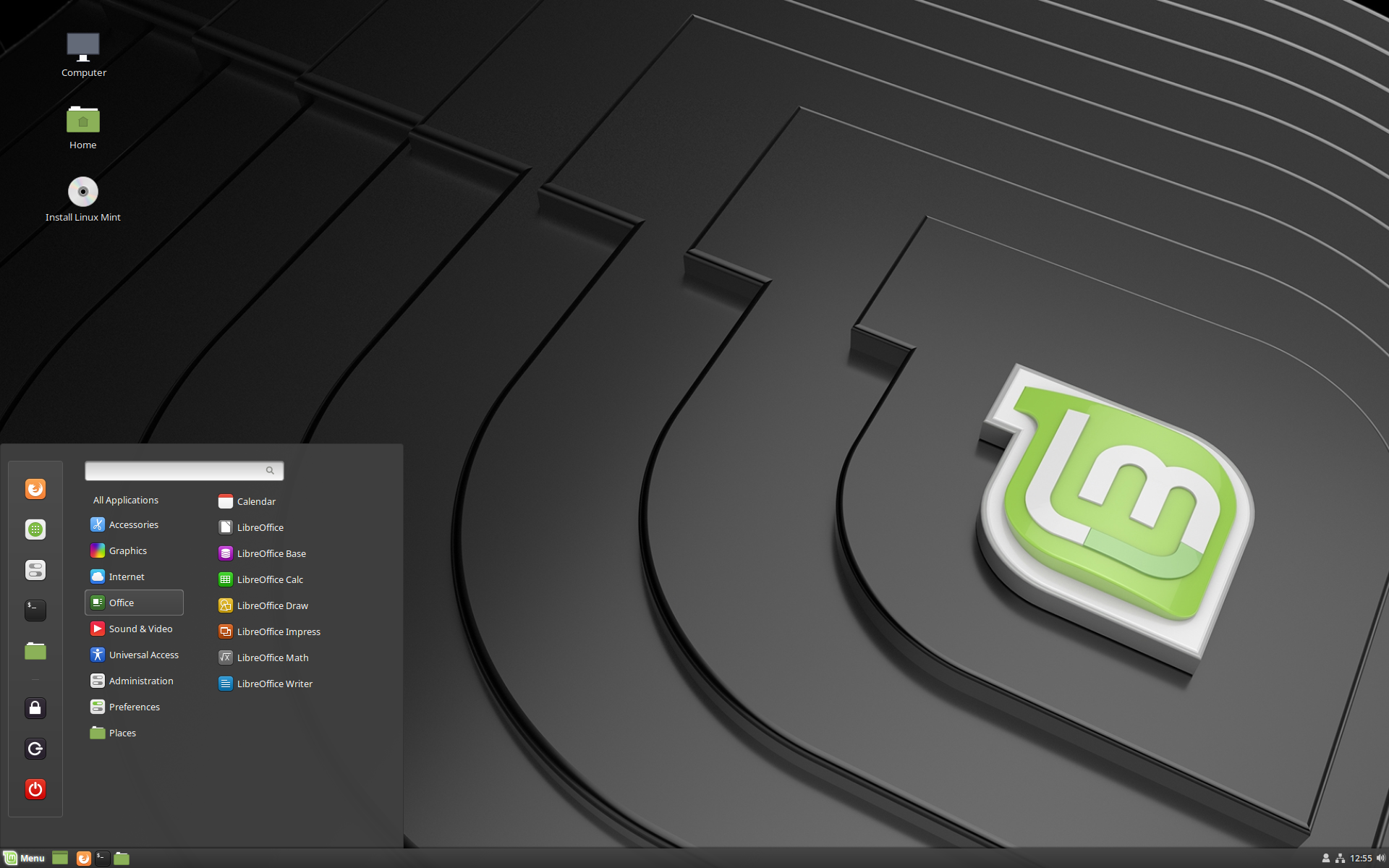
Also, elementary OS looks a lot like the "gnome shell" and latest Ubuntu thing. Mint/Mate has become the main Linux shell by staying with Window 7-like-shell. The newer shells are easier but less powerful. So it would win for those who want easy. Except those who want easy will do nothing and stay with MS/Apple. After they are "free" too or seem like that to the average person.
Just curious if noticing or more so, even being bothered by them is the norm?
Example Mint, the font heights I wouldn't have noticed and definitely something I would not be consciously aware of if I used it. And I still don't know what's wrong with the render beyond it looking at bit outdated.
Am I the odd person here or is it a vocal minority that have issues with it?
Most people intuitively have a sense of whether the software they're using is elegant, polished, and user-friendly without necessarily being able to articulate that the "font heights", etc. are the problem.
By a common user's standards, Mint looks amateur and janky compared to Windows 10 and Mac OS.
Here's a screenshot from OS X from a while back:
https://i2.wp.com/512pixels.net/wp-content/uploads/2018/08/1...

Looks amateur and dated right? The thing is, 15 years ago people like you shat all over linux because it didn't look shiny and pretty like OS X. 15 years ago that OS X screenshot was the pinnacle of elegance and polish. If your UI didn't look like that, you were amateur and dated and janky. What Linux desktops needed was shiny buttons and genie effects to be taken seriously.
Now that there are a bunch of perfectly usable linux desktops you need to move the goalposts again because it doesn't meet "common user standards". Meanwhile, you could put a "common user" in front of OS X 10.1 or windows XP and they would get along just fine, just like they did 15 years ago.
The top menu bar is clearly too short to hold its contents but hey even Apple makes mistakes.
10.1 and even the late and great 10.6 were products of their time. The world has moved on, and Linux does not handle itself well in an era of 4K high DPI monitors.
Sure, and clearly you are part of the other vocal, minority, that complains bitterly about this. The majority is silent. The majority doesn't care about Linux or Windows but keeps their Windows install because that is the ultimate easy (maybe MacOs people care). Someone in majority could probably be trained/persuaded to agree with either perspective if someone took the time to point it out one or another of these to them and if they had any incentive to look.
Linux is usable. Linux isn't pretty by graphic designer's view of pretty. That lack of prettiness probably doesn't have that much to do with desktop Linux not being adopted widely. At least in the sense that the only way that kind adoption is going to happen is if a wider percentage of people have some actual material incentive to adopt.
Most Linux desktops are not visually consistent. Their UI isn't designed intuitively. You put that in front of the average person, and they will have trouble using it.
There is a high level of subjectivity in all these, especially user-friendliness. Polish, you can quantify with stuff like alignment, consistency etc., but for user-friendliness, I find most modern UIs, including elementary or gnome, to be quite hostile. You can stare at pretty icons and parallel and perpendicular lines all day, but how do you get shit done ? That's what most modern designs miss. And it's not just these poor OSS projects. Look at all the random apple inspired navigation changes that google added to their basic navigation in pixel 3, which you can't even change although the old code exists in aosp. TLDR: user friendliness is very hard to get right.
https://www.linuxmint.com/pictures/screenshots/tara/cinnamon...
https://www.linuxmint.com/pictures/screenshots/tara/mate.png
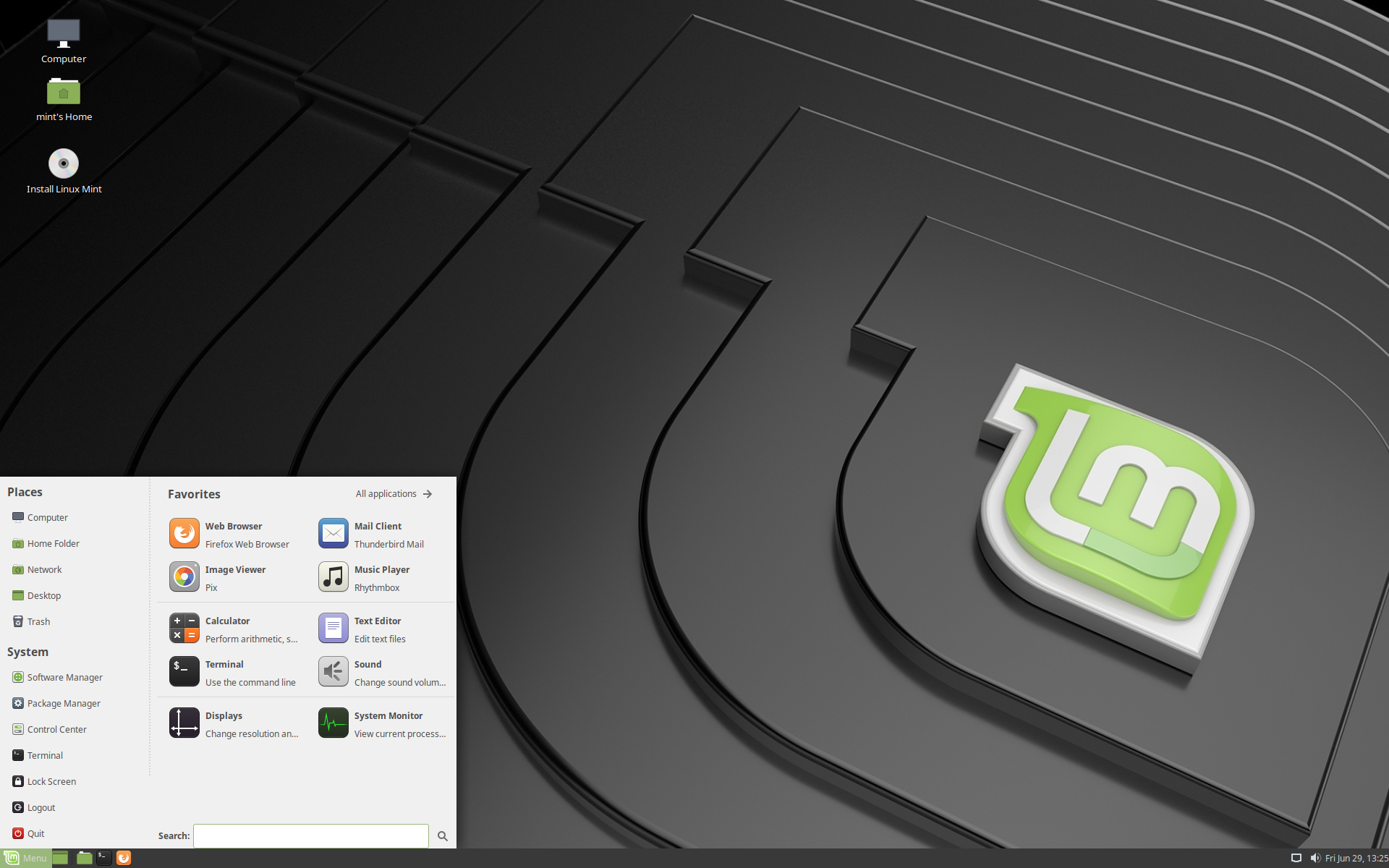
Or is it just some perpetual need to evolve for the sake of evolving?
I've tried moving away from the traditional desktop (yes, for the sake of it), but I just can't. And cinnamon seems to suck the least.
(and no amount of polish will move me to mac/win)
I have used macOS for 10 years[1] and I always had the same feeling about Windows 7. The icons looked ugly, apps were all over the place UI-wise. The directory structure is impenetrable for a non-expert. Etc. With Windows 8 and 10 things are even worse, discoverability is hard in the super-flat new interface, Win32 applications or universal apps look out of place (depending which one you like), and even for Windows' own settings, things are scattered between Win32 and universal applications.
The Windows UI mess doesn't drive Windows users away, so I do not see why some misaligned icons or text would drive users away from e.g. Mint. There are other reasons why people do not use Linux, but I don't think this is it (outside some niche groups, such as designers). Death by a thousand paper cuts is why most people will stop using Linux after trying.
[1] Though I am now using Linux again the majority of my time.
I also don't see any real problems with icons or fonts or anything but maybe it's just because I adapted to them. Without hardware problems overall experience with MATE is far superior than with Windows or Mac OS.
I genuinely can't see the other problems with the image, and I feel that it's not a good example to illustrate the point.
But I'm sure parent poster is right, and that linux desktop environments use a wierd mish-mash of icons and fonts with weird sizing and line heights.
Or is it just a feature hidden somewhere?
I've thought on several occasions that I'd be pretty happy if I could just hijack how the UI layer was rendering some program, tweak text sizes, adjust colours and make that a user specific choice that can be done at the OS level. It would make linux far more accessible in my opinion and give the average user a way to fix issues that as you say may make some feel physically sick and dizzy.
Users could then start sharing fixes and tweaks and devs who are interested could pull in these settings into the main program, the work could be shared and these OS's could get better! =)...
It just seems such a prefect example of give power to your user and everything is editable, many people don't have time to dig into the internals of everything, but they'd be happy using a relatively straightforward tool (or at least one with tons of tutorials) to adjust the programs they use to their liking, and I'd wager they'd be pretty happy sharing the tweaks they made too.
Maybe this already exists? If it does please tell me! It's the one major thing that keeps me coming back to macs/windows machines. I find it pretty funny, most of my linux time is lived in servers and when I was a teen I ran ubuntu desktop for some time, but I just couldn't deal with it after a while. Which is a shame in my book, and I could certainly see something like this being in the community spirit of linux.
PS: If anyone is thinking of doing this and want's to talk to me for some reason, I'll be happy to discuss this further =)...
Isn’t this what you describe?
Side note: Window managers are only responsible for the window decoration, i.e. the frame around the contents and the title bar. Not a lot to tweak there, but most window managers do actually allow changing pretty much every aspect of it. GTK/Qt are toolkits, not window managers.
I'm thinking of something where say I load up a program UI Tweak, I don't need to know anything about the software I'm working with, I just select the element that I want to adjust, the label sizes for text in the dialogue, or the colour of the text by clicking on it.
Think Autohotkey's spy tool[0], when using Autohotkey with the spy tool, I just select the elements that I want to manipulate and then choose what I want to do with them. In my opinion, this significantly lowers barriers to entry for users wanting to change things to suit them. Then the developers of such software can work out ways of making apps work better with such a system. Maybe linux based UI apps need to improve their api so that they can take instructions to adjust it? Or they just add some simple hooks the UI Tweak can understand and use to adjust behaviour?
I don't know what users will want, but allowing users to describe what they want, letting them know it's possible, and giving them an avenue to share and communicate their needs can only help improve the quality of the software, as well as provide an avenue for devs that care about user experience to have a channel to understand what needs might not be being met by existing offerings.
- [0] Image example here => https://stackoverflow.com/a/45680175
I never went that way as I prefer to just use a theme designed by someone who knew what they were doing.
Since starting to primarily use Linux in 2008, I've consecutively moved to simpler and simpler DEs, to the point where I'm currently running i3 everywhere for about 4 years. Less ui = fewer things to fuck up.
I disagree, recent Gnome versions from the last few years have been amazing. Nearly on par with Elementary.
I then ended up using Ubuntu and that has been stable as rock. No surprises, rock solid. I used it back in college. There are very few Linux based distros that are battle tested, Ubuntu is certainly one of them, on account of being backed by Canonical, which actually gets paid to develop the OS unlike most other linux based distros that have to work on "donations" or "foundation money".
Anyway, I'm happy with Ubuntu for my needs, I don't have super fancy needs and I don't want Arch level of customization. All I want something that works out of box and has a UNIX like CLI (I'm a programmer).
Another thing that sucks about Linux based OS's is that the power management is just repugnant. There are so many OS's out there and so many laptop models that I understand it is a herculean task to get maximum performance on every possible laptop.
Which is why, I decided that my next laptop is going to be an MBP, the Retina display is mind blowing, has a UNIX like interface, great battery life, a bit pricey but when it comes to being more productive as a programmer, I'm willing to pay more.
Everything "just works", even more than macOS IMO, and you can configure everything to your hearts content. Animations are smooth, UI is very polished and consistent. Definitely recommend checking it out.
At this point though, most of my professional life is spent in a terminal emulator (alacritty), Firefox, Visual Studio Code, Android Studio, qpdfview, and pcmanfm-qt. I also switched to a tiling wm (i3) with window decorations shut off, so basically my consistency comes from being super simplistic (graphically atleast).
Been toying with the idea of picking up a few design books and taking a hack at writing a GUI toolkit using Rust with something like the react/redux ideology of GUI app development and seeing where that goes (would be for Wayland). Would try the flux model because unidirectional data flow maps very nicely to Rust as I don't want to deal with any refcell shenanigans.
I love Linux, and I use it almost every day (Debian), but only ever as GUIless servers, which it's amazing at. Just hope one day a team with design and ease of use will make a distro that "normal" people can enjoy to use. (but you would need other apps that look and work great in it too, which I fear will be the harder issue to tackle)
The most recent example I can think of that I had this issue with is Ubuntu MATE last week.
And I get it, this is a very nitpicky issue, but in my mind, it's a basic operation that both macOS and Windows do really well and as a user switching from that, it's a little annoying.
https://www.reddit.com/r/kde/comments/6963sa/plasma_tip_you_...
If you watch the gif in plasma basically you hold down the alt key and right click and drag to resize from anywhere on the window. Likewise you hold down the alt and left click and drag anywhere on the window to move it around.
Further there are hotkeys to place the window on a segment of the screen example: the left/right/top/bottom half or one of the corners. I think there is a function for sizing it to thirds as well. For me this virtually replaced any manual resizing even before I swapped to using a tiling wm where there is zero resizing.
I just tested this on cinnamon and this works there too. I don't know if it works in mate.
And using ONLY the mouse is the common way on a desktop for common folks where surprisingly many still don't even know strg + c
For chromebooks galliumos is very nice as well.
Just watch the video and wait for settings app to get what I'm talking about. If it miss-aligned items don't bothers you, then you're weird (or maybe I'am) :)
But anyway, agree with your points in general. I'll probably end up installing ElementaryOS in a VM. I do VR development full-time so I will need Windows as my main computer, but I definitely like having a Linux system around for everything else I do.
Disclaimer: I only used it for a few hours.
Smart people do dumb things sometimes. Trying to get the general public to use Linux is a perfect example. It's not even Linux under the hood. It is Linux.
Can we put this myth to bed yet? I use Linux full-time at home and on my laptop and I can't remember the last time I had to do this. Hey, I only see a command line because I can do stuff much faster there, not because I need to (I live in a command line on my Mac at work, too).
We should do a test and see if it really is a "myth". Get 10 normal users to install 10 programs not already in the repositories and see how well that goes. Just the other day I had to unzip a .tar.xz from the command line.
You're wrong twice in your first sentence. Normal users need to be able to install software and generally use their computer otherwise you're pushing a curated experience with zero third party support. But also, no, what I said IS the point. It's Linux. Its not magically not Linux no matter how many times you downvote my comments.
I'll check back in a year so you can explain why this flavor of Linux didn't sway a single user away from Windows or MacOS.
The problem with 'traditional' linux distributions is not Linux the kernel but the notion of window managers and other stuff that just isn't very good or user friendly. With Chrome OS, basically Google decided to cherry pick Linux for stuff that they could use/savage and scrap/replace the rest. Given how successful they are with that approach, I'm very confident in predicting that KDE vs. Gnome is never going to end in a victory for either. At least not in the form of world dominance. If anything, I see a lot of techies using alternative, lighter weight window managers. Even the target audience is opting out of using either.
Elementary OS looks like straightforward rip off of OS/X before they dropped the whole aqua look. That is to say a bit dated, not very original, and not that impressive or tempting to me.
I honestly see very little about your argument that is constructive, and in fact "It's not even Linux under the hood. It is Linux." makes absolutely no sense whatsoever.
But my main point is that it takes a massive effort to make Linux easy. Anything short of that is just another reskin.
But even then there are endless issues with drivers. Like research your chipset, find a repository on github, and then clone and build it yourself kind of issues.
Trust me, I like the idea and would love getting past our two party system. But Linux will never be easy.
Your argument is that Linux cannot be easy, not that there isn't any issues.
Anyway, I'm cool if you don't want to use it and if you want to maintain your worldview, but you haven't presented me any real arguments or evidence to back this worldview.
For the I guess third or fourth time I use Linux regularly. I'm not telling you Linux is hard because I want it to be hard. God knows I wish it wasn't so hard. I'm simply stating my observations as a user of multiple distros over several years.
In Linux you always end up in the command line. The Linux community is hostile to newbies. CLI programs are inconsistent, constantly changing, and often obtuse which means if you want to use Linux you will need to learn it.
Ubuntu did a great job making Linux easy, relatively speaking. If they hadn't cancelled Ubuntu Touch I'd be tapping to you on that right now. But even in Ubuntu you will not get far without the command line. Say you want to setup a VPN in Ubuntu. There's a good chance you're going to be doing some non-easy work in the command line vs Windows or MacOS where it's just point and click.
I have to wonder why you insist on pretending that Linux is easy. Windows is easy. That's why its popular. Linux is difficult. That's why it doesn't appeal to people who want a computer that "just works".
In my opinion the way to make Linux easy is to do the hard work of documenting and integrating all of the open source software that makes Linux great. It's not glamarous but seriously, someoene needs to do it, lol.
Elementary OS has picked a specific niche, and its arguably the best distribution in it. It has a really well designed and consistent UI experience, and you can't break it. I think most of you just don't realize how difficult linux is for people who barely understand how to use a Mac or Windows machine.
Furthermore, linux is a world where mainstream distributions still release with horrible UI experiences with numerous typography mistakes, icons of different sizes and grid alignment imbalances everywhere.
Like check out this Mint (grey theme) screenshot: https://upload.wikimedia.org/wikipedia/commons/thumb/4/43/Li... and compare it with elementary OS here https://news-cdn.softpedia.com/images/news2/elementary-os-0-...
Mint is great, but seriously. Look at that logo render. Even worse, look at the start bar. Every single text and logo has a different height. I mean how do you even do something like that unintentionally?
I am using XFCE right now, and it's great because its much faster than KDE or Gnome on this old laptop. But it sure isn't a pretty UI. I know a MSc. designer and she claims using my laptop makes her physically sick and dizzy. I don't care as much, but I can see the point. Everything is misaligned, in the start menu, the task bar, the apps. In the window bar the buttons and the minimize arrow aren't the same size. I mean seriously, whoever did this just did not care about Ui.
I don't think ElementaryOS is for everyone. If you have any interest in non-standard repos, recent kernels or doing stuff in commandline, you are just better off elsewhere. I understand their choices, but I don't use it because of how they do the app store, among other things.
But if you just want a computer that runs, looks good and doesn't break if you do X, then I think ElementaryOS is the #1 choice in the Linux world, and we should be thankful that it exists.