News for hackers. Stuff that matters.
Re:KDE: A Nice Tiling Environment and a Surprisingly Awesome DE by anyfoo on Monday February 07, 2022 @07:27PM (#30253488)
I must be one of the very few "hackerish" minded people that does not really get the appeal of tiling window managers. Even in the early days of Linux I meticulously arranged my overlapping windows in my X11R5 window manager.

For example, there are some terminal windows or similar with running logs (or chats) at some of the edges, partially obscured by other windows who make better use of the space they cover. But those partially covered windows are still showing me what's currently going on at all times (i.e. the last few lines), and I can get their full content at a mouse click/keyboard shortcut press.

Then there are partially obscured browser windows. Again the most relevant part of their content remains visible (e.g. for blogs that's usually roughly their "left half", for documentation with a content bar on the left their "right half"), and scrolling them does not require giving them focus.

Then there are tiny windows like minimized views of media players that usually neatly fit into some of the open space resulting from my arrangement. And series of windows all similar to each other that are carefully arranged such that a single click reveals any of them, nearly obscuring the rest of the same series, but never hiding any of them completely.

It may look "unkempt" at a first glance, but is actually very deliberate. I feel like a tiling environment with its constantly changing layout would be actual chaos... and somehow generally a step backwards. There are some dedicated situations where I tile two windows next to each other, but that's just that: A dedicated situation, often happening on another space/desktop.

Re:KDE: A Nice Tiling Environment and a Surprisingly Awesome DE by stormbrew on Monday February 07, 2022 @11:58PM (#30255041)
Everything you're describing in this reply just exhausts the hell out of my brain. You're describing an incredibly large amount of cognitive load you hold in your head all the time about where things are and what they mean and how much of them are visible.

Tiling WM are largely about just not thinking that much about windows at all. They're visible or they're not, they occupy precise areas on your screen, and moving them around is easy and simple and they don't scatter to the 4 winds when you plug your laptop into an external monitor and then unplug it again.

Every time I have to go use a computer with overlapping windows I suddenly find myself thinking about where things are about 10 times as much and it's frustrating and tiring.

Re:KDE: A Nice Tiling Environment and a Surprisingly Awesome DE by laumars on Tuesday February 08, 2022 @03:33AM (#30256111)
What you’re describing there is a little like the difference between those who like to have tidy desks vs those who don’t.

You’ll often find that some who work in organised chaos still know exactly where everything is.

Is their organisation worse than those who keep things tidy? From an outsiders perspective it might seem that way. But if they’re the only ones using that workspace then it doesn’t really matter.

For some people, remembering where stuff is creates no extra cognitive overhead. For others, it’s like trying to access their computer while it’s covered in bubble wrap.

Re:KDE: A Nice Tiling Environment and a Surprisingly Awesome DE by stronglikedan on Tuesday February 08, 2022 @09:32AM (#30258792)
> You’ll often find that some who work in organised chaos still know exactly where everything is.

I don't know where things "go", but I know where I last put them!

> if they’re the only ones using that workspace then it doesn’t really matter

Yup, both methods have the exact same weakness - someone else moving something I need.

Of course, as you imply, everything should have it's place in a shared workspace.

Re:KDE: A Nice Tiling Environment and a Surprisingly Awesome DE by eternityforest on Tuesday February 08, 2022 @11:30AM (#30260450)
I never have any idea at all where I last put things. I just remember 5 to 30 minutes ago I had something... and that's all I know.

I've pretty much always relied on full searches of my entire surroundings, or very long term plans with labels and everything, since remembering a new location takes active effort or weeks of time, I don't just see things and passively remember where they were.

The desktop completely rearranging itself randomly doesn't even bother me, as long as I can quickly scan the task bar, since I basically never use Windows any way other than maximized.

Re:KDE: A Nice Tiling Environment and a Surprisingly Awesome DE by WastingMyTime89 on Tuesday February 08, 2022 @06:19AM (#30257160)
I don't see the cognitive load you are talking about.

It's just windows. You put roughly where you want them when you need them to have what you want visible. They stack. If one is out of your sight and you need it, you use the list or expose to find it and move it where it will be useful. It's like manipulating documents in the physical world except it's always easy to find a window in your stack of windows. It's a very natural flow.

Tiling is the solution imposing an unnatural cognitive burden on the user. With tiling you need to constantly think about exactly what you want to see, where you want your windows and you constantly need to fiddle with the arrangements and spend time preemptively positioning your windows. It gets very annoying to me as soon as I want more than one full screen window.

Re:KDE: A Nice Tiling Environment and a Surprisingly Awesome DE by kiawe_fire on Tuesday February 08, 2022 @09:02AM (#30258451)
I’ve been the same. I came from MacOS into Linux in the last couple of years, but gave Pop_os! a try early on with its tiling wm.

I found myself constantly planning layouts and positioning things. Nothing ever ended up feeling right, and it was exhausting.

“I’ll have my browser window take the full height and half the width over here. Then I’ll put my code editor over on the right, half high, then my Terminal below it.

No wait, that’s not enough height for the code editor, so let’s shrink the Terminal down… except now the terminal’s uncomfortably short.

Well, maybe the browser can be split with the Terminal and the code editor can be full height.

Except now the code editor feels too narrow and I don’t really need it this tall, it would be really nice if I could have the browser window full height instead.”

And then I’m back where I started.

And if I finally get used to a layout and whatever shortcut keys I have for jumping around, then !!! A wild Slack message appears!

Now I need to open a PDF viewer along with Slack along with my code editor but don’t need my browser but maybe need my Terminal, and I’m back to the layout drawing board for the next task.

With overlapping windows, every window can be the exact size and shape it needs to be.

I’m open to the likelihood that I’m just doing it wrong. I would also bet this is less of an issue if I were using multiple large, unscaled 4K monitors.

So I’ll try it again someday with a different setup, but for now I’m mostly happy with my 1440p monitor(s), and overlapping windows.

Re:KDE: A Nice Tiling Environment and a Surprisingly Awesome DE by michaelmrose on Tuesday February 08, 2022 @02:15PM (#30263081)
If your future 4K monitors are the exact same physical size having higher resolution wont make you want to have more tinier windows.

The most useful arrangement for windows to be tiled into is 1-2 windows on a horizontal monitor with more windows accommodated by adding more monitors to your workspace instead of splitting a window 7 ways.

Re:KDE: A Nice Tiling Environment and a Surprisingly Awesome DE by smichel17 on Tuesday February 08, 2022 @04:24PM (#30264922)
Psst. Try PaperWM. It allows quick resizing and tiling.
Re:KDE: A Nice Tiling Environment and a Surprisingly Awesome DE by deadbunny on Tuesday February 08, 2022 @06:48AM (#30257352)
I can't speak for everyone and I'm a multiscreen type, but for me I have things on specific workspaces.

Workspace 1-4 Primary monitor (center, ultrawide, landscape)

Workspace 5-7 Second Monitor (left, portrait)

Workspace 8-10 Third Monitor (right, landscape)

1. Browser and terminals/vim for current project (ultrawide monitor = 4:3ish split)

2. As above if I need to switch to another project

3. As above if I need to switch to another project

4. Spare/"Personal" slacking off things like HN

5. Comms Slack/IRC etc...

6. Spare/Displaying things that work will in portrait like reading PDFs

7. Spare/Monitoring specific things to do with what I'm working on

8. Spare/Background noise videos

9. Music player

10. Email/Calendar

For me I usually sit with 5, 1, 10 visible across the 3 monitors 95% of the time which means I can see everything I immediately need. However if on a single monitor device the workspaces have the same use (mostly, 1 might get split into 1 = Terminals, 2 = Browser because it's a bit cramped on 16:9).

This means If I need my emails I hit Mod+0 which then focusses my email/calendar whether it's visible on my 3rd monitor or hidden on a single monitor setup. Or Mod+5 and I get Slack.

Once it's in your muscle memory you don't even think about it. The way I see it is it's like vim, once you have the shortcuts in your muscle memory you don't even think about where things are, they just appear when you need them.

Re:KDE: A Nice Tiling Environment and a Surprisingly Awesome DE by GekkePrutser on Tuesday February 08, 2022 @03:22PM (#30264074)
Yeah I do the same with virtual desktops, except I right now have only one screen. Because I hate the way KDE switches virtual desktops for all screens together, I would really want each screen to have its own separate virtual desktop. I have 9 of them and mapped my numpad to the virtual desktop because I don't like combo keys very much. And I don't normally use the numpad for anything anyway :P

How did you manage that? Or don't you use KDE but something like i3? (Especially because you call them workspaces).

Re:KDE: A Nice Tiling Environment and a Surprisingly Awesome DE by deadbunny on Tuesday February 08, 2022 @06:39PM (#30266453)
Ah yes, forgot that bit. You're correct I use i3.
Re:KDE: A Nice Tiling Environment and a Surprisingly Awesome DE by michaelmrose on Tuesday February 08, 2022 @02:10PM (#30262985)
Keep in mind that to some degree workflows are inevitably a matter of taste and familiarity. That is we adjust over time to a certain way of working changing how we work to be in line with out our tools work and enjoy things whose workings are in line with our own mental models.

I think you may have misunderstood how one works with a tiling wm rather than fiddling with the arrangement constantly one hardly does at all. Certain applications can be automatically routed to certain monitors and in certain arrangements. 99% of the time the primary window management operation one does is simply to switch what a given monitor is displaying or change focus between applications with none of the sizing arranging exposing or alt tabbing through lists of windows. The most useful arrangement of windows on a per monitor workspace is either a single large window or 2-3 aligned horizontally or vertically based on the orientation of the monitor and the creation of the arrangement is by no other means than simply opening an application and having it pop into the arrangement.

This is increasingly evident and useful with multiple monitors and increasing number of windows. There is probably no meaningful difference in utility between any window management method that can be discerned with 3 windows on a single monitor but at some point between 3 windows and say 15 one really needs at least virtual desktops to break up the windows and switching windows is a 2-3 level operation switching virtual desktop then focusing the correct monitor and then expose.

Much worse if it it would useful at the moment to have an application from Desktop 2 Monitor 2 on Desktop 1 Monitor 1 and then back again in its original location. Especially if you need it to share space with an existing window because now one most resize both windows in addition to rearranging.

The cognitive overhead is in remembering which desktop one has which window however this is trivially mitigated by always using the same desktop for the same task. This ultimately microscopic amount of overhead is paid for by not constantly paying for windows arrangement amnesia by using overview and expose to find the window you were using 30 seconds ago.

Re:KDE: A Nice Tiling Environment and a Surprisingly Awesome DE by WastingMyTime89 on Tuesday February 08, 2022 @08:09PM (#30267275)
I pretty much never use virtual desktops. I never got the point. I want my windows to always be available not be hidden somewhere else. They stack perfectly fine and now that starting things is nearly instant I just close the applications I’m not currently using (I still have between ten and twenty windows open but that’s perfectly manageable with one desktop). I can get wanting windows side by side however but most descent floating windows managers have that nowadays.

Well, I guess it’s another thing I will never understand with people having trouble managing their hundreds of open tabs. It’s fascinating to me how people actually have very different way to use their tools and how it much shape the feelings they have towards them.

Re:KDE: A Nice Tiling Environment and a Surprisingly Awesome DE by salamandersauce on Tuesday February 08, 2022 @07:16AM (#30257551)
You don't need to constantly think about exactly what you need to see. Nor do I need to fiddle with arrangements. There's less fiddling. With the WM I use every window is available in every frame and I can just cycle through them. I don't need to remember what a window is called or distinguish between 5 nearly identical thumbnails because I'm cycling through the windows at full size instead of looking at list or expose. I don't need to think about what monitor some window is on or what virtual desktop and there's never any visible clutter or noise because anything that's not something I want to look at is just not visible.
Re:KDE: A Nice Tiling Environment and a Surprisingly Awesome DE by djur on Tuesday February 08, 2022 @12:26AM (#30255209)
Right, for me the default in a tiling WM has always been one fullscreen pane, which I can split on those occasional situations where I want to see more than one window at a time. Exactly the same as how I use screen or vim (which I use splits in far more often than my WM). If I'm not using a window right now I don't need or want to see it.
Re:KDE: A Nice Tiling Environment and a Surprisingly Awesome DE by jmchuster on Tuesday February 08, 2022 @05:07AM (#30256686)
So if everything is visible or not, then isn't the cognitive load now on keeping track of all the windows that aren't visible? How do you handle "secondary" windows, so like something you don't need right now, but will in a bit, or you're checking in on it or using it from time to time.

So then overlapping windows serves the requirements of:

- constant visual reminder of which secondary windows you have

- but occupying minimal window space so as to be effectively ignorable if you're concentrating on your primary windows

- that might be able to show some visual indication in the corner of your eye when focus is required

- that can be easily switched to be the primary window when such indication happens, and then back again to the secondary state

Re:KDE: A Nice Tiling Environment and a Surprisingly Awesome DE by bayindirh on Tuesday February 08, 2022 @03:24AM (#30256062)
KDE has two solutions to these problems: Present windows and desktop grid view. Present windows also has a search feature, so you press a key combination, present windows open. Two or three letters for the title of the window, then enter.

If you want to fast organization, showing all windows and desktop is also achievable. Open the view, drag and drop windows or desktops.

For me, both views have their active corners and keyboard shortcuts. People give me sideways looks when I use both of them.

Re:KDE: A Nice Tiling Environment and a Surprisingly Awesome DE by GekkePrutser on Tuesday February 08, 2022 @03:28PM (#30264155)
Yes indeed, another thing I really like about KDE.

macOS used to have the grid view (with virtual desktops in a grid), along with Expose, basically like KDE has it now. But at some point (a long time ago) they decided I shouldn't want a grid view anymore, reduced virtual desktops to a horizontal line only and combined it with Expose, and called the whole thing "mission control". Since then my use of it reduced dramatically because it didn't fit my workflow anymore.

It was one of the many things they broke over time which built up and eventually caused me to leave macOS. KDE still gives you choices. Apple will just take away what you've been using and often gives something worse back in return.

For one, the grid view is really great if you're monitoring multiple things. I have 9 virtual desktops and I often use it to "zoom out" so I can see multiple screens at once. This is especially useful because I run my 4K screen at 200% scaling so even zoomed out it's still fairly readable (about 60% of normal pixels)

Re:KDE: A Nice Tiling Environment and a Surprisingly Awesome DE by cmrdporcupine on Tuesday February 08, 2022 @07:59AM (#30257832)
Every time I try a tiling WM again the cognitive load of memorizing new key bindings and trying to get various apps to cooperate with this exotic scheme pushes me away again.

Also many apps have their own built in tiling or separation. I use emacs, I use CLion, irsii, etc and I use a web browser. None of them have agreement on how tabs/documents/windows can be broken up.

I like the idea. The practice of any of them has been less than desirable.

Re:KDE: A Nice Tiling Environment and a Surprisingly Awesome DE by stormbrew on Thursday February 10, 2022 @07:32PM (#30295102)
> Every time I try a tiling WM again the cognitive load of memorizing new key bindings and trying to get various apps to cooperate with this exotic scheme pushes me away again.

Some tiling WMs are really into the whole "a keyboard should be all you ever use" thing and I don't personally like that. One of the reasons I like i3wm in particular is it's not extremely mouse-hostile and the number of key bindings I have to keep track of is pretty low and most of them make intuitive sense (mostly variants of <modifier-set>-<direction>.

Re:KDE: A Nice Tiling Environment and a Surprisingly Awesome DE by michaelmrose on Tuesday February 08, 2022 @02:46PM (#30263549)
I like the idea of meaningful sequences as bindings. o->t open terminal w->f workspace f r->f relocate focused window or windows to f y->f grab whatever is in f and put it in current.

Naturally you need a binding to start the sequence. Personally I like setting it up to produce a different binding if shift keys are pressed and released because this is much easier to press than a modifier key + key or a key which would require moving away from the home row.

Re:KDE: A Nice Tiling Environment and a Surprisingly Awesome DE by Joeri on Tuesday February 08, 2022 @01:33AM (#30255532)
Your comment and the comment it is a reply to remind me of the post-show part of the classic ATP episode “The Windows of Siracusa County” where John Siracusa explains his approach to windowing, to the absolute dismay of his cohosts because of the seemingly insane amount of complexity.

https://atp.fm/96 (at 1:29:30)

Re:KDE: A Nice Tiling Environment and a Surprisingly Awesome DE by anthk on Tuesday February 08, 2022 @03:36PM (#30264271)
That's because you're first overlapping windows experience was Windows for sure.

With virtual desktops you just have 2 opened windows at most per workspace.

Re:KDE: A Nice Tiling Environment and a Surprisingly Awesome DE by stormbrew on Thursday February 10, 2022 @07:35PM (#30295127)
> With virtual desktops you just have 2 opened windows at most per workspace.

My first experiences with overlapped windows was actually probably Turbo C for DOS. :P Windows 3.0 and Macintosh System.. 6? after that. I've been through a lot of them.

I find nearly all overlapped windowing system's concepts of virtual desktops nearly unusable and incomprehensible, and I have used many. I'm a daily polyglot with operating systems, I use macs and linux for work, windows for play, and linux for everything else.

The only version of virtual desktops that's ever actually worked for me is i3's, because it's simple and easy to use.

Re:KDE: A Nice Tiling Environment and a Surprisingly Awesome DE by xiaomai on Monday February 07, 2022 @07:33PM (#30253540)
I'm the same way. I've tried the various tiling WMs over the years. To me the ideal is just letting me manage the windows myself, and then if you give me some keybindings to snap a window into a certain half or quadrant of the screen then life is real good.
Re:KDE: A Nice Tiling Environment and a Surprisingly Awesome DE by aspaceman on Monday February 07, 2022 @07:54PM (#30253677)
IMHO it's like your actual desk. Some people like it clean and organized - others have a cluttered mess of objects.

My desk is a tragedy, but I much prefer tiling window managers and rigid, well-organized computing environments. Great to see the variety of options provided by KDE. I'll have to give this a try.

Re:KDE: A Nice Tiling Environment and a Surprisingly Awesome DE by hbbio on Monday February 07, 2022 @07:43PM (#30253595)
That's exactly how I feel too!

For MacOS, I love Rectangle, which is both great and open source:

https://github.com/rxhanson/Rectangle

Re:KDE: A Nice Tiling Environment and a Surprisingly Awesome DE by brimble on Monday February 07, 2022 @08:33PM (#30253931)
Yeah, I'm still on Spectacle, which is basically the same thing. It's all I need as far as tiling-alike stuff goes and is the very first thing I install after Homebrew, on a new Mac. In fact, Homebrew, Spectacle, and using the Settings GUI to set my caps lock to an extra ctrl, is the entirety of my new-Mac setup routine, as far as stuff that never varies. I've tried "real" tiling WMs on Linux and don't really get it. I just need quick and consistent keyboard shortcuts for send-to-quarter, send-to-half, and maximize. That's plenty.
Re:KDE: A Nice Tiling Environment and a Surprisingly Awesome DE by dsego on Tuesday February 08, 2022 @07:44AM (#30257739)
It seems that spectacle is not being actively maintained anymore.
Re:KDE: A Nice Tiling Environment and a Surprisingly Awesome DE by brimble on Tuesday February 08, 2022 @11:08AM (#30260122)
I'll stop doing `brew install spectacle` and look for something else when it stops working :-)

M1 Mac, but I'm still on Big Sur. Maybe Monterey breaks it. Guess I'll find out soonish.

I'm reluctant to change a piece of software that's never given me so much as a hiccup in years of use, until I have to.
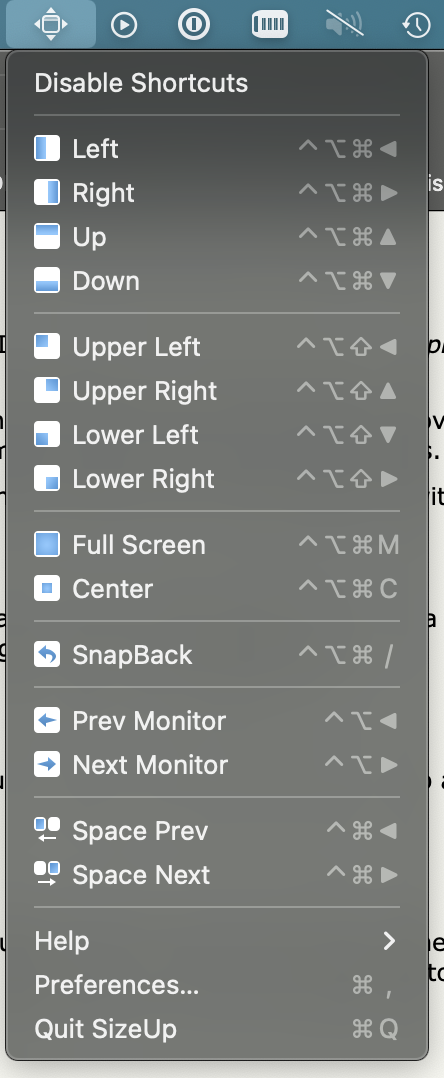
Re:KDE: A Nice Tiling Environment and a Surprisingly Awesome DE by whalesalad on Monday February 07, 2022 @07:37PM (#30253565)
This is all I need. I use an app on macOS called sizeup that let's me do this. I can center a window for reading text on my larger display. Fullscreen a window without using the actual native full screen on macOS. Snap left, snap right, up down etc. It can also keep track of hardware profiles, so windows will restore to their bigger sizes and positions when I plug my laptop into a display.

https://s3.whalesalad.com/images/sizeup.png

Re:KDE: A Nice Tiling Environment and a Surprisingly Awesome DE by dotancohen on Tuesday February 08, 2022 @01:15AM (#30255450)
Just so you know, KDE does all this natively.
Re:KDE: A Nice Tiling Environment and a Surprisingly Awesome DE by selectodude on Monday February 07, 2022 @10:22PM (#30254559)
Am I the only person left who still uses Expose? I feel like Apple is going to kill it off, they already rolled it into "Mission Control" and removed all the keybindings.
Re:KDE: A Nice Tiling Environment and a Surprisingly Awesome DE by jen20 on Tuesday February 08, 2022 @12:07AM (#30255092)
I use it constantly, but usually via the trackpad. I hadn’t actually noticed any key binding changes!
Re:KDE: A Nice Tiling Environment and a Surprisingly Awesome DE by trymas on Tuesday February 08, 2022 @06:23AM (#30257186)
I concur to whole this thread. Have no need for tiling VM especially on macOS. With trackpad gestures I can manage all windows quickly and conveniently (and to be fair I did not know about keyboard shortcuts).

Though I use spectacle.app for those rare occasions when I want to snap a window to the left or right.

Re:KDE: A Nice Tiling Environment and a Surprisingly Awesome DE by GekkePrutser on Tuesday February 08, 2022 @03:34PM (#30264246)
Is it still there? I thought they had already killed it. How do you open it?

I'm not on Mac but I missed the real expose too. Mission control is too cluttery for me. And I really really missed the desktops in a grid. In a line does not work for me, I just have too many and I want them to have fixed places, not to jump order when I maximise something.

Re:KDE: A Nice Tiling Environment and a Surprisingly Awesome DE by whalesalad on Tuesday February 08, 2022 @02:07PM (#30262939)
I really dislike the full screen on macOS. I wish the little green balls would maximize, not full-screen. Even on modern hardware, the transition between spaces is a waste of time and resources. I much prefer immediately switching to an open application.
Re:KDE: A Nice Tiling Environment and a Surprisingly Awesome DE by tokamak-teapot on Tuesday February 08, 2022 @07:39AM (#30257704)
I use it and love it. I use three finger swipe up and hadn't ever looked for a keyboard shortcut. It seems to be set to ctrl-uparrow in the 'Mission Control' settings page. Or am I confused about terminology here?
Re:KDE: A Nice Tiling Environment and a Surprisingly Awesome DE by tcoff91 on Wednesday February 09, 2022 @12:12AM (#30269108)
There’s mission control which shows all the windows of every app and then there’s expose which shows all the windows of the current app.
Re:KDE: A Nice Tiling Environment and a Surprisingly Awesome DE by schmorptron on Tuesday February 08, 2022 @06:28AM (#30257213)
Funny, because that feature seems to be what inspired the entire Gnome 3+ desktop, and it's now wonderfully polished there.
Re:KDE: A Nice Tiling Environment and a Surprisingly Awesome DE by rodgerd on Monday February 07, 2022 @08:12PM (#30253802)
For me, the PowerToys tools are the gold standard here (https://docs.microsoft.com/en-us/windows/powertoys/fancyzone...), especially the Canvas mode: remember where I like my applications, and put them there, including whatever peculiar layout that I think is important.
Re:KDE: A Nice Tiling Environment and a Surprisingly Awesome DE by cam_l on Monday February 07, 2022 @08:20PM (#30253854)
Agree.. but if only we could stop windows from stealing focus.
Re:KDE: A Nice Tiling Environment and a Surprisingly Awesome DE by spockz on Tuesday February 08, 2022 @12:48AM (#30255306)
Ah well. Stealing focus is happening more and more in macOS. A great annoyance…
Re:KDE: A Nice Tiling Environment and a Surprisingly Awesome DE by unicornfinder on Tuesday February 08, 2022 @04:57AM (#30256610)
Indeed. I switched from macOS to Windows about a year ago now and I have to say I really appreciate how on Windows stealing focus is much, much more rare than it was on macOS.

I honestly found it infuriating on my Mac.

Re:KDE: A Nice Tiling Environment and a Surprisingly Awesome DE by GekkePrutser on Tuesday February 08, 2022 @03:36PM (#30264263)
I know right? Especially when you've just booted up and half your apps are still realising they've just been opened and screaming for attention. They should just open in the background and only appear when I look for them. I don't understand why they haven't tackled that in 18 macOS versions. Simply launching an app with a flag saying "this is not a user-initiated launch but a reopen, stay back" would fix it.

At least bootup is a lot quicker on the latest M1s (privately I use KDE now but for work iIm still on Mac)

Re:KDE: A Nice Tiling Environment and a Surprisingly Awesome DE by spockz on Wednesday February 09, 2022 @01:17PM (#30276069)
Apps used to open in the background in macOS. Also OS dialogs would not steal focus iirc, or maybe those modal dialogs dood not exist. Not stealing focus used to be one of the top rules in the Apple human interface guidelines.

I’m really not sure what happened.

Re:KDE: A Nice Tiling Environment and a Surprisingly Awesome DE by stronglikedan on Tuesday February 08, 2022 @09:36AM (#30258840)
lookin' at you, onedrive popup! so many half sentences submitted as email addresses
Re:KDE: A Nice Tiling Environment and a Surprisingly Awesome DE by aybarshazar on Tuesday February 08, 2022 @05:37AM (#30256890)
I didn't use any tiling window manager so I don't really know what I'm missing. But I've come up with a system based on my own needs.

I use Hammerspoon (https://www.hammerspoon.org/) and a few little Lua methods to do the following and it works perfectly:

- Resize windows

- Position windows around the screen

- Instantly jump between apps I frequently use (this is especially good, for example with option+1 I can focus on the browser, with option+2 I can focus on my text editor, no more cmd+tab)

Re:KDE: A Nice Tiling Environment and a Surprisingly Awesome DE by GekkePrutser on Tuesday February 08, 2022 @03:32PM (#30264221)
This is basically what Windows 11 is doing now. It's a sensible middle ground IMO.
Re:KDE: A Nice Tiling Environment and a Surprisingly Awesome DE by oblio on Tuesday February 08, 2022 @05:03AM (#30256659)
Sooo... Windows? :-D
Re:KDE: A Nice Tiling Environment and a Surprisingly Awesome DE by zamalek on Monday February 07, 2022 @07:44PM (#30253607)
I think it's purely based on you workflow. I'm a "maximizer," 99% of the time things are maximized on my desktop. A second tile (browser) is usually extremely temporary. Other stuff goes to other desktops.

So I general, my layout is highly consistent: just one tile.

For what it's worth, hiding the unimportant details in a web page can also be accomplished by zoom/scroll - but that's definitely not to say your approach is wrong. Different things for different people.

Re:KDE: A Nice Tiling Environment and a Surprisingly Awesome DE by gordaco on Tuesday February 08, 2022 @01:13AM (#30255437)
Same here. I'm usually a "single task" person (I like to focus. I know well that I don't function well when trying to do many things at once), so a single maximised window is always the optimal approach for me. This is also why I've never bothered with multiple displays, which most of my workmates love.

On the rare occasion when I need to use data from a window to write something on other (like something that can't be copied and pasted, or cases where I need to extract information but not literally copying, such as using some data points from a reference file in code I'm writing) I just use win+left and win+right to spliut the screen between the two windows (I assume that OSes other than Windows have similar hotkeys).

Re:KDE: A Nice Tiling Environment and a Surprisingly Awesome DE by pjerem on Tuesday February 08, 2022 @12:13AM (#30255137)
Fellow maximiser here. It’s probably the reason why I still love OSX after all the shitty updates.

The full-screen mode is a marvel of ergonomics once you get it. Just maximize your apps and switch between them with the trackpad like they are virtual desktops (because they, in fact, are).

It’s an awesome mode for a single screen workflow.

Tilings WM are cool but you are rapidly limited with be screen (and even with two).

Re:KDE: A Nice Tiling Environment and a Surprisingly Awesome DE by djur on Tuesday February 08, 2022 @12:30AM (#30255228)
My main gripe with the macOS fullscreen mode is that there's no way to force the non-fullscreen desktop to stay in one place. If something in a fullscreen app pulls up the desktop (for instance, running an installer you just downloaded), the desktop gets moved to the next position. I want to force it to stay in one place (or, ideally, have a gesture or hotkey to switch between my fullscreen windows and the desktop). I could do this with most of the tiled WMs I've used.
Re:KDE: A Nice Tiling Environment and a Surprisingly Awesome DE by hibbelig on Tuesday February 08, 2022 @02:23AM (#30255769)
Isn’t there an option to support spaces by LRU? It defaults to on. I turned it off ages ago. But I also stopped using spaced some time after that so perhaps the option was removed…
Re:KDE: A Nice Tiling Environment and a Surprisingly Awesome DE by slimsag on Tuesday February 08, 2022 @12:38AM (#30255258)
Oh my god, this, this, this!

I've basically trained myself not to click links anywhere, because I know the macOS window manager will f* up my virtual desktop order and I'll have to fix it.

Re:KDE: A Nice Tiling Environment and a Surprisingly Awesome DE by spockz on Tuesday February 08, 2022 @12:50AM (#30255312)
And in addition hotkeys to go to a specific desktop/app!
Re:KDE: A Nice Tiling Environment and a Surprisingly Awesome DE by cycomanic on Tuesday February 08, 2022 @02:48AM (#30255893)
I'm confused, you make it sound like there is something unique to OSX here. But every Linux WM has had virtual desktops since ages ago and virtual desktops are a superior solution to just fullscreen windows (they can do the same for fullscreen windows+do the same for groups of windows... )
Re:KDE: A Nice Tiling Environment and a Surprisingly Awesome DE by dagw on Tuesday February 08, 2022 @04:00AM (#30256259)
OS X also has normal virtual desktops. The 'unique' feature of OS X is that when you maximize a window instead of maximizing on your current desktop, covering any other windows you have open, it creates a new virtual desktop and moves the maximized window there. When you de-maximize it automatically moves the window back to its original virtual desktop and removes the temporary desktop you created.
Re:KDE: A Nice Tiling Environment and a Surprisingly Awesome DE by Macha on Tuesday February 08, 2022 @07:18AM (#30257566)
I've always found this behavior of OS X super confusing as it means full screening a window breaks my mental model of workspace arrangement when I use the workspace left/right commands. I much prefer i3's behaviour of full screen just being a state on the window you can toggle.
Re:KDE: A Nice Tiling Environment and a Surprisingly Awesome DE by GekkePrutser on Tuesday February 08, 2022 @03:39PM (#30264306)
I actually hate this with a passion. Because it breaks the order of my virtual desktops, the new temporary one gets inserted after the one you maximised the application from. So the order gets completely messed up after that.

I love using many virtual desktops so YMMV.

Re:KDE: A Nice Tiling Environment and a Surprisingly Awesome DE by distances on Tuesday February 08, 2022 @08:02AM (#30257855)
So that's why maximize behaves so weirdly on Mac! I find it pretty jarring so I only use maximize now for some meetings and presentations if I have to use Mac.
Re:KDE: A Nice Tiling Environment and a Surprisingly Awesome DE by GekkePrutser on Tuesday February 08, 2022 @03:41PM (#30264347)
Yeah and even before they did this, maximise behaved weirdly on a Mac. It didn't maximise to the screen but to the "content" which meant that some apps would not maximise fully.

You can still initiate the old behaviour by holding option when you click the green dot, by the way.

But macOS (at least since macOS X) has never had a maximise in the way that most other desktop environments have it. To simply make a window occupy the whole screen on top of everything else.

Re:KDE: A Nice Tiling Environment and a Surprisingly Awesome DE by markstos on Monday February 07, 2022 @09:46PM (#30254382)
Sway supports both tiling and floating windows and you can define the rules and defaults as you wish. For example a browser window tiled with an editor and a media player floating on top.

You could have one virtual desktop that defaults to tiling and another to floating. With a keyboard shortcut you can toggle a window between the two states.

I was aware of tiling window managers for a decade before I switched from Gnome to Sway. Now I don’t want to go back.

Tiling may seem chaotic, but with Sway you are in the driver’s seat, deciding where each window goes and whether it’s floating or not. There is also interactive window resizing with the mouse and as well as moving windows with the mouse via drag and drop.

Re:KDE: A Nice Tiling Environment and a Surprisingly Awesome DE by aorth on Tuesday February 08, 2022 @12:43AM (#30255285)
> Sway

Sway also supports a tabbed layout! I'm a full-time window maximizer (as are sibling commenters). I keep all windows fully maximized and organized on virtual desktops: web and music on 1, terminals on 2, email and office on 3, etc. Love it!

Windows being fully maximized was something I learned to like from GNOME 3 when it came out a decade ago. I used Openbox, Fluxbox, GNOME and others for years and I would never go back. Never KDE though. Too messy...

Re:KDE: A Nice Tiling Environment and a Surprisingly Awesome DE by MayeulC on Tuesday February 08, 2022 @05:10AM (#30256705)
As someone who switched from KDE in ~2017 mainly to try wayland, and stayed for the configurability and tiling aspect... Is there a way to make KDE ingest my sway configuration? I would get the best of both worlds this way. Bonus points if the resulting config is compatible with both!

I'm pretty sure kwin's window rules support everything you can express in a sway configuration.

Re:KDE: A Nice Tiling Environment and a Surprisingly Awesome DE by ubercow13 on Tuesday February 08, 2022 @07:17PM (#30266777)
> I'm pretty sure kwin's window rules support everything you can express in a sway configuration

That seems very unlikely

Re:KDE: A Nice Tiling Environment and a Surprisingly Awesome DE by rawoke083600 on Tuesday February 08, 2022 @02:01AM (#30255668)
> really get the appeal of tiling window managers.

There might be "levels" of appeal and value... I too a few years ago moved to i3. The "tiling" nature is not where I got the most value from. I got it from have "multiple dedicated virtual workspaces(vdesktops)". With the ability to switch to them fast.

Example:

1) Terminal

2) Browser

3) Browser-2

4) Code (VStudio)

5) Code-2 (VStudio)

6) Files (File manager)

7) Gimp

8) Geany (Text Editor)

9) Empty

10)Empty

Just "knowing" how to "instantly" go from Code to a Browser or Text Editor has giving me A LOT of productivity. I'd say more so than any "tiling feature"

Re:KDE: A Nice Tiling Environment and a Surprisingly Awesome DE by christophilus on Tuesday February 08, 2022 @08:15AM (#30257972)
I do this with Gnome.
Re:KDE: A Nice Tiling Environment and a Surprisingly Awesome DE by karmakaze on Monday February 07, 2022 @09:20PM (#30254208)
I think it's related to the way people organize. I also like to have edges (maybe a few log lines) and corners of windows peeking alongside the edges that are small reminders of their existence. What others consider 'clutter' is 'context' to me. My physical desk area looks much the same--but worse with different layers for other projects.

What I really don't like is the swipe-the-entire-full-screen to an entirely new context when working on another part of the same thing.

Re:KDE: A Nice Tiling Environment and a Surprisingly Awesome DE by jraph on Tuesday February 08, 2022 @08:03AM (#30257860)
> I must be one of the very few "hackerish" minded people that does not really get the appeal of tiling window managers

Are we very few, or just non vocal?

I maximize the windows I work on. When I need to see two things on a screen, my window manager's ability to place windows side by side using the mouse or keyboard shortcuts is more than enough. I usually disable compositing to make shadows disappear when I do this, they are distracting.

Kwin (like more window managers I think) can place windows side by side (left - right or top - bottom), or one window on each corner of the screen. I can't imagine needing to see more than 4 windows at the same time. Seeing three / four windows is already more than distracting enough for me. My brain is too small for that. They wouldn't hold enough information anyway since I zoom text quite a bit, so I can be far from my screen and watch it for long hours without tiring my eyes.

When I notice colleagues tiling their terminal sessions with Terminator I feel claustrophobic. Konsole offers this now, but I've been sticking with tabs so far.

Re:KDE: A Nice Tiling Environment and a Surprisingly Awesome DE by lewispollard on Tuesday February 08, 2022 @09:04AM (#30258468)
> I can't imagine needing to see more than 4 windows at the same time. Seeing three / four windows is already more than distracting enough for me.

KDE + bismuth user, with dual screens. Terminal, IDE, window for the application I'm working on, browser for the documentation of the framework or tool I'm using. Sometimes an extra browser window for miscellaneous searching. Sometimes MS Teams is in the mix there too. Oh and as you mentioned, terminal is usually tmuxed into 2 or more panes.

And if I do need to focus down to one maximised window, meta+m to toggle "monocle" layout which maximises and removes borders.

But, I have ADHD and find that if something isn't visible in front of me, it's basically non-existent from the point of view of my working memory.

Re:KDE: A Nice Tiling Environment and a Surprisingly Awesome DE by lostmsu on Tuesday February 08, 2022 @01:40AM (#30255561)
Disclaimer: I am the author.

For Windows 10+ I made Stack WM: https://losttech.software/stack.html

I works differently from i3: you predefine screen zones (possibly overlapping), and then just move your windows between them with keyboard shortcuts or middle mouse button.

IMHO, covers the problems you mentioned. You can have:

- multiple windows in one zone with normal Z ordering

- an improvised taskbar for any zone or a group of zones

- zones that stack windows vertically or horizontally or tile them in a fixed grid

- zones that dynamically adjust size depending on contents

- windows of certain app opening directly into a certain zone

- floating windows

- widgets (the easiest one is simply showing text from a URL with XQuery or JSON parser)

- customize the hell out of it with WPF

It is now one of a few things holding me back on Windows: until I have it or something else very similar running on Linux, I have no replacement to manage my 3 screens the way I like it.

Re:KDE: A Nice Tiling Environment and a Surprisingly Awesome DE by oblio on Tuesday February 08, 2022 @05:05AM (#30256668)
This looks really cool!
Re:KDE: A Nice Tiling Environment and a Surprisingly Awesome DE by hnlmorg on Tuesday February 08, 2022 @03:48AM (#30256185)
It's not just you. I'd written my own Bash replacement shell and use it daily so I'm not some Linux n00b and I've never got on with tiling VMs. I started to think that maybe the issue is just that I don't like existing tiling WMs, so I started to write my own. After about 2 days of coding I realized that the issue wasn't that other tiling WMs suck, the issue was me: I just prefer floating windows which I can snap via drag and dropping when I want tiling. In fact Kwin is already my perfect WM.

I had seen all these screenshots and work colleagues using i3, Awesome, dwm and such like and looking ultra cool (from a nerdy point of view) and fooled myself into thinking this is what I should be doing too without realizing that I was already happy and productive without them.

Re:KDE: A Nice Tiling Environment and a Surprisingly Awesome DE by godshatter on Monday February 07, 2022 @07:43PM (#30253597)
I was going to say the same thing. I set things up a particular way with an eye to easily clicking on partially hidden windows, and I usually have specific empty areas on each virtual desktop in the same place because you can place the cursor over the background and use the scroll wheel to change virtual desktops. Each desktop has it's own layout, but they all respect that one area is to be blank so I can easily put my mouse there and rotate between the desktops. It's silly, but it's incredibly useful.

But everyone is different, which is why I go for configurable over programs that expect you to work a particular way. KDE is very good about this.

Re:KDE: A Nice Tiling Environment and a Surprisingly Awesome DE by eikenberry on Monday February 07, 2022 @08:02PM (#30253737)
I think it is people who use their laptop display exclusively (or nearly so). On small laptop displays tiling windows is nice and helps maximize the use of the display. I use the tiling features of mine WM a lot more when using my laptop display, but I still very much prefer 'floating' windows when using a large, external monitor.
Re:KDE: A Nice Tiling Environment and a Surprisingly Awesome DE by indymike on Monday February 07, 2022 @09:30PM (#30254273)
I use an abnormally large ultrawide monitor, and find khronkite (another KDE tiling script) to be very useful. The three column layout works particularly well on the ultrawide, while the standard tiling layout works great on the laptop's built in screen. There is a little tiny hack to enable settings on the krohnkite github page: https://github.com/esjeon/krohnkite
Re:KDE: A Nice Tiling Environment and a Surprisingly Awesome DE by rawtxapp on Monday February 07, 2022 @09:38PM (#30254331)
I think once you get used to a tiling window manager, like force yourself to use it for over a couple weeks, it's very difficult to go back. Somewhat similar to vim.

Personally, I have 2-3 external 32" 4k monitors and I want to maximize the real estate that's used, tiling wm (specifically i3 in this case) makes it very easy to move windows around, to switch between different screens, to move screens between different monitors quickly. Dragging a mouse across that relatively high screen real estate is a huge pita without i3.

Re:KDE: A Nice Tiling Environment and a Surprisingly Awesome DE by hibbelig on Tuesday February 08, 2022 @02:27AM (#30255785)
I used to love tiling. But then I started to use apps that needed more than half of the screen: web browser, IDE. Now I put my IDE full screen and the browser about the top right 70% of the screen so that the console output in the IDE peeks out below the browser so that I can see what output is generated when I use the app I’m developing in the browser.
Re:KDE: A Nice Tiling Environment and a Surprisingly Awesome DE by KronisLV on Tuesday February 08, 2022 @04:43AM (#30256540)
Heh, i feel like maybe hardware constraints also play a role here.

For example, right now i have 4 1080p monitors connected to my computer. I've never really needed anything more than the ability to snap windows to either side of the monitors (or bottom/top for vertical ones) or make them full screen.

With a higher resolution monitor (or an ultra widescreen one) i suspect that it would rapidly change and i'd need to look into either more advanced snapping setups (e.g. AquaSnap or PowerToys FancyZones on Windows, or the Linux equivalent, though even XFCE is pretty flexible out of the box there).

That said, on a laptop i probably wouldn't even try doing that and in many cases the software where i would actually want some sort of tiling already has it baked in - SSH clients like MobaXTerm (though Remmina is also nice on *nix) or all of JetBrains products. Tiling OS windows with smaller sizes feels rather inefficient, because many OSes out there waste space immensely with menus and other always visible items.

But hey, i'd argue that my current setup only has manageable cognitive load because i use overlapping windows managers as "optionally tileable" and due to the amount of monitors have a maximum of 8 open windows without any overlapping. Someone might achieve the same with a single (albeit larger) monitor and a proper tiling manager.

Re:KDE: A Nice Tiling Environment and a Surprisingly Awesome DE by christophilus on Monday February 07, 2022 @08:49PM (#30254019)
I’m the same. Neovim fills the center of my screen. The web application I’m working on sits behind it, with enough exposed that I can see if my changes are working / breaking, and with another terminal partially revealed showing any build errors. Works well for me. I never liked the layout that WMs picked, because they always force me to look to one side or the other (on a 4K and 5k monitor). Maybe if I was solely running on a 13 inch laptop, a tiling WM would make sense.
Re:KDE: A Nice Tiling Environment and a Surprisingly Awesome DE by JNRowe on Monday February 07, 2022 @09:57PM (#30254446)
Many tiling WMs support this type of layout; magnifier in awesomewm, centeredmaster in dwm, etc. The difference compared to manually performing the task being that you can cycle the arrangement through various states without extra effort or losing the previous configuration.

Of course, you can also just choose to float individual windows across background tiles in practically all tiling window managers too. I guess it depends a lot on whether the neovim use is an exception, or a layout style you use for other projects too.

Re:KDE: A Nice Tiling Environment and a Surprisingly Awesome DE by Macha on Tuesday February 08, 2022 @07:31AM (#30257647)
It's not built in, but you could configure such a layout in i3 too (and I guess sway, since it's intended to be a clone?): https://i3wm.org/docs/layout-saving.html

Bit of first time setup but then you can just bind it to a hotkey after that.

Re:KDE: A Nice Tiling Environment and a Surprisingly Awesome DE by christophilus on Tuesday February 08, 2022 @08:28AM (#30258102)
My experience with those was that they’d crunch the window down to a small rectangle which was hardly useful. I like having the browser and terminal be a reasonable size, even if hidden. Especially the browser; as I’m rarely testing mobile layouts when making changes.
Re:KDE: A Nice Tiling Environment and a Surprisingly Awesome DE by JNRowe on Tuesday February 08, 2022 @06:09PM (#30266183)
The sizes are configurable, for example by setting mwfact in awesomewm via the config or dynamically with keys.
Re:KDE: A Nice Tiling Environment and a Surprisingly Awesome DE by mackrevinack on Tuesday February 08, 2022 @12:48AM (#30255304)
for me, a good in-between is using the "super + left click & drag" to move windows around and "super + right click and drag" to resize a window. they allow you to move or resize when you cursor is anywhere in the current window instead of only at the edges. it makes it really quick to perform and can be done it of the corner of you eye.

setting a window to always-on-top with a hotkey is another useful one

Re:KDE: A Nice Tiling Environment and a Surprisingly Awesome DE by blindstitch on Tuesday February 08, 2022 @09:20AM (#30258655)
I half agree. I used the tiling window manager i3 for about a year, then gnome for the past two years. I really do like to move windows around and arrange them, it feels sort of tactile. I like the simple extensibility of i3 - even as a novice programmer it was possible for me to add new features and even build my own custom python bindings to add more nuanced controls. After a while i3 did become a sort of second brain and it felt like I could keep various domains of life separate very effectively when I was going to school reading and writing a lot, working part time at a job that required lots of terminal windows, and doing my leisure computing all on the same machine. Life has changed and I no longer have a need for balancing all that stuff at once and my window management needs are simpler, a handful of browser windows mostly.

When things get complex gnome is only about 50% as good as I need it to be to manage many things going on at once, though. Alt-tab application switching is a trash paradigm that is terrible no matter the OS.

Re:KDE: A Nice Tiling Environment and a Surprisingly Awesome DE by thawaya3113 on Monday February 07, 2022 @10:37PM (#30254636)
There’s nothing there a tiling WM cannot do. I have only tried i3 so I can speak only about that. But I’d assume most others are similar.

1) Tiling WMs make Workspaces incredibly easy to access. Super + # is usually enough to get you to a specific workspace and you can easily have 10 of those. So if you are monitoring stuff constantly, it’s easy enough to tile them all in a workspace and gain almost immediate access and come right back to your primary workflow without disrupting much.

2) If you want constant visibility to a small section of a webpage, for example, you can trivially tile it and resize it to be extremely narrow/high on your current workspace, and scroll to ensure the party you want to be visible is visible.

And you can do all of this with a keyboard probably a lot faster than you can with a mouse.

And the tiling WM ensures you’re using up all the space in the screen without you doing anything (as you make the “background” window smaller, the “foreground” window grows).

3) Finally, you can always pop out 1 or more floating windows as well.

Re:KDE: A Nice Tiling Environment and a Surprisingly Awesome DE by GekkePrutser on Tuesday February 08, 2022 @03:15PM (#30263969)
I think tiling is better, but to each their own. And tiling WMs don't mean everything is constantly changing.

I think you have a good point about the sidebars of webpages. A lot of webpages don't cope very well with being put in a narrow window like documentation beside a code editor. A lot of cruft, padding, menubars etc tend to take up unmoveable space. It would be nice if we could pan and zoom that kind of stuff out of the way.

But I personally use something in the middle. I have 9 virtual desktops (mapped directly to the numpad on my keyboard using KDE's shortcuts) with some static tiled configurations of the apps I use daily. This way I can quickly check an IM that comes in and snap back to my work stuff in an instant.

But like I said, whatever works for you! I don't think it's a matter of one size fits all.

The only thing I really miss about KDE is having virtual desktops switchable per monitor, not as a whole set of all monitors together :(

Re:KDE: A Nice Tiling Environment and a Surprisingly Awesome DE by qwertox on Tuesday February 08, 2022 @02:41AM (#30255858)
My issue is mostly with the half-screen vertical split (two side by side panes). Half a monitor is not enough for me to feel comfortable in an editor, so I'd split it 2/3 or even 3/4, but the remaining 1/3 or 1/4 are not wide enough to hold let's say terminals, and using a horizontal split to get the full width for terminals also steals a lot of height from the editor, while full width in terminals is usually not desired, it's between 1/2 and full width what my terminals should be.

So I prefer to alt-tab cycle. Even though I know that this is an extra effort, at least I can size the windows so that they contain the optimal amount of information.

I do use tools which help me with sizing and positioning of windows.

Re:KDE: A Nice Tiling Environment and a Surprisingly Awesome DE by Macha on Tuesday February 08, 2022 @07:28AM (#30257629)
I certainly have this problem with 1080p (or 4k at 2x, which is similar in screen area to content ratio at the same monitor size). But for me I don't have the same problem at 1440p (and I guess if I had one, 5k at 2x).

When I was younger I used to turn the font size way down to make two across work in 900p, but these days I stick to more comfortable font sizes.

Re:KDE: A Nice Tiling Environment and a Surprisingly Awesome DE by mkesper on Tuesday February 08, 2022 @07:38AM (#30257694)
You need a bigger monitor with higher resolution. Found that much easier than any two monitor setup or even monitor and laptop display.
Re:KDE: A Nice Tiling Environment and a Surprisingly Awesome DE by tokamak-teapot on Tuesday February 08, 2022 @07:46AM (#30257752)
I sometimes keep 2 or three windows 'tiled' on a 34" monitor, but on anything smaller I tend to use 1 or perhaps 2 windows (like you, often with some overlap).

Perhaps eyesight is important here? I'm short sighted but find wearing glasses when reading a monitor gives me eye strain, so just keep a distance from my monitor where I can read without my glasses (about 1m). To tile windows in a way that is useful I'd need to have much smaller fonts, and I wouldn't be able to read.

Re:KDE: A Nice Tiling Environment and a Surprisingly Awesome DE by nvarsj on Tuesday February 08, 2022 @08:09AM (#30257913)
I can sort of see what you’re saying, but the cognitive management of what you describe sounds like a huge pain. I use PaperWM and it’s awesome. It just gets out of my way and let’s me manage tons of apps and windows with ease and 0 manual window management. The sliding window tiling approach is also much better imo than that of i3 style, especially on large/widescreen monitors.

As an aside, it’s interesting to me that it’s predominantly OS X users that “don’t see the point in tiling WMs”.

Re:KDE: A Nice Tiling Environment and a Surprisingly Awesome DE by DyslexicAtheist on Tuesday February 08, 2022 @03:38AM (#30256136)
interesting how people are so different in what makes them productive. Your setup sounds like an organized chaos. Like my living room which has things cluttered here or there but is not actually filthy. But when it comes to my WM and technology in general I am so swamped by information that it's an ongoing struggle not having my attention hijacked.

Most of the time I'm in a single full-screen window unless I need to context switch. Some exceptions would be working on a pdf where the markdown is edited in one window and the pdf is to the right (auto-reloading when I save the markdown).

Other exceptions are running a terminal right next to my browser because I need to enter a few commands (installation instructions etc).

I used dwm, switched to i3 then stuck with sway. What I love about it is my limited screen real-estate (laptop) isn't wasted. I don't have an external monitor because I move a lot. My colleagues can't imagine working productively just on a laptop. It's perfect for me.

Re:KDE: A Nice Tiling Environment and a Surprisingly Awesome DE by Saint_Genet on Tuesday February 08, 2022 @07:08AM (#30257478)
TBH, it feels like so many "hackerish" people spend so muck time dinking around with their environment they don't get much else done. I used to be that way too when I first started using Linux back in the 90s, but nowadays I mostly run with whatever the defaults are and concentrate on my work.
Re:KDE: A Nice Tiling Environment and a Surprisingly Awesome DE by falsaberN1 on Tuesday February 08, 2022 @05:17AM (#30256744)
I must be one of the few that doesn't favor tiling as well. Kinda. My setup is unusual. Allow me two paragraphs to describe it and then why tiling wouldn't work for me.

I usually have 3 windows open at a given time, either a terminal/IM/notes program at the bottom right corner, vlc/deadbeef/copyq/scrcpy at the top right corner, and everything else is the main program I'm working with (2/3rds of the screen width, 100% of height, so stuff like Firefox, Krusader, vscode, Godot, Blender/Krita/GIMP/Inkscape, Audacity, qemu/Virtualbox, etc). I use 3 hotkeys to put a window into one of those 3 spots, via wmctrl, everything else is floating. If things get messy (like if I need a few virtual machines and seeing their contents all at once) I use virtual desktops. I also assigned hotkeys that either open or focus specific programs (like meta+X to focus Konsole or launch it if it doesn't exist, meta+E for Krusader...) so I can quickly switch to them even if they are at the bottom of the stack or aren't opened yet. Got all sorts of custom launchers, clipboard processing and a lot more functions available to key combinations I can do with my left hand only (it's the "alt+tab" hand so I extended it to all important shortcuts). The layout is a standard Windows style bottom panel (Used to have an Unity-style left sidebar but that gave me whiplash when using other computers) full of info/alert plasmoids, including custom ones. All support scripts are fairly universal and mostly work in other desktops, but KDE has nice configuration options to automate window settings, so it works better with it. Also got custom themes but I have no idea how to port them out of KDE. So KDE it is.

Anyway with the description out of the way, tiling might work fine if all you work with is terminals, a browser and other text sources, but for that I'd rather just have tmux managing the important stuff and extra Konsole tabs for the minor operations (or to passively display output of updates in a new self-destructing tab so it gets rid of itself if I forget to close after seeing the output). Because I work with many visual tools that need plenty of space (and don't like sudden resizing) the tiling workflow just can't work for me, anyway. I can see why some would prefer it, though. As I said my use case is unusual. (Yeah I know artists would rather use Windows or Macs but my job requires Linux. My creative things are a hobby, but I wanted to have my cake and eat it. KDE has enough flexibility to let me hack it into submission, so it's not bad at all.)

Re:KDE: A Nice Tiling Environment and a Surprisingly Awesome DE by LAC-Tech on Monday February 07, 2022 @09:34PM (#30254299)
I think my ideal WM would me split the screen up regions, then I populate the regions with a bunch of apps. Where as in tiling WMs all your windows need to be visible.
Re:KDE: A Nice Tiling Environment and a Surprisingly Awesome DE by djur on Tuesday February 08, 2022 @12:33AM (#30255240)
A lot of tiling window managers also support tabbing or stacking of windows within tiles. That's always how I used ion and wmii, off the top of my head.
Re:KDE: A Nice Tiling Environment and a Surprisingly Awesome DE by yes_but_no on Tuesday February 08, 2022 @05:29AM (#30256816)
I think herbsluftwm[0] fits better to this description than the other tiling wms, with its frame and virtual monitor features. [0]https://herbstluftwm.org/
Re:KDE: A Nice Tiling Environment and a Surprisingly Awesome DE by uberduper on Monday February 07, 2022 @09:37PM (#30254324)
This is basically what you get from pygrid (or Spectacle / Rectangle on a mac). I use a slightly modified pygrid to do all my window sizing and placement.
Re:KDE: A Nice Tiling Environment and a Surprisingly Awesome DE by nsonha on Monday February 07, 2022 @11:40PM (#30254957)
no you are not the only one. Don't even get me started on binary space partitioning, don't these people even stop for a moment and think what the point is.