I am speculating here as I don’t know for sure, but I remember iOS started as a derivation of OSX so this may be the case for macOS as well. So I think it’s not your imagination, it’s a different input and render architecture than windows or android.
The thing macOS on M1 does very cleverly is scheduling threads on cores. IIRC all UI threads run on high-power cores, while all background tasks run on low-power ones. So they never interfere with each other. iOS probably does the same; Android probably does none of this.
This feature has been in the Linux kernel for ages[1]. Android and ChromeOS are based on the Linux kernel, and have had this feature for quite some time. This is nothing new.
[1] https://community.arm.com/developer/ip-products/processors/b...
As with most of Linux's rough edges, however, this is trivially fixable if you're technical enough. Of course, that's exactly macOS's advantage. If you want the best experience on macOS, you don't need to be technical.
Personally, I run Linux with a tiling window manager and lots of custom keybindings and little scripts. Having used the default macOS experience a few times at work (on machines far more powerful than my dinky laptop), I can assure you that my highly customized setup feels far more responsive. On the flip side, it required a lot of up-front investment to get it to this point.
I think the main advantage with macOS is that it's above all else a system designed to be used interactively, as opposed to a server, so they don't have to put out a configuration "good enough for most things".
I also run Linux with a tiling window manager on an old machine (3rd gen i7), and it flies. One thing that made a huge difference in perceived latency for me was switching the generic kernel with one having Con Kolivas' patch set [0].
I'm using Arch and sign my own EFI binaries, so I don't care about out of tree patches, but for Ubuntu users and similar who don't want to mess with this, there's an official `linux-lowlatency` package which helps [1].
---
[0] https://wiki.archlinux.org/title/Linux-ck
[1] https://packages.ubuntu.com/search?keywords=linux-lowlatency...
https://donhopkins.medium.com/the-x-windows-disaster-128d398...
It's funny to read this in an era when smartphones come with 6 GB of RAM to compensate for developers' laziness and unprofessionalism.
Can you elaborate on this? If you do too much work on the main thread in iOS, it's going to hang the UI. Isn't the main thread the "render thread"? Do scroll views have some kind of special escape hatch to get off the main thread for continuing to scroll if the main thread is blocked with loading the content?
Some Android phones really have input lag, but it is not caused by CPU load. For example, on my phone, there is approximately 100-150 ms lag between tapping the screen and registering the touch. The lag is not caused by CPU load, but by slow touch sensor.
I don't think Apple has any smart code optimization tricks. Either they have a faster touch sensor or just some people believe that if something is made by Apple then it is of a better quality.
Here is a comparison of input lag in games in iOS and Android [1] and it shows similar results: 80 ms between a tap and reaction on screen.
[1] https://blog.gamebench.net/touch-latency-benchmarks-iphone-x...
The scrolling animation is 99.9% of the time implemented as a client-side animation timer submitting non-animated hierarchy updates to the server. It’s common to have janky scrolling.
Is that how all these third party iOS apps all have completely consistent “pop” animations on long press?
On-topic: they should build an M1 app that simulates loud coil whine at low-CPU usage, so you can feel like you're using a Dell XPS.
I'm using a tiling window manager with mostly GTK apps, so pretty much all menus and such look the same. The worst offenders are Firefox and IntelliJ, although they have improved a bit lately.
However, I'm not sure that this is the reason for lack of adoption. Windows has always been a patchwork of interface design, every other app having their own special window decorations and behavior, including MS' own apps (thinking of Office in particular). Also, seemingly similar elements, such as text inputs, behave differently in different places. For example ctrl-backspace sometimes deletes the previous word, sometimes it introduces random characters.
Basically, it's like an iframe — you declare what contents this portion of screen should have, and the render server composes it onto the screen. The render server is shared between all apps (just like in X11), so it can compose different apps with dependent effects (like blur). Apps don't have direct access to the render server's context, just like a webpage doesn't have any way to extract data from a foreign iframe.
You might be experiencing the mini-LED effect where the back lighting is regionalized, which isn’t ghosting but can be noticeable.
If you have the 12.9” M1 iPad, the ghosting is likely due to the new miniLED backlight which was introduced with that model.
This backlight is not static, but tracks to content in order to increase effective contrast (similar to FALD backlights on higher end LCD TVs). If the backlight does not track the LCD content fast enough, there can be ghosting.
In addition, since the LEDs are large compared to pixels, you can sometimes see haloing, particularly in small bits of white on a black background.
Overall, while the display is great for video, especially HDR video, it has some problems with UI and (white on black) text.
I don’t know for sure the processor is the difference, this is just a report of my observations.
The M1 processor makes a real difference. I have both the M1 and the most recent non-M1 iPad Pro's.
120hz is something you don't notice much when you enable it, but you definitely notice when it's gone.
https://www.extremetech.com/computing/261148-modern-computer...
Anyway, is it any better on displays that have a higher refresh rate? I feel like it should make a substantial difference.
All CRT displays attached to computers in the last 40 years were driven from memory buffers just like LCDs, and those buffers were typically only allowed to change while the electron beam was "off", i.e. moving from the bottom of the screen back to the top. Letting the buffer change while the beam is writing results in "tearing" the image, which was usually considered a bad thing.
Video game aficionados would like to have a word with you:
https://www.wired.com/story/crt-tube-tv-hot-gaming-tech-retr...
To be fair, much of this is the color and shape rendering, where pixel art had been tailored for CRTs.
Twitchy gamers do swear by “zero input lag” but are perhaps just nostalgic, difference is likely to be 8ms vs. 10ms:
“Using the industry-standard definition of input lag, 60Hz CRTs don't have 0ms input lag. 60Hz CRTs have 8.3ms of input lag…”
https://www.resetera.com/threads/crts-have-8-3ms-of-input-la...
If we shift the discussion to vector CRTs (which have no pixels) such as the one the old Tempest [0] game used, the CRT has a major advantage over an LCD and the lag can in principle be whatever the application programmer wants it to be. I miss vector games and there's really no way to duplicate their "feel" with LCDs.
Back when I had CRTs, 60Hz displays were the older, less-common, cheapo option. I'm having a hard time remembering a CRT display that wasn't at least 75Hz (I believe this was the VESA standard for the minimum to be flicker-free), but most of the monitors I used had refresh rates in the 80-90Hz range. I remember a beautiful higher-end CRT that had a refresh rate around 110Hz.
85Hz gives you a frame time of 11ms, which doesn't sound much better, but is a 30% improvement over 16ms.
This is exactly the same as LCDs though, no? LCDs are also drawing an entire frame at a time, they're not "random access" for lack of a better term. There's just typically no image processing going on with a CRT* though, so there's no inherent latency beyond the speed of the electron gun and the speed of light.
*I'm aware there were some later "digital" CRT models that did analog->digital conversion, followed by some digital signal processing on the image, then digital->analog conversion to drive the gun.
Best option is to use adaptive sync and get rid of vsync. But support for this technology is surprisingly not mature, it works mostly in games.
The single core performance of my 11900K is really hard to beat at 5.3GHz, and with 7 of 8 cores hitting that frequency simultaneously (which it hits all the time in desktop use) it's just buttery smooth. My guess is that you just came from an older system. The advances in CPUs (along with good compiler programmers working on that architecture's behalf) in my experience are larger than reviews and colloquial recommendations would suggest.
My 2018 MBP 13” and the Surface Laptop I’ve tried did that well. An XPS 15 I’m currently using does not.
More specifically, HN would use less RAM than VSC would to open a .txt file.
Eh, not bad. not good; we don't know what the new goalpost positions mean yet.
Its more expensive too… not sure why anyone would buy it over the air. Two more usb-c but you can only hook in one external monitor! Also 200 more nits on screen but… is it really that important?
I cant wait for the 14/16 with the m1x. These are already barn burners.
The Touch Bar is also well-integrated into QuickTime Player as well as Quicklook, making video navigation much more efficient.
I only wish VLC would use it for timeline navigation.
Actually you still only get two USB-C ports on the M1 MacBook Pro. The four-port model is still Intel.
That lower-spec Pro has never made much sense. The last time an entry level MacBook Pro made sense was 2015, where you got a noticeably higher TDP chip (28W vs 15W in the Air iirc—could be mistaken), more IO (two Thunderbolt 2 ports vs the Air's 1, and a full-size HDMI port), and of course an IPS retina screen.
I think the low-end Pro came to existence because they intended it to replace the Air, but the tiny 12" MacBook had already claimed the unadorned "MacBook" name, which would have made a lot more sense.
But then they ended up refreshing the Air as people just never stopped buying the old one, despite its ageing internals and garbage 2010-era screen (possibly because it was the only computer Apple were selling at the time with a keyboard that worked).
I have no idea while it still exists though. It's filling a niche that isn't there. I think the intent is for it to be basically an "upmarket" alternative to the Air, but they only thing they have to offer right now is a Touch Bar. Which for most people, including myself, is more of a reason not to buy it.
A lot of the time it’s really nice to have a context sensitive/modal form of input.
It only have 99% of the performance under specific loads. The Air is ~12W TDP, the MBP is a ~20W TDP. That is quite a bit of difference ( 70% ) when you absolutely pushes it to the limit in both CPU and GPU.
That is why half of the not "throttle" comment in this thread dont make much sense as they only consider the CPU usage pattern.
There are also a lot of other use cases where GPU or NPU are important.
As I wrote in another comment, I produce video news.
My M1 MacBook Pro is a beast of a machine, but I work it to the point of full-blast fans every day.
You can run multiple monitors on an m1 with a DisplayPort hub. (not relevant to the point about the number of usb-c ports of course, since you're plugging into the hub anyways)
Go back 5+ years and you had the (2010+) Macbook Air, which was fantastic. A good compromise of size and power at a really low price. Like competitors just couldn't compete. The only problem? By 2015 or so the display was pretty outdated. It needed a thinner bezel and a retina display and it would've been perfect.
But no, Johnny Ive came along with his war of thinness and foisted the butterfly keyboard on us and added the Touch Bar to increase the price. There's no other reason for it to exist.
I would never buy a laptop where throttling was a presumed solution to thermal issues, because I want to get work done. Pre-m1 macbooks were awful. Even worse than top of the line dell laptops.
I have always felt like a minority for expecting a 2k laptop to actually be able to get work done.
If I would ever be able to run Linux as a first class citizen on an M1 (not going to happen) I would buy one in a flash. I have been playing with my mother in law's MacBook air and the thing is pretty darn amazing.
I got a Lenovo Legion with 4800H(8/16)/32GB/2T/GTX1650/144Hz a couple of months ago. That's a really sufficiently cooled system. It almost never spins up the fans, it's powerful, has a lot of space, no RGBs and has a super boring, tasteless, anti-theft design that never goes out of style (but the last one is more of a personal preference ;) It's been great.
The fact that most (all?) gaming laptops come with NVidia GPUs (requiring closed drivers, unless Nouveau got much better since last time I tried it) doesn't help.
Just in case, are you actually monitoring temperatures?
Regardless, buy some proper thermal paste and pads and replace them on everything, it will quiet down significantly while also running cooler.
The difference between factory Thermal Interface Material and custom is often ridiculous.
Edit: and I don't mind the noise. I will maybe do something if it starts throttling, but I have had 0 issues for as long as I can remember.
The MacBook Pro has fans and basically never throttles as I understand from others.
Besides, when it throttles, it’s not a huge slowdown, so most people wouldn’t notice it “skipping a beat” anyway.
However, it's not as hot as my old 16" MBP got (which would get too hot to have on your lap), it doesn't noticeably get slower, and it's of course totally silent.
Kind of depends on the steady state and your target turbo frequency. I have my fans basically idle when temperatures permit it, but aggressively ramp them to full speed to keep the CPU as cool as possible so as to allow the frequency to scale up beyond spec. This results in a similar effect as a laptop fan -- under heavy load, the machine is loud. I don't really have a problem with this, at idle my computer is using ~100W, at full load, it's nearly 1000W. That's a lot of heat to get rid of, and it has to go somewhere. Having a large water cooling loop can help with the noise, but since I really only use the CPU that heavily for bursts that measure in the minutes at worse, I think it's fine.
It doesn't make me anxious but I do kind of like the feedback that things are under load. (I have the ramp-up time set pretty long, so something like "go build" that only uses all 32 CPUs for a second doesn't really trigger anything. There's enough inertia to prevent that from raising temps much.)
It’s quite surreal the big Xeon server (an actual server, with optional rackmounts) with lots of spinning rust under the desk is still much less distracting.
My latest laptop (Ryzen 7) takes a lot of beating before putting the fans at an audible speed. I've never seen this happen in laptops before either. (But well, my last one didn't slow down either, it just started making some noise.)
What’s the catch?
I went from a mid-2015 15" MBP to 13" M1 with 8GB. I made the impulsive purchase to get 8GB ASAP rather than wait for 16GB (which was backordered). My primary apps are DaVinci Resolve, Lightroom and Photoshop. On the 15", the fans would run on full constantly. I would have to create proxy video files to work with.
On the M1, I don't create any proxies at all and the video files I work with just play in real-time.
Main catch for me is the two USB ports and one external screen limitation. I have a hub (card readers, USB, HDMI, etc) and a 10-port USB hub coming off that (with 7 external drives connected). As soon as there is a 15/16" available that handles two external displays, I will get that as well.
I dislike the TouchBar and the lone external display, but everything else about the M1 has been excellent for me.
Honestly I feel like multi monitor setups are actually worse than single monitor. Having to bend your neck to use some of your windows left me with neck pain. Now I only use one large monitor and use the workspace switching shortcuts to move everything around so I only look forwards.
My productivity is identical and my neck feels better. I'd only say its worth it for when you really do need to see a huge amount at once like watching the feeds of 30 security cameras. Not for general work/programming.
Seems like multi monitor setups become more of a looks thing because they make people feel like they are sitting in the FBI command center rather than a generic office worker desk.
I can simply keep the specification/documentation/stack overflow alongside editor/IDE window alongside debugger. If I had to put the benefit in words, I can offload the state of my programming session all on screen, instead of in my head, taking space where more of the abstract logic and relational graph can reside, before it gets turned into code.
On the other hand, it gets way easier to get distracted because you can keep a chat window on one side, constantly getting pinged.
Designate one of them as the 'main' monitor, and put anything you need to work with for long periods of time on that. Add an office chair, so you can swiwel to look straight at the other(s) instead of twisting your neck. And you'll find there's no such issue.
Outside of unreal, I usually find workspace switching to be a better workflow than alt tabbing my way to a window on a second screen
I feel confident running the system for a while now. Seeing more software come on board. Even for the extra money, I say go. I’m a dev/product designer, most of my work is coding, product development, product management and graphical design. It does everything I need faster, no lag.
The problem is now my work desktop is a 32-core Threadripper w/ huge GPU and way too much ram.
It’s kinda nice knowing that if my computer ever slows down it’s because of bad programming and not having a too slow computer.
I want to like laptops. I really really do. But they’re slower, have bad keyboards, and have tiny screens. Or I’m docked and the fact that it’s a laptop isn’t meaningful.
That said, I can’t fricken wait to see Apple build a beast of a desktop with their silicon. I just really really hope the GPU doesn’t suck. Lack of good GPU on Mac is a huge problem for certain lines of work.
You might be underestimating the value in that. I’ve been working off of MacBooks since 2011, and for almost all of that time I’ve had them docked and hooked up to multiple monitors, and working just like a desktop.
But if I ever need to go anywhere, meet a client, travel, go to another room/office, I just unplug and go. If power goes, I don’t lose anything, the laptop is still running. Whatever happens, it’s all there with me, always. It’s not as comfortable when it’s on laptop mode but it’s better to have a less comfortable experience than not having it available at all.
It’s a portable desktop. And I love it. But yeah if you’re looking for workstation-level specs, then yeah, a laptop is never going to be enough.
> If power goes, I don’t lose anything, the laptop is still running.
What kind of monster doesn’t use a UPS!? =P
I mostly work in games and VR. Maybe someday there will be a laptop that doesn’t suck for game development. Sadly that day has not yet come.
The only catch is I need to make sure my dev machine is online.
Now with neovim 0.5 with support for LSP and treesitter, neovim is on par with visual studio code.
And then someone with 4 cores tries to run the code and its unusable because it only runs well with 32 cores.
A great pet peeve of mine is that designers are notorious for only testing their designs on high-resolution MacBooks. A lot of tools look like crap on 1080p Windows displays.
The benefits of 32-cores mostly comes with compile times and build processes. Where, depending on your project, it can make a HUGE difference. One of my C++ projects went from 15 minutes to under 3.
Just saying, I definitely get the feeling Apple values form over function. His biggest issues happen when he's using Docker (the annoying Docker for Desktop version) but I also use Docker all day and dont have any issues...
Still I likely buy a M1 Air soon. Not because of the M1 CPU, but because it's almost half the price of a comparable Thinkpad. And I hate the bloatware shipped with basically every non-Microsoft Windows laptop.
So you installed Gentoo, what's your problem? 8)
The whole reason the phrase "IBM PC" existed was to differentiate it from the other PCs that already existed. "IBM" was the adjective. "PC" was the noun.
Because of its success in offices, "IBM PC" became just "PC" the same way other words like "omnibus" became just "bus" because it's simpler to say.
Since then, you might refer to any of a variety of machines as "personal computers", but "PCs" only meant "IBM PCs" (or later "IBM PC-compatible machines"). In other words, I would argue that the term "PC" derives specifically from the "IBM Personal Computer", and not generically from "personal computer".
Source: I was there. :-) I haven't done the research, but I bet if you did search through Byte and similar magazines of the time, you'd find plenty of supporting evidence. (I do have a memo cube from the early '80s with the slogan "Apple II -- The Personal Computer", but I suspect that was Apple Marketing trying to fight an ultimately losing battle.)

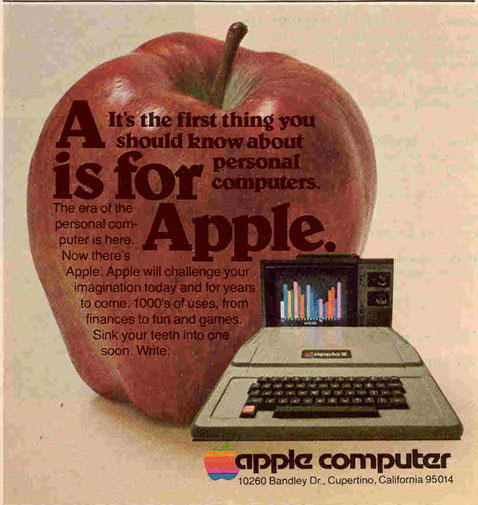

I do disagree with the suggestion that the initialism "PC" was understood to mean "personal computer" in general before the release of the IBM PC. If that's overly pedantic, well, I'm a computer nerd; what can I say...
https://books.archivelab.org/dateviz/?q=home+computer
https://books.archivelab.org/dateviz/?q=personal+computer
Personal computer was used a lot more when books were eventually written about the era.
"Home computer" was things like the VIC-20 and the TI-99 4/A. "Personal Computer" was machines that you had in your home or office that you didn't have to share, or timeshare with someone else. Think Cromemco, Kaypro, PET, and SuperBrain.
But in this case it was used as "desktop computer", which sounded strange to me as I consider laptops, however portable, to be personal computers.
You don't think Apple's marketing is behind the aforementioned recent trend; do you?
You're misremembering history. It eventually evolved into that, yes.
Apple didn't really buy into that until the "I'm a Mac/I'm a PC" ads.
This has not been a good experience for me.
8GB for a development laptop is not a great idea in 2021. I've been using 16GB since 2013. I'll get more with my next laptop, which may or may not end up being the 16" M2?
You can fix it by setting 'Prefer Tabs' to never - https://www.reddit.com/r/androiddev/comments/jtbl4m/has_anyo...
The same things on an Intel laptop will turn it into what my friend comically calls a "weenie roaster" (for what it does when it's on your lap).
Things like JetBrains CLion don't even make the M1 warm. That will make any Intel laptop start cookin'.
No amount of memory will be good. The problem is not memory but inefficient programming. Desktop apps consume as much memory as possible. The only way to have a good experience is to have more memory than the average user. But then the average user catches up and you need even more memory.
Right now I have ms teams running in the background purely to receive notifications and it is using over 1GB of memory and 8% of my cpu to show me a notification window when I get a message. MS teams on my 3gb ram iphone does exactly the same job and uses no memory and no power because it doesn't even have to run to show me notifications.
I have 32GB on my laptop and I am only just above the average now but in a few years electron will have ballooned so far that 64 is the new minimum. While my 3gb iphone and 8gb ipad feel more than enough.
When I'm using a laptop, especially doing real work, they heat up, the fans go crazy, the laptop is hot to the touch and everything slows down.
It almost makes you anxious. You're wondering if it's about to crash or go on fire.
I've always kept a Desktop PC on the go for this reason, a well cooled desktop just doesn't have these issues. With a laptop, I always feel like I'm compromising a bit.
I got an M1 Macbook Pro recently and it just doesn't have these issues, I fire up my whole dev environment and get busy, and it's still quiet and (mostly) cool, and I can't notice anything slowing down.
I don't care so much about the architecture differences, x64 vs ARM etc, but the fact that I can finally use a laptop like a desktop is massive.