News for hackers. Stuff that matters.
Re:Home Lab Beginners guide by buybackoff on Friday March 08, 2024 @09:41AM (#39641459)
The article is good, but it is intimidating buy its size and scope. A homelab could be a single NUC on a desk. I have one with 64GB RAM and it could fit so so many things. NUCs are very efficient to run 24/7, but become noisy with sustained CPU load. For that one could grow the setup with OptiPlex or Precision Tower (can haz ECC) SFF from eBay. These Dell SFFs are very good, quite small yet proper desktops/servers with proper quiet fans, could fit 10G Mellanox 3 cards (also from eBay for $40), and you could stack one on top of another horizontally. Don't go older than OptiPlexes with 12th gen CPUs, electricity and space they take could become a constraint. The used ones with i5-12500 are already very cheap. With LGA1700 one could put i9-14900 (non-K) there if needed.
Re:Home Lab Beginners guide by cybrox on Friday March 08, 2024 @10:23AM (#39641856)
In addition to that, I don't think people should overthink the rack as an essential component. I like racks as much as the next guy and homelab racks look really cool but for usability and learning, just go with whatever you like.

I personally have 4 boxes stacked in a corner that are connected to a "rack", which is just two rack side panels bolted to the back of a workbench that I screw components into, connected to NAS and multiple Raspberry Pi's on a shelf and I really like the mess and have learned a lot.

Just use what you have and expand as you need. Racks are cool once you're into the hobby enough to care about style points.

Re:Home Lab Beginners guide by mech422 on Friday March 08, 2024 @12:12PM (#39643196)
When I started using SBC's for my home setup, I skipped rPi's. At the time, being ARM based was a bit limiting (IIRC, at the time some stuff still hadn't been ported to ARM). So I went with odroid h2/h3 [0]. X86 based, lots of memory to work with, and much cheaper then a nuc - and uses much less power then my old Dell/HP blade servers from EBay :-)

0) https://ameridroid.com/products/odroid-h3

Re:Home Lab Beginners guide by NelsonMinar on Friday March 08, 2024 @11:34AM (#39642740)
From what I've seen on reddit's /r/homelab, the neat thing about racked systems is you can buy very cheap used hardware that are discards from enterprise uses. There's very little market for an old server or rackmount network switch so you can get very good bargains.

Personally I buy new cheap mini PCs and consumer networking stuff. That's another way to get bargains, since consumer hardware is so cheap. But I'm a bit jealous of the enterprise capabilities like proper managed switches or remote managed servers.

Re:Home Lab Beginners guide by mech422 on Friday March 08, 2024 @12:19PM (#39643281)
The down side to the old enterprise servers is the power draw. I had 2 Dell blade server chassis and 1 HP blade server chassis that used Xeon based blades. The electric bill was UNREAL with 10+ blades running at once.

I do use Dell PowerConnect manged switches from EBay, but tbh for what I do, TP Link switches work really well and are cheap. They support VLANs, MAC Lans, SNMP, SSH/Web configuration, etc etc - basically fully managed switches. And they have been rock solid as 'edge' switches for each room in the house. The powerconnects basically work as top-of-rack switches for pulling all the different rooms/rack into 1 feed to the cable modem.

Re:Home Lab Beginners guide by blackfawn on Friday March 08, 2024 @01:24PM (#39644150)
Agreed. Power draw and often noise on enterprise equipment is ridiculous in a home setting. I try to stick to the small form factor (SFF) or ultra-small form factor (USFF) computers whenever I can, which is what the author is using. I used to use Raspberry Pi boards for some things but always ran into problems w/ microSD cards dying, even with log2ram and buying industrial cards. I haven't had a single issue after switching to tiny x64 machines w/ real SSDs in them.

I picked up a HP managed switch that I thought I might use but it draws more power than the ThinkCentre M93p Tiny computers do and it's actively cooled w/ super noisy 1U fan(s) so I'm going to ditch it.

Re:Home Lab Beginners guide by mech422 on Friday March 08, 2024 @03:18PM (#39645859)
Yeah - I skipped rPi because back when I started replacing stuff ARM still had some gotcha's with stuff that hadn't been ported. I do use the rPi's for the 3d printers though.

I've found the TP Link stuff to be good for home switches. cheap, quiet, and basically fully featured/managed. Stuff like SNMP, VLAN/Mac Lan, port mirroring/monitoring, etc. Also SSH and web interfaces... I have 2-3 currently, 1 per room feeding back to the PowerConnects (NOISY) and haven't had a single issue in 3-5 years of use :-)

Re:Home Lab Beginners guide by doawoo on Friday March 08, 2024 @05:58PM (#39647543)
One of the coolest additions to my home lab recently was an Orange Pi 5 plus/pro - 8 core ARM 64-bit cpu and 32GB of RAM all with awesome power usage and zero noise, plus an up to date kernel. I skipped the rpi as well a while back but these newer boards are worth lookin at! :)
Re:Home Lab Beginners guide by mech422 on Friday March 08, 2024 @06:07PM (#39647624)
Oh nice! - I'll have to take a look

Thanks!

Re:Home Lab Beginners guide by vGPU on Monday March 11, 2024 @02:58PM (#39672044)
The Omada line makes pretty decent AP’s too. A step above ubiquiti in terms of reliability but also dead simple. I’d have gone ruckus if I could have but the mailman stole my $200 eBay R550 score and I didn’t feel like shelling out $500 for one.
Re:Home Lab Beginners guide by nvy on Friday March 08, 2024 @02:24PM (#39645116)
Which x64 machines have you been using? I'm looking for a successor to PC Engines APUs
Re:Home Lab Beginners guide by blackfawn on Friday March 08, 2024 @02:59PM (#39645610)
I've been sticking w/ very compact units, mainly ThinkCentre M series "Tiny" and Dell OptiPlex "Micro" form factor, which are both practically identical in size. Both use a laptop power supply. You can get current versions for many hundreds of dollars or generation(s) old ones for as cheap as $30 USD. My most recent ones were older 3rd & 4th gen i5 & i7 CPUs but they still blow current Raspberry Pi, etc. out of the water, have M.2 for network, etc. & SATA for storage. A Dell I have that's a generation newer than these adds NVMe too. It's hard finding these small PCs that have multiple Ethernet but I just added a gigabit Ethernet M.2 card to the one.
Re:Home Lab Beginners guide by vially on Friday March 08, 2024 @03:11PM (#39645772)
I was also looking for a successor to the PC Engines APUs and came across https://teklager.se/en/ that lists some possible alternatives that you might find interesting.

Personally I was looking to build a router so I ended up buying a fanless N100 based mini PC from Aliexpress (e.g.: search term is "N100 firewall appliance") and have been very satisfied with it so far (Proxmox homelab with OPNsense running as a VM).

Re:Home Lab Beginners guide by mech422 on Friday March 08, 2024 @03:14PM (#39645812)
I love the Odroid H series [0]. cheap, quiet and only like 4w idle draw

0) https://ameridroid.com/products/odroid-h3

Re:Home Lab Beginners guide by transpute on Friday March 08, 2024 @05:27PM (#39647266)
On paper, these look promising, no direct experience. Also on Amazon US/CA.

$170, N100, 16GB LPDDR5, dual 2.5GbE, https://aoostar.com/products/aoostar-n-box-pro-intel-n100-mi...

$210, N100, dual 3.5" SATA, M.2 NVME, dual 2.5GbE, https://aoostar.com/products/aoostar-r1-2bay-nas-intel-n100-...

$250, Ryzen 5700U, https://aoostar.com/products/aoostar-cyber-amd-ryzen-7-5700u...

Re:Home Lab Beginners guide by InvaderFizz on Saturday March 09, 2024 @08:05AM (#39651366)
The N100 is the current thing. It is in a large variety of form factors with a variety of available connectivity options.

N100 sips power while performing as well as a 60w quad core Skylake.

Re:Home Lab Beginners guide by buybackoff on Friday March 08, 2024 @03:59PM (#39646414)
Power draw also comes with terrible noise. They were designed to be in a server room, not a living/bed room.
Re:Home Lab Beginners guide by EvanAnderson on Friday March 08, 2024 @03:28PM (#39645983)
> The down side to the old enterprise servers is the power draw.

It depends on the generation of the gear. Stuff coming off-lease in the last 3 - 4 years has been of a generation where lower power draw became a major selling point. In Dell land, for example, the power draw differences are dramatic between the Rx10, Rx20, and newer series. (Basically, throw Rx10 servers in the trash. Rx20 servers are better but still not great.)

Re:Home Lab Beginners guide by doublepg23 on Friday March 08, 2024 @12:36PM (#39643491)
I feel like it’s a harder sell than it used to be because post-Ryzen there’s been real increases in CPU performance. Modern NUCs and prebuilt also having native NVMe is a boon too.

All depends on what you’re going for though.

Re:Home Lab Beginners guide by internet101010 on Friday March 08, 2024 @03:57PM (#39646382)
The caveat to this is noise. People who have never seen a rack server in person don't understand how loud they really are. PSUs, case fans, cpu fans (if applicable) all gotta go. You kind of have to go into it knowing you are going to spend an additional $100-200 replacing it all, and that's assuming you will not have to 3D print a custom bracket to house the new fans.
Re:Home Lab Beginners guide by freedomben on Saturday March 09, 2024 @09:01AM (#39651606)
Yep, the noise is serious. I may not even seem that bad at first, but if you are going to hear it prolonged, it starts to get really unbearable after a 20 minutes of it. I don't know anybody who isn't irritable after a couple hours.

And the heat is enough to make a room very uncomfortable. I started my home lab in my office, and it didn't take long to realize that was not an option. Luckily I was able to find a nook under the stairs where I could stash it, but the heat and noise are polar opposite of a productive office environment.

Re:Home Lab Beginners guide by bayindirh on Friday March 08, 2024 @05:25PM (#39647248)
What homelab people who do not work with/in a data center daily doesn't realize is how noisy and power hungry is the equipment they procure.

They got a managed switch, nice. It has VLANs, stacking, etc. nice. How many 48 port switches you can possibly stack in a home? You got a Sun ZFS7420. Great. That's a rack with two controllers with 1TB RAM each. That thing screams. An entry level 7320 is maybe workable, but you can't do 7420 at home. Same for HPE/Dell/Netapp storage boxen.

Doing Infiniband is home is another thing I can't understand. Fiber cables are extremely expensive. Copper is range limited and thick, plus unless you do HPC, its latency and speed doesn't mean much. Go fiber Ethernet. Much more practical.

I understand the curiosity and willingness to play, but it's not that practical to play with these at home (noise, space, heat, power wise). I also buy high end consumer hardware. TP-Link has 4/8 port smart managed SOHO switches for example, they even have PoE. Power your Raspi cluster via PoE with less cables and get some respectable computing power with no noise. Neat! No?

Dell's Rack servers are generally not noisy at idle, but a 2U server under some real load is unbearable. What's funny that an Intel N95 has the same power with an i7-3770K with better SIMD support while being 4x more efficient, and that thing is not slow by any means.

Re:Home Lab Beginners guide by isopede on Friday March 08, 2024 @07:20PM (#39648128)
I don't think fiber cables are expensive. I ran CAT6 in my house and at the same time pulled an OS2 single-mode 30m fiber cable to my office for core switching. The 30m fiber cable was $17 on Amazon, plus two 10G-LR modules at $18 each. The equivalent CAT6 is more power hungry, has less range, the cable is the same damn price, and the 10GBase-T SFP->RJ45 transceivers are twice the price of the LR transceivers at $50 each.
Re:Home Lab Beginners guide by bayindirh on Friday March 08, 2024 @07:26PM (#39648160)
Infiniband uses its own cables with dedicated/integrated transceivers. It's not compatible with Ethernet and can't be swapped (unless you plan to talk plain Ethernet with your IB card, which is possible).

A 5m, 200gbps cable is $1,149.00 a pop [0].

Mind you, this is neither the longest, nor the fastest cable.

[0]: https://esaitech.com/products/mellanoxmfs1s00-h005v-200gbps-...

More cables: https://esaitech.com/search?type=product&options%5Bprefix%5D...

Re:Home Lab Beginners guide by yummypaint on Saturday March 09, 2024 @08:07AM (#39651379)
I haven't seen any mention of going to scrap yards in this thread, but just about every general-purpose yard ive been in has had racks of some kind. Hard to beat scrap price as racks themselves tend to be light when empty.
Re:Home Lab Beginners guide by geek_at on Friday March 08, 2024 @11:46AM (#39642882)
I did just the same. Built myself a little movable 6 node rack out of wood.

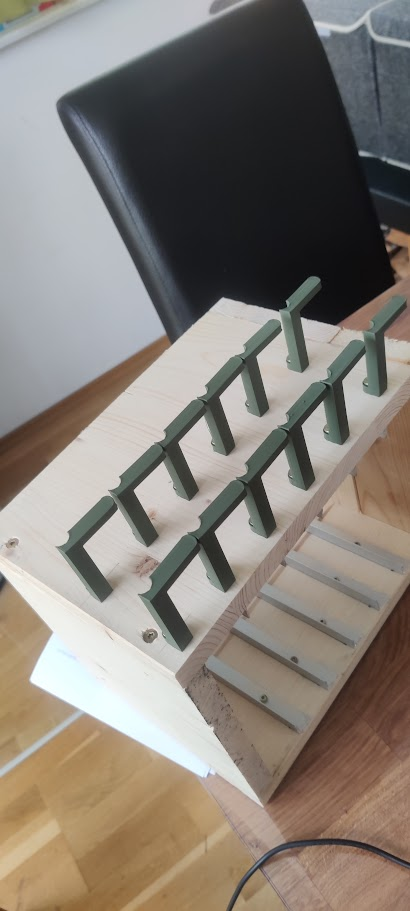
With 3d printed powerbrick holders on the sides and a switch with a 10g uplink so all servers can use the full 1g nic.

Warms my home office in the colder months and can be put in the garage on the warmer months.

Photo front: https://pictshare.net/qi7zv2.png
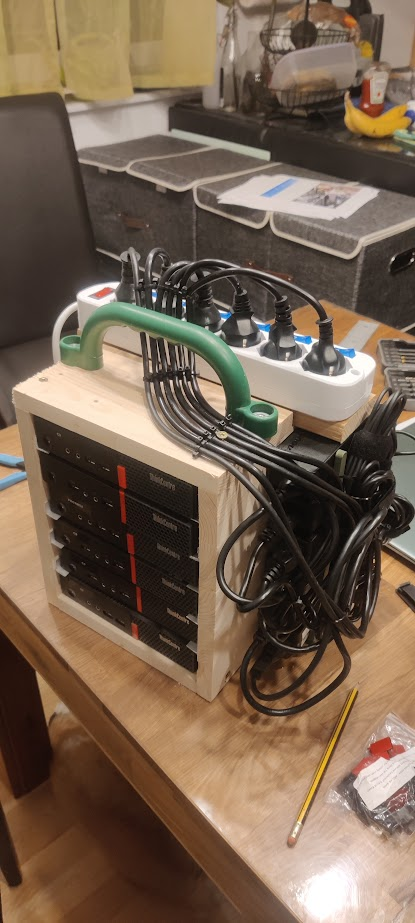
Photo back: https://pictshare.net/llloiw.png
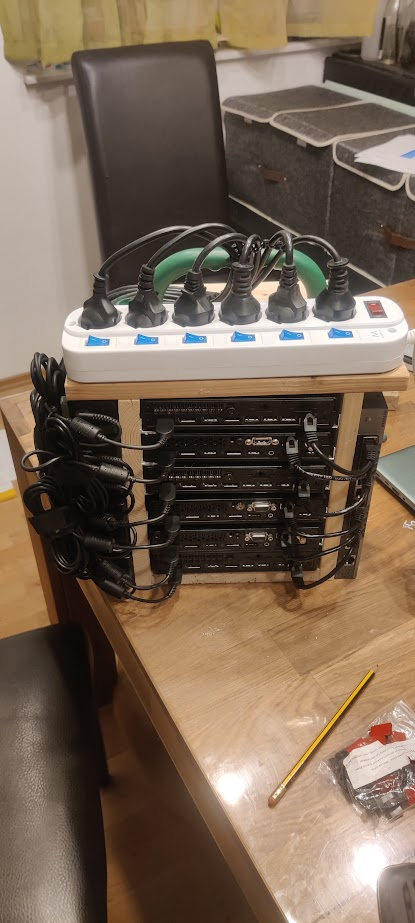
Photo of the 3d printed power brick holders: https://pictshare.net/kgffy6.png
[edit] Specs:

- 80 Watts during normal load

- 50 cores

- 9TB nvme storage

- 300GB RAM

- 3 of them are running proxmox

- 3 of them Docker swarm

Re:Home Lab Beginners guide by E39M5S62 on Friday March 08, 2024 @01:26PM (#39644183)
I can't quite see which Thinkcentre's those are, but the M920x can fit a 10GbE PCIe NIC in it and provide it enough power. I have one on my desk with 2x2TB NVMe, 32GB RAM and a 10GbE fiber connection to it.
Re:Home Lab Beginners guide by idatum on Friday March 08, 2024 @11:51AM (#39642952)
In the spirit of "your setup, should be your setup. As traditional or as custom as you’d like!" as mentioned in article, I went with a vertical mount rack. It's not enclosed so it has enough ventilation.

The advantage with a vertical rack for me was space savings. Key parts of my home lab are near the low voltage panel (lucky to have in newer house) which does have foot traffic from other household members. Much less risk of someone bumping into the rack.

Re:Home Lab Beginners guide by nextos on Friday March 08, 2024 @12:40PM (#39643540)
Also there are great fanless cases for NUCs and RPis.

Actually, Asus has taken over NUCs from Intel and they are releasing fanless machines, so now there is not even the need to mod them.

Re:Home Lab Beginners guide by nucleardog on Friday March 08, 2024 @12:45PM (#39643589)
Racks are nice from an organization perspective as well, but agreed it’s an unnecessary complication and expense and limits your options.

I run a half dozen Lenovo ThinkCentre tiny PCs I picked up off eBay super cheap. Sure, I could go buy some rack mounts for them all… to the tune of $750. It would look really nice. That’s about it. If I’d decided that was a “requirement” I never would have done any of this.

For anyone considering diving in to any of this stuff, don’t let the pursuit of “perfect” stop you before you’ve even started.

My PCs are quite content sitting in a pile with some scraps of wood shoved between to help with airflow.

Re:Home Lab Beginners guide by noobermin on Friday March 08, 2024 @12:57PM (#39643754)
This is because like many things this is a rich man's hobby. See mechanical keyboards for example.
Re:Home Lab Beginners guide by CharlesW on Friday March 08, 2024 @01:00PM (#39643807)
Re:Home Lab Beginners guide by noobermin on Saturday March 09, 2024 @04:33AM (#39650546)
Most of the things on r/homelab and elsewhere are not wooden racks. Most are expensive server racks retrofitted to be vanity projects to serve videos to at most 2 people in a home. It's fine, it's just that people should be honest about what these are.
Re:Home Lab Beginners guide by Fnoord on Saturday March 09, 2024 @07:05AM (#39651144)
Interesting you mention 2 people.

I got kids. So I got a lot of toys in the living room. The small office I got, does contain a printer, a PC, a space for my laptop plus dock, a server, a switch, and a small cluster. But what I don't have is more space. I don't have space for a rack.

Furthermore I've been replacing industrial grade fans (in switches, desktop, the cluster and the like) which make a lot of noise (and cool very well) with Noctua which are expensive and have less CFM but are silent enough.

Re:Home Lab Beginners guide by tombert on Friday March 08, 2024 @01:48PM (#39644512)
I don't know if I'd call myself a "hobbyist" for keyboards, but my mechanical keyboard that I am typing this on, and that I bought in 2021, cost me $35 after tax. Obviously not the cheapest keyboard in the world, but also within the reach of nearly any employed person in a rich country like the US or UK.

I posted this in a sibling comment, but it doesn't really have to be expensive regardless. I got started with the homelab stuff with a partially broken laptop. Considering that that laptop was about to go into the trash, I consider that (sort of) free to get started, but even if you don't have an old laptop lying around you can purchase a used "Craigslist Special" for basically nothing, generally less than $200, and often much much much less because you probably have a friend or coworker that has an old laptop lying around that they'd be happy if you took off their hands. Old laptops are kind of in this frustrating category of being "too good to throw away, but not good enough to use", so people will often hoard them inadvertently. Additionally, they're extremely ubiquitous; most households in the US have at least one laptop, and often at least one per person.

Even rack mount servers (used) cost very little, at least upfront. My server with 128gb of RAM and 24 cores was $150, but of course the power draw is where most of the cost for that comes from, so for those you could argue that they're a rich man's hobby.

ETA:

For those interested, the listing I ordered from a few years ago on Amazon appears to have mutated into a different item, but this one appears to be an identical product. I think for the price it's actually a really decent keyboard. I'm able to get about 120WPM on MonkeyType with it, for what it's worth.

https://www.amazon.com/Mechanical-Keyboard-Ultra-Slim-Anti-G...

Re:Home Lab Beginners guide by BadHumans on Friday March 08, 2024 @01:19PM (#39644093)
You can get into custom mechanical keyboards for under 50 dollars. I don't think you understand what you are talking about.
Re:Home Lab Beginners guide by bowsamic on Friday March 08, 2024 @03:14PM (#39645813)
Don’t be disingenuous he’s obviously not referring to that part of the mechanical keyboard community
Re:Home Lab Beginners guide by BadHumans on Friday March 08, 2024 @03:17PM (#39645854)
I'm not being disingenuous. Calling it a "rich man's hobby" might dissuade people from partaking which I wouldn't want to happen. Yes, there is a high-end to mechanical keyboards where it can get really expensive but is cooking also a rich person's hobby because there are $1000 knives? If you don't want to play in that side of the pool you don't have to. You can get a lot of mileage out of $50-$100 in mechanical keyboards.
Re:Home Lab Beginners guide by slyall on Friday March 08, 2024 @05:33PM (#39647321)
Whereas a "poor mans hobby" is a a 1970s muscle car and a home workshop...

Sure you can spend thousands on racks of servers and UPS/generators but you can also spend less than $500.

Personally I rent a unit in a quadplex and have:

    Old 42" rack -  $50 from old employer
    10 year old HP Microserver G7 for storage - $250 new
    repurposed old desktop virtual machines - Free
    Cheap dumb switch - $50
Re:Home Lab Beginners guide by Semaphor on Friday March 08, 2024 @01:04PM (#39643874)
In my experience, homelab means high powered or at least a lot of compute. People like me who have tiny, power saving devices are in the selfhosted communities.

There's no definition like that, but it happens to turn out that way.

Re:Home Lab Beginners guide by didntcheck on Friday March 08, 2024 @02:36PM (#39645293)
You can add "data hoarder" to the Venn diagram too!
Re:Home Lab Beginners guide by Semaphor on Friday March 08, 2024 @06:33PM (#39647819)
Fair enough, kinda works with neither group. Usually not enough compute for homelab, but care way too much about storage for selfhosted stuff.
Re:Home Lab Beginners guide by atomicnumber3 on Friday March 08, 2024 @01:20PM (#39644103)
I am honestly kind of anti-rack at this point.

"Deals" on used enterprise are IME dreadful unless you can get in on your own employer offloading old stuff, which requires you to a) even have an onprem setup at all and b) be friendly enough with the IT/NOC people that they give you a tip when it's going to happen. (For me b seems to happen naturally so it's really all on a).

eBay is a fools game, terrible prices. Craigslist is usually the same sellers too. Maybe some people live behind an Amazon datacenter or something, I unfortunately live in a city where the only reason we have Amazon 2-day shipping is because we're a major shipping hub. And anything that does resemble a good deal is ancient Opterons that are literally e-waste these days.

So anyway, sorry, my whole point here is that most people are actually going to be running a ton of old enterprise stuff that is actually rackmountable with good sliding rails. You're either building whiteboxes in a 4U rosewill case or you're putting stuff on rack-mountable shelves. The rosewill cases theoretically have sliding rails but they're awful, just awful. So you're either using shelf rails or literal shelves which tends to throw off efficient utilization of the U's available in the rack - shelf rails usually result in a dead U either above or below them, and shelves obviously have similar effects.

So yeah. As someone who owns a rack (4-post open rack), if you asked me, I'd say just go buy one of those big heavy duty Lowe's shelf units and ask for extra shelf inserts so you can have more, but less-tall shelves. Boom, you now have something that'll hold anything and is way better than fucking around with rack nuts and shelf rails and stuff.

Love homelabs in general, though.

Re:Home Lab Beginners guide by sophacles on Friday March 08, 2024 @03:45PM (#39646237)
10-15 years ago the deals were real. I picked up a lot of off-lease and/or used stuff on ebay really cheap. As more and more companies move to cloud, and as more people get into homelabs, prices on decent gear have gone up. I was starting to think the good times were over in 2018 and in 2020 I stopped defaulting to ebay when I saw a great lot getting broken up and sold cheap suddenly pull all their stuff and relist it at much higher prices - "the scrappers are on to us" is what I realized.

These days I've been replacing the guts of my old servers with mini-itx setups for the most part. It does what I need and lets me shove 2 or 3 nodes into a 2u case so I can keep the aesthetic of "a personal rack".

Re:Home Lab Beginners guide by mindslight on Friday March 08, 2024 @11:49PM (#39649454)
FWIW Supermicro slides work with those 4U Rosewill cases. I was pushed in that direction because my rack is just slightly narrower than 19 inches.

Honestly I don't mind wasting 1 or 2U between machines because the tops of server cases function as great "temporary" shelves.

I do agree the meme of used enterprise deals is completely overblown, unless you actually want 15+ compute nodes and are prepared to suffer power, heat, and noise for the density. Honestly I wish they made those Rosewill cases in 5U so I could put any full height cooler in there instead of being somewhat restricted.

Re:Home Lab Beginners guide by OJFord on Friday March 08, 2024 @01:51PM (#39644555)
Or as a compromise, you can buy strips of appropriately spaced/sized square-punched metal angle; before I moved I built a shelf unit designed so that the depth of the shelf was correct (19" between posts plus a bit for the sheet metal thickness) for a rack, I had access to the side so I had a combination shelf & rack. People do similarly with Ikea tables ('lack rack'). Nice thing about the shelves was that I could buy a short strip (it was maybe 12U) and if I'd outgrown it I could've just removed a shelf and added another strip.
Re:Home Lab Beginners guide by m463 on Friday March 08, 2024 @07:52PM (#39648304)
Thing is, you can get pre-built racks on amazon for < $100 that are both sturdy and designed for it. with removable sides, or casters, or whatever. For a little more you can get nice wooden audio racks that are spouse-friendly.. ish.
Re:Home Lab Beginners guide by OJFord on Saturday March 09, 2024 @08:40AM (#39651509)
Ok? I chose to build sometbing custom fit to my space, and the rack mounting strip things were <£10 on eBay. Obviously the wood brings it more to '<$100' realm, but I was also just building a shelving unit. My point wasn't really cost anyway, I didn't mention it, my point was just that 'rack' doesn't have to mean floor standing 4-sided 42U behemoth from a supplier surprised to be delivering to a residential address, on which point we're agreeing.
Re:Home Lab Beginners guide by mindslight on Friday March 08, 2024 @02:57PM (#39645580)
From a home perspective, the best way to think about a (full depth four post) rack is as an extremely high density shelving for specific types of things. You won't make any gains with one or two machines, or several SBCs in small cases, that you couldn't have made with similar non-rack shelves. Having a few pieces of gear with rack ears not in a rack will forever call to you though. In general I'd either say commit to it (42U and understand you'll be paying a premium for shelves/gear/accessories), or regular shelving will suit you fine.
Re:Home Lab Beginners guide by m463 on Friday March 08, 2024 @07:49PM (#39648286)
I didn't care about racks either, but I got a 6u desktop rack and mounted a couple of things in it and turns out I love it.

- shelf with two mini systems - power strip with individual switches - power strip always-on outlets front/back - ethernet switch - "broom" thing to feed cables through - many-port USB 3 hub

other systems are under the desk.

It's really convenient. I have hooked some systems to power switches, others are always on. It is organized, takes up space but doesn't fall over, and gives me desktop access to ports if I need them.

That said, many years ago I had a server setup where I really organized everything, zip ties for all cables for neatness, etc. I turned out to be a pain every time I rewired something (cut zip ties, etc). I eventually learned there's a neat and organized vs flexibility balance you have to maintain.

Re:Home Lab Beginners guide by jbverschoor on Saturday March 09, 2024 @06:34AM (#39651055)
Get a DIN-rail and some mounting brackets
Re:Home Lab Beginners guide by mech422 on Friday March 08, 2024 @12:09PM (#39643154)
Personally, I really like odroid H2/H3 units (0). Much cheaper then Nuc's, DDR4 SO-DIMMs up to 64G, very low power draw, and X86 based so no compatibility issues. No where near as powerful as desktops but more then enough for running basic home lab stuff.

I used to use a half rack full of Xeon based Dell and HP blades - but the blade chassis are huge/heavy and the power usage was HUGE!

0) https://ameridroid.com/products/odroid-h3

Re:Home Lab Beginners guide by gorkish on Friday March 08, 2024 @12:48PM (#39643621)
One additional NVMe slot and 10GBe nics would make the H3+ an object of absolute perfection. So close, and yet so far.
Re:Home Lab Beginners guide by mech422 on Friday March 08, 2024 @03:21PM (#39645913)
Heh - maybe in the H4 ?? :-) Though you can prolly stick a 10GB nic in the PCIE slot ??

Edit: Oh shit...just checked, it does NOT have a PCIE slot..I was sure it did :-(

Re:Home Lab Beginners guide by culopatin on Friday March 08, 2024 @06:39PM (#39647867)
And the n100 cpu
Re:Home Lab Beginners guide by gorkish on Monday March 11, 2024 @12:08PM (#39669928)
n100 is overhyped IMO; I would prefer vendors focus on the connectivity and application requirements first and let the choice of SoC follow. The most important factor for this type of application is really PCIe lanes. If someone (other than broadcom) could introduce a basic fanout switch with PCIE5.0 upstream and loads of PCIe 3.0 downstream ports that would hopefully open the floodgates.
Re:Home Lab Beginners guide by tombert on Friday March 08, 2024 @01:53PM (#39644596)
How much is "huge"? My HP Proliant idles around 175W, and even running Folding@Home it only peaks at around 300W. Considering that I used lots of incandescent light bulbs throughout my house, each about 60W, 175W doesn't really seem that bad to me.

Granted, this is one server. If you have a bunch of them running at high load all at once then of course that can get pretty pricey power-wise.

Re:Home Lab Beginners guide by mech422 on Friday March 08, 2024 @03:20PM (#39645890)
The Dell chassis has a 2500w powersupply for 6 blades. The HP chassis has a 3000w PS for 8 blades..

I actually ran 3-4 extra circuits to the computer room to run it all...

Re:Home Lab Beginners guide by CTDOCodebases on Friday March 08, 2024 @05:22PM (#39647222)
Not the person you are replying too but huge will largely depend how much you pay for electricity. Electricity is very expensive in Europe

In Sydney, Australia running your server just at idle would cost just over AUD $50 a month assuming it is powered by the grid.

For about AUD $400 you could replace it with a 7 or 8 series Intel i7 mini PCI and throw a 10Gbe NIC in it and that thing will cost you AUD $7 a month to run.

It gets tricky though if you want ECC RAM. Most of the cheaper low power systems that are available will take UDIMMs and that becomes prohibitively expensive if you need a decent amount of RAM.

Re:Home Lab Beginners guide by Fnoord on Saturday March 09, 2024 @07:37AM (#39651260)
> Considering that I used lots of incandescent light bulbs throughout my house, each about 60W, 175W doesn't really seem that bad to me.

Well, your monthly power bill would be much higher than needed with either those light bulbs or a server like that.

Those light bulbs can be cheap to replace with more efficient variants. This was already true approx 30 years ago, back in the 90s.

I got solar power. Without that, I wouldn't be having a Xeon server right now.

Don't get me wrong, to each their own! That is the fun thing with homelab. You can optimize for power, price, noise, size, heat, or a combination of these. Then you can decide to have a couple of machines dedicated or have one large VM. Then you pick the OSes.

For example, right now I am settled for my homelab server. I got a cluster to play with, too. I got a 10 gbit switch (which I only put on if I need the speed, otherwise I use a second hand Brocade with 10 gbit SFP+ uplink). Loads of fun. But my router is just an Edgerouter-Lite. EdgeOS is dead, and it doesn't have failover nor does it run a VM. If I run it in bridge mode (which I do now) and I use Wireguard it doesn't saturate 1 gbit at all. So I am looking for an alternative which is a bit future proof. Ie. with SFP+ because I will get fiber instead of DSL eventually.

Re:Home Lab Beginners guide by tombert on Saturday March 09, 2024 @09:58AM (#39651987)
A bit of a typo, I meant to write that I used to have dozens of 60W light bulbs; all the lights in my house are LEDs now.

I’ve been debating trying to find a smaller, low power computer to reduce energy; it’s hard to find a small one that have 10GbE or that would take a pcie card. Maybe I can find a Thunderbolt one.

Re:Home Lab Beginners guide by Fnoord on Sunday March 10, 2024 @09:59AM (#39659129)
Right, I guess most of us used to, but we save a lot of money that way. Still, why waste money on energy when you don't have to? If you could invest some money on different, more efficient hardware?

Yeah, Thunderbolt would work. I use LAG on my NAS with 4x 1 gbit, I got some devices with USB-C to 2.5 gbit NIC, these are cheap (30 EUR or so). I'd then use that managed 10 gbit switch which I put off by default. If I'd need the speed, I'd put it on. Thunderbolt is even better (way faster and cheaper, multipurpose, though you'd need to set up TCP/IP over USB), but I prefer AMD over Intel.

If you want a TB4 one with Intel, there's many Intel NUCs available, very cheap on Ali. Many of the ones I saw not from Ali are just rebrands (some, admittedly, with Coreboot).

Re:Home Lab Beginners guide by tombert on Sunday March 10, 2024 @02:56PM (#39661566)
Annoyingly, I can't really do 2.5G because when I was looking to upgrade my network, I ordered a bunch of 15 year old old 10GbE switch, because I mistakenly assumed that that would work with 2.5G as well. It turns out that the 2.5GbE came after 10GbE and so compatibility is not guaranteed, so I ended up having to upgrade everything in my house to 10GbE to make the switches work. Fortunately, used 10GbE cards from data centers go for around $40 on eBay. Thunderbolt cards cost a lot more so I only have one for my MacBook, and it's a big chunky boy that weights half a pound.

I was looking into some of those single-purpose computers, some of which will sometimes have a PCIe slot.

Re:Home Lab Beginners guide by tombert on Friday March 08, 2024 @11:53AM (#39642977)
My first homelab thing was a laptop with a broken monitor. It wasn't terribly hard to get Ubuntu server working on there, it had a gigabit ethernet port built in, and it had USB 3.0 so it wasn't too hard to get reasonably good hard drive speeds to use a NAS.

You can buy old used laptops (especially with broken monitors) for basically nothing (or maybe literally nothing if you already have one, or you have a friend of family member who has one they're willing to donate). If your goal is just to use it for Plex, it will work fine, and the power draw on laptops (particularly when idle) isn't that much more than a NUC.

I use a proper rack mount server now largely because I thought they were neat, but I think for most people an old laptop is fine.

Re:Home Lab Beginners guide by rodolphoarruda on Friday March 08, 2024 @02:19PM (#39645054)
That's my setup. I decided to use old laptops instead of proper servers because power cuts are common in the region I live, especially when it rains. So laptops have built in UPS (their batteries) which can hold power for some minutes in the worst cases. It sounds like a poor man's home lab, but it works.
Re:Home Lab Beginners guide by tombert on Friday March 08, 2024 @03:08PM (#39645736)
Honestly, I think that's probably smarter than what I do now. My personal laptop idles around 15-20W, tends to peak at about 80W. If I bought a dozen laptops, the total energy usage would be roughly the same as my server at idle, and I could use Docker Swarm or something to glue everything together, while also having a lot more power resiliency because of the batteries (like you mentioned).

I also think it's good to prevent ewaste. There's a lot of raw computing power that just ends up in landfills. It's almost certainly better for the environment to get as much use out of existing stuff as possible than it is to buy new stuff. I can't imagine it's good for the world for a bunch of old lithium batteries to lie dormant.

If I can find a good deal on a dozen old laptops, I might honestly put this plan into action.

Re:Home Lab Beginners guide by m463 on Friday March 08, 2024 @07:53PM (#39648314)
I wonder if it is hard to configure graceful shutdown when batteries run low and automatically come back up when power is restored?
Re:Home Lab Beginners guide by smallmancontrov on Friday March 08, 2024 @09:58AM (#39641595)
I've been thinking about upgrading my current "homelab" (just an old PC), and I've been waiting for a small form factor with an integrated power supply and a bunch of NVMe slots. Does that exist yet?
Re:Home Lab Beginners guide by CharlesW on Friday March 08, 2024 @10:18AM (#39641808)
> …I've been waiting for a small form factor with an integrated power supply and a bunch of NVMe slots. Does that exist yet?

Have you considered using a NAS as your homelab? I run a few containers (no VMs yet, although I can) and just do that on my QNAP.

The TBS-h574TX (https://www.qnap.com/en-us/product/tbs-h574tx) has five E1.S/M.2 slots. The HS-453DX-8G has two SATA 3.5-inch drive bays and two M.2 2280 SATA SSD slots (https://www.qnap.com/en/product/hs-453dx), and the TBS-h574TX. Or you can just throw SATA SSDs into any NAS.

Re:Home Lab Beginners guide by smallmancontrov on Friday March 08, 2024 @10:46AM (#39642133)
These NASbooks are sooooo close to what I want!

My problem is that none of them have an internal power supply. They all require a power adapter that's decidedly less easy to source than an IEC cord. I have had 3 separate experiences where I give someone instructions to grab a box and the power adapter... and they show up with the box and without the power adapter (or with a power adapter in a box of similar power adapters and no volt/amp/size rating on the box to disambiguate). In short, the internal power supply is something I actually care about.

Re:Home Lab Beginners guide by bombcar on Friday March 08, 2024 @10:55AM (#39642216)
It's harder and harder to find small computers with internal power, because they've found that nobody counts the power brick in the "size" (remember the original Xbox?).

The best bet might be to wait until they've all finalized on USB-C.

Re:Home Lab Beginners guide by smallmancontrov on Friday March 08, 2024 @11:02AM (#39642322)
Yep, that's probably how it has to be. Hopefully USB4NET can save us from "gigabit ethernet is enough for everyone," too.
Re:Home Lab Beginners guide by buybackoff on Friday March 08, 2024 @10:23AM (#39641855)
It's easier to turn an OptiPlex into NAS. Actually you could pass-through entire SATA stack as a PCI device into TruNAS running in Proxmox VM so it sees SATA ports natively, with all goodies such as SMART.
Re:Home Lab Beginners guide by znpy on Friday March 08, 2024 @11:43AM (#39642844)
If you just need to run a few containers, you might want to take a look at TrueNas (Scale) rather than Proxmox.
Re:Home Lab Beginners guide by belthesar on Friday March 08, 2024 @03:33PM (#39646066)
Depending on the use case, this is definitely an option. I personally prefer using Proxmox under my Container Orchestration hardware because, as it seems to always eventually do, my home lab has become production, and being able to do software patches of the underlying system without service outages is really desirable. I've been agonizing and going back and forth between various potential solutions for this for a couple months now, with the most recent attempt being "Deploy k3s, with a fully separate control plane from the worker nodes, and run all of those atop a Proxmox cluster because being able to migrate VMs across nodes and also stand up isolated workloads to test out other solutions makes changing things in the future far less risky".

That said, I was running the Homelab on effectively a single Unraid hyperconverged NAS/compute layer before then, and that worked wonders for quite a long time. I wouldn't consider Unraid my first choice now, given the advancements in TrueNAS SCALE in the time since I chose it as the solution, but the concept of NAS + Container Orchestrator as hyperconverged homelab today is quite attractive.

Re:Home Lab Beginners guide by justinclift on Sunday March 10, 2024 @10:42AM (#39659518)
> ... being able to do software patches of the underlying system without service outages is really desirable.

Yeah, that's what I was looking at Proxmox (8.x) for recently as well, but it never made it through basic qualification testing. VM migration's would randomly hang forever about 25% of the time. Definitely not a case of bad network interconnect either. :(

I'm using Ryzen 5000 series cpus on all the test gear though, and recently saw a mention that it may have been a known problem that's fixed. But not super keen on wasting more time.

What sort of cpus are your hosts using, and are you using your VMs with Ceph as their storage? :)

Re:Home Lab Beginners guide by belthesar on Tuesday March 12, 2024 @06:57PM (#39685939)
Great question! I haven't gotten that far yet. I have Proxmox running on a 12th gen i5 currently, and my other two compute nodes, a 3rd gen i7 laptop and a 7th gen i5, are currently still serving production workloads, so I haven't had a chance to set up a cluster yet. That said, I don't mind limiting features to lowest common denominator for the k3s control plane node, as I don't need gobs of power for it or advanced CPU features, and I imagine that's the pain you might be facing (though I'm new to Proxmox, so who can say?)

That said, I do have a NAS that I can provide both NFS and iSCSI storage to, so I imagine if I run NFS as the backing storage, I shouldn't have to worry about clustered file systems. Each compute does have local storage, but the plan is to provide that via a CSI for workloads that don't need to be highly available or where fault tolerance isn't a concern.

Re:Home Lab Beginners guide by justinclift on Friday March 15, 2024 @08:31PM (#39722151)
As a data point, the vm migration hangs aren't happening in testing any more. Looks like there really was a fix added to Proxmox recently.

Can proceed with more testing now. :)

Re:Home Lab Beginners guide by buybackoff on Friday March 08, 2024 @10:03AM (#39641643)
For my homelab, I bought OptiPlex 7000 with 3 NVMe slots (one PCIe 4.0, one 3.0, one 3.0 short 2242), 1 PCI x16, 1 PCI x4, 3 SATA and 3 DisplayPorts for 300 EUR near 2 years ago.

It was so good actually that I've made it my main PC. I already had 3 monitors and this SFF just worked fine with them. No games of course.

I also have Precision Tower with Xeon/64GB ECC RAM and 1 native NVMe slot. I use PCI-to-NVMe adapters there (2 slots), it works well with ZFS mirror.

Re:Home Lab Beginners guide by Andrex on Friday March 08, 2024 @02:50PM (#39645499)
OptiPlex seemed to be the best option when I was browsing around.
Re:Home Lab Beginners guide by jhickok on Friday March 08, 2024 @10:17AM (#39641796)
I think you could DIY that, but I found getting a few little PCs can be stuffed in a drawers with some holes drilled in the back. Haven't complained about suffocation yet! I bought some Bee-Link mini PCs with pretty impressive specs. No idea if I am now being spied on by China.
Re:Home Lab Beginners guide by natebc on Friday March 08, 2024 @12:26PM (#39643365)
Maybe give this thing a look? it's newish and a little expensive but pretty dang well equipped. (not internally powered though)

https://store.minisforum.com/products/minisforum-ms-01

Re:Home Lab Beginners guide by jay-saint on Friday March 08, 2024 @07:46PM (#39648275)
After massively overthinking things for my homelab / firewall, I am ordering one this weekend, just deciding which cpu.
Re:Home Lab Beginners guide by buybackoff on Friday March 08, 2024 @08:01PM (#39648362)
It's a mobile CPU (with H). Unless it's fanless it will sound like a rocket lunch. Or it will be thermal-throttled with any sustained load. And it looks too expensive.
Re:Home Lab Beginners guide by unregistereddev on Friday March 08, 2024 @03:35PM (#39646105)
There are SFF PC's with integrated power supplies that have a few PCIe slots. PCIe -> NVME adapters are readily available (not my website or article, but posting a link to a review site seemed more genuine than posting Newegg or Amazon links to specific products): https://thunderboltlaptop.com/best-nvme-pcie-adapters/
Re:Home Lab Beginners guide by buybackoff on Friday March 08, 2024 @05:45PM (#39647418)
The cheapest from Amazon works well. Just make sure it matches PCI Gen and slot overall for throughput, e.g. PCI 3.0 x4 are fine for NVMe 3.0, but for NVMe 4.0 more is needed.
Re:Home Lab Beginners guide by justinclift on Sunday March 10, 2024 @10:34AM (#39659437)
For the "bunch of NVMe slots", the OWC PCIe NVMe adapters look interesting:

* https://eshop.macsales.com/shop/ssd/owc-accelsior-4m2 (4x NVMe drives)

* https://eshop.macsales.com/shop/ssd/owc-accelsior-8m2 (8x NVMe drives)

I'd personally get them without drives included, as the OWC drives seem pretty expensive.

Re:Home Lab Beginners guide by Scene_Cast2 on Friday March 08, 2024 @11:25AM (#39642631)
Yep, agreed. When living in a high cost of living area (i.e. where lots of tech professionals tend to live), space is limited.

I'm annoyed at the lack of ECC-capable sub-ITX NAS boards. I have a Helios4, but I've no idea what I'll migrate to when that dies.

Re:Home Lab Beginners guide by kjkjadksj on Friday March 08, 2024 @11:33AM (#39642732)
N100 boards are ddr5 compatible which has internal ecc
Re:Home Lab Beginners guide by mrob on Friday March 08, 2024 @11:44AM (#39642858)
Internal ECC doesn't protect the data in transit. It also doesn't have error reporting, so you could be operating with the error correction already operating at maximum capacity without knowing it, leaving no error correction available for unusual events. It's not a substitute for traditional ECC.
Re:Home Lab Beginners guide by sitkack on Friday March 08, 2024 @12:25PM (#39643348)
DDR5 ECC is an internal mechanism just to make DDR5 viable due to the speed and node size. It doesn’t increase reliability, in enables not having a reduction in reliability over DDR4.
Re:Home Lab Beginners guide by epakai on Friday March 08, 2024 @08:50PM (#39648715)
If you want cheap, but non-performant, there are AMD R-series like found in Dell/Wyse thin clients. They're pretty weak machines though 2-4 cores, but support ECC DDR3 single channel.
Re:Home Lab Beginners guide by znpy on Friday March 08, 2024 @11:42AM (#39642830)
Intel NUCs are so *insanely* good for homelabbers.

I got a few recently, and they're just great, particularly in terms of power usage. I hooked mine to tasmota-powered smart plugs, and they idle at something like 6W ... Granted, I always tune hardware (from bios config) and software (tuned profile) for low power... But long story short, my nucs rarely spike over 30W.

Literally half of one of those old tungsten-based lightbulbs.

Re:Home Lab Beginners guide by mech422 on Friday March 08, 2024 @12:24PM (#39643343)
Personally, I thought the NUC style boxes were really expensive. I like odroid H2/H3 SBCs[0] - they have much less compute power, but support large memory (DDR4 up to 64G), SSD/NVME, dual on-board nics (up to 2.5Gbps), X86 based and just sip on power (2 watts idle, 15w stress, 18w cpu+gpu stress).

0: https://ameridroid.com/products/odroid-h3

Re:Home Lab Beginners guide by buybackoff on Friday March 08, 2024 @04:21PM (#39646645)
NUCs may be expensive, until you see a 40% discount on Amazon :) I've got mine this way. Now they are discontinued so one may expect to get them cheap on eBay. Anyway, I'm talking about the box itself and MB/CPU only. Vendors/people often sell a good box with bad RAM/disks at a very low price.
Re:Home Lab Beginners guide by windexh8er on Sunday March 10, 2024 @09:56AM (#39659098)
They were discontinued by Intel but the brand was picked up by Asus [0], so not discontinued [1].

[0] https://www.asus.com/us/content/nuc-overview/ [1] https://www.howtogeek.com/say-goodbye-to-intel-nuc-as-asus-t...

Re:Home Lab Beginners guide by Arcanum-XIII on Friday March 08, 2024 @12:53PM (#39643692)
I got a Ryzen 7 5800H with 32gb of ram and a 1tb hard drive for 320€... I don't have the dual on board nic, but beside that, it's quite great cpu wise with Proxmox — multiple VM on it, doing transcoding, DNS, dealing with download and search, Home Assistant. Of course transcoding 4k live is costly, but that's an exception. I can use NVMe and SATA hd, that's nice.

And I can update the ram and use ECC.

Not bad all in all !

Still, I got a Dell SFF with an I5 and 16gb of ram for less than 100€ — updated it with a 4 2,5gbps NIC, will be good for OPnsense... If I don't switch to a Melanox Connect 3.

Re:Home Lab Beginners guide by mech422 on Friday March 08, 2024 @03:11PM (#39645775)
Very Nice :-)

I don't really need that much horsepower (My stuff is like 90% idle - git server, etc.) but I _really_ appreciate the lower noise and power usage compared to my old Xeon blades

Re:Home Lab Beginners guide by Andrex on Friday March 08, 2024 @02:52PM (#39645522)
I didn't know ODROID was in this market, that's awesome! Definitely checking them out next time I need hardware, the H3 looks perfect.
Re:Home Lab Beginners guide by mech422 on Friday March 08, 2024 @03:09PM (#39645743)
I sound like a shill - I have no affiliation, just a customer but I _LOVE_ the H series :-)

plenty of power for my needs, silent, low power ... and CHEAP! I especially love the large RAM capacity as it lets me run a lot of docker/vm/etc without swapping. Most of my stuff is idle like 90% of the time (stuff like git servers, etc) so the CPU is fine for me.

I've had mine for a few years now (I had the first gen..) and never any problems!

Re:Home Lab Beginners guide by Andrex on Friday March 08, 2024 @03:15PM (#39645825)
Don't worry, I'm actually (the original?) ODROID shill!

https://news.ycombinator.com/item?id=32619740

:)

Glad to hear they never stopped doing what they were good at, sounds like they've gotten even better!

Re:Home Lab Beginners guide by mech422 on Friday March 08, 2024 @03:32PM (#39646047)
One of us...One of us :-)

I really hope more people hear of the H2/H3 stuff...I'd love for Odroid to keep making/improving them! :-D

Re:Home Lab Beginners guide by mech422 on Friday March 08, 2024 @04:26PM (#39646697)
Oh hey - that post was pretty cool :-)

Amazing how much a kind gesture sticks with you! Glad to see stuff like that these days :-D

Re:Home Lab Beginners guide by giantrobot on Friday March 08, 2024 @12:15PM (#39643236)
Not only do NUCs sip power but they're embarrassingly fast for most "I want to play with servers" jobs. RAM is cheap and 32GB goes a long ways.
Re:Home Lab Beginners guide by diffeomorphism on Friday March 08, 2024 @12:46PM (#39643599)
How do they compare to SFF (like thinkcentre tiny) or other minipcs (e.g. Minisforum um790)? Power usage seems to be fairly similar (5-7W) but maybe there are less obvious perks?
Re:Home Lab Beginners guide by Wuzado on Friday March 08, 2024 @06:01PM (#39647566)
Any power tuning tips?
Re:Home Lab Beginners guide by thethindev on Friday March 08, 2024 @10:33AM (#39641965)
I actually did just that and setup my homelab with my "old" laptop [1].

[1] https://thin.computer/index.php/2024/03/08/self-hosting-my-s...

Re:Home Lab Beginners guide by ryukoposting on Friday March 08, 2024 @03:31PM (#39646043)
I'll second this. My "home lab" is several small computers crammed wherever they can either be totally hidden, or where they can justify their presence. An old Celeron NUC lives under my couch, and it runs Pi-Hole, Syncthing, and some diagnostic stuff. It's extremely useful, and the impact on my electric bill is negligible. A Lenovo mini PC lives behind my TV, and serves double duty as a Syncthing node and an HTPC. I'll probably make it do other stuff eventually.

It's not the most sophisticated setup on earth, but it works great, it's dirt cheap, and it's apartment-friendly.

Re:Home Lab Beginners guide by fsckboy on Friday March 08, 2024 @03:43PM (#39646210)
> A homelab could be a single NUC on a desk

then a better name than homelab would be your "NUC/NOC-nook".

with regard to TFA, I don't trust "labs" with neat wiring.

Re:Home Lab Beginners guide by rpcope1 on Friday March 08, 2024 @04:35PM (#39646777)
Unless something has recently changed, the SFF Precisions and Optiplexes used weird smaller PSUs and generally have really poor airflow. Generally the lower end precision mid-tower also flow air terribly and get hot and whiny. There's no way I would recommend an SFF system if you can get the MT variant, as your options for fixing the MT systems when the Dell PSU inevitably fails are much better than getting a regular ATX PSU, cutting a hole to feed the cords in, and bolting it to the side of the case, which I've done repeatedly for SFF Dell systems with blown PSUs.

Additionally, one challenge I have with all of these is that none of them have anything like a BMC. If you have more than one system, moving peripherals around sucks, and KVM technology is kind of iffy these days. It seemed easier to just jam an old Supermicro motherboard that had IPMI enabled in a reasonable ATX case with a lower power Xeon variant, and call it a day.

Re:Home Lab Beginners guide by buybackoff on Friday March 08, 2024 @07:15PM (#39648092)
Thermals are perfect with these Dell SFF things. I tested it couple of times. Not 24/7 at 100%, but e.g. for 5 mins at 100% before vacuuming the outsides and after. NUCs are much more sensitive to dust. I have to *push* air through my NUC like every half a year (not just vacuum pull). But Dells are fine.

Just do not put CPUs with >65W there. Or hungry PCI things.

Re:Home Lab Beginners guide by CTDOCodebases on Friday March 08, 2024 @05:07PM (#39647106)
BMC is not a requirement these days as there are options like using a piKVM or AMT/vPRO on certificied Intel systems.

Personally I turn IPMI off. The difference at idle can be up to 20w. Not to mention the outdated interfaces are a sercurity risk

Re:Home Lab Beginners guide by _peeley on Friday March 08, 2024 @04:45PM (#39646900)
I agree. For most people just starting out, it's a lot more worthwhile to get a single cheapo repurposed desktop or a single Raspberry Pi to run PiHole or something on and then expand from there. My homelab[0] started as a single Pi running PiHole and has expanded to four machines running everything I need from Jellyfin to Calibre to DNS, etc.

That being said, when I finally got around to rackmounting and upgrading some of the other hardware in my lab, this "beginner"'s guide was really helpful.

[0] https://blog.janissary.xyz/posts/homelab-0

Re:Home Lab Beginners guide by buybackoff on Friday March 08, 2024 @05:09PM (#39647118)
Please, do not use Raspberry Pi for a homelab unless you are 100% sure your workload is OK with it. I've just sold mine after ~2 years it being in a box in a closet. It's just to weak, too useless. I value my power socket slot more that RPi. If ARM is important, especially Mac Mx, the lowest Mac Mini is not that expensive. RPi is close to zero in performance. It could be just some unnoticeable VM in Proxmox/AnotherHypervisor performance-wise.
Re:Home Lab Beginners guide by bayindirh on Friday March 08, 2024 @05:16PM (#39647170)
My homelab (or infrastructure if you will) consists of 2 ARM SBCs distributed geographically and connected via a VPN & syncthing. They are fanless, powerful enough (8 cores and 8GB of RAM is plenty for what I do), and handle 90% of the automation my old desktop was doing.

I don't need Proxmox, tons of containers or anything. If I do, I can always throw a N95 into the mix with ample RAM and storage.

Re:Home Lab Beginners guide by vGPU on Monday March 11, 2024 @02:54PM (#39671999)
I actually picked up a refurb desktop from Walmart with a ryzen 3500 for $400, it runs basically everything without breaking a sweat. Proxmox running homeassistant, docker, my seedbox, media server, etc and it averages 3% CPU usage.

I did not know just how much heat a 16tb disk can put out up until that point though.