Personally I buy new cheap mini PCs and consumer networking stuff. That's another way to get bargains, since consumer hardware is so cheap. But I'm a bit jealous of the enterprise capabilities like proper managed switches or remote managed servers.
I do use Dell PowerConnect manged switches from EBay, but tbh for what I do, TP Link switches work really well and are cheap. They support VLANs, MAC Lans, SNMP, SSH/Web configuration, etc etc - basically fully managed switches. And they have been rock solid as 'edge' switches for each room in the house. The powerconnects basically work as top-of-rack switches for pulling all the different rooms/rack into 1 feed to the cable modem.
I picked up a HP managed switch that I thought I might use but it draws more power than the ThinkCentre M93p Tiny computers do and it's actively cooled w/ super noisy 1U fan(s) so I'm going to ditch it.
I've found the TP Link stuff to be good for home switches. cheap, quiet, and basically fully featured/managed. Stuff like SNMP, VLAN/Mac Lan, port mirroring/monitoring, etc. Also SSH and web interfaces... I have 2-3 currently, 1 per room feeding back to the PowerConnects (NOISY) and haven't had a single issue in 3-5 years of use :-)
Thanks!
Personally I was looking to build a router so I ended up buying a fanless N100 based mini PC from Aliexpress (e.g.: search term is "N100 firewall appliance") and have been very satisfied with it so far (Proxmox homelab with OPNsense running as a VM).
$170, N100, 16GB LPDDR5, dual 2.5GbE, https://aoostar.com/products/aoostar-n-box-pro-intel-n100-mi...
$210, N100, dual 3.5" SATA, M.2 NVME, dual 2.5GbE, https://aoostar.com/products/aoostar-r1-2bay-nas-intel-n100-...
$250, Ryzen 5700U, https://aoostar.com/products/aoostar-cyber-amd-ryzen-7-5700u...
N100 sips power while performing as well as a 60w quad core Skylake.
It depends on the generation of the gear. Stuff coming off-lease in the last 3 - 4 years has been of a generation where lower power draw became a major selling point. In Dell land, for example, the power draw differences are dramatic between the Rx10, Rx20, and newer series. (Basically, throw Rx10 servers in the trash. Rx20 servers are better but still not great.)
All depends on what you’re going for though.
And the heat is enough to make a room very uncomfortable. I started my home lab in my office, and it didn't take long to realize that was not an option. Luckily I was able to find a nook under the stairs where I could stash it, but the heat and noise are polar opposite of a productive office environment.
They got a managed switch, nice. It has VLANs, stacking, etc. nice. How many 48 port switches you can possibly stack in a home? You got a Sun ZFS7420. Great. That's a rack with two controllers with 1TB RAM each. That thing screams. An entry level 7320 is maybe workable, but you can't do 7420 at home. Same for HPE/Dell/Netapp storage boxen.
Doing Infiniband is home is another thing I can't understand. Fiber cables are extremely expensive. Copper is range limited and thick, plus unless you do HPC, its latency and speed doesn't mean much. Go fiber Ethernet. Much more practical.
I understand the curiosity and willingness to play, but it's not that practical to play with these at home (noise, space, heat, power wise). I also buy high end consumer hardware. TP-Link has 4/8 port smart managed SOHO switches for example, they even have PoE. Power your Raspi cluster via PoE with less cables and get some respectable computing power with no noise. Neat! No?
Dell's Rack servers are generally not noisy at idle, but a 2U server under some real load is unbearable. What's funny that an Intel N95 has the same power with an i7-3770K with better SIMD support while being 4x more efficient, and that thing is not slow by any means.
A 5m, 200gbps cable is $1,149.00 a pop [0].
Mind you, this is neither the longest, nor the fastest cable.
[0]: https://esaitech.com/products/mellanoxmfs1s00-h005v-200gbps-...
More cables: https://esaitech.com/search?type=product&options%5Bprefix%5D...
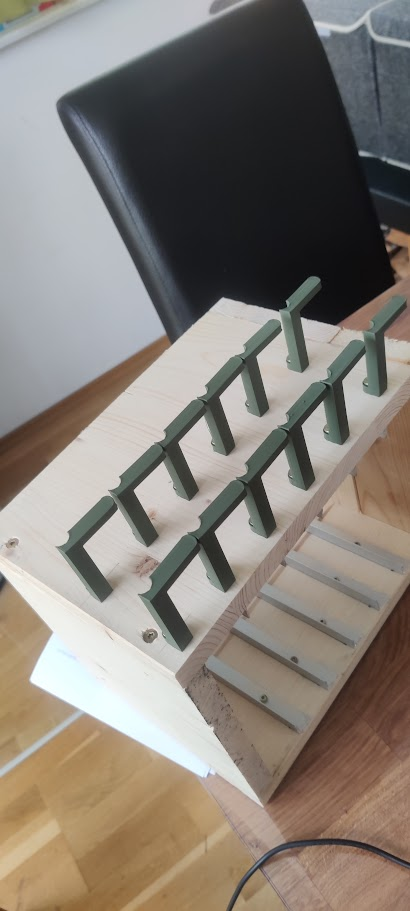
With 3d printed powerbrick holders on the sides and a switch with a 10g uplink so all servers can use the full 1g nic.
Warms my home office in the colder months and can be put in the garage on the warmer months.
Photo front: https://pictshare.net/qi7zv2.png
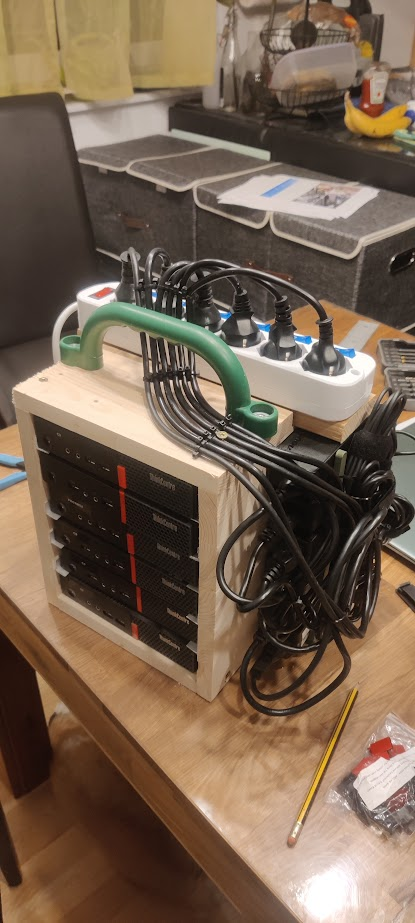
Photo back: https://pictshare.net/llloiw.png
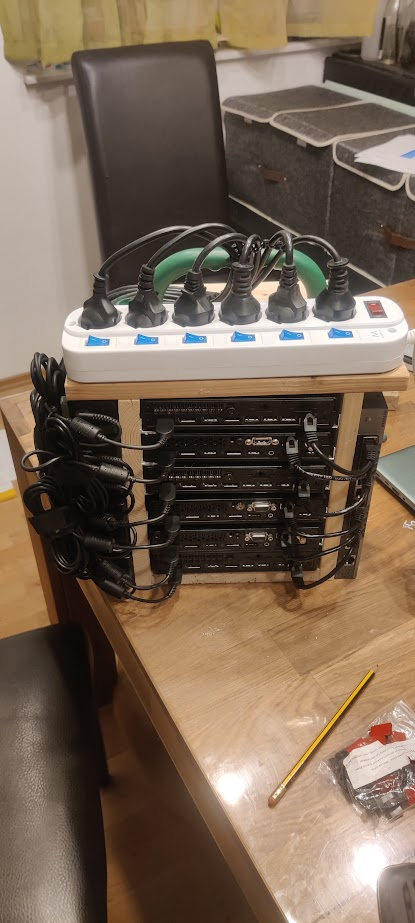
Photo of the 3d printed power brick holders: https://pictshare.net/kgffy6.png
[edit] Specs:
- 80 Watts during normal load
- 50 cores
- 9TB nvme storage
- 300GB RAM
- 3 of them are running proxmox
- 3 of them Docker swarm
The advantage with a vertical rack for me was space savings. Key parts of my home lab are near the low voltage panel (lucky to have in newer house) which does have foot traffic from other household members. Much less risk of someone bumping into the rack.
Actually, Asus has taken over NUCs from Intel and they are releasing fanless machines, so now there is not even the need to mod them.
I run a half dozen Lenovo ThinkCentre tiny PCs I picked up off eBay super cheap. Sure, I could go buy some rack mounts for them all… to the tune of $750. It would look really nice. That’s about it. If I’d decided that was a “requirement” I never would have done any of this.
For anyone considering diving in to any of this stuff, don’t let the pursuit of “perfect” stop you before you’ve even started.
My PCs are quite content sitting in a pile with some scraps of wood shoved between to help with airflow.
I got kids. So I got a lot of toys in the living room. The small office I got, does contain a printer, a PC, a space for my laptop plus dock, a server, a switch, and a small cluster. But what I don't have is more space. I don't have space for a rack.
Furthermore I've been replacing industrial grade fans (in switches, desktop, the cluster and the like) which make a lot of noise (and cool very well) with Noctua which are expensive and have less CFM but are silent enough.
I posted this in a sibling comment, but it doesn't really have to be expensive regardless. I got started with the homelab stuff with a partially broken laptop. Considering that that laptop was about to go into the trash, I consider that (sort of) free to get started, but even if you don't have an old laptop lying around you can purchase a used "Craigslist Special" for basically nothing, generally less than $200, and often much much much less because you probably have a friend or coworker that has an old laptop lying around that they'd be happy if you took off their hands. Old laptops are kind of in this frustrating category of being "too good to throw away, but not good enough to use", so people will often hoard them inadvertently. Additionally, they're extremely ubiquitous; most households in the US have at least one laptop, and often at least one per person.
Even rack mount servers (used) cost very little, at least upfront. My server with 128gb of RAM and 24 cores was $150, but of course the power draw is where most of the cost for that comes from, so for those you could argue that they're a rich man's hobby.
ETA:
For those interested, the listing I ordered from a few years ago on Amazon appears to have mutated into a different item, but this one appears to be an identical product. I think for the price it's actually a really decent keyboard. I'm able to get about 120WPM on MonkeyType with it, for what it's worth.
https://www.amazon.com/Mechanical-Keyboard-Ultra-Slim-Anti-G...
Sure you can spend thousands on racks of servers and UPS/generators but you can also spend less than $500.
Personally I rent a unit in a quadplex and have:
    Old 42" rack -  $50 from old employer
    10 year old HP Microserver G7 for storage - $250 new
    repurposed old desktop virtual machines - Free
Cheap dumb switch - $50There's no definition like that, but it happens to turn out that way.
"Deals" on used enterprise are IME dreadful unless you can get in on your own employer offloading old stuff, which requires you to a) even have an onprem setup at all and b) be friendly enough with the IT/NOC people that they give you a tip when it's going to happen. (For me b seems to happen naturally so it's really all on a).
eBay is a fools game, terrible prices. Craigslist is usually the same sellers too. Maybe some people live behind an Amazon datacenter or something, I unfortunately live in a city where the only reason we have Amazon 2-day shipping is because we're a major shipping hub. And anything that does resemble a good deal is ancient Opterons that are literally e-waste these days.
So anyway, sorry, my whole point here is that most people are actually going to be running a ton of old enterprise stuff that is actually rackmountable with good sliding rails. You're either building whiteboxes in a 4U rosewill case or you're putting stuff on rack-mountable shelves. The rosewill cases theoretically have sliding rails but they're awful, just awful. So you're either using shelf rails or literal shelves which tends to throw off efficient utilization of the U's available in the rack - shelf rails usually result in a dead U either above or below them, and shelves obviously have similar effects.
So yeah. As someone who owns a rack (4-post open rack), if you asked me, I'd say just go buy one of those big heavy duty Lowe's shelf units and ask for extra shelf inserts so you can have more, but less-tall shelves. Boom, you now have something that'll hold anything and is way better than fucking around with rack nuts and shelf rails and stuff.
Love homelabs in general, though.
These days I've been replacing the guts of my old servers with mini-itx setups for the most part. It does what I need and lets me shove 2 or 3 nodes into a 2u case so I can keep the aesthetic of "a personal rack".
Honestly I don't mind wasting 1 or 2U between machines because the tops of server cases function as great "temporary" shelves.
I do agree the meme of used enterprise deals is completely overblown, unless you actually want 15+ compute nodes and are prepared to suffer power, heat, and noise for the density. Honestly I wish they made those Rosewill cases in 5U so I could put any full height cooler in there instead of being somewhat restricted.
- shelf with two mini systems - power strip with individual switches - power strip always-on outlets front/back - ethernet switch - "broom" thing to feed cables through - many-port USB 3 hub
other systems are under the desk.
It's really convenient. I have hooked some systems to power switches, others are always on. It is organized, takes up space but doesn't fall over, and gives me desktop access to ports if I need them.
That said, many years ago I had a server setup where I really organized everything, zip ties for all cables for neatness, etc. I turned out to be a pain every time I rewired something (cut zip ties, etc). I eventually learned there's a neat and organized vs flexibility balance you have to maintain.
I personally have 4 boxes stacked in a corner that are connected to a "rack", which is just two rack side panels bolted to the back of a workbench that I screw components into, connected to NAS and multiple Raspberry Pi's on a shelf and I really like the mess and have learned a lot.
Just use what you have and expand as you need. Racks are cool once you're into the hobby enough to care about style points.