News for hackers. Stuff that matters.
Re:System Preferences Reimagined on macOS by saagarjha on Tuesday June 14, 2022 @01:43AM (#31735154)
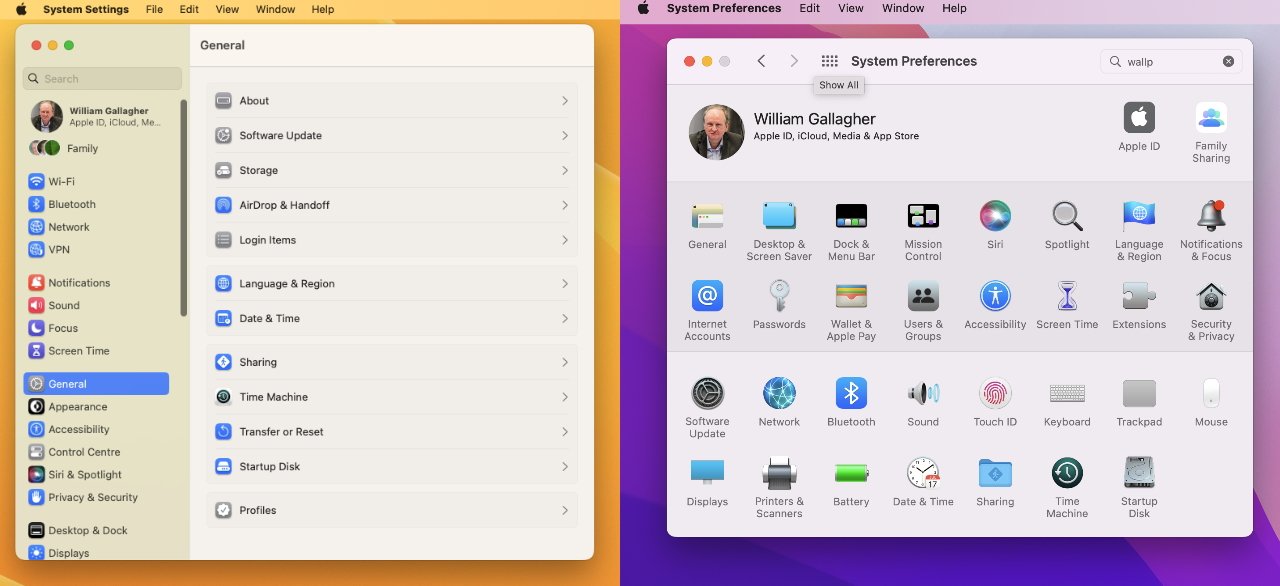
If anyone hasn’t tried using System Settings yet on macOS Ventura, overall it’s…pretty bad. On iOS the canonical way to display a bunch of settings is a table view, because there really aren’t that many controls available to be used on a touch-first device. In Ventura they brought this over to macOS, trying to cram all the old settings into lists of options (which used to be nice little checkboxes, but are now tiny little switches that look pretty bad). In many cases the thoughtful, if somewhat dated, layout of some preference panes are completely lost and bulldozed over with the list of switches. In other places it’s clear that the team was forced to do the redesign and keep all the old options available somewhere, but couldn’t really figure out where to put the stuff, so there’s little push button on the bottom that will show a sheet with the UI that didn’t fit in the list. Of course, any settings that don’t really make sense to share with iOS are now lumped together and hidden from sight-in this case, under the “General” tab.

If you remember how everyone moaned about iTunes and begged Apple to rewrite it, then got Music in macOS Catalina, you can kind of see how the new System Settings app is.

Re:System Preferences Reimagined on macOS by mulmen on Tuesday June 14, 2022 @04:39AM (#31736238)
My 2014 MacBook is no longer getting major updates. Apple is still popping up ads for the latest MacOS, even though I can’t install it. I considered buying a new Mac with Apple silicon but the last three MacOS releases have been enormous regressions. At this point a Framework seems to make a lot more sense.

I hated everything about the UX on Big Sur and they seem to have doubled down on their poor decisions. This news destroys the final bit of hope I had that they’d correct the MacOS path the way they did with MacBook hardware.

Re:System Preferences Reimagined on macOS by pembrook on Tuesday June 14, 2022 @05:31AM (#31736541)
The idea that someone would switch to the Windows (or linux) ecosystem because of some visual tweaks to MacOS settings is very amusing to me.

For example, have you ever used the system settings panel in Windows? It’s the most confusing, horrible, and neglected part of the OS. For like 15 years they had mashed together settings panels from different versions of Windows without even bothering to make them visually consistent. Ditto for a lot of Linux distros.

I think you’re overthinking it. MacOS has barely changed at all in last 20 years from a UI perspective compared to Windows. Upgrading from an 8 year old intel model to an M1/M2 model is going to feel like strapping on a jetpack.

Re:System Preferences Reimagined on macOS by bsaul on Tuesday June 14, 2022 @08:21AM (#31738120)
"Upgrading from an 8 year old intel model to an M1/M2 model is going to feel like strapping on a jetpack."

i did just that, and it simply felt "normal" again after years of increased slowdowns on every macOS update without any noticeable big improvement to the UX.

The bloat is real.

Re:System Preferences Reimagined on macOS by memsom on Tuesday June 14, 2022 @11:25AM (#31740859)
No. My MacBook Pro is a 2012 pre retina with a decent Samsung evo SSD and 16GB RAM. It has a OCLP’d Monterey install and it is smooth and functional.I dev on this machine and honestly, same hardware runs MacOS better than Windows 10 (212H iirc) in Bootcamp. This is VS Mac building Mac Catalyst, Android and iOS apps. Building my pet PSP tool chain for .Net and Retro68 GCC port for BeOS PowerPC. Nothing trivial.
Re:System Preferences Reimagined on macOS by smoldesu on Tuesday June 14, 2022 @11:18AM (#31740751)
This is my conjecture, too. M1 is fast, but only because MacOS is ludicrously slow. Apple has their hardware figured out right now, but their software experience keeps me away from using MacOS
Re:System Preferences Reimagined on macOS by runjake on Tuesday June 14, 2022 @12:12PM (#31741541)
I think you're just getting used to the M1.

There's only been 1-2 major macOS releases since the M1 launch and benchmarks have gotten faster during that time. There's simply been no "years of increased slowdowns".

Re:System Preferences Reimagined on macOS by pessimizer on Tuesday June 14, 2022 @12:52PM (#31742240)
> There's only been 1-2 major macOS releases since the M1 launch

Consider that the "years of increased slowdowns" probably referred to the years before the M1 was released a year or two ago. Which would make sense, as the comparison was pre-M1 vs post-M1.

Re:System Preferences Reimagined on macOS by runjake on Tuesday June 14, 2022 @01:10PM (#31742558)
Again, the benchmarks for M1 have gotten faster by macOS release, so my comment is entirely within the scope of what OP was saying.

The rest is irrelevant to the point.

Re:System Preferences Reimagined on macOS by mgsk on Tuesday June 14, 2022 @05:41AM (#31736605)
> The idea that someone would switch to the Windows (or linux) ecosystem because of some visual tweaks to MacOS settings is very amusing to me.

That wasn't even the gripe. They have disliked the last few major revisions of macOS. I think that's a good enough reason to consider a switch.

Re:System Preferences Reimagined on macOS by FractalHQ on Tuesday June 14, 2022 @10:59AM (#31740485)
Spending a week on Windows will help provide some perspective… it’s hard to remember just how bad things can get when you’re spoiled by MacOS for so long.
Re:System Preferences Reimagined on macOS by wsc981 on Tuesday June 14, 2022 @11:43AM (#31741131)
I am not too happy with the direction macOS is moving towards, though I do understand Apple’s motivations and agree it is still better than Windows. For reference: been a Mac user ever since I was like 10 years old or so, starting with System 6.0.

I do feel some Linux or perhaps a BSD system with a GUI like WindowMaker might feel like an improvement at this point.

It’s something I will probably try in the coming year.

Re:System Preferences Reimagined on macOS by blueberrychpstx on Tuesday June 14, 2022 @12:36PM (#31741956)
Just curious how you would describe in a couple sentences what that direction feels to you
Re:System Preferences Reimagined on macOS by wsc981 on Wednesday June 15, 2022 @09:01PM (#31761411)
Apple's OS is becoming more and more secure and while I understand this makes sense for the average user, it brings many annoyances. Also from a developer perspective (notarisation, having to jump through hoops to install software from 'untrusted sources', etc...). This is my biggest annoyance with macOS at this point.

I'd like to have a system that is 'less secure' in which I feel I have more control over my system.

Also it seems Apple is moving apps included in macOS to be more in line with iOS, which is not really something I like to see. It will likely dumb down app functionality.

Re:System Preferences Reimagined on macOS by vkoskiv on Thursday June 16, 2022 @05:12AM (#31763946)
I think you expressed my feelings as well quite accurately. Dumbing down + adding more (unfortunately somewhat necessary on a mainstream platform) annoyances and hoops.

I used OS X exclusively from 2008 onward, and I switched fully to linux late last year. I managed to make the switch tolerable by learning and falling in love with tiling window managers and minimal desktop environments that are available on linux. I could never stand 'traditional' desktop environments on linux, they always felt so clunky. With Sway (or i3 on my desktop), the operating system just disappears out of sight. All I see is what I want. A little bar with information and system status, a browser window, a bloated text messaging program or two, and heaps of terminals. Really fast, too, unlike macOS.

Re:System Preferences Reimagined on macOS by philistine on Wednesday June 15, 2022 @09:38AM (#31752696)
My work provides me with a Surface to do my thing. I get to experience both. With that birds-eye view, I can decide that none of my money gets spent on Windows. Xbox, sure. Windows, pfft.
Re:System Preferences Reimagined on macOS by mulmen on Tuesday June 14, 2022 @01:36PM (#31742997)
If I switch to Framework I will run Linux on it.
Re:System Preferences Reimagined on macOS by thesuitonym on Tuesday June 14, 2022 @09:43AM (#31739386)
> It’s the most confusing, horrible, and neglected part of the OS.

The worst part is: It's not even neglected. It's been undergoing constant changes, and while they're mostly for the better, the constant stream of changes really highlights how poorly thought out it was in the first place, and makes finding anything an exercise in frustration.

Re:System Preferences Reimagined on macOS by taylodl on Tuesday June 14, 2022 @01:19PM (#31742731)
>> makes finding anything an exercise in frustration

That's what I use Spotlight for. Years ago someone pointed that use of Spotlight out to me and I've been using it that way ever since. No longer have to pull up System Preferences and I can find any setting I need immediately.

Re:System Preferences Reimagined on macOS by formerly_proven on Tuesday June 14, 2022 @08:23AM (#31738159)
> For like 15 years they had mashed together settings panels from different versions of Windows without even bothering to make them visually consistent.

Closer to 30 years actually - there are many configuration dialogs which have been virtually or entirely unchanged since their first appearance.

Re:System Preferences Reimagined on macOS by Finnucane on Tuesday June 14, 2022 @12:02PM (#31741378)
I've been using Macs for nearly 30 years, and over the past few years, I've been switching to Linux, at leasat for personal stuff. At work, I sill try to avoid Windows (and the crappy work-issued Dell hardware). There's definitely a feeling that new Mac development from Apple is more a thing to dread than to look forward to.
Re:System Preferences Reimagined on macOS by behnamoh on Tuesday June 14, 2022 @12:49PM (#31742185)
Looking forward to the day when Linux becomes the de facto OS that MS and Apple look up to for inspiration.
Re:System Preferences Reimagined on macOS by mulmen on Tuesday June 14, 2022 @01:36PM (#31743014)
MacOS seems to be slowly morphing into Gnome.
Re:System Preferences Reimagined on macOS by behnamoh on Thursday June 16, 2022 @07:01PM (#31772079)
Its new settings looks like Windows 11.
Re:System Preferences Reimagined on macOS by ksec on Tuesday June 14, 2022 @09:07AM (#31738842)
And that is the sad state of things, it isn't macOS ( old or new ) is perfect, but neither Windows or Linux Distro seems to be trying to compete.
Re:System Preferences Reimagined on macOS by mistrial9 on Tuesday June 14, 2022 @10:21AM (#31739934)
wow - pick a terrible choice because there is only one other choice that is worse.. really?
Re:System Preferences Reimagined on macOS by mulmen on Tuesday June 14, 2022 @05:46AM (#31736639)
MacOS has changed dramatically in the last 3 years alone. This isn’t just UI tweaks, although those are annoying. I have daily driven MacOS for 10 years now. It’s no longer serviceable.
Re:System Preferences Reimagined on macOS by chefandy on Tuesday June 14, 2022 @09:32AM (#31739193)
Specifics? I’m not saying you’re wrong — different use cases are different use cases — but I just don’t see anything in the last three releases that changed it enough to make it unserviceable for any previously suitable use case.
Re:System Preferences Reimagined on macOS by corrral on Tuesday June 14, 2022 @10:56AM (#31740450)
Been using macOS/OSX for work since 2010 or 2011. It seems basically the same to me, aside from a couple performance-enhancing releases that really did improve things noticeably. And better/smoother interoperation with iOS and iCloud. I don't see any big differences.

iOS, that's changed a lot. Could we move back toward iOS 6? I still miss it.

Re:System Preferences Reimagined on macOS by memsom on Tuesday June 14, 2022 @11:19AM (#31740771)
I’ve used OSX on Intel since Leopard (10.5), though I have a Jaguar (10.2), Panther (10.3) install on my old PowerBook and Tiger (10.4) on my G4 Mac Mini, and small things changed, but on the whole the OS is the same. I mean, Aqua style changed massively between 10.2 and 10.5, so there are arguments that the UI might have seemed better to some pre Intel. For me, Spotlight, Exposé and Spaces made a massive difference and that is what I miss most when I have to do something on a legacy install. Even Tiger is painful to use because of missing Spaces and Exposé.

I use Monterey at the moment on my main Mac and it’s absolutely fine.

Re:System Preferences Reimagined on macOS by einherjae on Tuesday June 14, 2022 @02:14PM (#31743554)
Tiger has Exposé, it was introduced in Panther.
Re:System Preferences Reimagined on macOS by memsom on Wednesday June 15, 2022 @02:06AM (#31749642)
Possibly the lack of spaces? I use Exposé mostly to organise my spaces these days. I use older OSX less and less as PowerPC is only useful to developing the retro68 port. Since I got Sorbet Leopard on the G4 it also hardly boots Tiger.
Re:System Preferences Reimagined on macOS by chefandy on Tuesday June 14, 2022 @07:49PM (#31747474)
The one big core OS thing that's changed by my reckoning— and I don't even believe it was within the last three releases— is the hoop jumps required to run unsigned code. I honestly don't see a problem with the move because they do provide a path to execute it when you need to, but it could probably be a little more straightforward.
Re:System Preferences Reimagined on macOS by ibejoeb on Tuesday June 14, 2022 @01:02PM (#31742418)
I don't use music, but whenever I connect a bluetooth audio device, it opens. You can't disable it without disabling SIP.
Re:System Preferences Reimagined on macOS by chefandy on Tuesday June 14, 2022 @07:41PM (#31747414)
Just tried this with a pair of AudioTechnica headphones and an Insigia bluetooth speaker and couldn't reproduce it. Tried regular already-paired connections and removing/pairing. Maybe it's driver-specific with something you're using?
Re:System Preferences Reimagined on macOS by plufz on Tuesday June 14, 2022 @04:58AM (#31736357)
Enormous regressions? I could agree on “not great” but that was strong words. Haven’t really had a lot of trouble with the updates. I would say that macos 2014 and 2022 have a lot more in common than 2014 macos and current linux.
Re:System Preferences Reimagined on macOS by mulmen on Tuesday June 14, 2022 @05:05AM (#31736403)
Messages basically doesn’t work anymore. I had to disable Time Machine because of the thrash of indexing itself. The UI makes no sense anymore. They removed established shortcuts for… no reason? There’s some kind of pseudo-touch style going on. Like they plan to add a touch screen but didn’t. The iOS-ification continues.

MacOS is a clear second class citizen at Apple. Each of the least three releases has been worse than the one before. I hoped it was the last gasp of Ive but it’s apparently intentional. Or maybe nobody is in charge, which would make more sense.

At this point Linux looks like a better option.

Re:System Preferences Reimagined on macOS by neoglow on Tuesday June 14, 2022 @05:15AM (#31736446)
What's even more frustrating was the removal of 32-bit apps in Catalina and the continued deprecation of OpenGL. So many functional apps where the developers have lost interest are now non-functional. Not to even start on the irritating, vista-like security prompts for apps that are not signed (which in development is a lot...).

MacOS has become less and less pleasant to use in that last 3 to 5 years for me as a developer, because of this. Which is such a shame, because the new Macbook Pro's are really amazing machines, hardware-wise. Great keyboard, Magsafe, no Touchbar, amazing screen and great battery life.

I will be requesting a Linux (or Windows.. whatever) laptop at work if this one dies.

Re:System Preferences Reimagined on macOS by scarface74 on Tuesday June 14, 2022 @09:34AM (#31739215)
There is literally no hardware support for 32 bit apps in the latest ARM processors. The die space was used for something more useful.
Re:System Preferences Reimagined on macOS by pjmlp on Tuesday June 14, 2022 @07:20AM (#31737396)
I will take Metal over Khronos APIs any day of the week, if Khronos would be doing the Internet, all we would have as standard would be IP protocol, with everything else as custom extensions.

The Khronos APIs are the ones I have more experience with, and it pains me that all these years it stays as kind of initialiation ritual to go through all the things they miss versus proprietary APIs.

Everyone has to write their own mini-engine with their APIs.

Re:System Preferences Reimagined on macOS by philistine on Wednesday June 15, 2022 @09:41AM (#31752732)
If not for the removal of 32-bit apps, we would not have ARM chips in our computers. What do you think of Microsoft's depreciation of 32-bit?
Re:System Preferences Reimagined on macOS by nicky0 on Tuesday June 14, 2022 @06:45AM (#31737035)
What are some of these interesting, unmaintained 32-bit apps you speak of?
Re:System Preferences Reimagined on macOS by mrsteveman1 on Tuesday June 14, 2022 @09:42AM (#31739354)
The only Steam game in my library that still works now is Myst.

The list of Steam games that even supported macOS at all was already quite short, but now Portal, Portal 2, Team Fortress, the entire Half-Life series, and quite a few others will no longer run.

The switch to Apple silicon machines also makes running them in a VM tricky. Even though Windows supports running x86 code on Arm hardware, the mix of architectures inside the VM creates new problems, particularly for Steam.

Re:System Preferences Reimagined on macOS by philistine on Wednesday June 15, 2022 @09:42AM (#31752759)
Nomenclature wise, those are games, not exactly apps. What are some applications that are missing?
Re:System Preferences Reimagined on macOS by vetinari on Tuesday June 14, 2022 @08:23AM (#31738166)
Samsung Easy Document Creator scanner app.

With it, I could at least scan. Image Capture/Preview just produce invalid files. (Samsung M2070w). Now to scan I have to use Linux or Windows machine.

Re:System Preferences Reimagined on macOS by tambourine_man on Tuesday June 14, 2022 @09:07AM (#31738832)
What do you mean by invalid files? I never had a problem with Preview scanner.

You can also try VueScan, which is a spartan UI, but works great.

Re:System Preferences Reimagined on macOS by vetinari on Tuesday June 14, 2022 @09:54AM (#31739547)
Invalid files as in it creates PDF, but it is not valid PDF and it will fail to open. When trying to scan into TIFF, it will crash.

It is pretty much device specific; an HP MFP at home works fine. The Samsung app was an workaround, but it was pretty obvious that nobody is going to fix Image Capture.

Re:System Preferences Reimagined on macOS by wl on Tuesday June 14, 2022 @08:10AM (#31737972)
The most painful one for me: https://wxtoimgrestored.xyz
Re:System Preferences Reimagined on macOS by memsom on Tuesday June 14, 2022 @11:12AM (#31740669)
Tascam us-122mkII support was dropped. It is ancient, but it still works and there was a Windows 10 driver. I just got a cheaper Behringer uphoria that uses standard USB audio (or whatever) but loosing the Tascam was annoying.
Re:System Preferences Reimagined on macOS by bigDinosaur on Tuesday June 14, 2022 @07:14AM (#31737314)
If you're asking this question and not a Mac user I'll eat my Macbook.
Re:System Preferences Reimagined on macOS by 0des on Tuesday June 14, 2022 @08:06AM (#31737913)
start eating
Re:System Preferences Reimagined on macOS by bigDinosaur on Thursday June 16, 2022 @09:13PM (#31772962)
They're an Objective C developer, so no, I won't. It's a very typical Apple device user response of 'why would you want to do that?' epitomised by Jobs' 'you're holding it wrong' advice.
Re:System Preferences Reimagined on macOS by 0des on Tuesday June 14, 2022 @08:05AM (#31737909)
new mbp has touchbar.
Re:System Preferences Reimagined on macOS by memsom on Tuesday June 14, 2022 @11:08AM (#31740600)
Not really. The last hold out is the 13”, but that design has not changed since it was Intel based. The 14 and 16” versions have no touchbar and I would guess the 13” won’t either on the next redesign.
Re:System Preferences Reimagined on macOS by 0des on Wednesday June 15, 2022 @12:40AM (#31749183)
i hadn't noticed that, good eye.
Re:System Preferences Reimagined on macOS by timeon on Tuesday June 14, 2022 @05:34AM (#31736556)
> Messages basically doesn’t work anymore.

What do you mean?

Re:System Preferences Reimagined on macOS by mulmen on Tuesday June 14, 2022 @05:38AM (#31736586)
Huge CPU hog. Features that exist on mobile are missing on desktop. There’s no timestamps on messages. I’m not sure search even exists. Sync with iCloud only mostly works.
Re:System Preferences Reimagined on macOS by kcplate on Tuesday June 14, 2022 @10:56AM (#31740443)
This has not been my experience. No cpu issues, I can see time stamps on messages if I choose, I can search messages, if there are feature differences between mobile and desktop they are not features I am using, and between my Apple Watch, iPad, iPhone and Mac, all my messages are sync’d just fine.

To be honest, the apple ecosystem stuff and how well it works, for me, is one of the biggest benefits of Apple. I walk up to my computer and my watch unlocks it. I can take a call or respond to a message literally on whatever device I happen to be on. For me, I can put up with UI/UX quirks in features like system preferences that I use maybe one or twice a month.

Its the holistic experience that matters to me.

Re:System Preferences Reimagined on macOS by shotta on Tuesday June 14, 2022 @06:06AM (#31736774)
Right click a message window -> show times.

Search works great. My CPU is idle. Sync iCloud works perfectly if you toggle your iPhone to also share SMS with your Mac.

Re:System Preferences Reimagined on macOS by chefandy on Tuesday June 14, 2022 @07:52PM (#31747503)
hover over the message window and swipe left with two fingers to see all of the times
Re:System Preferences Reimagined on macOS by matwood on Tuesday June 14, 2022 @06:07AM (#31736779)
The messages rewrite that happened a version of two ago was the bring it inline with the mobile features - it is much closer now. It seems to still have some bugs though. But, I have timestamps on every group of messages and if I slide to the left I see each message timestamp.
Re:System Preferences Reimagined on macOS by Veen on Tuesday June 14, 2022 @09:18AM (#31738999)
You can see timestamps if you do a two-finger swipe to the right on a trackpad. Not sure how you'd do it with a non-Apple mouse.
Re:System Preferences Reimagined on macOS by saila on Tuesday June 14, 2022 @06:05AM (#31736767)
> There’s no timestamps on messages

Right click in the message pane and select "Show Times"

> I’m not sure search even exists

Search exists and seems to work pretty well

Re:System Preferences Reimagined on macOS by fbanon on Tuesday June 14, 2022 @06:44AM (#31737023)
But at least search finally works.
Re:System Preferences Reimagined on macOS by parkingrift on Tuesday June 14, 2022 @07:26AM (#31737484)
If you are legitimately using an 8 year old laptop I can imagine the experience is pretty awful. That has practically nothing to do with the OS.
Re:System Preferences Reimagined on macOS by ghaff on Tuesday June 14, 2022 @08:26AM (#31738226)
I have a 2015 MacBook Pro. I'm typing on it now. I admittedly do mostly fairly lightweight stuff on it--I do photo/video editing elsewhere although until recently that was a 2015 iMac--but it works fine for that. Certainly not an awful experience.
Re:System Preferences Reimagined on macOS by mulmen on Tuesday June 14, 2022 @01:42PM (#31743097)
Why? It’s got 16g of RAM and a blazing fast SSD. I had to get the heatsinks cleaned out once. There’s definitely slowdowns but they’re resolved by reboots which makes me think it’s more to do with software than hardware.
Re:System Preferences Reimagined on macOS by philistine on Wednesday June 15, 2022 @09:46AM (#31752806)
Have you heard of this thing called a CPU? The ones Apple puts in its machines have gotten much faster since 2015. All kidding aside, you have a CPU from the nadir of Intel's slow march into irrelevance. I went from a 2013 Air to an M1.

It wasn't the software.

Re:System Preferences Reimagined on macOS by callmeal on Tuesday June 14, 2022 @09:31AM (#31739179)
> Enormous regressions?

Well I would consider hiding system traffic from firewalls to prevent tracing to be an enormous one, wouldn't you?

https://www.obdev.at/support/littlesnitch/245914647368270

Oh I almost forgot about the image scanning regression:

https://techcrunch.com/2021/12/15/apple-removes-csam-detecti...

And the ominously named "Gatekeeper"

https://www.engadget.com/macos-slow-apps-launching-221445977...

Re:System Preferences Reimagined on macOS by egypturnash on Tuesday June 14, 2022 @11:23AM (#31740826)
"UPDATE: This issue has been resolved in macOS Big Sur 11.2. Apple has removed this whitelist completely, allowing third-party firewalls like Little Snitch to reliably monitor and filter any network traffic." - the Little Snitch link
Re:System Preferences Reimagined on macOS by chefandy on Tuesday June 14, 2022 @08:01PM (#31747578)
A one-time certificate server slowdown two years ago and two deeply unpopular features that they scrapped?
Re:System Preferences Reimagined on macOS by blitzar on Tuesday June 14, 2022 @07:52AM (#31737765)
> Apple is still popping up ads for the latest MacOS, even though I can’t install it.

I have this on my 11 inch Air from whenever it was - maybe I can get them for false advertising - because they are saying I can have some great new features if I click the button ...

Re:System Preferences Reimagined on macOS by saagarjha on Tuesday June 14, 2022 @04:55AM (#31736340)
> Apple is still popping up ads for the latest MacOS, even though I can’t install it.

This seems like a bug they might actually fix? As opposed to the "bug" of showing you those at all, which is pretty annoying but unlikely to get looked at.

Re:System Preferences Reimagined on macOS by mulmen on Tuesday June 14, 2022 @05:37AM (#31736573)
Or not because I’m on old hardware so who cares? The only bug is that clicking it doesn’t send me to apple.com to buy a new Mac.
Re:System Preferences Reimagined on macOS by sk0g on Tuesday June 14, 2022 @05:51AM (#31736682)
It may even be intentionally left in. Newer is better, and your PC can no longer run the new. Upgrade time!
Re:System Preferences Reimagined on macOS by bdlowery on Tuesday June 14, 2022 @05:59AM (#31736731)
In what world is a 2 hour battery life laptop better than a laptop with a 20 hour battery and amazing performance?

The OS is perfectly fine.

Re:System Preferences Reimagined on macOS by djvdq on Tuesday June 14, 2022 @06:33AM (#31736960)
Is battery only thing that you think is better on Mac so you mentioned only this one thing? Lol. I'm really considering getting new Air with M2 but man, battery is one of the last things to compare. It's _nice_ to have long battery life but it definitely not killer feature by any means
Re:System Preferences Reimagined on macOS by Jcowell on Tuesday June 14, 2022 @08:13AM (#31738025)
If it’s a laptop battery life should be the first thing to compare. The ability to be anywhere and not worry about battery life seems like THE #1 most important aspect.
Re:System Preferences Reimagined on macOS by tambourine_man on Tuesday June 14, 2022 @09:12AM (#31738922)
It used to be, but these days laptops are the new desktops.

Almost no one buys desktops anymore, even though they are obviously a better choice in many regards, including ergonomics, if the thing is to be strapped to a desk 100% of the time.

Re:System Preferences Reimagined on macOS by pessimizer on Tuesday June 14, 2022 @01:14PM (#31742634)
The batteries on my laptops are pragmatically just a UPS. The time between occasions that I need to use my laptop on the hoof (for more than "two hours") is so long that the age of the battery is a far bigger factor to consider than the software being run. I don't loiter at coffee shops unless I'm on a date, and libraries/offices/hotels have outlets.

Speaking of UPSes, I wish that desktops/servers would just chuck a laptop battery socket on the back. Batteries are the only real difference between desktops and laptops, and desktops need them nearly as much as laptops do.

Re:System Preferences Reimagined on macOS by samatman on Tuesday June 14, 2022 @12:41PM (#31742044)
Because as soon as that 100% becomes a reasonable number like 98%, a laptop is your only choice.

The market for desktop computers is a market for people who also own laptops, with very few exceptions (mostly gamers).

Re:System Preferences Reimagined on macOS by tambourine_man on Wednesday June 15, 2022 @10:21AM (#31753321)
The 98% would probably be better served with a very light with great battery laptop and beefy, quiet, large screen and good keyboard, desktop but instead end up buying something that's not great for either use case.
Re:System Preferences Reimagined on macOS by abrouwers on Tuesday June 14, 2022 @12:24PM (#31741715)
Personally, I have a minimum expectation, but beyond that, it moves a lot lower on my priority list, too. I wouldn't accept 2 hours, but once something hits 5-6, it's usually GoodEnough for my case (though, I'm not OP). Of course, I would love 20hr, but the OS, etc. starts to become more important at some point.
Re:System Preferences Reimagined on macOS by smoldesu on Tuesday June 14, 2022 @11:19AM (#31740769)
It's a desktop operating system. The software itself doesn't have a very robust impact on battery life.
Re:System Preferences Reimagined on macOS by abrouwers on Tuesday June 14, 2022 @12:26PM (#31741751)
Just to clarify, it seems that most people are getting much more than 2hr on their framework - are you referring to something else?
Re:System Preferences Reimagined on macOS by mulmen on Tuesday June 14, 2022 @06:11AM (#31736801)
The world where I haven’t been on battery for more than an hour in years but I fight with the OS daily.

Battery life is more a hardware concern than software anyway.

Re:System Preferences Reimagined on macOS by neurostimulant on Tuesday June 14, 2022 @08:30PM (#31747773)
I actually just upgraded my late 2012 MBP to Monterey last week using OpenCore Legacy Patcher [1]. Everything works great so far. Your 2014 MBP should be supported as well.

Made me wonder how part-time hobbyist with minimal resources can continue supporting old hardwares while a trillion dollar company cannot.

[1] https://dortania.github.io/OpenCore-Legacy-Patcher/START.htm...

Re:System Preferences Reimagined on macOS by sk0g on Tuesday June 14, 2022 @05:55AM (#31736708)
I was trying to figure out how to do a factory reset, which they call "erase all content and settings". It's available through settings, but not in settings. You have to open the settings app, then in the menu bar click the app name, and click the erase all content and settings button. Searching for "erase", "reset", "clear", "empty", etc in settings returns no results.

Of course, I couldn't tell if it was indeed a factory reset or not - what even is content? Does it include non-user scoped files and folders? Why not just use normal language people are accustomed to?!

Re:System Preferences Reimagined on macOS by mproud on Tuesday June 14, 2022 @09:41AM (#31739344)
It’s almost the same as erasing a phone.

There’s a read-only partition that contains system files and default applications, and a read-write partition that contains files and apps you’ve added. The second gets erased, keeping the first.

Re:System Preferences Reimagined on macOS by mcculley on Tuesday June 14, 2022 @09:44AM (#31739391)
Would “factory reset” mean reverting to the version of the OS installed at the factory? That is no longer a viable option. “Erase all content and settings” is clumsier language but more accurate.
Re:System Preferences Reimagined on macOS by Isthatablackgsd on Tuesday June 14, 2022 @12:00PM (#31741343)
Factory Reset does not mean to reset the phone back to the original version it came with. Factory Reset is basically erase everything and load the protected partition to "reinstall" the OS (if you upgrade your OS several times, it will use the current OS version.)

Factory Reset term been around for so long and everyone already know the term meaning. Even I remember that term 25 years ago. Apple chose to change the language and this cause confusion. "Factory Reset" and "Erase all content and settings" didn't implies the same meaning. Apple should add a subtitle or a tooltip to indicate that it is factory reset or additional context for us to understand what it does. So why change the term if it isn't broken?

Re:System Preferences Reimagined on macOS by mcculley on Tuesday June 14, 2022 @04:16PM (#31745453)
I also remember the term from 25 years ago. For newcomers to modern systems, it is a misleading term.
Re:System Preferences Reimagined on macOS by sk0g on Tuesday June 14, 2022 @09:57PM (#31748283)
Accuracy is irrelevant when there's a commonly used term though. They could just have "reset" or "factory reset" lead to that settings item, but like with so many things Apple does, it's their way or the highway. Feels like you have to learn Apple English to effectively use Mac.

- Task/ process management is done in "activity monitor" - what the hell is an activity? An event? - Error logs and crash dumps are found in "console", which is different from a terminal. There's many more examples too

Re:System Preferences Reimagined on macOS by mrweasel on Tuesday June 14, 2022 @03:08AM (#31735670)
That's really annoying, because the settings in iOS is terrible enough on the phone. Tons of stuff doesn't make sense, naming is bad, many settings are, in my opinion, placed under the wrong menu item.
Re:System Preferences Reimagined on macOS by harha on Tuesday June 14, 2022 @09:52AM (#31739524)
Also: it used to be ok-ish to have all settings in one place when apps were rather simple and few. Now it's super annoying to be in an app, want to change something, go to settings, scroll forever to find the app settings and make the change.
Re:System Preferences Reimagined on macOS by azinman2 on Tuesday June 14, 2022 @04:25AM (#31736158)
Could you give examples?
Re:System Preferences Reimagined on macOS by vetinari on Tuesday June 14, 2022 @08:16AM (#31738060)
As someone who normally doesn't use iOS, it is always a chore to find what I'm looking for. That means that the logic of the hierarchy is not intuitive and to use it, you need learned behaviour.
Re:System Preferences Reimagined on macOS by ghaff on Tuesday June 14, 2022 @08:22AM (#31738142)
More and more options have certainly been added over time, often for good reason. But it means that someone who hasn't lived with iOS for a while, when suddenly presented with it out of the box, can be overwhelmed and a lot isn't intuitively discoverable.
Re:System Preferences Reimagined on macOS by jclardy on Tuesday June 14, 2022 @08:30AM (#31738290)
I’ve used iOS since the first iPod touch. Basically everything dumped into “General” is misplaced and hard to find, you only find it because it has been there for 10 years now.
Re:System Preferences Reimagined on macOS by KORraN on Tuesday June 14, 2022 @08:38AM (#31738407)
My recent example when I needed to set up a proxy - Certificate Trust Settings are under General -> About, at the same time there is VPN & Device Management.
Re:System Preferences Reimagined on macOS by azinman2 on Tuesday June 14, 2022 @01:12PM (#31742597)
Trusting a certificate needn’t have anything to do with VPNs, however.
Re:System Preferences Reimagined on macOS by TheNewsIsHere on Tuesday June 14, 2022 @01:49PM (#31743194)
On the admin side Apple tends to group those functions together though. Trusting certificates isn’t a “General” task for most people. It’s typically for the purposes they’ve delegated to the VPN & Device Management section.

I’m not saying that necessarily makes -any more- sense. Given that the VPN settings are much more widely used and used to be available only through the top line settings, and is still also available at the top of the first list of settings.

Re:System Preferences Reimagined on macOS by JKCalhoun on Tuesday June 14, 2022 @10:02AM (#31739639)
There are a lot of pref panes owned by a lot of different teams/owners. I suspect the rough edges will get ironed out in future updates as other teams have time to come in and do a re-think/re-write.

I have to say though, iOS does not seem like the best model of Settings that I would emulate. Rather than the years-long, pile-on model that iOS Settings seems to be the result of, someone needs to step back and reevaluate where every setting ought to belong — how best to organize them.

Also, speaking of iOS Settings — Mail setting should be in the Mail app, Safari settings in the Safari app. I have always loathed that iOS 1.0 idea that you had to go to a different place to find the settings for the apps.

Re:System Preferences Reimagined on macOS by egypturnash on Tuesday June 14, 2022 @11:25AM (#31740857)
I have always loathed that iOS 1.0 idea that you had to go to a different place to find the settings for the apps.

You are not alone, it drives me nuts to have to scroll through the settings for every dumb joke app I have when I'm looking for something.

Re:System Preferences Reimagined on macOS by GekkePrutser on Tuesday June 14, 2022 @03:42AM (#31735908)
I don't think it's too bad, it just needs a bit more discoverability.

I use KDE now as main driver which has a ton of options compared to macOS and they use the same format. What I do find myself using a lot more is the search. Part of the reason I didn't have to do this with the old macOS preferences was just my muscle memory (only slightly thwarted by Apple's changing of the icons). And the other part was that there's simply less to find there.

But essentially I think the scrolling left and right panes are not a bad idea. The old format consisted of a non-scrolling and non-resizable(!) window that would be replaced, and this caused some issues on really low-res screens in the past, at 800x600 pixels (or even 800x480 like the eeePC) it was impossible to reach all the settings on the old preferences.

At least this is now fixed to a format where more controls don't need to be crammed into the same space, it can simply expand. And the number of "menu" options is now also dynamic and no longer constrained by screen space.

But it's going to mess up decades of muscle memory which is not fun :)

Re:System Preferences Reimagined on macOS by alxlaz on Tuesday June 14, 2022 @03:55AM (#31735990)
> I use KDE now as main driver which has a ton of options compared to macOS and they use the same format.

Those of us who remember the old tree-based layout from before Kirigami took over were about as happy about the change as macOS users are about the new Preferences layout in Ventura. It used to look like this a long time ago: https://fedoranews.org/krishnan/review/kde3.2/fullsize/contr... -- it was a lot more space-efficient and going into one sub-section didn't automatically hide all other sections, so it was a lot easier to look for things.
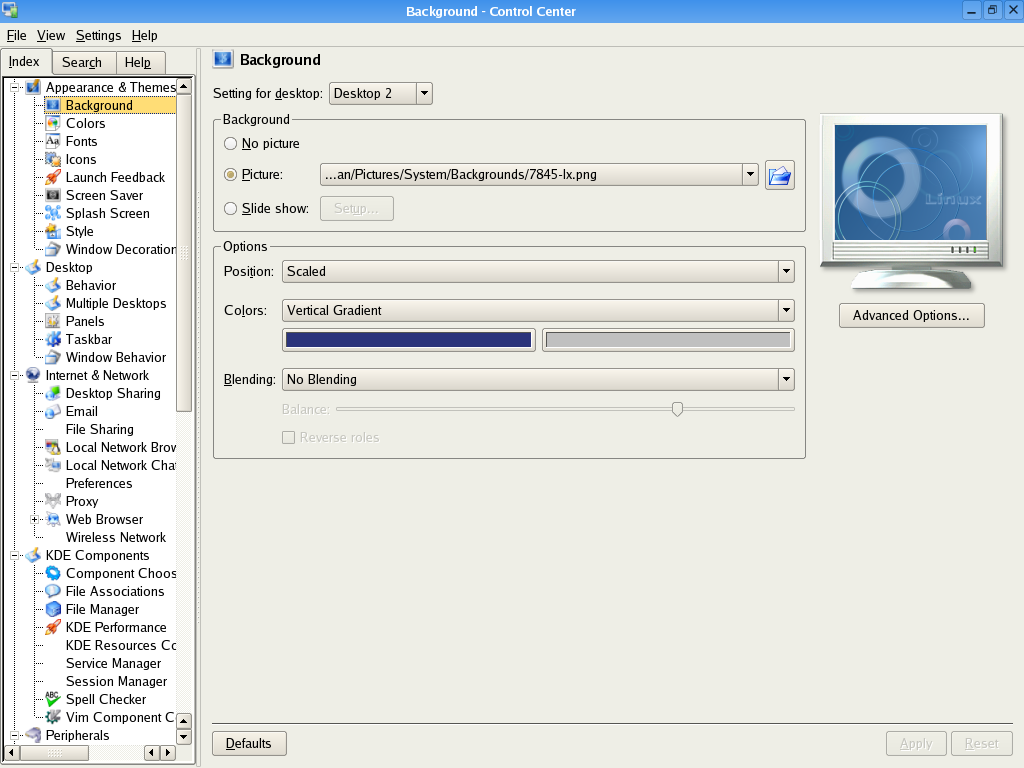
I don't recall if the window in Plasma-era releases was resizable but it certainly replaced one that was both scrolling and resizable. Early 5.x releases still supported the tree-based layout IIRC but it hadn't been the default since the 4.x days, which used that awkward icon-based layout, eek!

Re:System Preferences Reimagined on macOS by GekkePrutser on Tuesday June 14, 2022 @07:03AM (#31737192)
I only started using KDE recently so I didn't know that one. It does look very useful indeed.
Re:System Preferences Reimagined on macOS by necovek on Tuesday June 14, 2022 @04:31AM (#31736192)
> But essentially I think the scrolling left and right panes are not a bad idea.

Until touch/mouse inputs have a widespread support for horizontal scrolling by default, like they do for vertical scrolling (scroll wheels or two-finger drags), I think they are going to remain a bad idea: you have to move your pointer from the thing you are looking at to the scrollbar and then back.

One could say it's a chicken and an egg problem, but displays are already much wider than they are taller, and if you do need them even wider, you are failing miserably IMO.

Re:System Preferences Reimagined on macOS by egypturnash on Tuesday June 14, 2022 @11:28AM (#31740903)
Apple's trackpads have supported two-finger horizontal drags for ages. If you're on a Mac right now here's something I did that's explicitly designed to be a very long horizontal scroll that you can try it with: http://egypt.urnash.com/rita/chapter/01/
Re:System Preferences Reimagined on macOS by GekkePrutser on Tuesday June 14, 2022 @07:02AM (#31737185)
I wasn't speaking of horizontal scrolling, Apple's (and KDE's) only needs vertical.
Re:System Preferences Reimagined on macOS by necovek on Tuesday June 14, 2022 @08:28AM (#31738259)
Oh, my apologies: I misread "scrolling right and left panes" as horizontal scrolling.
Re:System Preferences Reimagined on macOS by GekkePrutser on Tuesday June 14, 2022 @10:05AM (#31739690)
Yeah sorry about that, I meant that both panes scroll independently (but only vertically).

I totally agree about horizontal scrolling by the way, it's horrible. I used to use Siebel 6 which used that heavily. And Microsoft's Azure portal does it too Though in Azure it's more like a 'breadcrumb' thing to go back, you don't normally need it. In Siebel you actually needed it to get to some important fields.

Re:System Preferences Reimagined on macOS by mikepurvis on Tuesday June 14, 2022 @07:19AM (#31737378)
Sounds comparable to the Windows metro rewrite of control panel— an attempt to modernize and make it tablet friendly, but only 80% of the way there, so the old UI had to still be maintained behind the scenes.

Didn't expect a mess like that from Apple.

Re:System Preferences Reimagined on macOS by mihaaly on Tuesday June 14, 2022 @04:04AM (#31736053)
I do not want to relearn how to configure my OS, waste of time!

I want something that make life easier, not harder!!

: ((

Re:System Preferences Reimagined on macOS by pilsetnieks on Tuesday June 14, 2022 @04:37AM (#31736225)
From what I've seen, there's not much to re-learn. Everything is in the same place as it was before, it's just that the layout is clunky and does not look that good.
Re:System Preferences Reimagined on macOS by kcplate on Tuesday June 14, 2022 @11:01AM (#31740504)
How often are you in system preferences? Literally I am in there maybe once/twice a month. I guess I don’t see the outrage over minor UI tweaks for a feature I rarely use
Re:System Preferences Reimagined on macOS by eevilspock on Tuesday June 14, 2022 @06:43AM (#31737018)
It's easier, not harder. You can find settings easily using the search box.

Seems to me like your reaction is rather out of proportion.

Re:System Preferences Reimagined on macOS by jamil7 on Tuesday June 14, 2022 @03:51AM (#31735967)
With the whole Safari debacle, maybe they learned a little and will improve the design before the release based on feedback.
Re:System Preferences Reimagined on macOS by arrrg on Tuesday June 14, 2022 @08:25AM (#31738212)
They massively iterated on Safari after receiving bad feedback.

I really like the version that shipped: I love the much more reachable address bar and use the quick tab switching by swiping (and also the quick tab creation) all the time.

I also like it much more visually – but even if you don’t, it‘s clear that the design is different for functional reasons, not visual appeal. There is a clear purpose behind the changes (moving the address bar to the bottom is the obvious change, making the address bar look draggable and providing the hint of the other tabs to the left or right is also quite important and very much function first.

I didn’t care for the first iteration. I do like the final design. The only thing that‘s weird is that they kept the old variant around as an option. Maybe because the discussion turned toxic and people became unable to evaluate the design based on its merits?

Re:System Preferences Reimagined on macOS by lathiat on Tuesday June 14, 2022 @07:50AM (#31737735)
Craig says in John Gruber’s “The Talk Show” chat that the developer beta for this is early and they have a much better touchpad experience in the works already but wasn’t ready yet and hopefully the rest will get improved also

https://youtu.be/WfnvsepVJC0

Re:System Preferences Reimagined on macOS by wodenokoto on Tuesday June 14, 2022 @07:55AM (#31737782)
Re:System Preferences Reimagined on macOS by r00fus on Tuesday June 14, 2022 @11:45AM (#31741142)
I don't know about you - but the "shelves" UI that current System Preferences uses is - hard to navigate. There's no real rhyme or reason for the shelf location.

At least the Ventura/iOS multiple menus has a hierarchy. Ultimately I use "search" for such large settings to find stuff like 90% the time.

Re:System Preferences Reimagined on macOS by 2Gkashmiri on Tuesday June 14, 2022 @08:21AM (#31738117)
why is wifi/bluetooth/network/vpn separately laid out instead of being in a single "network" like i assume was in the old ui?
Re:System Preferences Reimagined on macOS by wodenokoto on Tuesday June 14, 2022 @08:27AM (#31738234)
I think the sidebar is a big improvement and I think it is nice that you can quickly get to the network items you need. It's the right hand side that is awful.
Re:System Preferences Reimagined on macOS by shotta on Tuesday June 14, 2022 @06:03AM (#31736759)
Took me forever just to find sharing to rename my machine.

Trying to step people through this convoluted app over the phone or text is really going to be a chore. I had the old System Panes memorized.

Re:System Preferences Reimagined on macOS by eevilspock on Tuesday June 14, 2022 @06:38AM (#31736993)
Took me one second to type "name" in the search box. Results:

    Computer Name
    Network Name
    Login Name and Password
    VLAN
    ...
Re:System Preferences Reimagined on macOS by shotta on Tuesday June 14, 2022 @03:21PM (#31744655)
I shouldn’t (and won’t) have to do that.
Re:System Preferences Reimagined on macOS by thirdsun on Monday June 20, 2022 @07:55AM (#31809202)
Searching? I think it's a viable option if you don't know which path leads to the desired seting.
Re:System Preferences Reimagined on macOS by pjmlp on Tuesday June 14, 2022 @05:18AM (#31736460)
You forgot the cherry on top of the cake, if I understood correctly it is now written in Catalyst and based on the iPad OS one.
Re:System Preferences Reimagined on macOS by madeofpalk on Tuesday June 14, 2022 @07:02AM (#31737180)
I don't think that would actually make sense. I'm sure the backend/business logic/functionality of settings has extremely little in common with iOS, so that cannot be reused with catalyst. And the UI is tweaked and "improved" for macOS (compared to iPad UI). So you don't actually gain anything from using the iPad settings app on macOS through catalyst.
Re:System Preferences Reimagined on macOS by saagarjha on Tuesday June 14, 2022 @05:21AM (#31736475)
Nah it's just SwiftUI
Re:System Preferences Reimagined on macOS by Phurist on Tuesday June 14, 2022 @04:44AM (#31736267)
They are just moving on with the industry standard. I am quite happy with this layout on Gnome for a long time already. Get with the times
Re:System Preferences Reimagined on macOS by saagarjha on Tuesday June 14, 2022 @04:54AM (#31736332)
What industry standard? There's no industry standard for this stuff, it's just each OS doing what it wants.

As it stands System Settings now looks different from every other preference panel on the system. I helped ship a sidebar+search design in IINA and we do a far better job that System Settings does. Go take a peek if you'd like to see how this could've been done. (Personally, I think most apps should stick with top tabs, but we–and Apple–are constrained by how many preferences we can show on screen at once.)

Re:System Preferences Reimagined on macOS by hnlmorg on Tuesday June 14, 2022 @05:30AM (#31736536)
There is no industry norm. KDE, for example, follows the approach described in the article. In fact even Windows has some control panels designed that way too (though Microsoft still cocked it up be creating multiple different settings applications each with overlapping utility yet somehow differing support for configurability thus leaving left to Google how to make even some of the simplest of changes).
Re:System Preferences Reimagined on macOS by yjftsjthsd-h on Tuesday June 14, 2022 @06:36AM (#31736986)
I struggle to credit the idea that GNOME did something and that it's a standard; their whole thing ever since 3 is "innovation" (i.e. NIH).