Connectors, cheap and reliable are hard to design, and there's that much solution that works, and economics of scale works wonderfully by this kind of mass production (the good enough converges to reliable cheap). Also, the backward compatibility is real, and not to be dismissed too lightly. Say, for an USB-A connector, would really go one way where a USB 3 cable and device should NOT work with your older computer ?
There will be waste, there will be disgruntlement, but at real diagnostic will be possible (instead of the vague indications like «use provided cable» we have for HDMI and DisplayPort). For power, you can already find cable with a mini LED display on the plug to show max wattage once plugged.
Limited cables will quickly have label to show their specific capability (4K/8K, for PD only, 100W 60W), for cables you buy. General case for cables provided by manufacturer is, you keep you cable with the device, no real confusion here.
I know many have the cable drawer full of just-in-case that never comes that would dream to have it blissfully replaced by unlabeled USB-C cables, but this is just not how general people handle the problem. They keep the cable with the device, and learn what they need before or after buying a replacement, or better, asking someone in a shop, those still exists for all I know.
It’s been around a long time and most people have managed just fine, and absolutely loved the common cable. And everyone hated the iPhone user because you had to pull out a new cable to charge it.
1. What speed does the cable support?
2. How much data does the cable support?
3. Can it support video over USB-C?
5. Is it capable of charging devices when plugged into this charger?
6. If it can charge this combination of things, what wattage can it charge at?
5. It depends, but the output capacity is printed on the power supply[0]. (Compare to USB-A, where the most you could do is 12W.)
6. The minimum of the cable (60W for any cable, 100W for some cables, 240W for a very few[1]) and the charger
[0] Annoyingly, this problem is compounded when using a power supply that can output (say) 100W on one USB-C port, but when both are used, the limit on the two ports is 60W / 40W.
[1] There are vanishingly few products (power supplies, cables, and devices) that support USB EPR. If you have one of these, just use the power supply and cable the device came with; this is no worse a situation than with devices that used proprietary power cables.
Speaking of which, every time I ask the question about “tell me just from looking at a USB C cord…”, I learn something new.
Plugging it in would probably be a good start. I can't name a single time where I've ever mistakenly identified a USB-C cable. Sometimes I've plugged it in when it wasn't connected to the wall, but I think worrying about non-compliant USB-C cables is no more relevant than caring about non-MFI certified Lightning cables.
99% of people only care about power (and optionally data), so that's what the spec focuses on.
Regardless, the fact that DP-Alt-Mode exists is not a refutation of the base USB-C spec. You're either spec compliant or you're not; same as Lightning without the license fee.
0: https://www.usb.org/sites/default/files/USB%20Type-C%20Spec%...
Some “low wattage” specification USB-C devices are compliant with USB-C but are only compatible with USB-A power bricks because thet require 5V:
https://www.reddit.com/r/UsbCHardware/comments/c3q4s6/why_do...
Some USB-C cables are only 31 watts, and some devices can’t charge with less than 60W:
https://www.macworld.com/article/234030/how-to-tell-whether-...
Example brands from the above two links include JBL, Schooshe, and Apple.
I’ve hit similar problems with all my USB-C devices.
This is because they are not USB-C compliant, despite physically featuring a USB-C port. The USB-C spec calls for any USB-C sink (i.e. device that consumes power) to include a pull-down resistor (Rd in the diagram on page 4: https://www.ti.com/lit/wp/slyy109b/slyy109b.pdf?ts=169690039...)
Devices that do not include this resistor, and are therefore unable to be powered with a USB-C to USB-C cable, are noncompliant and should not exist.
> Some USB-C cables are only 31 watts, and some devices can’t charge with less than 60W
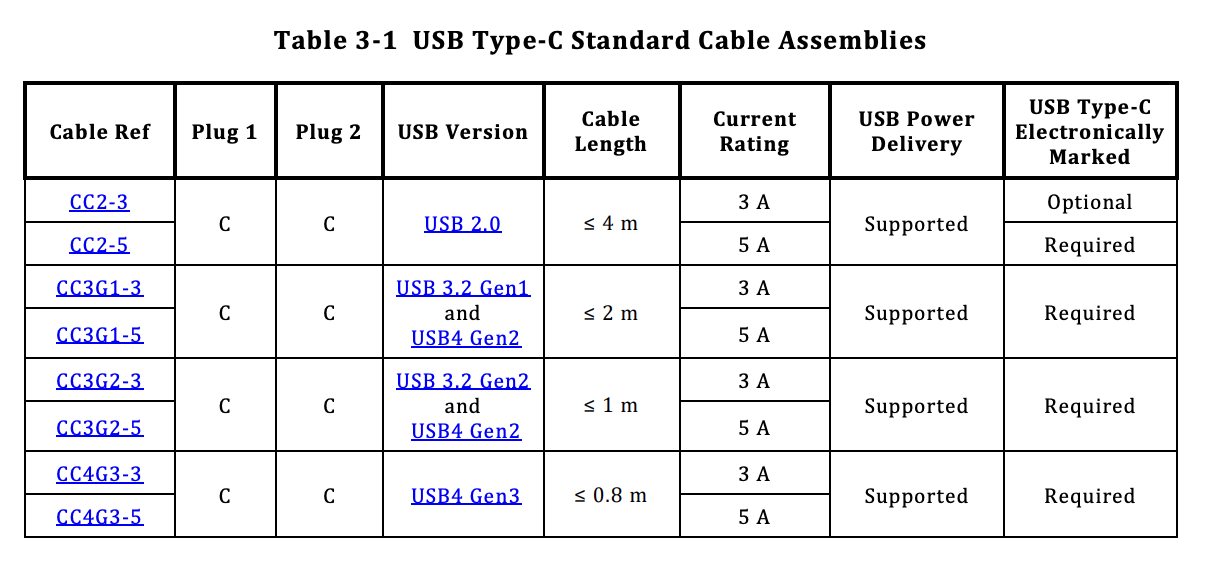
As seen in [0], page 37, even USB 2.0 C-to-C cables will support USB-PD at 3A: https://host.zlsadesign.com/HJU_Drfba.png
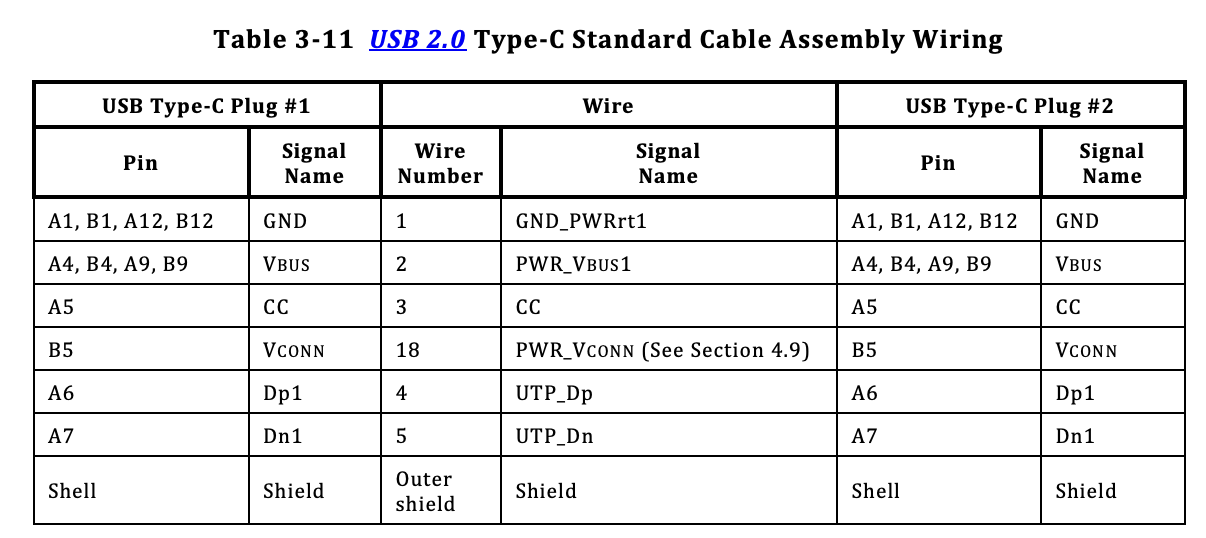
The USB-PD handshake is performed independently of the cable, and uses the CC wire that is mandatory even in USB 2.0 C-to-C cables (page 76 of [0]): https://host.zlsadesign.com/Bk62vSMZp.png
You're right about the 60W point. Anecdotally, every device I've ever tried to charge has had no problems at 60W (although of course they'll charge more slowly than if they had 100W), but this is definitely not guaranteed.
0: https://www.usb.org/sites/default/files/USB%20Type-C%20Spec%...
https://hackaday.com/2022/12/27/all-about-usb-c-illegal-adap...
There is a certain combination of cable+adapter+device that can ruin your device. I don’t remember the details. I heard about it on the Accidental Tech Podcast
[0]: https://www.usb.org/sites/default/files/usb-if_usb_type-c_ca...
But (2) seems very unlikely. Most consumers just won't even consider that it has an orientation, and after it fails a few times chuck it in the bin or send it back. If it comes with a device (i.e. printer or monitor comes with a non-reversible cable) they're likely to send the whole device back. That would be a ridiculous false economy for the manufacturer.
It could be that the phone correct determined the orientation but a pin was dirty/broken so it couldn't be used. When flipping the cable around the pin in use changes to one that isn't dirty/broken and so it works fine. USB-C may have a ton of pins but that doesn't mean all of them are needed to charge so flipping it can move a broken pin into the unused pins.
If we were still limited to domain specific connectors (one for storage, one for networking, one for audio, one for video, one for each type of user input) we'd still run into the same (non)issues: unless every revision of, say, displayport came with it's own unique connector, without digging a little deeper (checking some version/capability symbols) you don't know wether a given cable supports the latest feature set or not. The universal in USB is not the problem.
From my understanding I think that is not technically possible because to pass video they need the data lines but maybe I'm mistaken?
IIUC again even if it did work I think these would be non-compliant. People hell-bent on doing non-compliant things would do it irrespective of any design.
> low-voltage only cables
That's a given due to physical constraints (length, diameter: would you accept that all cables are 0.8m / thick and unbendable). It was so with USB-A too, as well as non-standard power delivery, at the risk of setting things on fire or destroying devices. USB-PD makes it so that you basically can't fry anything or melt a cable, it falls back to the best possible through negotiation. But then again, people hell-bent on doing non-compliant things would do it irrespective of any design.
> literally manufactures are going to cheap out and not do that and you have 1-way USB-C cables without any kind of orientation markers.
Non-compliant for sure. Ah, yes, people hell-bent on doing non-compliant things would do it irrespective of any design.
At least with USB-C+USB-4+USB-PD we get a fighting chance.
> An obviously key'd connector like firewire / ethernet would've solved all of USB-A's flip it thrice problems
Rumour has it that USB-B which is keyed, has five positions due to squareness. FireWire and Ethernet have the same state superpositions as USB-A. Hell I've seen people shove an Ethernet cable the wrong way in and have it fit (breaking the infamous clip in the process). USB-C? I lay it basically flat and clip it in, barely looking at the connector and not even taking a glance at the port. Worst case it needs a few degrees rotation.
Counterexample: The Meta Quest link cables use a USB-C style connector but internally are very different from a regular cable.
One can't blame non-compliant cables on USB-C as it could happen with any other connector.
Time has shown that doesn't seem to prevent cheap - and potentially dangerous - knockoffs from areas outside possible litigation.
IIRC, the Ethernet standard means ports should tolerate 5V, but I'm still spooked someone's going to use the cable thinking it's something else.
The solution is - I guess - to buy plenty of 'good' multipurpose cables and throw anything that doesn't work as expected away.
[1]: https://old.reddit.com/r/NintendoSwitch/comments/87vmud/the_...
1. A laptop with a USB-C power/data/DisplayPort port
2. A phone with a USB-C power/data port
3. Multiple USB power banks which use a single USB-C port for both charging and discharging
4. A smartwatch with a dock that uses USB-C
5. Multiple flashlights with USB-C charging
6. Multiple bluetooth speakers with USB-C charging
7. A pair of earbuds with a case that uses USB-C charging
8. Dozens of various USB-C cables and power bricks, some of which came included with the products above
So far I've had zero issues with any of them. Sure, not all cables support full charging speeds/data rates, but generally speaking I can just plug things in and expect them to work in some fashion.
Maybe to iPhone users USB-C feels like a new thing? To everyone else it's been a mature ecosystem for a long time now, which is why a lot of the comments in this thread commenting about it as if it's a brand new, unproven technology seem very strange to me.
Edit: Just remembered I also have an air duster and an electric toothbrush that use USB-C. Those didn't immediately occur to me because I don't have to charge them often. There might be more I'm forgetting...
No displayport or smartwatch here, and my power banks all came with A-to-micro or A-to-C cables (mostly the former) - there's a convention in that ecosystem that power flows from the A connector to the other end.
For the products you've purchased that came with an A-to-C cable, have you tried using them with a plain C-to-C cable? In my experience usually that will "just work". (Maybe there are some power banks out there that don't support outputting power through their USB-C port. If those exist I've managed to avoid them so far.)
At least on Android, there's an option to change the power direction (IIRC, it's in the same place where you choose the data connection mode). I have to use that option to switch the direction whenever I use the USB-C cable to charge my phone from my laptop, otherwise it tries to charge the laptop from the phone.
That's not just a convention, it's a vital part of the specification :)
USB-C devices go to significant lengths to make it hard for users to violate that invariant using an unsafe combination of otherwise safe adapters – that's why there is no USB-C-to-A adapter, for example (because that would let you build an A-to-A cable, and USB-A hosts are not required to detect possible loops/short circuits; USB-C hosts are).
I believe an USB-C device port is easier to implement than a host/power supply port, since the host is only allowed to supply Vbus after ensuring that it's connected to a device (by actively probing the resistor connected to the CC pins etc.), whereas a device port only needs to present that resistor. After all, even a passive C-to-micro-B cable can do that.
Assuming that that's true, this has nothing to do with being wired incorrectly, nor is it an implementation mistake that's facilitated by the design of the USB-C plug being reversible. It could literally happen with USB-PD over USB-A/B.
It is kind of annoying that that functionality isn't built into phones and PCs though.
USB-C has been out for years now and neither of these predictions have come to pass. Your comment aged poorly before you even finished writing it.
USB-C isn't without its problems, but neither of those are one of them.
You have a point though; I'm sure there are abominations out there that abuse the USB spec in all sorts of interesting ways, they just haven't been something I've encountered in my years of using USB-C for everything.
[1]: https://www.reddit.com/r/UsbCHardware/comments/10xj74r/why_d...
It seems that the committee behind the spec was somehow unable to learn from decades of experience, and did not predict that people would want extension cables, and that companies would make them. That's not an actual problem for me. Not being able to reach my yubikey when I'm using my laptop at my desk, is a problem.
I have USB-C charging devices that will charge off of some cables, but not off the one that will charge my laptop. I now have a box of weird crappy cheap USB-C cables with taped-on notes that say which toys they'll charge.
I never had this problem with previous USBs. If the cable fit in the port, it would charge and transfer data. Sometimes you needed a different cable or port or something to go faster, but they all basically worked.
However, I do have one other cable that won't do data. I think it came with a cheap charger I bought while travelling. I would certainly like it if there was a label saying charge only or something to that effect, on the incomplete cable.
I thought I was being smart ordering some decent Anker cables until I found out when trying to connect a display that they apparently they only support charging? And maybe USB 2.0 transfer speeds?
So I went back looking to try and figure out what I needed instead. Depending on what the various devices involved support, I needed some variation of a thunderbolt cable (2, 3, or 4?) or a USB 3.1 Gen 1 Type C or a USB 3.1 Gen 2 Type C. But then I’m supposed to know something about thunderbolt versus DP alt mode versus god knows what else none of which is clearly labeled or explained anywhere on the devices I’m trying to connect.
But then there’s this handy table from Adafruit that says maybe not? https://learn.adafruit.com/assets/85323 — apparently only Thunderbolt supports video, or DisplayPort? And USB-C “full featured” cables are only for higher speed charging, not displays?
Find 10 sites, get 10 different answers.
Anyway, turns out a USB 3.1 Gen 2 Type C cable worked for this specific display. Why? No idea. Will it work elsewhere? No idea.
I’ve been in the industry professionally for about 25 years now and I have no idea what cable I need to purchase and have no idea how to tell before I purchase whether it will work for a specific use case. I have no idea what non-technical people are expected to do with this besides try every cable they own and pray.
Are other docking stations not like this?
Kinda like saying that I have a bunch of very light indoor extension cords and you are wanting to run an outdoor high amperage device (both 110v in this example). Yea, the interface for both is the same, but one is going to be used far less often and require a much more expensive cable for a reason.
- 2 equal size blades
- 2 unequal size blades
- 3 unequal + ground pin
plus a fourth for 20A
- 1 vertical blade, 1 horizontal blade, 1 ground pin
USB-C cables have one form factor, which is what GP is talking about.
It carried 4K/60, but I haven’t tested it across all our devices to be sure it does full power delivery to all. (If it only works on some, I have no problems sending it back until I get one that works well for all.)
I’ll try to remember to come back and report on thread if I found one that works for all my devices (and what it worked for). It’s not something that I’ve time to carefully test during the week.
I’m thinking I should just spend $70 for the Apple cable because it will probably work.
On my personal desk setup, I don’t charge my Macbook in the same cable that carries video. My wife’s setup is a single cable connection (but she has an Air, so only a single external monitor).
Working from home, I undock rarely, so two cables is not a problem for me, but I want a one cable for the kids who will dock/undock almost daily.
https://www.amazon.com/dp/B0B1J7Z21J
I have my laptop (Lenovo P1) connected to my monitor. The one cable charges my laptop from my monitor (slowly) and displays 4k video.
It’s possible for noncompliant usb c cable to fry electronics.
I don’t know of any other connector standard where the connector doesn’t clearly indicate or imply the cable’s capabilities. I’m sure they exist, but generally for consumer electronics if a cable fits, it works. Except for usb c.
Kind of hilarious. It's the only example I've ever seen though so not a real problem IMO.
The cables issue is real, but I don't really see the alternative. Would everyone really be happier if all USB-C cables had to be expensive thick 40 Gb/s 100W cables? No.
In a perfect world require every port to have the supported modes displayed beside it, and every cable to have the supported modes etched on the metal connector or something? Lightning bolt for PD, little screen icon for video, something?
It will fall apart as soon as cheap unlicensed electronics hit the market, but at least in general use “hook this brand name laptop up to this brand name monitor with this brand name cable” would not be a seemingly completely inscrutable trial-and-error problem.
I suspect the real answer is better software support to tell you why something isn't working.
Guess what? That's already the case! Manufacturers just choose to completely ignore that part of the specification.
Number 1 absolutely has. I've been somewhat in the market for a tester that I can plug both ends of a USB-C cable into and see what voltage, speed, and other specs it supports since most of my cables have zero markings on them.
(This is something Apple should fix at the software level by alerting the user, but it highlights the problem that cables are not readily distinguishable.)
https://daringfireball.net/linked/2023/10/05/farsace-iphone-...
At the beginning of USB-C you had devices that were not implementing the standard correctly, and using the wrong cable could fry a device.
Now the devices are better protected, you can charge any device with any charger. Of course the charger needs to be powerful enough but if it's too powerful it's still safe to use.
A common offender is devices which leave out the CC resistors, making them only work with A-C cables. But the soon-to-be-released Raspberry Pi 5 also violates the specs, making it basically only work with their proprietary charger.
Edit: in fact, trying now it seems to be perfectly recessed that I can't even push on it from an angle with the connector, it has to go straight in a bit before it even touches, on any of my devices
I can emphasize with many of the gripes people have with USB-C cables and supported modes being confusing, but the port is really, really well thought out: Make the cable the part that fails more easily [1]; make it so that the plug only minimally acts as a lever while partially or fully plugged in; cover the pins on the plug (because otherwise people will inevitably touch them, and these cables can carry up to 48 V of voltage).
[1] That part has actually worked well for everything but my Yubikey :( USB-A and an adapter it is for the next one.
Alternatively, there are "brick nogging" connectors which stand up straight from the PCB and are therefore unusable for a Yubikey, or "sink board" ones which require a custom jig for assembly.
Meanwhile with USB-A you don't even need a male connector at all - just have a bit of your PCB stuck out in a vaguely USB-A-looking shape and it'll work just fine.
I'll grant that it's robust in that it continues to work more than I'd expect, for example continuing to charge the laptop but not reliable for the external display. And once connected, sure it's secure.
I suspect it's not the cable mating that causes the failure, but other foreign objects… keys in the bag or something… that manage to dislodge it. And some laptops have more play in the connector than others, which I think allows the connector on the cable end to hit the wafer with an angle of attack sufficient to dislodge it. Some of my users handle heavy bulk materials all day and are anything but gentle with computers.
In any case, I'm sure the designers considered this, and far be it from me to second-guess their compromises. It is what it is. But if the port has failure modes, this is one of them.
Why do you think that the wafer is the most fragile part?
One might argue that the latch mechanism would be the part most exposed to wear and tear due to mechanical stress incurred by plugging and removing. Those side latches are located in the plug, not in the receptacle.
See also figure 3-14 in the USB-C spec [1].
[1]: https://www.usb.org/sites/default/files/USB%20Type-C%20Spec%...
I guess I'll have to take a video next time I see it.
I haven't seen a USB-C cable that has wore out.
For people who are not versed in mechanical connector design it might look like the fragile part is that center wafer.
USB-A is massive compared to USB-C, that's why it's so robust, thick plastic, thick metal, wide connector lanes.
If USB-C is fragile, is just because it's so small, you can easily break it with not so much pressure.
I've now had to replace 2 USB-C host ports (on expensive Apple devices, where an "official" repair would cost ~50% of the value of the device) despite taking reasonable care of my devices (under which care no other connectors ever failed).
Examining them under a magnifying glass showed that the metal pin delaminated from the plastic middle part of the host connector and was ever so slightly skewed towards the adjacent pin, presumably making enough contact/interference to make the whole thing fail.
In a sane design, a misalignment/skew of <1mm would be well within tolerance and would be a non-issue. Worse, despite the machine being from the same brand that ushered all this crap onto the world, there is no software support or notification to say that something is wrong - the machine just silently stopped charging after a random delay. Very annoying when you plug your machine in to charge and only realize (at the most inconvenient time) that it silently stopped charging and you've now drained whatever battery was remaining.
Even with the new ports, I can make it lose Thunderbolt/DisplayPort connection by bumping the connector. It's probably a mismatch of tolerances between connector and port (maybe my cables are out of spec), but it's never been a problem with any other connector.
I don't recall having this issue with any of the connectors it replaced. I have devices that are close to a decade old and all their USB/Ethernet/HDMI ports are still working just fine.
It's a terrible design that prioritizes form over function/reliability.
Manufacturers are going to cheap out, always. There's no way around the fact that goods can get on the market claiming a thing that it doesn't do (perfectly) in practice. Tech is littered with semi-compliance. I hate to kick the can down to 'let consumers figure it out' but there's hardly a realistic alternative, you just can't police ~10 billion cables sold a year across ~10 million retailers. I haven't heard of your first example anywhere actually happening, it sounds theoretical more than widespread in practice in 2023, 8 years into this USB-C thing.
As far as cables with different capabilities, what is the alternative here?
1. Physics of signaling demand certain capabilities require higher quality / more expensive cables. Zero chance you get people or manufacturers lined up around the idea of highest common denominator (e.g. 40gbps capable $30 cable when consumer wants a $3 charging cable), and that's sorta moot anyway because...
2. Standards evolve, and we're all tired of playing the game we've played for 50 years in tech of new physical connectors every few years.
It's either a) you have the same physical connector and different cables, or b) different physical connectors that briefly use the same cables before they become differentiated when standards evolve.
The reality is 'it works but not as good' (speed or charge-wise) is a superior tradeoff to 'I have to buy a totally different cable' in the high % of use cases where 'not as good' is possible, which is stuff like 'charge my phone' or 'plug my printer/audio device/whatever in'.
Honestly the only unforced errors I see with USB-C are consumer education related. USB versioning should be simple (3, 4, 5) not intentionally obtuse ("3.2 gen 2x2"), and something like iconography should be added to indicate premium cable capability (specific higher voltage & bandwidth capabilities) to avoid to play the plug in and try it game.
The set of permutations is too large to fit into an icon, but a lookup table allows for unlimited detail.
Power-wise it is 60W, 100W (deprecated), and 240W. Data-wise it is 480Mbps, 5Gbps, 20Gbps, 40Gbps, 80Gbps. A simple power/data rating like already specified[0] is enough for >99% of cables.
[0]: https://www.usb.org/sites/default/files/usb-if_usb_type-c_ca...
Chargers and devices of course have a wide variety of power ratings, but those are generally all compatible with each other. Just get a charger with a higher rating than the device and it works.
When it comes to cables, pretty much everyone just uses the standard 20V 3A / 20V 5A / 48V 5A cables. The only exception I am aware of is Oppo's SuperVOOC.
A 67W Poco (Xioami) USB-C charger can barely charge a Pixel 6 (it basically runs out of battery while charging, 200-300mA are transmitted according to an app).
USB-C is in a terrible state.
It's unfortunate the USB group chose these particular labels. They're so ugly that you'd never want one on a cable, and they don't reduce to small sizes well. It's like they were never designed to be put on cables, or they never consulted anyone who ever used or sold a cable as to whether they were going to use it.
I'd have preferred something that could be depressed into the plastic mold of the connector with two icons, a bolt and a dot:
- default (USB2, whatever min watts) is blank cable
- 60w has one bolt, 100w+ has two bolts
- 5gbps has one dot, 20 has two, 40 three, 80 four
That way you avoid the uncleanness of labels and their eventual scratching off, while maintaining at-a-glance (and even physical feel) understanding of cable capability. It also scales to future improvements. Honestly I think this would solve like 90% of people's complaints with USB-C.
For a time at work, our desks had different docking stations for employees with Mac laptops or HP laptops. USB-C "standard" notwithstanding.
Because USB-C does a lot and touches a lot of things, I think there's a tendency to place the blame on it (and specifically its cables) for any circumstance where 'plug does not work as expected', which I agree is a frustrating problem that isn't fully worked out.
I bet your HP docks are like Dell power adapters, which only provide specific volts/amps and maybe use some proprietary negotiation and aren't great device-agnostic chargers. I've experienced this firsthand, and unfortunately the blame lines squarely with HP/Dell/your IT department. It's also a sort of 'stage 1' problem in USB-C's rollout, in that manufacturers are used to doing things their way (e.g. proprietary power bricks), and the feedback loop of customer expectations hasn't yet reached a point to pressure them to change. When customers say 'this sucks it doesn't charge my iPad', HP/Dell/whoever begrudgingly realize they need to up their charger game, and little by little the problem is solved.
I think politics might be the best lens to see USB-C through, because USB-C will only work as expected when consumers are providing that pressure. Hence my point about consumer education and clearer labeling being the unforced error of USB-C: moving up the learning curve quicker will minimize these problems and shake manufacturers into offering the thing that meet user expectations and the promise of USB-C. Ultimately someone has to make these things though and manufacturers all have their own misaligned incentives. It's the job of standards to meet them where they are and provide a path to aligning their incentives with better user experience. The reality is it's herding cats.
I haven't seen anything in this thread or other USB-C threads that has offered a solution that improves upon the spec itself that is realistically possible within the constraints USB-C is operating in. That's unfortunate but I think represents the idea that USB-C is, to paraphrase, 'the worst type of connector, except for all the others'.
One of the things I find particularly aggravating though is the discussion that goes approximately "it's outrageous that I should have to buy a new cable for my device <glares menacingly at Apple pre-USB-C>" followed almost immediately by "yeah, it turns out I have to buy a new cable for my device <because reasons>..."
regarding 1) look at this post from 2019: https://people.kernel.org/bleung/now-how-many-usb-c-to-usb-c... I imagine it only got worse in the mean time.
regarding 2) I have seen various posts in the past of devices that only work if the cables are connected in a specific orientation. Technical background is discussed here: https://acroname.com/blog/why-usb-c-connections-sometimes-do...
There is no such thing for USB-C.
> low-voltage only cables
As far as I know, only the amperage is negotiated; every compliant cable needs to support at least 20 V.
And even then, the minimum is also 3 A, which allows for 60 W to be carried on even the cheapest cables – enough for many use cases. I actually like having lighter and more flexible cables for most of my devices.
> The connector is symmetrical but the pins aren't. You can see a wiring scheme of how symmetry is handled [1]; literally manufactures are going to cheap out and not do that and you have 1-way USB-C cables without any kind of orientation markers.
With all the many USB-C headaches I’ve heard of (and only very rarely encountered myself), I’ve never seen that happen.
The most common problem must be using a USB 2 only cable for a use case that requires USB 3 speeds and/or video.
When USB-C was brand new, I got a flawed breakout board where only the socket's data pins on one side were connected. I did not notice it until it was soldered together and the device got power but no connection when the cable was connected in one orientation. But then I had already built a metal case to fit that breakout board perfectly, so I just left it in.
Whether or not this happens, it will have nothing to do with USB-C's merits as a connector. You could (theoretically) have the same mess happen with USB-A connectors as well.
USB 3 ? or 3x3 or 2x or ...with Thunderbolt or not...
And now that lightning is going the way of the dodo, soon I'll finally be able to consolidate to basically just the one cable type for trips.
For example, video-only cables are only possible if they have active electronics - so that means you are buying a very expensive cable which somehow doesn't follow the specs. I know Monoprice does make one, but it starts at $115 and it is explicitly marketed and labelled as video-only.
Low-voltage cables are the same thing. All passive cables can do 100W using 20V, and the 240W ones using 48V are explicitly marketed as such. There are some optical cables which do not transfer power at all, but again you're looking at specialized >$100 stuff. You don't just accidentally grab one of these out of your Box Of Cables.
As far as I am aware, no cable manufacturer cheaped out on the wiring because there is zero reason to. You can't simplify USB 2 cables like that, and anyone selling USB 3 cables wants all pins for it to actually be usable as a data cable.
The biggest problem with USB-C is that the USB Implementers Forum created a very clear design to indicate exactly what each device and cable is capable of - but then manufacturers decided it was ugly and just completely ignored it. If everyone just followed the damn spec there wouldn't be nearly as much confusion.
Yes you do. You set up the studio and wire it all up, with all of the devices, and with the right $100 wires and $30 wires and $2 wires. (Along with $50k in equipment.) But then you need to move out for some reason, so you tear it all down and it all gets boxed up and loaded into a truck and then you have nowhere to set that studio back up so then you end up with a box of cables in your living room that then gets shoved into your closet. Now you have a box of cables, some more expensive than others and you are just gonna randomly grab one until you find one with the right ends on but now also the right innards as well which means you'll have to test it.
I am not looking forwards to looking at a tangle of usb-c cables and extracting the one that actually meets my needs. Still better than trying to pull a DB9 through, but still.
In my experience you can barely get the phones to survive without their "own" wall charger + cable combination. It's really terrible.
I don't understand how a 120€, 140W MacBook usb-c can't charge my OnePlus 8 at all. Not even with 5V 1A.
1) There's going to be video-only cables; low-voltage only cables; etc and this time everything is usb-c so you can literally only tell which ables work by testing all of the dozen cables instead of the 1-2 USB-As you have.
2) The connector is symmetrical but the pins aren't. You can see a wiring scheme of how symmetry is handled [1]; literally manufactures are going to cheap out and not do that and you have 1-way USB-C cables without any kind of orientation markers.
An obviously key'd connector like firewire / ethernet would've solved all of USB-A's flip it thrice problems. And this could've been allowed in a backwards compatible where old USB-A cables were basically a skeleton key and the new USB-A cables had a ward that blocked them from fitting incorrectly.
[1]: https://electronics.stackexchange.com/questions/125011/how-d...