On the other hand, what's changed massively is how easily Windows 10 can be used as a power user, single-user desktop computer from the shell through powershell. I do not even have to rely on bad or outdated click UIs --- although my employer recently sent me to a AWS course where the task was to configure a Windows Server based AD controller, and the experience involved admin GUIs from my worst nightmares --- to do things like checking the current IP addresses, configuring and overriding DNS servers, or definining/scheduling custom background services anymore.
While other parts and usage paradigms of the Windows computer are experiencing a boost and are being "supported" right now, esp. when it comes to developer tools and developer workflows, package management (winget...) --- thank you Microsoft for that vision ---, the "classic way of using Windows" and the use of good UI to make the OS accessible to users of all PC user skill levels is being neglected to such a degree it's not even funny.
It is our fault as an industry that this has happened and we are reaping what we've sewn.
Look at iOS (and to a lesser extent Android) for instance. It has had I believe 3 or 4 major UI looks in its 13 year life.
Consider yourself blessed if that’s the most dreadful computer experience. I’ve had severe anxiety induced by:
* user errors, e.g., why is that “rm” command taking so long? or “Save As” over-writing an important file
* software bugs, e.g., “no boot device found” after the most recent Windows 10 update
* hardware errors, e.g., USB flash drive suddenly becomes unreadable
I now have a Texas calculator on my desk.
Meanwhile, my linux box has a dedicated macro to opening and closing SpeedCrunch, I also have br from the command line. Along with a numberpad input, there is literally no difference here from a desk calculator (which I still have, of course)
    from numpy import *
    from numpy import array as c
    from math import *
    import numpy as np
    import pandas as pd
    import matplotlib.pyplot as plt
The Windows 7 calculator is a solid basic calculator, but I think most power users in that time used third-party options or something like a spreadsheet. Microsoft clearly thinks of the calculator as a demo application for UWP and XAML, as evidenced by them open-sourcing it, sort of like how Apple treats TextEdit like a Cocoa text rendering demo. If you want a serious calculator or a serious text editor, you're better off looking outside these bundled tools.
Can't live without that one in $PATH.
At this point the linux desktops have become more useable.
[1] Assessing our software deployments at customer sites
Anyway. It was interesting to see how it evolved. There definitely are familiar elements and patterns, but it's... different. There's no dock. You can't minimize windows. The menu bar is there, but the item with the current app name is to the right and it's an app switcher; what is now in that item, is under File, so you do File -> Quit. There are no status/tray icons in the menu bar, they're instead in a separate bar at the bottom left. There are desktop shortcuts to programs, something that feels Windows-only to me because no one does that in the modern macOS. Files don't have extensions, but instead rely heavily on extended attributes in the file system to remember what type the file is and what program it opens in. There's some third-party software installed with the system, and craploads more bundled on the installation CD for you to install manually. Inclusion of third-party software with the OS felt very un-Apple to me. And, the most perplexing thing, there's no support for scroll wheel and right mouse button! I understand that Macs of the time came with single-button mice, but c'mon.
Apple really thought about those things a lot back then. In some ways, modern MacOS is a step backwards on details like this.
I hope you give 7.5.5 a try with Basilisk.
Dos 6.22 and Win3.11.
Much more usable than I remembered. Was kinda sorta able to get online with a PCMCIA Ethernet card.
Aside from the whole, well... lack of HTTPS support in any browser you could possibly use on that OS. Also in Win95. And Win98. But regardless...
The UI was very straightforward even then. Open folder. Click icon to run app. It wasn't hard to use. Like you say, the bigger issue was the amount of power we had under the hood. Task switching wasn't perfect but it didn't exactly hurt us then, either.
I realised that for as long as I have had a Windows system (all the way up through to my Win10 box though I now prefer xUbuntu)... I always did something that is kind of a holdover from my days of using Win3.0... Instead of using the start menu, I put shortcuts to all of my mostl commonly used apps in a folder called 'Proggy Bin' on the desktop so I can alt-tab to it when I needed to instead of dragging my mouse to the corner. So, in some ways, the old Win3.x UI was more productive in my workflow.
Use a proxy running on your LAN.
The proxy connects to the site over modern HTTPS (i.e. TLS 1.2 or whatever) and you connect to the proxy over plain HTTP, or whatever old version of HTTPS your client supports (NT4 sp6 with IE6 supports TLS1.0 or SSL3, as the latest, dunno about win 98), if you make sure to trust its cert.
https://github.com/atauenis/webone
Also saw one recently that proxies to archive.org for that really nostalgic feel.
    gopher://sdf.org
    gopher://hngopher.com
    gopher://magical.fish
    gopher://bitreich.org
gopher://i-logout.cz/1/software/PC/Software/]
Ah that takes me back, I remember having a computer magazine at the time when Windows 95 was in development (and was just known as Chicago) which came with a bunch of software on the free disk/CD which "emulated" the Win95 look and feel on Win 3.11. Was pretty fun at the time. I guess Calmira might have been one of them!
https://winclassic.boards.net/thread/456/reversibly-enable-d...
I feel like Win 2k was "underappreciated" because of that surprise, but also to the point of the author. The visual design was not a huge improvement over previous editions. I'm sure it didn't "feel" like an upgrade.
I do remember back in the day the name was confusing, up till that point all DOS based Windows had a year name, and all NT based windows were, well, called NT :) I remember people being surprised to find out 2000 was an NT based Windows.
I still long for the Rainy Day theme. I wish Windows 10 would allow us to use the classic shell.
And that's because it copied heavily from NeXTSTEP of the late 1980's.
See https://en.wikipedia.org/wiki/NeXTSTEP#/media/File:NeXTSTEP_...

That beveled look was invented by Steve Jobs's team, and copied by Microsoft.
I would much rather use NeXTSTEP look & feel than Windows 10 or even OS X.
But your enthusiasm for NeXTSTEP really makes me think of this Steve Jobs anecdote:
https://twitter.com/imranchaudhri/status/1374934903188414467
And doesn't even look (too) dated when paired with a compositor: https://i.imgur.com/YJkDMjr.png

If Wayland could just give me this I'd switch to it in a heartbeat, versus possibly-never :(
https://infinitediaries.net/wp-content/uploads/2018/05/NeXTS...
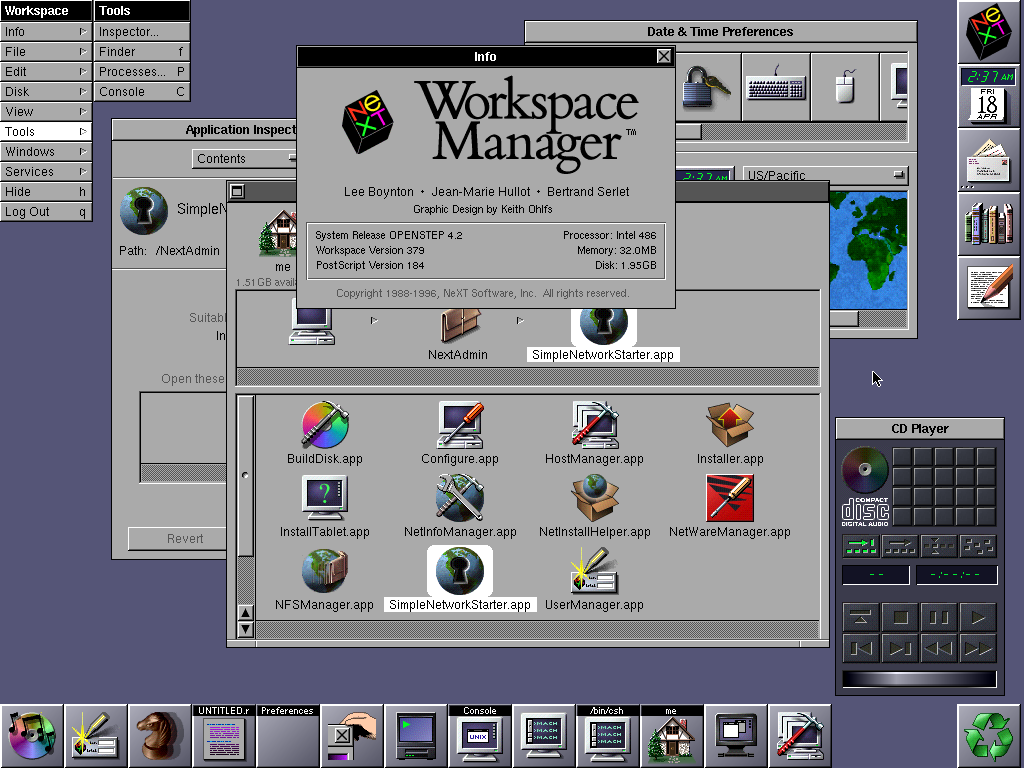
OpenStep ran on a 486 without FPU.
https://en.m.wikipedia.org/wiki/LiteStep
It was my favorite ui replacement on Win98/95 until Win2k come out.
No matter the framework flavor of the day, web technologies make for sub-standard user interfaces.
Win95 was a big step from Windows 3.1x. Being a Microsoft Windows support tech at the time, supporting both the older Windows 3.1x and new Windows 95, it made for many lengthy support calls. It definitely took a while for the new look & feel to catch on.
Interesting. What sorts of things did people struggle with?
But in general you are right
2000 reigns as the pinnacle of Windows UI consistency in my perception, but that particular management UI style was a first hint at future deviations, it was an outlier even then (I think it's because it's a family of UI built to interact with a separate system service, potentially remote?)
Or maybe windows just never progressed. If you see how much linux desktops changed over this period. Windows today just looks like a fancy clone of 95, always has.
I grew up in DOS days, and a lot of kids back then were using it just fine. You learned some dual pane commander, how to navigate/copy dirs/files around on floppies, a:, c:, what files are runnable and you could run and share games and programs.
It was not that incoherent either. Norton/Volkov/M602 commander was the main interface, had popup menus for most functions (so everything was quite discoverable), and the rest was just about running random executables you got from someone on a floppy. There was barely any multitasking. At most you got to run some resident programs (mouse driver or various cheats for games :)). It was conceptually simpler than what you get these days.
And having a file manager as a primary interface kind of invited you to explore what's on your computer.
People who still like to use two pane file managers probably come from those days. :)
FWIW, my first ever computer had Win95 installed, so I grew up believing that the start menu was always a given, and I thought DOS was just part of the computer start-up procedure.
My first PC when I was a kid came with Win95, but all the good games were still on DOS. Some games like Ultima VII had their own extended memory system and was a pain to get working right, especially on a newer PC running Win95. It took a lot of trial and error to get the right boot disk/config.sys to get the game to work. It was like a game in itself. Needless to say, I got DOS-savvy pretty quickly since playing cool games was my motivation.
Not really. While Linux DEs had open in place, Windows would keep opening new Windows when clicking a folder. Until the UI crashed. I believe the NT line had open in-place.
That's besides the point though. The same list of actions would randomly BSOD in one case and not the other. Windows 95 was not coherent it was chaotic.
You only had 4 hours left on the 0day FtP WaReZ site? Tough luck. Deadline at work? Too bad. With Win95 randomly crashing and corrupting files whether you'd get there or not depended on Russian roulette kind of luck.
I don't think anybody misses Windows 95 in terms of technological quality, but there was actual deliberate and well-researched design behind its UI.
- It has established strong foundations about Windows UI. The Menu/Toolbar couple, scrollbars with a relative size, 3D buttons, start menu, toolbar...
- The gap between Windows 3.1 (1992) and Windows 95 is insane.
- It was beautifully coherent. Today, Windows 10 seems like a mess with different UI pieces from different universes: Modern UI, Windows Vista/7 era utilities, Windows XP/2003 config things and some older gems. Fun thing: open a Word document from a pendrive and unplug the pendrive, MS Word will show an error box from Win95 era, asking to insert the floppy in the drive.
- When booting a VM or an old computer with classic Windows I feel "at home". Our first family computer when I was a child was a Pentium II / Windows 98. I have strong reflexes with this kind of UI and I'm faster with classic window and menus compared to my phone or a tablet with modern touch interface.