4K TVs only seem to become usably readable with Chroma 4:4:4 at 38" or above, ideally curved, to get 4 usable 1920x1080 quadrants.
When the screen sizes go smaller, absolutely detail and quality increases, but for software development or text centric work is concerned, am I missing something when it comes to 6K or 8K Monitors?
24 definitely can be a bit tight, but realistic for 3 monitor setup.
If I was going with only 2 monitors for software development, or mainly text work, there are nice 2K monitors that are about 25" that are perfect.
I have two older 27" 2K monitors as well and they tend to be too big in the long run, and 3 were untenable.
4k 27" with 2x scaling is effectively the same size as 1080p 27". But one looks like absolute crap, the other is reasonably sharp and detailed. Text is much better with higher PPI. And 4k27" is just 160 PPI, the 6k 32" monitors are 220 PPI so text is very crisp.
I don't know about other OSs, but fractional scaling "just works" on KDE Linux. The size of displayed content has nothing to do with the pixels you have. You control the physical screen size (inches) and scale factor to get the content size you want, and you buy as many pixels as you can afford to get good quality at that size. There's a parent comment on this submission talking about how his 8k 32" monitor is visibly better than 6k 32" for text sharpness; TFA says the same thing. You really want as many pixels as you can afford to buy.
Of course, the minimum (densest) content size you can use is constrained by PPI, low PPI won't be able to display very small content.
27" 4K just won't cut it.
I have had my eye on an LG[1] out there at 24" 4k (currently about 300usd) -- as that size/resolution has been the sweet spot for me for the last few years. I'm planning to pick one of these up and stick it in a closet just to have on hand in case the Dell dies on me.
For context, my MacBook from 2015 had a PPI of 220, so this comment is extremely accurate.
The Dell 8k has 288 pixels per inch, which is 4x the detail of the original Mac.
Macintosh 128k was released with a 72 ppi display, so every pixel was the size of a "point", a unit used in more traditional, paper-based graphic design.
https://webplatform.github.io/docs/tutorials/understanding-c...
It's as if the Windows spec were retconned into being the historical norm all along, but I need to dig around to find the origin story here... Why 96 dpi?
My simple guess is that 96 is also divisible by 12, and thus easy to split up into 2, 3, 4, 6, 12, 18, 24 parts... you also have eight pieces in 72 for every nine pieces in 96.
  72 = 8  x 9 = 2^3 * 3^2
  96 = 32 x 3 = 2^5 * 3
In 1996, it was adopted by W3C for Cascading Stylesheets (CSS) where it was later related at a fixed 3:4 ratio to the pixel due to a general (but wrong) assumption of 96 pixel-per-inch screens
I actually never really questioned this.
It looks mighty nice, just 4 ppi short of exactly 2x pixels per linear inch of these new Macs. I have no idea why.
For context, 20/20 vision is the ability to perceive 1 arcminute of angular resolution. On a display, this means that pixel spacing needs to be half of that. Beyond that point there's diminishing returns.
To see what that looks like for different viewing distances: https://www.desmos.com/calculator/dtrszipgmd (black line is mm, red line in freedom units, green is 220PPI reference).
There is a difference between your ability to resolve, and whether you can tell _any_ difference. The usual measure of sight is visual acuity, which is your ability to discern details of a certain size at a certain distance. Specifically, in most exams, it's the ability to tell strokes from blobs.
However, even when the pixel density is beyond your ability to discern details, they can still affect your perception in other ways. For example, misalignment of borders can be detected far beyond what your visual acuity is.
On computer screens, particularly, pixel density also affects how things are rendered, think diagonal lines, curves, hollow spaces, etc. Take an extreme example, a box rendered on a 4x4 screen is going to look better than on a 2x2 screen even if the former is twice the distance away.
First world problem, but I hate when companies choose a one-size-fits-all value that is allegedly supposed to reach the limits of human perception, but that value still turns out not to be enough for me because (surprise) some people are naturally slightly better than average.
For example, the new Apple VR headset, despite having a resolution of around 4k*4k pixels per eye, would probably still have to make up for it in other ways, because I can still see significantly more pixels than that.
Apple actually seems to know this, and they know it so well that their entire marketing push is based on augmented reality and immersion. Blending things with the environment, moving around and interacting- basically things that can never really be disappointed by the screen resolution being insufficiently high.
Step aside 8 bit color, 16 bit color displays are here: 65536 colors! Nobody can perceive more than that! Then 32 bit color came along: 1+MILLION colors!! How can it get better than that? Humans can't perceive more! 30FPS gaming as the gold standard for what the eye can behold, then it became 60FPS, now it's 120FPS! The PPI arms race is the same thing.
The phones are assumed to be held close to your eye and have a 460ppi.
The MacBooks are assumed to be seen from a medium distance and use around 225ppi.
The Studio display and Prod Display distance is a little longer and use 218ppi.
Retina is a property based on subtended angle from the viewer's perspective, not on a physical property of the device.
I always joke that if it gets much more worse my arms won't be long enough to hold my phone :-)
Does VR work for you?
Absolute preach right here. I would say I laugh when someone says it's not perceptually possible for me to differentiate the pixels of my 4K display from a typical viewing distance, but that's actually become such a common assertion that I'm dying to know if my vision is just that much better or theirs is just that much worse. :/
I'm not really sure what you're refuting, if anything. Either I personally find 220ppi now rather unimpressive, or I found the 2015 MacBook display to have been especially impressive, but I am not sure which; all I was really saying is that they do indeed have quite similar pixel densities.
While PPI has stayed mostly static (which is a good engineering choice), plenty of other display parameters have improved: better contrast, faster response times, deeper colour, larger continuous surfaces. The 2015 MacBook display was impressive. Modern panels are too!
Apple's always been pretty impressive with their color reproduction. Which makes sense, since they are really, really pushing hard for designers and content creators (that's one of the big central themes of nearly all Mac-related advertising). Their newer, more premium machines are mostly sporting HDR & WCG displays, and macOS has had incredibly good software support for many years.
The MacBook was a premium product for its time, so even 5 years later, there were brand new higher-resolution (and higher-PPI) panels that performed much worse! My 2020 ASUS laptop is a great example of that. The display was 4K, Adobe RGB, and had a higher PPI, so it sounds like it should have been better, but it only supported 24 bpp and had awful ghosting (around 6 frames to change a pixel).
But at least then I won't screenshot something and have the file saved to disk in Adobe-RGB-interpreted-as-sRGB (which is literally what would happen when the dedicated GPU did the color space conversion, but that was then taken as an input to the Intel APU and interpreted as sRGB, even though it was rendered for an Adobe RGB display) which even if converted back still loses a ton of precision due to Adobe RGB being squeezed into 24 bits in the middle. I care about that a lot. Something that annoys only me is possibly tolerable, but something that affects the content I share with others is like life and death (in terms of importance to me).
They also connected that display to the Intel APU so Windows could not properly do the color space conversion in hardware, resulting in artifacts that were so terrible I had to turn off the conversion entirely and just deal with viewing everything in sRGB-interpreted-as-Adobe-RGB. (yes I know "switchable graphics" is a near-universal configuration in laptops, but it's incredibly cursed and causes so many fucking problems in a completely irreparable fashion. Why not just connect the display input to the display output as it was intended, ASUS turds.)
They market it as "Pantone validated", so I guess that means that they added negative value for the sake of a marketing sticker. (Honestly, put that way, it definitely sounds like something that they couldn't possibly not do. Companies just can't help themselves when it comes to this stuff.)
When I switched to a desktop, I grabbed a random 15" 4K monitor from China for $70. It's sRGB, but it's proudly sRGB, and didn't half-ass itself into something that is hopelessly broken like ASUS did.
When I have a spare $400 I'll dish out for one of the 10-bit DCI-P3 displays on AliExpress and then be happy.
Yes. There is one upstream USB-C port on each display that is used for this purpose.
> The monitors are daisy chained?
Daisy chaining with Thunderbolt 4 (not Thunderbolt 3) is supported, but when daisy chaining the second display will only do 4K@60Hz or 6K@30Hz. For this reason, I plug both Thunderbolt 4 cables directly into my Macbook Pro M1, both on the left side of the laptop so it's a clean setup. Thankfully, the included Thunderbolt 4 cables are plenty long enough to reach across to the laptop positioned on either side. Apple's displays include such short TB cables that you'd have to buy another longer one to do this.
In addition, you may want to know that HDR mode is great but only supported with HDMI for some reason and I haven't found any DP->HDMI adapters that support it which rules out dual HDR displays with an RTX 4090 which only has 1 HDMI port. I think this is due to HDR needing HDMI 2.1. But I can have 1 monitor connected with HDMI for HDR when I need it. I just haven't bought a long HDMI cable for that yet. The KVM switching could support that setup just the same.
Other than that, I'm quite happy with my screen real-estate. So, I would indeed love it to have a higher resolution. I could probably use a somewhat bigger screen, a bit further away, that would do a better job as a TV the rare times I use it as such (don't have an actual TV). But all in all, I just want smaller pixels.
Others are talking about higher refresh rates, but for my use case it wouldn't be as useful since I rarely drag things around (I use a TWM) and don't use smooth scrolling in apps.
Are you talking about subpixel rendering?
Leveraging individual R G and B dots needs knowledge of the layout to achieve increased resolution, and the algorithm should be adjusting (best effort) to compensate for human colour perception with knowledge of the subpixel layout + subpixel size.
But usually it might be that the screen has a different layout than the OS picked, e.g RGB vs BGR, vertical vs horizontal, or it has a peculiar layout like RGBG. See down the page for an example when it doesn't match, which usually gives the perceptual effect you described https://www.grc.com/ctwhat.htm
At some point though I found with increasing DPI there's diminishing returns to go subpixel and it's simply easier and just as good to go grayscale AA and be done with it.
I agree that at some point grayscale AA is good enough. But I've found that that point is at a higher DPI than I get on a 4k 32" screen. On my 24" 4k screen grayscale is good enough, so the limit is somewhere in between for me.
I guess it's popular because 32" 4k TVs make the panels cheaper?
At 2x things don't look too big, just comfortably big, and the PPI is still Retina-like.
Aesthetically, no. I am grateful that there aren't any gamer aesthetics involved, but my desk is not a showroom; it's a workspace. However, the cloth that wraps the speaker cluster seems cheap, like it could rip or get pilly over time. That is the only aspect that bothers me. I like that the cameras are attached because they are very nice cameras and support Windows Hello and I prefer not having a corded camera balancing on my displays.
I use a USB switch connected to both displays for my input devices so I can switch between screens/computers: https://a.co/d/ckNXGpt
If you only need 4K, there is this extremely badass TESmart KVM switch that I have used before and would highly recommend. It also has a cycle mode. It's $700 but the thing supports 3 4K monitors and 4 computers and works exactly as described. https://www.tesmart.com/products/4-port-triple-monitor-hdmi-...
I wonder if I’ll ever find a way to drive 4k@144Hz and switch inputs without the current cable replugging ritual.
There's software to help do this automatically (https://github.com/haimgel/display-switch)
And that sometimes it’ll get confused and won’t switch the USB peripherals correctly, but that’s not too common (hasn’t happened in a long while in fact, maybe there was a firmware update I didn’t notice which fixed it).
Personally, I rarely adjust brightness on my desktop displays and my ZMK keyboard volume buttons work reliably cross-platform.
I wish my personal was a mac as well, but I had to abandon macs when they abandoned me by not upgrading the mac pro for like a decade then kept me away by later ending support for eGPUs.
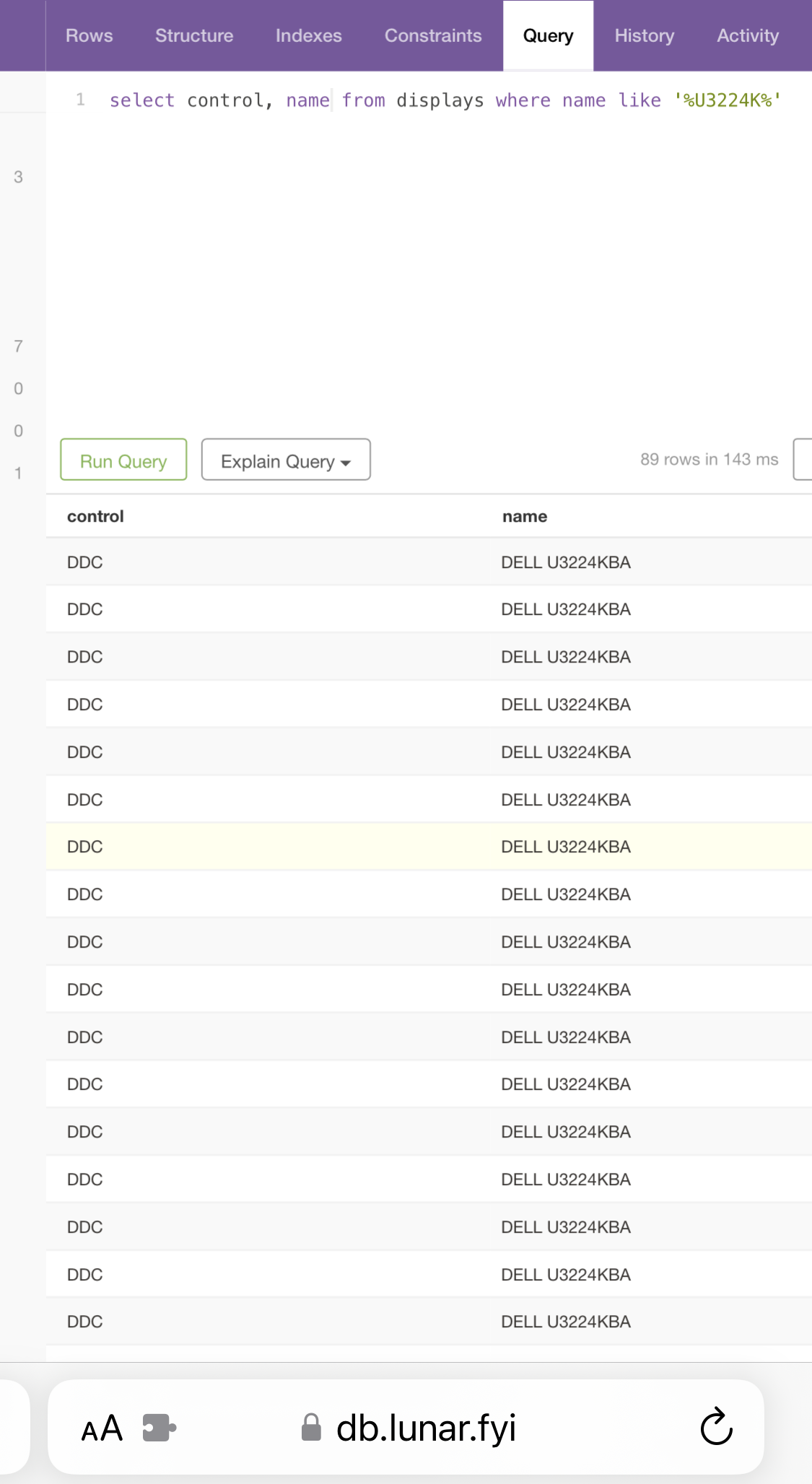
I checked this on https://db.lunar.fyi using the following query:
select control, name from displays where name like '%U3224K%'
What do you do with the monitors? Do you work with images, videos, code, etc.?
I don't even understand all this ppi hype, nor dual displays anymore. I always used dual-triple displays in the past but nowaways I just bought a single table-size (49-inch or something like that) 4k display and put it right in front of my desk just to use it in a plain old 100% mode (no "hi-dpi" scaling). This way it effectively replaces 4 displays with a single seamless space - no additional frames, no constraints, almost no head turning, beautiful tiling (when on Windows - PowerToys' FancyZones are great).
By the way, I once noticed that vertical stacking of 2 monitors feels much better for me that when I place them side by side horizontally. This is why a single big (big in both ways, also vertically) display works much better than fancy ultra-wide monitors for me.
What is DCC?
I do not understand the complaints about pixel density. The display is 223 ppi, which is approximately the same as most Apple displays. I am using them in a dual display configuration with an M1 Macbook Pro and a Windows PC with an RTX 4090. I am using 175% scaling (in Windows) and I don't think 8K with 1:2 scaling would be suitable sized OS components for me.
The startup time doesn't matter in practice because they still wake up from sleep instantaneously.
The mini-DP IN port is annoying but Club3D makes a bi-directional adapter that fixes that for about $20.
I am fine with the camera defaulting to ON for Windows Hello to work in my 2 computer setup.
My only serious complaint is the piss poor speakers and the fabric covering them.
I would also prefer a glossy display, but in practice I just don't find it makes any difference. I arrange my office for no reflections anyhow, which results in the same experience as far as I can tell. Additionally, the Dell 6K has excellent blacks. It has much better blacks than any IPS panel I have used.