Yes, this is key, and why ip is so terrible for the way I currently work. No doubt I'll have to get used to it, like those stupid biosdevname interfaces.
90% of my machines don't have more than 1 IP per physical interface, the rest are aliases
ifconfig outputs clear whitespace, so picking out the specific details of
- interface name
- ip address
Is far easier. I do prefer /28 to 255.255.255.240 when specifying subnets, but it does make it far harder to scan what the IP is. I suspect the people writing the utilities are the ones who are able to automate everything, as they do the same job 1000 times, with IP in, IP out, and no concern about physical devices, so rarely use the tool to read data, certainly not as a human.
You've then got the "what's the default gateway" problem
route -n
shows it nice and easy
  Kernel IP routing table
  Destination     Gateway         Genmask         Flags Metric Ref    Use Iface
  0.0.0.0         172.26.32.1     0.0.0.0         UG    0      0        0 eth0
  172.26.32.0     0.0.0.0         255.255.240.0   U     0      0        0 eth0
  ip route -n
  Command "-n" is unknown, try "ip route help".
It's all good having tools to manage lots of ip namespaces etc, that's great in the subset of cases you need that functionality, but for those of us that manage physical machines with physical inputs/outputs, rather than datacenter scale devices, it's a right pain.
> > ifconfig's output is simply more readable IMO
I prefer iproute2's terseness.
Adding more punctuation to delimit the fields (, : etc...) would be nice too. I mean what the hell:
mtu 1500 qdisc pfifo_fast qlen 1000I once tried to use tc and gave up after more than a day of trying, that is how bad it is. The syntax is a word soup and the semantics are very poorly explained.
http://inai.de/images/nf-packet-flow.png
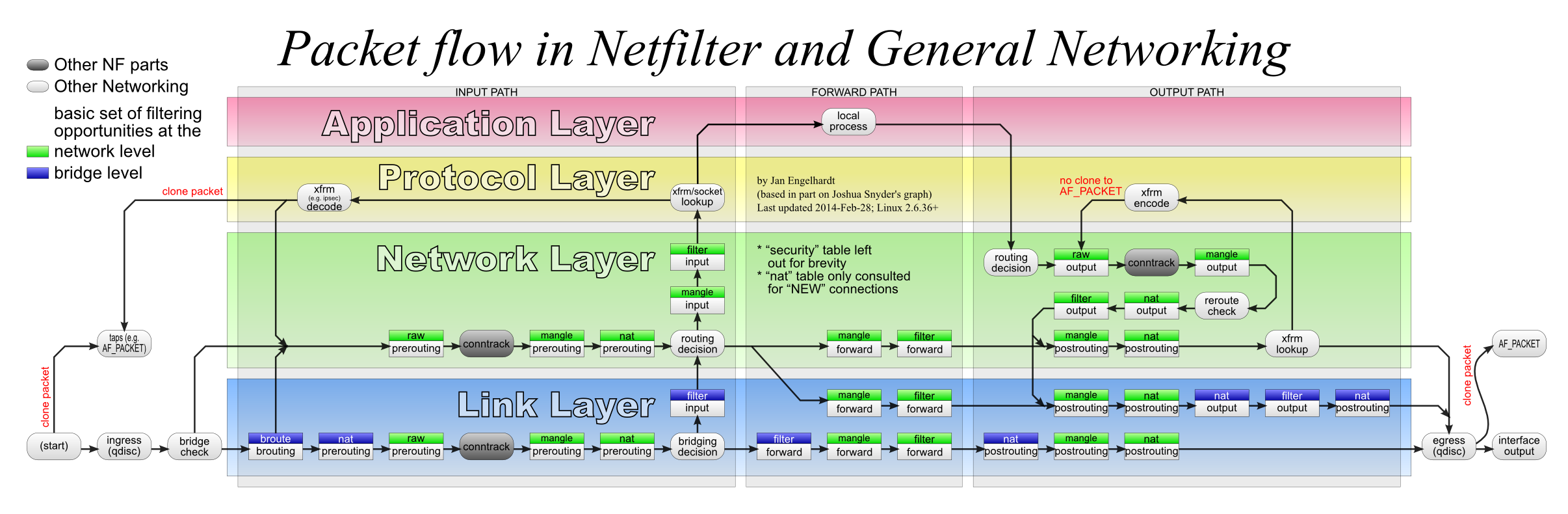
tc is implemented by packet pacing at either egress or ingress steps.
and this is how iproute2 compares to the old net-tools stuff: https://linoxide.com/wp-content/uploads/2014/05/Linux-Nettoo...

netfilter: https://en.wikipedia.org/wiki/Netfilter#/media/File:Netfilte...

regarding UI/UX/CLI. yes, there's no arguing about it, it's just horrible. no documentation, no discoverability, no sanity. but it works, and it's free :o
I'm with you on tc having the worst interface and documentation that I have seen from a command before. I spent maybe a few days total on it then gave up because I figured if there isn't much documentation on it, it isn't worth figuring out.
tc fit the bill nicely.
https://stackoverflow.com/questions/22988824/why-swap-needs-...
valid_lft forever preferred_lft foreverRFC 3484 "Default Address Selection for Internet Protocol version 6 (IPv6)".
> ip route | column -t
(With iproute2 4.3.0, I get the same output between "route", "route show", and "route show default"; no idea if it's changed since.)
Alas it doesn't work quite so well for "ip addr". It would have been great if they'd just decided on CSV or JSON or whatever and then relied on secondary utilities to go to "pretty-printed".
ip --oneline addr | column -t ip route get XI do use ip route a fair bit - if I have a machine connected to two (or more) network segments and want to ensure traffic gets routed back the way it came
However my main criticism for "ip route" is that it's inconsistent and a change route "route"
"route" does reverse dns lookups - e.g "my.server.tld rather than "1.2.3.4", or "default" rather than "0.0.0.0"
"route -n" shows 1.2.3.4
"ip route" doesn't do reverse lookup, however it does say "default" rather than "0.0.0.0".
Most docs will mention iproute2. You can use that for googling.
Of course in the specific case of "ip", both are going to return quite a haystack to search through...
> $ which ip
> /sbin/ip
> $ dpkg -S /sbin/ip
> iproute2: /sbin/ip
I use cope to colorize my output, which makes 'which' useless to me for most common commands, but 'whereis' still works.
Edit for examples:
    $ which ip
    /usr/share/perl5/vendor_perl/auto/share/dist/Cope/ip
    $ whereis ip
ip: /usr/bin/ip /usr/share/perl5/vendor_perl/auto/share/dist/Cope/ip /usr/share/man/man7/ip.7.gz /usr/share/man/man8/ip.8.gz command -V
    $ command -V ip
    ip is /sbin/ip
    $ command -V ll
    ll is aliased to `ls -AlF --color=auto'
    $ command -V command_not_found_handle
    command_not_found_handle is a function
    command_not_found_handle ()
    {
        if [ -x /usr/lib/command-not-found ]; then
            /usr/lib/command-not-found -- "$1";
            return $?;
        else
            if [ -x /usr/share/command-not-found/command-not-found ]; then
                /usr/share/command-not-found/command-not-found -- "$1";
                return $?;
            else
                printf "%s: command not found\n" "$1" 1>&2;
                return 127;
            fi;
        fi
}Thanks for this! After 14+ years of using Linux almost daily, I had never heard of this command. I learned something new today, so now it's time to go home!
That being said while docs specifically written about the tool will probably mention it random forum posts, tutorials or even stackoverflow questions may not.
I don't know the decisions behind the naming either, but the ip shell command comes as part of the iproute2 [1] package.
After I found out about this googling became much easier.
The point is that searching for "ifconfig tutorial" is going to give you what you want, while "ip route" is probably going to get you Cisco documentation, honestly. Even something like "parse ip output" is going to give you a mix of results from Linux, Windows, or web services while "parse ifconfig output" is a lot more clear.
"ip" is simply a saturated keyword, making it a bad keyword.
`ip` takes a --oneline arg to make it more parseable.

The only real gripe I have with IP is their long argument/switch format. Unlike everyone else, ip is a minority, which accepts long options with single dash "-". This prevents someone from combining many short parameters under a single dash, also it's confusing to use.
Yes, it unofficially supports the old double dash format, but if you are supporting it, there's no point in supporting single dash long options.
The flags that a UNIX command uses can sometimes used to carbon-date that command. For example, dd(1) doesn't use a dash at all, uses long args, and uses an equals-sign to connect a flag with its argument (e.g. `dd if=/dev/null`). It's because dd(1) was written in the dawn of UNIX, before a convention was established for flags.
I believe the first step in creating a convention was the introduction of the getopt(3) library, which introduced single dash, single character options (e.g. `tar -x`). Commands that only have short options tend to be old commands.
Later, GNU introduced getopt_long(3), which allowed for long options and double-dashes to distinguish them from the short ones. This made commands more readable.
There have also been cases where the `-` is optional. `tar xvf` for example. And with the `ps` command, the `-` is used to distinguish BSD flags from System V flags (e.g. `ps auxwww` vs. `ps -elf`).
There has also been a movement for subcommands rather than options (which bring to mind the Cisco CLI), of which `ip` is an excellent example: `ip route show`. But subcommands are not a substitute for options; sometimes you need both (e.g. `ip -6 route show`).
All this goes to show that, although long options are quite common, they are not only game in town, and UNIX commands have a rich and varied set of conventions.
Old versions of sort used a + to begin some options. So yes, there has been a lot of variation over time, but I see no reason to gratuitously diverge from the common standards now in use, unless following them is too restrictive in some way.
Extreme flexibility becomes a burden after a certain point if it lacks adaptability.
Standards are built for these reasons.
For the `find` command the single dash is for predicates not for options (not that it makes a whole lot of difference)
You'll find them in ex-Bell labs people (e.g. go-lang) and associated (docker).
The double dash was born in the 90s; there was a poll on Usenet gnu.misc (or similar). Those who did not habituate usenet didn't get the memo.
gcc uses single dash for long options too: -std, -pedantic, -dumpspecs, etc.
I am sure there are many more modern commands that do this.
Neither are for 'dd' or 'tar' (probably 30 YO) from the other comment.
There are probably other, younger commands not following the --long-option pattern, but i think that doesn't make it better to break this convention.
Not all subcommands support it though.
  rascul@coyote:~$ ip -json addr
  Option "-json" is unknown, try "ip -help".
  rascul@coyote:~$ ip -V
ip utility, iproute2-ss160111https://git.kernel.org/pub/scm/network/iproute2/iproute2.git...
Mind expanding NIH?
It's better that the command you type often is short, (you can certainly alias ifconfig as "ifg" or anything too).
Take for instance a very simple query: "ip show default route":
https://duckduckgo.com/?q=ip+command+show+default+route&t=ff...
There are a few obviously relevant matches in the first page but also a bunch of completely irrelevant results. Adding "command" doesn't improve that much. And that's for a very simple query that's probably been asked hundreds of times before.
Meanwhile if I search "ls sort date" I get mostly relevant results immediately because even though it's also a 2 letter identifier it's not quite as ambiguous: https://duckduckgo.com/?q=ls+sort+date&t=ffab&ia=qa
Let alone the non-conformity of other OS's like Solaris, HP-UX which really might not matter now. I'm sure FreeBSD matters to someone... just not me
ifconfig -L
Looking at it more closely now, ip addr's output doesn't seem that difficult to fix. Remove that random number before the adapter name (what the hell is that anyway? The order in which the adapter appeared? If so, why are not in that order?)
I think that alone would make it so much more readable! Maybe white space between each entry with a flag?
All of the help sections are awful too. I feel like I'm looking at language grammar definition instead of useful usage information.
I have a few issues though:
* "ip" is useless as a keyword if you're looking for help online. It's extremely frustrating and probably my main issue actually learning how to use the damn thing.
* ifconfig's output is simply more readable IMO: https://svkt.org/~simias/up/20180525-113825_ip-vs-ifconfig.p... . It's pretty weird that a brand new tool manages to have worse output than a venerable old unix command. Because of this I often end up configuring the network with ip only to double-check everything is right with a quick ifconfig. That's silly.
I think at this point I would've preferred if they had made an "ifconfig2" instead, mostly identical to the old one but with a few breaking changes to add the missing functionality. An incremental update instead of a full rewrite. There's definitely some NIH going on.