Imagine:
* an unpredictably modal interface
* chugging, tasteless animations
* software updates every few weeks
* terrible battery life
* a constant glow out of the corner of your eye
* easily broken
But you can sell ads on it. You know it makes awful sense.
It was nice for things like switching HDMI inputs; you could dynamically update the name and icon, making it more intuitive for someone who had never used the TV before and didn't know what was plugged into which port. You could also adjust settings more easily without everyone have to watch together with you on the big screen as you dug to find the obscure setting to tweak.
But your complaints were equally valid, and were a concern at the time.
I would have liked to see it ship, if just to see if customers liked it. A traditional remote still worked too. But oh well.
I have a ~2022 Samsung OLED, and it doesn't have an input button that I can find. I have to go into the home ribbon menu to find the inputs.
They have very few buttons, which you can't tell apart in the dark (unless you remember the layout) and everything must be done through the UI which tries to upsell you some streaming service everywhere.
https://en-americas-support.nintendo.com/app/answers/detail/...
What TVs should be adding, though, is Wiimote functionality. Build the IR array into the bezel and let me point the remote to select something with a cursor, with arrow keys as a fallback if I'm lazy.
You could do that sanely, with e-ink display on a button.
I'm sure I'm messing up some of the details, but --
The TV needed to be connected to a network for the app to work. The university required you to register the device's MAC address before it could join the network. The TV had an ethernet port, and its MAC was printed on a sticker on the back of the TV, so I was able to get that going. But it wasn't convenient to keep an ethernet cable routed to the TV (the room was awkward) so my roommate and I wanted to get it on the WiFi.
There was literally no way to open the TV's OSD and view the WiFi MAC address with the Vizio app. You needed a physical remote to access that part of the UI.
IIRC we ended up finding an old WiFi access point and connected the TV to it in order to view its WiFi MAC in the access point's admin UI.
They could have just given us a damn remote in the box! It was infuriating.
https://www.amazon.com/Logitech-Harmony-Elite-Remote-Control...
even if it was pricey. (Used to be able to get them refurbed at a decent price...) The touchscreen works really well, you can even use it to control the cursor on a PC. It has the buttons you'd expect on a remote control. It can run your Phillips Hue, CD changer, Blu Ray Player, TV everything. Makes the dominant paradigm of Apple, Netflix, Spotify and all that look like garbage, but I guess a lot of people now don't have anything to control with it anymore.
The configuration of my system got messed up and and I didn't bother to fix it because I thought they'd discontinued it; the latest I've seen is that they quit manufacturing it but they are still keeping the database up so I might trying bringing it up again.
A TV and a receiver? Sure, fine. But also the PlayStation, movie server, regular cable input, Roku and Netflix and the "Smart" features of the TV for some reason. So many redundant boxes and services.
The difference is that is does not come with a remote - instead there is either a phone app which can be used to directly control it or it can work with Alexa/Home Assistant.
I think it's a great way to "smarten" some older "dumb" devices.
https://community.home-assistant.io/t/getting-started-with-b...
Phillips used to make a great switch, for instance, that was powered by the piezoelectric effect and didn't need batteries. I got a good deal on mine but regular pricing was unreasonable and it's been replaced by something nowhere near as cool. Sengled switches work well and are well priced but whenever the power goes out (10x a year at my location) they drain the battery trying to contact the hub, so I've spent in CR2032's whatever I saved.
(I'm glad Phillips avoided making the own goal of selling off the Hue brand because we'd still like to have a few Western brands in this space. I mean, they are getting their ass kicked by the likes of
https://us.govee.com/products/govee-curtain-lights?srsltid=A...
as it is without a western competitor to DJI we'll probably lose Boeing and Airbus within my lifetime)
I had one of these and oddly loved it, a bit of a geek toy.
If there is another person at home I can boot a second Raspberry connected to another cable from the antenna or connect one of those devices to the HDMI input of my TV that sits unused in a corner of my living room. It's not usual to watch something with other people nowadays.
With this arrangement everybody can watch TV anywhere in the house and carry it wherever they go without having to pause the stream.
So I gotta imagine Samsung/LG will eventually just make apps anyways. Why bother with a touch screen remote that has to be a similar size anyways
its just 1 button and it does what the built in AI predicts you wanna do.
This is utterly aggravating. That's literally the button I use the most by a factor of 10x. The center button behavior differs between apps and is inconsistent enough to drive me crazy. This just makes me want to live more exclusively inside a single app, and that app is without question going to be Jellyfin. I'm certainly not a normal consumer, but I'm just moving further and further away from what they want.
I got an old TCL(don't get me started) and when the original remote died I got a noname IR thing that is even capable of switching to a custom channel.
At least on my LG C1 my old Logitech Harmony still does a good job.
Note though that the native remote uses Bluetooth or since other radio technology and the Harmony uses infrared.
Play and pause were there in 2016: https://www.lg.com/us/tv-audio-video-accessories/lg-AN-MR600...
There were other weird designs over the years too: https://media.us.lg.com/transform/b10eeb90-5206-4f69-9959-bc...
We might have TVs with remote locator buttons that would make the remote control ping audible via a press of a button on the TV? So much time saved and happiness granted with ancient technology.
But no, AI. Bad product folks who want to experiment and make their mark more than they want to improve the experience.
This one : https://discussions.apple.com/content/attachment/949603040
White, plastic, 6 buttons (up, down, left, right, select, cancel). That's it. Worked great with Kodi on an Intel MacMini. Could easily do everything I needed to do.
Since then they first ruined it by changing it be a kind of metal that felt like chalk on my hands. It was horrible
https://cdsassets.apple.com/live/7WUAS350/images/apple-tv/ap...
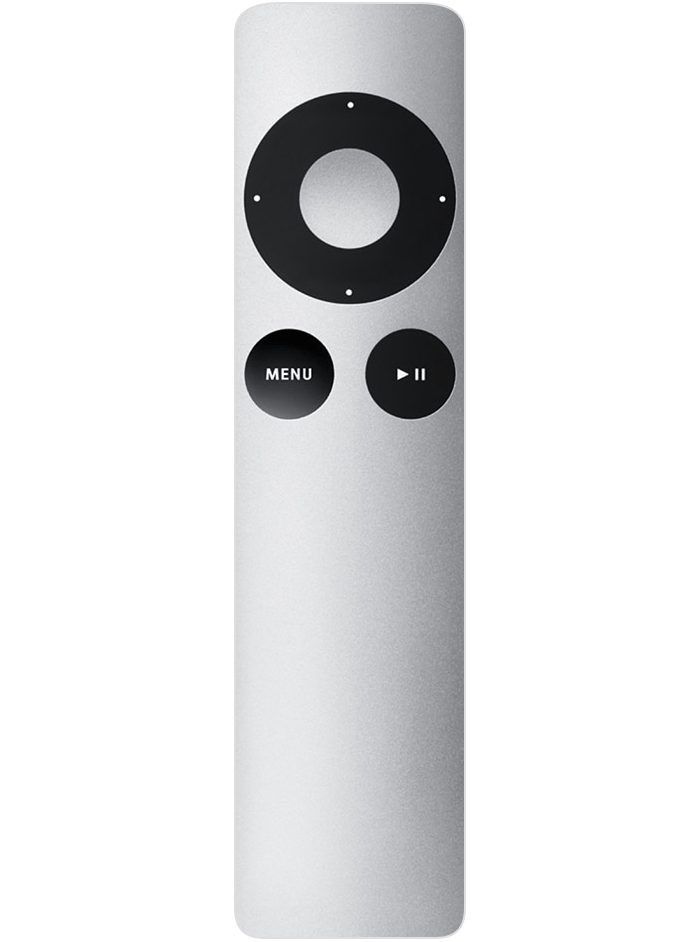
Then they broken it completely by making it larger with a touch surface.
https://cdsassets.apple.com/live/7WUAS350/images/apple-tv/ap...
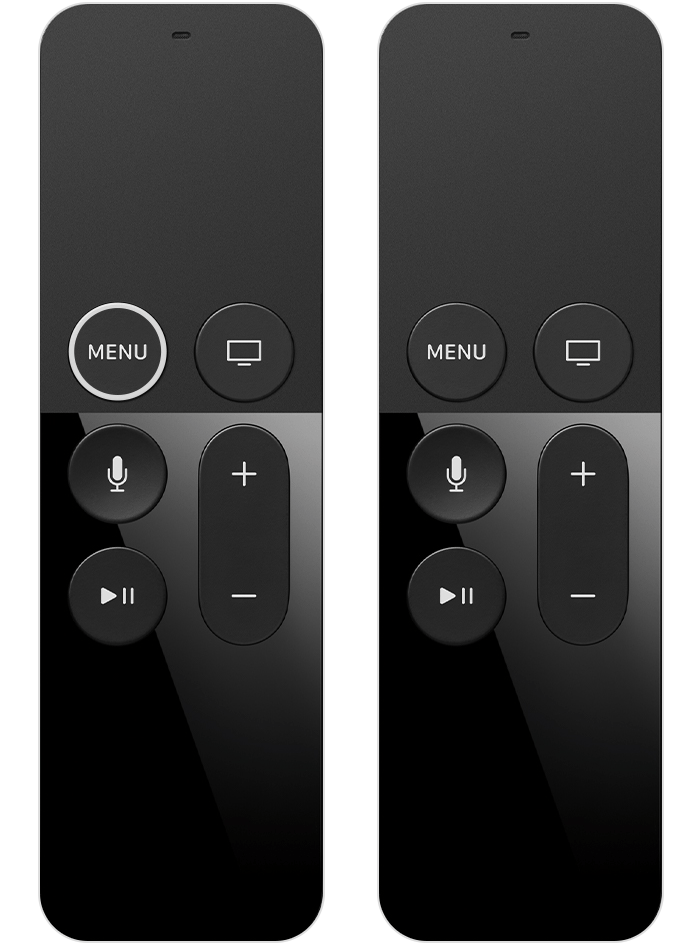
It was impossible to use because trying to select (clicking the touch surface) would always end up also adding left/right/up/down events so you'd always select something other than what you wanted to select. I have no idea how that POS ever made it out of user testing.
They made it slightly better but still broken by changing it back to a circle.
https://cdsassets.apple.com/live/7WUAS350/images/apple-tv/ap...
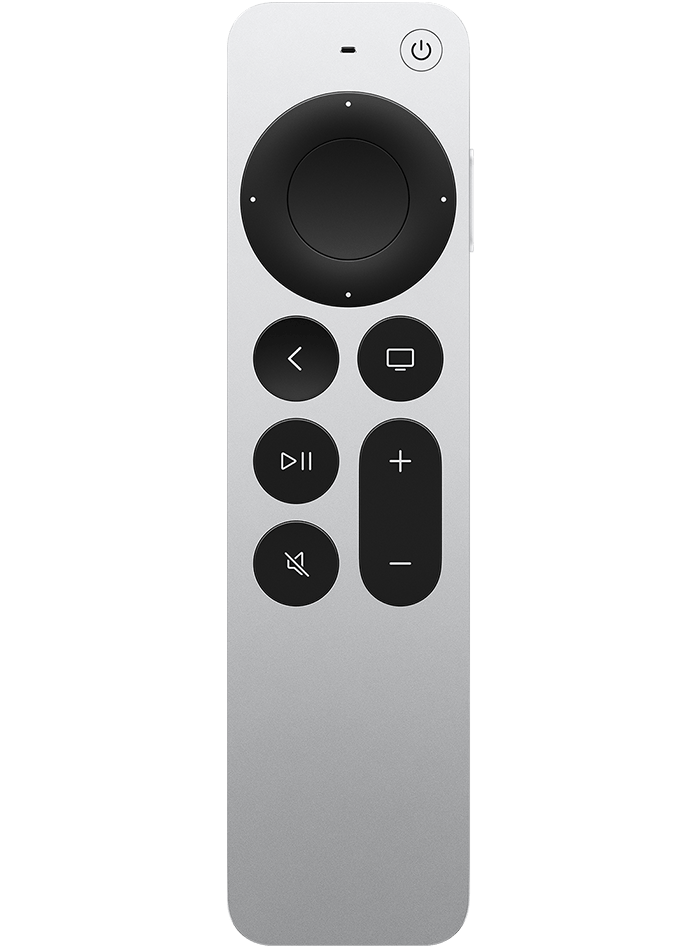
But the circle itself is still a touch surface and still always moves your selection as you try to select something. It's atrocious!
In any case, the 6 button remote back from the beginning was the best. I still use Kodi on an AppleTV now, but I use a separate remote and only use 6 buttons.
When something is playing, pressing the cetner button pauses, pressing again unpauses, pressing up/down adjusts the volume. Pressing back exits the movie, holding the center for 2 seconds brings up more detailed controls.
Kodi also has the best queing experience of any app. Pressing right skips forward 10 seconds, again within some threshhold, 30 second, then 1 min, 3 mins, then 10. I can get anywhere in a movie instantly.
Compare this to Netflix, or Apple TV+, or Crunchyroll, or Amazon, etc... They all suck. Generally left/right jumps +10 or +30 period. If you want to get to the end you're forced to hold right, wait for it to go into "fast forward mode", then press right for 2x, 4x, 8x, 16x, Then wait forever as it slowly goes through the movie. So bad.
I remember a time long ago, in a galaxy far far away where the user experience mattered more than whatever whims designers had.
My old car, for example, had big buttons that were meant to be usable with gloves. That was a godsend in the Swedish winter. It wasn't very pretty, but the memory of it makes me want to scream every time I have to use a touch interface in a car.
I like their OLED, but mostly I chose LG more because I was voting against the other guys who are worse.
The new remote is abysmal, though. I guess I need to get my hands on a 2024 model before this one blows up, contrary to what I planned originally.
No guarantees about the 2025 model, but a couple of years back I specifically bought a _newer_ remote, because my 2018 model didn’t have a pause button, but the 2019 ones did. Everything worked fine out of the box.
I don't have an LG nor a TV but why would you need a pause button. Isn't it more interesting to have play button act as a toggle play/pause like on any software video/music player?
Now pausing and unpausing is done with the general-purpose click-wheel, is up to each app to implement, and is dependent on the UI state.
If a wrong element is focused (which is not hard to do, because the button is a scroll wheel surrounded by directional buttons), you may end up toggling subtitles or some other option when trying to pause or unpause.
It used to be a hardware button that always worked, was trivial to find by feel, easy to activate, and worked instantly.
Now it's "wait, I need to pause! Oops, I moved the scroll wheel button by a notch when pressing it, so it's a mouse cursor now! I fast-forwarded to the second half of the movie and the audio is in French."