News for hackers. Stuff that matters.
Re:How many layers of UI inconsistencies are in Windows 11? by flohofwoe on Monday January 02, 2023 @09:41AM (#34218326)
Funny how the more the screenshots go back in history, the more 'useful' the UI looks like (even though they no longer adhere to the current fashion fad - which should actually be handled through a user-accessible themeing engine, no need to pay some UI designers big bucks to come up with rounded corners).

For instance right in the first Task Manager screenshot, I have no clue what those tab icons on the left side actually mean - with one exception: "users". There are two icons that both look like hamburger menues FFS.

Re:How many layers of UI inconsistencies are in Windows 11? by majewsky on Monday January 02, 2023 @10:05AM (#34218627)
The newer UIs also seem to be lacking a clear visual hierarchy. The Task Manager screenshot feels quite cluttered to me, not because of the amount of information presented (which is actually well-balanced IMO), but because different parts of the view are not properly separated from each other visually. The biggest offender is probably the scrollbar between the stack of summary graphs on the left and the stack of CPU graphs on the right. This scrollbar would work way better in the "old" style, with a frame that extends over the entire height of the scrollable viewport, since that frame would provide a clearer boundary between left and right.
Re:How many layers of UI inconsistencies are in Windows 11? by akersten on Monday January 02, 2023 @10:23AM (#34218837)
It's not just looks, there are real features missing from the new control panel activities too, and I don't look forward to the day the old ones are removed. For example, to disable a network adapter, you have to go into the Vista/7 version of Network settings so you can right click it and get the context menu. It's a mess!
Re:How many layers of UI inconsistencies are in Windows 11? by csours on Monday January 02, 2023 @10:28AM (#34218898)
ncpa.cpl forever baby
Re:How many layers of UI inconsistencies are in Windows 11? by procarch2019 on Monday January 02, 2023 @11:11AM (#34219505)
I work as a “contractor” and when I sit down to work with some sysadmin they watch me and ask out I bring up the old style config windows. One of them had started a sheet while watching me with all the run commands and helper phrases (North Carolina PennsylvAnia).

Run commands are great for me, but it sucks when I have to walk someone through something over the phone. It’s gotten to the point where I can’t walk people through the gui methods anymore and it’s actually easier to explain how to open a run prompt and type xyz

Re:How many layers of UI inconsistencies are in Windows 11? by nazgulsenpai on Monday January 02, 2023 @11:19AM (#34219620)
I have been doing this my entire career. IMO its always been much easier to tell someone to hold the Win key and press R and enter a short command than it is to guide them through the UI to whatever setting needs interacting with, especially over the phone.
Re:How many layers of UI inconsistencies are in Windows 11? by wazoox on Monday January 02, 2023 @12:35PM (#34220802)
All Linux users have known that forever... Also you can email a command to copy and paste into a terminal, try emailing a procedure like "open app X, click button Y, type Z in field W..."
Re:How many layers of UI inconsistencies are in Windows 11? by procarch2019 on Monday January 02, 2023 @01:54PM (#34222052)
Some of the people I work with don’t understand cmd/posh syntax. Additionally they are often working with air gapped systems, so copy paste is not really an option. Those 2 things make it really difficult to have someone do something by cli only, especially if it’s relatively complex command (pipes, regex, vars)
Re:How many layers of UI inconsistencies are in Windows 11? by whoopdedo on Monday January 02, 2023 @03:24PM (#34223159)
If you ever end up talking to Microsoft tier 2 support they'll do almost everything through PowerShell.

Which I think hints at the problem. Internally, Microsoft must not be dogfooding (or is it dogfeeding?) their GUI. It's an over-correction from the time when Windows was criticized for being too reliant on visual tools for administration and devs asked for better automation. Well, now scripting is the preferred way to interact with the OS and the GUI plays second fiddle.

Re:How many layers of UI inconsistencies are in Windows 11? by procarch2019 on Monday January 02, 2023 @03:46PM (#34223424)
There’s actually new functionality that has been specifically designed with no GUI on purpose. Do a google of split brain DNS. The only way to set it up is by creating additional DNS zones and creating DNS query filters. Can only be done in posh. There are other examples of that too, but I’ve had to implement split brain before so I know that one for a fact.
Re:How many layers of UI inconsistencies are in Windows 11? by wenus on Monday January 02, 2023 @02:02PM (#34222170)
>North Carolina PennsylvAnia

What is that?

Re:How many layers of UI inconsistencies are in Windows 11? by generalizations on Monday January 02, 2023 @02:12PM (#34222272)
looks like ncpa (.cpl)
Re:How many layers of UI inconsistencies are in Windows 11? by cpeterso on Monday January 02, 2023 @02:19PM (#34222357)
What does ncpa.cpl do? I assume it’s part of the Control Panel, but a cursory Google search doesn’t return any useful explanation.
Re:How many layers of UI inconsistencies are in Windows 11? by jaywalk on Monday January 02, 2023 @02:39PM (#34222594)
It's the old school Network Connections manager.
Re:How many layers of UI inconsistencies are in Windows 11? by procarch2019 on Monday January 02, 2023 @02:21PM (#34222385)
Haha, yep. Sorry, I was relying on the context.
Re:How many layers of UI inconsistencies are in Windows 11? by jojobas on Monday January 02, 2023 @02:18PM (#34222350)
Whoever decided to move away from that had a lapse of reason that day, and every day he didn't back out of it later.
Re:How many layers of UI inconsistencies are in Windows 11? by nunez on Monday January 02, 2023 @03:19PM (#34223100)
I'm a inetcpl.cpl man myself
Re:How many layers of UI inconsistencies are in Windows 11? by csours on Monday January 02, 2023 @06:13PM (#34225069)
Ah, a man of distinction and class
Re:How many layers of UI inconsistencies are in Windows 11? by gizmo385 on Monday January 02, 2023 @11:22AM (#34219678)
> o need to pay some UI designers big bucks to come up with rounded corners).

It’s really unfortunate how dismissive of the entire ui design profession so much of HN is. Not a great look IMO

Re:How many layers of UI inconsistencies are in Windows 11? by josephcsible on Monday January 02, 2023 @11:40AM (#34219956)
Microsoft's UI designers used to be useful. The Windows UI design got better by leaps and bounds at first, was at its peak between Windows 95 and Windows 2000, and has been getting worse ever since. The problem is now that the field has matured, there's a lot less that needs to be changed, so they've started to change things that were fine the way they were to justify not being downsized.
Re:How many layers of UI inconsistencies are in Windows 11? by djur on Monday January 02, 2023 @12:01PM (#34220268)
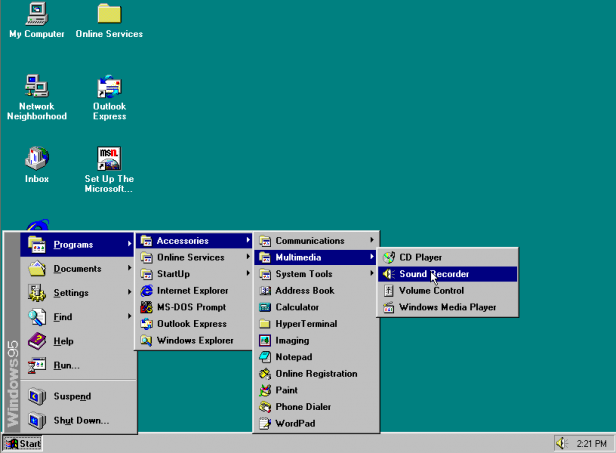
I've been working on a project recently that involves running Win95 in a VM and it's almost shocking how nice the UX feels compared to the Win11 host surrounding it. Consistent, clean, legible - nothing hidden, very little extraneous animation or visual flash. Even the battleship gray is nicer than I remember. Nostalgia goggles for sure, but...
Re:How many layers of UI inconsistencies are in Windows 11? by rstat1 on Monday January 02, 2023 @06:03PM (#34224953)
The one improvement modern Windows has over Windows from the 90s is the lack of those godawful cascading menus that would disappear off the screen the second you even slightly missed a hover target. I do not miss those at all.
Re:How many layers of UI inconsistencies are in Windows 11? by bundie on Tuesday January 03, 2023 @06:54AM (#34230381)
> The one improvement modern Windows has over Windows from the 90s is the lack of those godawful cascading menus that would disappear off the screen the second you even slightly missed a hover target.

I don't understand

Re:How many layers of UI inconsistencies are in Windows 11? by nayuki on Tuesday January 03, 2023 @10:34AM (#34232708)
Re:How many layers of UI inconsistencies are in Windows 11? by bundie on Tuesday January 03, 2023 @11:02AM (#34233150)
oh I get it now
Re:How many layers of UI inconsistencies are in Windows 11? by josephcsible on Tuesday January 03, 2023 @01:47PM (#34235976)
To be clear, I'm not saying that Microsoft hasn't improved any UI since Windows 2000, just that overall, they've made more stuff worse than they've improved since then.
Re:How many layers of UI inconsistencies are in Windows 11? by kmoser on Tuesday January 03, 2023 @12:48AM (#34228189)
Not to pile on trashing the Windows 11 UI, but my first experience with it was actually watching a not-very-technical person attempt to restore a mistakenly deleted file by opening the trash can. The Windows Explorer app showed them a very large, obvious trash can icon, which they proceeded to click to open. It failed to open, so they clicked again...and again...not realizing that each time they clicked it, they were actually deleting an item they had selected. To add insult to injury, I don't believe the icon had a tooltip.

Bravo, Microsoft.

Re:How many layers of UI inconsistencies are in Windows 11? by bitwize on Monday January 02, 2023 @11:33AM (#34219829)
I've met some great UI designers and they could take a libXaw application and have it present information cleanly and offer available actions and context transitions that make sense.

But these people are not rewarded in today's industry. The criteria for good UI design these days is all about "lOoKs mOdErN". Plus the field seems increasingly tied to HTML/CSS/JS. Development teams as a whole are not incentivized to do UI design with an emphasis on making the user's work easier... they're incentivized by engagement KPIs and the like. So there's a trendline towards more sizzle and less steak.

Re:How many layers of UI inconsistencies are in Windows 11? by flohofwoe on Monday January 02, 2023 @11:55AM (#34220167)
Respect must be earned, like back when it was called "Human Interface Design" and involved actual scientific research (e.g. between ca the late 70's to mid-90's) instead of just coming up with esoteric essays from time to time about what 'emotions' certain colors, fonts or rounded corners evoke.
Re:How many layers of UI inconsistencies are in Windows 11? by concordDance on Monday January 02, 2023 @12:14PM (#34220460)
It's some specific fads that get complained about. Plus the big fact that, for the people who post on hackernews, more modern UIs are actually worse for them and their workflows.

Why would you not dismiss a profession that actively makes your life worse?

Re:How many layers of UI inconsistencies are in Windows 11? by mbesto on Monday January 02, 2023 @12:20PM (#34220578)
You're conflating 'being dismissive' with 'being critical'. I think HN very much agrees that good UI is very important, so much so that they take the time to critiquing it when it's obviously bad.
Re:How many layers of UI inconsistencies are in Windows 11? by toast0 on Monday January 02, 2023 @12:32PM (#34220768)
Piling on. It's easy to be dismissive when the resulting design is so uncompelling. It can't accomidate the existing needs, but the existing needs are compelling enough to leave the old version, likely for at least a decade.

If the new design was adequate, it would probably be adopted in a release or two. If it were better, there would be demand to get it to all the well used components. There might still be some components left behind, there's a lot of components.

A truly inspiring design might pull everything forward automatically... But that's asking a lot.

Re:How many layers of UI inconsistencies are in Windows 11? by tehbeard on Monday January 02, 2023 @12:46PM (#34220981)
Would you please care to point to something ACTUALLY useful to end users that came out of the W11 UI "redesign"?

Because you cannot legitimately look at the W11 task manager and tell me it was designed with any sort of professional UI/UX in mind. It's busy work to keep a job. And if it is then there's something deeply wrong where no UX theory is being applied, or they're being overruled to make it "app-y".

Re:How many layers of UI inconsistencies are in Windows 11? by frosted-flakes on Monday January 02, 2023 @01:36PM (#34221742)
The Settings app. It's head-and-shoulders better than the Windows 10 version, or the mess that was Control Panel.
Re:How many layers of UI inconsistencies are in Windows 11? by sitzkrieg on Monday January 02, 2023 @02:17PM (#34222335)
itd be a decent point if it wasnt still missing stuff that's existed as long as windows
Re:How many layers of UI inconsistencies are in Windows 11? by frosted-flakes on Monday January 02, 2023 @02:28PM (#34222460)
At this point there is very little need to use the old Control Panel applets. There are a few advanced cases that haven't been migrated, but they're also quite rare, and they are still linked from Settings.
Re:How many layers of UI inconsistencies are in Windows 11? by wtallis on Tuesday January 03, 2023 @04:05AM (#34229439)
Also, that new Settings app wasn't even in the original release of Windows 11. It was delivered after the fact through an update.
Re:How many layers of UI inconsistencies are in Windows 11? by numpad0 on Tuesday January 03, 2023 @07:33AM (#34230634)
Problem is fun busywork “creates value” and pays better than boring “actual work” in this absolute meme economy.
Re:How many layers of UI inconsistencies are in Windows 11? by Fatnino on Monday January 02, 2023 @01:00PM (#34221211)
The windows UI is not a great look either.
Re:How many layers of UI inconsistencies are in Windows 11? by FatActor on Monday January 02, 2023 @01:06PM (#34221297)
I don't know why it is so pervasive, but programmers think they are inherently good at UX/UI for some reason. And they are very possessive about it. I was until I married a designer, and they actually went to school to study visual composition, balance, color language, etc.

I'm fond of saying UIs designed by engineers look exactly like UIs designed by engineers. I'm not saying that all designers are always better than all programmers, but when you've studied visual composition, it shows.

I mean just look at the scorching replies you are getting. You definitely offended some people who fall into this "I know better than any stoopid artist" category.

Re:How many layers of UI inconsistencies are in Windows 11? by wtallis on Monday January 02, 2023 @01:53PM (#34222020)
It sounds like you think the job of a UI designer it to make UIs look pretty. That's exactly the misconception that people are railing against, because it leads to disasters like Windows Vista, 8, and 11.

The job of a UI designer is to make the UI usable. Looking pretty in screenshots must always be a lower priority than being functional and accessible.

Re:How many layers of UI inconsistencies are in Windows 11? by FatActor on Monday January 02, 2023 @02:08PM (#34222232)
You are exactly confusing UX and UI.

Usability--what you are describing--is the UX or user experience, buttons colors composition affordance is the UI, connecting the buttons to the REST endpoints is frontend, servicing the REST endpoints is backend, making sure the backend is running and so is the gateway is devops. At least that's what it has been for 20+ years.

Re:How many layers of UI inconsistencies are in Windows 11? by madebyporter on Monday January 02, 2023 @02:34PM (#34222537)
You're correct. For example, if you're in someone else kitchen, trying to eat a meal and you didn't ask the house owner where the forks at so you go searching by yourself:

UX would be "what drawer will the utensils be within the kitchen? Usually close to the microwave/stove/fridge."

UI would be "Does this drawer need handles or can you open it from the bottom?"

Re:How many layers of UI inconsistencies are in Windows 11? by wtallis on Monday January 02, 2023 @03:23PM (#34223152)
It sounds like you're describing more of a macro vs micro distinction, rather than a functional vs aesthetic/visual distinction. But either way, you can't cleanly separate the two responsibilities.
Re:How many layers of UI inconsistencies are in Windows 11? by wtallis on Monday January 02, 2023 @02:25PM (#34222429)
> You are exactly confusing UX and UI.

> Usability--what you are describing--is the UX or user experience, buttons colors composition affordance is the UI,

Considering these to be separate disciplines is just more of the same madness. They're inextricable.

> At least that's what it has been for 20+ years.

I think it's more that over the past 15-20 years there's been a growing trend of people forgetting that "look and feel" doesn't just mean "look".

Re:How many layers of UI inconsistencies are in Windows 11? by FatActor on Monday January 02, 2023 @04:04PM (#34223633)
> Considering these to be separate disciplines is just more of the same madness. They're inextricable.

Not if you've actually done both. ;-)

Here's an example:

UX would be: on beginning a customer purchase, do we use a funnel pattern (isolating the purchase experience from the layout template), or is there backout that allows the user back to the store instead of back through the path.

UI would be: how do we design the checkout template, what colors and fonts from the corporate palette do we use where

Totally unrelated.

Make sense?

Re:How many layers of UI inconsistencies are in Windows 11? by wtallis on Monday January 02, 2023 @05:34PM (#34224641)
No, it doesn't make any sense.

You cannot decide whether a small piece of what you call "UI" is good without considering its place within the larger context that you call "UX". A dialog box that is very pretty, fits well with the overall aesthetics of the application and the platform/OS, and properly does what it says it does—would still be an example of bad UI if it's one of those dialog boxes that shouldn't exist in the first place and is a product of the developers/designers fundamentally misunderstanding the workflow or goals of their users.

This distinction you're trying to make is really not productive. Its too vague and subjective about where to draw the line, and I'm pretty sure most people who are adamant that a line must be drawn are people who will subsequently neglect things on one side of the line as "somebody else's problem".

Re:How many layers of UI inconsistencies are in Windows 11? by FatActor on Monday January 02, 2023 @06:34PM (#34225283)
There is an experience to using a UI (bad colors make for a bad experience), but it is not UX. Totally different. Here's how it Don Norman makes the distinction: there is no medium to UX. That's a fairly large conceptual difference.

I can see this is pointless because clearly you have no experience with either in a professional context. I feel like you're just trying to "win" here and not really listening.

Re:How many layers of UI inconsistencies are in Windows 11? by wtallis on Tuesday January 03, 2023 @04:00AM (#34229409)
> I can see this is pointless because clearly you have no experience with either in a professional context. I feel like you're just trying to "win" here and not really listening.

Don't be an ass.

You seem to have finally elucidated a meaningful, unambiguous distinction between UI and UX as you see it: UX is purely abstract, can be described with nothing more than flowcharts and probably is concerned with what kind of mental model the user forms for how the application works behind the scenes, while UI is any concrete realization of an interface; any discussion of a real on-screen layout of information and controls would fall under UI rather than UX.

I can see how that distinction could be useful in a more or less academic way. Unfortunately, even using your definitions there are a lot of usability concerns to UI, as I originally claimed but you took exception to. Bad UI layouts can lead to objectively, measurably worse usability (eg. number of clicks required, hard-to-hit targets, etc). Those problems are real: you cannot assess usability in your purely abstract "UX" context and then completely set aside usability concerns in favor of aesthetics when you start drawing a real UI. You have to constantly keep usability in mind throughout the entire design process, even when fine-tuning your final UI layout.

(Your definitions of UX vs UI would also seem to lead to "UX Designer" being a job title in the same vein as the kind of "software architects" who don't contribute at all to writing, reviewing or testing the actual code.)

Re:How many layers of UI inconsistencies are in Windows 11? by FatActor on Tuesday January 03, 2023 @07:47PM (#34240329)
I will never understand why people like you start fights in disingenuous attempts at discussion, with practically know knowledge of the topic. I guess I fell for your trolling. Well done.
Re:How many layers of UI inconsistencies are in Windows 11? by vor_ on Tuesday January 03, 2023 @06:35PM (#34239714)
> Considering these to be separate disciplines is just more of the same madness. They're inextricable.

But the terms have different meanings.

Re:How many layers of UI inconsistencies are in Windows 11? by wtallis on Wednesday January 04, 2023 @11:31AM (#34247679)
They have different nuance, at the very least. But claiming that UI design has nothing to do with usability is absurd.
Re:How many layers of UI inconsistencies are in Windows 11? by rolenthedeep on Monday January 02, 2023 @03:09PM (#34222978)
UI design is trending in a bad direction. UIs are being designed as some sort of modern art piece rather than a tool that is designed to be used by humans.

My favorite example is VS Code vs Rider.

VS code looks like a toy. A big stack of unlabeled vage icons that require a decade of context to intuit. Compiling your program takes three clicks and a context switch away from your code! Unless you're a normal person who hasn't memorized those icons, and then it's six or seven clicks while you fumble through the menus.

Rider is a classic ugly UI. everything has labels or tooltips. There's a goddamn toolbar with all your common controls. Building your code requires one single click.

Not a single person is going to stare at your landing page like it's a genuine Picasso. Your ui is not going to be placed in the museum of modern art.

A UI is a tool. If someone has to ask you how to use it, it's not very good. If your users are fumbling through menus after the first hour, it's a bad design. If a user has to have the documentation open at all times to decode your hieroglyphic icons, it's a bad design.

As for my own UI design, the core philosophy is first-order accessibility. If you have to do a task every time you open the program, then that task is accessible with one or zero clicks. If a user asks me what a button does, it gets a better label or a helpful tooltip as well as a mention in the docs. My UIs look like something out of windows 95: simple controls laid out in a grid in clearly delineated functional groups. Everything is labeled and laid out in a way that places the most common controls in VERY OBVIOUS and CONVENIENT locations. It's ugly because it's designed to be used and not looked at.

If a user spends time in my program that isn't related to the task they're doing, I've done something wrong. If someone has to ask me how to do something, it means I have to rethink my design. If users are relying on documentation to navigate my program, I need to redesign.

I respect ui designers who build helpful and useful UIs. I don't respect designers who drop all text and sprinkle a dozen abstract images on a vast barren wasteland of screen space.

Re:How many layers of UI inconsistencies are in Windows 11? by IAmGraydon on Monday January 02, 2023 @01:42PM (#34221835)
>Funny how the more the screenshots go back in history, the more 'useful' the UI looks like

Maybe because you’ve spent time in those older OS interfaces and are therefore more familiar? Your post amounts to “new things have a learning curve”.