News for hackers. Stuff that matters.
Re:Macbook Pro frying USB peripherals by bb88 on Tuesday May 01, 2018 @04:44PM (#16971381)
First thought is that probably a SMD component has shorted itself out. Unfortunately that's default behavior for many SMD components -- short circuit instead of an open circuit.

If the power adapter supplies 20V (which sounds like it might), then any components which might have shorted them selves out could be passing 20V to the other usb power line right next to it.

The other side of the machine probably has another USB controller, which likely explains why it's fine.

So, in short, I don't think this is a problem with USB-C, just a bad luck of the draw that you got a failed component along the way.

Edited to add:

Louis Rossmann's macbook repair Youtube channel is pretty good at discussing why things fail for a mac. https://www.youtube.com/channel/UCl2mFZoRqjw_ELax4Yisf6w

Re:Macbook Pro frying USB peripherals by _wiv7 on Tuesday May 01, 2018 @05:45PM (#16972013)
Actually, it's not SMD components in particular. The failure mode for many MOSFETs and other semiconductor devices tends to be a short. They only tend to fail open if there was enough energy at hand to blow the short clear.
Re:Macbook Pro frying USB peripherals by dmoy on Tuesday May 01, 2018 @06:16PM (#16972231)
Ah yes, I remember from lab, you'd get a fail open right after you managed to manufacture a temporarily light emitting diode from things that are not normally light emitting diodes (or maybe not even diodes).
Re:Macbook Pro frying USB peripherals by bsder on Tuesday May 01, 2018 @06:35PM (#16972367)
We call those "Light Emitting Resistors".

They result when you attempt to violate Ohm's Law.

You can generally diagnose those olfactorily as well as visually. :)

Re:Macbook Pro frying USB peripherals by morganvachon on Tuesday May 01, 2018 @07:34PM (#16972740)
> You can generally diagnose those olfactorily as well as visually. :)

Indeed, my electronics engineering mentor described it as "letting the magic smoke escape". Once the smoke is gone, so is the magic.

Re:Macbook Pro frying USB peripherals by lathiat on Wednesday May 02, 2018 @05:07AM (#16975174)
Now if only you could capture the smoke and get it back inside the chip.

It would work again!

Re:Macbook Pro frying USB peripherals by Yetanfou on Wednesday May 02, 2018 @03:11AM (#16974797)
There was this guy called Edison who once made quite a healthy business out of selling LERs. They seem to have lost some of their sheen nowadays but I suspect they'll make a come-back one day in miniaturised form, something like 'nano-LERs'.
Re:Macbook Pro frying USB peripherals by phyzome on Tuesday May 01, 2018 @11:03PM (#16973728)
Or alternatively, SEDs (smoke emitting diodes).
Re:Macbook Pro frying USB peripherals by MisterTea on Tuesday May 01, 2018 @08:27PM (#16973066)
> exercise Ohm's Law.

FTFY ;-)

Re:Macbook Pro frying USB peripherals by tyingq on Wednesday May 02, 2018 @01:07AM (#16974203)
Old bad electrolytic capacitors often smell like bad fish. Not sure why.
Re:Macbook Pro frying USB peripherals by marshray on Tuesday May 01, 2018 @07:49PM (#16972826)
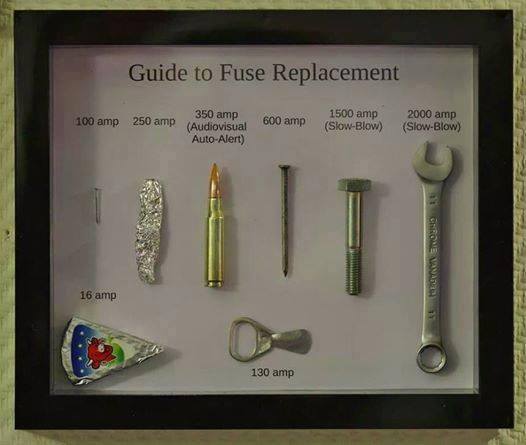
Everything's a fuse, it's just a question of how much current it takes to blow.
Re:Macbook Pro frying USB peripherals by crankylinuxuser on Tuesday May 01, 2018 @08:02PM (#16972908)
Indeed! Reminds me of this joke image https://i.imgur.com/TtFotWu.jpg

Unfortunately, in really old houses, I have seen pennies used. Shudder

Re:Macbook Pro frying USB peripherals by mchahn on Tuesday May 01, 2018 @08:41PM (#16973136)
I had a friend that would fix bad PCBs that had a short in a middle layer by hooking up a car battery and burning up the short. It actually worked.
Re:Macbook Pro frying USB peripherals by sebazzz on Wednesday May 02, 2018 @01:06AM (#16974200)
It worked without unwanted side-effects? Wow.
Re:Macbook Pro frying USB peripherals by marshray on Tuesday May 01, 2018 @08:54PM (#16973194)
These days I bet a thermal camera would be great for finding those.
Re:Macbook Pro frying USB peripherals by watersb on Saturday May 05, 2018 @03:03AM (#17000739)
Rossman (see link above) shows how to use 91% isopropyl alcohol to find these more effectively. It evaporates more rapidly at the heat source, so there's your short. I don't know how well this would work to find shorts in middle layers of circuit boards; I am still learning to identify the broken active components on the surface.
Re:Macbook Pro frying USB peripherals by Rebelgecko on Tuesday May 01, 2018 @05:09PM (#16971674)
> The other side of the machine probably has another USB controller, which likely explains why it's fine.

Unfortunately (well, except in this case) that's true. On the 13inch MacBooks, the ports on the right side have less bandwidth and can struggle with multiple 4k displays

Re:Macbook Pro frying USB peripherals by stefan_ on Tuesday May 01, 2018 @05:20PM (#16971774)
You need to remember what you are asking for here. Two 4k displays already require 30 Gbit/s of bandwidth.
Re:Macbook Pro frying USB peripherals by Filligree on Tuesday May 01, 2018 @05:28PM (#16971848)
Then they should be labeled appropriately, and preferably use different form factors. There's no excuse from having identical-looking ports that do different things.
Re:Macbook Pro frying USB peripherals by JonathonW on Tuesday May 01, 2018 @05:43PM (#16971995)
That appears to be kind of the point of USB-C-- identical-looking ports which may or may not actually do the same thing. A given USB-C port might be a host port; might be a device port; might be capable of serving in both roles; might support video (over HDMI or DP or some combination of the two) or might not; might support Thunderbolt or might not; might support high-voltage/high-current power delivery or might not... and all on the same connector, so good luck trying to figure out what supports what without looking at manuals.
Re:Macbook Pro frying USB peripherals by ansible on Tuesday May 01, 2018 @06:00PM (#16972133)
I see it as one of the big failings of USB standards in recent years.

USB used to be simple, and they worked so hard to make it so that whatever plug could be plugged into whatever compatible socket.

Then we had USB on-the-go, and issues with then a micro-A port isn't just a micro-A port.

And now we have USB-C and Thunderbolt. Ugh.

Re:Macbook Pro frying USB peripherals by macintux on Tuesday May 01, 2018 @05:56PM (#16972092)
Same problem applies to USB-C cables. Understandable why (want to spend $100 for every cable you buy?) but intensely frustrating.
Re:Macbook Pro frying USB peripherals by duncan_bayne on Tuesday May 01, 2018 @06:08PM (#16972186)
But that would spoil the symmetry!

No, seriously, that sort of thinking is baked into Apple's DNA. Jobs once tried to intervene in memory bus layout on aesthetic grounds.

https://www.folklore.org/StoryView.py?project=Macintosh&stor...

"But look at the memory chips. That's ugly. The lines are too close together."

Re:Macbook Pro frying USB peripherals by whywhywhywhy on Wednesday May 02, 2018 @07:12AM (#16975805)
Surprised more haven't noticed how symmetry had become one of the guiding principles behind all Apple industrial design of recent years.

This ideology has damaged things that used to work fine like the keyboard arrow keys just for the hope of symmetry as visual harmony.

Re:Macbook Pro frying USB peripherals by klodolph on Tuesday May 01, 2018 @05:44PM (#16972001)
We’re well past that point. USB is explicitly designed to have ports with different capabilities, right from day one. Even with USB 1.1 you couldn’t treat all ports equally, since there’s no difference between a port that can give 100mA and one that can give 500mA.
Re:Macbook Pro frying USB peripherals by perl4ever on Tuesday May 01, 2018 @05:51PM (#16972056)
The nice thing about universal things is that there's so many different kinds.
Re:Macbook Pro frying USB peripherals by marshray on Tuesday May 01, 2018 @07:52PM (#16972844)
Don't worry! You'll be able to tell them apart by the slightly different logo embossed in black plastic on black plastic lettering on the back of the device.
Re:Macbook Pro frying USB peripherals by timb07 on Tuesday May 01, 2018 @11:40PM (#16973865)
And there's a black button with black lettering which lights up black if you press it which tells you not to press it again.
Re:Macbook Pro frying USB peripherals by amiga-workbench on Tuesday May 01, 2018 @05:33PM (#16971908)
Re:Macbook Pro frying USB peripherals by locusm on Tuesday May 01, 2018 @08:20PM (#16973017)
Videos like that and personal experience with MBP's since 2009 have seen my wallet go elsewhere.
Re:Macbook Pro frying USB peripherals by konschubert on Tuesday May 01, 2018 @04:58PM (#16971536)
What is SMD?
Re:Macbook Pro frying USB peripherals by jburgess777 on Tuesday May 01, 2018 @05:06PM (#16971641)
Surface Mount Device. The name given to components which are soldered directly to the surface of the PCB (printed circuit board). SMD devices are very common now and replace older components which had legs (or leads) which had to pass through holes in the circuit board, also known as "leaded components" or through-hole.
Re:Macbook Pro frying USB peripherals by wlesieutre on Tuesday May 01, 2018 @05:12PM (#16971710)
Adding to the other comments, this is in contrast to "through hole" components with leads that poke through holes and are soldered to pads on the reverse side of the board.
Re:Macbook Pro frying USB peripherals by graystevens on Tuesday May 01, 2018 @05:02PM (#16971588)
Re:Macbook Pro frying USB peripherals by diabeetusman on Tuesday May 01, 2018 @05:03PM (#16971602)
Surface Mount Device; sort of the opposite of through-hole, they're both soldering and electronics mounting methods.

https://en.wikipedia.org/wiki/Surface-mount_technology

Re:Macbook Pro frying USB peripherals by gsteinb88 on Tuesday May 01, 2018 @05:02PM (#16971590)
Re:Macbook Pro frying USB peripherals by nasalgoat on Tuesday May 01, 2018 @05:02PM (#16971585)
He probably means SMT - surface mount technology.
Re:Macbook Pro frying USB peripherals by dsr_ on Tuesday May 01, 2018 @06:43PM (#16972424)
SMT is the technology; individual devices are SMDs, or "surface-mounts" or "surface-mounted".

Beyond terminology, SMD are much harder for an individual hobbyist to desolder, replace and resolder than through-mount, but they are easier for pick-and-place machines to deal with.

If you're prototyping a simple device, you can start with a breadboard -- no soldering. Then you can get a circuit board printed to your spec and use the same components, for low-volume work. If you need high-precision placement, you will probably need to transition to surface-mount.

Re:Macbook Pro frying USB peripherals by jonhendry18 on Thursday May 03, 2018 @01:58AM (#16983654)
"Beyond terminology, SMD are much harder for an individual hobbyist to desolder, replace and resolder than through-mount, but they are easier for pick-and-place machines to deal with."

And SMD are smaller, allowing smaller circuit boards and smaller devices.

Re:Macbook Pro frying USB peripherals by ksec on Wednesday May 02, 2018 @01:04PM (#16978970)
I thought it is worth pointing out, the newest rumours from Weibo, all latest iPhone and iPad in 2018 will ship with USB-C to Lightning cable. And all Charger will support USB-PD with 18W.
Re:Macbook Pro frying USB peripherals by Rjevski on Tuesday May 01, 2018 @10:19PM (#16973568)
On some MacBooks it’s common for the CPU to get charger voltage (instead of the usual 1V or so) if the CPU power transistors are damaged (often due to liquid).
Re:Macbook Pro frying USB peripherals by ender89 on Wednesday May 02, 2018 @11:18AM (#16977707)
That's the thunderbolt port, which is designed to pass full current, that's why it's specific to that port.
Re:Macbook Pro frying USB peripherals by seltzered_ on Tuesday May 01, 2018 @05:35PM (#16971929)
From googling for a few minutes, I’d make a guess it’s the intel jhl6540 (thunderbolt/usb-c) that may need to be replaced