News for hackers. Stuff that matters.
Re:Writing Gnome Apps with Swift by treprinum on Thursday March 28, 2024 @04:28AM (#39848855)
Writing UI code layouts is suboptimal in any language. Delphi had it right - place whatever controls you like in a GUI, set up basic behavior via properties, then just quickly write handlers in code.
Re:Writing Gnome Apps with Swift by ptx on Thursday March 28, 2024 @08:07AM (#39850197)
Perhaps, but as a counterexample, the SerenityOS people implemented the Delphi approach with Visual Builder but then realized that they preferred working with text, so they replaced it with a declarative DSL and live preview (GML Playground).

Here's Andreas Kling briefly demoing both and talking a bit about it: https://www.youtube.com/watch?v=1QYBvTy9QKE&t=519s

Re:Writing Gnome Apps with Swift by badsectoracula on Thursday March 28, 2024 @08:27AM (#39850390)
I don't know about Visual Builder, but judging from this screenshot[0] it doesn't look like the Delphi approach, but the "Windows resource editor" approach. Yes, both allow you to place things visually, but one works with live instances of serialized objects in an IDE that also understands the edited source code and can modify the code to -e.g.- introduce a new event handler for the OnClick event when you doubleclick the button (even with the cursor placed just right where you can start writing the actual logic of the event handling code), while the other has you draw the UI, assign some IDs and then expects you to do all the plumbing of loading the UI, associating it with code and handlers by hand.

The difference might sound trivial but in practice it is like trying to dismiss editing text with Emacs by experiencing editing text in Notepad.

[0] https://adkaster.github.io/images/build/VisualBuilder.png
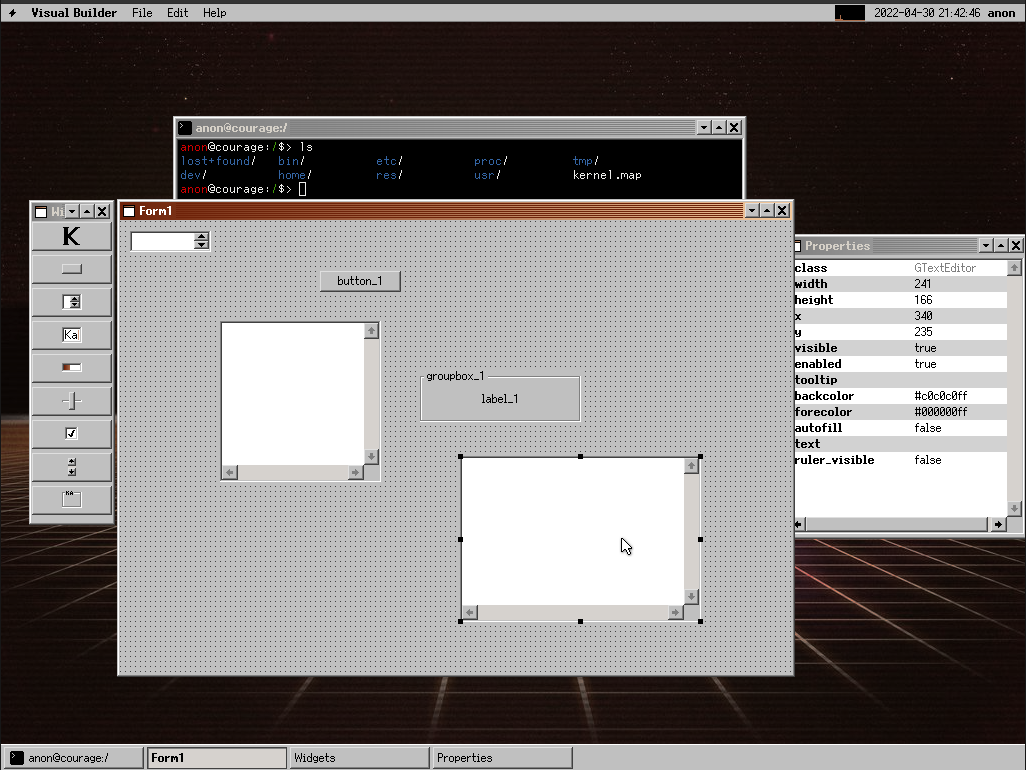
Re:Writing Gnome Apps with Swift by berkes on Thursday March 28, 2024 @04:42AM (#39848921)
My immediate though of the Swift Example Code was "but where does the business logic go".

This trivial example lacks it, and places it simple logic inside the UI code. But what if we want to protect against negative numbers? Or want to increase the number with larger increments if we hold the button pressed? Etc.

Your Delphi setup isolates business logic from UI. Which may seem "overly complex" in trivial demoes, but will help you the very moment you write the first test or add some business logic.

It's also why I see so many React apps spiral into an unmaintainable mess within days after their "git init".

Re:Writing Gnome Apps with Swift by NiteOwl066 on Thursday March 28, 2024 @05:54AM (#39849272)
You would just use some architecture pattern. I would say the most natural one for SwiftUI is MVVM so the logic would go to viewModel.
Re:Writing Gnome Apps with Swift by berkes on Thursday March 28, 2024 @11:07AM (#39852523)
Do I understand it correct when the UI then calls methods or functions on a model layer?
Re:Writing Gnome Apps with Swift by Wytwwww on Thursday March 28, 2024 @06:06AM (#39849356)
> Your Delphi setup isolates business logic from UI. Which may seem "overly complex" in trivial demoes, but will help you the very moment you write the first test or add some business logic.

So basically, the same as Cocoa/obj-C?

Re:Writing Gnome Apps with Swift by diggan on Thursday March 28, 2024 @05:48AM (#39849233)
> It's also why I see so many React apps spiral into an unmaintainable mess within days after their "git init".

This is true for any library/framework/architecture, and the same problem is very prominent in Svelte/Vue/React/Backbone/Angular and everything else.

Re:Writing Gnome Apps with Swift by berkes on Thursday March 28, 2024 @08:37AM (#39850490)
> and everything else.

No. It's true for any library or framework that lack isolation or decoupling concepts.

In react (and many of the ones you mention) there is nothing on place that guides you into decoupling. It has nothing, not even conventions, that help a junior to put stuff in the right place (or to prohibit or make it difficult to put stuff in the wrong place).

Part of that is due to how in TS/JS everything can grope around in everything else. But the bigger part is lacking conventions, primitives and structure in the libs and frameworks.

Sure, a library (which react is) doesn't provide structure (it's a distinguishing trait from frameworks). But the many frameworks on top of React don't do a good job either. They either become some Enterprise Ready amalgamation of saga's, redux, message-bus, setups, or they offer too little guidance. And in all situations, it's still possible to just fire a fetch() or put data transforms or business logic within the UI. Only discipline keeps people from taking this "much easier" route.

And when only discipline stands between us and "the easier way for now", that "easier way for now" will be chosen, and pain in future will be felt.

Re:Writing Gnome Apps with Swift by imbnwa on Thursday March 28, 2024 @11:04AM (#39852491)
>They either become some Enterprise Ready amalgamation of saga's, redux, message-bus, setups, or they offer too little guidance

At least Redux provides a semblance of immediately grokable data flow, this all gets worse with mobx which gives you all the flour you need to make spaghetti for the whole village. Worked on a codebase where you might have to chase down references across all sorts of files you wouldn't expect because everything is 'observable' so people, working 2-week sprints, just stop thinking about any kind of coherent structure cause it works anyway.

Re:Writing Gnome Apps with Swift by berkes on Tuesday April 02, 2024 @09:29AM (#39905534)
TBC. I don't mean that "redux == bad" just that it's often part of a large swath of systems that somewhat work together. And then still does not prohibit developers or libraries or mui or whatever from also keeping their own state in some `useEffect()` or `useState()`.

I've seen too many react projects that employ all sorts of enterprise patterns (amongst which redux) yet also wrangling-spagetti of useEffect and useState, often intermixed. There's one thing worse than having to unknot a mess of useStates: thats having to unknot a mess of useStates that is sometimes synced to and sometimes from and sometimes both, a redux global state.

Re:Writing Gnome Apps with Swift by fleabitdev on Thursday March 28, 2024 @06:04AM (#39849342)
I also admire the simplicity of this approach, but it has several downsides:

- Code-based UIs tend to work better with existing tooling, like comments and source control. You can freely customise your development environment, rather than being at the mercy of a single GUI app.

- Most serious UIs need code-like features, such as "for-each" to render a list of objects, or "if" to reveal a form when a checkbox is ticked. The easiest way to access code-like features is to write your UIs in code.

- You'll need to write some backing code in any case. Defining the UI tree and its "code-behind" in the same file could be considered more DRY.

- Live preview (or alternatively, hot reloading) will give you very quick iteration when writing a UI in code. It's not quite as good as drag-to-resize, but it's close.

- Automatic layout (which is non-optional nowadays) isn't necessarily a great fit for WYSIWYG editing.

- As React has demonstrated, the ability to quickly throw together custom components is extremely useful. Visual editors tend to make it more complicated and bureaucratic to define custom components.

Re:Writing Gnome Apps with Swift by jwells89 on Thursday March 28, 2024 @11:56AM (#39853092)
In addition:

- WYSIWYG editors are bad about making small unintended changes that can easily slip by undetected (Interface Builder in Xcode for example often changes XIBs/storyboards just by viewing them)

- WYSIWYG editors bury bits of configuration in inspectors that are only visible in certain conditions, e.g. a control being selected, making them less evident and more difficult to find

There are circumstances where I think they still work alright — for instance I still enjoy building Mac apps with XIBs in Cocoa, but there’s a reason for that: traditional desktop UI has much less of a need for flexibility and generally speaking, has far fewer moving parts since it doesn’t have to hide things as a result of limited screen real estate. Additionally, these apps will only ever run on Macs which further reduces need for flexibility/adaptivity.

For mobile and multiplatform on the other hand, I strongly prefer code. It just works better.

Re:Writing Gnome Apps with Swift by teekert on Thursday March 28, 2024 @05:14AM (#39849079)
But then what if the UI changes dimensions? Then you'd need an underlying set of rules, and isn't it best if you can set those rules yourself? How would that work graphically?

And then how about version control? Sure there could be (and is) underlying machine code, and you could try hard to make it human readable. But... IDK seems like a lot of effort to me for some small benefits.

Disclaimer: I have only very little experience with UI programming.

Re:Writing Gnome Apps with Swift by badsectoracula on Thursday March 28, 2024 @05:28AM (#39849136)
> But then what if the UI changes dimensions? Then you'd need an underlying set of rules, and isn't it best if you can set those rules yourself? How would that work graphically?

I don't know about current Delphi, but in Lazarus (which is kind of an open source and crossplatform Delphi) you set those rules visually. For example you can "draw" the UI by drag-and-dropping controls in a window/containers/etc and then you can add rules like "this button's left side will be 5 pixels from that label's left side and will be placed vertically so that it is centered relatively to the label". You can also set things like "this control (or container or whatever) will always be at the top/left/right/bottom edge of its window/container". This is done in the visual editor with immediate feedback (you can even resize the window/container while you are editing its layout to see how it behaves).

This allows you to make UIs that work not only across dimensions, but also handle different fonts, texts (for localization), scaling (for DPI) and themes. Especially important for Lazarus since its GUI framework has various backends that often look very different from each other.

> And then how about version control?

Lazarus (and Delphi - with the exception of some earlier versions - and really most GUI designers) save UIs in a text based format with a tree-like structure of key/value pairs, e.g. (i edited it a bit for brevity):

    object Main: TMain
        Left = 625
        Height = 505
        Top = 393
        Width = 903
        Caption = 'World Editor'
        Menu = MainMenu1
        Position = poScreenCenter
        object plRenderContainer: TPanel
            Align = alClient
            BorderStyle = bsSingle
            object plRenderWindow: TPanel
                Align = alClient
                BevelOuter = bvNone
            end
        end
    end
This can easily be stored in version control and diffed to see changes (in fact in my own projects before committing something to VCS i check both the code and the UI files to see what exactly i changed).
Re:Writing Gnome Apps with Swift by diggan on Thursday March 28, 2024 @05:47AM (#39849226)
> But then what if the UI changes dimensions? Then you'd need an underlying set of rules, and isn't it best if you can set those rules yourself? How would that work graphically?

Look into how various design tools handle flexible layouts. Usually a combination of flexbox/something similar to flexbox or slightly more old-school; constraints.

Here is an example with Figma: https://gdwn.medium.com/how-you-can-create-really-flexible-a...

Re:Writing Gnome Apps with Swift by hgs3 on Thursday March 28, 2024 @12:16PM (#39853525)
You solve this by using a layout control (a UI control specifically for managing the size/position of its child controls). For example using a visual form builder you could drag-n-drop a "vertical layout control" and then drag-n-drop controls inside it to be resized/positioned in a vertical stack.

The window itself can have a layout control that stretches to fill the window regardless of resizing. Layout changes would cascade down through the tree of UI controls and everything would resize/reposition accordingly.

Re:Writing Gnome Apps with Swift by datascienced on Thursday March 28, 2024 @07:35AM (#39849889)
The old fashioned screwdriver has it right. Why fiddle with charging batteries, using a chuck and selecting direction when you can just pick up a ol’ screwdriver and get going!

… assembles an appartments worth of new Ikea furniture…

Oh!

Re:Writing Gnome Apps with Swift by treprinum on Thursday March 28, 2024 @08:38AM (#39850497)
Try Delphi/Lazarus for just 10 minutes, then come back with a better metaphor. The productivity difference in comparison to React, Qt, GTK etc. is enormous. When was the last time you built the whole UI of a large app in 1 day?
Re:Writing Gnome Apps with Swift by datascienced on Thursday March 28, 2024 @08:36PM (#39859248)
How well does it handle having repeating collections, or complex state interactions that something like React can handle beautifully. Or reactivity (for example a feed of live production system information updating a display with lists if controls with buttons and actions that depend on that state)?

If you answer “brilliantly” I am genuinely curious to give it a go!

Re:Writing Gnome Apps with Swift by treprinum on Thursday March 28, 2024 @09:44PM (#39859676)
Delphi is not limited by crappy web limitations so reactivity is a moot point as one can develop whatever one likes with it. Play with FL Studio DAW, that one is written in Delphi, and see if it satisfies your definition of a "feed of live production system information updating a display with lists if controls with buttons and actions that depend on that state".

https://www.image-line.com/

See it in action e.g. here:

https://www.youtube.com/watch?v=gJUmUd4FfeM

Re:Writing Gnome Apps with Swift by rudedogg on Thursday March 28, 2024 @11:10PM (#39860254)
Wow I had no idea FL Studio was written in Delphi.

Anyway, I went pretty deep on SwiftUI from the announcement, and started programming with Delphi 7 / Visual Basic 6. While I enjoy SwiftUI, it has some rough edges still, and it's been 3 or 4 years. Hopefully Apple can put things together this year, especially for macOS apps.

I agree that Delphi is leaps and bounds better than the web technology in popular use today, and every reason I've heard for why (increased DPI, variable screen sizes, etc.) are just poor excuses.

The web is where the money was, development approaches forked, and now the worse approach happens to be more popular.

I can't decide whether it's sad or funny what Microsoft is trying to do with Blazor. They solved their Desktop UI problems by offloading them to you with a browser (now you have the problems).

Re:Writing Gnome Apps with Swift by datascienced on Friday March 29, 2024 @12:22AM (#39860673)
Just to note Reactivity vs. event handling soup and web/desktop are orthogonal.
Re:Writing Gnome Apps with Swift by boxed on Thursday March 28, 2024 @05:08AM (#39849055)
That's what mac/iOS development has had since before it was even mac, back in the NeXTStep days... But it doesn't work very well for very custom stuff.
Re:Writing Gnome Apps with Swift by sgt on Thursday March 28, 2024 @05:13AM (#39849077)
My thoughts exactly.

Generally writing UI code in Xcode (and presumably before that on NeXT as well) is a breeze and a joy. Work with your delegates, connections, outlets etc.

Re:Writing Gnome Apps with Swift by izacus on Thursday March 28, 2024 @05:13AM (#39849078)
And that's a good thing, because it discourages "very custom stuff" that made mobile apps such a usability disaster.
Re:Writing Gnome Apps with Swift by atlasduo on Thursday March 28, 2024 @05:52AM (#39849259)
It is the same approach as declarative UI programming like SwiftUI or QML, but with an extra GUI abstraction on top of it. An artifact of this GUI-driven development process (like Xcode or Glade) is still a file with some declarative markup (sometimes even human-readable).
Re:Writing Gnome Apps with Swift by treprinum on Thursday March 28, 2024 @08:35AM (#39850475)
There is a big qualitative jump when one can arrange and play with UI without writing a single line of code, even if the user's decisions about component placement are recorded in a declarative file.
Re:Writing Gnome Apps with Swift by steve1977 on Thursday March 28, 2024 @12:26PM (#39853745)
> An artifact of this GUI-driven development process (like Xcode or Glade) is still a file with some declarative markup

Not really in the case of Cocoa's Interface Builder (nib/xib files). There the artifact is basically a marshalled object tree of the actual UI objects, not declarative markup.

Re:Writing Gnome Apps with Swift by rimliu on Thursday March 28, 2024 @09:39AM (#39851273)
It is not. macOS/iOS had it for a long time with AppKit, UIKit. But the progression is usually this: you start with Interface Builder and storyboards or .xibs, then you see the problem with that and gradually move to code-only UI and then start looking at SwiftUI with it's declarative UI like a guy in that meme. GUI for layout just does not cut it, especially when your app runs in very different environments - it can be macOS, it can be a phone or just a smartwatch/widget.
Re:Writing Gnome Apps with Swift by steve1977 on Thursday March 28, 2024 @12:28PM (#39853788)
> especially when your app runs in very different environments - it can be macOS, it can be a phone or just a smartwatch/widget.

But the question here is also if it makes sense to basically have the same UI or even UI paradigms for such different types of environments.

Re:Writing Gnome Apps with Swift by treprinum on Thursday March 28, 2024 @10:47AM (#39852250)
Alternate take: macOS/Qt/MFC/React etc. got it wrong, Delphi got it right.