Last year my father unexpectedly passed away. All his stuff was on lastpass. Thankfully we had emergency access setup, and I was able to get into all his accounts 2 days later. It was an exceptionally important part of the transition phase, and without it we would have experienced significant financial harm.
How would KeyPass deal with the same type of situation?
Edit: as a site note, have used keepass + file on my (vpn reachable) synology for like 10 years, never had any issues. I use it in linux, android, ios and windows.
The bank I use maintains a list of people I allow to access my box along with their physical signature. When I needed to access my box, I had to sign in with a pen, on paper and show my ID. They compared that signature with the one I gave when I first obtained the box. I was granted access if they matched. If someone else came in with the key but their name wasn't on the bank's list or the signature didn't match, they wouldn't allow access to the box.
So make sure people you want to be able to access the box are on that list (which means they will have to go to the bank to provide a signature ahead of time.)
I am not saying we do this right. I certain have to "sharpen the pencil right" but the point is this should not be an afterthought.
I don't have one currently but perhaps I should.
Said items are titles to my vehicles and home, my marriage license, the will of a family member I've been entrusted with, birth certificates for my self and family members, and a couple of keepsakes for the kids that I'm very long on. It only costs me about $80 per year, and it brings me a lot of peace of mind. I have photocopies of all those docs at home, because you rarely need the real thing.
You give someone a copy of your password, your key file (that is, your long-ass password), or both, if both are required.
If you want to duplicate the "Give people time to refuse the request for access" part of LastPass's feature, then retain a lawyer to hold the copies for you and -after receiving a request for them- release them after an agreed-upon period of time (or if they get a proper death certificate or whatever).
It's frustrating, but the fact that 1Password's emergency kit is primarily intended and documented for me to use, and incidentally happens to enable account recovery for my heirs as well, means that they won't use it. One look at the documentation and they'll write it off as techie stuff that I was into that they won't be able to understand. With LastPass, there's stuff online specifically explaining that it's intended to provide access for family members in case of death, and I think that is reassuring enough that they'll stick with the process until they figure it out.
Your family sounds fun to be around.
1Password emergency kit is pretty well-designed, all things considered. It's a neat, single-page PDF with all the necessary information[0] (URL to login, email address/password, and the security key as text or QR Code for easy setup). I guess a link to a sort of tutorial/guide of how to use it to recover the account would be a welcome addition, but I find the format to be pretty solid.
It's pretty hard to find information on lastpass version of the feature. What does it look like? According to their documentation of the "Emergency Access" feature, it claims to be a one-time access[1]? What happens after that access, do you just lose your access forever? That seems much worse than the 1password emergency kit!
[0]: https://i.1password.com/media/1password-emergency-kit.png [1]: https://www.lastpass.com/features/emergency-access
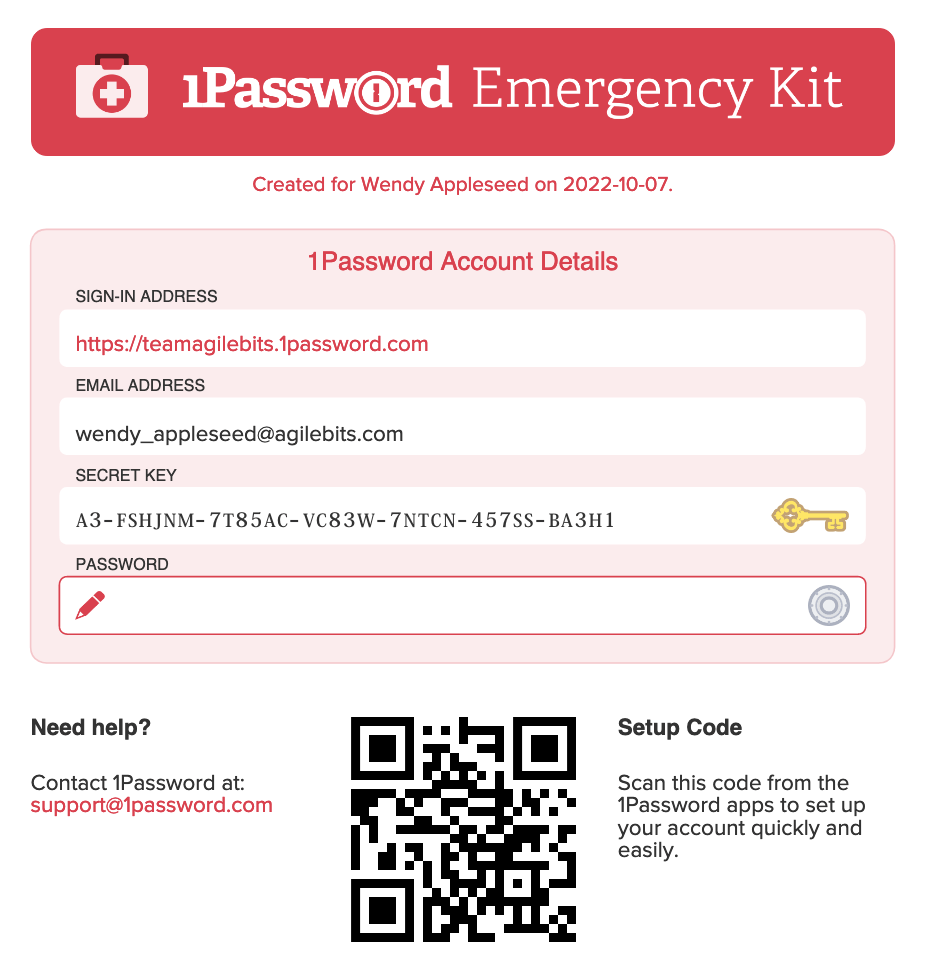
The rest of my accounts should die when I do.
For the financial companies, the process varied greatly by company. Some were OK, others were terrible, some flat out didn't work. The bottom line is that this isn't a super common business flow for them and its not something they make money on, so it gets very little attention. When you actually need to go through it you realize its a very difficult process.
Oh and it always takes a LONG time, even with the better companies. Easily months to get everything fully done.
For longevity a CD / DVD might last longer, but even then those are 30 years on average.
Just to offer a counter anecdote, I had a flash drive fail with my kdbx file on it and it was a monumental pain in the ass to recover from because I didn't have backups. Have backups. Especially for critical passwords that lock you out of everything. Flash drives do fail. Statistical failures SPECIFICALLY mean that some people will not fail, but that doesn't mean failures don't happen or that they're unlikely/uncommon.
I only have very low end flash drives (like the free ones you get at trade shows) fail on me. None of the decent ones I've bought (Kingston, generally) ever failed. I still have my various 4G, 8G, 16G, 32G drives I've bought along the years, all still work fine.
The only one that failed were used continuously plugged, or to write a lot (like recording audio), and very low-end with that.
It likely failed due to the nature of its transit (in my pocket, with my keys) but that's kinda the point. I think it's worth pointing out to those who haven't really investigated your "always plugged in" is the known failure of flash drives. Flash storage does has a fairly well documented write/erase cycles in the realm of like 10k-100k cycles. While the data should still be readable, its pretty easy for bad controllers and bad filesystems (most flash drives use fat32 which is a bad filesystem) to fail a write and corrupt data.
I think the main issue I have with a "do it yourself because you can't trust the cloud" mentality is that this advice usually comes from people who have done their homework as you have. It'd be dangerous to apply "just do x" advice without those conditions as it's a bit more nuanced and it can really put people in bad situations. I've seen this same thing with people who use a NAS over cloud storage and then it fails and they discover just what the monthly cost of cloud storage actually paid for. It'd be like telling home owners "just don't have a fire" and instead of paying for insurance, but not talking about the money you set aside and fire mitigation systems you invested in.
I can't imagine my parents wanting me to be locked out, and I can't imagine wanting my children to be locked out. Things like personal correspondence usually stop being private once someone is deceased, and indeed, are one of the few ways to get you know your ancestors.
I'm not American by birth, but I've lived in America long enough to understand both values. I don't think either way is better, but this strong emphasis on privacy (with family) is a very Western phenomenon. In most places, families have far fewer internal secrets.
What's especially odd is how much more Google and other corporations are allowed to know about Americans than families. For me, it's backwards.
Other things were also required. E.g. my father had a small business. It was big enough that it had real income and we wanted to keep it going, but not big enough that there was tons of redundancy for this type of event. Without having his passwords the business would have ground to a halt in 2 weeks (payroll). Add to that all sorts of business accounts (domains, mail, accounting, etc, etc) and having this emergency access turned out to be the key to keeping things going.
Even his personal email - he would have wanted us to have access, but how does he give access without just giving us his PW? Turned out that emergency access was the perfect solution.
Anyway even delegating it to a notary imho isn't near as much of a possible security issue than having an SaaS store all your auths online & them having a system in place to grant third party access.
Emergency access is a human problem. Seeking a technical solution to a human problem is just asking for trouble. This is why lawyers and customer service will always be necessary.
It would be great if someone can succinctly destroy that idea :D
Firefox, Chrome, and Edge also allow you to import passwords between browsers natively. I'm not saying that I recommend relying on the browser-based password manager (personally I use KeePassX), but I wouldn't advise against it for the reason you're describing. Just sharing some info! Please let me know if I'm mistaken on any of this.
Firefox doesn’t allow you to import a CSV in its default config. You need to enable it (it’s straightforward) and there is a guide here: https://support.mozilla.org/en-US/questions/1328161
Then you can import to eg Safari to have it all in iCloud Keychain.
And besides, if it was your private domain, you could submit that to google (I didn't follow up, but perhaps they spared the nuke for regular folks who just used their custom domain with gmail)
I am more worried not having access to my REGULAR Gmail account, with none to contact with, rather than G Workspace.
i have 1 vault with any important things and the other one just has everything else and i don't need to worry as much about the security of it or worry about where its stored and if that's secure.
its also great not having to type in a long master password just to get the login details for some small forum where it really wouldnt be a huge deal if somebody got access that vault. half of passwords in that vault are there mainly because i want them to be autofilled, not because i need to keep them secure
I'll have to pull changes if anybody added entries but: - Db lies on our own encrypted servers instead of someone elses cloud - access within the team is easily managed via ssh - I'll have a commit stream telling me if anybody added sth and what - can't easily fuck anything up in those shared records, have to consciously commit changes - when we rotate master pw we clean the repo
The db file on my Mac is shared with iCloud and is acted as the master file. All updates happen on the mac and the rest of the clients just sync and do read only. It has been working well.
All my website passwords are saved in firefox account so I rarely need to update the db file.
Sure it’s more cumbersome when it comes to syncing between devices, but it’s really not a big deal. One or twice a month I will combine my DBs from all my devices ok one machine, use the built in ‘merge’ functionality, and redistribute the I updated DBs back out to each device. It might take 10 minutes.
But I can rest assured that I’m the only one who has a copy of my DB/ key files, and a breach of _blank_pw_manager_ service can’t compromise my secrets. Highly recommend KeyPass. It’s free and open source, with high quality community ports available on every platform. https://keepass.info/index.html