News for hackers. Stuff that matters.
Re:Guest WiFi using a QR code by acchow on Tuesday July 12, 2022 @02:26PM (#32073893)
"ShinyTortoise78, no spaces, capitalization on the first letter of each word. Seventy Eight is the numbers 7 then 8, not spelt out as a word"

"Uhh English is my 3rd language and I don't know how to spell tortus. is there a QR code I can scan?"

Re:Guest WiFi using a QR code by na85 on Tuesday July 12, 2022 @03:26PM (#32074560)
The optimal solution is thus:

"What's your wifi password?"

"It's written right there on the fridge"

Re:Guest WiFi using a QR code by itake on Tuesday July 12, 2022 @04:19PM (#32075105)
"oh, I have to get up from my table, carry my laptop over to your fridge and attempt to type in the password without dropping anything?"

(I have a horrible short term memory and struggle with short phrases)

Re:Guest WiFi using a QR code by samatman on Tuesday July 12, 2022 @06:56PM (#32076848)
I have solved this (and a surprising number of similar problems) by pulling out the powerful camera I carry everywhere and taking a picture of the text I would otherwise need to remember.
Re:Guest WiFi using a QR code by itake on Tuesday July 12, 2022 @07:20PM (#32077070)
I have an iPhone 13Pro Max and this solution is cumbersome.

When I walk back to my desk, my phone locks (due to time out or intentional habit of keeping it locked). Then I have to tap buttons to unlock phone, launch the photo app, and find the image I just took. Then I have to spend time later to delete the image.

iOS has OCR on images. I can copy and paste the password from the photo, but still not as efficient as no or simple password, since I must still deal with locking.

Perhaps, this is better on android.

Re:Guest WiFi using a QR code by vbezhenar on Tuesday July 12, 2022 @09:22PM (#32077932)
Is Face ID so terrible? I'm still on iPhone 8 with fingerprint reader and unlocking is not something I notice, it's absolutely smooth.
Re:Guest WiFi using a QR code by itake on Wednesday July 13, 2022 @12:26PM (#32084902)
I use FaceID and it works well (even with a mask), but you still have to tap to find the Photos app and then the image you just took.
Re:Guest WiFi using a QR code by vbezhenar on Wednesday July 13, 2022 @03:20PM (#32087563)
Open camera (swipe from up side, then swipe from right side), click on latest photo in the corner, swipe if necessary. I very rarely open photos app.
Re:Guest WiFi using a QR code by itake on Wednesday July 13, 2022 @10:12PM (#32091204)
that is exactly my point: lots of tapping, when a simple verbal easy to memorize password is requires no extra typing.
Re:Guest WiFi using a QR code by 6510 on Tuesday July 12, 2022 @08:24PM (#32077559)
a clay tablet perhaps?
Re:Guest WiFi using a QR code by pjerem on Tuesday July 12, 2022 @05:07PM (#32075699)
You don’t talk like this when you are invited somewhere? You do ?
Re:Guest WiFi using a QR code by itake on Tuesday July 12, 2022 @05:57PM (#32076222)
I internally think this every time I bring my laptop to a cafe and the barista points at a 'cute' wifi password sign (or bathroom unlock code).
Re:Guest WiFi using a QR code by na85 on Tuesday July 12, 2022 @10:43PM (#32078476)
If someone wasn't smart enough to realize they could take the piece of paper off the fridge, I'm not sure they'd be able to operate a computer
Re:Guest WiFi using a QR code by denysvitali on Tuesday July 12, 2022 @03:40PM (#32074703)
Is that an O or a 0?
Re:Guest WiFi using a QR code by na85 on Tuesday July 12, 2022 @03:45PM (#32074753)
I would never write something so ambiguous.
Re:Guest WiFi using a QR code by noSyncCloud on Tuesday July 12, 2022 @04:05PM (#32074957)
Return to monke:

    password123
Re:Guest WiFi using a QR code by ant6n on Tuesday July 12, 2022 @07:14PM (#32077013)
The password is “1234”?! That’s the kind password an idiot would have on their suitcase!
Re:Guest WiFi using a QR code by randomhodler84 on Tuesday July 12, 2022 @08:38PM (#32077661)
That's amazing. I've got the same combination on my luggage.
Re:Guest WiFi using a QR code by justnotworthit on Tuesday July 12, 2022 @06:42PM (#32076690)
Is that a 0 or a Ø?
Re:Guest WiFi using a QR code by luhn on Tuesday July 12, 2022 @04:45PM (#32075449)
My solution to this is that "password" is the literal password of my guest WiFi.
Re:Guest WiFi using a QR code by oynqr on Wednesday July 13, 2022 @01:42AM (#32079343)
Might as well just open it up at that point.
Re:Guest WiFi using a QR code by luhn on Wednesday July 13, 2022 @02:58AM (#32079742)
No way. “password” protects me from the neighbor torrenting movies or Googling bomb recipes or whatever, which is the bulk of the threat model for residential Wi-Fi.
Re:Guest WiFi using a QR code by Gigachad on Tuesday July 12, 2022 @07:01PM (#32076897)
The proprietary Apple way is honestly the best but only works inside their system. You just try to join the wifi network and if the wifi owner has you as a contact they will get a popup requesting permission to the wifi and you tap accept and its done.
Re:Guest WiFi using a QR code by rootusrootus on Tuesday July 12, 2022 @07:23PM (#32077100)
To be pedantic, it doesn't require the owner to give permission. It'll get it from anyone else near enough who has it on their device. My kids give away our primary WiFi to their friends with some annoying regularity, even though I keep telling them to scan the QR code on the wall for the guest network.
Re:Guest WiFi using a QR code by mjevans on Tuesday July 12, 2022 @07:43PM (#32077263)
Why have a non-'guest' network? Force anything secure over a proper VPN E.G. wireguard.
Re:Guest WiFi using a QR code by fmajid on Friday July 15, 2022 @03:14AM (#32105551)
Streaming services block VPNs, many sites like Wikipedia impose restrictions (no editing allowed from a VPN), and geoloc based services act oddly (I live in London and my VPN server is in a London data center, but Google thinks we are in Dubai and G.Apps default to Arabic).
Re:Guest WiFi using a QR code by rootusrootus on Tuesday July 12, 2022 @08:20PM (#32077533)
Hadn't really considered that. A bit inconvenient, I don't know that I'd want to VPN inside my own network just to access my servers.
Re:Guest WiFi using a QR code by mjevans on Tuesday July 12, 2022 @09:24PM (#32077945)
Surely this is desirable while away from home too?
Re:Guest WiFi using a QR code by Abekkus on Tuesday July 12, 2022 @08:49PM (#32077728)
Not sure I could enforce QoS priority on the wireguard traffic. Easier with a non-guest SSID. Is there a huge performance benefit if there's just one SSID running in my airspace?

Also, for the OP, sounds like it's time to put the kids on the guest network.

Re:Guest WiFi using a QR code by mjevans on Tuesday July 12, 2022 @09:28PM (#32077967)
You can QoS tag by whitelisted mac addresses if it's just priority to known devices generally. At best your router may be able to slightly shape devices on the network (strategically dropped packets). QoS over the air doesn't really work as there's zero control of any devices tying up RF spectrum, and zero ability to defend against DoS attacks (E.G. neighbor trying to stream 4K over wifi).
Re:Guest WiFi using a QR code by rootusrootus on Tuesday July 12, 2022 @09:00PM (#32077800)
> sounds like it's time to put the kids on the guest network

I have considered that, for sure.

Re:Guest WiFi using a QR code by lxgr on Tuesday July 12, 2022 @07:56PM (#32077365)
It definitely asks for permission, and only prompts mutual contacts to begin with, as far as I know.
Re:Guest WiFi using a QR code by rootusrootus on Tuesday July 12, 2022 @08:21PM (#32077538)
It asks the sender for permission, which is not the same as asking the WiFi owner. My kids have their friends as contacts, so it happily shares with them.
Re:Guest WiFi using a QR code by Gigachad on Tuesday July 12, 2022 @09:10PM (#32077855)
My wording was probably a bit wrong but there is no concept in wifi of ownership so by owner I meant the person who set it up but not exclusively them, just that they would have it.
Re:Guest WiFi using a QR code by acchow on Tuesday July 12, 2022 @07:28PM (#32077136)
Why would a coffee shop owner have me as a contact?
Re:Guest WiFi using a QR code by ant6n on Tuesday July 12, 2022 @07:12PM (#32076996)
It’s terrible because it means on apple there’s no obvious way to share Wi-Fi settings like on android. Thanks apple for using Wi-Fi to try to do vendor lock in.
Re:Guest WiFi using a QR code by rootusrootus on Tuesday July 12, 2022 @07:24PM (#32077108)
How is that lock-in? It's just a feature. It doesn't in any way lock you out of setting up WiFi the old fashioned way.
Re:Guest WiFi using a QR code by ant6n on Tuesday July 12, 2022 @07:29PM (#32077144)
Okay so how do I find out the wifi password of a network an iOS device is connected to, using that device? On android it’s easy: go to Wi-Fi settings, hit “share”, show QR code.
Re:Guest WiFi using a QR code by rootusrootus on Tuesday July 12, 2022 @07:32PM (#32077173)
That's just a normal security feature, passwords are input only. Just because Android lets you read them doesn't make it an ideal choice or any kind of standard. Besides, I don't want my kids to get the password from their devices and then share with their friends.

And how would that constitute lock-in anyway?

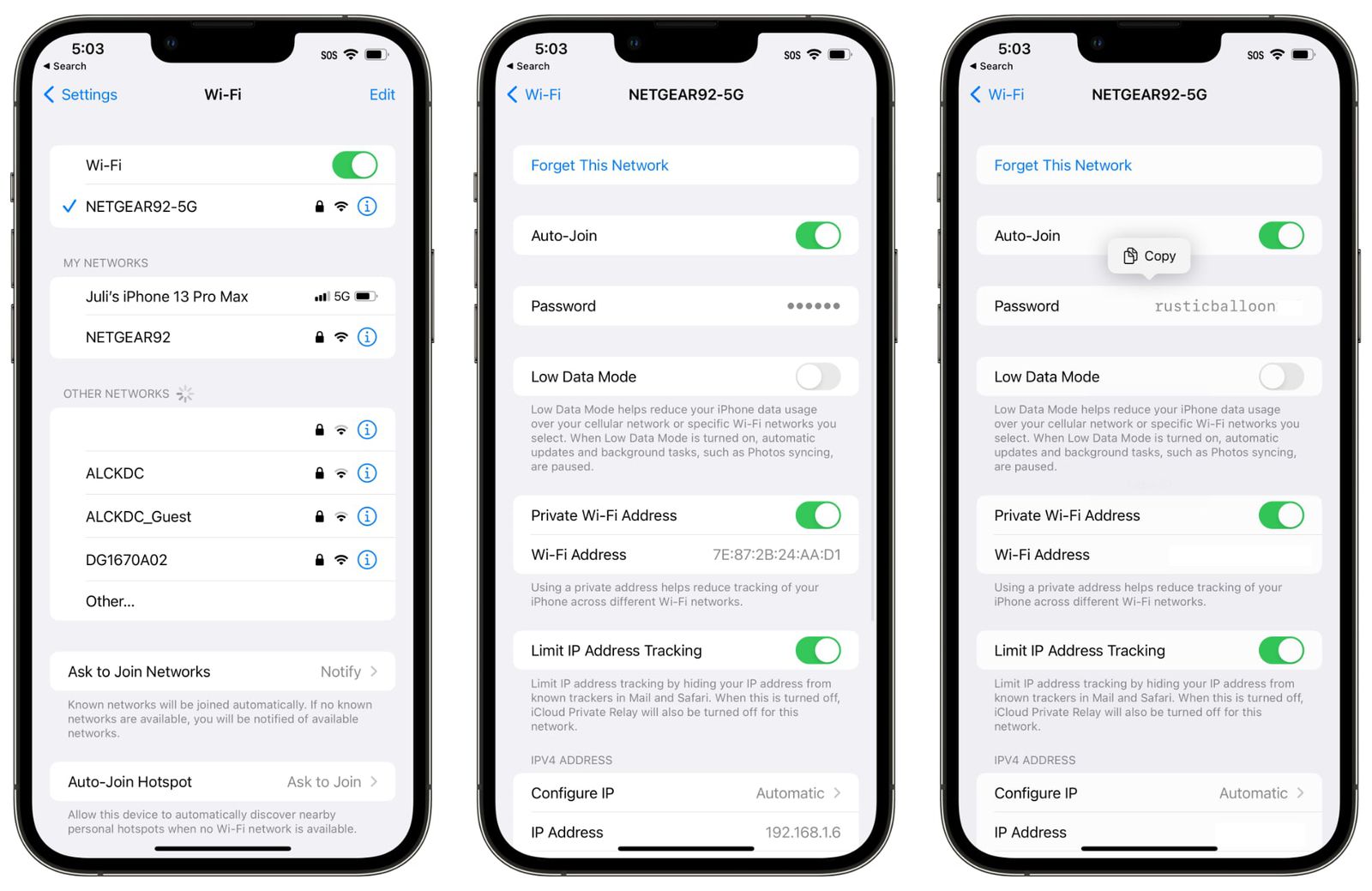
Re:Guest WiFi using a QR code by vbezhenar on Tuesday July 12, 2022 @09:20PM (#32077920)
iOS 16 allows to look up a saved password.

https://images.macrumors.com/t/3REfPfn3TRhO5oOFqVsyqdR9qcI=/...
Re:Guest WiFi using a QR code by woojoo666 on Wednesday July 13, 2022 @01:38AM (#32079328)
I wonder why they didn't just add it in at the beginning, I can't imagine the implementation being that difficult
Re:Guest WiFi using a QR code by 6510 on Tuesday July 12, 2022 @08:22PM (#32077547)
you are not my father!
Re:Guest WiFi using a QR code by cortesoft on Tuesday July 12, 2022 @11:50PM (#32078850)
Just make your WiFi password simpler