Re:Guest WiFi using a QR code
by Gigachad on Tuesday July 12, 2022 @07:01PM
(#32076897)
The proprietary Apple way is honestly the best but only works inside their system. You just try to join the wifi network and if the wifi owner has you as a contact they will get a popup requesting permission to the wifi and you tap accept and its done.
[ Parent
| on HN ]
Re:Guest WiFi using a QR code
by rootusrootus on Tuesday July 12, 2022 @07:23PM
(#32077100)
To be pedantic, it doesn't require the owner to give permission. It'll get it from anyone else near enough who has it on their device. My kids give away our primary WiFi to their friends with some annoying regularity, even though I keep telling them to scan the QR code on the wall for the guest network.
Why have a non-'guest' network? Force anything secure over a proper VPN E.G. wireguard.
Streaming services block VPNs, many sites like Wikipedia impose restrictions (no editing allowed from a VPN), and geoloc based services act oddly (I live in London and my VPN server is in a London data center, but Google thinks we are in Dubai and G.Apps default to Arabic).
Re:Guest WiFi using a QR code
by rootusrootus on Tuesday July 12, 2022 @08:20PM
(#32077533)
Hadn't really considered that. A bit inconvenient, I don't know that I'd want to VPN inside my own network just to access my servers.
Surely this is desirable while away from home too?
Not sure I could enforce QoS priority on the wireguard traffic. Easier with a non-guest SSID. Is there a huge performance benefit if there's just one SSID running in my airspace?
Also, for the OP, sounds like it's time to put the kids on the guest network.
You can QoS tag by whitelisted mac addresses if it's just priority to known devices generally. At best your router may be able to slightly shape devices on the network (strategically dropped packets). QoS over the air doesn't really work as there's zero control of any devices tying up RF spectrum, and zero ability to defend against DoS attacks (E.G. neighbor trying to stream 4K over wifi).
Re:Guest WiFi using a QR code
by rootusrootus on Tuesday July 12, 2022 @09:00PM
(#32077800)
> sounds like it's time to put the kids on the guest network
I have considered that, for sure.
It definitely asks for permission, and only prompts mutual contacts to begin with, as far as I know.
Re:Guest WiFi using a QR code
by rootusrootus on Tuesday July 12, 2022 @08:21PM
(#32077538)
It asks the sender for permission, which is not the same as asking the WiFi owner. My kids have their friends as contacts, so it happily shares with them.
My wording was probably a bit wrong but there is no concept in wifi of ownership so by owner I meant the person who set it up but not exclusively them, just that they would have it.
Why would a coffee shop owner have me as a contact?
It’s terrible because it means on apple there’s no obvious way to share Wi-Fi settings like on android. Thanks apple for using Wi-Fi to try to do vendor lock in.
Re:Guest WiFi using a QR code
by rootusrootus on Tuesday July 12, 2022 @07:24PM
(#32077108)
How is that lock-in? It's just a feature. It doesn't in any way lock you out of setting up WiFi the old fashioned way.
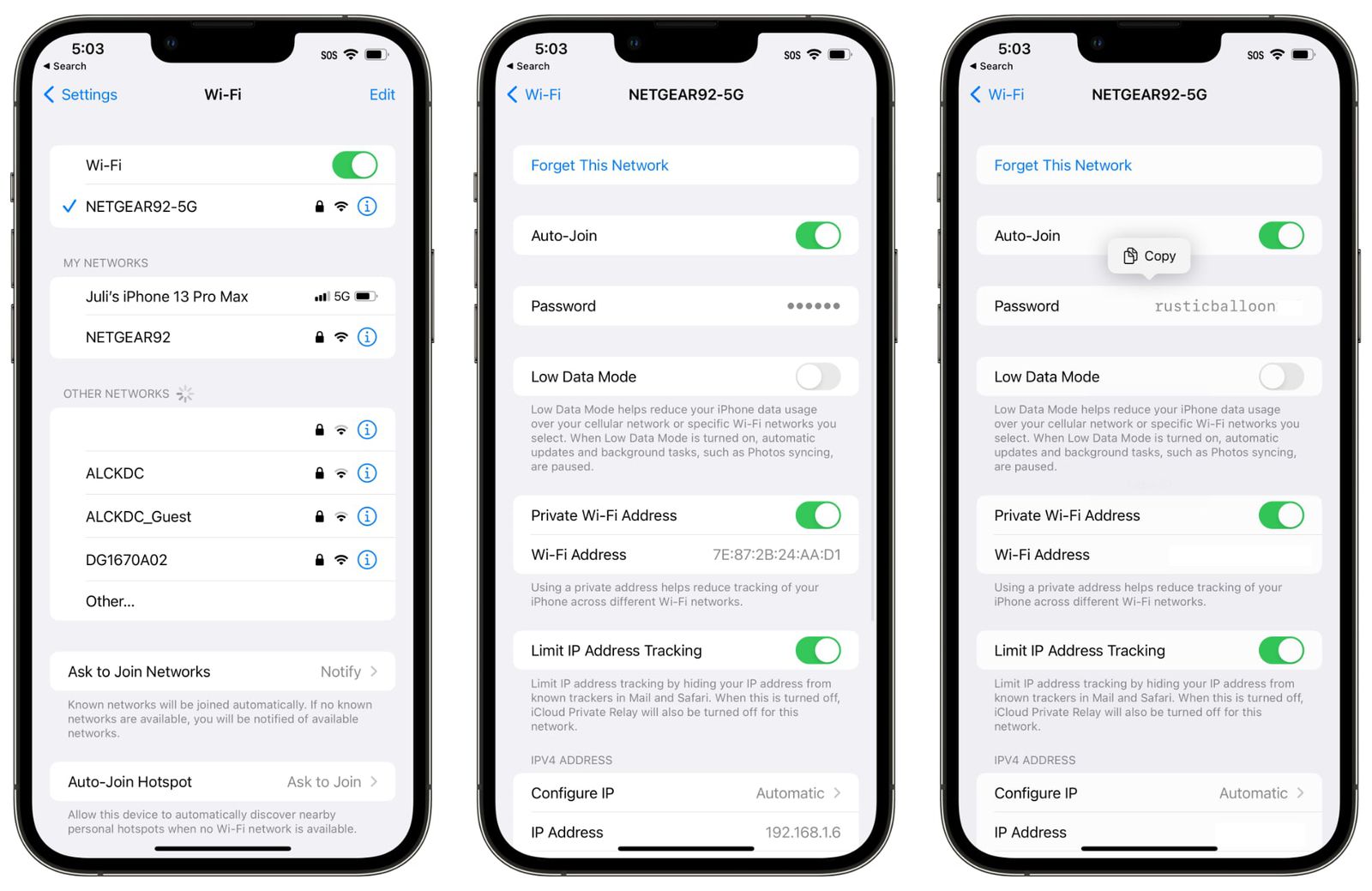
Okay so how do I find out the wifi password of a network an iOS device is connected to, using that device? On android it’s easy: go to Wi-Fi settings, hit “share”, show QR code.
Re:Guest WiFi using a QR code
by rootusrootus on Tuesday July 12, 2022 @07:32PM
(#32077173)
That's just a normal security feature, passwords are input only. Just because Android lets you read them doesn't make it an ideal choice or any kind of standard. Besides, I don't want my kids to get the password from their devices and then share with their friends.
And how would that constitute lock-in anyway?
iOS 16 allows to look up a saved password.
https://images.macrumors.com/t/3REfPfn3TRhO5oOFqVsyqdR9qcI=/...
I wonder why they didn't just add it in at the beginning, I can't imagine the implementation being that difficult