It has no comprehension of the actual components it's placing, or the nets it's routing. So it'll find a physical layout that matches your schematic in a logical sense, but the actual circuit may not work when it's finally assembled (ADC chip placed next to a switching power chip, for example). Some components have strict tolerances or needs, and some types of designs require special considerations.
So, a newbie will click the button to auto-route and then have the board fabricated and then do the final assembly - then wonder why it doesn't work, or it sometimes works, etc. If you don't have the skills and knowledge to do the layout the "right" way, you likely don't have the skills or knowledge to debug a bad board layout.
PCB layout is not trivial. Some folks spend an entire career doing just PCB layout. For low-speed trivial designs, you can get away with a lot of bad practices, but it's best to invest some small amount of time learning the craft.
However, general rule of thumb, if your design works on a breadboard then you can probably make it work on a PCB... probably.
The issue with PCB-design is that:
1. Even the slowest ~4MHz microcontrollers have 1ns rise/fall times, or 1GHz+ of high-frequency noise all over the place. Faster chips have even faster rise/fall times.
2. ~1GHz wavelength is ~30cm, meaning that a 7.5cm trace is an effective antenna for 1GHz noise. As it turns out, 7.5cm is well within the scope of typical PCB design. A faster rise/fall time (ex: 0.2ns rise/fall time is 5GHz noise instead) could have "antennas" as small as 2.5cm or 25mm.
3. Vias have non-negligible inductance and resistance. Modern signal design also requires the designer to think of "the return path", so a 2nd nearby via to serve as a capacitively-coupled via (IE: "Route a ground-via next to any signal-via"), and other such rules, are rarely followed by autorouters.
------------
It looks like the professional tools are fixing this problem by performing FEA of signals / coupling / electronic flux, and helping the engineer visualize the magnetic and electrical fields of the designed PCB-layout.
However, if you are a conservative human, you can get such a feel for your circuit by thinking about return-paths and mentally thinking about microstrips (ex: wire + ground-plane return), or striplines (ex: ground-wire-ground plane for internal layers). The return path is always on the nearby ground plane, so it makes it very easy to think about.
On a long-enough timeline, ML tools will become a natural fit for placement and routing. It is a rather dumb thing for humans to have to deal with, at the end of the day, but the existing tools are just not good enough to take over the job. At least not the tools that most of us have access to.
Lets say you have a trace that's 4mm wide that skips across a slot in the ground-plane. Is this good or bad?
1. Why is it 4mm? Is this a high-current line / power line of some kind? A crude power-plane that's just oversized for a trace? Is this a switching regulator with a bit of switching noise? Or is it a "quiet" power line, like a battery or LDO-line?
2. Is this trace actually ground? And the 4mm is to "jump" across the gnd-slot to provide a controlled return-path for some other line? What is the relationship of this trace vs another trace?
----------
If its a fat line on a switching power supply with a ton of current, maybe its a bad idea. If its a fat gnd, maybe its a good idea. Its all contextual. Its not very clear how a hypothetical ML tool would figure out this context, outside of like learning to read data-sheets and/or the EE writing down the purpose (very precisely) on each net... which probably is slower than just routing the trace manually to begin with.
Eventually.
Or hell, that PinC1 is an input vs output.
Modern chips have very flexible pins. Many microprocessors (and MCUs) can configure any pin to be input, output, tri-state output, pull-up output, or pull-down output, for example, with different properties in each state. Some pins can be analog (on-board op-amps), others can be digital and high frequency, still others can be digital but rarely-changing / effectively DC for the lifetime of the application.
Each scenario changes how you'd route a trace.
Tools to help with high speed are much much more important
Because when you market a tool as "Easy to learn", "from beginners to experts", and "For everyone", then I would expect some decent newbie-friendly features.
Honestly as a non-professional who makes PCBs that are almost exclusively "connect this pin to this other pin over here", this kind of comment comes of as a bit unnecessarily condescending in a "I don't need this feature, so nobody else should need it either" type way.
Take software for example - newbies can and do write code, but it's rarely good or error-free. Codeless solutions have appeared - but there's good reasons even those aren't used often.
Any auto-routing feature is going to appeal to absolute beginners, and few if anyone else. So, we're asking a FOSS project to spend a tremendous amount of time building in a good-enough auto-routing feature that only a small portion of their audience will ever actually use, or use more than once.
If your board is simple enough for auto-routing to provide value to you - then I would assert your board is simple enough for you to spend 30 minutes doing the layout yourself.
I would have thought that autorouting would have improved in all that time, but from this conversation, it sounds like it has become worse. What gives?
More focus on hybrid routing tools where there is some automation going on while a user routes things is typically were you get much more useful help in modern ECAD.
Maybe you could encode all of them in the schematic and then let a modern algorithm suggest a board layout, but in practice nobody seems to do it that way (note that I am just a hobbyist with limited experience).
I worked with an RF engineer who'd been in the field since the 70s, and he'd always use the auto-router for anything "slow". If it was "digital dc" or digital logic or under a MHz then it was auto-routed because he didn't have time for that. Anything critical that carried RF or drove a reference was hand-routed first then anything left would get the auto-routing treatment. And this was in a radio astronomy observatory!
If you cannot commit a few minutes to learn how to route correctly, then you really are just "hoping" for something magical to work.
Would you take the same position in software? Almost certainly not - because it is complex.
Sure, there's plenty of no-code or low-code platforms out there - but why are they not more popular? Because they universally suck and their target user quickly "graduates" into real coding.
People asking/demanding auto-routers are asking a FOSS project to commit a lot of time and resources (because it's not trivial to implement!) to a feature a very small subset of their userbase will ever use, and will also be the most negatively impacted by said tool when it fails them without them realizing.
Seriously, if your board layout can be done by an auto-router then it is a trivial board and you should spend a few minutes learning the basics. There is nothing but upside in doing so.
Unlike software, all the "features" of a component are not readily available to a tool like that. Maybe one day they will be, but we're very far away from that. No two component manufacturers do anything the same...
Its the random creation of antenna that suddenly throws your electrons off the board and suddenly causing nearby traces (to also turn into antenna) to get crosstalk leading to failure. Or throwing your electrons off the board and failing EMI regulations.
With 1ns rise/fall times on typical microcontrollers (even a 4MHz ATMega328 / Arduino), an antenna can be inadvertently created with just a 75mm trace. With a faster chip, you could have antenna at 25mm or even shorter traces.
-----------
PCB board design today is about understanding the physical attributes of the PCB: how the stackup causes your board to act like a capacitor (and therefore a source of voltage when the bulk / decoupling capacitors run out of energy). Seriously, this is called "PDN" or power-distribution network. You turn Layer2 into a ground-plane and add a plane to Layer3, calculate the dielectric thickness and estimate the amount of latent capacitance you get between a 30mm^2 ground vs power plane seperated by 0.1mm of dielectric.
And not only do you calculate this, you *take advantage of it* to reduce high-frequency (ie: 1GHz+) power-delivery issues.
Which could happen as low as ~100MHz in practice, because its more about rise/fall times than it is about the actual clock speeds.
--------
There are two kinds of PCB designers. Those who know that they're designing an antenna... and those who do not know they're designing an antenna. The PCB itself is an antenna and you need to design it in a very peculiar manner to minimize radiation. You can't just guess-and-check this (I mean, I guess with enough time/money you can guess/check... but ideally you lay things out with a mental simulation of inductances, eddy currents, an idea of electric fields and return paths of your signals across low-through-high frequencies)
If ~20MHz is the highest speed signal on your entire design (ie: ~20ns rise time, which STM32G0 or PIC or AVR beginner-friendly chips are around), then your wavelength is 15-meters, meaning the quarter-wave antenna would be (at a minimum) 3.75 meters (12 feet long), which is just far larger than any PCB-circuit a beginner will ever come across. (And will only in practice, be an issue on cables running off-board).
Why not?
> Sure, there's plenty of no-code or low-code platforms out there - but why are they not more popular?
I would compare software with auto routing and without more to Python with C situation. Auto routing is more like garbage collector to me. Should we discourage people from programming in Python just because for hobbyist C or C++ might too hardcore? It's not that they have to be professional developers - why not let them learn how to write even simple python script that help them processing some text and do simple automation? It's not that everyone need or want to write operating system.
After all today python is the most popular programming language even though it mostly started being used in education or basic scripting. Should we also forbid people using ChatGPT to help with programming for doing some creative coding? Let them have some fun.
Your example perfectly illustrates that autorouting is a catch 22: in order to get something useful out of autorouters you either have to (a) provide them with a enough information on signal, DRC, and fab parameters OR (b) have a design so simple that it doesn't really matter. (a) requires subject matter expertise that beginners won't have and (b) really is such simple point and click that beginners don't gain anything from an autorouter. The beginner already has to learn enough to place components on the board before routing, which IMO is where 80% of the leverage of expertise comes in anyway.
The calculation changes if you're all bought in on an EDA package like Altium and you know all about modular schematics and PCB docs on with standardized PCB layering. Then maybe you can start cobbling together quick designs that are largely autorouted but again, catch 22: you have to know enough Altium to know how to do that and enough electronics to know how to select open source modules and parts.
And I mean *learned* because it was not as simple as clicking a button.
Using it right means dropping down keepouts over sensitive areas so that the autorouter knows to stay away -- you know it, but it has no way to. It means placing vias to a ground plane next to every ground pin so that it doesn't try to deal with top layer ground planes breaking. It means telling it how much to penalize a trace for being routed on the power plane layer or the ground plane layer.
It's a super useful tool -- if you are careful with it like you should be with, well, chatgpt. Give it all the information you know it needs to know, patiently and quantitatively, and sure it'll find a reasonably optimal solution. You just have to tune it as well as you tuned yourself.
The newbie doesn't know that yet, and believes there could be any other approach, but that doesn't matter. They are wrong.
* The very best most costly, fall over and fail
* If your design is simple enough for the autorouter to work at all, then it's simple enough to do yourself.
These two points are true and unavoidable.
The "subject matter expert", actually, all of them not just any paryicular one, is in fact a subject matter expert, and is giving you the useful information that you lack. It is the most useful info and the shortest most convenient path from idea to working board.
I'm a hobbyist, and when I started out I used autorouting a lot initially to give me a starting point, and inevitably I would adjust everything manually. Autorouting wasn't magic, or even particularly good, but I found it helpful. My PCBs weren't particularly complex, but not dumb either.
I totally get that autorouting is almost certainly a waste of time anything serious, but writing off autorouting entirely, even for hobbyists, comes off as more of a meme than a position resulting from actual experience.
Hell, if autorouting really sucks that bad, then maybe that's a good way for some people to learn how not to route your circuit paths.
Don't you think it'd be possible to create such a thing, which would also create labeled solder points for jumpers where traces needed to cross?
Maybe "rat's nest" already does this; I don't know what that is.
Without that knowledge, it's impossible to create a good auto-router/layout tool. The tools often just stack components as close together as physically allowed by the necessary traces.
For very trivial stuff, it might work ok. Anything else, no chance unfortunately.
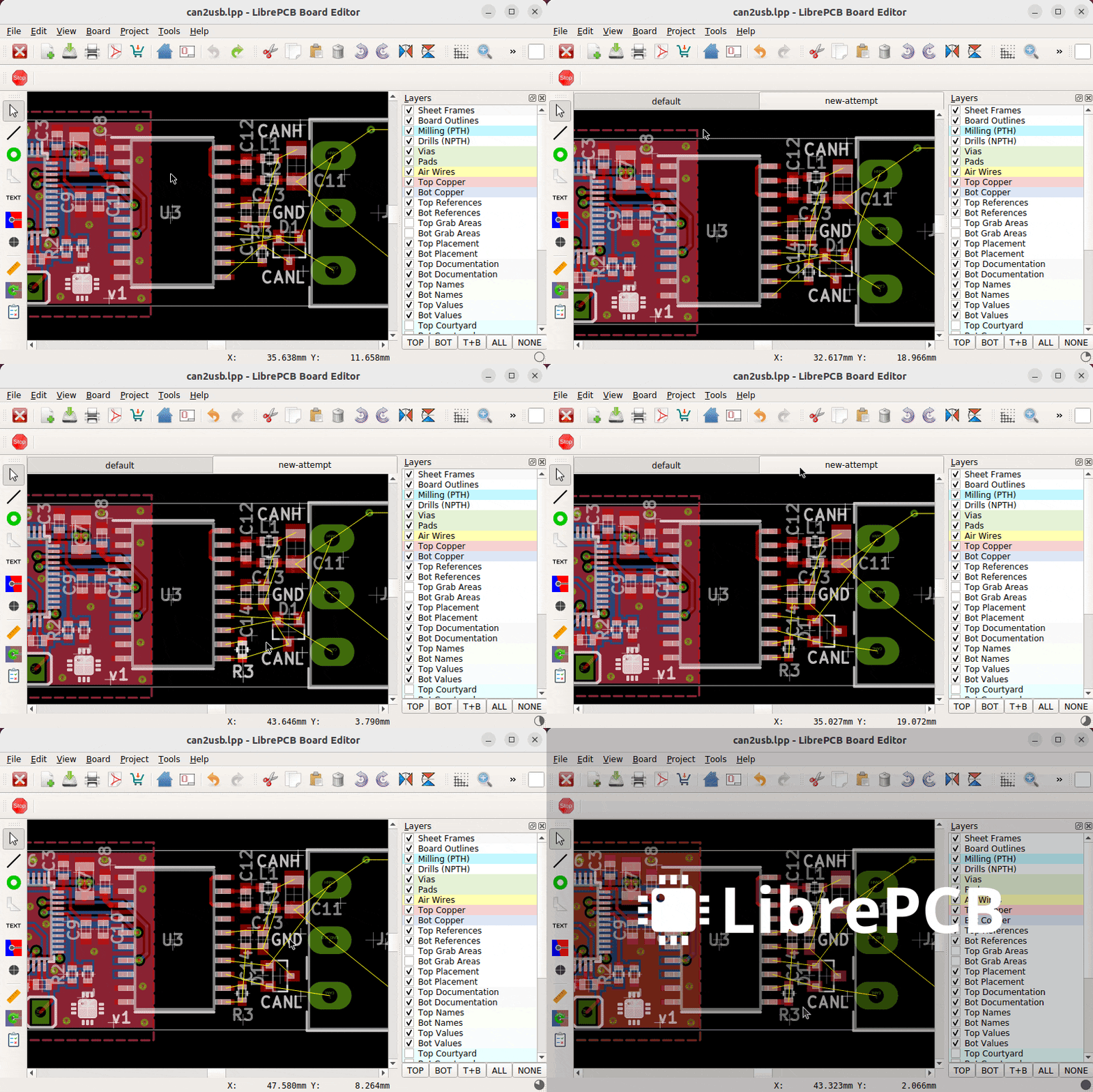
You start out the board deisgn by orienting your parts in a way that there are as few intersections as possible. Then you draw the connections, and the ratsnest lines disappear one by one. If you have intersections, you need to route around the part, or work with multiple PCB layers to get rid of them.
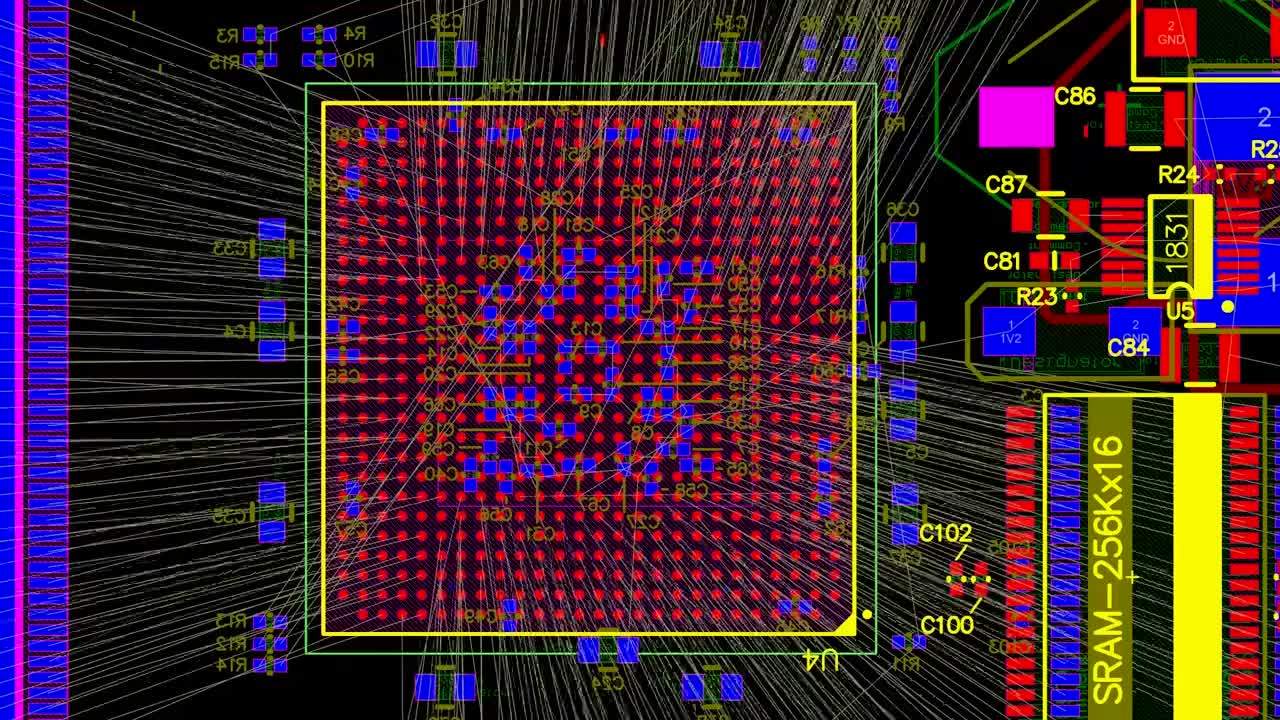
At that point "as few intersections as possible" becomes a bit of a lark and to maintain any semblence of sanity you have to prioritize connections, hiding all other nets.
It’s not meant to be condescending. Virtually everyone who starts doing PCBs goes through a phase where they think that it must be “easy” to press a button and get everything laid out and connected. Countless developers have tried to create software to do that over the years.
Maybe some day it will come to fruition, but the reality is that autorouting just isn’t very useful for setting up entire boards.
I think beginners get confused because they think the schematic connections contain all of the information needed to properly route a real board. Then you get into the real world and realize that you need to select connector locations in a way that make sense, place capacitors to minimize loop area, orient components to keep parasitics minimized on important nodes, make traces bigger where you need high current or better heat dissipation, and so on.
Which is why it’s not condescending to say that autorouting/autoplacement isn’t useful. It’s just a reality of making PCBs. You have to do a lot of manual decision making at layout time that isn’t easily automated away.
I have used autorouters for certain buses, but I have to set up the constraints in detail and steer the routing myself still. There is no autorouting/autoplacement that will make good boards for you, even though everyone goes through a phase where they assume it must exist.
I hope they add autorouting, but I would much rather have more parts libraries, access to the part supply house APIs, more 3D models, better tools for verifying that your design will be pick and placed the way you think it will and there isn't something inexplicably upside down because of a bad footprint file, etc.
Hobbyists often like to do more analog stuff with discrete parts than I do, so SPICE simulation in a way that's as easy as the Falstad sim may be important.
I don't think there's any true beginner friendly open sims out there, ideally you'd have a one-click way to fuzz all the components and see how everything behaves with noise in every wire, bad connections everywhere, 60Hz buzz getting in, etc, so you could verify it still works in the worst case of crappy counterfeit parts and loose connections.
My experience with the Altium auto-router (which is pretty good, as these things go) was that it took quite a bit more time to setup and tune than to just bite the bullet and manually route the board. Eagle's auto-router was easier to use, but it was also attached to Eagle.
At the end of the day, the difference between getting an autorouter to the point that it can autoroute a simple 2-layer board with lots of through hole parts, getting it to the point that its useful to the average professional, is monstrous. There's so much more to routing that just widths and clearances. It will probably someday be the case that most PCBs are laid out and routed entirely by computers. But for now, there's too much subtlety in PCB design. I'd lose my mind if I had AI-designed boards failing QC because of tombstoning, for instance. I'm not sure that anyone is trying to simulate board heating in detail enough to predict its occurrence, let alone evaluate solutions prior to board fab. And yet, the solution is pretty easy once you see that its happening in the first place.
I would consider it absolutely unnecessary, and invariably results in something that is unreliable at best.
Do you have examples that show how it is essential?
I can't see how it would cost me money to do so, on the other hand if I was to blindly autoroute my designs i'd spend more time troubleshooting and way more money doing several revisions before I got something stable.
It can't trivially tell which areas of your board you have intended for analog signals, or where high speed things are. When you autoroute a 2 layer board (in particular) if you don't drop vias next to ground pins it goes nuts trying to connect ground pins with a ground pour constantly changing. It tries to keep traces as close as possible to edges where a human would really just give it "breathing room". If you want to make a prototype that can be reworked, you need to be super careful (you always do, but it's easier to miss a lack of accessibility if it's automatic). It orients traces in ways that are in accordance with a score metric rather than geometric elegance, legibility, or crosstalk because it doesn't know what signals are where.
None of these are unsolvable, but they are the kinds of problems I expect when I use it. That said, if I have 1000 traces to route I will do 970 of them manually and be grateful for the autorouter doing the last 30 that would take me a half day to figure out a clean path for.
The problem comes when people think an autorouter is a computer program written by people who know about their PCB and that the results will approximate an expert doing an okay job. Then they realize that's not the case and decide the autorouter cannot do a decent job ever. Much later they realize that if they actually learn how the autorouter works they can use it as a tool to do... what the autorouter is programmed to do. But it can't read the designer's mind.
In the future I certainly hope that the integration of ECAD and Spice works transparently, I think it's closer every year.
I also hope that EMI simulations of PCBs become straightforward as well. I think if Spice worked, that would be a pretty clear second step and it would be a gamechanger.
As soon as the autorouter is aware of all of these constraints and is trying to keep signals that you manually specify to constraints you specify (say, from spice or from you reading the datasheet -- or an language system trying its best I guess, I've had terrible luck extracting data from datasheets).
That would be genuinely game changing. You could tell the autorouter not just "go diagonal or add 4 points" or "a via costs 3 points" or "stay away from this area" but instead "keep EMI spread spectrum and give me a spectrum for the noise as measured in a solid surface one meter away" so that you can actually simulate your FCC test. And make the autorouter minimize the spikes with filters of various kinds. And since Spice might know how fast you are operating different traces, and knows rise-fall times, the autorouter can simulate how much cross talk there is.
None of this puts the designer off the hook, it just changes the nature of the work. For more than a trivial board I think it's unlikely a human could do better than an EMI aware autorouter with Spice level knowledge of what every single net is doing -- and on top of that knows all about the capacitance between planes...
Basically, I see this as a huge opportunity for growth, and dismissing autorouting out of hand is something a senior professional might well do because autorouters have sucked for so long. They may continue to suck, if you don't use them like algorithms and instead pretend they are an expert. But I see a heck of a lot of people trying very hard to create an EMI and Spice aware ECAD system, even KiCAD has Spice integrated (albeit I have no clue how to use it). Eagle does too, so Autodesk will.
I assume Altium has Spice and I sure hope it has EMI since what else is the thousand dollars per year per head for... Okay, no, I know their parts management system is second to none I've ever seen, god I wish I could specify alternate parts and automatically generate BOMs based on alibaba real-time availability in KiCAD. But again... soon.
In any case, kudos to this project either way. I will never, ever use a proprietary PCB tool again in my life, I still struggle to get OrCAD 16.2 running and regret learning Eagle instead of just jumping to KiCAD and recognizing that nothing that can be bought will stay available.
It is too much to ask someone who does professional PCB designs to change tools for reasons that only are about the business that makes the tools. It's just a waste of so much billable productivity... that I don't want to do. KiCAD will hopefully be my last, I've learned my lesson.
That said... I am still trying to understand how this is better for a beginner than KiCAD, which does have an autorouter, has a pile of paired extremely useful tools (calculator, geber viewer, image importer), a pile of excellent add-ins, an excellent footprint library (I've rarely had to manually do it), a shockingly complete symbol library, a 3D viewer that I can use to check footprints against manually downloaded packages, excellent DRC, and for little things it can round traces and make teardrops which is just aesthetically pretty compared to sharp corners.
Why do people always ask for this? It's a feature only newbies use, and once a project becomes even slightly less than trivial, the best auto-routing tools fall face down. There's an awful lot more to PCB design than just physically fitting the components on the board.