News for hackers. Stuff that matters.
Re:Windows 11 Start menu ads look set to get even worse – th... by bottlepalm on Tuesday April 18, 2023 @01:33PM (#35617116)
It’s funny for what is essentially a ‘file manager’ Microsoft makes it hell to manage your files. My friends and family and constantly confused by the 10 different interfaces there are for file management. Desktops are a mess of of half trash files. The cloud integration the file explorer is a confusing mess. The UI for saving a file from Office is the absolute worst. I’ve had to help someone just save a file and it was difficult even for me to figure out the UI — borderline comical how bad it is.
Re:Windows 11 Start menu ads look set to get even worse – th... by mixmastamyk on Tuesday April 18, 2023 @01:38PM (#35617201)
So depressing because Explorer from the 2k/XP era was best in class and about as complete and discoverable as a shell ever got.
Re:Windows 11 Start menu ads look set to get even worse – th... by sodapopcan on Tuesday April 18, 2023 @01:47PM (#35617301)
XP was the best OS and I miss it. You had to switch it to use the classic 95/97/2000 skin, of course :) I haven't used Windows since.
Re:Windows 11 Start menu ads look set to get even worse – th... by mixmastamyk on Tuesday April 18, 2023 @02:07PM (#35617565)
The shell yes. Lack of a decent terminal would sink it—besides the other reasons it is not suitable any longer... software support and security.
Re:Windows 11 Start menu ads look set to get even worse – th... by sodapopcan on Tuesday April 18, 2023 @02:17PM (#35617727)
Oh right. I was writing spaghetti PHP in those days so never had use for a terminal, so I guess that is required context.
Re:Windows 11 Start menu ads look set to get even worse – th... by Dagger2 on Wednesday April 19, 2023 @01:14PM (#35630713)
bash in mintty is pretty decent.

mintty can do some things better than many terminals on Linux, even: https://mintty.github.io/mintty-gnuplot.png

Re:Windows 11 Start menu ads look set to get even worse – th... by mixmastamyk on Thursday April 20, 2023 @07:29PM (#35647933)
Believe I've seen that, come to think of it. Does a featureful version support XP?

How did they work around the console limitations of older Windows?

Re:Windows 11 Start menu ads look set to get even worse – th... by MichaelZuo on Tuesday April 18, 2023 @03:23PM (#35618752)
What made you dislike Windows 7?
Re:Windows 11 Start menu ads look set to get even worse – th... by mey on Tuesday April 18, 2023 @03:55PM (#35619162)
Windows 7 and Windows 8.1 were both very good operating systems. My memory is hazy, but I feel like Windows XP didn't really hit it's stride until SP 1 or 2, when USB really stabilized.
Re:Windows 11 Start menu ads look set to get even worse – th... by CRConrad on Monday May 01, 2023 @11:53AM (#35774611)
IIRC, XP SP3 was the canonical “use this” version.
Re:Windows 11 Start menu ads look set to get even worse – th... by sodapopcan on Tuesday April 18, 2023 @06:05PM (#35621021)
Sorry, that was very misleading wording on my part. I started a job where they gave me a Linux machine that was lying around. When it was clear I was going to stay they said I could get whatever I wanted. I was going to get a Windows machine but since everyone else was on a Mac (and it was the time when the 27" iMac was brand new) I decided to follow suit and that's what I've been on ever since.
Re:Windows 11 Start menu ads look set to get even worse – th... by mixmastamyk on Tuesday April 18, 2023 @06:18PM (#35621173)
That's when the Explorer and task bar started getting convoluted, hiding things, and becoming abstract instead of concrete. It's done in the spirit of helping newbies of course but it actively harms folks who do understand, as well as crippling the newbies who might learn, to always be dependent.

Also, the transparent effects didn't help anything and look silly in hindsight. They also took out color customization and you couldn't have a dark theme for the next ten years!

Of course the type ahead search in the Start menu was a big improvement, and elevation for security. But as always one step forward, two steps back with modern Windows.

Re:Windows 11 Start menu ads look set to get even worse – th... by mihaaly on Tuesday April 18, 2023 @02:26PM (#35617857)
Agreed. That OneDrive thingy my company foolishly employs is making the file ""manager"" only bigger, not better.

One of my favourite is how it overrules me in renaming a file. Half way into renaming it decides I will not rename it and just clears my editing, or exits editing mode. Refreshes or something, ruining what I do along the way. Renaming files is a hit or miss thing, unpridictable. Something pretty essential thing solved pretty well more than half a century ago, managed to be ruined by MS.

Re:Windows 11 Start menu ads look set to get even worse – th... by wkat4242 on Wednesday April 19, 2023 @12:09AM (#35624156)
The business version of onedrive is just a shell around SharePoint which has a bunch of awkward character restrictions. This is the cause of that. I don't use consumer onedrive but I wouldn't be surprised if it doesn't do this.
Re:Windows 11 Start menu ads look set to get even worse – th... by jcparkyn on Wednesday April 19, 2023 @12:42AM (#35624305)
* * *
Re:Windows 11 Start menu ads look set to get even worse – th... by dahwolf on Tuesday April 18, 2023 @04:28PM (#35619587)
Same for "My Documents". If they are mine, then why are 7 trillion programs and processes dumping their random garbage in it?

Or how about Modern office programs, where saving something to disk instead of the cloud is now many clicks away.

Re:Windows 11 Start menu ads look set to get even worse – th... by jiggawatts on Tuesday April 18, 2023 @06:52PM (#35621578)
Because the KPIs for the OneDrive product managers is based on usage.

They have to break your workflow for their bonus.

Re:Windows 11 Start menu ads look set to get even worse – th... by Loughla on Tuesday April 18, 2023 @04:38PM (#35619726)
My number 1 complaint after switching from linux mint back to windows after years in linux-land after building a gaming rig -

The auto sort by date and group by most recent in their file explorer that you have to either use a third party app to turn back into sort by name and group by none, or - do that selection for literally every folder on its own.

That's a fucking train wreck. Who decided that sorting by date instead of name was a good idea? WHY?

Re:Windows 11 Start menu ads look set to get even worse – th... by vel0city on Tuesday April 18, 2023 @05:25PM (#35620449)
> Who decided that sorting by date instead of name was a good idea?

It depends on the context. Sometimes when I'm looking at photos, I really do prefer sorting by date. Similarly, when I'm looking at the Downloads folder, I'm probably most interested in the thing I just downloaded, so having that near the top makes a lot of sense and would gladly prefer that than having it sorted alphabetically.

However, if I'm just looking at a directory of documents, alphabetical wins for sure. If I'm looking at a music collection, I'd probably want to sort by artist name alphabetically, but not necessarily filename.

Re:Windows 11 Start menu ads look set to get even worse – th... by thewebcount on Tuesday April 18, 2023 @05:32PM (#35620554)
I can kind of understand making it the default sort, but not getting rid of the others. Most users don’t know they can sort the list of things in a folder. They just want to see the thing they just created, or the thing they were last working on. So sort by either creation date, modification date, or date added is what will be most helpful to most of them and result in the least open tickets for Microsoft. But to remove the other options, that’s just bad.
Re:Windows 11 Start menu ads look set to get even worse – th... by nitrammm on Tuesday April 18, 2023 @07:59PM (#35622281)
Maybe I misunderstand, it's definitely possible to sort by name and select to apply it to all folders? That feature has been there for several decades...
Re:Windows 11 Start menu ads look set to get even worse – th... by Dah00n on Tuesday April 18, 2023 @05:12PM (#35620258)
I have used Windows since, well since Windows became a thing, and I have never had problems with finding Copy/Cut/Properties/Etc. but every single time in Windows 11.....

It amazes me that Windows gets worse with every update. I'd rater use an updated Windows Vista than Win11, yuck!

Re:Windows 11 Start menu ads look set to get even worse – th... by GuB-42 on Tuesday April 18, 2023 @07:31PM (#35621979)
File management in Windows is, I think, the best for a consumer OS, on par with Linux (sometimes better, sometime worse, depending on your distro).

Not because it is good, but because Microsoft can't keep up with the others when it comes to messing up file management.

iOS: you essentially don't have files, just internal storage for apps

Android: you have files, but they are making it really hard to access them

MacOS: actually not that bad, but they still try hard to hide the filesystem from you

Linux: it is a UNIX system, files are everything and you have free access, but the experience tends to be inconsistent because there is no standard toolkit

With Windows, you have full access to the filesystem (depending on your permissions of course), the UI has become inconsistent lately, but there is almost always a way to get to the common file picker, and the explorer shell is quite nice: you can open file, copy, move, drag and drop, etc... with relative consistency. These operations seem trivial but if you have used some bare bone Linux desktops, you will realize that they are not.

Re:Windows 11 Start menu ads look set to get even worse – th... by rafark on Tuesday April 18, 2023 @09:15PM (#35622965)
I have to disagree. There’s nothing like column view for windows. The “address” bar in the windows file manager is very useful, though. I’ll give you that. But other than that, I find Finder better. Finder also has tabs (I don’t know if windows copied this, I haven’t used windows since windows 8).
Re:Windows 11 Start menu ads look set to get even worse – th... by Bjartr on Tuesday April 18, 2023 @09:51PM (#35623290)
What kind of column view are you wanting? I've been more or less happy with the columns offered by the "details" "icon size" option.
Re:Windows 11 Start menu ads look set to get even worse – th... by rafark on Tuesday April 18, 2023 @10:10PM (#35623422)
I don’t use windows, I mean the column view in Finder:

https://osxdaily.com/wp-content/uploads/2010/02/mac-os-x-fin...
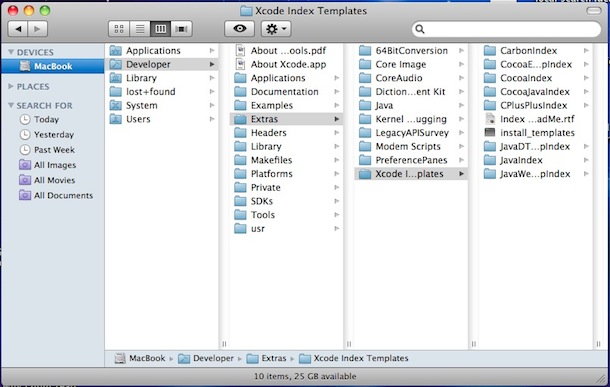
Browsing the full path of a file using columns is extremely useful (at least to me as a developer).

Re:Windows 11 Start menu ads look set to get even worse – th... by bobbylarrybobby on Wednesday April 19, 2023 @01:50PM (#35631122)
Finder has a quasi address bar via “go to”, although it's a bit hidden
Re:Windows 11 Start menu ads look set to get even worse – th... by rafark on Wednesday April 19, 2023 @07:33PM (#35634625)
Yeah, I use it quite a bit. But it’s ugly tbh.
Re:Windows 11 Start menu ads look set to get even worse – th... by CRConrad on Monday May 01, 2023 @11:46AM (#35774491)
> There’s nothing like column view for windows.

Yes there is. Only it's called “Details” view (if I understood what you meant correctly.)

Press the [Alt] key to make Explorer’s menu appear, then View, then Details. IIRC. HTH!

Re:Windows 11 Start menu ads look set to get even worse – th... by Toutouxc on Wednesday April 19, 2023 @04:18AM (#35625692)
Ad iOS: The Files app won't let you see the whole filesystem (and unlike on Mac there's no way to escape the jail), and the app itself is pretty anaemic, but it is possible to, for example, download a bunch of files from the web, make a ZIP out of them and copy it to a SMB share. Which is already the most complicated operation I'd want to do on a phone. iPadOS would deserve something better, that's true.
Re:Windows 11 Start menu ads look set to get even worse – th... by navane on Wednesday April 19, 2023 @05:24AM (#35626118)
The basic file manamegment in windows is good. But its the inconsistency that kills it. Saving a file in the new word is ridiculously awful.

click on file, in the top menu bar. Instead of a drop down menu, a ribbon apears from the left. The word file is nowhere to be seen.

click on save, two columns appear, filling the entire screen. Left column: Onedrive, Sites, This PC, add a place, browse. Right column: a list of sharepoint locations, that i have visited recently, without any tree structure. I don't want to use any of the cloud solutions (onedrive, sites, any sharepoint), I want to store it locally.

click on This PC. The right column changes: file name, extension, new folder. But it doesn't tell me where I am on this PC, even though it shows me a couple subfolders. But it doesn't show my my current path. So I look back into the left column.

click on Browse. I get the old save menu, with a fully functioning explorer.