Re:Windows 11 Start menu ads look set to get even worse – th...
by rafark on Tuesday April 18, 2023 @09:15PM
(#35622965)
I have to disagree. There’s nothing like column view for windows. The “address” bar in the windows file manager is very useful, though. I’ll give you that. But other than that, I find Finder better. Finder also has tabs (I don’t know if windows copied this, I haven’t used windows since windows 8).
[ Parent
| on HN ]
Re:Windows 11 Start menu ads look set to get even worse – th...
by Bjartr on Tuesday April 18, 2023 @09:51PM
(#35623290)
What kind of column view are you wanting? I've been more or less happy with the columns offered by the "details" "icon size" option.
Re:Windows 11 Start menu ads look set to get even worse – th...
by rafark on Tuesday April 18, 2023 @10:10PM
(#35623422)
I don’t use windows, I mean the column view in Finder:
https://osxdaily.com/wp-content/uploads/2010/02/mac-os-x-fin...
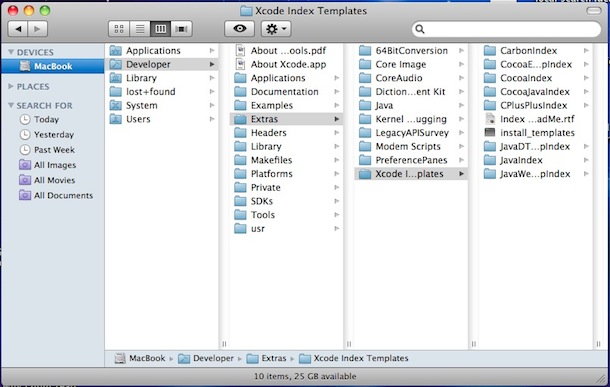
Browsing the full path of a file using columns is extremely useful (at least to me as a developer).
Re:Windows 11 Start menu ads look set to get even worse – th...
by bobbylarrybobby on Wednesday April 19, 2023 @01:50PM
(#35631122)
Finder has a quasi address bar via “go to”, although it's a bit hidden
Re:Windows 11 Start menu ads look set to get even worse – th...
by rafark on Wednesday April 19, 2023 @07:33PM
(#35634625)
Yeah, I use it quite a bit. But it’s ugly tbh.
Re:Windows 11 Start menu ads look set to get even worse – th...
by CRConrad on Monday May 01, 2023 @11:46AM
(#35774491)
> There’s nothing like column view for windows.
Yes there is. Only it's called “Details” view (if I understood what you meant correctly.)
Press the [Alt] key to make Explorer’s menu appear, then View, then Details. IIRC. HTH!