https://osxdaily.com/wp-content/uploads/2010/02/mac-os-x-fin...
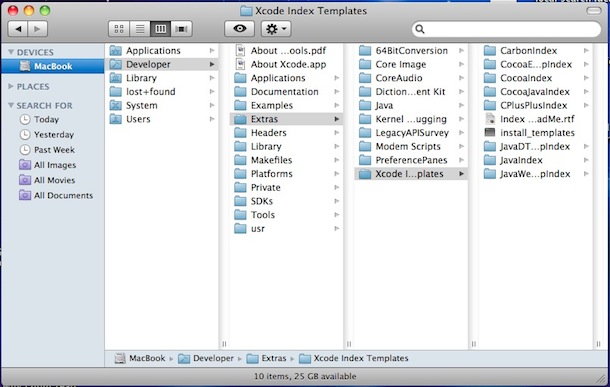
Browsing the full path of a file using columns is extremely useful (at least to me as a developer).
Yes there is. Only it's called “Details” view (if I understood what you meant correctly.)
Press the [Alt] key to make Explorer’s menu appear, then View, then Details. IIRC. HTH!
click on file, in the top menu bar. Instead of a drop down menu, a ribbon apears from the left. The word file is nowhere to be seen.
click on save, two columns appear, filling the entire screen. Left column: Onedrive, Sites, This PC, add a place, browse. Right column: a list of sharepoint locations, that i have visited recently, without any tree structure. I don't want to use any of the cloud solutions (onedrive, sites, any sharepoint), I want to store it locally.
click on This PC. The right column changes: file name, extension, new folder. But it doesn't tell me where I am on this PC, even though it shows me a couple subfolders. But it doesn't show my my current path. So I look back into the left column.
click on Browse. I get the old save menu, with a fully functioning explorer.
Not because it is good, but because Microsoft can't keep up with the others when it comes to messing up file management.
iOS: you essentially don't have files, just internal storage for apps
Android: you have files, but they are making it really hard to access them
MacOS: actually not that bad, but they still try hard to hide the filesystem from you
Linux: it is a UNIX system, files are everything and you have free access, but the experience tends to be inconsistent because there is no standard toolkit
With Windows, you have full access to the filesystem (depending on your permissions of course), the UI has become inconsistent lately, but there is almost always a way to get to the common file picker, and the explorer shell is quite nice: you can open file, copy, move, drag and drop, etc... with relative consistency. These operations seem trivial but if you have used some bare bone Linux desktops, you will realize that they are not.