I hope they provide a beefier battery.
https://images.idgesg.net/images/article/2021/07/framework_5...
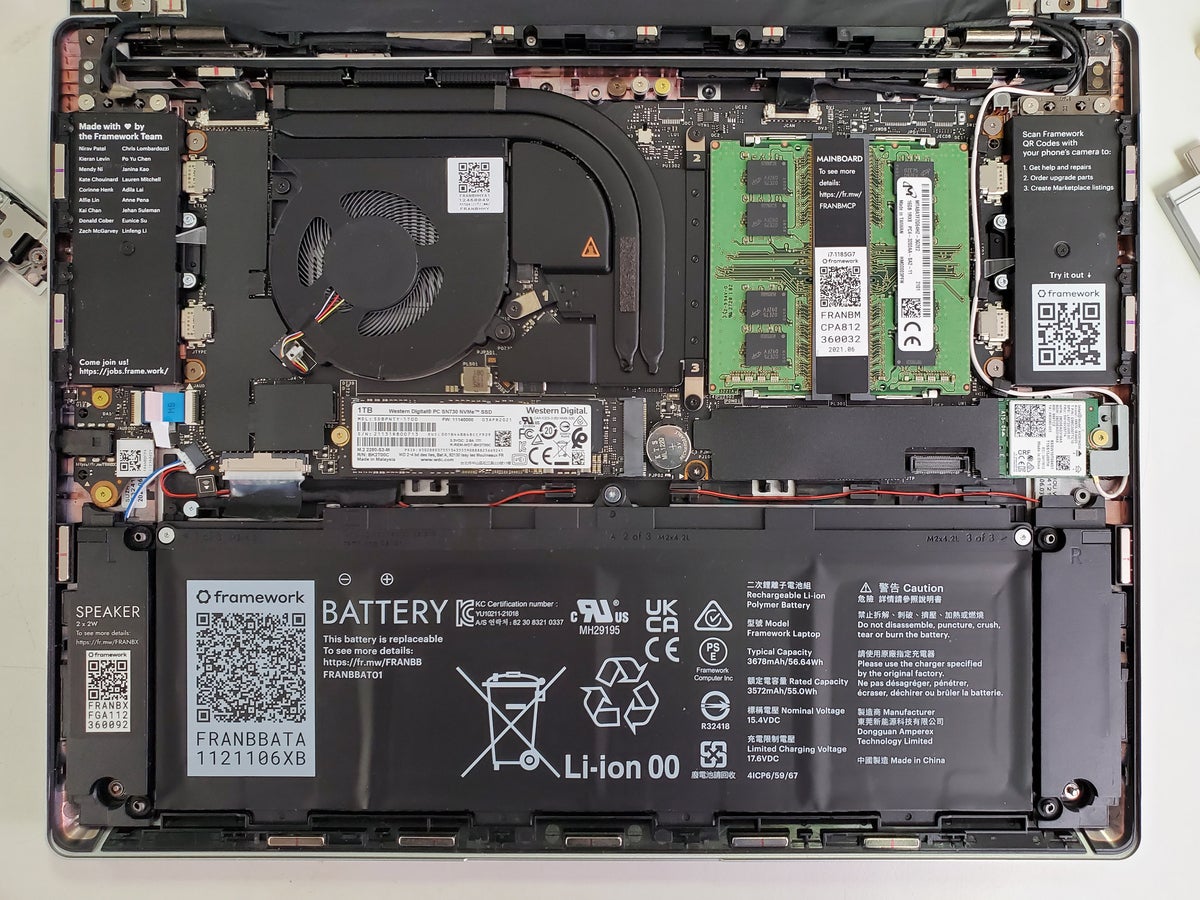
Note how remarkably large the speakers are, how much structure is around the battery, and how much the logic board is pushed down. We all hate the reduction in reparability in modern macbooks but look at the outcome: https://images.macrumors.com/article-new/2021/10/macbook-pro...
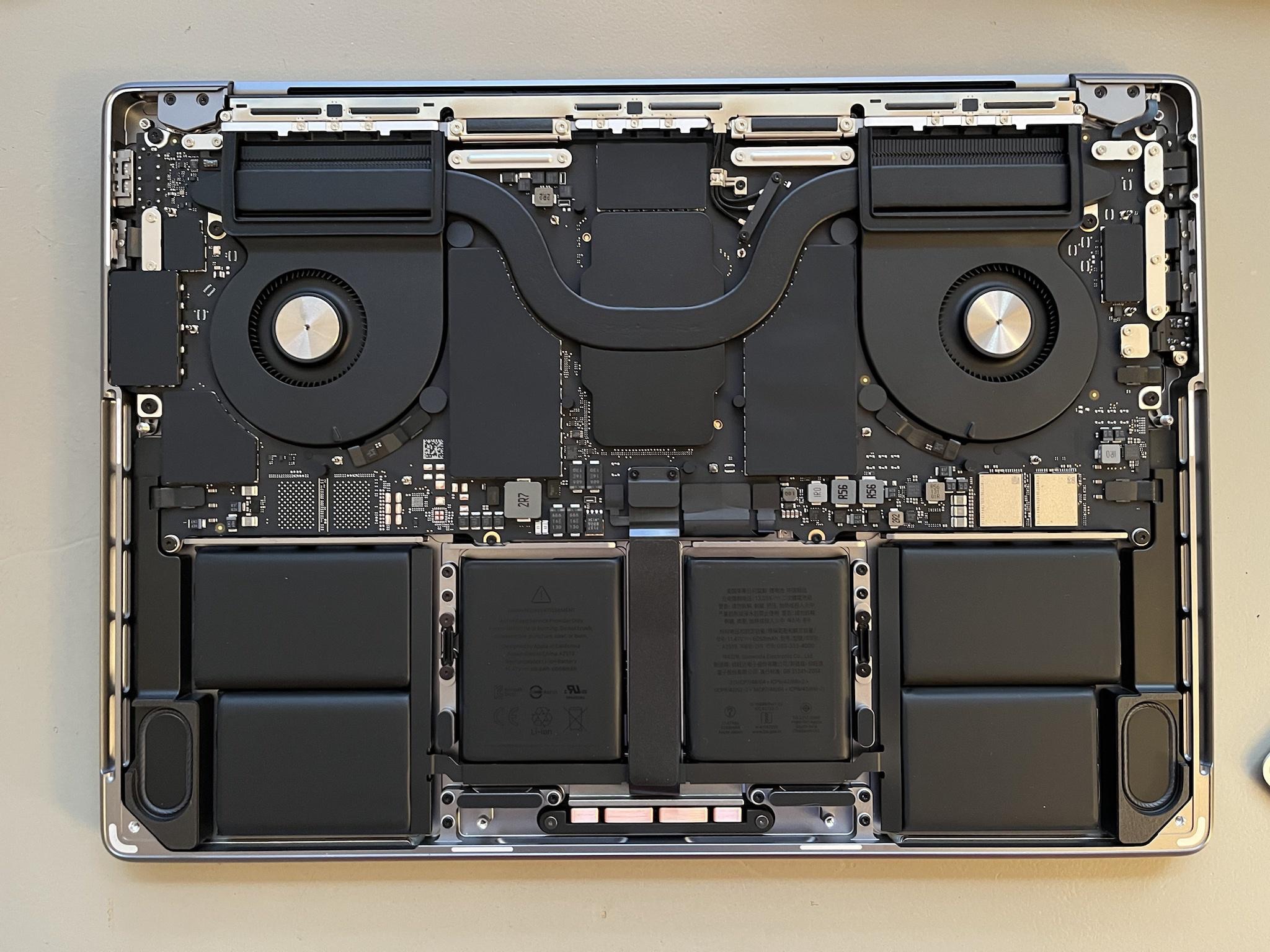
This is a 14 inch Macbook Pro. It fills every last inch with equipment that, each on their own, are best in class. The battery is 30% bigger. The Speakers are louder and have more bass, the system is designed to handle far more wattage from the SOC.
The Framework laptop is a great first attempt, but I'm not really convinced they are quite there yet. They really need to drop the Macbook Air design and go for boxy here to maximise volume. It absolutely needs a dedicated GPU option.
Having a laptop a lightly technically minded person can repair easily makes little sense if it isn't targeted at their niche. Generally you start deep in the niche and move mass-market as you expand.
There are two diffetent problems with repairability - one is making it easy for a dilebtante to replace parts.
The other, is making parts and schematics avaliable so that a specialist can repair it. You don't actually have to change the design. This is what Luis Rossman is talking about
> Dedicated GPU
Yeah I only buy laptops with GPUs. Honestly laptops outside power user/gaming niche rarely need things replaced
I disagree. There's value in a laptop that can be easily repaired/upgraded for non tech people. And I mean that. People that will only use their laptops for zoom, lightweight internet browsing and stuff like that.
Because, they will fucking break something and better to have it easily repaired than having to go a specialized center.
Keep in mind I'm not talking about people that can afford new iphone every year but people that can afford a mid-budget Android phone every two-four years.
> Generally you start deep in the niche and move mass-market as you expand.
Isn't that how you piss away your niche market?
Then you get to the fact that this machine is incredibly poorly sold if that is your market. The pre-configured options are almost insane. $1050 for a machine with 8GB ram..or $400 more to get 16GB because they paired it with CPU and Storage upgrades? Of course you can go DIY but keep in mind this is for lightly-technical users. Then a user needs to pick their port loadout.
It is overload and a lot of money for anyone who isn't technical...but if you ARE technical...this thing is basically a bad ultrabook in use. You can get a like-spec (1240p, 8gb, 256) Asus Zenbook 14 OLED...for $500 dollars less!
That's my gripe. I love the repair angle. The expansion cards are downright silly for most users. The money is basically nuts for prebuilt. And, ultimately they made a non-touch Surface Book 3..rather than a Macbook Pro.
> Isn't that how you piss away your niche market?
Well yeah. It's also how you continue to exist outside a niche. Some companies manage to do both. I would argue that the current top-end Macbook Pro is a downright niche product compared to the rest of their lineup. See also: The Mazda Miata. Niche, well loved, technical, co-existing.
And 8gb is all you will ever have on the Asus, since it's soldered to the board.
So the comparison between the two is completely dishonest because the Framework is an upgradable computer that can be used for decades, and the Asus is a toy which will be rusting in some 3rd world landfill in two years.
Personally, the idea is all pretty oversold. If the motherboard was standardized and had a swappable CPU..maybe..but this is just a laptop with marketing. The Dell XPS 15 has the exact same upgrade path as the Framework..but also a 15 inch display and dedicated graphics. Any number of MSI laptops support upgrading ram. The idea is nobel...but not novel.
There are still people using the thinkpad x61 (2007) today. It came with 512MB-2GB ram, but you can put up to 8GB in it. 8GB and a SSD is enough to comfortably run the latest Linux and Chrome and is pretty decent on such a little computer.
If it had a soldered 1GB it would be junk.
8GB soldered ram will make your Asus junk in 2039 (2023 + 16 years), but 64GB in the Framework has a much better chance of being usable.
Laptop manufacturers (and clueless crony reviewers) say that the ram is soldered to make the laptop smaller, but units like the Framework clearly show this is bullshit. They're just doing it to stop you from extending the life is old hardware.
Totally! Also for on die/soldering being allegedly the only way around hardware issues "requiring" the RAM to be physically as close to the CPU as possible, Dell CAMM standard shows that there are other way!
FWIW these are the things that I need to upgrade the most frequently with computers I've owned in the past. My desktop has gone through 5 storage drives (500GB spinning disk, 2TB spinning disk, small crappy 2.5 inch SSD, bigger slightly faster 2.5 inch SSD, and finally an M.2 drive) and 3 RAM iterations (2 sticks DDR3, 4 sticks DD3, 2 sticks DDR5). I only recently got to the point where I needed to upgrade the CPU for the first time.
How does the price of a Framework today plus upgrade modules in three years compare to a cheap laptop now and a new cheap laptop in three years? Obviously the former is better for the environment, but if you don't break even on your investment in a Framework laptop by the first upgrade then it's going to be a very, very hard sell for most consumers.
Does Framework even need embedded speakers? Why not just rely on external wired or Bluetooth speakers, or headphones, instead, and use the space for a larger battery.
I think I'd be very happy with 2 expansion card slots and 3 hardwired USB C ports that can be upgraded with mainboard revisions to support newer USB standards.
I could be wrong, but I don't think anyone at Framework is hacking on Linux and upstreaming drivers that implement efficient power management correctly. I also don't think they're hacking on custom firmware for components, either.
Looks like System76, for example, puts a lot of work in to get white label Clevo laptops working pretty well with Linux. Framework is likely working with whatever the kernel already supports, and often times it's hard to implement good power management for components because the documentation isn't available, so you're lucky if someone spent time trying to reverse engineer anything at all.
Also conjecture: I don't think Framework is designing low-level hardware, either, and the boards they design/buy aren't optimized for power saving versus actually shipping a product.
I'd assume that LG has more resources dedicated to power efficiency when it comes to time, money and manpower, and they have kernel hackers on their payroll, as they roll and deploy their own Linux-based OS.
It could also just be chance, where the LG gram just happens to be built with well supported components.
I know system76 has had their own laptop designs in the works for a while now, I wonder how that’s going… being tethered to Clevo is kneecapping them in a few ways IMO.
And here they talk about what they learned working on the Chromebook version: https://news.ycombinator.com/item?id=32927094 that they've been working on in the latest (beta currently) BIOS updates: https://community.frame.work/t/12th-gen-intel-core-bios-3-06...
For anyone interested, you can take a look at their community forums - they're doing as much Linux support as anyone else out there I think: https://community.frame.work/
The LG gram has a few things going for it:
* Soldered LPDDR memory is lower power than SODIMMs
* Not having the extra retimer, not needing it to be active unless the TB4 port is used
* A lower res display (1920x1200)
* A 72Wh battery, which is 30% bigger than the 55Wh in the Framework
That being said, LG (and other ODM/OEMs) have been making laptops for almost 20 years, and Framework is on year two on basically their first design, so it's probably to be expected that they have some stuff to learn/improve.
In any case, I'm incredibly pleased with mine, the battery life really is fantastic and knowing it can be this good is probably the only reason a framework wouldn't be my next laptop.
I guess it improves repairability and all. But eh, I never had a laptop where those parts failed before any other parts. So if I can just pay someone to help me solder on a new port the once pr decade one might fail, I'm ok with that. Or maybe they could make it easily replaceable without the modularity, that'd be great.
When I first heard about the port changing feature I thought it was cool and useful. But i am now starting to wonder how often it would be used even by myself if I had one.
Rather, it's so everyone can get the ports they want with minimal overhead for Framework the company (fewer SKUs, less spare inventory, etc.).
It's like LEGO: You can put together exactly what you want using exactly the bricks you want, and you aren't expected to take it all apart and build something new the next day just because you could either.
That's the question, though: What is "bog standard"?
Apple will tell you bog standard is two USB-C ports.
A tech enthusiast will tell you bog standard is at least 10 mixed USB-A and -C ports, at least three DisplayPorts, at least one ethernet jack, and a headphone jack.
Jane Average over there will tell you bog standard is a power button.
A DIYer will tell you bog standard is GPIO and serial.
USB-IF will tell you bog standard is USB4.11 For Workgroups Revision 5 Type D 50gbps 2x4.
One option might be to have a backplate adapter similar to ATX motherboards, where that just slots into the case itself attached to the motherboard... so Gen 3 could have 3x usb-c, 1 usb-a and a 4-pole headphone jack... Then all usb-c + headphone a generation after... but the horizontal spacing pre-defined like ATX backplane.
1. None of the machines I have to switch between have remotely enough sockets for the USB devices I actually need to use. Mouse, keyboard, headset, external webcam, yubikey are all USB-A. For the machines I've got that are USB-C only I need at least two hubs daisy-chained if I want to have the first in the chain be something I can put in my bag.
2. If I try to power some of them through the hub, they complain that they can't get enough power.
3. If I plug those same ones into the power directly, I don't have enough ports to also have a USB-C monitor connection, forcing that over onto HDMI.
4. Only one of the machines I use has an HDMI socket, but the hub I tend to use has one so that's usually fine.
5. It's not fine on my XPS13, which for some reason can't power both its own screen and the external screen when plugged into the hub, and it goes into a flickery loop as it tries, fails, and resets. So that's either lid-closed-only, or is the only device connected over USB-C as a direct connection, which means an extra plug to plug in for only that laptop, and I end up fiddling with the screen controls every time I switch to it.
This is supposed to be a unified ecosystem but it just falls apart in practice, and my desk has never had more wiring all over it. I get that I'm an outlier here: two work laptops, two personal laptops, and regularly needing to use any of them, but there's nothing I'm trying to do that's outside what USB-C claims to be within its sphere of capability. Maybe the problem is the hub I've got but if that's the case I can't see how you're supposed to make better purchases. The ecosystem just seems to be broken.
Joking aside, to my mind bog standard is by definition not given by Apple, enthusiasts, hardware hackers, USB-IF, or someone who never needs a port ever. My mom is very tech illiterate and even she uses a cheap wireless mouse, and other USB stuff.
It's obviously something Framework would have to research and think about. But I don't think it's unreasonable to say there is some definition of bog standard that should be able to serve 80% of customers. Where the 20% is made up of various niches that are happy to pay a premium for the modularity because they really need it.
Additionally, fewer is fewer, regardless of scale. 999,999 of something is fewer than 1,000,000 of something.
So yes, the "Lego approach" would mean fewer SKUs.
My 14inch macbook pro has a power jack(magsafe), three Thunderbolt ports, an SD card slot, HDMI, and a really low-noise, high-power fantastic 3.5mm. About the only thing I really would ever want is ethernet but even then I probably would rather dock the machine over TB anywhere I would use that. It is just is so much better than plugging in 4 cables.
(Side note: It's kinda surprising that mankind has not invented a smaller RJ45)
Like HDMI, or USB-A, or MagSafe.
The 2016 macbooks were...something.
FWIIW though...Modern Mirrorless cameras tend to have high-performance USB-C. Some also have internal storage. But the value of swapping media in a camera is critical for organization however. Many Cameras also have dual SD slots for mirroring.
I've had one, thing was pretty flimsy and required finagling to use. Meh.
> Personally I find the choice of SD card slot puzzling Something like 90% of the photography market uses a Mac.
I heard probably more hoopla about that SD card slot than anything else when it was announced.
HDMI port is first thing to die on last two laptops. Thanks to thunderbolt, I didn't have to junk the more recent laptop, but I do need a dongle for HDMI which is mildly infuriating.
The connectors for the expansion cards are all USB-C too, so if it's beneficial to have connection further in instead of right at the edge, you could go without an expansion card for a slot at all.
What… how, why? I think it’s unacceptable for a laptop in sleep mode to be draining energy at that rate. Must be a bug, I refuse to believe they tested this and though it’s ok?
> in particular, beware that the HDMI, DisplayPort and particularly the SSD and MicroSD cards take a significant amount power, even when sleeping, up to 2-6W for the latter two
> you have to do some serious tuning to get proper (10h+ idle, 10 days suspend) power savings
Why is the Framework so much worse at these than e.g. the LG gram series? HDMI, 2x USB-C/TB4, 2x USB-A, micro-SD out of the box, no serious tuning required...
> 296.63mm X 228.98mm X 15.85mm, 1.3Kg
> Battery: 55Wh
Why does such a relatively big and heavy laptop have such a comparatively small battery?