The thing that really blew my mind was the shared clipboard, I’ve always been sending myself messages through Signal or Discord to share my clipboard. Now it’s just automatic. The only thing I would have liked was a better way to discover this, I only did by accident.
I’ve used KDE connect in the past, and this feels like the polished version of it.
edit: Mac Pro -> MacBook Pro
For the windows and Android users (of which I am one), the first party "your phone" app in windows 10/11 gives you this along with a lot of other amazing features (running your phone apps on desktop, access to photos and sms, notifications, calling and answering through your computer).
I wasn't aware this was a thing, and my mind just got blown. Thanks.
Thanks for reminding me about it. My problem has been kinda the opposite: I trigger the notification center by accident too often. So this was enough for me to finally rebind it to a hot corner.
I’ve seen so many students upload images for online exams via things like cam scanner unaware that they don’t need third party solutions. They complain about the time needed to get the images off their phones and onto their laptops for exams because of these supposedly hidden features.
(On Windows you can browse your android’s phone’s photos via the photos app via USB)
Similarly they go to extremes with various oddball apps to make PDFs with cam scanner images in all sorts of orientations with nasty watermarks because they’re unaware of the power of Preview.
Also most people don’t know that when you Screenshot a webpage, there’s actually a tab at the top to capture the entire webpage (even if it’s way taller than your screen) as a pdf. Essentially “print to pdf”.
It's infectious. So much so that I'm constantly annoyed that Music supports neither Continuity nor some form of remote control. It feels like the feature was released and then they suddenly stopped adding more apps to support it.
You can also use an Apple Watch as a remote for music playing on any device in your home. Apple want your money.
Apple locks their ecosystem so nobody else can make a smooth seamless experience. They ensure that only they can deliver such an integrated experience. I respect the effort of their engineers, but there are countless smart UX people and engineers in the world.
KDE Connect and GS Connect do virtually the same things between Linux and Android, and sometimes even more than what Apple can do[1], and is proof that you don't need vendor lock-in and a 3 trillion $ valuation to achieve the same features, just a group of dedicated enthusiasts with a vision and free time on their hands. That's the beauty of FOSS.
Unfortunately, the Apple apologetics brigade will shout loudly that vendor lock in is the key to Apple delivering these features and that openness is somehow bad as it will only hurt the ecosystem and get you hacked.
Not hating on Apple or Apple users, just stating my POV.
It's entirely possible that a closed ecosystem enables a large number of features with a certain set of tradeoffs, and an open ecosystem enables a large number of features with a different set of tradeoffs, and there is overlap between the feature sets.
Does that mean that there is no need for an open ecosystem, when you can get what you need from a closed ecosystem? No, because while all the features you care about may be in both, the tradeoffs you have to make to use the closed ecosystem might not be the tradeoffs you want to make.
And the converse is equally plausible: That you can get all the features you care about in both, but it does not mean that there is no need for a closed ecosystem, because while all the features someone cares about may be available in both, the tradeoffs they want to make may align more closely with the closed ecosystem's tradeoffs than with teh open ecosystem's tradeoffs.
I think it is true that given some set of features, we can nearly always find a set of open source products/packages to deliver the required functionality, and for a very pedantic literal sense of "need, " OSS does everything people need.
But hardware and software products are more than just a set of features. They're the other tradeoffs that form a messy collection of affordances and pain points, and different people have different needs from the entire product's perspective.
This feature is indeed innovative yet iterative - it’s like a zero-configuration Synergy or Logitech Flow where you can use the same mouse on multiple devices - but it requires basically no configuration at all to do so. And the impressive part is how it built on top of previous work to add shared clipboard between devices and other “handoff” features, plus has a similarity to features that shipped before handoff such as airdrop.
To underscore how impressive it is, Microsoft still has yet to ship a suite of such features and they should have very similar resources available. Apple might be all marketing and sometimes buggy, confusing or unexpected, but there is an undeniable sense of progression when you look at the 5-10 year improvements.
The caution I would have is that it works so well I was confused when my mouse cursor disappeared and showed up on another screen. And it can’t automatically figure out the positioning of displays or computers, which is annoying now that Apple is experimenting with chips that can precisely position devices relative to each other. [Full disclosure, I have a couple shares in Apple.]
It does way more than that:
It will pause your PC music/movie when you get a call.
It lets you sync clipboards.
Syncs notifications, SMS, etc and can even reply to SMS from your PC.
Remote view of photos and files on your phone from the PC.
Take phone call on your PC.
And I might be missing a couple.
But, yes, the fact that Microsoft hasn't delivered such features on Windows is baffling. They did try with the Your Phone app, but that's worse than KDE connect.
I agree with the other commenters - it's nice, but it's not nearly the same. The beauty of it is really that 'it just works' - you don't need to know about it, you don't need to open a specific app, find something by name and press 'connect', there are no options. The behaviour just slots in perfectly between the existing model of icloud / sharing / handoff. This kind of long-term design vision is difficult to achieve and very rare in FOSS, maybe with the exception of Elementary.
> and is proof that you don't need vendor lock-in and a 3 trillion $ valuation to achieve the same features
> the Apple apologetics brigade will shout loudly that vendor lock in is the key to Apple delivering these features and that openness is somehow bad
Can't have it both ways.
I buy a new iPad and MacBook, log in with my iCloud account, and boom, it works.
Sure, but now we're moving the goal posts and arguing about semantics. The original comment I replied to, said Apple features are only achievable due to their ecosystem and I disproved him, that's it. The fact that the Linux community doesn't have billions of $ for marketing and commercialization of their products is a separate issue that's been the thorn of Linux adoption on the desktop since forever.
>I buy a new iPad and MacBook, log in with my iCloud account, and boom, it works.
Unfortunately, some people in the world that don't earn western wages can't afford to own several Apple products worth multiple times their salaries to enjoy the ecosystem, so it's great that FOSS alternatives exist that do the same things so those less fortunate can enjoy them at a fraction of the cost.
No, they said those features are only achievable on Apple systems by Apple because of they close everyone else out of their ecosystem.
> so it's great that FOSS alternatives exist that do the same things so those less fortunate can enjoy them at a fraction of the cost.
I agree 1000%, but that's not what we were talking about.
I have the western income and I have multiple Apple products as a result, and I should really appreciate that more than I do.
Why did my comment bother you? I did not insult anyone.
Now that I have a comfortable middle class western lifestyle I can appreciate the appliance nature of Apple’s products. I use them for work because they are reliable and do indeed just work.
In the lab I can still tinker with computers but I try to leave that to my students so they can have the same wonderful experience I had.
I haven’t build a PC in a few years and hope to build something new in a couple of years. It’s not a monoculture just because I prefer Macs for getting work done and I’m not going to apologise for my situation. Apple know their users and I’m happy that they can meet most of my needs.
But it has ZERO sleep modes. There are 4 exposed to the OS in most cases, non are supported by the BIOS...the only thing I can reasonably do is 'hibernate with lid close.'
The mac is half the price, half the weight, twice the CPU...I'm a little disappointed in Dell and sad that my office requires it use.
But in the context of this thread, I really need a dose of humility and a recognition of what I have due to my geography.
In a windows/linux/notApple ecosystem, you've got to give permission to an application to fully control other devices...that's...not a good idea, from a security standpoint. It's how Bonzi Buddy gets a really crappy hold of your information. But apple has spent a lot of time building a reputation where they can be trusted to do so()
=and yet...
Apple should provide safe defaults - but ultimately the user should be making that decision. Its entirely possible to do this safely, Apple simply chooses not to and pretends its something to do with security.
> But apple has spent a lot of time building a reputation where they can be trusted to do so()
Regardless of whatever "reputation" they've built, Apple products are riddled with bugs and security problems. As a technical user, I never think "security" when I think Apple. I guess for most people security is something that is easily marketed.
Feature bloat has plagued Apple developers to the point nobody knows how to wrangle all the gestures and interactions properly. Even a man as diligent as Steve, I suspect, wouldn't know what to do with the current state of things. He'd probably just burn it all down and start over with the front end, as is the natural order of things.
Music works fine. Passwords work fine. The window manager works fine.
Revolutionary? No. Needing an update? I think so.
A failure? Only in your fevered dreams.
For starters, it’s as hard for me to plug my phone in on multiple computers without licensing alerts going nuts/blocking certain songs despite the fact the music was bought through them. That is baffling to me given how synchronized Apple ID usually is.
https://www.apple.com/shop/product/MQ052LL/A/magic-keyboard-...
The Mac desktop works extremely well when used more or less as intended for the vast majority of Mac users (ie, on a laptop): with a multi-touch trackpad, flicking rapidly between virtual desktops, and flicking up to see everything at once.
Honestly, that's a terrible workflow for me. Due to the nature of my work, many times I need to tile 2, 3 or 4 windows on the same screen so I can view them all at once. Flicking quickly between them instead of having them all static in front of me is a UX nightmare that gives me eye strain just thinking about it.
I have no idea how people mange to multi task efficiently by flicking and not get headaches, or on desktop with a mouse and keyboard, but maybe Apple thinks most of its customers are content creators who should just be focusing on one app at a time and never need to tile several. I guess I just wasn't meant to be an Apple customer.
For my type of work, I much prefer the Windows/Linux way of having the flicking option for laptops but also great out of the box tiling built in.
If you want a full screen app that you flick through like an iPad you can. If you want a mess of windows on one desktop you can use App Exposé to see only the ones from a particular app. If you want a tiling manager you can install one.
If you want to turn off all the gestures you can.
It’s a mature desktop OS that has many ways of doing things.
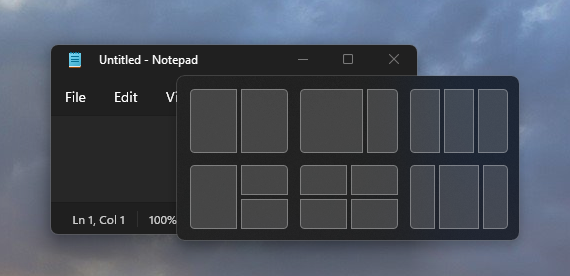
I just want my OS to give me the option, out of the box, to quickly tile on demand 2 to 4 windows on the same screen in a sane layout that I can choose that's easily resizable to my current needs. That's it.
Kind of like this:
https://docs.microsoft.com/en-us/windows/apps/desktop/modern...
Apple Music still won't sync all of my wife's MP3 songs to her iPhone 13 Pro, even though she pays for the subscription. Some stuff goes through. Some doesn't. It's very random.
My iPhone X syncs fine, even wirelessly, with the same library, though.
I'm just glad (OK, amazed) that Apple Music still syncs songs with my 17-year-old first-generation iPod Shuffle. I used it just yesterday. My only complaint is that the icon displayed in the Finder sidebar for the second-generation Shuffles has the wrong aspect ratio. Still the best music player on the planet.
People really underestimate the contagiousness of Apple brand names.
Earlier this week I was listening to several non-technical people in the real world talking about their "AirTags." Eventually one of them took hers out, and it turned out they were talking about their Tile trackers. Nobody says "Tile," but everyone says "AirTags" now.
And in my company, everyone says "FaceTime," but nobody means FaceTime because it's a Windows-only organization. They mean Teams, or Zoom, or even BlueJeans, but they never actually mean FaceTime.
In Windows you search for Disk Management and you not only have to type the entire name but the result you get is not the program you’re looking for but some long winded description that makes you stop and have to decipher it. It adds friction and confusion.
At least since Windows 10 Start-X opens a useful list of utilities.
Legitimately asking this: how so? I don’t really have any issues with it and I’m formatting drives all the time off of it. Are there some other features that are janky?
The responsiveness and web experience of the first iPhone was just, a generational leap.
Same thing with Universal Control. I've used Synergy, ShareMouse and basically every clone, and I've never seen close to this same precision as Universal Control which Just Works out of the box.
I'm actually upgrading to a new Mac right now, and Universal Control is an absolute game changer for that workflow.
Touch screens, FaceTime, AirDrop, Handoff, Sidecar. These are generally polished and reliable iterations of existing ideas that don’t require a bunch of other apps and configuration. They are usually marketed and smartly named, unlike Windows where they can’t seem to name anything or features are locked behind different tiers of the OS.
Even the PC Master Race brigade who love to shout that they could build a better machine for less than whatever desktop Apple releases miss the point. Macs are appliances. They work reliably and do so for a long time and you know what you’re getting in terms of functionality.