You don’t have to flick anything. Windows align against each other and you can position them how you like. You can even configure it to always open specific apps in a particular virtual desktop should you chose.
If you want a full screen app that you flick through like an iPad you can. If you want a mess of windows on one desktop you can use App Exposé to see only the ones from a particular app. If you want a tiling manager you can install one.
If you want to turn off all the gestures you can.
It’s a mature desktop OS that has many ways of doing things.
Re:Apple’s Universal Control
by ChuckNorris89 on Saturday March 19, 2022 @04:19PM
(#30737227)
Yeah, but I don't need any of that swiping most of the time, nor do I wish to install a tiling window manager to do the tiling automatically for me all the time, as I only need the tiling sometimes and I prefer to do the tiling myself.
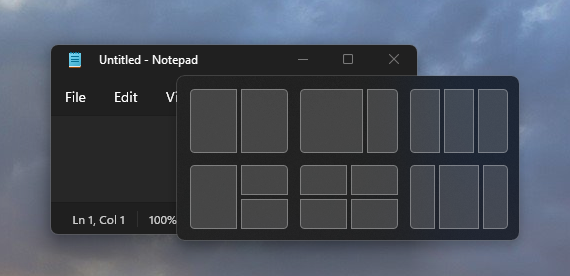
I just want my OS to give me the option, out of the box, to quickly tile on demand 2 to 4 windows on the same screen in a sane layout that I can choose that's easily resizable to my current needs. That's it.
Kind of like this:
https://docs.microsoft.com/en-us/windows/apps/desktop/modern...
Re:Apple’s Universal Control
by panda88888 on Wednesday March 23, 2022 @01:12AM
(#30775199)
Have you tried rectangle? https://rectangleapp.com/
Honestly, that's a terrible workflow for me. Due to the nature of my work, many times I need to tile 2, 3 or 4 windows on the same screen so I can view them all at once. Flicking quickly between them instead of having them all static in front of me is a UX nightmare that gives me eye strain just thinking about it.
I have no idea how people mange to multi task efficiently by flicking and not get headaches, or on desktop with a mouse and keyboard, but maybe Apple thinks most of its customers are content creators who should just be focusing on one app at a time and never need to tile several. I guess I just wasn't meant to be an Apple customer.
For my type of work, I much prefer the Windows/Linux way of having the flicking option for laptops but also great out of the box tiling built in.