Not in the slightest. I tried to configure TOTP-only and Google effectively tells me to go fuck myself, because they apparently know how to secure my account better than I do.
And the Gmail app refuses to allow IMAP accounts to archive emails, so that's pointless...
Unfortunately that's a number a hacker can call to social engineer the employee and steal your account. Same method as in SIM swapping attacks.
1.) Some unexpected glitch occurs (could be the user's fault or could be the company's), and the user's ability to access the service is temporarily interrupted until a human is able to investigate and resolve the problem.
2.) The user is specifically targeted by a malicious actor performing SIM swap and/or social engineering attack.
I'm not really a gambler, but if I'm forced to guess, I'd say #1.
EDIT: clarify initial assumptions
While I do have a VPS, it only has like 20GB, so I've yet to find an affordable and easy photo sharing solution.
But if you're into "cloud" storage, Mega.nz gives you 50GB of free and very reliable storage.
This is definitely true for 99% of people though
"Trust us."
Yet no company wants more personal information from you than this one. They want everything. Even when they have so much, they are going to great lengths to get more.
They are not in the security business, they are in the online ad sales business.
Some bullshit with Windows Hello, I'm sure, since using a hardware key in the browser triggers it.
If you have both Windows Hello enabled and a Yubikey inserted into your computer and you start the registration, Windows 10 will always bring up the Windows Hello dialog, asking you to perform a biometric verification. In my case, this will be a fingerprint reading. Your Yubikey won't be in any way active and the option to use your Yubikey won't be visible even if you click "More choices".
What you actually need to do is to press the "Cancel" button on the Windows Hello dialog. If you press Cancel, only then are you prompted to register a security key. And if the registration was started accidentally, you need to press "Cancel" both on the Windows Hello dialog and on the security key dialog.
It's just downright stupid UX. You basically need to teach the users to "start the registration and then immediately cancel it" if they want to use a Yubikey on a Windows Hello machine. If the website doesn't specify "platform" or "cross-platform" preference during registration and the user is using Chrome on macOS with Touch ID, Chrome will just ask if you want to use Touch ID or use a security key.
If the website specifies a preference for cross-platform authenticators, or there's no Windows Hello set up on the machine, then Windows will actually show the security key registration dialog without any need to click "Cancel".
There's also the issue that WebAuthn resident keys can only be managed through the clunky command-line interface. At least I haven't found a way to manage resident keys in another manner. But the clunky command-line interface is actually among the best management options - other browsers provide no management for resident keys.
I've actually considered writing a blog post griping about how stupid the experience with WebAuthn is. Chrome, Firefox, Safari, Edge, Windows, macOS, iOS. I don't think there's been any combination there where something hasn't annoyed me.
The unfortunate fact is nobody except us geeks uses Yubikeys. 99% of users prefer platform keys. So it's not hard to understand why software defaults to it.
By ensuring that whoever signs into the account has at least two distinct factors: the password and the trusted phone with the authenticator app. One thing you know, one thing you have. Perfect. (Depending on your phone's settings around biometric unlock, it might be even the trifecta: one thing you know, one thing you have, and one thing you are).
Let's imagine we implemented your suggestion of requiring the login to be on a different device than the authenticator app. What threat model does this protect against? An attacker who has your password and the unlocked phone will just sign in from a different device with the password, and then use the authenticator app from the phone. The only people you're protected against are those who do not have any access to another device than the stolen phone.
It’s literally the only reason I’m considering dumping the Gmail app. If you use an app password and the standards based mail client like imap or pop, this isn’t forced on you.
Ive also seen an increase in google flagging my accounts for some reason and I have to go and reclaim/verify them using the recovery accounts.
Apparently not, but it's always worked for me. Two things, though: 1) sites should support multiple methods of 2FA. I don't understand why many only let you have one. If I drop my phone in the toilet, I want to have a FIDO token enrolled as backup. 2) some of these implementations, like Google's, are proprietary. I want something universal and standards-based so we're not dependent on a different app for every service we use.
> But how have we increased safety when my Team/Outlook phone app requests that I click "approve" on a different app? I'm basically alt-tab'ing and clicking a different button, not really an improvement. It should be on a separate device, or something out of Microsoft's control so they can't screw it up.
You're correct, and knowing only what you've told me, I would argue this solution was implemented incorrectly.
It’s a good point though — how munch more secure is two factor if you have an unguessable password locked away in a password manager. Your single point of failure is security of your computer.
And yeah I do get the idea that if my password is actually compromised and hostilely changed, I'm going to be looking at the company for some sort of reset. But the right way of doing this is a higher friction process that could require phone engagement, in person notarization, etc. It's certainly not to make this reset process part of the every day login experience based on this mistaken idea that passwords are always insecure.
Apple and Google should just short circuit this and directly be an Authenticator as well as manage the long lived token (the password) behind the scenes, which will eliminate the alt-tab dance.
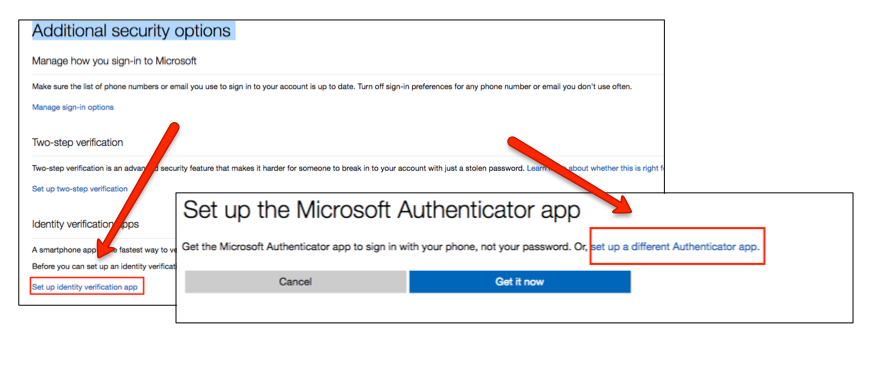
My work has the same sort of setup, they expect you to install the "Microsoft Authenticator" app (no TOTP supported) and click approve in that. But how have we increased safety when my Team/Outlook phone app requests that I click "approve" on a different app? I'm basically alt-tab'ing and clicking a different button, not really an improvement. It should be on a separate device, or something out of Microsoft's control so they can't screw it up.
Worse still is SMS 2FA, which appears to just be an analytics technique rather than a security feature. As we know, a phone number is only as secure as a carrier's most-tired employee.