News for hackers. Stuff that matters.
Re:History and Effective Use of Vim by 2bitencryption on Friday July 19, 2019 @03:30PM (#20481729)
After years of a love/hate relationship with Vim (I love what it does, but have configuring it), I had an epiphany: by sticking with the defaults, whether they are my preferred choices or not, I can instantly understand how to use Vim in any environment. Once you get used to biting the bullet and hitting escape instead of jj, or ctrl+c, it just works, everywhere.

If you abandon the urge to pimp out your Vim with a billion plugins, and just use it raw, it's a kind of editor Nirvana. Let go of your desires and live without want :)

Of course, that's just me. I understand why someone would want to turn Vim into their personalized powerhouse editor with IDE powers, with their .vimrc a 'git pull' away.

But I've learned to live with the humble defaults, and it's made life easy.

Re:History and Effective Use of Vim by coldtea on Friday July 19, 2019 @08:03PM (#20483400)
>After years of a love/hate relationship with Vim (I love what it does, but have configuring it), I had an epiphany: by sticking with the defaults, whether they are my preferred choices or not, I can instantly understand how to use Vim in any environment.

Which I've never found much important.

If you know Vim basics (modes, basic commands, movements, etc), then you can use vim in any environment that you SSH to or happen to have to work temporarily on.

But why wouldn't you want the Vim on your main driver laptop, which you use every day to not have a nice custom setup, and some good third party plugins (e.g. file search, linting, etc)?

It's not like using them will make you forgot the basic commands, movements, etc, to use vim in some unknown remote machine.

And it's also not like you should optimize for the random remote machine you'll get in, and not where you spend hours programming every day.

So unless one is a sysadmin and has no real "main" machine he uses vim in, this makes no sense to me...

Re:History and Effective Use of Vim by kd5bjo on Saturday July 20, 2019 @07:18AM (#20485168)
> It's not like using them will make you forgot the basic commands, movements, etc, to use vim in some unknown remote machine.

No, but time I spend setting up and tweaking a custom environment is time I could be spending internalizing the tools that exist everywhere and work well after the learning curve.

Since working on a foreign machine usually only happens when something’s broken, it’s already a stressful situation— my tools not behaving the way I expect won’t help matters.

Re:History and Effective Use of Vim by coldtea on Saturday July 20, 2019 @08:00AM (#20485266)
>No, but time I spend setting up and tweaking a custom environment is time I could be spending internalizing the tools that exist everywhere and work well after the learning curve.

You should be able to "internalize" the tools that "exist everywhere" in a year or two are most. If you start using vim at the university you would be done internalizing its internal tools when you graduate.

You then have the rest 30+ years of your career to use a nice environment, and it doesn't take much time "setting up and tweaking" to get non-internal tools like NerdTree, linters, git gutter, etc working. More like a week or so, on and off.

Re:History and Effective Use of Vim by kerkeslager on Saturday July 20, 2019 @08:38AM (#20485394)
> You should be able to "internalize" the tools that "exist everywhere" in a year or two are most. If you start using vim at the university you would be done internalizing its internal tools when you graduate.

Absolutely not. I have been using vim for almost a decade at this point and still am internalizing new vim skills.

Re:History and Effective Use of Vim by coldtea on Saturday July 20, 2019 @09:40AM (#20485690)
>Absolutely not. I have been using vim for almost a decade at this point and still am internalizing new vim skills.

One decade? How long can this go on? Two decades? Three? If one is in the middle of their professional career before they've mastered all the "vim skills" (or even more so, the more numerous) Emacs skills, then they'll never gonna master them all in time to matter anyway.

And the point of internal vs third party is not if internal are numerous enough, but if they're productive, convenient enough. Internally vim has tons of features, but it doesn't have a linter, for example.

In any case, things one still discovers "a decade in" are not really an argument for not setting up a good main driver vim environment with more than built-in conveniences. Those wont prevent you from learning vim built ins, and you could get immediate access to features, and in a more convenient form, that could take you a decade to chance upon as built-ins.

Re:History and Effective Use of Vim by kerkeslager on Saturday July 20, 2019 @10:46AM (#20486040)
> One decade? How long can this go on? Two decades? Three? If one is in the middle of their professional career before they've mastered all the "vim skills" (or even more so, the more numerous) Emacs skills, then they'll never gonna master them all in time to matter anyway.

I think you're mistaken in thinking there's a solution to this problem, or even that it's a problem.

The limiting factors here are your rate of learning and when you stop learning. Continuing to learn well into your career is a feature, not a bug.

> And the point of internal vs third party is not if internal are numerous enough, but if they're productive, convenient enough. Internally vim has tons of features, but it doesn't have a linter, for example.

I have a linter. It doesn't need to be in my editor, and I rarely make linting errors anyway. When I do make linting errors, I want it to be a bit painful so I stop making linting errors.

I'd argue that the bugs introduced by your linter are worse than the problem they solve. And the more plugins you have, the more buggy your system is due to the interactions.

> In any case, things one still discovers "a decade in" are not really an argument for not setting up a good main driver vim environment with more than built-in conveniences. Those wont prevent you from learning vim built ins, and you could get immediate access to features, and in a more convenient form, that could take you a decade to chance upon as built-ins.

Chance across? Don't plugins have the same problem, that you have to wait to chance across them? If you're actively out searching for plugins to solve your problems, you'll find them, but if you just google how to solve the problems with builtin tools, you'll find that too.

Plugins absolutely prevent you from using builtins, and frequently break the builtins to boot. You're probably right about the very basic stuff (i.e. movement, deletion, insertion) but anything beyond that is frequently broken on systems with a lot of plugins.

Re:History and Effective Use of Vim by kd5bjo on Saturday July 20, 2019 @08:46AM (#20485429)
That’s fair enough, I guess. At this point, I’m happy enough with my workflow despite (or maybe because) I don’t know what most of those things do. Some novelists use fancy purpose-made software and others use old-fashioned yellow legal pads; I guess I lean more towards the latter when it comes to software development.
Re:History and Effective Use of Vim by kerkeslager on Saturday July 20, 2019 @08:37AM (#20485389)
> But why wouldn't you want the Vim on your main driver laptop, which you use every day to not have a nice custom setup, and some good third party plugins (e.g. file search, linting, etc)?

There are two assumptions I think you're making here:

Assumption 1: You can do better than the defaults enough to justify the costs of optimizing. I use a pretty much default vim configuration as my primary development environment, and see zero evidence that this hampers my productivity in any way.

Built-in file searches are good enough for open files, and grep/git grep do well enough for other files.

Linting should be part of your build process. There's a benefit to it being a bit painful for linting to fail, because that negative reinforcement causes you learn the linting rules and start writing pre-linted code.

You might disagree with me that these benefits are minor, but that's only looking at the benefits: let's look at the costs of "optimization":

First, there's the bugs in plugins and bad interactions between plugins. Very few plugins are written to any sort of reasonable QA standard. I've pair programmed with a lot of devs who use highly custom vims, and without fail, they've got bugs in their configurations that are far more distracting and impeding than any minor inefficiencies in the default configuration. Say what you want about the default configurations, but I've not found any bugs in them in years of using them.

There's also simply the time spent configuring. At one time in my life, I spent hours trying to get things just right in my configs. The results were pretty mixed--a lot of times I ended up not liking the changes I had made and reverting them.

There's a bit of hubris involved in believing you can do better than the defaults. Instead of looking at the settings as the problem, consider the possibility that your knowledge is the problem. It's likely that there's a good enough way to solve your problem in the defaults, and you simply don't know or grok it yet.

When I first started learning vim, I thought it was kind of stupid--everything seemed way harder than it needed to be. But once I actually grokked the tool, I realized that my initial impressions were the stupid ones. A lot of problems I've run into over the years with vim are like that--the problem wasn't that the default vim didn't solve my problem, it was that I didn't grok the solution which was easily assemble-able from the vim skills I already had.

A programmer I really respect has a background process which watches file edits, internet usage, and a few other things (i.e. VLC) and automatically tracks his productivity. His process marks time spent editing Emacs configuration as wasted time, and I agree. Although that might be because it's Emacs configs rather than Vim configs. ;)

Assumption 2: Text entry is a significant bottleneck compared to other areas of your process. In backpacking, there's a saying, "Don't save ounces when you can save pounds." The idea is, don't optimize the weight of your lightest things, i.e. your stove and water bottle, when there are still big optimizations to be made on your heavier stuff, i.e. your big three (backpack, sleeping bag, tent). Configuring your editor is almost always an attempt to save milligrams.

Frankly, once you reach a certain proficiency with an editor that's automatic enough to just get out of your way, editing becomes a subconscious process, and you can be thinking about other things while you edit. I think some people believe that they think of what to write, and then edit it in, and any slowness in editing is preventing them from thinking of what to write after that. I don't think that's how the brain works--if you don't have to think about editing, then you don't have to finish editing to be thinking about the next thing. So the best thing your editor can do for you is to not make you think about it consciously. The more complicated you make your editor, the less likely this is to happen. The power of vim is that it lowers a lot of more complex edits to the subconscious level: swapping two lines is three keystrokes, so it's a simple enough process that I don't have to think about it.

Once you reach a certain level of subconscious-ness with an editor, editing simply isn't the bottleneck. I've known Notepad++ users who were faster Ruby programmers than me--I could certainly edit faster with vim, but they could come up with the solution to the problem in their head faster because they're more proficient with idiomatic Ruby. If editing really is the bottleneck, the problems you're solving are quite easy for you, and you could probably get paid a lot more if you took on harder problems!

And that's just looking at the process of implementing features! There's a lot more to software development. I've yet to work at a workplace where requirements gathering and keeping shareholders informed weren't much larger opportunities for optimization than my editor configuration.

Re:History and Effective Use of Vim by tripzilch on Sunday July 21, 2019 @08:02AM (#20490978)
> The power of vim is that it lowers a lot of more complex edits to the subconscious level: swapping two lines is three keystrokes, so it's a simple enough process that I don't have to think about it.

But it's not. In a modern editor, swapping two lines is ctrl-shift-up for swapping up, or ctrl-shift-down for swapping down.

Vim isn't that much more powerful any more compared to modern code editors, it's just weirder.

> I've known Notepad++ users who were faster Ruby programmers than me--I could certainly edit faster with vim

So were you a faster typer? How was it faster?

I find there's two points that get me speed in a code editor: Language specific shortcuts (like go to definition) and multi-cursor editing for editing formulas and the like.

But I'm not sure if Notepad++ has multi-cursor.

I'm not sure if vim does, either? I know you can do stuff whose result is very similar to as if you were multi-cursor editing, but do you actually get intuitive methods to place multiple cursors in various ways and then interactively edit what's there while seeing it change?

Because that's no longer a "nice to have". There's a huge difference between formulating an incantation in your head firing, and seeing if the result is right--that gets really complex with multiple edit points--and doing it interactively. You actually see a block of code grow and unfold interactively as you edit it. And it doesnt involve regular expressions :) (which are cool, but almost never fail to take my mind completely off the problem at hand, I only benefit if it operates on a pretty large chunk of text)

Re:History and Effective Use of Vim by kerkeslager on Monday July 22, 2019 @04:11PM (#20501854)
> But it's not. In a modern editor, swapping two lines is ctrl-shift-up for swapping up, or ctrl-shift-down for swapping down.

Sure, if you really hate your hands. ;)

> So were you a faster typer? How was it faster?

Maybe I just was a faster typist. I don't know. It doesn't really matter to the point: if your text editor gets out of the way enough that text editing isn't your bottleneck, then all time spent optimizing your text editor usage is completely wasted. My argument isn't "vim is better than Notepad++", my argument is "vim in the default configuration is good enough to not be a bottleneck". Notepad++ may be good enough to not be a bottleneck either--I haven't used it enough to have an opinion.

> Language specific shortcuts (like go to definition)

I would argue that this is more of an IDE feature than a text editor feature.

> multi-cursor editing for editing formulas and the like.

I'm not sure what you mean here. There's two things I do in vim which might be what you're talking about: splits so I can be in two parts of the same file at once, or splits where I have a REPL open and am editing fragments in one half of the screen while running them in the other half of the screen. But if you're talking about something else, I'd like to understand it so I can learn how to do it in vim. ;)

Re:History and Effective Use of Vim by kd5bjo on Sunday July 21, 2019 @09:06AM (#20491157)
You won’t ever catch me saying that vanilla vim is the best editor out there but it’s sufficient, as are all of the others you named. At some point, the bottleneck becomes thinking up the correct solution and not the data entry. In my opinion, we passed that point at least a decade ago; even if you reduced the amount of data entry effort to zero, it’ll make little difference in my overall efficiency as a programmer.
Re:History and Effective Use of Vim by kerkeslager on Monday July 22, 2019 @04:12PM (#20501865)
Exactly, you said it better than I did.
Re:History and Effective Use of Vim by Legogris on Saturday July 20, 2019 @09:24AM (#20485590)
I have a specific counterexample: softtabs and tabstop. vim uses tabs by default I have to be conscious of when to use tabs vs spaces. With some configuration to detect it by file type, this (for me significant) overhead is removed.
Re:History and Effective Use of Vim by kerkeslager on Saturday July 20, 2019 @10:59AM (#20486125)
I develop mostly Python for a living, so I'm well aware of this problem. :)

Like all rules, this has exceptions. This is sort of a good "exception that proves the rule". Yes, PEP8 compliant Python development requires you make a few-line change to your .vimrc. My .vimrc contains this:

    " Set tabs to width 2.
    filetype plugin indent on
    set shiftwidth=2
    set softtabstop=2
    set tabstop=2
    set expandtab

    " language-specific settings: tab width is 4 for python
    autocmd FileType python setlocal shiftwidth=4 softtabstop=4 tabstop=4
So sure, not completely default. But note: the 8 line change I have works without any other changes on every vim install I've come across, and doesn't really change my behavior as a user that much. The people I'm arguing against are proposing installing whole giant behavior-changing plugins (i.e. a linter). I've got a few changes in my .vimrc, but probably fewer lines than even the most basic plugins.
Re:History and Effective Use of Vim by stefco_ on Friday July 19, 2019 @04:37PM (#20482247)
I've taken this approach halfway and only install plugins/config that I can easily do without. Things like git-gutter [0] and a line at the 80th column [1] are great, but I don't depend on them when I log into a remote machine. If I really want some features, I have them somewhat organized in my .vimrc [2]. It's a great compromise; I find that I haven't thought about major editor configuration in a couple of years.

[0] https://github.com/airblade/vim-gitgutter

[1] set colorcolumn=80 textwidth=79

[2] https://github.com/stefco/dotfiles/blob/master/linkfiles/.vi...

[edit] Just want to add that I 100% agree that erring towards vanilla vim is a great idea; I used to use emacs and switched to vim precisely because the starting point fit my use style far better than vanilla emacs.

Re:History and Effective Use of Vim by aaron_m04 on Friday July 19, 2019 @05:52PM (#20482756)
I would recommend ditching gitgutter for vim-signify: https://github.com/mhinz/vim-signify

It is less buggy and doesn't refresh until you save, which I find to be less distracting.

Re:History and Effective Use of Vim by dmix on Friday July 19, 2019 @09:15PM (#20483626)
I've never really understood why you'd want a constant visual indication of changed lines all the time, especially with something bright/colourful on the side. The only time I find that useful is during reviews before committing. Otherwise it seems like a distraction. Vim is great for minimalism.

Likewise I keep Nerdtree closed until I need it and it opens on the right. While VSCode, old Textmate, etc has it always visible and on the left side.

Re:History and Effective Use of Vim by stefco_ on Friday July 19, 2019 @11:45PM (#20484081)
This is partly a matter of taste, and since I don't find it distracting at all, there's no downside for me. But as far as value added, I find it super convenient. I like that gitgutter gives a quick indication of what chunks I've been working on and lets me quickly navigate between them (without having to remember to mark them/hit ^O) by hitting ]c or [c (I think these are defaults, but I might have overridden them). I also like that it lets you effortlessly interactively stage changes (in case you have a good hunk you want to commit before trying something more experimental out) as well as previews that show you diffs of specific hunks as well as the ability to selectively undo hunks. It also is a great way to immediately verify that a file is unchanged without hitting ^Z and running `git diff FILE` for the file I was editing. It's also an easy confirmation that I didn't accidentally change or break something accidentally. Obviously I run a `git diff` and tests before a commit, but for me, nothing beats seeing my diffs in the full context of the file to confirm that, yes, those were all things I did on purpose.
Re:History and Effective Use of Vim by dmix on Saturday July 20, 2019 @03:43AM (#20484629)
I wasn't aware of the ability to jump between changes via shortcuts. That seems useful.
Re:History and Effective Use of Vim by ibly31 on Friday July 19, 2019 @09:50PM (#20483734)
Ones that take up space are kind of annoying, I agree. I like IntelliJ's solution: mark with green, or yellow for additions and changes. It's a 1px line next to the line number, and also it's in the "minimap" type of view so you can jump right to where your changes are in a large file.
Re:History and Effective Use of Vim by stefco_ on Friday July 19, 2019 @11:41PM (#20484065)
I haven't had any problems with gitgutter so far, but I'll give it a look! I think gitgutter can also be configured to only update on save, though I actually like the live updating and have never had issues with it (IIRC I set it to wait a second before updating to keep it from constantly running git commands).
Re:History and Effective Use of Vim by cgag on Friday July 19, 2019 @05:52PM (#20482754)
I use a bunch of plugins and I've never had trouble remembering the defaults in the odd case I'm unable to use my own config.

I don't get why the top comment on all vim threads is always recommending using poor defaults your whole life so you can avoid learning to configure it or avoid a second of confusion when you're ssh'd somewhere.

Maybe everyone else besides me spends all their time ssh'd into random servers.

Re:History and Effective Use of Vim by carterehsmith on Friday July 19, 2019 @06:12PM (#20482868)
Nah, I've seen people downloading their preferred configs right to the production server, because they, understandably, feel more comfy with that.

But, it may not be for everyone.

Where I work, we are in the process of reaching some compliance targets, and all this downloading unknown stuff from unknown servers is out the window. For the best, I think.

Re:History and Effective Use of Vim by michaelmrose on Saturday July 20, 2019 @04:13AM (#20484698)
How much editing do people need to do on the production server in the context of developing software?

Incidentally one can mount a remote filesystem via ssh and edit the files as if they were local with any editor.

With Emacs you can skip a step and directly point your editor to the remote file via tramp.

Re:History and Effective Use of Vim by clinta on Friday July 19, 2019 @11:07PM (#20483957)
People need to stop editing directly on servers. Vim's netrw can write out over scp, use your configured vim on your desktop to edit the files on the server.
Re:History and Effective Use of Vim by lunchables on Saturday July 20, 2019 @09:31AM (#20485628)
The problem is browsing files, for me. I can't use fzf, nerdtree, nnn.vim, whatever. I much prefer sshfs and treating the remote file system like a local one.

But I'm not really familiar with netrw other than just:

:e scp://host/path/file

Re:History and Effective Use of Vim by kqr on Saturday July 20, 2019 @03:16PM (#20487708)
This is one of the reasons my preferred implementation of Vi is Evil -- the TRAMP network layer in Emacs does exactly what you want: let you treat any remote file system as local. It even does multi-hop access through e.g. bastion machines. It is great.
Re:History and Effective Use of Vim by clinta on Saturday July 20, 2019 @02:57PM (#20487628)
I've never used any of those plugins, but the built in netrw has a directory browser that works.

On vanilla vim if you :e scp://host// you should get the built in netrw browser working over scp.

Re:History and Effective Use of Vim by trcollinson on Friday July 19, 2019 @11:04PM (#20483949)
It's unfortunate that in this day and age we still have people who directly access and touch a production server at all, ever. There is zero need.
Re:History and Effective Use of Vim by alasdair_ on Friday July 19, 2019 @11:20PM (#20483999)
This sounds nice until you have to debug a crazy error that only happens in production.
Re:History and Effective Use of Vim by michaelmrose on Saturday July 20, 2019 @04:24AM (#20484722)
Wouldn't this represent 0.1% of your usage? Meanwhile the thinking portion is 99% of the job and the act of using the UI to enact the changes on any editor is the other 1%.

Making 1% of 1/10 of 1% more effecient seems like a curious optimization.

Re:History and Effective Use of Vim by trcollinson on Saturday July 20, 2019 @02:00PM (#20487286)
Honestly, if you have to hop on production to debug a crazy error, you have two bugs. The infrastructure being so different on production compared to development or local is a fixable issue. As are any other differences between production and local that make difficult to debug in these special cases. It takes a long time. It's a substantial effort. But it is worth while.
Re:History and Effective Use of Vim by airnomad on Saturday July 20, 2019 @04:10AM (#20484687)
You're quite green, aren't you?
Re:History and Effective Use of Vim by trcollinson on Saturday July 20, 2019 @02:03PM (#20487305)
It may seem that way, but no I've crossed that chasm long ago. I've debugged on production more than I would ever care to remember. But in all honesty it is easier than ever to stay completely off of production. It's also extremely cost effective. It's not simple and it is work, but it has never been easier to actually be successful at staying off if production.
Re:History and Effective Use of Vim by airnomad on Saturday July 20, 2019 @05:18PM (#20488443)
Easier then ever maybe but still probably impossible to avoid. It's not that anyone wants to mess up with live, it's more like you don't have a choice.
Re:History and Effective Use of Vim by trcollinson on Saturday July 20, 2019 @07:36PM (#20488970)
Really? I haven't allowed people to log directly only a production environment in almost 10 years. There is definitely a choice.
Re:History and Effective Use of Vim by bin0 on Friday July 19, 2019 @07:54PM (#20483353)
It's not a serious issue for me. I can't download my configs to random devices either. Working on embedded stuff I've usually only got vi, and honestly, the most annoying thing is no `F` binding (which is a default in vim).
Re:History and Effective Use of Vim by rhizome on Friday July 19, 2019 @09:50PM (#20483732)
Poor undo is my main bugaboo in vi, but I'm usually OK with just :e! and starting over.
Re:History and Effective Use of Vim by WhatIsDukkha on Friday July 19, 2019 @05:10PM (#20482465)
If you want portable then yeah empty out your .vimrc and get fluent with vims superpowers as they are.

If you want "personalized powerhouse editor with IDE powers" you are FAR better off going with Emacs/Evil.

The Emacs plugin ecosystem is way ahead of Vim.

Plugins are clean, stable and compose well together. That was never my experience with Vim.

Also unlike Vimscript, Elisp is pretty clean useable language that many Emacs users actually learn. I'd bet the vast majority of vim users never get past step 1 on learning Vimscript?

Emacs/Evil for the workstation and clean Vim for the random server side work.

Re:History and Effective Use of Vim by kbp on Friday July 19, 2019 @06:49PM (#20483090)
Use tramp with Emacs and you can interact with remote machines as if they were local. Who cares if the server only has vim, you have Emacs.
Re:History and Effective Use of Vim by webgoat on Friday July 19, 2019 @08:51PM (#20483555)
+1 for Tramp. You can connect to SMB, ssh, and even docker containers from within Emacs. It's strictly better than using a remote ssh session with vim because you don't need to configure anything server-side. It would be a huge hassle to setup plugins like autocompletion on a remote machine for vim, but Emacs lets you use all your regular plugins while ssh'ing, which is a huge bonus.
Re:History and Effective Use of Vim by begriffs on Friday July 19, 2019 @09:07PM (#20483606)
Vim can also edit remote files, with its built-in netrw module. It can do ssh, ftp, dav, fetch, http, rcp, rsync.

vim scp://[email protected]//absolute/path/to/document

:help netrw-start

Re:History and Effective Use of Vim by kqr on Saturday July 20, 2019 @03:19PM (#20487723)
But will every other Vim plugin (like fuzzy-finding file browsers or whatnot) work with netrw-accessed files as if they were local? Does it trivially do multi-hop SSH through e.g. bastion machines?

I have yet to see something as powerful as tramp for this.

Re:History and Effective Use of Vim by guylyons on Friday July 19, 2019 @09:24PM (#20483658)
I agree, and I use both Vim and Emacs regularly. Both great tools with different payoffs.
Re:History and Effective Use of Vim by smitty1e on Saturday July 20, 2019 @05:54AM (#20484903)
They're especially awesome together: http://spacemacs.org/
Re:History and Effective Use of Vim by topmonk on Friday July 19, 2019 @04:09PM (#20482011)
Just a quick note, you can use Ctrl +[ rather than Escape. Saves your fingers from constantly having to reach for that corner.
Re:History and Effective Use of Vim by MoratoriumBone on Friday July 19, 2019 @04:36PM (#20482242)
I bind my CAPSLOCK to ECAPE that way instead of the escape key killing my hand my left pinky finger can just naturally get me out of insert mode by hitting CAPSLOCK.
Re:History and Effective Use of Vim by Anthony-G on Friday July 19, 2019 @08:07PM (#20483418)
I used to do this and really enjoyed the convenience.

Whenever I resume a Vim session (from another window/terminal), I have a habit of automatically pressing the (Escape) key to ensure I'm in Normal mode. However, every now and again, I have to use Vim on someone else's computer and muscle memory would cause me to press CapsLock instead of Escape. Then pressing 'h' moves the cursor all the way to the top of the screen instead of one space to the left, pressing 'j' joins the current line to the following one instead of moving the cursor, etc. Because I'm used to typing normal mode keys in quick succession, I've already entered 4 or 5 normal commands before I realise it's all going horribly wrong. I press 'u' a few times to undo the craziness but successive presses of 'U' only undoes the previous Undo action!

In the end, I retrained myself to use Ctrl-[ which isn't quite as convenient but does work on all platforms I've had to use.

Re:History and Effective Use of Vim by pault on Friday July 19, 2019 @06:28PM (#20482961)
Do yourself a favor and figure out how to bind caps lock to press for escape, hold for control. I use a programmable keyboard (web search for QMK if you're interested) but there are software options too. You'll never look back and you'll be baffled how you ever lived without it.
Re:History and Effective Use of Vim by weaksauce on Friday July 19, 2019 @07:07PM (#20483168)
i have ctrl-shift-command-option+hjkl mapped to the arrow keys in any app.(works in tandem with the next config so it's just the press of the caps lock key)

caps+(any other key) mapped to ctrl-shift-command-option+that key(useful to bind to extra shortcuts in an app).

a single just caps lock press alone bound to escape.

and finally right shift + caps lock is bound to toggle caps lock on and off.

works pretty well for me for a long while now.

karabiner elements on macos lets you do all that with "complex modifications" though the config is a bit dumb to do manually as they expect you to download configs from the web.

Re:History and Effective Use of Vim by VyperCard on Saturday July 20, 2019 @04:10AM (#20484690)
On Linux you can use the awesome xcape for this
Re:History and Effective Use of Vim by jasonl99 on Friday July 19, 2019 @05:10PM (#20482462)
I actually started binding my CAPSLOCK key to F5, and I have F5 set as a tmux attention key, but I've never had too much problem with left pinky finger hitting escape..

A side benefit of this is that F5 is mapped to refresh for a lot of apps (Firefox, for one) so I can hit capslock to refresh a page.

Re:History and Effective Use of Vim by mongol on Friday July 19, 2019 @05:38PM (#20482664)
F5 is the Midnight Commander copy key, would never work for me.
Re:History and Effective Use of Vim by wyclif on Friday July 19, 2019 @07:25PM (#20483247)
That's good for some people, but I have Caps Lock bound to Commmand/Ctrl. The above default key combo works well for me since that way only my right pinky leaves the home row.
Re:History and Effective Use of Vim by shawxe on Friday July 19, 2019 @11:22PM (#20484003)
Am I the only person who actually finds Esc easier than C-[ or Caps Lock? Maybe it's just heavy muscle memory at this point, but I've been using Esc for years and every time I try to use anything else it just feels clunky.
Re:History and Effective Use of Vim by mikekchar on Saturday July 20, 2019 @12:15AM (#20484154)
Esc is often a half height key and is placed in the Function key row. This is quite a stretch if you are touch typing and want to hit Esc while still keeping your index finger on the F key. But you have the same problem with Ctrl. It's sometimes placed under the left shift key, which is a really awkward pinky reach (I think Mac keyboards have the Command key in a slightly better place, but I haven't used a Mac keyboard extensively, so I'm not sure). For me, since I have a Japanese keyboard with a short space bar and an extra key on either side of it, I make the extra key on the left a Tab key, which I hit with my thumb. Then I make the Caps Lock a control key (to match the old place it used to be) and the Tab key becomes the Esc key. The nice thing about that is that it's usually oversized so easy to hit. It's also an easy reach.

But sometimes I hit the real Esc key out of habit :-)

Re:History and Effective Use of Vim by yomly on Saturday July 20, 2019 @06:23AM (#20484996)
Using the ring or middle finger allows you to hit the escape with very little motion and you can find the home row again afterwards without looking. Try it - usually takes the slightest wrist angling and extension of the fingers.
Re:History and Effective Use of Vim by Kaiyou on Friday July 19, 2019 @04:26PM (#20482144)
On my keyboard I need ALT GR for [. On a side note, I'm rather disappointed that the ESC key didn't get updated with modern keyboards. The keyboard vi was designed on had ESC where Capslock now resides.
Re:History and Effective Use of Vim by zaat on Friday July 19, 2019 @04:44PM (#20482300)
I despise and hate with passion the Capslock key. On linux I always run setxkbmpap -option caps:escape. I wish the same could be done on Windows. I got used to it so much that I find myself from time to time writing catpital letters when I'm on Windows or foreign setup.

My hate for the key came years before I thought about the possibility of remapping it. Similarly, I hate the F1, a key that when accidentally pressed on some windows machines inside programs like excel can steal the focus and leave the computer unusable until it loads the useless help sidebar (when all I wanted was hitting the F2 for editing a cell content).

Re:History and Effective Use of Vim by yjftsjthsd-h on Friday July 19, 2019 @05:51PM (#20482752)
> I wish the same could be done on Windows

You can:) https://vim.fandom.com/wiki/Map_caps_lock_to_escape_in_Windo...

Re:History and Effective Use of Vim by keithnz on Friday July 19, 2019 @08:55PM (#20483568)
I use autohotkey...

This is a bit older than my current bindings, but this does 3 useful bindings

https://github.com/keithn/vsvimguide/blob/master/vsvim.ah

CapsLock = Esc

Alt-J = Down Arrow

Alt-K = Up Arrow

this is super useful in non vim editors that support vim bindings, and the browser with vimium. The arrow keys are for where you get a dropdown list and don't want to touch your arrow keys. In Visual Studio where I use vim keybindings ( using VsVim ) a lot of refactorings / auto complete gives dropdown options and this gives an easy way to select them without leaving your homerow.

Re:History and Effective Use of Vim by the_pwner224 on Friday July 19, 2019 @06:03PM (#20482825)
That page mentions the 'uncap' tool which I have been using for a while. It is excellent. Download the few kb executable from GitHub, launch it once, place it in your startup folder, and it just works forever.

If you don't have admin then you'll need to launch it every boot since you can't put it into the startup folder.

To get to the startup folder, open the start menu, right click on an application (might have to be a windows-included app, like Edge, instead of a 3rd party one), and do 'open in folder', then go up to the Start Menu folder if necessary and then into the startup folder. Google says the path of that is this, but I haven't verified:

C:\ProgramData\Microsoft\Windows\Start Menu\Programs\Startup

Programs / links in there get autorun at boot :)

I haven't tried it but it appears there's a user-specific startup folder which might work without admin: C:\Users\Username\AppData\Roaming\Microsoft\Windows\Start Menu\Programs\Startup

Re:History and Effective Use of Vim by susam on Saturday July 20, 2019 @07:04AM (#20485132)
Hi! Author of Uncap here. I am glad to know that you find it useful. Putting the executable in the startup folder is how I use this tool too.
Re:History and Effective Use of Vim by zaat on Friday July 19, 2019 @05:57PM (#20482791)
Yes, technically it's possible, but it is too complex and too permanent to run on every machine and server I log into. Perhaps I should set those registry keys on my own Windows VM though. Thanks for the reference.
Re:History and Effective Use of Vim by airstrike on Friday July 19, 2019 @07:05PM (#20483160)
buy a keyboard that lets you customize keybindings. my anne pro cost me probably less than $50 and there are many other (better!) choices out there
Re:History and Effective Use of Vim by kzrdude on Friday July 19, 2019 @05:50PM (#20482737)
You can do that on windows, in some way. I've got it setup like that (former caps lock key acts like control), but I don't remember exactly what the setting was.
Re:History and Effective Use of Vim by kej on Friday July 19, 2019 @11:52PM (#20484103)
It's a registry edit, but SharpKeys is a small GUI for editing that part of the registry: https://github.com/randyrants/sharpkeys
Re:History and Effective Use of Vim by pault on Friday July 19, 2019 @06:32PM (#20482989)
Are your sure it wasn't control? I know the ADM terminals were set up that way and they even had the arrows on HJKL.
Re:History and Effective Use of Vim by Kaiyou on Friday July 19, 2019 @06:42PM (#20483049)
Re:History and Effective Use of Vim by wyclif on Friday July 19, 2019 @07:23PM (#20483239)
That's what I do, and lately I've been recommending it more often to others when I hear them complain about the lack of a hardware Esc key on MacBook Pros.
Re:History and Effective Use of Vim by rhizome on Friday July 19, 2019 @09:52PM (#20483740)
ESC is a much much larger target requiring much much less peripheral attention. Maybe I'm not as good a touch-typist as I like to think I am.
Re:History and Effective Use of Vim by xtracto on Saturday July 20, 2019 @10:59AM (#20486122)
And ctrl+m for newline. Tose two are great to keep hands in the home rows
Re:History and Effective Use of Vim by asix66 on Saturday July 20, 2019 @02:24PM (#20487423)
I’m a long time VI(m) user, who started with emacs. I’m proficient in both editors, but use vim as my daily driver.

When I started my career, my mentor was an emacs user, and the reason I started with emacs. I became very proficient with the editor, learning how to handle multiple buffers, window splits, rectangle selects, etc. At that time, I didn’t know vi. Until I started working on another project, where the project manager made a statement to me that started my migration to vim. I was logged into a machine that didn’t have emacs, and I was complaining about it. “Just use vi”, he said. “I don’t know vi”, I said. Then came the statement that stuck with me, “Son, you got to know vi just enough so you don’t look stupid.”

So I learned vi, just enough to not look stupid, and eventually, as proficiency set in, turned to vi more often than emacs.

Now vim is my primary editor, and I can use emacs just enough to not look stupid. ;)

Back to defaults. I customize my vim with colorized syntax highlighting, and several plugins. But at its core my vim is still default with respect to key bindings. These are the defaults that matter. If you leave key bindings alone, then the core of vim use is identical anywhere you use vim, with or without your personal vimrc. You can a make “stick to the core defaults” argument for just about any editor. Just keep the core defaults, and customize away on systems you use daily. Then when you use the editor without your personalizations, the editor still behaves as usual.

My editor life is also easy, but with some more creature comforts for daily use.

Re:History and Effective Use of Vim by fezz on Saturday July 20, 2019 @04:42PM (#20488243)
“Son, you got to know vi just enough so you don’t look stupid.”

Put that on a t-shirt.

Re:History and Effective Use of Vim by kqr on Saturday July 20, 2019 @03:12PM (#20487693)
Oh, but you should know enough Emacs to avoid such embarrassing situations: TRAMP!
Re:History and Effective Use of Vim by Diederich on Friday July 19, 2019 @04:14PM (#20482053)
Yup.

I've been using vi[m] on an almost daily basis since about 1989...wow, that's 30 years.

In those decades, I have resisted putting anything in my .vi[m]rc except:

set tabstop=4

set expandtab

set shiftwidth=4

set shiftround

That's it. And I agree with you, it's a very happy place for me.

Re:History and Effective Use of Vim by airstrike on Friday July 19, 2019 @07:09PM (#20483174)
swapping ; and : is a must for me at this stage from sheer muscle memory... trips me up every time i run into a new setup

so I've saved my .vimrc to a gist and I just curl it every time I remote into a new environment

https://gist.github.com/airstrike/e361d94dbe4bb90f4fe6ff4418...

Re:History and Effective Use of Vim by creeble on Saturday July 20, 2019 @12:48PM (#20486844)
Pretty much likewise. Actually, I do away with the tabstop=4 these days too -- I've grown to like 8-width tabs.

When I started using vi on a Sun machine in ~1986 or so, I was an expert at 'edlin' (if there could be such a thing) because it existed on every DOS machine. I learned vi for the same reason: It not only ran on everything, it was pretty much guaranteed to be installed on everything.

I hated it, as I was used to many other 'visual editors' that were modeless, more like emacs. The first Apollo editor was my favorite.

But in those days, installing an editor was a real task, so I went with what was there. Now it's in my fingers.

Although on the (fairly frequent, because busybox) occasion I have to use REAL vi, I'm flustered when I type capital-V to get a visual line buffer...

Re:History and Effective Use of Vim by mushufasa on Friday July 19, 2019 @04:50PM (#20482342)
I also find it important to set encoding=utf-8.

I'm not working with Latin-1 files.

Re:History and Effective Use of Vim by begriffs on Friday July 19, 2019 @07:05PM (#20483162)
Yes, this is a good idea, although I'd like to note there is more nuance.

* `encoding` is what vim uses internally -- the way buffers and registers are stored in memory. Default value is latin1 as you mention, but it will also pick up on the $LANG environment variable. It's more effective in general to set that variable than directly tweak `encoding`. (Mine is en_US.UTF-8 due to my locale.)

* `fileencoding` is the encoding for the current buffer on disk, how it will be read and written. It is translated in memory to `encoding`. Thus you can manipulate files in encodings other than the one used in-memory. (Although if encoding was latin1 I'm not sure how well the round-trip would go.)

* `termencoding` is how the buffer will be displayed to the screen and how the user input will be read. Once again, it can differ from encoding, and will be translated.

* `fileencodings` is an ordered list of options to try when opening a file. Default value: "ucs-bom,utf-8,default,latin1" when encoding is a unicode value.

If you were editing Japanese text, for instance, choosing UTF-16 encoding would actually make vim use less memory than UTF-8, and would not affect the fileencoding used on disk either.

Re:History and Effective Use of Vim by Diederich on Friday July 19, 2019 @08:30PM (#20483491)
vim does not disappoint with completeness. (:
Re:History and Effective Use of Vim by sevensor on Friday July 19, 2019 @08:29PM (#20483489)
The nice thing about these settings (I use the same ones) is that if you're on a machine that's not configured to use them, they take only moments to type.
Re:History and Effective Use of Vim by WorldMaker on Friday July 19, 2019 @04:41PM (#20482280)
Other than shiftround, the other three seem rather language dependent (which is why I've cluttered so many files with various vimlines/modelines over the years). Wonder if the editorconfig-vim plugin might be a better compromise "only plugin" approach? Particularly given the growing consensus towards editorconfig across editors.
Re:History and Effective Use of Vim by urda on Friday July 19, 2019 @04:15PM (#20482071)
What made you pick those 4 if I may ask?
Re:History and Effective Use of Vim by pvg on Friday July 19, 2019 @05:21PM (#20482550)
Every thousand years this metal sphere ten times the size of Jupiter floats just a few yards past the Earth. You climb on your roof and take a swipe at it with a single feather. Hit it once every thousand years til you've worn it down to the size of a pea.

Same thing but start with the biggest vim config you can find.

Re:History and Effective Use of Vim by Diederich on Friday July 19, 2019 @06:39PM (#20483029)
I have no idea where it started...I've been pasting those into my .vimrc for perhaps 20 years now, or more. I'm pretty sure I copied it from someone else.

Specifically, I can't tolerate the tab key actually putting a tab character in. And I like four spaces per tab.

Re:History and Effective Use of Vim by layoutIfNeeded on Friday July 19, 2019 @05:26PM (#20482592)
set nu
Re:History and Effective Use of Vim by Diederich on Friday July 19, 2019 @06:41PM (#20483042)
Oh man...I know a lot of people love that, but I just can't handle it. (:
Re:History and Effective Use of Vim by dws on Friday July 19, 2019 @04:25PM (#20482131)
most of those, plus

set hlsearch

Re:History and Effective Use of Vim by danaur on Friday July 19, 2019 @03:52PM (#20481889)
Depending on your job there's no reason that you would ever need to use defaults. You should optimize your editor for your day-to-day use case
Re:History and Effective Use of Vim by ifoundthetao on Friday July 19, 2019 @03:52PM (#20481888)
I am right there with you. I did the same thing, and now when I jump into Vim from anywhere, it's so much easier.

Though I really do like having the Capslock key remapped to escape.

Re:History and Effective Use of Vim by chasedehan on Friday July 19, 2019 @04:57PM (#20482378)
I much prefer mapping caps lock to ctrl. That reach is much more difficult for me
Re:History and Effective Use of Vim by jabl on Friday July 19, 2019 @05:27PM (#20482595)
Swap caps lock and escape, then set the bottom row from the left as windows key, alt, ctrl, space.

Then you can easily use ctrl with your left thumb.

Re:History and Effective Use of Vim by jstimpfle on Saturday July 20, 2019 @04:43AM (#20484764)
If you are on a regular keyboard, you can keep all your fingers on the home row and use your palm to hit ctrl.
Re:History and Effective Use of Vim by kej on Saturday July 20, 2019 @12:04AM (#20484127)
Around the time I learned vim I also got myself into the habit of using the opposite hand for Ctrl, the same way you would for Shift. It has pretty much eliminated any need to stretch for a key chord.
Re:History and Effective Use of Vim by xtracto on Saturday July 20, 2019 @11:03AM (#20486149)
That's mechanography 101. I am so happy I got into those courses in secondary school in the 90s. Even if everybody said it was for girls.

Now I type at 100wpm and using Vim gives amazing productivity.

Re:History and Effective Use of Vim by lunchables on Saturday July 20, 2019 @09:33AM (#20485648)
Re:History and Effective Use of Vim by colordrops on Friday July 19, 2019 @04:52PM (#20482352)
I don't find myself needing to use Vim in random environments enough to gnash my teeth about how it doesn't work as expected. Even for those who do, it's not hard to pimp out Vim while leaving the baseline behavior alone. Any new functionality I add I make sure not to override existing frequently used key bindings.
Re:History and Effective Use of Vim by Qwertystop on Friday July 19, 2019 @03:59PM (#20481933)
I go for a heap of plugins but don't remap the things that start off built-in, so I get the muscle-memory for the defaults when I need a remote shell somewhere, but still the useful plugins on my own computer.
Re:History and Effective Use of Vim by styfle on Friday July 19, 2019 @11:35PM (#20484041)
This is my philosophy with most software. I expect to get 80-90% of the way with zero configuration and then maybe for some advanced features I’ll touch the config and personalize some things.

The added benefit to becoming proficient with default configuration is that it is really easy to upgrade to a new computer and start from scratch.

And of course with vim, the benefit is the ubiquity when using ssh or docker or VMs which typically use the defaults.

Re:History and Effective Use of Vim by darkpuma on Friday July 19, 2019 @06:03PM (#20482829)
I find that the muscle memory for my personal config is keyed off the visual appearance of my preferred color scheme. So I have no problem context switching between personal config and default config, provided the color schemes are right for each.

(Or anyway, that was the case until recently when I switched to evil-mode. I'm totally helpless in default config emacs.)

Re:History and Effective Use of Vim by ggm on Friday July 19, 2019 @03:54PM (#20481902)
this +

nvi had more direct lineage to true vi, Keith Bostic was in the Bill Joy headspace, but it kind-of got stuck. Vim diverged in ways which used to annoy me but I've come to accept.

I won't mention "the other editor family" here but it is interesting to see the things in that one, which I miss in this one (for me at least) which are principally the ability to cut-paste regions, and a set of things which became screen and tmux. Now there IS screen and tmux, that matters less.

Not having 2D region cut-paste is a small price to pay for the joys of a modal editor.

Re:History and Effective Use of Vim by cozzyd on Friday July 19, 2019 @04:20PM (#20482098)
Maybe this is betraying my ignorance of emacs, but Ctrl-V?
Re:History and Effective Use of Vim by pault on Friday July 19, 2019 @06:38PM (#20483020)
What about dip, di(, and di{? Those have always worked for me, as long as the code is well formed.
Re:History and Effective Use of Vim by reidrac on Saturday July 20, 2019 @08:29AM (#20485361)
Some defaults aren't very usable, although "Debian defaults" are very close. I had the same approach, but lately I've decided to add plugins or configuration to "enhance" and never "replace", and I have never been happier as I'm now with vim.

I also decided to invest some time to move to vim + tmux instead of using gvim and now that I'm used to the extras I get with tmux (yep, terminal support in vim 8 is nice but not as flexible), I think I can't go back!

Re:History and Effective Use of Vim by JetSpiegel on Saturday July 20, 2019 @05:24PM (#20488470)
There's also tpope's vim-sensible but I think nvim took nearly all of them.

https://github.com/tpope/vim-sensible

Re:History and Effective Use of Vim by TransAMrit on Saturday July 20, 2019 @01:28AM (#20484349)
I do exactly the same thing. It really relieves the stress of working with an unfamiliar environment, and you become that much more effective with stock vim!
Re:History and Effective Use of Vim by WorldMaker on Friday July 19, 2019 @04:46PM (#20482314)
My biggest reason to not use the defaults has been keyboard layout. I've bounced back and forth between a version that deeply changed the Vim keys and one that tried to minimally change keys as best as possible. I'm back on the "minimal change" layout preference, but the problem is still "minimal change" is not "no change" and definitely not quite "nirvana".
Re:History and Effective Use of Vim by derefr on Friday July 19, 2019 @06:33PM (#20482992)
I want syntax highlighting and correct tab behavior, though, and I use a language that not even Neovim has built-in syntax support for.
Re:History and Effective Use of Vim by root_axis on Friday July 19, 2019 @04:56PM (#20482370)
This makes sense if you don't use vim as an IDE, but if you do, configurations and plugins are essential. Of course, you wouldn't expect to have a fully configured jetbrains IDE when you SSH into a remote server, but that doesn't mean you can't use one on your local development machine.
Re:History and Effective Use of Vim by JadeNB on Saturday July 20, 2019 @11:32AM (#20486344)
> This makes sense if you don't use vim as an IDE, but if you do, configurations and plugins are essential.

Your parent (https://news.ycombinator.com/item?id=20481729) does say that:

> > Of course, that's just me. I understand why someone would want to turn Vim into their personalized powerhouse editor with IDE powers, with their .vimrc a 'git pull' away.

Re:History and Effective Use of Vim by root_axis on Saturday July 20, 2019 @04:07PM (#20488017)
I am pretty sure that was edited in after my comment, but it could just be a reading fail.
Re:History and Effective Use of Vim by dr01d on Saturday July 20, 2019 @02:43AM (#20484488)
I would agree, but then I found this: https://vim-bootstrap.com/ and it is sooooo nice. I no longer have to think about configuring vim or managing plugins because it is done. Esp for golang.
Re:History and Effective Use of Vim by jasonincanada on Saturday July 20, 2019 @08:44AM (#20485424)
Re:History and Effective Use of Vim by mythrwy on Friday July 19, 2019 @10:27PM (#20483824)
I'd take a tremendous hit in productivity if I followed that advice.

The amount of time I spend in Vim not customized is negligible, and I can always hit Esc in those cases with a not even in the ballpark time saving over losing snips and all the custom plugins.

Re:History and Effective Use of Vim by pessimizer on Friday July 19, 2019 @07:07PM (#20483167)
I'm the same way, and I hit the same spot with my desktop OS. I don't need any more individualization than I can put on a machine in 5-10 minutes.

The reason vi(m) is awesome is because it's everywhere and it's (pretty much) the same.

Re:History and Effective Use of Vim by HeavyStorm on Saturday July 20, 2019 @06:34PM (#20488755)
I usually stick to this rule almost everywhere, with just a few exceptions for some shortcuts.

Reconfiguring means trouble when, for instance, helping a colleague or teaching someone, as well as the overhead whenever the configs are lost.

Re:History and Effective Use of Vim by komali2 on Friday July 19, 2019 @04:09PM (#20482010)
On a lot of machines, C-[ (control + left bracket) maps to escape. But some programs don't seem to acknowledge this? Like in firefox, doing that changes tabs, but in Emacs + evil mode it's how I "ESC."
Re:History and Effective Use of Vim by pault on Friday July 19, 2019 @07:10PM (#20483180)
There's an interesting reason for this related to the ASCII table and bit shifting, but I can't find a description of the exact mechanism for it. H and [ are in the same column as escape and delete respectively, and control shifts the bits in the character codes by some amount. Maybe someone smarter than me can elucidate.
Re:History and Effective Use of Vim by mrcarrot on Saturday July 20, 2019 @10:33AM (#20485951)
This table might help explain:

          00  01  10  11
  00000   NUL Spc @   `
  00001   SOH !   A   a
  00010   STX "   B   b
  00011   ETX #   C   c
  00100   EOT $   D   d
  00101   ENQ %   E   e
  00110   ACK &   F   f
  00111   BEL '   G   g
  01000   BS  (   H   h
  01001   TAB )   I   i
  01010   LF  *   J   j
  01011   VT  +   K   k
  01100   FF  ,   L   l
  01101   CR  -   M   m
  01110   SO  .   N   n
  01111   SI  /   O   o
  10000   DLE 0   P   p
  10001   DC1 1   Q   q
  10010   DC2 2   R   r
  10011   DC3 3   S   s
  10100   DC4 4   T   t
  10101   NAK 5   U   u
  10110   SYN 6   V   v
  10111   ETB 7   W   w
  11000   CAN 8   X   x
  11001   EM  9   Y   y
  11010   SUB :   Z   z
  11011   ESC ;   [   {
  11100   FS  <   \   |
  11101   GS  =   ]   }
  11110   RS  >   ^   ~
  11111   US  ?   _   DEL
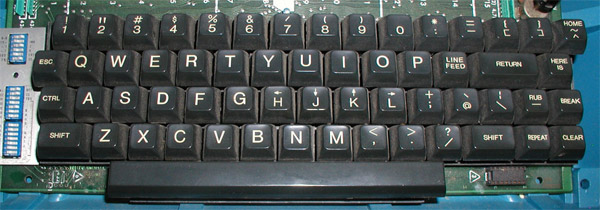
Re:History and Effective Use of Vim by kps on Saturday July 20, 2019 @11:45AM (#20486418)
Now split the second column, and you understand the keyboard layout of pre-microprocessor ASCII terminals like the Teletype 33¹ and vi's own ADM-3A²

       011 010 
  0000  0   SP 
  0001  1   !  
  0010  2   "  
  0011  3   #  
  0100  4   $  
  0101  5   %  
  0110  6   &  
  0111  7   '  
  1000  8   (  
  1001  9   )  
  1010  :   *  
  1011  ;   +  
  1100  <   ,  
  1101  =   -  
  1110  >   .  
  1111  ?   /  
¹ https://commons.wikimedia.org/wiki/File:TTY33ASR.jpg

² https://catonmat.net/images/why-vim-uses-hjkl/lsi-adm3a-full...
Re:History and Effective Use of Vim by pault on Saturday July 20, 2019 @02:54PM (#20487613)
Right, I was trying to figure out what bitwise operation the control key performed specifically, but my google-fu was failing. Is it key ^ 0b10?
Re:History and Effective Use of Vim by ahallock on Friday July 19, 2019 @06:28PM (#20482964)
I try to keep it minimal as well, but some plugins are too good not to install for my daily work. TabNine, Auto Pairs, Vim Surround, Endwise, and CtrlP are a few that come to mind.
Re:History and Effective Use of Vim by davidgerard on Saturday July 20, 2019 @04:28PM (#20488153)
I tend to only mess slightly with my .vimrc, but I get fancy in my .gvimrc for this reason.
Re:History and Effective Use of Vim by 87zuhjkas on Saturday July 20, 2019 @05:38AM (#20484869)
> Once you get used to biting the bullet and hitting escape instead of jj ... it just works, everywhere.

Well you can also invest the small amount of time to type in:

:imap jj <Esc>

Re:History and Effective Use of Vim by arvinsim on Saturday July 20, 2019 @09:03AM (#20485500)
Still have to configure fonts. Can't stand the defaults.