I don't know if the Kinesis reduces the finger movement between rows, but your hands definitely sit in a much more relaxed way. The thumb has quite a bit more responsibility too and you don't do any stretch moves like using the pinky for the twiddle or a lot of control pressing. Love the keyboards.
As for the pedals, they are programmable and the general thinking was control/option/alt type configurations for them. I just never got in to heal-toe typing, the pedals got dusty and I never really used them much. Had I actually had CT or something, I think I might have been more motivated to make use of them.
I felt that some kind of wireless, in-shoe, toe-activated device might be the best option. But that's not really very practical!
Actually, in a situation where I can't require significant force, the 'upshift' almost seems like it would be more comfortable.
I use karabiner on 2 versions older of macOS, which allows you to use a special keyboard way to control the mouse... You hold the D-key then use other letter keys to move the mouse up,down, left, right, click, scroll up, scroll down etc... Works so much better than you'd expect. It literally allows me to do everything including screensnap selections, making keypoints without mouse etc.
Because karabiner doesn't work on latest macos, I've been busy writing my own replacement from scratch.
I did also initially start by mounting a trackpad in the middle of the kinesis - but ultimately this isn't perfect. My mouse keys setup simply blows everything away, even compared to just using a regular trackpad for most things, since you never take your hand off the keyboard, and can get about 70 percent as fast using the keyboard as mouse as using a real trackpad.
My code is in such a disorganized state, I have never coded MAC stuff before, this was my first try, creating a test project scaffold with xcode. I mixed old school C-code with objective C because I don't know objective C ;->
Finally I manually injected my compiled binary into another app's package structure, just to make it work. You have to grant it accessibility permissions in preferences to work!
For now I have downgraded my MacOS-X and gone back onto Karabiner, because I literally refuse to work with computers without this awesome thing.
It takes a bit of time to get fast and accurate, but eventually it is all just muscle memory moving a pointer around on the screen. Some stuff with keyboard-mouse is even better than normal mouse(trackpad). But overall I am so happy with it that I do video editing and all other document editing with it, and wouldn't dream of going back to my trackpad or mouse. (I also get RSI pains from using pointing devices, but as I say, it is devine to never lift your hands OFF your Kinesis Advantage keyboard).
I suspect part of what makes this really great is using it on the Kinesis. When I work on the train on my MBP I still use mouse-keys, but sometimes use the trackpad intermittently.
I would really recommend trying Karabiner if you have an older mac, otherwise I could email you a binary.
I will probably clean up the project, and use fancier tecniques like direct hardware access from user-space instead of the eventtapper, and copy some tricks from Karabiner-elements.
Eventually I will create a github and maybe a project site ;-> If by the time I am somehow forced to upgrade MacOS and there still isn't a good solution out there, I will certainly make mine work, otherwise I am screwed!
Since this is a vim-inspired thread: among other mappings, I swap Escape with Delete, and swap ↓ with ↑ so they line up with J and K.
I use caps-lock for escape. It’s really nice but whenever I use a coworkers computer I find myself suddenly writing with caps-lock on even though I’m the only vi-user at the office.
And I hear good things about Vimperator on Firefox.
There are trackball buttons on the top of the keyboard. When using it, my right hand curls around the corner and my thumb is over the trackball. I have the 2nd mouse button set to scroll-lock, and scrolling up and down web pages and through terminal histories never felt better.
Ended up going back to the trusty $20 Anker cause it feels more comfortable on my hand/forearm. Go figure.
I'd actually started with a Kensington Expert Mouse (also a trackball, despite the name). I switched to the CST because it has a higher resolution. The one thing I didn't like about the CST was the placement of the middle button, but the CST is easily hackable so I added a "sidecar" with a button for my thumb, and it works really well.
Here's a photo of my setup:

They're also fantastic once you're used to them. I frequently consider switching to trackball, but my favorite option is still the Trackpoint. IBM/Lenovo really screwed the pooch there though.
Completely avoiding the mouse isn’t an option for some workflows.
I wish there were more keyboards with IBM-style trackpoints.
Because I rarely use the mouse (trackball in my case), and if I type on a 'regular' keyboard for any extended period of time I will experience discomfort; whereas on the Kinesis Advantage I don't experience any discomfort.
300$ seems like a steal to me!
(Not that I paid. My company did.)
The point is to reduce strain and fatigue of the fingers and wrists, not to reduce movement for the sake of reducing movement.
Mouse ergonomics is a completely separate can of worms.
A keyboard that doesn’t have an integrated mouse solves only part of the problem. That’s why I like having a trackpoint for small mouse movements.
I don't mind having to switch to the mouse. It gives me time to take both hands of my keyboard and change their positions even if for a little bit.
The ideal for me would be a two-in-one. An ergonomic, well designed keyboard like the kinesis, with the addition of a trackpoint to avoid lifting a hands for small mouse movements.
Building keyboards has been a hobby for a minute, I've settled on an HHKB that I've gutted and replaced the controller with a Teensy 2 so I can program all my mouse keys and shortcuts in hardware, therefore avoiding the inevitable discussion on who's mappings to use when pairing. You can often find good offerings for sale/trade on reddit/r/mechmarket.
They are not curved like the Kinesis Advantage are, but I have really long arms and the ability to move both keyboard parts around is so good on my elbows and wrists.
As per mouse, I have been looking at trackballs, but I was kinda scared to get one so far. Having large hands, I previously used a Razer Mad Cat, because I could adjust the mouse to a size so I don't have to grab inwards, and I could just hold it without effort. That thing recently broke, and I changed to a slightly angled, equally large trust mouse.
I had spent 10+ years working nomad style on a Thinkpad, and when I got a desk I got one of those USB Thinkpad keyboards with the trackpoint in it. Turns out if you zap them with static 2-3 times a day for a couple years, they'll eventually stop working... One day it just up and died, and a co-worker had the Advantage and Ergodox Ez and I'd been meaning to try them.
I had switched to a tiling window manager a few years before that, i3, so I could do a lot of the navigation without using the mouse. I've at times toyed with the idea of putting a trackpoint in the Ergodox, and if they made one I'd probably buy it, but I'm pretty happy with my current setup.
For most navigation I use my keyboard. Since I have 3 monitors, using the mouse is not a great experience anyway. I mostly use the mouse for web browsers (never really been happy with the mouseless navigation experience there).
Love the Ergodox Ez. I've also got an Ergodox Infinity with Cherry Brown, I kind of prefer those keys, but I like the Ez's tenting kit. I also picked up an Ez with Gaetron Blue, which is honestly too loud for my work environment and doesn't feel enough better to be worth it. My normal keyboard is Ez with Gaetron Brown. I just noticed they have a new Ez that has switches you can remove and replace (without a soldering iron), and they have switched to Cherry. A good move, IMHO.
Works well. With my Kinesis Advantage forget pair programming; except with those in the office I have converted to the Kinesis Advantage of course!
Took maybe 3 days to get used to the movement between them mouse and the keyboard. I think it would be more uncomfortable to have one in the middle space in the keyboard, your hands sort of naturally fall away to the side but they have to reach in to the middle space.
I tried velcroing the trackpad to the middle, but the angle is weird. I like it better to the left.
[1] https://www.amazon.ca/Logitech-Cordless-Trackman-Discontinue...
Hmm, I've used Vi and other editors long enough that I find it annoying that most editors enter text when in normal mode.
https://vintagecomputer.ca/wp-content/uploads/2015/01/LSI-AD...
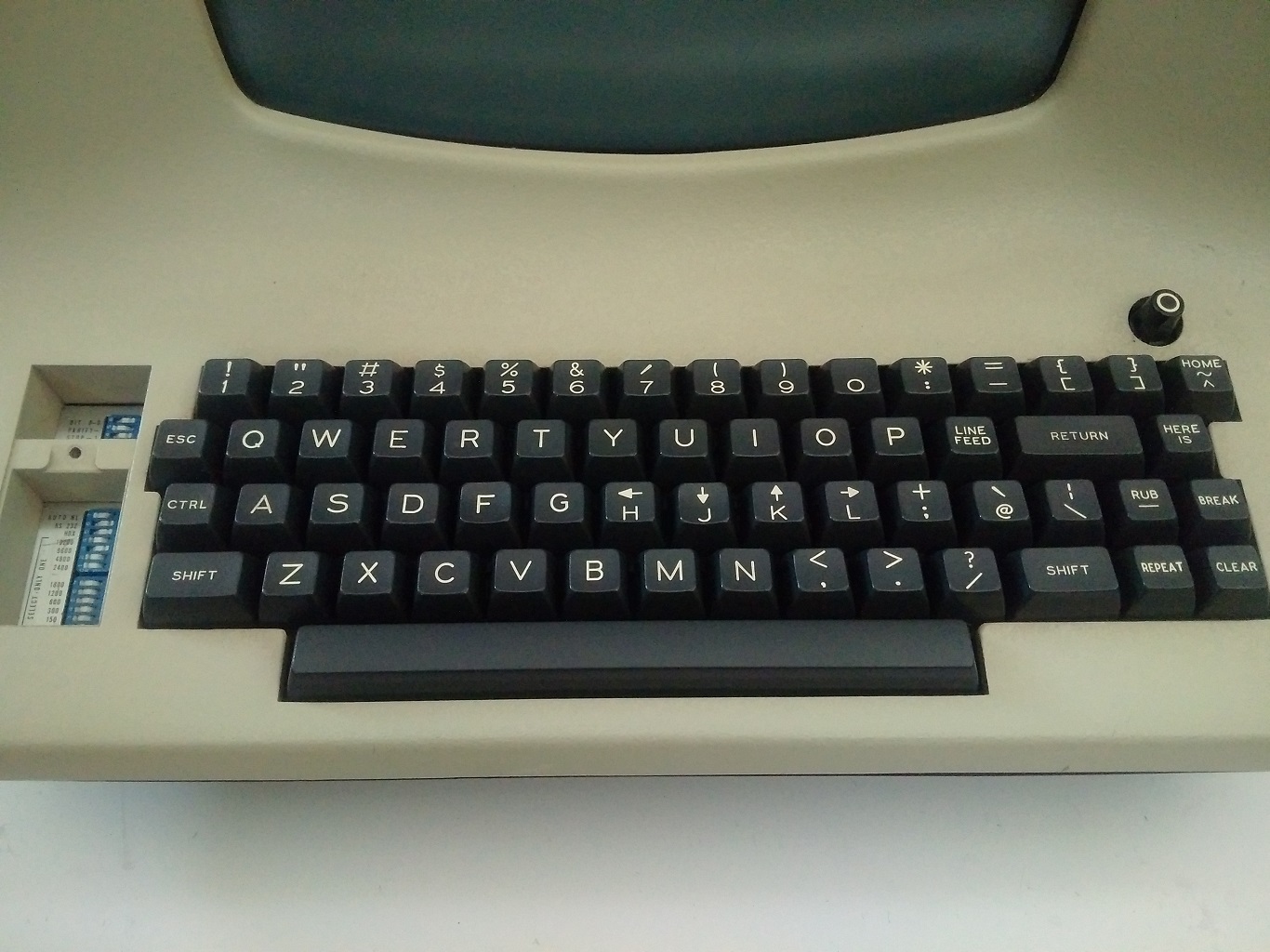
Where escape is in a similar place to tab on PC keyboards. Also note the arrows on the home row.
Most dedicated vim users will move to using C-[ probably with caps lock mapped to Ctrl.
Other alternatives are map caps lock to escape or even have caps lock as escape when pressed and ctrl when held.
1. more compact. No extra surface, instead just have separate wells connected either by a wire like the Kinesis Freestyle, or fully wirelessly ideally. Kinda like the ErgoDox keyboard.
2. lightweight. Don’t want to be carrying a brick in my backpack. I’m totally fine with using low travel keys like how a MacBook or any decent chiclet keyboards feels, I mostly just want the layout.
3. wireless. Bluetooth with ability to switch multiple inputs like the Logitech K811 would be incredible.
If anyone knows how someone would start to hack something like this together, please tell me! I have never done hardware but I would love to mess around with something like this as a project.
Iris and dactyl look like the sort of things I’m thinking, though I’d probably want to find a way to either have f keys or configure some of those thumb keys to hit certain common f keys, I assume that’s doable though! Thanks for the resources, just mentioning names and where to look really helps :)
- Start playing with 3D modeling software
- Figure out what the base/frame should look/work like and have that professionally made somewhere (ie a cheap CNC place)
- Invest in a good 3D printer (I hear the cheap kit/"project" ones are terrible) or find one you can rent/borrow, and 3D print attachments to the base for iteration purposes
I realize this approach describes several months of work but is probably a "99.9% solution" - as in it'll be likely to (viably) get you the absolute closest to exactly what you're looking for.
Looks stunning to me. The rather underrated Cherry ML switches strike the balance of low travel and good feel for me. Maybe one day someone will get sufficiently inspired to make such a thing.
I imagine some frustrated IBM programmers in the late 80s saying "fuck it, I'm just putting caps lock where Control used to be."
I wonder what happened? Maybe since computers are cheaper, more ubiquitous and people might use several (home, work, laptop), it's much less practical to use an exotic setup these days?
My Logitech with side buttons finally wore out, and the only symmetrical standard mouse with five buttons was a Razer gaming mouse. I bought it, but I feel a bit silly with it on my desk at work.
Bought it because you can do simple macros for buttons which are stored on-device. Also allows for mode switching with rotating profiles that are differentiated by LED color.
If you're on a budget and don't care about on-device macros or looks then there are branded variants, like the Guild Wars 2 one when I initially tried it out and now there's a CoD one.
The downside is that the branding paint job wears out with use. Especially problematic on the white GW2 one I had (yellowing under fingers). Don't try to clean it with IPA (rubbing) alcohol though, it dissolves the matte sides and the paint job (learned from experience). https://www.amazon.com/SteelSeries-Call-Black-Gaming-Mouse/d...
It took me a good 2 weeks to become proficient on it, but that was four and a half years ago and I haven't felt any RSI symptoms at all. I think I'm now faster on it than my old keyboards, mostly due to the thumb clusters. I recommend it to everyone who asks about it.
The most elite setup, as I recall, was the Kinesis Advantage combined with pedals. The keys on the Kinesis are recessed in these sort of cups that your fingers rest above. The idea is that this reduces the distance that your fingers travel moving between rows. I could never get the hang of typing on one of them, but people swore by them. Adding the pedals for shift/ctrl/esc was supposed to further reduce the need to stretch your fingers and get them into awkward positions. People also swore it made them faster and of course it looked and sounded super cool.