That's true - but playing hide and go seek with the non-subscription version is uncool.
I got a marketing email about a week later from Dave Teare and replied expressing my disappointment that publicly they're saying the stand-alone model will continue indefinitely but privately, they're "moving away" from the "lesser product" that they couldn't in good conscience sell me any longer. No reply.
The actions of Agile Bits are not matching the words in my experience and that's a big deal given the type of software they sell.
>3. They're promoting cloud vaults and hiding local vaults, and the Windows version of 1Password has apparently never used local vaults.
1Password has absolutely used local vaults since its inception. They STOPPED supporting them in the latest version which is ridiculous, frustrating, and feels like a bait and switch. Had I known that was going to be their tactic going forward I never would've bought version 4 for Windows.
And no, I don't want to hear about how "version 4 still works just fine" - version 4 has all sorts of bugs, on windows 10 frequently hangs for minutes at a time when unlocking the database, and in general looks like it was written as an after-thought.
It makes it maddening trying to get on a website, and having to wait for the vault. Input queues up in the meantime, meaning I can't click or type on other things. Then suddenly, my mouse will shoot around the screen and my characters will get typed to wherever I was.
Yes the UI is "classic Windows" not "modern UI"[1] but written an afterthought seems a bit harsh.
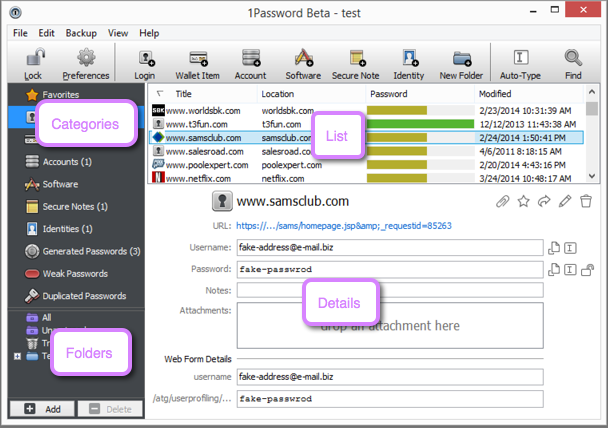
I've been considering just going back to LastPass, but it all seems like a hassle. Why am I even paying for these companies if I can't rely on them? I should be paying because I don't want to deal with this shit. Which is ironically why I've toyed around using ownCloud and KeePassXC
You can switch again to a homerolled solution like you are suggesting, but you're not going to "no deal with this shit", you are now your own IT for this shit you homerolled.
But since now 1Password is changing their subscription model if I were the use Lastpass, what would happen if one day they would shutdown their services? At least with 1Password I have (or had) my local vault in Dropbox/iCloud/whatever and I could still use it.
So next step beyond that would be to roll "my own" (obviously using software written by actually smart people) password management system which used open source and self hosted parts. That way I factor in upfront the "I have to deal with this shit" part and it doesn't come as a surprise years along the line when the company I'm relying on goes belly up, or changes their business strategy or whatever. Obviously it's not perfect, but I have to consider things. It's not wise to just rush into things.
AgileBits has also used dark patterns, if I may call them so, on the website to hide or obscure what's available but not considered favorable by the company, and prominently push what's considered favorable by the company as if that were the only option available (one visit to the home page in the last couple of years is adequate to get this). This ought to be shameful for any software company, especially one that claims to care about the users.
When it was originally created and stabilized, 1Password was a great solution, almost like Dropbox in simplicity and value. But the focus has been sorely lacking on other platforms, like Windows (and of course, nothing on Linux). There doesn't seem to be a lot nowadays to justify what the end user gets from the subscription when there are other options out there (that didn't exist several years ago).
Ever since I started using Linux, I've looked for solutions and have been trying Enpass once in a while. [1] It's free on all desktop platforms and has browser integration.
Edit: Of course, it's also been quite sometime since I started using Keychain Access and Safari on OS X/macOS/iOS.
1Password 4 for Windows uses local vaults just fine - I'm using it right now. The new 1Password 6 for Windows does not support local vaults.
That's not a statement about 1Password; it's about the fact that the security models are different on the two platforms, and I'm very familiar with how 1Password works on macOS and less so on Windows.
https://msdn.microsoft.com/en-us/library/ms995355.aspx
At that point you should probably be about as (in)secure as access to the platform is. I don't know how you could improve much on that (assuming secureboot and bitlocker encrypted disk).
Is there some magic going on the MacOS side that somehow improves on this?
The hard problem is getting the passwords out of the encrypted store and into form fields in your browser.
They also support copying the password to your clipboard (which they then clear after a few seconds). There's also the automated entry system which basically emulates keystrokes.
[1]: https://www.microsoft.com/en-us/store/p/1password-alpha/9nbl...
1P4 for Windows was the last version that was "buy once and forever", but they weren't providing good browser integrations for that version.
I am happy to support them though, and gladly used their products.
I definitely don't want to have to unlock my vaults on their website though.
Are there any open source password manager products that you would recommend?
It bothers me when people point to other password managers as alternatives to 1Password because of packaging and pricing issues. It's easy to find other commercial password managers that have attractive packaging and pricing! That's not the hard part!
I happen to like 1Password as a product, but that's not why I recommend it.
I'd really like to know this as well.
I'm aware that LastPass doesn't have a perfect security record, but because of its prominence it gets lots of attention from hackers and security researchers, security issues tend to be well-reported, and the responses to them seem to be reasonably transparent and proactive.
In contrast, Enpass appears to be a side-project of a small app development house in India. Did a miss a memo where Security Expert X said Enpass is better than LastPass?
What I can see is that 1Password is pushing users towards a model that's fundamentally insecure. Their web-based products require a level of trust in 1Password (the company) that none of us should be willing to place in any company. What we've learned from Snowden is that any cloud provider can be secretly made to bend to their governing body's will. Running closed-source software on our own computers involves a level of trust in the authors of that software. That's just a fact of life when software isn't open source. But when code is pushed out into the world, it can, at least, undergo some scrutiny/testing by people outside the company. This is not true of software running on the company's servers. In so much as the security of 1Password requires executing a single, line of code on servers controlled by 1Password, the product is insecure and fundamentally unauditable because that line of code can be changed at any time without users being made aware.
The other point that should probably not get lost is that we're dealing with levels of security. In advocating for password managers, the interface absolutely does matter. Most computer users haven't adopted any password manager yet. When comparing a secure but difficult to use password manager, a potentially insecure password manager with an easy-to-use UI and a combination of insecure passwords, post-it notes and all the other terrible ways that users have of "managing" their passwords, the middle ground is likely to come out ahead for all but the most technically adept users. Need proof? PGP/GPG passes security reviews but has terrible UIs...what percent of emails are PGP/GPG encrypted? We shouldn't let the perfect be the enemy of the good. There can be different classes of security products for those that need protection from state-level actors and those that don't. Because people who are worried about that level of attack are generally willing to undergo a lot more pain to stay secure than your average user is.
1Password is an incredibly complex, solid and polished suite of software products that provides an essential security function. It absolutely boggles the mind that people get up in arms over the idea that they would be forced to pay $36 each year to use it.
It boggles my mind that people are so quick to support a company that's making changes solely for their own benefit to the detriment of their customers. I want AgileBits to succeed too. That's why I bought the software despite having access to a license from work. But try this for math...if they release a major update to their software every year and charge, say, $36 to update, it costs the same exact amount to stay on the latest version. As a bonus to them, they get the money all up-front and get to collect what little interest you can get these days. The main difference is that I don't have to worry about their company imploding and taking all my passwords with it. My software will work in perpetuity without any cloud service they provide. That's piece of mind that I need when it comes to my passwords.
I use Keepass. Reasonable security but ugly gui in linux due to mono. Has plugins. Completely offline.
How has your experience with it so far?
It is absolutely rock solid.
I'm not sure that KeepassXC can be considered unmaintained - their last release was in June, this year - https://keepassxc.org/blog/ . Also note the monthly tone of the updates - even the koolist of kool dev kids kant complain that is slow 8)
I can't yet wean myself off of LastPass though, just because it's synced everywhere and is more reliable when doing form fills on websites. For example, KeePass and its variants don't have a concept of equivalent domains. For "equivalent domains" I should be prompted with the same lists of auto-fillable credentials, such as:
* youtube.com/google.com/gmail.com
* bing.com/hotmail.com/live.com/microsoft.com/msn.com/passport.net/windows.com
* apple.com/icloud.com
LastPass gets this right, but I sadly haven't seen any other password manager that does. I think there's an open issue with KeePassXC to address this but it's not merged or production ready.
The problem is that they can't deviate from the official KeePass database format, so adding something like aliases requires hacks like the above.
KeePassXC doesn't support KDBX yet, but they'r working on it[2].
Other than that it has better gui if that is your thing (Keepass is ugly). It is mostly a fork of keepassx which is still usable but KeepassXC merged all pull requests and fixed a load of bugs in keepassx after the maintainer stopped maintaining. Try it. It works. It also has mutilple releases (snap, appimage etc.).
+ kpcli for TTY use, keepassdroid for android, sync to owncloud, voila.
If you are extra concerned with security after storing your file remotely, you can have it use an addtional external keyfile in addition to the which you manually copy to 'authorize' devices
My favorite thing about it is that it uses standard tools I understand, and I can back it up and version it with git.
I recommend website-based password managers to my non-technical friends because they're easiest to use and therefore most likely to actually BE used, and the security vulnerabilities noted in the article are very small compared to not using a password manager at all.
The DOD defines software commerce as anything available to the public and used for any non-government purposes.
http://dodcio.defense.gov/Open-Source-Software-FAQ/#Q:_Is_op...
So to take your comment one step further, for some organizations, the definition of commercial also has nothing to do with whether you sell it or give it away for free, even though many people reasonably assume commerce==sales.
I've been working on the marketing a bit, and the sense I get in this space is that, like home security, password security is a series of trade-offs. One size doesn't fit all; different situations require different needs, and everyone tries to balance the safety they want to feel with convenience that they desire.
So, in our case, there are a couple of good options. You could operate on a hosted service and get the cloud-based benefits without needing to worry about infrastructure or updates, or you could self-host and trade a bit of hassle in exchange for trusting the host and verifying that the updates will do what they say they're going to do.
[0]: http://passit.io
1Password v6 for Windows doesn't work with local vaults, it requires 1password.com
Enpass doesn't seem to support multiple vaults at all though...
However, on my Surface Pro 4 I use Edge, because it supposedly uses less power than Chrome.
If I've understood the 1Password forums correctly, the Edge integration that they are working on will only be in the subscription version. Those of us staying on 4 will be stuck with manually looking up passwords in 1Password.
https://discussions.agilebits.com/discussion/comment/340062/...
Apparently someone commented below that is a documented "feature". Wow.
This is just fear mongering.
Boo hoo. Did I say it's a bug? I said it's a security issue. It's also an exceptionally stupid thing to have as standard behavior without warning. It demonstrates poor priorities and ideas about safety on the part of LastPass.
I would prefer a tool that works for teams if anyone has suggestions. I care about how my team manages and shares their passwords. Looking for something that works across devices, and where I can share access but not necessarily share the actual passwords if I can avoid it. I really like LastPass, it's a shame about some of their issues.
Disclosure: happy user of pass, but haven't tried encrypting to multiple identities.
Perhaps this is a case where a feature that makes some sense in some cases was added, the problem is, outside that scope it's a really bad idea. But then someone said "We'll make it optional..." and the rest was history?
What would I do? I'd probably set up a second Chrome user and the LP for that user/browser would be auth creds for only stuff I'd need offline.
That would allow the main LP vault to have it disabled. This mitigates exposure.
Windows had local vault, I used the local vault version synced via dropbox for years.
(You can no longer use other clouds than their own...?)
Sounds like there's something about to blow?
> "I know about some security flaws (or behind-the-scenes issues with the dev teams) in other products, but I can't reveal them publicly because of NDAs, etc"
But there is also:
> "I know enough to recommend this product, but I don't know enough about the other products -- not necessarily because I lack the skill, but because I haven't spent the time -- to endorse/recommend them."
I don't mind a recurring fee, its just that I want a native (cloud-free) password manager.
It's crazy that it isn't clear.
But Steve Thomas, who I also respect, has a lot of specific bad things to say about it.
I don't think it will destroy you. But it is not my first choice.
> ...
> there's currently no other commercial password manager that I recommend.
> I'm sorry I can't go into more detail than that.
Hmm. OK. Well. How about this?
Without getting into specific products, can you list the top 10 things a good password manager must do, offer or implement in order to secure the recommendation of someone doing research in the field?
There are four issues that I'm currently aware of with 1Password:
1. They've converted from flat to subscription pricing.
2. They're pushing people to a 1Password-managed cloud sync system instead of the a la carte sync they were doing before.
3. They're promoting cloud vaults and hiding local vaults, and the Windows version of 1Password has apparently never used local vaults.
4. Now that they have 1Password.com, first-time enrollment in 1Password requires you to interact, once, with 1Password.com.
Of these, only (4) is a serious security concern. Their last release further eliminated the native app's dependency on 1Password.com. I'm confident they'll get all the way towards decoupling them, but I'm not them, so grain of salt.
I have no relationship with 1Password other than as a happy customer and as someone who does research in the field they work in. Having said that: I strongly recommend that you be very careful about what password manager you choose to use. The wrong password manager can be drastically less secure than no password manager. I recommend 1Password, and there's currently no other commercial password manager that I recommend. I'm sorry I can't go into more detail than that. :(