News for hackers. Stuff that matters.
Re:Lenovo Launches ThinkPad X1 Yoga at CES with OLED Display by frik on Monday January 04, 2016 @05:47AM (#10834844)
Will Lenovo ever produce a high quality notebook again?

All I want is a real "ThinkPad". Give me a proper T460 with 32GB RAM, IPS display, a recent Intel i7 CPU, replaceable batteries and the notebook body of the T410 or better the T60 or IBM ThinkPad T41.

Re:Lenovo Launches ThinkPad X1 Yoga at CES with OLED Display by xendo on Monday January 04, 2016 @05:56AM (#10834865)
Re:Lenovo Launches ThinkPad X1 Yoga at CES with OLED Display by frik on Monday January 04, 2016 @06:10AM (#10834898)
Thanks for the pointer.

It looks promising, except for the keyboard layout. WTF http://images.anandtech.com/doci/9889/T460.jpg

Can we please go back to IBM designed keyboard layout. The T410 had a very good keyboard, I want to keep such an layout :(

I want my keys grouped together not such a mess. The F1-4, F5-F8, F7-F12 keys should be grouped. The Del, Home, Page Up/Down keys should be grouped. I want to be productive, not look at the keyboard the whole time...

Edit: The T410 keyboard looked like this: http://cdn6.bigcommerce.com/s-blhknq8/product_images/images/...
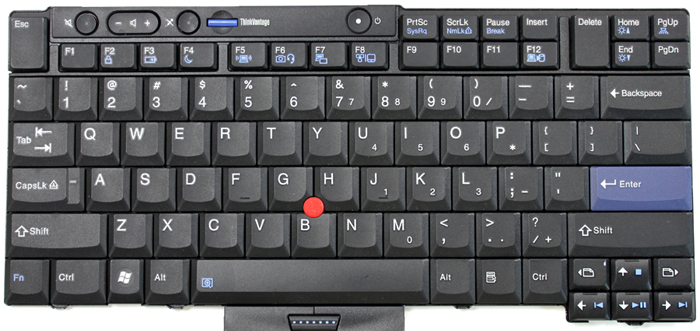
Re:Lenovo Launches ThinkPad X1 Yoga at CES with OLED Display by leaveyou on Monday January 04, 2016 @06:45AM (#10835008)
I really don't understand what is their logic when they place a full Print Screen key (which I use 10 times a year at most) right between the Alt and Ctrl but the arrow keys are smaller and crowded and Home and End (which I use every time I edit something) are not even on the keyboard (or maybe there is some unhandy Fn+ shortcut?). WTF ? I got used to Sony Vaio which has full arrow keys and a smaller shift and an additional column of keys "Del, Home, PgUp, PgDown and End and now they discontinued the brand... I'm doomed. http://postimg.org/image/yt3kpzarx/
Re:Lenovo Launches ThinkPad X1 Yoga at CES with OLED Display by Already__Taken on Monday January 04, 2016 @07:42AM (#10835270)
F12 home end insert del, right there on the top row. I'd much rather them be function keys on the left/home right/end arrow keys.

Someone really needs to figure out a sleek backlit fixed size keyboard area for everyone to have their own keyboard custom printed. I wouldn't even want an insert key.

Crap-sized enter is a deal breaker too.

Re:Lenovo Launches ThinkPad X1 Yoga at CES with OLED Display by ansible on Monday January 04, 2016 @08:27AM (#10835471)
I use the Insert key a lot. Shift-Insert and Ctrl-Insert for cut and paste work well with Cygwin. They also work for some programs like Orcad for entry boxes where Ctrl-C and Ctrl-V don't.
Re:Lenovo Launches ThinkPad X1 Yoga at CES with OLED Display by floatboth on Monday January 04, 2016 @06:50AM (#10835034)
You can remap Print Screen (or any key really) to anything you want in software.

Home and End... Have you seen this keyboard? They're in the top right corner.

Page Up/Down near the arrow keys is really nice.

Re:Lenovo Launches ThinkPad X1 Yoga at CES with OLED Display by leaveyou on Monday January 04, 2016 @07:24AM (#10835187)
They were not visible in the image posted by frik. I see them now. PgUp/Down are nice if they are "wherever you are used to look for them" but for some unknown reasons most brands keep making changes to the layout with every model. Another irritating trend is to make the touch pad unnecessarily big while the keyboard is crowded and pushed so close to the screen that you cover the lower part of it with your hands when you type.
Re:Lenovo Launches ThinkPad X1 Yoga at CES with OLED Display by Qiasfah on Monday January 04, 2016 @01:20PM (#10837319)
"but for some unknown reasons most brands keep making changes to the layout with every model"

The thinkpad keyboard layout has been consistent as of late. The T460(s) keyboard layout is the same as the T450(s) keyboard, which is the same as the T440(s) layout, which is almost the same as the T430(s) layout with minor differences in the function keys.

These thinkpads are not an example of a brand changing the layout every model.

Re:Lenovo Launches ThinkPad X1 Yoga at CES with OLED Display by floatboth on Monday January 04, 2016 @06:54AM (#10835050)
The function keys are grouped! Hard to see on the photo, but on my X240 they're grouped: Esc-F1-F4, F5-F7, F9-F12, Home-End-Delete.
Re:Lenovo Launches ThinkPad X1 Yoga at CES with OLED Display by kitd on Monday January 04, 2016 @06:20AM (#10834926)
I have a W530 and it looks very similar to this layout (Return key is over 2 rows though).
Re:Lenovo Launches ThinkPad X1 Yoga at CES with OLED Display by floatboth on Monday January 04, 2016 @07:04AM (#10835096)
Usually, European keyboards have the weirdly shaped enter/return key that's over 2 rows, and US keyboards have a single-row return key.
Re:Lenovo Launches ThinkPad X1 Yoga at CES with OLED Display by mdellabitta on Monday January 04, 2016 @09:29AM (#10835754)
That "weirdly shaped enter/return key" is an ISO standard.

https://en.wikipedia.org/wiki/ISO/IEC_9995

Re:Lenovo Launches ThinkPad X1 Yoga at CES with OLED Display by darklajid on Monday January 04, 2016 @06:08AM (#10834895)
Thank you for that link.

Now to convince management that a 3yo lowish T520 with a ~half-dead~ battery and constant thermal problems isn't exactly the best gear for your developers.. But at least I got time until February, until the T460p ships :)

Re:Lenovo Launches ThinkPad X1 Yoga at CES with OLED Display by babby on Monday January 04, 2016 @06:42AM (#10834994)
Honestly I'd rather a t520 over this new Dell i7 e7450 latitude they have our developers using. The keyboard has... Fn key Home and End keys! Maximum cringe.
Re:Lenovo Launches ThinkPad X1 Yoga at CES with OLED Display by sandGorgon on Monday January 04, 2016 @08:30AM (#10835487)
You can invert that in the bios.
Re:Lenovo Launches ThinkPad X1 Yoga at CES with OLED Display by totalrobe on Monday January 04, 2016 @07:37AM (#10835246)
Did you see the retro concept they were throwing around?

Very curious to see if anything will come of this.

http://blog.lenovo.com/en/blog/retro-thinkpad-time-machine

Re:Lenovo Launches ThinkPad X1 Yoga at CES with OLED Display by frik on Monday January 04, 2016 @08:02AM (#10835365)
Yes, I would buy one. But it's 6+ months and Lenovo hasn't started producing them.

In 2013 Lenovo annouced the T430, were they destroyed their ThinkPad brand with this aweful keyboard and touchpad, etc: http://blog.lenovo.com/en/blog/thinkpad-t431s-laptop-new-des...

And David Hill (the autor of the ThinkPad Time Machine? 2015 blob post) is mentioned in the 2013 article.

Re:Lenovo Launches ThinkPad X1 Yoga at CES with OLED Display by bitwize on Monday January 04, 2016 @07:47AM (#10835301)
Nothing will come of it.

The ThinkPad's target audience was business users and geeks.

Both of whom favor MacBooks in this day and age.

Re:Lenovo Launches ThinkPad X1 Yoga at CES with OLED Display by ekianjo on Monday January 04, 2016 @08:10AM (#10835401)
> Both of whom favor MacBooks in this day and age.

So you probably live in California or something. The rest of the world keeps using Lenovo Thinkpads just fine. Just look at their sales figures, they are not losing ground by droves or something. Macs are no replacement for Thinkpads in any way.

Re:Lenovo Launches ThinkPad X1 Yoga at CES with OLED Display by ctvo on Monday January 04, 2016 @01:50PM (#10837565)
What are you getting from a Thinkpad that you wouldn't get from a Macbook Pro? It's not price. If you spec out a similar one, in a lot of cases, the MBP beats it in price. The things that matter -- performance, battery life, display, weight all favor the MBP.

I've tried finding a Windows laptop that comes close for personal use. I ended up getting a MBP and putting Windows on it like a lot of developers.

Thinkpad T550 Ultrabook $2,399.00

Intel Core i7-5600U Processor (4MB Cache, up to 3.20GHz) Windows 10 Home 64 15.5" 3K (2880x1620), IPS, with WWAN Intel HD Graphics 5500 16GB PC3-12800 DDR3L (2 DIMM) 512 GB Solid State Drive, Serial ATA3 Intel 7265 AC/B/G/N Dual Band Wireless + Bluetooth Version 4.0 Up to 14.8 hours of battery life with 3 cell + 3 cell batteries Starting at 4 lbs

Macbook Pro 15 $2,499.00

15-inch MacBook Pro with Retina display 2.5GHz Quad-core Intel Core i7, Turbo Boost up to 3.7GHz 16GB 1600MHz DDR3L SDRAM 512GB PCIe-based Flash Storage Intel Iris Pro Graphics + AMD Radeon R9 M370X with 2GB GDDR5 memory Force Touch trackpad

Re:Lenovo Launches ThinkPad X1 Yoga at CES with OLED Display by Daishiman on Monday January 04, 2016 @07:37PM (#10840039)
* Heat management: Thinkpads just don't heat up in harmful ways. I have seen way too many Macbooks that can't be handled when they heat up or the continued stress degrades some component * Keyboard with a Delete key * You can install Linux on a Thinkpad trivially and have it ready for use. The MBP just isn't there * The chassis stands up to a lot more abuse, not just aesthetically (because the MBP frames scratch up just by looking at them the wrong way) but in terms of actually resisting falls. * With the newer models you can replace the external battery while running, and if you get the larger batteries you can run your machine for a full 24 hours.
Re:Lenovo Launches ThinkPad X1 Yoga at CES with OLED Display by op00to on Tuesday January 05, 2016 @09:16PM (#10847960)
Thinkpads certainly heat up if you're running Linux rather than Windows.
Re:Lenovo Launches ThinkPad X1 Yoga at CES with OLED Display by ekianjo on Tuesday January 05, 2016 @09:36PM (#10848053)
Yes, but if you install tlp the situation is somewhat better.
Re:Lenovo Launches ThinkPad X1 Yoga at CES with OLED Display by totalrobe on Monday January 04, 2016 @04:17PM (#10838698)
Well I'd never personally buy a brand new Thinkpad. Against a new mac or dell it's not a super great deal.

But if you like to tinker, Thinkpad is really your only option. It has widely available and inexpensive user replaceable components(screen, chassis, RAM, SSD, keyboard, mousepad, etc). Lightly used thinkpads are available for a few hundred bucks on ebay. I picked up a year old T440s with I7, 12gb ram, and 256gb SSD for $400 last year.

Also hot swappable battery, wide linux compatibility, spill proof keyboard, awesome industrial design.

Re:Lenovo Launches ThinkPad X1 Yoga at CES with OLED Display by ekianjo on Tuesday January 05, 2016 @09:36PM (#10848049)
> I've tried finding a Windows laptop that comes close for personal use. I ended up getting a MBP and putting Windows on it like a lot of developers.

Well a lot of developers actually use Linux, and Lenovo hardware support for Linux is much better than the non-official Linux support for Macs, for one.

Plus, Thinkpads are way more robust than Apple's products. They can drop, be trampled over, and still work just fine. They are made for the road, not just to shine in Starbucks.

Thinkpads are highly replaceable as well. You can open them up and change about every part inside, because they are made to be modular and easy to service. No need to go to your Apple Store to have your battery replaced.

On top of that, used Thinkpads can be extremely cheap and still work fine for YEARS after that. You probably will replace them before the hardware actually fails.

Re:Lenovo Launches ThinkPad X1 Yoga at CES with OLED Display by totalrobe on Monday January 04, 2016 @07:57AM (#10835344)
Thinkpad still has a pretty hardcore following among linux users..
Re:Lenovo Launches ThinkPad X1 Yoga at CES with OLED Display by bitwize on Monday January 04, 2016 @08:38AM (#10835531)
Linux users are statistical noise in the user base. If they're the only ones seriously interested, Lenovo management will look at the numbers and decide it's just not worth it.

Hey, maybe someone can Kickstart a 3D-printed retro ThinkPad case for modern laptop system boards.

Re:Lenovo Launches ThinkPad X1 Yoga at CES with OLED Display by totalrobe on Monday January 04, 2016 @10:57AM (#10836250)
In the US, yes. My understanding that desktop linux is rather popular in asia, russia, and eastern europe, and I've seen that lenovo offers thinkpads with linux pre-installed outside the US.
Re:Lenovo Launches ThinkPad X1 Yoga at CES with OLED Display by FireBeyond on Monday January 04, 2016 @02:50PM (#10838024)
Sounds like shades of this comment:

https://news.ycombinator.com/item?id=6322397

"The original iPhone was a conversation starter, just like the iPad when it came out. You can pull out a Thinkpad from 10 years ago in a full Starbucks if you like, but most people wouldn't enjoy doing it - and even apologize for it, if they got curious stares."

Re:Lenovo Launches ThinkPad X1 Yoga at CES with OLED Display by userbinator on Monday January 04, 2016 @06:23AM (#10834938)
Other features they definitely need to add back before I'll consider buying another ThinkPad:

- Non-chiclet keyboard with decent layout

- HDD and network activity indicator lights

- Hardware wireless-off switch

- Latching lid

They certainly don't need to make it any thinner -- I've had to carry some Macbooks around and the sharp edges are not very hand-friendly. I think 1" throughout is about right for a laptop thickness.

Re:Lenovo Launches ThinkPad X1 Yoga at CES with OLED Display by frik on Monday January 04, 2016 @07:10AM (#10835123)
> Non-chiclet keyboard with decent layout

This. These cheap keyboards are very annoying.

I hope Lenovo produces the old IBM style business quality keyboards for their brand new models.

@Lenovo: have a look at your great T410 keyboard, build them again: http://cdn6.bigcommerce.com/s-blhknq8/product_images/images/... (only the cursor keys are a bit too small, otherwise great)

Re:Lenovo Launches ThinkPad X1 Yoga at CES with OLED Display by r080 on Monday January 04, 2016 @09:30AM (#10835755)
I find these Lenovo chicklet keyboards very pleasant. I have t420s which has it and R40 with old style keyboard. Tried to write on R40 recently and was surprised that it's not that big difference. I don't use F keys much so their layout doesn't bother me.

edit: "F keys" part readability

Re:Lenovo Launches ThinkPad X1 Yoga at CES with OLED Display by proyb on Monday January 04, 2016 @07:58AM (#10835353)
I heard T410 wasn't popular, and there will be more hardware problems or known defective, look at most industry, I'm disappointed that the quality are getting lower.

Why would they practices selling replacement parts that could cost you half of the laptop price just to replace a casing?

Re:Lenovo Launches ThinkPad X1 Yoga at CES with OLED Display by dingo_bat on Monday January 04, 2016 @06:35AM (#10834975)
>HDD and network activity indicator lights

I never understood the point of removing these. I think it may just be cutting costs, trying to save a few cents on the custom shape LEDs.

Re:Lenovo Launches ThinkPad X1 Yoga at CES with OLED Display by toomanybeersies on Monday January 04, 2016 @06:58AM (#10835065)
With SSDs and the density of network traffic these days, both indicator lights are pretty much obsolete. Your HDD activity light would never be on, and the network activity light would constantly be on.
Re:Lenovo Launches ThinkPad X1 Yoga at CES with OLED Display by dingo_bat on Monday January 04, 2016 @12:58PM (#10837133)
Maybe you can set the network light to light up only when the utilization is above a certain level? Same goes for HDD light, we can use something like active time every 100 ms. My point is, these are useful things and it doesn't make much sense to remove them just to save some small fraction of a dollar.
Re:Lenovo Launches ThinkPad X1 Yoga at CES with OLED Display by anc84 on Monday January 04, 2016 @07:08AM (#10835117)
You could simply normalise them to not be constantly on then.
Re:Lenovo Launches ThinkPad X1 Yoga at CES with OLED Display by icebraining on Monday January 04, 2016 @07:11AM (#10835127)
As an user of a X201 with an SSD, that's not really the case, the differences of blinking rate are noticeable.
Re:Lenovo Launches ThinkPad X1 Yoga at CES with OLED Display by dogma1138 on Monday January 04, 2016 @07:18AM (#10835158)
AHCI and NVMe don't support this type of activity polling so I don't have a clue what your X201 bases the HDD usage off but it's really not the old IDE standard LED blinking, which makes me thing it's either faked intentionally or the same thing that will happen if you plug in a modern SATA to a motherboard with HDD activity monitoring it will just blink erratically regardless of what is actually happening.

modern SATA drives doesn't matter if they are still mechanical or SSD's don't work the same, your OS doesn't work the same when you save a file it doesn't mean that it's being written that moment, it can be in RAM, it can be in your HDD's cache or it can be written down.

HDD activity LED's haven't been doing anything real for over a decade now...

Re:Lenovo Launches ThinkPad X1 Yoga at CES with OLED Display by icebraining on Monday January 04, 2016 @09:50AM (#10835845)
I don't see why would you need AHCI or NVMe support, the activity "reporting" is done at a lower level.

From what I can tell, this feature is called "Device Activity Signal", and it essentially says the drive can use the P11 pin of the SATA connector to indicate activity, and the board can use this to electrically drive the LED, there's no need for high-level protocol support.

Obviously this won't detect writes to the buffer, only when they are actually pushed to the disk, but when there's heavy IO, the two are usually correlated.

Here's a doc by Samsung about DAS from 2014: http://www.samsung.com/global/business/semiconductor/minisit...

As a user, I can tell you that while I obviously can't relate a single "blink" with a write to a file, the link between having a bunch of processes hung waiting for IO and a heavily active LED is quite noticeable - and can be useful if the UI is completely blocked.

Re:Lenovo Launches ThinkPad X1 Yoga at CES with OLED Display by dogma1138 on Monday January 04, 2016 @09:56AM (#10835869)
DAS in SATA is pushed back over the power cable (pin 11) not the data connector like in ATA/IDE drives it's pretty much meaningless and up the the drive manufacturer to say if it's even supported, which is why for dekstop drives that are fed directly from the power supply the LED activity monitoring doesn't work at all and depending on your BIOS will either be off or just randomly signaling at best based on some data from your PCH.

Samsung for example only supports it on the DC (datacenter) series of their drives which is for enterprise storage the DAS in this case is only enabled in certain modes to note if the drive is active or spare/standby or to identify a specific drive there is no actual write/read iop activity feed back in SATA drives.

Also dear lord was that document auto-translated? I've expected this level of English from a 3rd tier Chinese OEM not Samsung...

>4. Samsung SSDs for data centers are

Basically, Samsung SSD 845DC PRO and 845DC EVO support the SATA 3.1 specifications. However, Samsung has adjusted only the DAS feature as “enabled” by default to make the LED blink regardless of the SATA specifications in the host systems.

Re:Lenovo Launches ThinkPad X1 Yoga at CES with OLED Display by JoshTriplett on Monday January 04, 2016 @07:25AM (#10835190)
Personally, I find blinking LEDs quite annoying; if I needed an indicator for either of those, the OS could easily provide one. If I could disable the LEDs my laptop does have, I would, with the exception of showing a power LED if and only if the screen is off.
Re:Lenovo Launches ThinkPad X1 Yoga at CES with OLED Display by JoshTriplett on Monday January 04, 2016 @07:27AM (#10835202)
> Hardware wireless-off switch

I have to wonder, why? The OS can do that quite well in software.

> Latching lid

More moving parts means more potential breakage.

> They certainly don't need to make it any thinner -- I've had to carry some Macbooks around and the sharp edges are not very hand-friendly. I think 1" throughout is about right for a laptop thickness.

Different customers have different preferences, but the majority of people do like thin, almost as much as light.

All that aside, check out the proposed ThinkPad Retro. Looks quite promising to me.

Re:Lenovo Launches ThinkPad X1 Yoga at CES with OLED Display by bitwize on Monday January 04, 2016 @07:45AM (#10835288)
Because when the stewardess says "Please put your devices into airplane mode", flicking a switch is much easier than remembering the syntax for rfkill.

If something can be turned on or off, I don't want to rely on the OS to do it. Give me a hard switch. This even goes for system power.

Re:Lenovo Launches ThinkPad X1 Yoga at CES with OLED Display by JoshTriplett on Monday January 04, 2016 @07:47AM (#10835297)
> Because when the stewardess says "Please put your devices into airplane mode", flicking a switch is much easier than remembering the syntax for rfkill.

I click on the wireless icon and click "turn off". It's good that command-line syntax exists, but that doesn't make it the only way, or necessarily the simplest way.

For that matter, some laptop models offer a function key to do the same thing.

Re:Lenovo Launches ThinkPad X1 Yoga at CES with OLED Display by cesarb on Monday January 04, 2016 @08:27AM (#10835469)
> I click on the wireless icon and click "turn off".

For that, the laptop must be on and booted. The main advantage of the hardware rfkill switch is that you can flick it to disabled before booting or waking up the laptop, so that it doesn't even try to connect before you can get to the wireless icon.

(I've done that before: on a plane, want to use the laptop, which is sleeping in the bag; just flick the rfkill switch and open the lid to resume from suspend.)

Re:Lenovo Launches ThinkPad X1 Yoga at CES with OLED Display by JoshTriplett on Monday January 04, 2016 @08:38AM (#10835532)
> For that, the laptop must be on and booted. The main advantage of the hardware rfkill switch is that you can flick it to disabled before booting or waking up the laptop, so that it doesn't even try to connect before you can get to the wireless icon.

Fair point. However, planes don't require turning off wifi or bluetooth during normal flight anymore. (And even when they did, no actual harm was done either way.)

Re:Lenovo Launches ThinkPad X1 Yoga at CES with OLED Display by cesarb on Monday January 04, 2016 @08:52AM (#10835599)
> However, planes don't require turning off wifi or bluetooth during normal flight anymore.

When I last flew (domestically, last year), the instruction was still that devices could only be used if they had an "airplane mode" function. Things might be different in your country. (And yes, I know normal 802.11 probe request packets won't do much interference, if any, to airplane systems. Still, it doesn't harm to flick the rfkill switch to disabled.)

Re:Lenovo Launches ThinkPad X1 Yoga at CES with OLED Display by JoshTriplett on Monday January 04, 2016 @09:04AM (#10835650)
The requirement in the US, and other countries I've flown in or through, was to disable cellular radios, not wifi or bluetooth.

Sometimes airlines fail to communicate that well. A friend of mine had a flight where they first warned against using any device with any kind of radio transmitter, shortly followed by "please enjoy our in-flight wifi".

Re:Lenovo Launches ThinkPad X1 Yoga at CES with OLED Display by bitwize on Monday January 04, 2016 @07:58AM (#10835350)
Tell you what, let's make the machine a plain black slab and let software handle everything, including having a software keyboard.

Oh wait, they're doing that already. And the usability sucks.

I'm running i3, not GNOME. I want a damn hardware switch when I need to flick wireless off. I don't want to have to keyboard OR mouse around to do it. You want a plain black slab, go buy one. There's a market for what we want, and ThinkPads shouldn't be that plain black slab. Leave that to Apple.

Re:Lenovo Launches ThinkPad X1 Yoga at CES with OLED Display by StevePerkins on Monday January 04, 2016 @08:18AM (#10835427)
> flicking a switch is much easier than remembering the syntax for rfkill.

If you have to drop to a console prompt and run rfkill in order to disable your wifi... then the flight attendant will have no idea whether your wifi is enabled or not.

He or she WON'T gawk with impressed amazement that you're a Linux user. For that matter, neither will anyone here.

Re:Lenovo Launches ThinkPad X1 Yoga at CES with OLED Display by serf on Monday January 04, 2016 @08:17AM (#10835418)
> More moving parts means more potential breakage.

That's just patently wrong with regards to latching ThinkPad lids, as the latch is actually saving the lid hinge from wearing out prematurely.

(which is one of the reasons for my recent model downgrade)

> I have to wonder, why? The OS can do that quite well in software.

You can't think of any nice reasons why it may be nice to have hardware blocking software from reactivating all the antennas on your machine at will?

https://ux.stackexchange.com/questions/34956/who-needs-an-ex...

Re:Lenovo Launches ThinkPad X1 Yoga at CES with OLED Display by mmarx on Monday January 04, 2016 @07:14AM (#10835140)
> - HDD and network activity indicator lights

Also, a battery and power supply LED that is not _on the back of the device_, so I can actually see them while using the device.

Re:Lenovo Launches ThinkPad X1 Yoga at CES with OLED Display by rayiner on Monday January 04, 2016 @12:32PM (#10836940)
> Non-chiclet keyboard with decent layout

I don't really get this complaint. They're all scissor-switch keyboards. I've got an old X220 lying around, and use a T450s for work. The chiclet keyboard on the latter is significantly better. In terms of key stability, I think the new Macbook keyboard is actually the best.

Re:Lenovo Launches ThinkPad X1 Yoga at CES with OLED Display by tadfisher on Monday January 04, 2016 @04:22PM (#10838738)
> Latching lid

This has been historically the first piece to break on my classic Thinkpads (I have quite the collection of IBM FRU parts as a result).

Re:Lenovo Launches ThinkPad X1 Yoga at CES with OLED Display by frou_dh on Monday January 04, 2016 @12:57PM (#10837126)
Boy, I wish my ThinkPad X200s came with an IPS panel. I got the 'high res' screen option (1440x900@12") and the viewing angle is woeful. Using it even in a perfectly optimal position, washout/shift is still noticeable at either the top or bottom of the screen.

In my book, including a garbage-spec panel disqualifies a computer from being a quality product no matter what range it is otherwise part of. Sadly this is (was?) all too common.

Re:Lenovo Launches ThinkPad X1 Yoga at CES with OLED Display by tertius on Monday January 04, 2016 @01:27PM (#10837384)
I have the same one, with the high end CPU (2.13GHz) and panel. I'm waiting for a refresh, the X260 may be an option.

I've given it a 256GB SSD, 8GB RAM. And while I like the resolution on a 12", I often try to adjust the angle of the display while working because the viewing angle is so bad and I think it may just be off, only to find out that it's just not that bright.

Re:Lenovo Launches ThinkPad X1 Yoga at CES with OLED Display by kozukumi on Monday January 04, 2016 @01:42PM (#10837499)
T420s user here, the TN panels Lenovo used a few years ago are shockingly bad.

I am still looking forward to getting a fanless ThinkPad. A laptop with zero moving parts is my dream. I tried an Asus UX305FA last year but the Core-M is a little lacking still, I am hoping in a generation or two we will be there :)

Re:Lenovo Launches ThinkPad X1 Yoga at CES with OLED Display by ue_ on Monday January 04, 2016 @01:04PM (#10837183)
Could you not swap it for an IPS panel? I've been thinking of getting an IPS panel for my x220, and I've seen people replacing them. I don't know if it's possible on x220s though.
Re:Lenovo Launches ThinkPad X1 Yoga at CES with OLED Display by frou_dh on Monday January 04, 2016 @01:17PM (#10837292)
Looked into it some time ago and I think there was something about having the no-webcam, beefed-up-wifi-antenna option that made it difficult.
Re:Lenovo Launches ThinkPad X1 Yoga at CES with OLED Display by JoshTriplett on Monday January 04, 2016 @07:33AM (#10835228)
> replaceable batteries

Have you ever seen the inside of a modern Ultrabook?

Pretty much the entire inside of the case is packed with battery cells, with only a tiny sliver near the hinge used by the system board. People comfortable opening the case and moving around a pile of tiny components and connectors could replace it, but I don't see any obvious way to make such a battery modular.

Re:Lenovo Launches ThinkPad X1 Yoga at CES with OLED Display by frik on Monday January 04, 2016 @07:48AM (#10835304)
I don't want an ultrabook. These slim cases and low-energy CPU are in fact slower than my 5 years high end old notebook. I want a new ThinkPad T series, a business class high end notebook.
Re:Lenovo Launches ThinkPad X1 Yoga at CES with OLED Display by JoshTriplett on Monday January 04, 2016 @07:49AM (#10835313)
> I don't want an ultrabook.

Then don't buy the ThinkPad X1 series, which includes this newly announced model.

Re:Lenovo Launches ThinkPad X1 Yoga at CES with OLED Display by totalrobe on Monday January 04, 2016 @07:39AM (#10835256)
Yeah, the current thinkpads with modular batteries have tiny capacity, unless you get the extended one that sticks out the back.
Re:Lenovo Launches ThinkPad X1 Yoga at CES with OLED Display by stadeschuldt on Monday January 04, 2016 @06:16AM (#10834911)
I wish Apple would do the same. Unfortunately there is no MacBook Pro with 32 GB RAM.
Re:Lenovo Launches ThinkPad X1 Yoga at CES with OLED Display by jrcii on Monday January 04, 2016 @06:40AM (#10834989)
Just out of curiosity, what are you using that much RAM for? Video editing?
Re:Lenovo Launches ThinkPad X1 Yoga at CES with OLED Display by TeMPOraL on Monday January 04, 2016 @07:45AM (#10835287)
16GB for browser, 16GB for that Java IDE, and you're done. Don't forget to have an SSD as a backup RAM if you're using IntelliJ ;).
Re:Lenovo Launches ThinkPad X1 Yoga at CES with OLED Display by odonnellryan on Monday January 04, 2016 @06:44AM (#10834999)
I've needed 16+ before for VMs!
Re:Lenovo Launches ThinkPad X1 Yoga at CES with OLED Display by jimktrains2 on Monday January 04, 2016 @07:35AM (#10835234)
Playing around with large datasets?
Re:Lenovo Launches ThinkPad X1 Yoga at CES with OLED Display by SSLy on Monday January 04, 2016 @06:50AM (#10835030)
Firefox.
Re:Lenovo Launches ThinkPad X1 Yoga at CES with OLED Display by kuschku on Monday January 04, 2016 @07:04AM (#10835101)
More like Chrome nowadays, considering their RAM usage...
Re:Lenovo Launches ThinkPad X1 Yoga at CES with OLED Display by i386081 on Monday January 04, 2016 @07:36AM (#10835241)
How many thousands of tabs do you have? :P
Re:Lenovo Launches ThinkPad X1 Yoga at CES with OLED Display by yoodenvranx on Monday January 04, 2016 @06:04AM (#10834889)
I'd love to have an updated T61 with a 1400*1050 (or a more high-res 4:3 display).
Re:Lenovo Launches ThinkPad X1 Yoga at CES with OLED Display by legulere on Monday January 04, 2016 @01:06PM (#10837197)
I don't know why people still insist on a hot-swappable battery today. They used to make sense when they lasted 3 hours and broke down after maybe one year of use.

As long as it's not glued in or tugged away behind dozens of other components you can still easily change it with a screwdriver.

Re:Lenovo Launches ThinkPad X1 Yoga at CES with OLED Display by tluyben2 on Monday January 04, 2016 @01:40PM (#10837480)
Because 9 hrs is not long enough and less is a joke.
Re:Lenovo Launches ThinkPad X1 Yoga at CES with OLED Display by Daishiman on Monday January 04, 2016 @07:40PM (#10840052)
Because the larger Thinkpad replaceable battery lasts for 21 hours.
Re:Lenovo Launches ThinkPad X1 Yoga at CES with OLED Display by irremediable on Monday January 04, 2016 @08:28AM (#10835479)
What do people use in place of the ThinkPad now? Are there any especially good and rugged current laptop models?

I'm not looking to buy, but I had to advise relatives lately, and it made me realise that I don't know what the ThinkPad's successor is.

Re:Lenovo Launches ThinkPad X1 Yoga at CES with OLED Display by nickik on Monday January 04, 2016 @08:30AM (#10835492)
The ThinkPads are still the best. Just not as good as they used to be.
Re:Lenovo Launches ThinkPad X1 Yoga at CES with OLED Display by pjmlp on Monday January 04, 2016 @06:14AM (#10834907)
I am quite happy with a W541.
Re:Lenovo Launches ThinkPad X1 Yoga at CES with OLED Display by pjc50 on Monday January 04, 2016 @08:45AM (#10835567)
If they did, would you buy it, forgiving them for the Superfish debacle?
Re:Lenovo Launches ThinkPad X1 Yoga at CES with OLED Display by ivl on Monday January 04, 2016 @09:14AM (#10835697)
The Superfish debacle never really affected ThinkPad users. It was just on their lower end home user laptops.
Re:Lenovo Launches ThinkPad X1 Yoga at CES with OLED Display by Aoyagi on Monday January 04, 2016 @07:30AM (#10835212)
Tech people trust Chinese companies nowadays?
Re:Lenovo Launches ThinkPad X1 Yoga at CES with OLED Display by tudorw on Monday January 04, 2016 @07:39AM (#10835258)
tech people trust no one :)