News for hackers. Stuff that matters.
Re:Lenovo Launches ThinkPad X1 Yoga at CES with OLED Display by userbinator on Monday January 04, 2016 @06:23AM (#10834938)
Other features they definitely need to add back before I'll consider buying another ThinkPad:

- Non-chiclet keyboard with decent layout

- HDD and network activity indicator lights

- Hardware wireless-off switch

- Latching lid

They certainly don't need to make it any thinner -- I've had to carry some Macbooks around and the sharp edges are not very hand-friendly. I think 1" throughout is about right for a laptop thickness.

Re:Lenovo Launches ThinkPad X1 Yoga at CES with OLED Display by frik on Monday January 04, 2016 @07:10AM (#10835123)
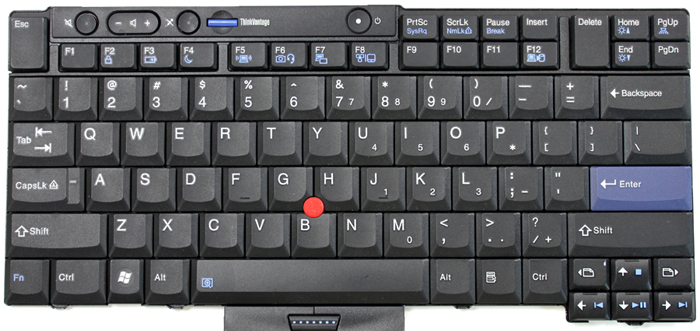
> Non-chiclet keyboard with decent layout

This. These cheap keyboards are very annoying.

I hope Lenovo produces the old IBM style business quality keyboards for their brand new models.

@Lenovo: have a look at your great T410 keyboard, build them again: http://cdn6.bigcommerce.com/s-blhknq8/product_images/images/... (only the cursor keys are a bit too small, otherwise great)
Re:Lenovo Launches ThinkPad X1 Yoga at CES with OLED Display by r080 on Monday January 04, 2016 @09:30AM (#10835755)
I find these Lenovo chicklet keyboards very pleasant. I have t420s which has it and R40 with old style keyboard. Tried to write on R40 recently and was surprised that it's not that big difference. I don't use F keys much so their layout doesn't bother me.

edit: "F keys" part readability

Re:Lenovo Launches ThinkPad X1 Yoga at CES with OLED Display by proyb on Monday January 04, 2016 @07:58AM (#10835353)
I heard T410 wasn't popular, and there will be more hardware problems or known defective, look at most industry, I'm disappointed that the quality are getting lower.

Why would they practices selling replacement parts that could cost you half of the laptop price just to replace a casing?

Re:Lenovo Launches ThinkPad X1 Yoga at CES with OLED Display by dingo_bat on Monday January 04, 2016 @06:35AM (#10834975)
>HDD and network activity indicator lights

I never understood the point of removing these. I think it may just be cutting costs, trying to save a few cents on the custom shape LEDs.

Re:Lenovo Launches ThinkPad X1 Yoga at CES with OLED Display by toomanybeersies on Monday January 04, 2016 @06:58AM (#10835065)
With SSDs and the density of network traffic these days, both indicator lights are pretty much obsolete. Your HDD activity light would never be on, and the network activity light would constantly be on.
Re:Lenovo Launches ThinkPad X1 Yoga at CES with OLED Display by dingo_bat on Monday January 04, 2016 @12:58PM (#10837133)
Maybe you can set the network light to light up only when the utilization is above a certain level? Same goes for HDD light, we can use something like active time every 100 ms. My point is, these are useful things and it doesn't make much sense to remove them just to save some small fraction of a dollar.
Re:Lenovo Launches ThinkPad X1 Yoga at CES with OLED Display by anc84 on Monday January 04, 2016 @07:08AM (#10835117)
You could simply normalise them to not be constantly on then.
Re:Lenovo Launches ThinkPad X1 Yoga at CES with OLED Display by icebraining on Monday January 04, 2016 @07:11AM (#10835127)
As an user of a X201 with an SSD, that's not really the case, the differences of blinking rate are noticeable.
Re:Lenovo Launches ThinkPad X1 Yoga at CES with OLED Display by dogma1138 on Monday January 04, 2016 @07:18AM (#10835158)
AHCI and NVMe don't support this type of activity polling so I don't have a clue what your X201 bases the HDD usage off but it's really not the old IDE standard LED blinking, which makes me thing it's either faked intentionally or the same thing that will happen if you plug in a modern SATA to a motherboard with HDD activity monitoring it will just blink erratically regardless of what is actually happening.

modern SATA drives doesn't matter if they are still mechanical or SSD's don't work the same, your OS doesn't work the same when you save a file it doesn't mean that it's being written that moment, it can be in RAM, it can be in your HDD's cache or it can be written down.

HDD activity LED's haven't been doing anything real for over a decade now...

Re:Lenovo Launches ThinkPad X1 Yoga at CES with OLED Display by icebraining on Monday January 04, 2016 @09:50AM (#10835845)
I don't see why would you need AHCI or NVMe support, the activity "reporting" is done at a lower level.

From what I can tell, this feature is called "Device Activity Signal", and it essentially says the drive can use the P11 pin of the SATA connector to indicate activity, and the board can use this to electrically drive the LED, there's no need for high-level protocol support.

Obviously this won't detect writes to the buffer, only when they are actually pushed to the disk, but when there's heavy IO, the two are usually correlated.

Here's a doc by Samsung about DAS from 2014: http://www.samsung.com/global/business/semiconductor/minisit...

As a user, I can tell you that while I obviously can't relate a single "blink" with a write to a file, the link between having a bunch of processes hung waiting for IO and a heavily active LED is quite noticeable - and can be useful if the UI is completely blocked.

Re:Lenovo Launches ThinkPad X1 Yoga at CES with OLED Display by dogma1138 on Monday January 04, 2016 @09:56AM (#10835869)
DAS in SATA is pushed back over the power cable (pin 11) not the data connector like in ATA/IDE drives it's pretty much meaningless and up the the drive manufacturer to say if it's even supported, which is why for dekstop drives that are fed directly from the power supply the LED activity monitoring doesn't work at all and depending on your BIOS will either be off or just randomly signaling at best based on some data from your PCH.

Samsung for example only supports it on the DC (datacenter) series of their drives which is for enterprise storage the DAS in this case is only enabled in certain modes to note if the drive is active or spare/standby or to identify a specific drive there is no actual write/read iop activity feed back in SATA drives.

Also dear lord was that document auto-translated? I've expected this level of English from a 3rd tier Chinese OEM not Samsung...

>4. Samsung SSDs for data centers are

Basically, Samsung SSD 845DC PRO and 845DC EVO support the SATA 3.1 specifications. However, Samsung has adjusted only the DAS feature as “enabled” by default to make the LED blink regardless of the SATA specifications in the host systems.

Re:Lenovo Launches ThinkPad X1 Yoga at CES with OLED Display by JoshTriplett on Monday January 04, 2016 @07:25AM (#10835190)
Personally, I find blinking LEDs quite annoying; if I needed an indicator for either of those, the OS could easily provide one. If I could disable the LEDs my laptop does have, I would, with the exception of showing a power LED if and only if the screen is off.
Re:Lenovo Launches ThinkPad X1 Yoga at CES with OLED Display by JoshTriplett on Monday January 04, 2016 @07:27AM (#10835202)
> Hardware wireless-off switch

I have to wonder, why? The OS can do that quite well in software.

> Latching lid

More moving parts means more potential breakage.

> They certainly don't need to make it any thinner -- I've had to carry some Macbooks around and the sharp edges are not very hand-friendly. I think 1" throughout is about right for a laptop thickness.

Different customers have different preferences, but the majority of people do like thin, almost as much as light.

All that aside, check out the proposed ThinkPad Retro. Looks quite promising to me.

Re:Lenovo Launches ThinkPad X1 Yoga at CES with OLED Display by bitwize on Monday January 04, 2016 @07:45AM (#10835288)
Because when the stewardess says "Please put your devices into airplane mode", flicking a switch is much easier than remembering the syntax for rfkill.

If something can be turned on or off, I don't want to rely on the OS to do it. Give me a hard switch. This even goes for system power.

Re:Lenovo Launches ThinkPad X1 Yoga at CES with OLED Display by JoshTriplett on Monday January 04, 2016 @07:47AM (#10835297)
> Because when the stewardess says "Please put your devices into airplane mode", flicking a switch is much easier than remembering the syntax for rfkill.

I click on the wireless icon and click "turn off". It's good that command-line syntax exists, but that doesn't make it the only way, or necessarily the simplest way.

For that matter, some laptop models offer a function key to do the same thing.

Re:Lenovo Launches ThinkPad X1 Yoga at CES with OLED Display by cesarb on Monday January 04, 2016 @08:27AM (#10835469)
> I click on the wireless icon and click "turn off".

For that, the laptop must be on and booted. The main advantage of the hardware rfkill switch is that you can flick it to disabled before booting or waking up the laptop, so that it doesn't even try to connect before you can get to the wireless icon.

(I've done that before: on a plane, want to use the laptop, which is sleeping in the bag; just flick the rfkill switch and open the lid to resume from suspend.)

Re:Lenovo Launches ThinkPad X1 Yoga at CES with OLED Display by JoshTriplett on Monday January 04, 2016 @08:38AM (#10835532)
> For that, the laptop must be on and booted. The main advantage of the hardware rfkill switch is that you can flick it to disabled before booting or waking up the laptop, so that it doesn't even try to connect before you can get to the wireless icon.

Fair point. However, planes don't require turning off wifi or bluetooth during normal flight anymore. (And even when they did, no actual harm was done either way.)

Re:Lenovo Launches ThinkPad X1 Yoga at CES with OLED Display by cesarb on Monday January 04, 2016 @08:52AM (#10835599)
> However, planes don't require turning off wifi or bluetooth during normal flight anymore.

When I last flew (domestically, last year), the instruction was still that devices could only be used if they had an "airplane mode" function. Things might be different in your country. (And yes, I know normal 802.11 probe request packets won't do much interference, if any, to airplane systems. Still, it doesn't harm to flick the rfkill switch to disabled.)

Re:Lenovo Launches ThinkPad X1 Yoga at CES with OLED Display by JoshTriplett on Monday January 04, 2016 @09:04AM (#10835650)
The requirement in the US, and other countries I've flown in or through, was to disable cellular radios, not wifi or bluetooth.

Sometimes airlines fail to communicate that well. A friend of mine had a flight where they first warned against using any device with any kind of radio transmitter, shortly followed by "please enjoy our in-flight wifi".

Re:Lenovo Launches ThinkPad X1 Yoga at CES with OLED Display by bitwize on Monday January 04, 2016 @07:58AM (#10835350)
Tell you what, let's make the machine a plain black slab and let software handle everything, including having a software keyboard.

Oh wait, they're doing that already. And the usability sucks.

I'm running i3, not GNOME. I want a damn hardware switch when I need to flick wireless off. I don't want to have to keyboard OR mouse around to do it. You want a plain black slab, go buy one. There's a market for what we want, and ThinkPads shouldn't be that plain black slab. Leave that to Apple.

Re:Lenovo Launches ThinkPad X1 Yoga at CES with OLED Display by StevePerkins on Monday January 04, 2016 @08:18AM (#10835427)
> flicking a switch is much easier than remembering the syntax for rfkill.

If you have to drop to a console prompt and run rfkill in order to disable your wifi... then the flight attendant will have no idea whether your wifi is enabled or not.

He or she WON'T gawk with impressed amazement that you're a Linux user. For that matter, neither will anyone here.

Re:Lenovo Launches ThinkPad X1 Yoga at CES with OLED Display by serf on Monday January 04, 2016 @08:17AM (#10835418)
> More moving parts means more potential breakage.

That's just patently wrong with regards to latching ThinkPad lids, as the latch is actually saving the lid hinge from wearing out prematurely.

(which is one of the reasons for my recent model downgrade)

> I have to wonder, why? The OS can do that quite well in software.

You can't think of any nice reasons why it may be nice to have hardware blocking software from reactivating all the antennas on your machine at will?

https://ux.stackexchange.com/questions/34956/who-needs-an-ex...

Re:Lenovo Launches ThinkPad X1 Yoga at CES with OLED Display by mmarx on Monday January 04, 2016 @07:14AM (#10835140)
> - HDD and network activity indicator lights

Also, a battery and power supply LED that is not _on the back of the device_, so I can actually see them while using the device.

Re:Lenovo Launches ThinkPad X1 Yoga at CES with OLED Display by rayiner on Monday January 04, 2016 @12:32PM (#10836940)
> Non-chiclet keyboard with decent layout

I don't really get this complaint. They're all scissor-switch keyboards. I've got an old X220 lying around, and use a T450s for work. The chiclet keyboard on the latter is significantly better. In terms of key stability, I think the new Macbook keyboard is actually the best.

Re:Lenovo Launches ThinkPad X1 Yoga at CES with OLED Display by tadfisher on Monday January 04, 2016 @04:22PM (#10838738)
> Latching lid

This has been historically the first piece to break on my classic Thinkpads (I have quite the collection of IBM FRU parts as a result).