News for hackers. Stuff that matters.
Re:XFCE 4.18 Released by coldpie on Thursday December 15, 2022 @09:41AM (#34000179)
Awesome. Been using XFCE for ages. It hits just the right spot of modern features and usability without trying to re-invent the desktop paradigm for the Nth time. If you just want "Win98, but in 2022," you've found your desktop environment.

WRT this update, the Thunar updates look fantastic. The File Highlight feature looks especially cool. I can imagine using that to highlight really frequently used folders in my home dir ("projects" folder etc) to make them stand out in the file browser. Customizing the toolbar buttons is a welcome feature. I'm also glad to see improvements on the default application feature, which I found difficult to use before.

Re:XFCE 4.18 Released by theandrewbailey on Thursday December 15, 2022 @09:55AM (#34000421)
> If you just want "Win98, but in 2022," you've found your desktop environment.

If you want Windows 95 in 2022: https://github.com/grassmunk/Chicago95

Re:XFCE 4.18 Released by gsich on Thursday December 15, 2022 @11:58AM (#34002373)
It's actually pretty good. Sometimes the inconsistencies shine through.
Re:XFCE 4.18 Released by cf100clunk on Thursday December 15, 2022 @12:21PM (#34002709)
While we're at it, you can customize XFCE to look like macOS Big Sur:

https://invidious.baczek.me/watch?v=oQ8RWtD3MTQ

Re:XFCE 4.18 Released by rcarmo on Thursday December 15, 2022 @06:19PM (#34007222)
Re:XFCE 4.18 Released by famicom0 on Friday December 16, 2022 @10:12AM (#34015402)
Woah, that brings me back. There used to be a Linux Mint theme that was a facsimile of Mac OS Classic, I've since lost track of what it was called and digging through the themes repository yields no results.
Re:XFCE 4.18 Released by gattilorenz on Thursday December 15, 2022 @01:44PM (#34003780)
> If you want Windows 95 in 2022

Indeed the metaphor is apt: font/positioning problems that still can plague Linux in 2022, but didn’t appear as much in Windows in 1995 :^)

Re:XFCE 4.18 Released by Koshkin on Thursday December 15, 2022 @03:41PM (#34005438)
Re:XFCE 4.18 Released by hulitu on Friday December 16, 2022 @03:05PM (#34019547)
As someone said a long time ago: "This is so desgusting".

I prefer fvwm with the mwm look.

Re:XFCE 4.18 Released by dmm on Thursday December 15, 2022 @10:08AM (#34000641)
As an enthusiastic XFCE user, do you mind answering a question? How do you usually launch applications?

I can appreciate the discoverability provided by a nested start menu but I've grown very fond of text launchers with autocomplete provided by gnome, mac os, dmenu, etc.

Re:XFCE 4.18 Released by ufo on Thursday December 15, 2022 @10:18AM (#34000812)
Here's what I did back when I used XFCE a couple of years ago:

The xfce whiskermenu plugin includes a text search feature that looks similar to the one from Windows. On Xubuntu the whiskermenu is the default "start menu" while in some other distros you may need to add it in the panel settings. Finally, in the keyboard shortcuts bind Super to the xfce4-popup-whiskermenu command, to bring up whisker menu for a text search.

Re:XFCE 4.18 Released by KronisLV on Thursday December 15, 2022 @10:52AM (#34001390)
> Finally, in the keyboard shortcuts bind Super to the xfce4-popup-whiskermenu command, to bring up whisker menu for a text search.

I've had this trigger the popup menu when there is another shortcut that binds the Super key in combination with something else. Say, if I had something under Super+R, then the menu would also open. Though maybe this has been patched out in the newer versions, I remember that issue being the case in an XFCE desktop from 2020.

But other than that, this is indeed a really nice and usable setup!

Re:XFCE 4.18 Released by andai on Thursday December 15, 2022 @11:50AM (#34002252)
Same, so I rebound whiskermenu to Meta+Space.
Re:XFCE 4.18 Released by iza on Thursday December 15, 2022 @03:00PM (#34004840)
I worked around this issue using xcape to map my Super key to another unused key ("Cancel" in my case):

  xcape -e "Super_L=Cancel"
Then using the XFCE settings editor or xfconf-query to bind this new key:

  xfconf-query -c xfce4-keyboard-shortcuts -p /commands/custom/Cancel -t string -s xfce4-popup-whiskermenu -n
This allows other Super shortcuts to work without triggering whiskermenu. I wanted to bind a more innocuous key like Hyper_L or F35 but couldn't get it to work. At least the "Cancel" key doesn't seem to do anything in any applications I use.
Re:XFCE 4.18 Released by raisin_churn on Thursday December 15, 2022 @03:51PM (#34005560)
ksuperkey[0] addresses this, though it is unfortunately not widely packaged so you likely have to compile it. I haven't used it in a while, but it worked well when last I did.

[0] https://github.com/hanschen/ksuperkey

Re:XFCE 4.18 Released by coldpie on Thursday December 15, 2022 @10:14AM (#34000739)
For super common stuff, I have icons in my panel for them and I use the mouse. I open Terminal so often that I gave it its own global keyboard shortcut.

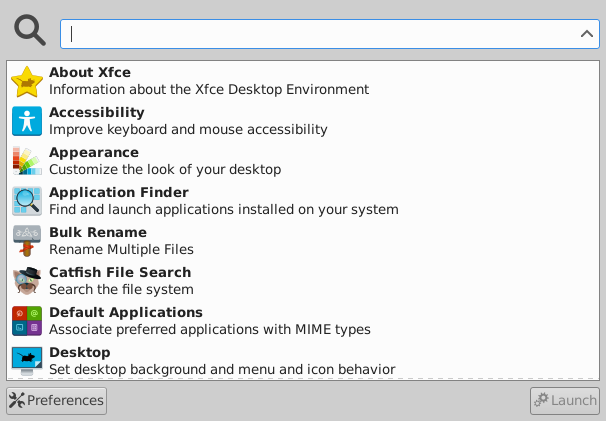
For less often used things, I use the xfce program launcher, which I think is what you're looking for. I have it mapped to some keyboard shortcut (the muscle memory is so automatic I don't even remember what the shortcut is and I'm not at my PC at the moment). It automatically focuses the text entry box, so no need for the mouse at all. Here's a screenshot from the linked article: https://alexxcons.github.io/images/blogpost_8/appfinder.png
Re:XFCE 4.18 Released by branon on Thursday December 15, 2022 @10:12AM (#34000696)
Not the parent but I have the Xfce AppFinder bound to the Super (Windows) key. I think I'm somewhat misusing it, but it's fast enough that I can strike Super and then immediately start typing the name of what I want. Dropped keys are rare, but it's not quite as fast as something like dmenu.
Re:XFCE 4.18 Released by bhattisatish on Thursday December 15, 2022 @10:19AM (#34000824)
Not parent commentator, but in my case I do the following:

  rofi -show run
The above command is mapped to Command-R Similarly Command is mapped `xfce4-popup-whiskermenu`

Both land on a search box and you can search to your heart content and select the option that works for you :-)

Re:XFCE 4.18 Released by tux on Thursday December 15, 2022 @10:32AM (#34001060)
I've switched from rofi to dmenu, its much faster for larger data. If only dmenu was more customizable without using too many patches.
Re:XFCE 4.18 Released by ollien on Thursday December 15, 2022 @11:46AM (#34002198)
+1 for Rofi
Re:XFCE 4.18 Released by aidenn0 on Thursday December 15, 2022 @02:14PM (#34004173)
I use rofi on pretty much any desktop environment, it's super great. I'm eagerly awaiting its window-search feature getting wayland support (Knowing wayland it will be compositor-specific though...).
Re:XFCE 4.18 Released by pachico on Thursday December 15, 2022 @10:12AM (#34000707)
I'm also an old hardcore user of xfce (xubuntu) but I can't live without https://ulauncher.io/ or similar projects.
Re:XFCE 4.18 Released by rwmj on Thursday December 15, 2022 @10:28AM (#34000983)
For browser windows and terminals I have special Launcher buttons on the panel. For the rest, sometimes from the menu, often straight from the command line in a terminal.
Re:XFCE 4.18 Released by rglullis on Thursday December 15, 2022 @10:23AM (#34000885)
<super+R> (at least on my settings, don't remember if that is the default) opens "Application Launcher", which gives you a search prompt that finds (AFAICT) by executable name and definitions in .desktop and .service files.
Re:XFCE 4.18 Released by jasperry on Thursday December 15, 2022 @10:19AM (#34000821)
Are you using WhiskerMenu? It should really have replaced the default application launcher by now. It upgrades the launching experience from Windows 98 to at least Windows 7.
Re:XFCE 4.18 Released by aliqot on Thursday December 15, 2022 @10:23AM (#34000881)
I just right click the desktop and use the menu that pops up
Re:XFCE 4.18 Released by apricot on Thursday December 15, 2022 @11:02AM (#34001542)
Most of the time, I use dmenu_run (bound to super-R) for launching usual applications, and the menu for seldom-used ones.
Re:XFCE 4.18 Released by nor-and-or-not on Thursday December 15, 2022 @11:16AM (#34001727)
I use XFCE4 together with Albert https://albertlauncher.github.io/
Re:XFCE 4.18 Released by eYrKEC2 on Thursday December 15, 2022 @11:16AM (#34001734)
I bind <ctrl> + <esc> to the "Application Finder". This makes it launch with keybindings matching those that launch the Windows start menu. I start typing the program and it narrows down the results until the program is selected. Then, I hit <enter> and it opens the program.

* In Applications -> Settings Manager -> Keyboard Shortcuts

* + Add

* command: xfce4-appfinder

* shortcut: Ctrl + Escape

----

My other favorite bindings are to tile a window into a quadrant of the screen.

Applications -> Settings Manager -> Window Manger -> Keyboard

Search "Tile window to the top-left", et c.

I hold ctrl + alt and then one of

    qwe
    a d
    zxc
These commands tile the window to

    <top-left> <top> <top-right>
    <left>               <right>
    <bot-left> <bot> <bot-right>
Re:XFCE 4.18 Released by gen2brain on Thursday December 15, 2022 @11:24AM (#34001827)
I use gmrun for many years, in every DE, bind to Alt+F2. I am happy that now there is a new home here https://github.com/wdlkmpx/gmrun. I cannot imagine using something else.
Re:XFCE 4.18 Released by forgotmypw17 on Thursday December 15, 2022 @12:23PM (#34002752)
I usually open a term and run "screen myapp"

I don't run that many applications though.

Re:XFCE 4.18 Released by blensor on Thursday December 15, 2022 @02:35PM (#34004496)
I know my desktop is a mess but I usually have one window with many terminals open.

So if I want to start a program without going through the menu Alt Tab to the terminal window, then I start it from the commandline (gimp, code, blender, godot, etc.)

Re:XFCE 4.18 Released by walderf on Friday December 16, 2022 @04:42PM (#34020859)
with a few exceptions... keyboard shortcuts!

examples: https://github.com/walderf/dotfiles/blob/e9d4e732cd25b248b4a...

or, an image visual: https://i.imgur.com/ANly2SU.png

basically super+<key(s)> all the things!

Re:XFCE 4.18 Released by capableweb on Thursday December 15, 2022 @10:23AM (#34000887)
> WRT this update, the Thunar updates look fantastic

Nice! I'm a Thunar user (but not XFCE in general) and missed that updates to Thunar was included until I saw your comment. As someone who deals a lot with images, the preview is a very welcome change! Really happy with Thunar.