This is the service manual you're referencing. The one they're complaining about it is the M1 MacBook Pro.
Here's the actual manual referenced: https://manuals.info.apple.com/MANUALS/2000/MA2085/en_US/mac...
And here's iFixIt's actual complaint:
> it’s not 162 pages because Apple has changed where batteries sit in the MacBook Pro. It’s that long because the manual says that to replace the battery, you’ve got to replace the entire top case. At the time of writing, Apple will not sell you a replacement MacBook Pro battery. They sell you a “Top Case with Battery and Keyboard.”
They never want a Samsung like situation where the airport announcer says “No MacBook Pro 14” on the plane”. Additionally, because it’s Apple, there would be a media shitstorm if that happened.
I believe it's that kind of guide people expected Apple to publish.
So you may be right that it's always been Apple's policy, but the point was that the self-repair program is falling short of expectations. iFixIt set a standard and Apple has fallen short.
And yes, Apple can do it and has even said they’re going to do it. So at this point, it’s just a matter of guessing for why they don’t do it now. And that could be any number of reasons, including easier manufacturing or in a surprise twist maybe easier repair. Look at the ifixit instructions and look at the spacing available to access the pull tabs for the adhesive around the various frame parts. It’s entirely reasonable to think that Apple did some math on battery repair frequency; on that fact that even when an M* systems battery is at the 80% mark where it’s eligible for repair that it will still be near or over 100% of the old intel laptop runtimes when new; evaluated the chances of those adhesive tabs breaking or having the battery or top case damaged while removing one or the other and decided that bundling the two together and eating the cost on battery repairs was the easier option for their repair people. Because ultimately Apple’s priorities likely are ease of manufacture first, ease of store based repair second and ease of user based repair third. Because even with really easy user based repair, I would venture to say close to 90% of people will still have Apple do it for $200. And I say that based both on the fact that Apple used to offer various DIY repair options for older models* and people have their mechanic or AutoZone replace their car batteries for them even though that’s literally just 2 bolts.
* I worked for an Apple authorized repair place in the G5 iMac days, in which for example the power supply was “user replaceable” and for which Apple offered customers DIY repair options on them. I can count on one hand, with fingers to spare, the number of customers who took us up on the option to order the part and do it themselves, even if having us do it meant longer turn around times. On the whole people don’t DIY repairs for things, and so engineering and manufacturing for that use case is probably a worse decision than engineering and designing for your own people and while those people might benefit from DIY friendly features, if that makes manufacture harder or more expensive, then that’s still likely a net negative trade off.
As to your experience working for an Apple authorised repair centre I'd suggest that the intersection between Apple users and DIYers is probably smaller than that between e.g. Thinkpad users and DIYers. Part of the appeal of the Apple world lies in its appliance-like nature where things (are supposed to) 'just work', not in its openness to tinkering.
As an aside I must say I'm surprised in the fervour with which these Apple strategies are defended. It is not hard to design a glued-down battery which can be removed by pulling a few tabs as is common in many mobile devices, why defend this clearly wasteful practice? Maybe Apple keyboards are (or were, at least during the 'butterfly keyboard' years - 2015-2019) close to being shot around the time the battery wears out but even so it would be easy to make that keyboard replaceable.
[1] https://www.notebookcheck.net/fileadmin/Notebooks/Lenovo/Thi...
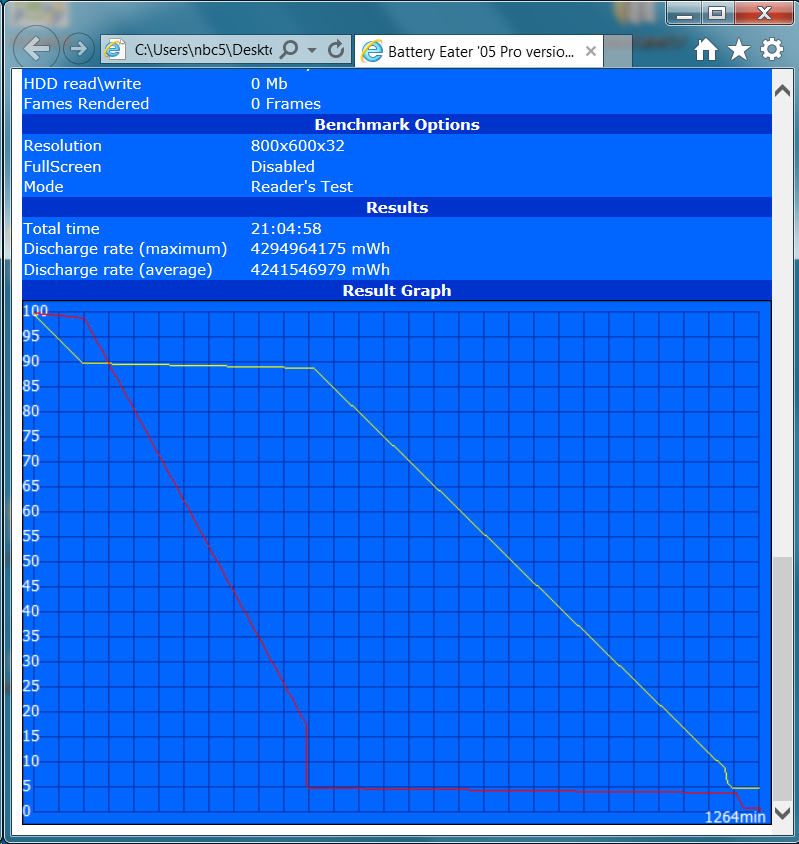
With T550 you get a computer with decent keyboard. With M1 Max you get a Mac. Even the best quality Mac keyboard is completely unusable for me and the OS feels like it is fighting you at every corner, I haven't been that frustrated since Windows Vista, so even if the CPU was 1000x faster, the user experience for me is horrible. My old Samsung T700t with 2nd gen i5 and a dock keyboard feels like usability king compared to every Mac I ever used and it also feels much faster once I swapped Windows for Linux.
The https://everymac.com/systems/apple/macbook_pro/macbook-pro-u...: 2008 15" unibody [last one that didn't need at a least a screwdriver] 1" thick, 5.4lbs, 5 hours of browsing
https://www.tomsguide.com/reviews/macbook-pro-m1:M1 MacBook Pro, 0.625" thick, 3.5 lbs, 16 hours of browsing.
Obviously technology has improved (there's a 6 hour increase in battery life going from last intel laptop to an m1), but it also probably helps that that smaller light modern MacBook has a 100 watt hour battery, while the one you're referring to had a 45WHr battery.
I would gladly trade a fancy unibody for a battery that's easily replaceable :-/
Incidentally on the flip side of this, I got a free new battery out of the keyboard replacement program because they replace this whole top case assembly for keyboard replacements as well.
I hoped that whole keyboard warranty extension fiasco would encourage Apple to stop gluing everything together so much and design for individual components to be replaced again, but I guess not.
The last Mac laptop I did repairs on was a snapped hinge and man that a painful process. Similar boat with having to take the entire computer apart (including the screen assembly). These days I'd be much happier to pay someone to deal with that, but doing it yourself is certainly the affordable solution and I'm glad that self repair continues to be an option.
https://www.ifixit.com/Guide/iPhone+SE+Screen+Replacement/61...
The instructions for reassembly are, in their entirety:
> CONCLUSION
> To reassemble your device, follow these instructions in reverse order.
Thanks. I would have loved to see actual instructions. It is distinctly nontrivial to get the display back in, especially if the case is even slightly damaged.
On top of this, I have never encountered a non-OEM aftermarket iPhone display that wasn’t linearly polarized. If you wear polarized sunglasses, a non-polarized or circularly polarized display is an important feature.
So I consider the Apple program to be a big improvement.
I also read the 162-page thing, along with a claim you had to read that just to replace the battery. And that’s not the case? The entire manual is 162 pages, not just the instructions for relaxing the top case and battery.
Yes, I think it’s insane that you (right now) have to replace the entire top case to replace the battery. It’s genuinely absurd. Apple says they’ll sell the batteries separately at some point, so that’s good. But that’s still insane.
That said, I’m not really here for exaggerations about what is an incredibly well-written manual. It’s not like this is going to cut into iFixit’s guide or tool business because I don’t see Apple trying to game the SEO for MacBook repair guide; Apple would rather you take your MacBook to an Apple Store.
I used to be a fan of iFixIt, and have even bought one of its larger tool kits, but have lost respect for it in the last few years.
In part, because any time Apple does anything, iFixIt is there with a snarky criticism. Like it just really really really needs the clicks. I don't mind people being critical of Apple, but what comes out of iFixIt these days is mostly very solidly in whiny baby/grumpy old man territory.
Second, because I've tried four times to repair items using iFixIt guides, and in every case the guide was incomplete, inaccurate, or the steps just sort of ended without finishing the job. Twice I was able to finish the repairs on my own. Twice, the device was ruined.
Many iFixIt guides seem to start out well-written and documented, but eventually get all hand-wavey. More often than not, when I've looked up a guide, it ends with "Reverse the steps to reassemble," which is not reassuring, considering the complexity with which modern electronics are built, and because some of the parts were destroyed (adhesive strips, for example) on the way.
Were you upgrading the hard drive in a 2014 mac mini?
Jesus. This is not what I'd consider "repairable". And that's not the only place in the manual where Apple just says "toss the whole top case out".
It had 50+ absolutely tiny screws, requiring a 000 Phillips head, probably about the size of the little ones in iPhone 6s, but all about 2mm long.
Can confirm. I ended up bringing a car to the dealer to replace a certain light bulb because it was not possible for me to put my man-sized hand through the metal hole to reach the bulb area. Fortunately, the dealer did it for free.
But that's apparently not the case here:
> If you can’t retrieve the rest of the strip, replace the top case
> If you can’t retrieve the rest of the strip, forcefully remove the battery by jamming a pry tool under it.
This is what other people do when those strips break. This is a service manual, not a binding contract. You can choose to service your device differently if you feel inclined to do so.
The solution was a slightly more expensive $15 piece of metal and $700 in labor.
If you look at how new appliances are made with difficult to replace electronics which ought to be trivially replaceable for cheap if you weren't getting bent over by the manufacturer you might begin to notice a pattern.
Manufacturers are saving their pennies at the expense of hardware that fails outside of warranty and makes them $100 bills for their trouble of doing a bad job in the first place.
Their is little reason to build to last when bad work pays dividends in the long run.
The Tesla story for those who didn't catch it originally.
https://www.thedrive.com/news/41493/teslas-16000-quote-for-a...
Heck we still live in a world where some cars with interference engines use timing belts instead of chains. Repair that 20 belt wrong and you will indeed need a whole engine, and that assumes your got to it before it broke and ruined your engine for you.
Apple isn't going to recommend you forcefully remove a LiPo, but you're free to do so if you want to do that instead.
Get a short in a wiring harness? The service manual for your car will almost certainly recommend replacing the entire harness which is a very labor intensive and expensive procedure. Will mechanics do this? Depends on which shop you're at and who is paying.
If there are multiple ways to solve a problem, an official service manual will typically list the safest and most repeatable solution. Rarely do they list any alternatives to this.
Apple has the resources to fix this. They choose to actively neglect it, since they have a very successful side-business dedicated to replacing your iDevices at-cost.
In that case should they provided detailed instructions on removal where that risks destroying the engine or at least the heads?
If I was following the shop manual and I broke a head bolt off in my engine block I would take it to a machine shop, but I wouldn’t expect the auto maker to provide instructions to remove a broken head bolt.
Automakers have been known to replace entire engines for recalls involving only one part of the engine, when they have concerns about one of the above factors.
They also describe the manual as “ they’re in-depth, mostly logical, and well worth an additional repairability point” higher up in the article.
But that's not true. The table of contents has links to the small subset of pages needed to be read to replace the battery.
There are over a dozen chapters and the page count includes parts lists, safety and regulatory notices, and information about tools.
My Webster's Unabridged Dictionary has 2,129 pages before it gets to the back matter. If I want to look up a word I don't open it to page 1 and start reading.
Same for replacing a battery.
1. Open PDF 2. Scroll to table of contents 3. Click on "Battery" 4. Read 14 pages, each with 1-2 steps, about how to replace the battery
Not 162.
Besides, with the text density of those pages, they should be thought of more as "slides". A 162-slide presentation that covers the tools, part numbers, safety information, and step-by-step procedures for replacing parts that you can skip around in is not intimidating.
Of course, my perspective may be skewed. My expectation is for comprehensive documentation with the hundred page behemoths that Sun used to produce back in the Sparc era for replacing a frame buffer card being the bare minimum acceptable level of documentation.
https://manuals.info.apple.com/MANUALS/2000/MA2085/en_US/mac...
You'll note that at the beginning of the three-page battery section, it says that you must have already removed every other part from the other 159 pages. The battery section is basically just "whatever's left doesn't come apart, so replace all that for a new battery". I think saying it takes a 162-page manual is fair.
Most of the pages are very much slide-like, extremely well done and don’t have the density one would expect from a typical electronic device manual. The statement is not fair at all.
I read the PDF.
https://manuals.info.apple.com/MANUALS/2000/MA2083/en_US/mac...
It seems highly likely to me that anyone claiming this document is intimidating either has not read it or is lying for some reason.
In many respects, the Apple document is vastly superior to the iFixit guides.
An example of that is that the Apple guide has more descriptive language to ensure that the user feels the correct sensations when performing a step.
Here's the iFixit guide for replacing the antenna module: https://www.ifixit.com/Guide/MacBook+Air+13-Inch+Late+2020+A...
iFixit: Pivot the spudger against the hinge to pry up the end of the antenna bar.
Apple: Gently slide the flat end of the black stick below one of the four screw holes (1) to loosen the antenna module from the tape on the top case. Then rotate the black stick until you feel a click (2).
Apple's instructions also include steps to perform if an action isn't "easy":
iFixit: The antenna bar is secured with some adhesive and may require some force to dislodge.
Apple: If the antenna module doesn’t release from the tape, slowly and gently slide the black stick under the module to loosen it.