I used to use the Scrapbook plugin for Firefox but I realized for the most part just plaintext might be best. So I'm in the process of setting up a workflow that will save article in markdown in one click and sync between my phone and my computer.
It might be a good compromise between PDF and plain text. It's pretty nice because it essentially serialises a snapshot of the current DOM tree, so it works with all kinds of JS-generated pages.
The files should be relatively grep-able, because it's normal HTML. Of course, you might want to strip HTML tags for more sophisticated searching.
(Seems like a bug in Firefox to me.. maybe this should be a config option..)
https://images.macrumors.com/t/zbOsBhKGQj6VvA9oq8KaZkLxXUc=/...
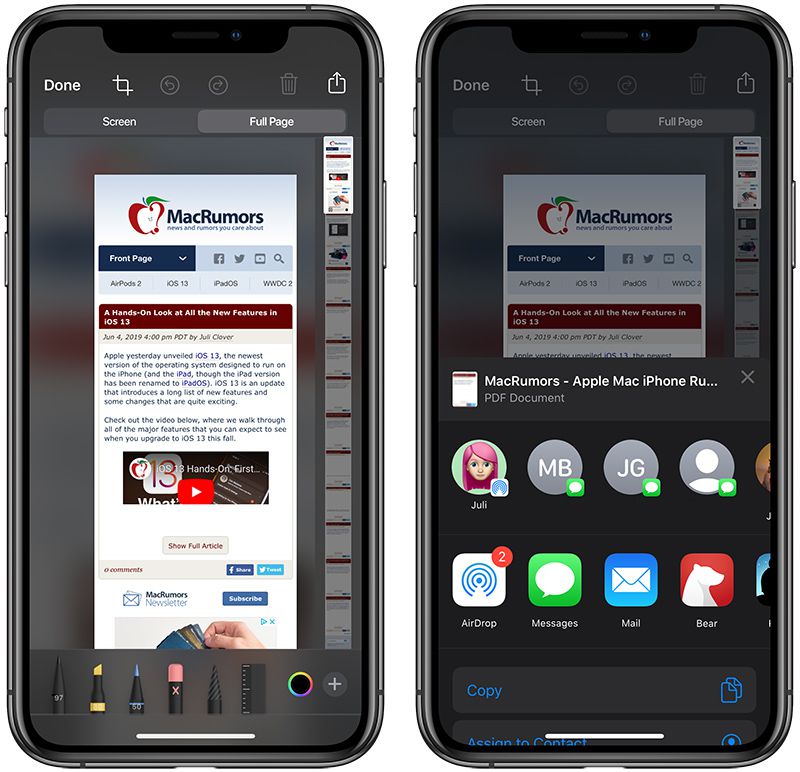
(note the scrollable preview at right edge of screen, the main preview is only showing a small fraction of the document)
There shouldn't be a need to setup a process. This functionality exists in many places.
For example, I use Joplin to save articles in Markdown format. It's the best web to markdown conversion tool I have found. Then at some point later, I'll pick what's still interesting to me and export from Joplin to PDF if I like.
Insapaper is $3 / month and is a save for later tool. You can then export all your articles in Epub and other formats.
I'm sure there are loads others.
I recently got bitten by that, when I was trying to print out some page in Chrome, and it was rendering as a bunch of white space surrounded by some elements from the page, but without any actual content I cared about. Turns out, my situation isn't that uncommon for pages that are heavily JS-dependent
Note: I am not saying JS=bad. This has nothing to do with JS itself and everything to do with how JS is used to generate/render the page. A lot of pages just don't bother with doing it the right way that doesn't screw up generated PDFs.
And although I do occasionally check the produced PDF's, the layout doesn't matter to me at all since I use a cmd-line grep or combination of 'pdftotext' to find the page, open the PDF, and click the link to go to the original web page if I need to .. haven't found a single dud PDF in the collection in a randomised sampling, but then again in 20,000+ files, there's bound to be one that didn't make it through the rendering pipeline, but so far, hasn't been an issue.
I actually remember having to eventually go through Safari to print out that one page I mentioned above that was giving me issues in Chrome, so that makes a lot of sense. Glad to find out it wasn't just me somehow being lucky with Safari, and that it is actually a known thing.
This archives every page I'm ever interested in, just fine. Links are preserved just fine, all the data that got me interested in the web page in the first place are just there on my disk, easily accessible any time of day without requiring any further accounts.
It is better since it doesn't require any involvement of a third party, is always accessible to me no matter the state of the Internet, and gives me absolute control over all of the data, which I can mine using whatever toolset I want. In fact, I get more data out of this method than the service described in the article.
A user recently said, X would use 'Calendar to remind about bookmarks' in a discussion about this problem[1].
[1]https://needgap.com/problems/57-i-forget-my-web-bookmarks-qu...
Also, frequently what yo want to save is a link to a book or an article (or a Wikipedia article, say) and Zotero recognizes many of these formats and saves them correctly, it's toolbar icon even changes to let you know.
It's a fantastic tool. It's got cloud storage, and it has an API (which I've used -- it's super easy).
You may be interested in my ripgrep-all [1] tool, it should allow you to search those tens of thousands of PDFs in under a second (with hot cache)
[1] https://phiresky.github.io/blog/2019/rga--ripgrep-for-zip-ta...
What's the advantage over browser's built-in 'save entire page' option? Print to PDF loses formatting and obscures the URL you got the thing from.
^^ first advantage
Also: a) Formatting is not lost, it just changes to fit the default paper size I've got selected (A4) but doesn't really make much difference, since its a snapshot, and b) URL is right there in the Header of the PDF, and is clickable, so no - not really an issue. This archive also functions as a bookmark collection as well as an offline copy for future reference ..
(Disclaimer: may be that your browser is borking the PDF's. Not the case with Safari, anyway, but ymmv..)
Most of the time though, the formatting isn't an issue. It depends on the site though - some authors produce stuff that doesn't look good as PDF, even if the content is still there. That doesn't bug me much.
As does 'Save as: Web Archive' in Safari or, if you tell it to store offline, 'Add to Reading List'. In Chrome you can save pages to .mht. All of these are single-keystroke, better ways to locally archive a web page.
PDF works just fine. It presents a feasible view of the original data, and allows for data harvesting with ease.
You can extract the full text from these (with whatever tools you like) with better fidelity than you can from a pdf, which is a lossy conversion from the same source. This seems to barely merit debating, unless I'm missing something.
PDF works just fine.
I'm sure it works for you and I'm not harbouring any delusions I'm going to talk you out of your decades-established workflow. But for anyone looking for ways to keep track of web pages, thinking about building tools in this space, etc - no, PDF is not a good way to archive web pages, either manually or programmatically.
I am not finding this to be true. Pretty much every PDF I have has been usable for extracting the text content - unless the Web authors intentionally work to obfuscate/disable this functionality, i.e. using images to display text content.
>PDF is not a good way to archive web pages, either manually or programmatically.
I disagree, entirely, with your conclusion - you haven't made a strong argument. 20,000+ fully-searchable, indexable, accessible-in-offline PDF files vs. your opinion so far. I don't see any of the issues you've stated are insurmountable - in fact, I find the reality to be completely the opposite to your stated opinion. Please expand on this if you have the energy.
Probably the shortest version of the point I'm trying to make is that every current browser does a much better job of providing you this than printing to PDF. If you rely on this as a personal web archiving system, you're going to lose data in the most irritating way - data you thought you collected but actually didn't.
They often do that successfully enough, especially if all you want is to grep for words. pdf2text also has a table mode that attempts to reconstruct table structured content. This is far less successful.
So depending on how you want to process your stored data, saving as PDF may or may not preserve sufficient information.
If you were storing pages for the purpose of extracting specific properties of things you are researching (say product information or the tree structure of HN threads), then throwing away all that structure makes it a lot more difficult or even impossible to reconstruct the information you need.
If I were storing pages for unknown future purposes, I wouldn't want to throw away any information I might need, and therefore I would never use PDF as an archival format.
But I understand that you store PDF files for a very specific purpose for which lossy PDF conversion happens to be good enough. So that's fine of course.
The only question I have is where I can find the source URL of the stored pages.
As long as I can read the site, I have what I need. Why do I need to read the HTML?
>So depending on how you want to process your stored data, saving as PDF may or may not preserve sufficient information.
As long as I can read it, the PDF is sufficient for my needs.
For everything else, there's wget.
The alternatives I'm talking about are absolutely available offline. I don't understand why you keep arguing against a position I've never taken.
It indexes your whole disk; if there's a limit as to how many files it will index, I've yet to reach it. I checked Apple's developer documentation, and they don't mention one.
mdimporter: yeah, sure, just no .. mmkay?
EmailThis extracts meaningful content from web pages and sends it to your email inbox. You can also tell it to save a PDF copy of each page, in which case the PDF is sent as an attachment.
Print-to-Pdf is done using Headless Chrome (so it works exactly like doing a Ctrl-P).
I find that the Print to PDF works best because it gives you a copy of the web page even if the original one disappears. Also, none of the content extraction services (mine included) work in 100% of the cases. Sometimes, they might incorrectly remove images and other meaningful content. So in such cases, having a full PDF snapshot is quite handy.
Let me know what you guys think.
> Sometimes, they might incorrectly remove images and other meaningful content. So in such cases, having a full PDF snapshot is quite handy.
Also interesting is that the context is preserved locally across visits to the site - over 10 years, I have gathered a pretty interesting view of some of the various A/B changes that have gone on, on my favourite 'daily visit' sites ..
And, it is often very revealing of my own habits. This highlights the privacy-factor of having a local-file based bookmark/ontology system a little more in my favour.
If it is something worth searching its text, then it is something worth saving offline, reading and annotating. I use Polar [1] for most and wallabag [2] for its .epub converting ability - especially if there is mainly text that interests me and a lot of it, so I can read it on my ereader. As soon as Polar manages .epubs I shall import all my .epub articles into it. :)
The URL for every single site is in the PDF.
I printed to PDF this HN thread in Chrome (I assume that the PDF printing was done on the system level by OSX -- EDIT yes, from the file: "/Producer (macOS Version 10.15.2 \(Build 19C57\) Quartz PDFContext)"), and none of the page's strings appear as ascii or utf-8 in the document. grep is unable to find any string in that file.
Do you have a specific print to PDF setup? Or a PDF-aware grep..?
EDIT: Seeing the command-line you're using, the search you do is over the files' names, correct? The PDF/(original web page) text content is not indexed, right? Just to make sure I understand correctly.
I do use 'pdftotext' to do more fine-grained searching if I need to - but for the most part I find that a simple "ls -l | grep <search>" suffices, since this method preserves page title text too ..
I did the same thing for this thread and had no issues with this command, whatsoever:
$ pdftotext WorldBrain\'s\ Memex:\ Bookmarking\ for\ the\ power\ users\ of\ the\ web\ \|\ Hacker\ News.pdf - | grep -i "Print-to-pdf"
".. nothing beats print-to-PDF. Its just awesome." "fancier laid out pages), I Print-to-PDF again after enabling Reader"
pdftotext gets the actual text from the PDF. I don't do this, but I'm sure that you could automate the process of generating a text file for each PDF in a directory with pdftotext and then ripgrep the text files when it's time to search the contents. That would be doable with a makefile or a couple of shell scripts.
E.g:
[$]mdfind -onlyin ~/MyDirectory someSearchTerm
There is also some degree of messiness even with printing to PDF. For example let's say I want to save an HN or Reddit discussion along with the comments - I would need to make sure I capture all the comments that overflow to "More" on HN or are behind a "load more comments" link on Reddit. Is there any elegant way to traverse all that and capture it?
I often go through the archive, find the HN comment PDF's I've created, and then automatically update them to get whatever new comments have occurred in the meantime. Haven't figured out how to navigate to the 'next' comment page automatically though - some pages detect they're being printed and use a print-friendly layout, though, which is nice .. would be cool to see more of that.
HTML largely beats PDF for this use case. And if you want something that produces a file in which you can easily extract resources from the saved page, see [1]. There is an option to automatically save the pages you add to your bookmark. There's also an option to make the text of the files indexable without unzipping them.
The OS-level PDF converter can lose a lot of information. Especially hyperlinks are not present in the PDF when it's generated through a print driver.
Unfortunately, this is one of the few times when it sucks to be a Firefox user, because it doesn't have a builtin Print-To-PDF.
Either way, haven't used Windows in decades, so its a non-issue, but it is interesting to note that this isn't something I'd be doing if I did switch.
What you’ve done instead is compiled a personal digital library; akin to a Kindle
Its not like I'd cut the spine off every book in my library and create an index out of the covers ..
/tmpᐅ pdftotext Add\ Comment\ -\ Hacker\ News.pdf - |grep http
https://news.ycombinator.com/reply?id=23232588&goto=threads%...
Safari 13.1 here, MacOS 10.14.6...
And the formatting issue isn't really that big of a deal, if I'm honest. The formatting did its work in the initial contact of the web page - beyond that, to me anyway, its superfluous to the later task of finding the reference again. pdftotext don't care about the formatting, either.
Open the page and you will probably realise that unless you want to pay for sync, this extention works offline.
It preserves hyperlinks and styling. Neat.
Still, would be nice if the Browser vendors would cotton on to how powerful this is, and make the whole thing a bit more seamless for the mobile/desktop bridge, or just make Print-to-PDF work more smoothly for this case on mobile.
Either way, I also have a list of every mail I've ever sent myself containing a URL from mobile, which is handy in and of itself at times, hehe ..
There probably is an avenue to automate printing from your desktop as soon as it receives the email; who knows, maybe even
The inconvenient of your way is that your bookmarks are only available on the Desktop, from your mobile all you can have is the list of URLs you sent yourself. It's still probably better than having some service running all the time you want to query though.
Your system is surprisingly "low-tech" and sounds extremely interesting, I'm tempted to start doing it as well. Do you have any kind of organization or viewer for your stack of PDFs, or are they just files amassed on your hard drive ?
And as for the mobile/desktop issue: I just sync my PDF dir to my mobile phone, and carry it all with me, anyway. The mobile version is not as grep'able, but its pretty neat to have every interesting website I've ever cared enough about to print-to-PDF with me in my pocket, even if it is a nearly un-navigable list of 20,000+ files to scroll through, hehe ..
Go Share...-> Chrome (Print) --> (Brings up "Save to PDF" (!!)) --> Save to Drive (and then sync this drive to your computer).
You could also save to Dropbox or whatever other syncing service you choose.
It's a bit hassle to print to PDF every time, but if the barrier is low enough, it would be useful.
The entire point is that there is absolutely no need for a third party to get involved in organising your web browsing history or remembering your bookmarks. Use the shell. Very few third-party services will be able to match the power of this tooling, for the reasons I gave above. My history = my data, for my own private purposes.
Reading through your comment i can already imagine you sitting there probably thinking all these inferior "normies" who don't deserve to enjoy convenience in their lives because they don't know tech.
Well, everybody on this site is a "hacker" yet not everybody has time and discipline to devote to doing this all the time. And I don't care for learning every single esoteric automation features on my computer. It's kind of weird giving a positive comment and getting all these negative snarky comments back.
Lastly it's stupid to think "Productization" is some evil thing. Productization simply means take some process that's useful and make it easily accessible for other people. It doesn't even mean you sell it for money. If you don't care about improving other people's lives, that's fine, but don't be so condescending about people who genuinely appreciate the idea and just wanted to provide some positive feedback.
Let's say you want to enable someone to make coffee at home. One could imagine two different approaches:
a) you give that person a bean grinder, some equipment to match their taste (e.g. an espresso machine or a chemex), and teach them how to make a tasty cup of coffee in their kitchen.
b) you give that person a nespresso machine, and tell them to order capsules once a month from amazon.com
Computing used to be much more like the former approach, philosophically. The foundations that we rely on today were about small, composable, modular programs, operating using well documented open standards and protocols. This approach gave us things like UNIX/POSIX and the internet.
However, mainstream computing has shifted towards much more about the latter kind of approaches. You stay in the walled gardens, you have no way to directly manipulate your data, and you're reliant on _features_ to get anything done.
In our previous coffee example, "pulling a long shot" would have to be a "feature" on the Nespresso machine, that the designers at Nespresso decided to surface on their machine as a switch of some sort for the end user to access. For approach a) though, it's something you can naturally do as part of the process.
One could also argue that a) is also maybe more aligned with the hacker ethos.
That's where my frustration at overzealous productization in computing comes from.
That's not even getting into how approach b) tends to be consistently worse for the environment and society.
If the PDF version is difficult to read - which it rarely is, by the way - all I need to do is open the PDF and use the links in the page header to go visit the site again - all the details about the page are still there in the PDF, links are still clickable, etc.
And if its really important, and I've taken the time, before moving to my PDF Archive, to verify that the site is not readable due to some layout inconsistency in the conversion to PDF (I do sometimes suspect this with the fancier laid out pages), I Print-to-PDF again after enabling Reader mode/view (Safari/Firefox): problem solved.
But really, there are very few web pages that don't survive the PDF conversion. And anyway, I mostly pipe the .PDF output through something like pdf2text for further grok/grep'ing...
Dynamic web sites? A PDF of my bank website isn't going to help me much.
However, if the intention is to just save a link to the bank website for future reference, my technique still works since every page in the PDF produced contains a header with the URL - just like a normal bookmark.
I've been doing it since last century, and I have 10's of thousands of PDF's of every single web page I've ever found interesting, sitting right there in a directory on my computer. Its indexable, searchable, grok'able, available off-line, allows me to harvest data without fuss, and gives me access to anything I can remember about the article, almost instantaneously.
= I've seen 20 other bookmark management 'solution' articles in 20 years.. nothing beats print-to-PDF. Its just awesome.