News for hackers. Stuff that matters.
Re:Show HN: Cross-platform desktop applications with PyQT by kelnos on Tuesday February 06, 2018 @02:57PM (#16319025)
How is this an issue? Before Electron and other HTML/CSS-based "native" apps became all the rage (which is fairly recently), native apps were built using Qt, GTK, Cocoa, WPF, WinForms, MFC, etc., and they did just fine. Perhaps we just really don't need these "effects" and just need consistent, simple UIs of the sort that toolkits that paint native widgets can give you. Whenever I install an app that's built using something like Electron (which is immediately obvious once the app launches), I know I'm in for a sub-par experience.
Re:Show HN: Cross-platform desktop applications with PyQT by horsawlarway on Tuesday February 06, 2018 @03:10PM (#16319141)
"Bah humbug, the old stuff is good enough for me!" is a shitty answer.

Why would you not want a toolkit that makes rich application experiences across multiple platforms easy and standard?

I get that performance is a problem with the tooling in its current form (arguably...) but that's not a reason to ignore the problem electron is solving: creating complex UIs using things like WinForms, QT, GTK, Cocoa, etc SUCKS.

It requires learning vendor specific toolchains, different builds for different platforms, and an incredible amount of wasted time that could be spent developing your business logic instead.

Re:Show HN: Cross-platform desktop applications with PyQT by kelnos on Tuesday February 06, 2018 @04:04PM (#16319634)
I'd argue the old stuff is better, not simply "good enough" vs. Electron etc. What have we gotten in exchange for the crap performance and extra RAM usage? Pretty animations? I don't need those; in fact they're distracting and annoying. You absolutely can make "pretty", complex UIs in native/cross-platform toolkits, and personally I find them much nicer to work with than the horror show that is HTML/JS/CSS.

I get that Electron brings benefits: it's dirt-easy to build something that'll run on Windows, MacOS, and Linux, without having to know a bunch of platform-specific details, and if you already have a webapp, you can leverage a lot of that work, but in the end it just feels to me like people cutting corners. You get a sub-standard app, but you don't have to pay developers to build for each platform plus the web. Which I think is a perfectly reasonable business trade off to make; I'm just not happy with the result as a user.

Re:Show HN: Cross-platform desktop applications with PyQT by jakelazaroff on Wednesday February 07, 2018 @08:52AM (#16324355)
> Pretty animations? I don't need those; in fact they're distracting and annoying.

Animations are an important tool for showing transitions between states.

Pasquale D'Silva has a bunch of good blog posts explaining how they can help an interface:

- https://medium.com/@pasql/transitional-interfaces-926eb80d64...

- https://medium.com/elepath-exports/spatial-interfaces-886bcc...

Re:Show HN: Cross-platform desktop applications with PyQT by SZJX on Friday February 09, 2018 @11:43AM (#16341644)
We can totally accept old-fashioned UI as developers. Hell, we even work in our terminals all day or use i3wm instead of any desktop environment. However, most apps target normal end users, not developers. Show your cousin whether she likes a flashy "modern" UI more or a succinct UI more, the answer is a no-brainer. And then try to explain to her what RAM usage actually means... The same as asking her whether she prefers using i3 or Windows, Vim or Word etc.
Re:Show HN: Cross-platform desktop applications with PyQT by solarkraft on Wednesday February 07, 2018 @06:53AM (#16323818)
I'm glad you understand one part of Electron adoption, but the other part is user experience.

Apart from being resource hogs Electron apps are usually delightful. And usability (for non programmers!) is what for a large part decides the value of your app. You want users to use your program, right? What they see is the UI. Making it easy to develop good UIs is important for a GUI tool (obviously!).

Re:Show HN: Cross-platform desktop applications with PyQT by papaf on Tuesday February 06, 2018 @03:35PM (#16319345)
creating complex UIs using things like WinForms, QT, GTK, Cocoa, etc SUCKS

I think that this depends on your background. Personally, I would rather do a UI in QT than Javascript. I like that Qt supports high level components such as trees:

  https://doc.qt.io/qt-5/qtwidgets-itemviews-simpletreemodel-example.html
With Qt I can also use a lot of the experience that I gained 5 years ago on a UI today. Any Javascript UI experience that I picked up 5 years ago is obsolete.

It annoys me when people say something sucks without taking the time to understand it.

Re:Show HN: Cross-platform desktop applications with PyQT by monkmartinez on Tuesday February 06, 2018 @03:39PM (#16319374)
"Any Javascript UI experience that I picked up 5 years ago is obsolete."

That is only true in the sense that your Python 2.x experience didn't translate into your Python 3.x experience. That is, I think the overlap is similar on a language level. The difference lies in the libs/frameworks.

Re:Show HN: Cross-platform desktop applications with PyQT by papaf on Tuesday February 06, 2018 @03:42PM (#16319401)
No its nothing like a minor language change. This actually happened to me and my Javascript UI experience (Jquery) is obsolete in the world of React and Angular or whatever the flavour of the month is.
Re:Show HN: Cross-platform desktop applications with PyQT by pythonaut_16 on Tuesday February 06, 2018 @04:06PM (#16319663)
If you learned Javascript and not jQuery then your experience is just as relevant today, with the main difference being that Javascript has had a lot of improvements since then (e.g. myArray.includes vs myArray.indexOf(x) != -1).

Even jQuery is still helpful if you think of how it's accessing the DOM rather than just a set of magic functions to make things happen.

If you know Javascript you can learn Angular or React or Vue fairly quickly.

Re:Show HN: Cross-platform desktop applications with PyQT by monkmartinez on Tuesday February 06, 2018 @03:51PM (#16319452)
Python's transition from 2 to 3 was anything but "minor"... further, jquery was designed and developed for a completely different reason than React or Angular at a different time in the evolution of the web. Your jquery knowledge still works I promise... the thing is there are better options.
Re:Show HN: Cross-platform desktop applications with PyQT by pritambaral on Tuesday February 06, 2018 @05:40PM (#16320612)
> Python's transition from 2 to 3 was anything but "minor"

For the purpose of this discussion — carrying learned knowledge forward — it was minor.

Re:Show HN: Cross-platform desktop applications with PyQT by chrisza4 on Tuesday February 06, 2018 @09:17PM (#16321779)
What does obsolte mean actually? Today you still can build web app by jQuery.

Obsolete does not mean you cannot use your knowledge anymore. It means that community are shifting interested into new thing, maybe for better or for worse.

In this case, I do not think stick with JQuery or old framework for 5 years is productive for programming. If that happen to any community I would say that is a downside, not an upside.

Except for that fact that community and newly graduated junior developer are ahead of me in something. I can live with that

Re:Show HN: Cross-platform desktop applications with PyQT by ziftface on Tuesday February 06, 2018 @04:24PM (#16319915)
> I would rather do a UI in QT than Javascript.

This has nothing to do with Javascript. It's much easier to do complicated UI using a web browser's layout engine than it is using one of the above frameworks. For really simple stuff, yes it's about the same, maybe even easier with native UI, but if you ever need to do something outside of buttons and lists, things will get ugly fast. On a browser on the other hand, you can very quickly implement any component you can think of using well-documented CSS rules.

Re:Show HN: Cross-platform desktop applications with PyQT by pjmlp on Wednesday February 07, 2018 @01:58AM (#16322725)
CSS rules still have a lot to improve compared with XAML styles, triggers and best of all, modularity.
Re:Show HN: Cross-platform desktop applications with PyQT by badsectoracula on Tuesday February 06, 2018 @03:14PM (#16319178)
> Why would you not want a toolkit that makes rich application experiences across multiple platforms easy and standard?

Because way more often than not the "rich" stuff are all fluff with no meat, end up taking wasting system resources and work badly with the rest of the system.

Re:Show HN: Cross-platform desktop applications with PyQT by matt_kantor on Tuesday February 06, 2018 @03:42PM (#16319394)
Also because it often violates the standard UI conventions for the given OS, so I have to learn how to use every application from scratch.†

Accessibility is another big one.

† The flip side is if you use the same app on different operating systems often. There are some apps that fall into that category for me personally, but I think your average user probably only uses two operating systems regularly: one on their mobile device(s) and another on their "real" computer(s).

Re:Show HN: Cross-platform desktop applications with PyQT by egeozcan on Tuesday February 06, 2018 @03:39PM (#16319372)
Developers have already been working around the standard styles with all those technologies. It only took more time and effort. I look at the native apps I've installed and the standard layout is the rare exception. I mean no offense, but arguing that a standard set of controls would be enough for most of the applications would be faulty judgement at best, if not being delusional.
Re:Show HN: Cross-platform desktop applications with PyQT by ajkjk on Tuesday February 06, 2018 @03:30PM (#16319312)
Sure, so we should try to make them better instead of sticking with things that are old and crappy.
Re:Show HN: Cross-platform desktop applications with PyQT by gkya on Wednesday February 07, 2018 @02:01AM (#16322735)
The platform widget set is a language: when you look at a well-behaving application that uses such language, you immediately know what's a button, what's a menu, what's a tooltip, what's a label etc., and you can configure how ALL the applications look via applying a theme system-wide. Especially important if one needs certain color schemes or font sizes globally. Modern apps each have their own distinct language, and that puts the user at discomfort (and also danger, from time to time) as he through trial and error seeks how to use the thing to get what he wanted to do done. It's a feature when all the apps look like each other for the most part.
Re:Show HN: Cross-platform desktop applications with PyQT by JustSomeNobody on Tuesday February 06, 2018 @05:36PM (#16320597)
> "Bah humbug, the old stuff is good enough for me!" is a shitty answer.

Ignoring the snark, "Modern" is better should not be the default, either. Performance is a valid reason to ignore Electron.

Re:Show HN: Cross-platform desktop applications with PyQT by pjmlp on Wednesday February 07, 2018 @01:57AM (#16322724)
That is the problem right there, not wanting to learn.
Re:Show HN: Cross-platform desktop applications with PyQT by chatmasta on Tuesday February 06, 2018 @03:07PM (#16319106)
It’s the difference between HipChat and Slack. Like it or not, the users do.
Re:Show HN: Cross-platform desktop applications with PyQT by TickleSteve on Tuesday February 06, 2018 @03:18PM (#16319211)
Do you mean this?

The Slack desktop app is the prime example for how bad Electron apps are. Its literally notorious for it.

Re:Show HN: Cross-platform desktop applications with PyQT by kelnos on Tuesday February 06, 2018 @03:08PM (#16319117)
What do you mean? I've uninstalled the Slack desktop app and just use the website because the app is such a terrible experience.
Re:Show HN: Cross-platform desktop applications with PyQT by horsawlarway on Tuesday February 06, 2018 @03:13PM (#16319174)
Wow. You realize they share most of the same code, and are essentially feature identical?

Seriously, open the desktop app, then open the web app. They're identical. Precisely because they chose to use a toolkit that let them easily handle cross platform issues with UI in a sane and repeatable manner.

Re:Show HN: Cross-platform desktop applications with PyQT by kelnos on Tuesday February 06, 2018 @04:11PM (#16319745)
> You realize they share most of the same code, and are essentially feature identical?

Yes. So why would I run essentially a second web browser instance to run the same code in a different place?

Beyond that, I had with weird screen refresh issues with the desktop app, where scrolling or even just typing in the text box would cause parts of the main HTML view to just disappear to the point where it'd be unusable. Often images wouldn't load, or would load, but then have the same disappearing issue. Restarting or refreshing the UI wouldn't help. I'd have to restart the app every couple days anyway due to ballooning memory usage. Hell, even the font rendering was weird and didn't match what I'd see by opening a regular Chrome window. I reported the issues to Slack, but never heard back, and after waiting through several releases for a fix, over a period of months, I gave up.

> ... let them use a toolkit that let them easily handle cross platform issues with UI in a sane and repeatable manner.

That's not what I want. I want apps that fit in with my desktop, not apps that look the same across OSes, ignoring platform idioms and style/placement standards.

Re:Show HN: Cross-platform desktop applications with PyQT by chocolatebunny on Tuesday February 06, 2018 @06:03PM (#16320786)
I wish Chrome apps for the desktop were more popular. Use the browser you're using anyways but on a thing that sort of acts like an application.

I installed the Netflix chrome app on my Windows PC. It's basically the Netflix webpage on a separate application window that doesn't have tabs or a search bar.

Re:Show HN: Cross-platform desktop applications with PyQT by tga on Wednesday February 07, 2018 @05:00AM (#16323381)
Re:Show HN: Cross-platform desktop applications with PyQT by tathougies on Tuesday February 06, 2018 @05:05PM (#16320351)
Yes, that's the problem. Web apps are never going to have the level of system integration that you'd expect with a native desktop app. Why install a 'native app' that offers you the subpar web experience when you could just open it in your browser?
Re:Show HN: Cross-platform desktop applications with PyQT by imtringued on Wednesday February 07, 2018 @04:39AM (#16323295)
The difference is that electron is crap.

A single Gitter tab uses 20MB RAM. I'm sure it would use at least 250MB for the same functionality if I used the electron version.

This is such an obvious problem. Why haven't they fixed it already by trimming down the web browser?

Re:Show HN: Cross-platform desktop applications with PyQT by wtetzner on Tuesday February 06, 2018 @04:09PM (#16319711)
If that's the case, then the desktop app buys you absolutely nothing over just using the webapp. In fact, now you have to have multiple instances of your browser running, instead of just one.
Re:Show HN: Cross-platform desktop applications with PyQT by pjmlp on Wednesday February 07, 2018 @02:02AM (#16322742)
Exactly, it doesn't have any business being a fake desktop app, just because the devs don't want to learn native frameworks nor how to write portable web applications.
Re:Show HN: Cross-platform desktop applications with PyQT by ake1 on Tuesday February 06, 2018 @04:04PM (#16319630)
if they are identical, why would i choose to open up a bundled web browser when the one i already have opened works just fine and can display the web page just as well?
Re:Show HN: Cross-platform desktop applications with PyQT by jpeloquin on Tuesday February 06, 2018 @10:54PM (#16322138)
The Electron and browser Slack apps are not /exactly/ the same on Windows. The Electron version of Slack swaps out the normal titlebar for a black bar and a hamburger menu. The point of a native app is to integrate with the native window manager, but Slack overrides the native styling. (Spotify does the same thing.) The browser version, by virtue of running in the web browser, is consistent with the rest of the system UI.
Re:Show HN: Cross-platform desktop applications with PyQT by cozzyd on Wednesday February 07, 2018 @06:09PM (#16328817)
The desktop app was using 4GB of ram on my workstation (Centos 7), so I stopped using it.
Re:Show HN: Cross-platform desktop applications with PyQT by s73ver_ on Tuesday February 06, 2018 @03:25PM (#16319274)
See, for a website, that's fine. But not for an application. Why would I not want an application that fits in well with my chosen OS, and follows the design guidelines and patterns of that OS?
Re:Show HN: Cross-platform desktop applications with PyQT by yetanother1980 on Tuesday February 06, 2018 @05:09PM (#16320375)
Except electron is a lot more resource heavy than one tab in a browser.
Re:Show HN: Cross-platform desktop applications with PyQT by negativegate on Tuesday February 06, 2018 @03:22PM (#16319241)
I don't think you can attribute Slack's success to choosing Electron over Qt WebEngine, which is used by HipChat.
Re:Show HN: Cross-platform desktop applications with PyQT by addicted on Tuesday February 06, 2018 @03:20PM (#16319228)
Linux and Mac weren’t as popular OSes either. And frankly, Windows apps didn’t need to look decent because people on the Windows/Linux side of the world were ok with really bad looking apps.

Now that Desktop apps compete with web apps those toolkit’s are falling short. They are falling short in ease of development, cross compatibility, lack of trained developers (relative to web), and lack of good looking UIs and UI patterns.

Re:Show HN: Cross-platform desktop applications with PyQT by danieldk on Tuesday February 06, 2018 @04:03PM (#16319623)
Have you ever designed an application with Qt Designer or Delphi for that matter? Both are literally drag and drop. You can make a first mock-up of a application in a few minutes.

I have developed some larger Qt applications and in each case there are at most a couple dozen of lines with platform-specific code. Qt abstracts away most of the platform differences.

For me ‘good looking UIs and UI patterns’ means: well integrated in the platform and accessible. Electron apps fail miserably in both departments.

Re:Show HN: Cross-platform desktop applications with PyQT by Mononokay on Tuesday February 06, 2018 @05:55PM (#16320737)
Neither are as good as 99% of the tools available for development with HTML/CSS. Plus, with HTML/CSS, you can work manually on your project, without any special tool besides your browser, and see the effects you have on the layout in real time.

Delphi/Qt Designer look way worse than any HTML/CSS/JS GUI builder, too - along with having interfaces equivalent to what GIMP's is to Photoshop.

Re:Show HN: Cross-platform desktop applications with PyQT by danieldk on Wednesday February 07, 2018 @01:33AM (#16322645)
Neither are as good as 99% of the tools available for development with HTML/CSS. [...] Delphi/Qt Designer look way worse than any HTML/CSS/JS GUI builder, too - along with having interfaces equivalent to what GIMP's is to Photoshop.

I have a feeling that you do not have any actual experience with Qt Designer or RAD tools? Designing a user interface quickly is many times easier in Qt, Delphi, etc. than in HTML/CSS. It start with the basic fact that Qt has many useful widgets that are not available in plain HTML, nor many CSS/Javascript frameworks. From there it is just drag and drop, adding a few spacers here and there and you are done.

Plus, with HTML/CSS, you can work manually on your project, without any special tool besides your browser,

Why would I develop in such an arcane manner if I already have great development tools for more than two decades?

Again, I recommend anyone who only has HTML/CSS experience to look beyond their bubble. We had RAD tools with Delphi 1.0 in 1995, where you could build a user interface using drag and drop and associate code with event by simply double clicking a widget in the interface builder. I built GUI applications in Delphi as a 13-year old because it was trivial, even without an internet connection, StackOverflow, etc.

Re:Show HN: Cross-platform desktop applications with PyQT by Fins on Wednesday February 07, 2018 @02:00AM (#16322731)
At one of my jobs, a Delphi application (admittedly quite old) was reimplemented with the latest (at trhe time, anyway, I'm sure it's completely passe now) web frameworks, fancy Javascripts, nd all that.

Not only did it take something like two orders of magnitude more man-hours to develop, but it takes users twice as long to get anything done, too.

Re:Show HN: Cross-platform desktop applications with PyQT by Mononokay on Wednesday February 07, 2018 @01:37PM (#16326839)
I have a feeling that you do not have any actual experience with Qt Designer or RAD tools? Designing a user interface quickly is many times easier in Qt, Delphi, etc. than in HTML/CSS. It start with the basic fact that Qt has many useful widgets that are not available in plain HTML, nor many CSS/Javascript frameworks. From there it is just drag and drop, adding a few spacers here and there and you are done.

I have a fair bit, albeit less than the average user of said programs, of experience with Qt Designer and, admittedly to a lesser extent, Delphi. They're infinitely more complicated than, say, Adobe Muse. Muse has plenty of widgets, too; even if it's not 1:1 on pure quantity. BlueGriffon is quite nice, too.

Why would I develop in such an arcane manner if I already have great development tools for more than two decades?

Modern web browsers* have more or less functional IDEs within their devtools.

*Except Firefox, of which has devtools half a mile behind most other browsers, at least in my opinion.

Of course, I'm speaking from the point of view of someone who's a much worse programmer than designer.

Re:Show HN: Cross-platform desktop applications with PyQT by Fins on Wednesday February 07, 2018 @01:55AM (#16322721)
But what exactly do any HTML/CSS do for me that I could not do with a 17 years old copy of Delphi? And the resulting application will be harder to use, bloated, and much slower than a Delphi one (let alone using something more modern).

I can understand the cross-platform angle, but not ease of development (unless you are limiting yourself to the very, well, limiting subset of interactions and controls that are easy to do in HTML). Nor, for that matter, the quality of the end-product.

Re:Show HN: Cross-platform desktop applications with PyQT by Mononokay on Wednesday February 07, 2018 @01:53PM (#16326994)
It can do a bit less, if you're opting to go with pure HTML/CSS; however, without JS, pure HTML/CSS is quite snappy if done well, and infinitely easier to write, from my experience. It's also easier, in my opinion, to make nice looking interfaces with.

Don't get me wrong, I love native applications—but saying that they're easier to develop than something in HTML/CSS is, generally speaking, not true.

Granted, I'm far worse of a programmer than a designer, so I might be missing out on what's good about Delphi because of it.

Re:Show HN: Cross-platform desktop applications with PyQT by Fins on Thursday February 08, 2018 @01:23AM (#16330580)
Well, it had always taken me far less time and effort to do a nice, interactive app in Delphi than it would in HTML/JS.

For a designer, yes, I can see your point -- it's easy to use markup to make something that looks good (or at least this month's fashion for web pages good) quickly. It's when you want to add any kind of sophisticated behavior and non-standard UI (i.e. exactly why you would want to have a desktop app instead of just using a browser in the first place) where even old Delphi would be far superior. And the result would actually look like a native app, too.

Re:Show HN: Cross-platform desktop applications with PyQT by Mononokay on Thursday February 08, 2018 @11:57AM (#16333541)
Native applications vary too wildly, in my opinion. HTML/CSS/JS make it easy to get a consistent UI, which is incredibly valuable if you're making software for less technically advanced people than your average HN poster.

Discord's a highly admirable, semi-complicated web application, that extremely benefits by not looking native, in my opinion. The interface of it is miles ahead of any native desktop VOIP/Text client I know of, and I don't think it'd have been done without Electron.

Of course, I'll agree that generally nothing more complicated than that should be anything but native.

Re:Show HN: Cross-platform desktop applications with PyQT by Fins on Thursday February 08, 2018 @02:04PM (#16334626)
AH, but how many of those less technical people use more than one platform? Most likely they are using Windows. Possibly MacOS. Very unlikely Linux. So giving them something that looks entirely different from all the other apps they are used to, and what integrates well with the system isn't necessarily the best.

Discord seems to be a nice app (never used it, though) but it has the exact same generic look of, say, Microsoft Teams (another Electron app). Nice, but I would not say that it has any better interface than even classic Skype. Much better than the new monstrosity that is Skype 8, but then Skype 87 also drops proper native interface.

Of course you can get native application to look like nothing else quite easily, but by default they at least agree with the host OS conventions, which is a good thing IMHO.

Re:Show HN: Cross-platform desktop applications with PyQT by Mononokay on Friday February 09, 2018 @12:27AM (#16338096)
The average Mac OS application varies wildly - from Garageband to Safari, it's not entirely consistent. Windows applications look terrible by default, and the main problem is that there are so many different versions of Windows applications. A Windows 7 application looks entirely different to the same application running on Windows 8 or 10.

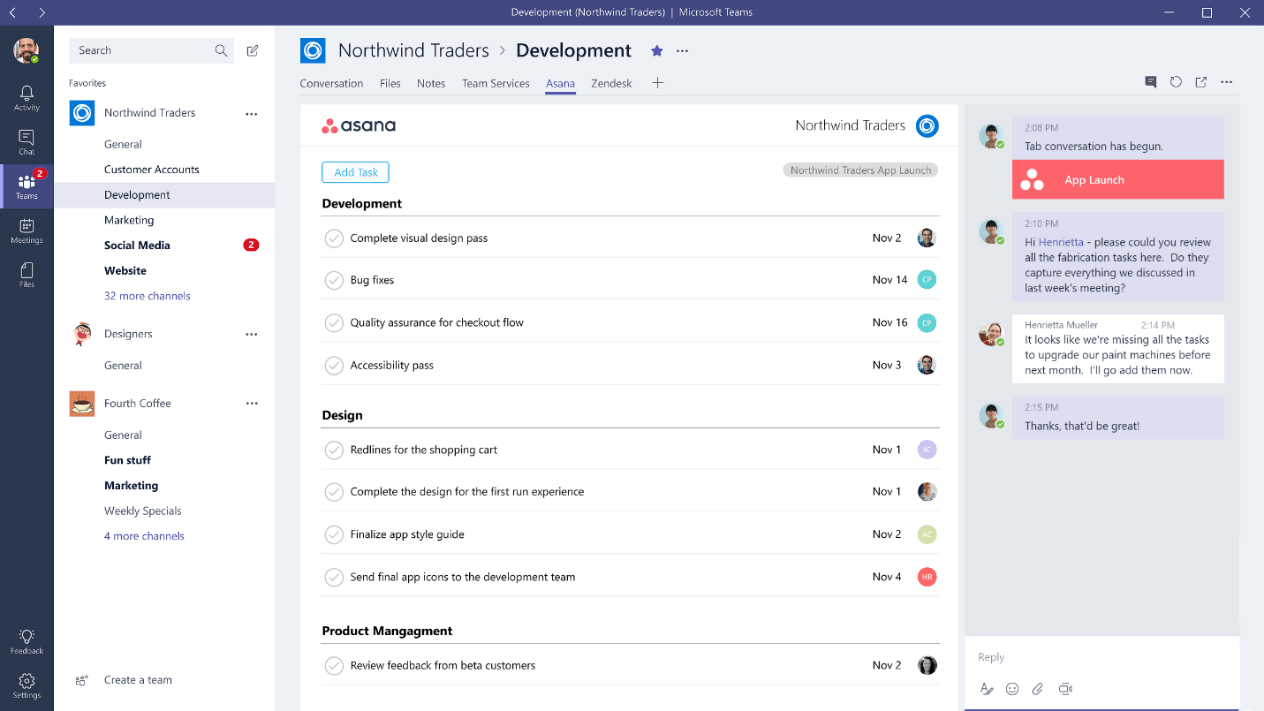
Also, the Discord interface looks entirely different than Microsoft Teams.

Microsoft Teams: https://www.windowscentral.com/sites/wpcentral.com/files/sty...
Discord: https://support.discordapp.com/hc/en-us/article_attachments/...
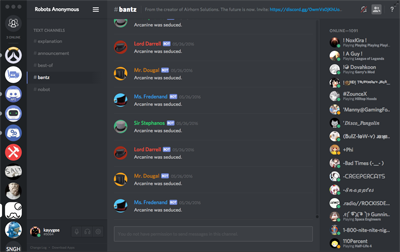
Discord also allows advanced users to theme it with ease, which is another good thing about it.

Re:Show HN: Cross-platform desktop applications with PyQT by Fins on Friday February 09, 2018 @02:30AM (#16338552)
I'm not tyhat familiar with Mac software, but last time I checked, Apple had some pretty stringent standards for UI design. And well, unless you went to some extreme lengths, your menus, textboxes and buttons would look consistent.

Now, just double-checked a few apps (Firefox, mIRC, Visual Studio) between Windows 7 and latest insider buld of Windows 10. They look exactly the same. Office? Looks the same, too. Can you reference some app that does look different between them?

Still not seeing any sinificanmt difference between Teams and Discord either. From left to right: - Narrow column with icons - Wider column with list of somethings - Even wider colunm with another list - Less wide column with more icons and text.

Seriously, if you swap icons between the two, would you be even able to tell the difference? Sure, some content in some of those colunms is different -- these are different apps, after all, but saying that one interface looks entrirely different seems to me to be an exaggeration. From a designers' POV maybe, colors re different, and icons are in slightly different locations. From a users view, they are basically identical. For that matter, Slack seems to look exactly the same, too. At least based on what they show on their site. Except, of course, that being an Electron app and not following even what little Windows has for UI standards, they have to start the description form saying that to find settings you need to go a Workspace menu. Which, of course, doesn't look like a menu to begin with.

Honestly, I do not see how this is an improvement. Cheaper for the manufacturer, sure.

Re:Show HN: Cross-platform desktop applications with PyQT by pjmlp on Wednesday February 07, 2018 @02:05AM (#16322752)
> Delphi/Qt Designer look way worse than any HTML/CSS/JS GUI builder, too

Can you please provide an example of such tool?

Doing UI development since Windows 3.x days, and I am yet to find such a tool for HTML/CSS/JS development.

Oh and in the process it would be nice to know about a least one comparable component library for such tool.