The reason is what developers already know: naming things is hard! (Two hard problems, etc.)
Of course, developers also know how valuable good names are, so we like to take the time to pick good names. Users would rather just skip naming altogether and refer to things by letter/number or just by clicking on them.
I think this is one of those great insightful points that's counterintuitive and yet has abundant real-world evidence we can't deny.
I'd guess that vast majority (99%) of programmers that program in languages requiring explicit variable names (Python, C, Java, Go, etc) will still use Excel without named cells nor named columns. Yes, they will label their adjacent cells with freeform text (e.g. "TOTAL PRICE:") but they won't use the Excel "named regions" feature to be referenced in formulas. How do we reconcile the inconsistent attitude we have about the benefits of names?!?
It turns out that yes, naming cells is a form of "code documentation" and helps avoid "spaghetti formulas" -- but it's also a friction. If programmers using Excel eschew cell names, it's a given regular users will too.
It also doesn't help that "names" in Excel is not a 1st class feature. It's a separate menu item and the name is a hidden "alias" for the cell.
With other products, the "name" of the cell is what you type into the box right there on the sheet. The UI for giving a cell a name is more immediate.
I use excel a lot and I found that the only convincing use case for range names is if you need to refer to ranges from VBA, then this is the only way for the code to find its way on a spreadsheet even if someone inserts some rows and columns. Otherwise range names create more problems than they solve.
This is really like copy pasting code from one namespace into other, with code in both spaces having same variable names.
You really need to think of a spreadsheet as a function. It must have single responsibility and must be called by another sheet to be used.
But if you are copying a formula that has things like variable names into a new sheet, you have to understand that pasting the formula with its variables pointing to nothing is like inducing a NullPointerException.
     //B1 is renamed as first
     //B2 is renamed as second
     _______________
      f(x)| C3 = first * second
     _______________
       A | B | C | D
      _______________
    1|___|_2_|___|__
    2|___|_3_|___|__
    3|___|___|___|__
    4|   |   |   |
     _______________
      f(x)| C3 = B1 * B2
     _______________
       A | B | C | D
      _______________
    1|___|_2_|___|__
    2|___|_3_|___|__
    3|___|___|___|__
    4|   |   |   |
In programming the UI to assign names is very intuitive and right there in your face. You place the name next to the thing you want to have named. Done.
At the top left corner of the sheet, just to the left of the formula bar, there is a textbox that displays the cell Number (eg. A1). Simply click on that and enter a name for that cell.
So it does come down to a UI issue after all: the right UI for getting users to name things is one they want to use for labels/headers.
Programmers are so used to having to name things that we don't see the mental overhead of using names. A named cell is conceptually a pointer -- you can change what it points to (by giving the same name to some other cell instead), and if you delete the referent, it can point to nothing. That kind of invisible indirection is not easy for non-programmers.
https://support.office.com/en-us/article/Switch-between-rela...
From that perspective it's very telling that the editor's/document's/spreadsheet's/product's name was taken from a long-time editor for the web, Coda.
R1C1 = Row 1, Column 1. R[1]C[1] = cell one row over and one row down.
One other point worth mentioning is that cell-relative references in Excel are more pervasive than they might appear. For example, you can specify a conditional format formula that highlights a cell if it has a different value than the cell immediately above. (Or a number of other more considerably complex scenarios.)
Range names work this way too... it's possible to define a range of the form "three cells to the right of the current cell".
Edit: and of course individual cells can be renamed since forever.
If you are building a business plan in Excel, or trying to explain how the financial accounts consolidates in a large organisation with multiple subsidiaries, tables are not particular useful.
That's the catch with Excel. One application, thousands of very different use cases.
Named cells does significantly improve the readability of spreadsheets at a later date though!
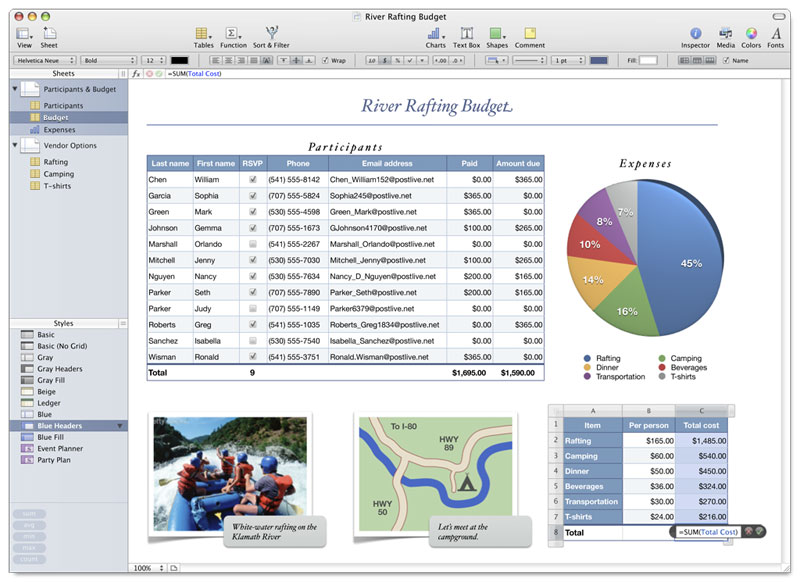
Basically a sheet is a blank canvas on which you can drop tables or charts or other things.
You can see on the left the list of the sheets, and within the list of the objects they contain.
It has all sorts of benefits over Excel's one grid approach:
- You can display two tables, one above the other, and the first can overflow without pushing the bottom table off-screen
- You can display two tables, one above the other, and the columns do not have to be aligned / have the same width (I am sure everyone using excel ran into this problem), same thing for row height for side by side tables.
- If these tables contain data, it allows to separate logically data on the same sheet instead of relying on empty columns as a convention. You can then filter the two tables independently but have both always visible on the same sheet
- Makes more sense for positioning charts vs tables
- Preserves the full flexibility of a generic excel grid, i.e. one object could be a table containing data, the other could be some complex calculation, etc. Excel has some ways to present data in a similar way but at this stage it is just summary data, not a generic spreadsheet
Random tutorial off Google:
https://www.excel-university.com/indirectly-refer-to-table-c...
I use Google Sheets for most spreadsheet work now, but I was never heavily invested in Excel. Everyone I know who is a serious Excel user just isn't interested in anything else. Excel does everything they need it to do, and they have years worth of templates and formulas developed for all their needs.
The first time I encountered the file-repair prompt, it was total déjà vu to the DOS era ;)
Its not cryptic, its the most intuitive way of finding the position of a cell in a spreadsheet.
      ABCD
      ____
    1|abcd
    2|efgh
    3|ijkl
    4|mnop
    5|qrst
    6|uvwx
    7|yzAB
Besides you can always name a cell in Excel and use that in a formula.
Except that doesn't work correctly if you move the formula around, whereas R5C3 does (and makes relative addressing very explicit).
Well an obvious reason is R1C1 clearly spells out which is the row and which is the column and further makes it very clear when you're using absolute addressing (RYCX) or relative (R[±Y]C[±X]).
But that's not what I'm talking about in the previous comment. What I'm saying is that A1 is implicitly relative: open excel or google spreadsheet, type "=A1" in a cell, then copy/paste it to an other cell, it won't be "=A1" anymore it'll be offset by the difference between the source and destination cell and thus may have become e.g. "=C8". To fix that you have to "lock in" the dimensions by prefixing them with $ e.g. $A$1 does not move around at all, $A1 does not move in the column but may move in the row and A$1 does not move in the row but may move in the column. R1C1 does not have that issue, as a user you spell out explicitly whether you want absolute or relative addressing (in either dimension) and the software keeps thing exactly as specified.
'TaxRate' makes more sense then 'Pick the value from the same row, three columns to the left'
Surely if you're not "using values from other cells" you don't need cell references at all, and then what do you care about A1 versus R1C1?
Its exactly like programming. A lot of state is stored in intermediate variables.
I mean even beyond just switching costs: Excel is for instance the only format for getting data from http://www.earthchem.org/petdb/ or, to keep harping on geologists, people that keep implementing models in excel: which you then have to use because nobody trusts code you wrote yourself.
and it only gets worse with time.
http://www.sciencemag.org/news/2016/08/one-five-genetics-pap...
though yes a calculator that refuses to let you enter numbers correctly is some 'Time Enough at Last' levels of irony.
"Battleship coordinates" are pretty darned far down the list of Things Wrong with Excel. Considering you still can't open multiple instances the way every other Windows application on the planet works...
It's just insanely stupid and nonstandard.
To some, excel is a data analysis tool. For those, all excel should have is big tables where every column should have a name and you would only ever do simple operations between them. To them, things like pivot functionalities, or connecting to database is critical. Data visualisation too.
To others, excel is a way to format a table, display a planning, a work flow.
To others it is a calculation scratch pad.
To others it is merely a UI, calling powerful custom XLL or calling server APIs that will do some complex pricing, book or retrieve trades from systems and whatever.
To others it is a full feature model builder, they will run some complex business plans, with all sorts of ratios and calculations that are unique to this use case and can't be generalised by an IT dept.
To others it is a custom app, with forms, lots of VBA code, etc.
For most people it is the "xml" (as in common standard format) for users to exchange data that they can open, inspect and reason without requiring a degree in computer science.
etc
So on one side there is nothing that annoys me more that someone pretending that all an Excel user ever needs is this particular feature and that he will replace Excel with that little website.
On the other side it is true that for parts of the Excel user base, all they will ever need is one particular feature and one could take a bite at Excel's market share.
I read that more as a way to demean Excel by comparing it to a toy than any kind of exhaustive list of complaints...
Lotus Improv from 1991 had "names" instead of rowcolumn coordinates. Quantrix from 2003 also has named "items" instead of rowcolumn coordinates. Neither product had widespread adoption.
It seems plausible that cryptic rowcolumns would be a major paint point for most Excel users but maybe it isn't.
Quantrix found a niche in financial modeling so maybe that domain of users (~50k users) value features like that enough to not use Excel.
Google Sheets continued the tradition of cryptic rowcols and has more adoption than either of those alternative products. (Probably because it costs $0.)
[1] https://en.wikipedia.org/wiki/Lotus_Improv
[2] https://www.quantrix.com/QuantrixandExcelWhitePaper.pdf