That's because we've been making a dedicated effort to find and stamp out sources of UI lag! It's called Quantum Flow; see https://wiki.mozilla.org/Quantum/Flow for more.
I highly appreciate what you doing. Hoping to get back on Firefox as soon as possible.
Once again please take care of those sudden cpu and ram usage with almost necessary addons like ublock, tab suspender etc.
If you want to trace uses of it in the code, here is a reasonable place to start, I imagine: https://cs.chromium.org/chromium/src/chrome/browser/engageme...
i think it's cool that you can see the actual ranking.
Firefox: https://www.mozilla.org/en-US/security/known-vulnerabilities...
Chrome: https://chromereleases.googleblog.com/search/label/Stable%20...
Hopefully with their sandboxing project done (Also with Rust) will make Firefox much better in the security department, but until then, no.
It's not accurate to say that Firefox has no sandbox. Sandboxing work has been rolling out for many months now, and later versions have increasingly restrictive sandboxes. You can see the current status per version here: https://wiki.mozilla.org/Security/Sandbox#Current_Status
Hardening the sandbox is a constant work in progress, but it's not as simple as "compromise of browser engine automatically means arbitrary code execution as running user" any longer.
When it is there I would definitely use it along with Chrome.
Looking at historical vulnerability reports can be misleading in this regard, as the sandboxing features are rather recent (pre-stable-version in some cases).
In terms of security architecture, there is to my knowledge only one bigger difference left and you can change that, if you want.
The difference is that Chrome will spawn a new process for every new tab (unless the webpage in it is from the same domain as another tab). Firefox instead will always round-robin the tabs across a fixed number of processes to achieve lower RAM usage and as result of that also somewhat better performance.
But you can tell Firefox to round-robin across up to 1000 processes or what have you, so that it then does spawn a new process for every new tab (and therefore sandboxes each tab individually).
To do so, go into about:config and set "dom.ipc.processCount" to a high number, like 1000.
https://v8project.blogspot.ro/2016/10/fall-cleaning-optimizi...
Also is using thread per tab approach more susceptible to memory leaks, resource sharing issues or OS scheduling shenanigans than process per tab approach? You close the tab, the process is dead and resources are mostly guaranteed to returned. My knowledge of modern browsers is limited, maybe this was considered an acceptable compromise though.
But this comes at the cost of battery life. I moved back to Chrome because it was constantly chewing CPU.
What I don't understand: why is it that other browsers don't put battery life before all else? We live in a portable world after all..
Do we? I'd say most people with laptops use them either at home or at work, both places were they can plug in.
The majority is not "Starbucks laptop users" or road warriors.
Mozilla will also want to target their engine at tablets and phones at some point. This is presumably why Samsung committed funding to Servo (IIRC).
Personally I can't use Safari, as I want my bookmarks/history synced between devices and don't use an iPhone.
Absolutely stunning improvement in performance!
Great work by team FFx! :D
  Safari TP 11.1 Release 40  - 62.71
  Chrome Canary 63.0.3221.0  - 55.45
  Firefox Dev Edition 57.0b3 - 44.17
    Firefox 55.0.3              - 71.4
    Firefox Dev Edition 57.0b3  - 113
    Chrome 61.0.3163.100        - 136
These are Browserbench 1 though, I have no idea how to run v2.
I've been sending feedbacks for Nightly for a while now, but they don't seem to read them. The two biggest issues are:
1- High CPU usage (which leads to high temperature and shorter battery life) 2- No "Look Up / Define" in right-click menu.
Fix them and I'll switch from Chrome in a blink.
Last time was a week ago :\
If I understand correctly, the photon changes haven't landed on current stable firefox yet. They have just landed in Developer edition. So you might want to give it (or nightly edition) a try.
However, I'll try Quantum and see if it improves the situation. I really don't want to be using Chrome.
In some ways I think firefox has actually surpassed chrome (e.g. on my xps 13 touchpad scrolling is much more responsive/smoother in firefox)
Everything feels 10 times faster without smooth scrolling, while I have to say that the nightly already felt blazing fast _with_ smooth scrolling, haha.
I just had the feeling that Firefox has news to be on-par with Chrome for years now, but I never really "felt" it, hehe.
I just wanted to say, that it isn't the first news about Firefox getting faster since Chrome came out.
I tried the new versions every now and then and Chrome always felt faster to me. Maybe it really is, maybe it just uses some perceptional tricks, I don'T know.
I encourage you to try out Nightly now (https://www.mozilla.org/en-US/firefox/channel/desktop/). I’m not promising that it’ll be faster than Chrome, but it just might be fast enough now.
They even got rid of that search bar, haha.
Only fonts and the scroll bars seem a bit old school compared to Chrome.
Also, WhatsApp Web keeps logging me out.
Chrome has a bunch of bugs related to font-rendering on Windows, e.g. https://crbug.com/414307. I'm not sure why switching to DirectWrite didn't just fix these bugs, but subjectively appearance-wise on Windows, Firefox > Edge > Chrome.
To me it seemed like the input font here on HN could need a bit more hinting in FF.
It's actually configurable by the user. I like having it on the side, so I added it back.
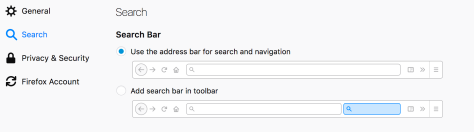
(Tested on Firefox 55.0.2/Linux)
Cheers. :)
This is an issue on my Arch Linux laptop, but not at work using Ubuntu. Both run Firefox nightly. Been going nuts with this issue!
Is there an easy way to convert your current Lastpass database to Bitwarden?
Seems 2FA (YubiKey) costs 10 USD/year instead of 24 USD/year which LastPass costs.
I've been looking for a recent feature comparison, the Wikipedia one is rather shallow and incomplete [1] [2].
My (incomplete) take on feature comparison:
Both are relatively cross-platform, widely supported by what I consider status quo platforms (Windows, Linux, Android, macOS, iOS, Chrome, Firefox).
Advantages of Bitwarden are open source and public development, approx half the price (and approx same as Lastpass before purchased by Logmein), and the ability to self-host.
Advantages of Lastpass are different login for accessing to account and decrypting database. This is important because without this, a MITM attack gets access to the master password.
I also found the announcement of Bitwarden, approx 1 year old now, on HN [3]. It includes some feedback about the software. Bitwarden uses AES256-CBC. How secure is AES256-CBC in this case, and what does Lastpass use? Another criticism is usage of Google Analytics. This can be disabled in the application, but I don't feel it serves a purpose for the user. It should never have been included in the first place. I also don't think either software is audited.
[1] https://en.wikipedia.org/wiki/List_of_password_managers
[2] https://en.wikipedia.org/wiki/Comparison_of_password_manager...
Is there a comparison of these tools that you’d recommend?
That said, I'm definitely going to give quantum a try
Also, with gfx.webrender.enabled, gfx.webrendest.enabled, gfx.webrender.blob-images, and gfx.webrender.layers-free all enabled, same version of Speedometer and Firefox on the workstation scores 63.47 (or 4% faster), but has render errors on the Speedometer's tach needle (SVG?) and renders fonts with very strong (very fatiguing to read) subpixel rendering.

[0] which is of course something google devs should consider and fix the sites, but hey... why do that when you're the market leader?
I feel like I'm being ActiveX'd into using Chrome now which is very non-Googly. Not sure how feasible it is to use a different mobile browser until Mozilla and Google work together to make sure they're all on the same API page on Android. Ironically enough, Windows is far more open and friendly to competing browsers than Android.
On Android Chrome is arguably better if you want Google account integration or raw speed, but Firefox for Android has a more traditional UI, extensions, and is fast enough for most of my browsing.
Sorry, but unless you have a Gecko-based version (which - AFAIK - is not what you can get from Google Play or F-Droid), it's system WebView (i.e. Chromium) under the hood.
I like Firefox Nightly on Android though, it's really good.
Um
Define "googly"
(If you're saying it's atypical of the behavior you'd expect of them: based on what?) Considering there's no trivial way to log into one of their services (gmail) without automatically doing so on others (yt etc) without fucking around with browser sessions - among many other non-customizability gotchas from them - saying google doesn't want to control how their offerings are used is going to be a very tough sell.
Holy damn Firefox is actually fast.
Fair comparison, both having Pocket, uBlock, Evernote, OneNote, Pushbullet, and Bitwarden; neither of them having an extension the other doesn't. Above described Firefox Nightly config vs Chrome Dev.
Test machines are a workstation with a i7-4771 @ 3.9ghz, 32GB DDR3-2133, Radeon 7970 with a trio of 1080p screens (a very fast modern machine from the Haswell era) and a laptop with a i5-32120M, 8GB of DDR3-1600, Intel HD4000 iGPU feeding a 13" 2560x1600 @ 200% hidpi (an Ivy Bridge era MBPr 13" Late 2012). Both machines run Win10.
Both machines have less real world wait on Firefox than Chrome, and the interface has less latency between when I do something and it even begins processing the request. Also, under a ton of windows and tabs, Firefox seems to use less RAM and the speed gap seems to widen.
I don't care about about artificial benchmarks, btw, they never seem to measure what actually makes browsers slower for humans.
Edit: Even though I just said I don't care about benchmarks, using Speedometer 2.0-r2216: On the workstation: Firefox 58.0a1 2017-09-26 64bit 61.18 vs Chrome 63.0.3217.0 dev 64-bit 51.67; on the laptop, same versions: Firefox 28.58 vs Chrome 26.74
So, arguably, flat out benchmarkable performance is the same, with Firefox just slightly edging ahead (18% and 6% faster). It isn't enough to explain how fast Firefox feels now.
Edit 2: And now with Edge 40.15063.0.0/EdgeHTML 15.15063: Workstation, 46.72; Laptop 21.37. Firefox is 34% and 31% faster, Chrome is 25% and 11% faster.