I walked in to a US Apple store and explained the problem. The Genius person agreed there was a fault and then started tapping away at their computer. He umm'ed and ahh'ed and called over a manager.
At this point I was thinking they were going to reject the warranty repair for some reason, but the manager ended up apologizing that they didn't have any UK-style MacBook replacement keyboards in stock, and they couldn't work out how to order the part in on their US system.
As it happens I had moved to the US, so getting a US keyboard was actually a bonus. I told them I was happy with a US keyboard, and 10 minutes later I was leaving the store with it installed in my MacBook.
Also, only about 20 countries have Apple stores, so that's also limited.
1. Physical keyboard layout (how keys are placed). There are two primary standards: ANSI (mostly US) and ISO (most of Europe). The most notable difference is the shape of the Enter key (L-shaped on an ISO keyboard and straight on an ANSI one). ISO keyboards also have one extra key and a shorter left Shift to make space for it.
2. Logical keyboard layout (how key presses are interpreted). This is what is printed on key caps, but it doesn't have any relation to the actual scan codes being sent. Many languages use their own accented characters (e.g. ąęćłóńżź for Polish) and historical preferences (e.g. QWERTY/QWERTZ/AZERTY), but this is implemented in software.
Logical layout can be easily configured in the operating system, and for touch typists it doesn't really matter what is printed on the keys, but differences in physical layout can take some time to get used to.
PS. I'm Polish, I live in the UK, and I type on a US mechanical keyboard with ANSI layout :)
As a UK->US transplant I really miss the Enter key shape. :(
The labeling is actually cooler, with images instead of "Shift", "Tab" etc.
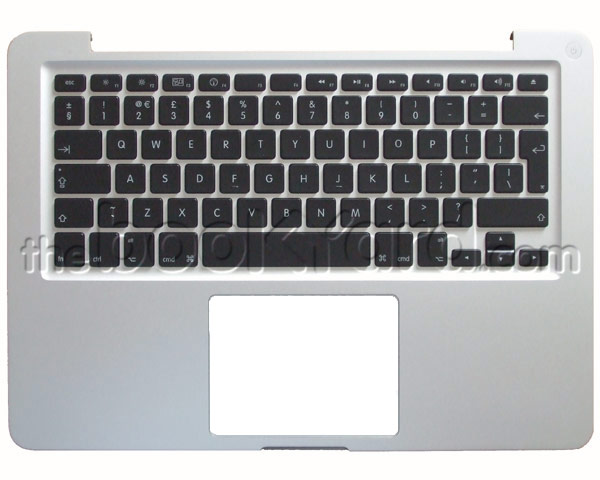
On the MBP I'm typing this on, the key is labeled enter in small type and below that return in larger type. I think holding down the fn key and pressing that key does the enter action, while without fn it does the return action. I am pretty sure my full-size Mac keyboard has return on the main keyboard and enter on the numeric keypad. I think the Lisa was the same.
IIRC there was no Enter key on the original (128K) Mac keyboard, but the optional numeric keyboard had the Enter key.
Apple have an old user interface guideline that basically said that the main keyboard was for primarily typing text, while traditional data entry was secondary. Hence the function of the Return key was strictly to insert a carriage return into some text. And so no Enter or Control key on the original keyboard. As a kind of substitute Apple introduced the Command (Swedish campground) key, but it wasn't a direct mapping of Control. And IBM further muddied the waters by introducing CUA. By the time of the Mac II the default keyboard was much more compatible with common computers. It was a time of rapid change.
I don't really understand why this is done, since well-made symbols are also understandable for illiterate people or those not speaking the language.
On the other hand having to read all that in text while you're riding by isn't very reasonable either. Complex signage is only as good as your knowledge of it, which maybe is why passing a driving test in Europe is so much harder; it requires knowledge we just get from being able to read in the US.
Only bicycles
>2. a bicycle on a white circle outlined in red
No bicycles.
>3. a bicycle on a blue [rectangle]
Recommended route for bicycles.
But really, if you're driving then you should have done a driving exam and test in your home country. Then you're ready to drive from Romania to Ireland (with the help of some tunnels and ferries) and be able to manage reading the road signs the whole way. This is possible because of a (mostly) shared iconography. Of course, on a bike you don't need to pass a test but you should do a little bit of studying to make sure you don't get a fine.
The US doesn't need this because it uses English.
This is also completely distinct from keyboards which aren't even QWERTY across Europe. There are also AZERTY (France) and QWERTZ (Germany) and some countries like Belgium have all three in the same office as people have different preferences. And pair programming is as painful as you can imagine.
That being said, traffic signage is a mixture of both, where some meaning is given by convention (e.g., white background and red border means "not allowed"), and then extrapolated by pictograms (bicycles not allowed, trucks not allowed, pedestrians not allowed).
Edit: A certain cultural context is of course always required, to know for example that a crossed out cigarette applies to smoking in general and doesn't mean that you can smoke pipes, cigars, or bongs. Such 'misunderstandings' only happen with QA engineers though. ;)
white circle with red outline: something that is forbidden (the road is forbidden for bycicles)
the last one indicates a bycicle-only path crossing the road, 150 meters before it you should see a white triangle outlined in red ("danger") with a bycicle inside it
It's a disgusting view, I'll give you that
Yes. US ISO layout is superior if you need to do any programming (or even just to write some Markdown), too bad it's not used more.
On German keyboards it's even 'worse' though. Because ;, [ and ] are used for ä, ö and ü, [ and ] are Strg + ⇧ + 8 and Strg + ⇧ + 9. Same for { and }.
(Strg = Ctrl)
So any keyboard shortcut involving those and ⇧ or Ctrl is pretty much impossible.
First, it's somehow easier to type ~ on UK layout (no weird finger twists) - helps quicker to get to your home directory when navigating terminal.
Second, I use cmd+1/2/3 to switch tabs a lot. Cmd + ` rotates windows. You can imagine it's very easy to mix up 1 with ` and instead of having the tab you want, end up with completely different window. Really breaks my flow often.
I do not mind enter key that much. In fact I think US one is better.
Protip: "cd" with no arguments normally takes you to your home directory. Though if you need to reference something in your homedir using a global path without changing directories, ~ is probably still the fastest way to do it.
4/$ still works, but some of the other symbols are in different places.
I had to take my MacBook in three times durnig its life, for the same issue (wifi/bt issues because of aircard connection to VM)
Every single time I was told to make an appointment. Which take about 3 days to get. They took the laptop and spend a week fixing it (every time!) My experience at Multiple Apple stores in Southren Ontario.
( Source: http://europa.eu/youreurope/citizens/consumers/shopping/guar... German EU LAW: http://eur-lex.europa.eu/legal-content/DE/TXT/PDF/?uri=CELEX... (99/44/EG) )
Edit: Well the most important fact of course is that there is no "eu law" there are just policies that the countries than can enforce/make a law out of it (http://ec.europa.eu/info/law/law-making-process/overview-law...) well european can than make claims against the country, but sometimes they even fail to do that.
In practice it's a mess system. Courts choose and pick however they want to implement the directives, even in countries where courts should be independent the ruling political countries have enough pressure on the courts. Sometimes they even enforce invalidated directives which is unlawful but then again if a country has enough money they could just pay the fines. Therefore there is so much unhappiness about the EU in the general populace, local politicians blame the EU laws, EU politicians blame the local laws and no one is accountable, it really sucks and isn't what a democracy is supposed to be.
On top of that, as merb said, following the EU directive, local law (in France, that's the Hamon bill) says the legal warranty of compliance[0] covers for the whole two years. So Apple can tell me to buzz off past the first year if I bought their hardware from Amazon, but so that I can go through them directly instead of going the roundabout way through the seller during the first year. The seller can never tell you to buzz of (as long as you duly prove the defect past 6 months as merb said), even during the time a possible commercial warranty applies, but it can be more efficient to go through the manufacturer directly, as is the case with Apple Stores, but I've been using this for other brands where the wait list was months long through the seller whereas the manufacturer fixed it in less than a week and even footed the bill for the postage.
[0]: https://www.service-public.fr/particuliers/vosdroits/F11094
[1]: https://www.service-public.fr/particuliers/vosdroits/F11093
[2]: https://www.apple.com/legal/warranty/products/mac-french.htm...
I still don't understand how these make sense together...
"This 2-year guarantee is your minimum right. National rules in your country may give you extra protection: however, any deviation from EU rules must always be in the consumer's best interest." (which is the case of UK law).
I still don't see any problem. Apple states that you get 1 year of "Apple" warranty, which allows you to get your product serviced by Apple, at no cost, independently of where you bought it.
Beyond that date UK law will apply, but since it applies to the seller, and not the manufacturer, they say to contact the seller (as I said in another post, a bit cheekily, since they will be also the seller in many cases).
Unless of course you buy Apple Care, that will allow the same level of service as the 1 year warranty...
Therefore, Apple either has to say "our laptops are only good for three years", or say that particular laptop was defective and fix it.
Sure does: 2 years. http://europa.eu/youreurope/citizens/consumers/shopping/guar...
They even have a page outlining the difference: https://www.apple.com/de/legal/statutory-warranty/
It is kind of cheeky, since in most cases for Apple products, the seller is also Apple.
The reason I wrote that is because I've purchased multiple MacBook Airs in the US and Apple UK has always serviced them. Obviously your experiences are different.
Was traveling in UK, and laptop keyboard cracked - big hole in the side of the keyboard. Took it to Apple store in London - forget which one - replaced at no cost in about 3 hours.
EDIT: per goatforce5's comment, I had a bit of 'umm' and 'ahh' when I was in London. I thought it would be "out of warranty", but it was the same thing - "not sure we have any parts to fit the US keyboard". They did find one, but that was the potential hold up.
Same thing happened to me (white Macbook, cracks on the keyboard). AFAIK it is a known defect from this series and Apple accredited repair shops were instructed to replace the keyboard for free no matter if the warranty was still valid or not.
It's still a good thing though, I know no other brand that would do that for free 4 years after the warranty expired (in my case).
I've gotten 4 or 5 replacements, for free. I always have spares (instead of carrying them with me). So always claim "Dude, weird, I just bought this a few months ago."
Given the past drama, I think Apple just swaps them, to avoid any further bad PR.
And, frankly, these adapters should last forever. For comparison, I don't think I've ever replaced an HP or Dell adapter.
I don't think that's an outlier. In my experience, going to an Apple Store is always more frustrating, time-consuming, and expensive (if you are buying upgrades) than going to an authorised reseller.
IIRC, there's an authorized retailer in Lisbon (Chiado). Warranty-wise, I wonder how buying one there factors in vs. getting one from anywhere that sells them new (like FNAC).
This can be misleading. I bought my Macbook Air in Portugal, had 2y warranty there. Then moved to the UK and the brick stopped working. Went to an Apple Store and since it was after the 1y warranty offered when you buy it in the UK, they rejected replacing it for me. Eventually went to Portugal to visit my family and got a new brick from the same store in 5 minutes. On a curious note, there's no Apple Stores in Portugal yet so in this particular case it was even more interesting to realise how much better help I got from a non-official store.