News for hackers. Stuff that matters.
Re:Google Noto Fonts by fazlerocks on Thursday October 06, 2016 @02:56PM (#12655054)
We had to stop using this font as it didn't support back tick(`). Try typing ` multiple times in the search box.

We had reported this to Google some months back but got no response.

Re:Google Noto Fonts by Normal_gaussian on Thursday October 06, 2016 @03:55PM (#12655552)
A quick summary of this issue:

- 'Dead' keys are keys used to modify the next character

- The backtick / grave key behaved as such on a typewriter

- ` + a = à

- Noto web fonts behave like this

- The latest Noto local fonts do not

- The expected modern behaviour in English is ` + a -> `a

- This is not necessarily the expected behaviour in other languages

Re:Google Noto Fonts by barrkel on Thursday October 06, 2016 @06:14PM (#12656575)
It seems like you're confusing COMBINING GRAVE ACCENT and GRAVE ACCENT. These are two separate characters with distinct code points. One combines, the other does not. It's not a property of the font; it's a property of the characters.

http://www.fileformat.info/info/unicode/char/0060/index.htm

http://www.fileformat.info/info/unicode/char/0300/index.htm

Re:Google Noto Fonts by Normal_gaussian on Thursday October 06, 2016 @06:30PM (#12656668)
Yes they are unique characters. I went to some pains to ensure I used the word 'key' as in physical switch on a keyboard. However I did not go far enough in ensuring I was referring to the font package as opposed to the font, please accept my apologies.

It is the font package, look at iverg's comment on the github issue https://github.com/googlei18n/noto-fonts/issues/736

here are screenshots with local font installed http://i.imgur.com/ycRs3A0.png

and without local font http://i.imgur.com/TUKsIY4.png

EDIT: it goes deeper: https://news.ycombinator.com/item?id=12656642

Re:Google Noto Fonts by dragonwriter on Thursday October 06, 2016 @04:32PM (#12655860)
> Noto web fonts behave like this

Dear god why? They're Unicode fonts. There are perfectly good Unicode combining characters that can be used when this behavior is intended. Making non-combining characters behave like combining characters breaks all kinds of text.

Re:Google Noto Fonts by shawnz on Thursday October 06, 2016 @04:03PM (#12655625)
> This is not necessarily the expected behaviour in other languages

But isn't it normally the operating system's responsibility to implement this, depending on the keyboard layout?

Re:Google Noto Fonts by coldpie on Thursday October 06, 2016 @04:07PM (#12655653)
Operating system? Buddy, this is web development. We're reinventing the whole stack on top of HTML and JavaScript. Welcome to the future.
Re:Google Noto Fonts by OJFord on Thursday October 06, 2016 @04:28PM (#12655827)

    > But isn't it normally the operating system's
    > responsibility to implement this
Presumably the font has backticks, but they're (poorly) implementing this method of accenting in the demo web app to allow people to search for accented characters?
Re:Google Noto Fonts by Normal_gaussian on Thursday October 06, 2016 @06:51PM (#12656789)
Nope.

It looks like "web fonts" in general are poorly implemented. You can recreate the problem with just a text box and font styling CSS.

If you look at some of my other comments in this tree you will see screenshots of the same text box with and without the local fonts installed. Presumably when local fonts are installed the OS handles everything, without the browser and the noto-fonts definition file gets in the way.

Re:Google Noto Fonts by viraptor on Thursday October 06, 2016 @06:01PM (#12656498)
What do you mean by "Noto web fonts behave like this"? Whether dead keys are enabled is a property of your system / input method.

The standard en_us linux config does [alt+\] [a] = à instead for example. (unless you choose a keyboard layout)

Re:Google Noto Fonts by Normal_gaussian on Thursday October 06, 2016 @06:31PM (#12656681)
That is what would make sense however that is not the case. I should have been clearer and used the term "package" after font:

Local fonts package installed: http://i.imgur.com/ycRs3A0.png

No Local fonts package installed: http://i.imgur.com/TUKsIY4.png

Re:Google Noto Fonts by viraptor on Thursday October 06, 2016 @07:10PM (#12656892)
That's weird. The package seems to include the ttf files only... https://www.archlinux.org/packages/extra/any/noto-fonts/
Re:Google Noto Fonts by Normal_gaussian on Thursday October 06, 2016 @07:27PM (#12656974)
It is seemingly to do with how the "web fonts" are implemented by browsers. For more weirdness look here: https://news.ycombinator.com/item?id=12656642
Re:Google Noto Fonts by the8472 on Friday October 07, 2016 @04:42AM (#12659072)
You are conflating keyboard layout, unicode codepoints and the font rendering of said codepoints.

The issue here is that the non-combining accent (as generated by many keyboard layouts, dead keys or not) is rendered by the font as if it were combining. All the other aspects are tangential.

Re:Google Noto Fonts by oelmekki on Thursday October 06, 2016 @04:51PM (#12655995)
> This is not necessarily the expected behaviour in other languages

Which language, for example?

I'm french, we have characters with grave accent ('à', 'è' and 'ù'), and we do not expect the "` + a = à" behavior, as for one language.

EDIT: we do expect that "^ + a = â", though, but that's an other thing, and we have actually two ^ keys, one for our behavior and one for the usual behavior.

Re:Google Noto Fonts by fermuch on Thursday October 06, 2016 @05:22PM (#12656218)
Brazilian Portuguese expects that behavior to write words such as "àqueles"
Re:Google Noto Fonts by wst_ on Friday October 07, 2016 @01:22AM (#12658375)
Forgive me, I don't want to sound xenophobic but this seems preposterous to me. So much energy wasted. I am deeply grateful to the guys who were developing keyboard standards in our country that I don't have to go through such waste. When we want to use "o" with accent we just press right ALT with "o". Simple and fast. Frankly speaking, this is first time I hear about such weird combination just to get local characters, in western countries ofc. PC keyboard is not mechanical one. Why someone would copy the same behavior is beyond me.
Re:Google Noto Fonts by piaste on Friday October 07, 2016 @05:43AM (#12659323)
If you write in a single language that has only a few combinations, sure. But as the number of diacritics - letter combinations increase, dead keys become a more attractive solution.

With just two or three Western European languages to write in, you can easily have grave, acute and circumflex accents, umlauts, tildes, plus a couple one-off letters (like ß for German, ç for French, or å/æ for Scandinavian languages). Combining those with every vowel they can apply to grows too much for the poor Alt key.

The US-International layout runs into this problem. Since Alt + A = Á, if you want to type Ä or Å or Æ in a single keypress you have to use Alt + Q, W, or Z respectively, which is hardly intuitive. And if you want À or Ã, you're SOL.

Dead keys (also in the US-International layout) solve this problem. I know which keys make the tilde, umlaut, both types of accents, and circumflex. If I want the bare symbol (or a quote in the case of umlaut) I press spacebar after the symbol key, otherwise I press any applicable letter to output the modified version. For example, I'm pretty sure there's a key combination for ç, but I don't remember what it is (Alt + C is ©); however I did remember that I could type it as ' + c.

The other main solution is to have a hotkey for switching language layouts - typing in each language will be slightly faster, but when I tried it I frequently forgot which layout I was on and had to stop, delete my mangled output, switch language, and type again. I find dead keys much more friendly to muscle-memory.

Re:Google Noto Fonts by ubernostrum on Friday October 07, 2016 @03:44AM (#12658890)
I find it useful on a Mac to use some of the shortcuts for accents and diacritics in the default US-English keyboard layout, since I occasionally do have to type accented characters, or type text in a non-English language and don't want the hassle of changing keyboard setup or going through the Unicode menu. They all involve holding Option and pressing the key, though (for example, 'à' is Option-` followed by typing the 'a'; Option-e gets acute, Option-n gets tilde, Option-i gets circumflex and Option-u gets diaresis; there are also shortcuts for some common specific characters like ç and å).
Re:Google Noto Fonts by talideon on Monday October 10, 2016 @07:36AM (#12676439)
It makes perfect sense if you know anything about Portuguese.

'àquele' is the preposition 'a' + 'aquele'. Grave accents are only used to mark contractions such as this, and the circumflex and acute accents - which denote differences in vowel quality and stress - are much more common, which is why it makes perfect sense to prioritise ease of typing for those two over the grave accent.

Re:Google Noto Fonts by seszett on Friday October 07, 2016 @06:45AM (#12659577)
> When we want to use "o" with accent we just press right ALT with "o". Simple and fast.

That's fine for ò I guess, but then how do you type ô, ö and ó?

But as has been said elsewhere, this thread is confusing dead keys, which have nothing to do with fonts: typing the ^ key followed by the o key enters a single character ô, with combining characters where the character ̂ followed by the character o is rendered as ̂o (which should look the same as ô) (edit looks like this works fine on my fixed-width font when editing, but not so fine on the regular proportional font when displaying the comment, it's sadly quite usual for fonts to mishandle combining characters).

Here, the issue is that the standalone non-combining ` (as well as ´, ¨ and ¸) is handled by this font as if they were combining, thus doubly confusing users with dead-key keyboards.

Re:Google Noto Fonts by oelmekki on Friday October 07, 2016 @01:07PM (#12662205)
I guess it all depends on the frequency of such characters in the given language. For example, in french keyboards, we have dedicated keys for 'é', 'é', 'à', 'ç' and 'ù', because they are incredibly frequent. On the other hand, 'â', 'ê', 'î', 'ô', 'û', 'ë' and 'ï' are less frequent, so they are generated using modifiers.

I'm quite glad of that, actually, it would be really annoying if we had to keep using modifiers every two words. I know french people who use English keyboards, they just usually forget about accents totally instead of using dedicated modifiers.

Re:Google Noto Fonts by oelmekki on Thursday October 06, 2016 @05:39PM (#12656341)
I see. Thanks!
Re:Google Noto Fonts by euyyn on Thursday October 06, 2016 @09:52PM (#12657599)
Spanish keyboards work like that too. If you want the accent by itself, you tap it followed by a space (same as in a type-writer).
Re:Google Noto Fonts by krzyk on Friday October 07, 2016 @06:52AM (#12659604)
Hmm, here in Poland we use right alt plus a letter to make the diacritic version of it, e.g. alt+a = ą (the left alt functions like in other keyboards).

It is probably easier for language that doesn't have multiple diacritics for the same letter.

In Poland we have only one such letter: z. The problem is solved by using 'x' for the other (less frequently used) diacritic type:

alt+z = ż

alt+x = ź

Re:Google Noto Fonts by dagw on Friday October 07, 2016 @03:21AM (#12658797)
Which language, for example?

On Swedish keyboards, for example, "` + a = à"

Re:Google Noto Fonts by GnarlyWhale on Thursday October 06, 2016 @04:34PM (#12655870)
Aside, I can't believe I never realized that was the intended use of the grave key.
Re:Google Noto Fonts by foolong on Thursday October 06, 2016 @04:01PM (#12655607)
This is not related to the font.
Re:Google Noto Fonts by Normal_gaussian on Thursday October 06, 2016 @06:32PM (#12656692)
Local font installed: http://i.imgur.com/ycRs3A0.png

Web font: http://i.imgur.com/TUKsIY4.png

See iverg's comment on the github issue: https://github.com/googlei18n/noto-fonts/issues/736

EDIT: To be clear, parent is technically correct. The problem is with the way "web fonts" is working, the actual 'font' is the same across both, just the web fonts are having fun.

Re:Google Noto Fonts by CodeMage on Thursday October 06, 2016 @03:15PM (#12655227)
I can confirm this. When I type back tick in the search box, the cursor doesn't advance to the right. The next character I type after one or more back ticks will look like it has an accent on it (e.g. `````a becomes à).

I'm using Chrome v53.0.2785.143m on Windows 7.

Re:Google Noto Fonts by snarfy on Thursday October 06, 2016 @11:48PM (#12658027)
I get the same behavior on firefox nightly.
Re:Google Noto Fonts by tux1968 on Thursday October 06, 2016 @03:07PM (#12655171)
Don't know what the problem looked like on your system, but there was no apparent problem here on Firefox/Linux.
Re:Google Noto Fonts by amyjess on Thursday October 06, 2016 @03:39PM (#12655412)
Chromium/Linux here, I can replicate it on the specimen page.

https://fonts.google.com/specimen/Noto+Sans

Under the 'Styles' section, type:

    `foo`
You'll see the first ` overlap the f.

Now erase it all and type:

    ````
They all overlap each other and show up as just one `.

Edit: from what it looks like, the problem is specific to the sans. I can't replicate it with the serif (https://fonts.google.com/specimen/Noto+Serif if anyone wants to try).

Re:Google Noto Fonts by behdad on Thursday October 06, 2016 @05:44PM (#12656376)
Ouch! Thanks for the report. We'll look into fixing that ASAP.
Re:Google Noto Fonts by tux1968 on Thursday October 06, 2016 @03:42PM (#12655437)
Thanks for taking the time to explain the issue. Yes, same problem shows up here.
Re:Google Noto Fonts by gizmo385 on Thursday October 06, 2016 @05:12PM (#12656160)
For me at least (Chrome), it seems like it isn't applying any surrounding spacing for the backtick. If you hit ` a few times and then hit some other character, they seem to occupy the same space in the text box.
Re:Google Noto Fonts by cpburns2009 on Thursday October 06, 2016 @04:15PM (#12655719)
I experience same problem with Firefox 47.0 on Ubuntu 15.10.
Re:Google Noto Fonts by TakerofVita on Thursday October 06, 2016 @03:19PM (#12655262)
On my system, it puts the backtick as an accent mark. When I type more than one backtick, they overlap. "`a" displays as "à". "``a" displays the same.
Re:Google Noto Fonts by icebraining on Thursday October 06, 2016 @03:05PM (#12655150)
I don't get it, what's the problem?
Re:Google Noto Fonts by taco_emoji on Thursday October 06, 2016 @03:23PM (#12655300)
Here's a link to the issue on Github: https://github.com/googlei18n/noto-fonts/issues/736
Re:Google Noto Fonts by bumblebeard on Thursday October 06, 2016 @04:07PM (#12655650)
Nothing looks wrong to me (Firefox/Debian). Are you sure it's a problem with the font?
Re:Google Noto Fonts by kasbah on Thursday October 06, 2016 @06:25PM (#12656642)
It does happen in the search box as you say but I have been using Noto Sans for a while now on my site and it doesn't have this problem: https://kitnic.it/.
Re:Google Noto Fonts by Normal_gaussian on Thursday October 06, 2016 @07:24PM (#12656956)
Interesting. After playing with it a bit I came to the example:

You must not have local noto fonts installed for this to work.

http://codepen.io/anon/pen/dpdOzk

Using chromium we see that:

Inheriting the font means the "bug" doesn't affect you.

Adding a class with the font only affects textareas, not inputs.

Adding the font directly affects both.

Notably the google demonstration page has the rule:

    html,input,textarea{font-family:'noto sans',arial,sans-serif}
this applies the noto bug directly to the input field.
Re:Google Noto Fonts by khaled on Friday October 07, 2016 @07:26AM (#12659773)
Can you link to the bug report?
Re:Google Noto Fonts by foolong on Thursday October 06, 2016 @03:35PM (#12655383)
Come on... google dead keys
Re:Google Noto Fonts by cpburns2009 on Thursday October 06, 2016 @04:26PM (#12655808)
Since when was the grave accent character a modifier or dead key on a computer keyboard? Using a compose key is one thing, but colons, carets, and tildes aren't magically combining with letters to form letters with diaereses, circumflexes, or tildes above them.
Re:Google Noto Fonts by mintplant on Thursday October 06, 2016 @04:43PM (#12655932)
Windows does this with the US International keyboard enabled. `+a=à, '+e=é, "+o=ö, etc.
Re:Google Noto Fonts by Symbiote on Saturday October 08, 2016 @10:01AM (#12666950)
On many non-English layouts there are dead keys, and the ` key may not exist, except as a dead key.

For example, the letters å, ø and æ are very common in Danish, so they have their own keys. The acute accent is sometimes used to mark stress, like é or ǿ, and this is done using a dead key -- it wouldn't make sense to have several keys just for this purpose.
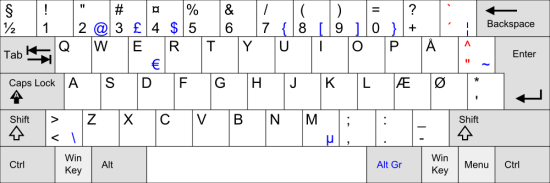
http://fontmeme.com/images/danish-keyboard-550x183.png