Aside from the components physically degrading (or environmental factors like radiation), I've never heard, read, or experienced this issue. Why do you believe this SD card would be susceptible to data loss after as little as six months?
This is something I never realized until I worked on an embedded system where every bit error showed up as a log message. It made me think, "how can computers work at all"? The answer is math and abstraction layers that work a little bit better than the average web framework.
The failure modes of FLASH are well-known, they dont necessarily need abstraction layers and they do work very well and reliably.
I can't tell you how many android phones I "fixed" for a couple years by replacing the SD cards. I actually had a sandisk 128G fail on me a couple weeks ago, that was just sitting in a dell/windows tablet with little more than a few movies copied to it. It didn't last 6 months, I guess something in win10 must have been rewritting a date/time stamp or something similar to the same sector long enough that the card just started hanging doing reads until it became bad enough that windows would choke and I noticed it.
Back about 10 years ago, I had an ARM device with an SD slot that I was writing firewall logs to. The SD cards in that machine would last ~2 months before they died. Eventually I replaced the SD cards with a USB attached SSD in an enclosure, and that fixed the problem.
There are many abstraction layers involved. For example, your Linux application isn't bit-banging the NAND chips directly. Your SoC knows there's flash attached, and handles it accordingly. Or, the Linux MTD layer handles it. Then, there are the flash-specific filesystems, like ubifs.
All in all I find it pretty interesting, because if you "echo foo > /dev/mtdX", you're not going to find any sequence of flash cells that contain the bit pattern 0x66 0x6f 0x6f 0x0a for very long after you do that write. And yet everything works anyway. There is a _high probability_ that you will be able to read it back, but there it's never guaranteed.
Nothing is ever guaranteed. All we can do is increase the probability of success.
you have a reference for this? which aspects did you compare or were compared?
So you ECC the shit out of things and hope. Or you use less ECC, get more "checkbox capacity" on the box the consumer sees, and most people won't experience failure until they throw the device away. It's all about margins.
SSDs, even the expensive ones you buy, don't have a super long shelf life and are not what you want to use for backup media.
It's a stunning paradox that densities and adoption is growing dramatically all the while raw retention gets worse with every generation (an astonishing amount of smarts goes into mitigating media deficiencies).
I'm not too concerned (assuming the standard backups) about devices in continuous and powered-on use, but for data at rest, powered off, this is very scary.
For long life I'm betting on DVDs (refreshed every few years). Easily half of the 15 year old drives I've been keeping are now bad; copying them forward every few years is a good idea. It might be time to go back to tape, but it's expensive. Pretty much everything sucks at retention.
Lower temps need more time but can still cause loss, higher temps less time.
http://www.storagereview.com/kingston_sdhc_sdxc_uhsi_u3_revi...
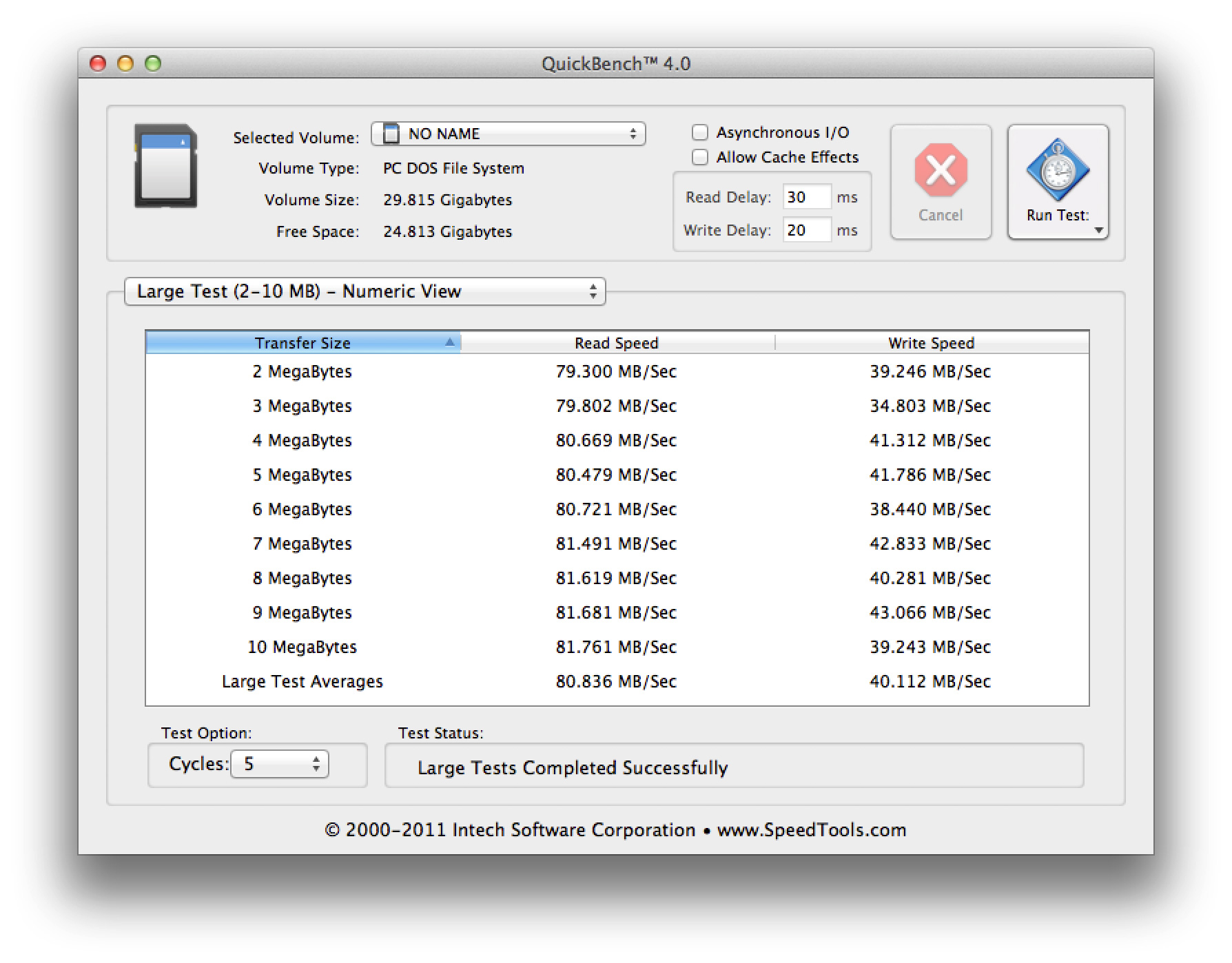
http://images.anandtech.com/reviews/mac/retinaMacBookPro/qui...
    # for i in {1..4} ; do ( time sh -c "dd if=/dev/zero of=/fusionio1/ddtest.$i bs=1M count=4000 oflag=direct" ) ; done
    4000+0 records in
    4000+0 records out
    4194304000 bytes (4.2 GB) copied, 4.90524 s, 855 MB/s

    real    0m4.908s
    user    0m0.006s
    sys     0m0.785s
    4000+0 records in
    4000+0 records out
    4194304000 bytes (4.2 GB) copied, 5.05399 s, 830 MB/s
Some questions:
1) What happens if you use bigger block sizes, say 16M?
2) Which filesystem you're using? Can it be fragmented? Can you test with raw disk to eliminate any filesystem influence?
3) Is dd running on same NUMA node (CPU socket) as your ioDrive2 PCI-e link?
4) To expand on 3, is there chance for QPI saturation (traffic between CPU sockets)? Have you ensured all the software uses CPU local RAM whenever possible and not access other CPU socket's RAM?
5) Are you sure all PCI-e lanes are active? (Try lspci)
I got 2.5-2.9 GB/sec (iirc) with a FusionIO ioDrive2 Duo. It has been more than a year so I do not remember all the details.
http://sirsql.net/content/2015/02/12/fusionio-and-the-go-fas...
We run a bunch of these things, and regularly bump up against the PCIe bus limits. There's something going on with your setup.
(Of course, my "backup" was my iPod Classic, which was stolen from my car shortly before the SD card died, but that's another story.)
You really should, though. Not in the filming domain but in stills, I've shot airshows in the company of professional[0] photographers who changed their cards for fresh ones after every act. No point losing a whole day's shooting to one bad card.
Apparently this is also common at weddings, though even more so as the photographer might be taking shots of the same scene on two different cameras and then changing cards in both. Just in case.
[0] as in, they are paid for their output
More common is the requirement to have a camera that supports dual cards, so you can either write to both cards, or write JPG to one and RAW to the other, so you'll never lose everything.
Touch wood, though, I am yet to have a CF failure. But I also pay for the most reliable.
External USB storage is find for archival and low volume use, but not great for anything you want performance out of.
Then again, on a laptop you probably don't have much choice . . .
And you should look really, really hard at retention when it is not powered (do the bits leak away, past recovery by ECC, when it's been on the shelf for six months?) Also look at reliability (transaction-nature) when it experiences unplanned ejects or power loss.