That means I always have my Kindle on me when I find myself sitting on public transport, when I arrive somewhere early or through lunch. It becomes the alternative to social media on your phone - and broadens your mind.
Believe it or not there's a huge scene for people who love the 8-9" form-factor. A NIB DX runs 500ish on ebay. I was waiting for this release for ages, but I see no reason to buy it. It looks like you're paying an extra $100 just to get back the side-buttons the Kindle fanatics demanded (it feels way more natural to press a button than make a slide motion, to the point where you don't even realize you're pressing the button after a few pages of immersive reading, unlike the slide action which breaks the continuity -- the same reason why I keep my 3rd gen around).
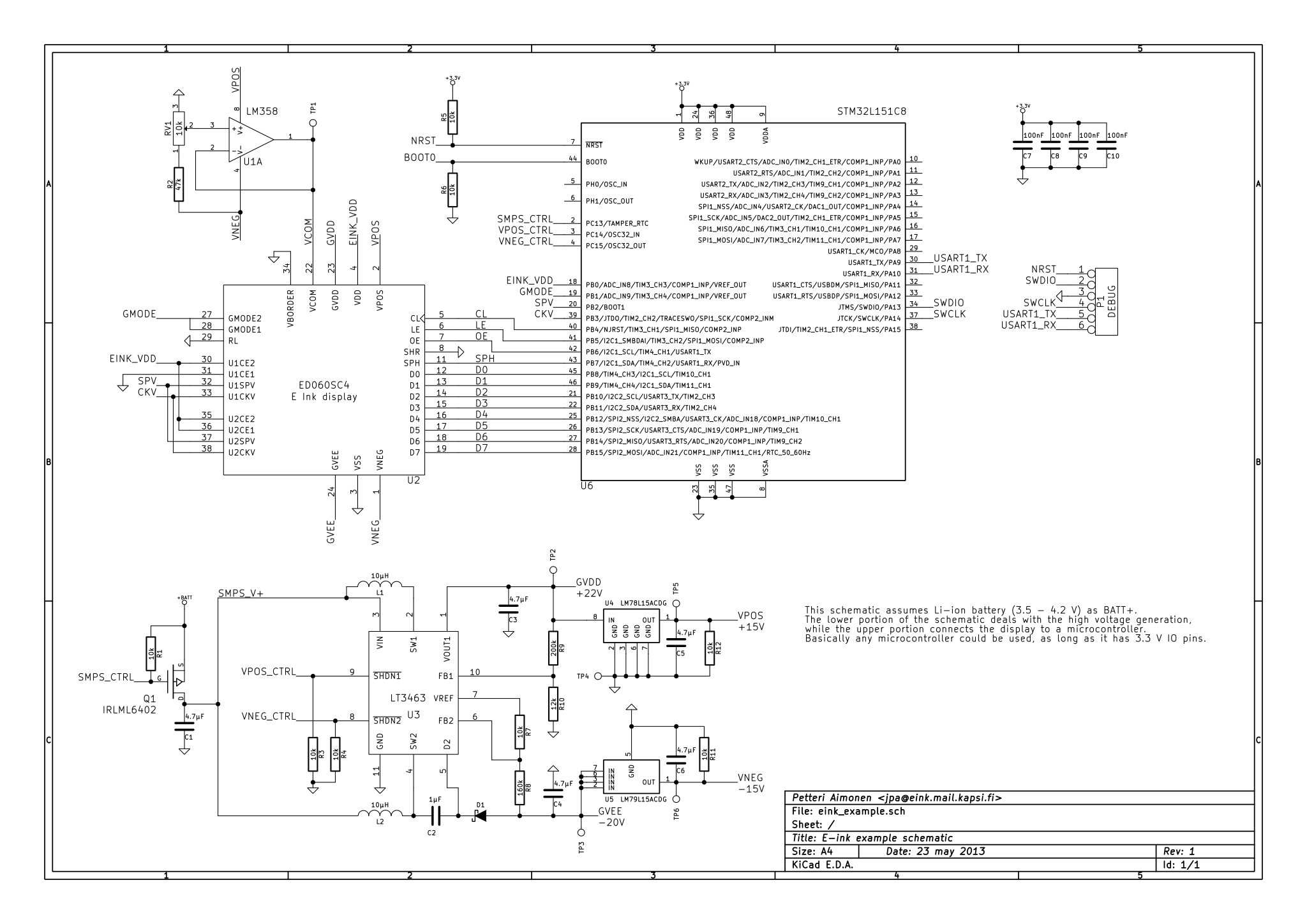
For $100 more, the Onyx BOOX N96[1] is definitely the best buy out there right now for that larger form factor. You get the same Paperwhite tech, the ability to jot notes down with a stylus, and a significantly bigger screen. I don't have one but I've heard nothing but good things about support from Onyx and let's be honest making an e-reader isn't the most complicated thing out there so odds are you won't need much tech support (you can buy a DX 9.7" replacement screen for ~65 and drive it with a uC almost trivially easily).
[1] http://www.ebay.com/itm/Onyx-BOOX-N96-ML-9-7-E-Ink-Pearl-Dis...
edit: http://wiki.mobileread.com/wiki/Cybook_Ocean 8" for 179$ (not "genuine" e-Ink(tm)) http://wiki.mobileread.com/wiki/PocketBook_InkPad 8" eInk Pearl with front-light for $250 (I've heard great things about this company too)
I like that they are offering (by invitation only) a ios and Android app -- so much of a tool like that is the OS and interface, if you can give people a simulated version on a device they already have, that's a pretty good share-ware like onboarding experience.
I'm waiting on my signature edition though, hopefully they took their time to make it decent enough...
I'd assume the lag is a software issue, it should be solvable with software updates in theory
You probably know this already, but on my PW1, you only need to tap the right hand side of the screen to go forward a page, and similarly, you tap the left hand side to go back a page.
The only thing you have to watch out for is quiescent current, not only for the obvious reasons (leakage == bad), but also because even a minimal amount of voltage drop 'across the FET' will fade out the image, so its double bad. (Each pixel with the characteristics of an N channel MOSFET.) Acting as the source on the FET -- continuously driving "on" for each "frame render" (it's just latched in from a shift register), and the horizontal pixels corresponds to the vertical pixels (which is just a shift register pushing data for each render).
If you have issues with that guy's build, http://spritesmods.com/?art=einkdisplay this dude consistently has some of the best documented hardware hacks ever. Those two sources in aggregate and a Saturday should be all you need for a one off.
http://www.amazon.com/Digital-Paper-DPT-S1-Japan-Import/dp/B...
I'm still hoping more manufactures will release bigger devices, but I assume there are still cost issues with larg(er) e-ink displays. I'd love to have something big enough to work for graphic novels and books with illustrations/diagrams. Even if only black and white.
I suppose if none are released, I'll just have to bite the bullet and consolidate on something like the Microsoft Surface Pro 4, or a Lenovo Yoga. Still not convinced that even the new high-dpi screens will work for ~12-14 hour reading sessions, though.
http://goodereader.com/blog/electronic-readers/good-e-reader...
that will be coming out at some point
https://www.indiegogo.com/projects/13-3-inch-android-e-reade...
You can't read comic books or magazines in such small edition.
Kobo honestly looks better. There must be some technical challenge to issue something 7-8" sized.
I've seldom seen a person go from Nook to the magazine displays. The same is true from Nook to larger format book sections like bookmaker or tech books.
The remaining market probably, and this is just my opinion from watching tech conversations, is to small to support with existing margins the cost of a larger form factor with the larger resolution screens. I haven't even seen a Kickstarter for such a device. The screens exist. The ability to get the other parts exist. The market for such a product does not, apparently.
If I'm reading a graphic novel or a technical book with illustrations, code, etc. I much prefer my full-size tablet--which I don't like as much for just reading.
The issue with the larger screen I suspect is that you're now competing with full-size tablets with a much more specialized device that that would probably be judged inferior to its smaller sibling by many people for plain reading. It feels like a very slim market.
ADDED: I actually forgot that there used to be a Kindle DX. Given that format doesn't exist any longer, I'm pretty sure that it didn't sell well.
PDFs are especially great on it...you can enjoy the original fonts, design, and layout in the original (often larger) size.
EPUBs are the weakest because (1) they're not officially supported and (2) converting leads to huge fonts. There's probably a way to fix (2) but I haven't bothered as I find my phone a better medium to read EPUBs.
I bought it specifically for reading pdf papers, and haven't been disappointed. Can't complain about the free 3g, and occasional browser use either if you flash it to 3.2.1 or higher from the kindle keyboard.
- Huge screen for PDF
- Great for technical books
- no backlit means I can read for hours
- decent batteries
My use case: I read mostly non fiction (technical books, business books with diagrams).
I feel like a dinosaur when on an airplane but there is no way I can read my books in these tiny Kindles.
Anybody who has my same use case believes it's time for me to finally upgrade from this old yet trusty DX thing?
I am starting to feel a little Self conscious!
You can read for a lot of hours on a tablet, which is a lot better than Kindle epaper for the types of material you describe. There was a time when some sort of epaper/LCD convergence seemed to make a lot of sense. Today, though, while I prefer a small Kindle for flow of text, an LCD tablet really does win for formatted and graphical content. I still prefer paper for some situations but, given digital, there's really nothing wrong with tablets.
I migrated to iPads once the iPad 2 came out and never really looked back.
I loved the screen though. I'd love to have a DX sized reader with even the processing power of a raspberry pi. Actually, I'd love something with a keyboard cover that let me do emacs in the sunshine, but that's an altogether different story.
I have an ipad as well now, but I prefer reading fiction on the DX.
6" does seem an odd compromise, though. Too big to be convenient, too small to be nice.
https://www.indiegogo.com/projects/popslate-2-smart-second-s...
Alternatively, if you'd prefer an Android device:
http://www.amazon.com/Kobo-N705-KBO-W-Mini-E-Reader/dp/B009A...
Right now, I tend to use my phone, but I don't enjoy reading off an LCD nearly as much as I do my eink Kindle.
The Kobo Mini [1] looks promising, but since it's discontinued you only seem to find them used on eBay.
Anyone has any ideas on how to deal with this?
I would love a larger one for comics and textbooks.
Finally bought one last year and ended up choosing the Kobo H20 partly because of that - it's 6.8" which is not bad, but I suspect the sweet spot would probably be somewhere between 7 and 7.5.
Edit: for people looking for big readers (for technical books and such, where 6" is quite useless), the ones I'm aware of are the 8" Bookeen Cybook Ocean and the inkBOOK 8 (the later was still vaporware when I looked into it, not sure if it's available now).