News for hackers. Stuff that matters.
Re:A Quick Guide to Sublime Text by ozh on Monday April 14, 2014 @08:58AM (#7585834)
I so badly want to use ST, but I need a sidebar with a function list like several editors & IDE can generate (yeah, I know fuzzy search, no, it's not what I need).

Seriously, if anyone with enough python-foo wants to code this, I'm sending cash their way.

Re:A Quick Guide to Sublime Text by epsylon on Monday April 14, 2014 @09:02AM (#7585853)
Which language are you using? Text editors like ST usually rely on third party tools like ctags to do the indexing (which is the hard part).
Re:A Quick Guide to Sublime Text by roryokane on Monday April 14, 2014 @11:53AM (#7586888)
In fact, there seems to already be a Sublime Text plugin that uses ctags to offer a function list: https://github.com/SublimeText/CTags. It apparently shows the tags in the file tree instead of in a separate pane, which some people may not prefer. But it sounds like basically what ozh wants.
Re:A Quick Guide to Sublime Text by ozh on Monday April 14, 2014 @03:05PM (#7588116)
Files are correctly parsed, .tag files are correctly generated, but for the life of me I cannot display anything anywhere.

Edit: although the "navigate to definition" feature is quite neat

Re:A Quick Guide to Sublime Text by rmccue on Monday April 14, 2014 @09:10AM (#7585896)
SublimeCodeIntel (mostly) works: https://github.com/SublimeCodeIntel/SublimeCodeIntel

I use it every day, and the only real issue for me is that occasionally the built-in suggestions override CodeIntel's, which is kind of annoying.

Re:A Quick Guide to Sublime Text by ozh on Monday April 14, 2014 @10:05AM (#7586186)
That's not what I need. I'm used to having a list of all functions / declaration in the current file, always visible, and I just can't live without it.
Re:A Quick Guide to Sublime Text by m_mueller on Monday April 14, 2014 @04:20PM (#7588614)
For functions there's cmd-R. Declarations I'm not sure though, I think this would need a language specific plugin.

One thing though, cmd-R doesn't work very well with closures, it gets a bit messy - the good thing is that you can just start typing words you know from the function's name and it will list anything relevant.

Re:A Quick Guide to Sublime Text by Denzel on Monday April 14, 2014 @11:11AM (#7586568)
Could you provide a link to a screenshot/example of what you're talking about. I understand the gist of what you're describing; I believe I've been looking for the same thing.
Re:A Quick Guide to Sublime Text by roryokane on Monday April 14, 2014 @11:44AM (#7586825)
The Vim plugin Tagbar matches ozh’s description. The Tagbar site has some screenshots: http://majutsushi.github.io/tagbar/.

An equivalent plugin would be harder to implement in Sublime Text, because Vim has identification of “tags” (function/class names) built-in, and the Tagbar plugin just displays them. I don’t think Sublime Text’s syntax highlighting rules do any equivalent thing. So a Tagbar-like plugin might need to parse the code itself to identify tags.

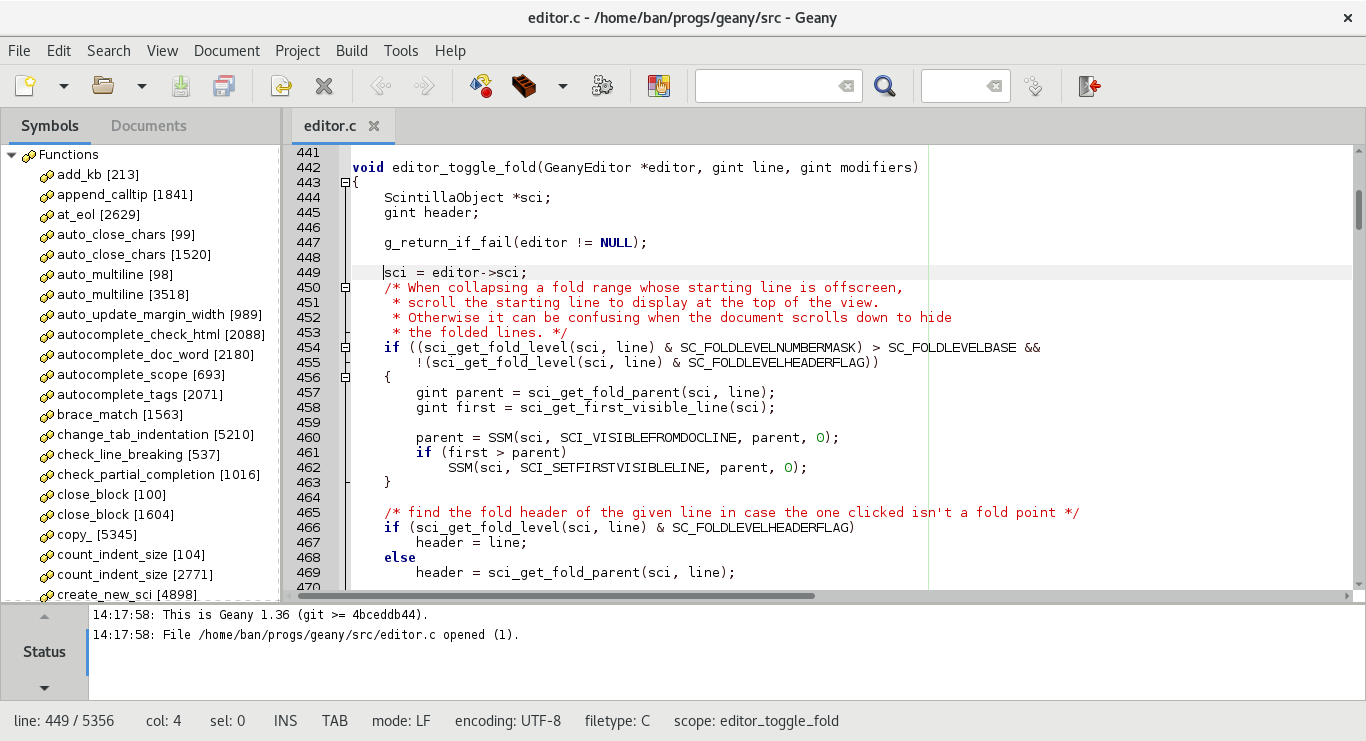
Re:A Quick Guide to Sublime Text by ozh on Monday April 14, 2014 @12:20PM (#7587050)
I'm used to something like this: http://i.imgur.com/gAQhd.png and I have a very hard time not using it (function list on the right). When hovering a function you also get a hint on parameters.
Re:A Quick Guide to Sublime Text by mixmastamyk on Monday April 14, 2014 @06:11PM (#7589249)