And color calibration.
>such as different HiDPI across multiple monitors
I had this working with multiple X11 servers 20 years ago.
>And that has changed in the past 2 years
I was told that exact same line 5 years ago. I guess it will be just as true in 5 years again.
You had to hack around X11's shorttcomings.
X11 does not support HiDPI or multiple DPI across multiple monitors without hacks and workarounds. Wayland does. That makes X a non-starter and Wayland the only choice for many users.
Wayland has clearly chosen a set of trade-offs that are far superior for a lot of users and I fully expect anybody sticking with X11 to gradually become more and more of an outlier over time, and that's entirely fine by me.
(I use fvwm2 with a sub-40 line config that starts by turning almost all the usual features off, plain xterm, and heirloom vi, I'm already perfectly used to being an outlier and so long as I can coax it all into keeping working I don't see any reason to complain that lots of other people prefer to use things from this century instead ;)
https://trout.me.uk/X11/fvwm2rc https://trout.me.uk/screenshot4.png
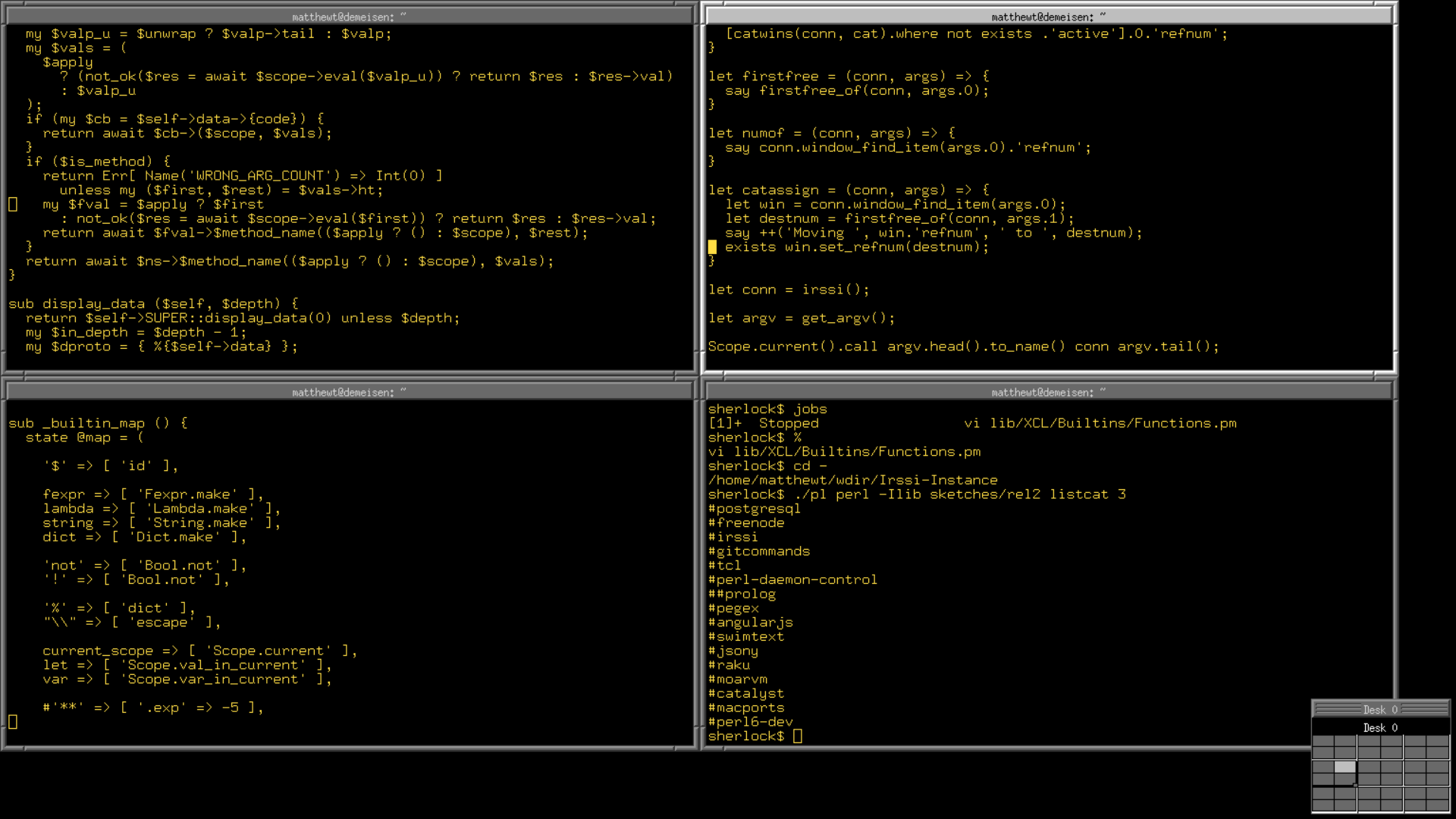
That gives me a 3x3 X11 screen of my actual screen size with the laptop screen acting as a scrolling viewport, keyboard shortcuts to jump one screen or one xterm's worth of screen at once (the xterms are launched pre-tiled by a script, I like that layout but I don't get on with tiling window managers) and rely heavily on focus follows mouse to be able to e.g. type into a window that's mostly covered by another one that I'm reading stuff from as I type.
Plus I'm currently running VcXsrv in full screen mode on a Windows 10 install connecting to WSL2 over local TCP, though so long as I can get "Alt-Tab to a full screen session with no windows title bar/etc. taking up space" -somehow- I'm not really tied to the X11 protocol, I'm looking at switching over to RDP anyway (and would accept VNC, I already use that for remoting to Debian and FreeBSD system out on t'internet but the full screen experience tends to be a tad inelegant at least with the client configs I've tried to date).
Now, if those both sound like they's at least -doable- with anything up to, say, a moderate amount of pain with Windows 10 acting as a client to all of WSL2 Debian, a 'real' debian install, and FreeBSD, I'm happy to endure lots of RTFM and some faffing to get there, but last time I tried I ended up at "either this isn't really possible yet or I've completely failed to find the correct FMs to R to figure it out."
If anybody has a minute, a reply to the effect of "yeah, not yet" or "here's what you should've read to realise it is actually possible and not -too- painful so long as you read all of these links carefully" would be appreciated and I'll go do the reading and try and find time to try it out (probably with the FreeBSD system as the thing running the RDP/VNC/whatever server first since I want to move my main firefox instance there) ... but I'm very much aware that my preferences and workflow are kinda weird and there are almost certainly higher ROI things for the relevant contributors to be spending their time on so I'm pretty comfortable with "Wayland should probably be the present or at least near future for most people but I may be staying on X11 for a while yet" as a situation :)
(yes, I know, but it all works for me)
People want to move windows between their screens.
The lack of proper HiDPI support was really starting to become a problem when trying to run Linux on a laptop that isn't from the early 2000s. Fortunately, with wayland, it now seems mostly solved (at least in Gnome and KDE).
Yes, you use he fact x is a network server and run each screen as a separate client.
X doesn't like this. Wayland works much better.
Wayland doesn't have all the features we'd like it to have yet, it's missing some big things like global hotkeys and color management. It's not moving as fast as I'd like, but all those things are being actively worked on.
X11 also doesn't have all the features we'd like it to have, such as the ability to render frames without tearing or the ability to lock the screen while a context menu is open or the ability to implement a desktop environment without a ton of race conditions. Those things are not being worked on, and X11 will actually regress as new hardware is released and developers don't focus on hacking X11 to work with that hardware.
For a lot of users (such as myself), Wayland is already better than X; there's a reason lots of distros ship Wayland by default now. The situation is certainly way better now than it was 5 years ago.
But that doesn't mean you have to use it! It's ready for you when it's ready for you, and maybe X's wonkyness doesn't annoy you or you've learned to hack around it (congrats on getting different DPI scaling on different monitors to work! I haven't, despite struggling with it. I didn't even know DPI scaling was a thing 20 years ago. Anyway, it worked out of the box on Wayland.)
What exactly do you mean? My Xorg setup can render frames without tearing just fine, both in video playback (VLC) and in games.
TBH i don't really care about tearing (since it tends to come with input lag even on desktop usage) aside from videos, so i haven't looked much into it. However people are working on tearing in Xorg - see the latest commits by Sultan Alsawaf on the xfree86 subtree[0] (which is the standalone X server). Specifically this[1] commit adds a "TearFree" page flip mode in the modesetting driver for not having any sort of tearing at any setup.
[0] https://gitlab.freedesktop.org/xorg/xserver/-/commits/master...
[1] https://gitlab.freedesktop.org/xorg/xserver/-/commit/a94dd95...
Note that i do have tearing in the desktop if i -e.g.- move windows around, but this is something i want as i do not like the slight input lag compositors add (even on my 165Hz monitor). However there isn't any tearing in VLC or in games (which, depending on the game, i might also run with VRR).
AFAIK the modesetting driver got VRR support only recently and the TearFree mode only just a few months ago so if you used that you might have used some older version.
Though if you tried a compositor, i don't remember using any compositor that didn't do some form of vsync to avoid tearing. I just started KDE Plasma with Xorg in another virtual terminal with its compositor and default settings (i started it as a different user with default settings that i sometimes use for testing) and there wasn't any tearing at all even on the desktop (again using the amdgpu driver).
I myself was not a fan of wayland either, due to a bunch of functionality removed which I use in my workflow, and will stick with XOrg until XFCE forces me to switch to Wayland.
There's a lot of churn in the Linux ecosystem, and some are going to be better received than others. I didn't see the point in Wayland (but I'm not a maintainer of XOrg code to understand how bad the codebase is), I see the principle behind ideas like Flatpak (although not sure if they have a good sandboxing story now, but they sure have their GBs of layers), but when it comes to pipewire, for example, I'm very happy that it exists.
I keep hearing this: "they've added things people care about, such as..." then a shopping list of utterly irrelevant stuff I can't even see.
>1 screen with different DPI is THE ONLY thing Wayland does that I want.
I don't give a flying monkey about rendering pipelines, refresh rates, tearing, or any of that stuff.
If someone found a way to add variable DPI to Xinerama, job done, and I could continue to use X for another decade or two, and ignore the weird arcane stuff that the Wayland folks want and AFAICS nobody else cares about...
Just as with GNOME, or systemd, or OStree, or Flatpak, or almost anything else new out of Red Hat and its community in the last decade.
What does different DPI mean for you though?
Xinerama causes the server to report the same fake DPI across monitors for backwards compatibility reasons (last year or so Xorg was released with a better approximation for DPI but it apparently broke a bunch of programs so it was reverted in the next release), but applications that care about DPI can still use the RandR extension to obtain not only per-output DPI but all sorts of output-specific information.
The X server had functionality for years, from what i can tell the issue isn't on X11/Xorg/Xinerama/Xwhatever anymore but on the clients (toolkits, window managers, etc) to use it to do something useful.
1. The toolkit/applications needs to support scaling, preferably using arbitrary (aka fractional) scaling.
2. The window manager needs to obtain per-output (output=monitor) DPI and associate a scaling value for each output (note that scaling and DPI are not necessarily tied - someone might e.g. want a high scaling factor for a secondary 1440p monitor because they have it farther away than their primary monitor).
3. The application/toolkit needs to tell to the window manager that it supports scaling as well as know that the window manager supports scaling. Window properties can be used to do that.
4. The window manager needs somehow to communicate to the toolkit/application to scale a window. This can happen either because the window was dragged to a monitor (output) with different output but it could also be because, e.g. the user explicitly requested to scale a window from the window menu (e.g. for making a screencast for youtube). This "somehow" is basically a set of messages since the mechanism is already used for other things already.
5. If a toolkit/application does not support scaling (i.e. it does not have the appropriate properties) the window manager may decide to fake it itself (e.g. by redirecting the window output to a pixmap and then drawing that pixmap scaled). If a toolkit/application does support scaling but the window manager doesn't then it is up to the toolkit/application to decide, e.g. it may do its own scaling by tracking the output the window is and scaling itself appropriately (this will need some heuristics to avoid being too janky as the toolkit/application is essentially taking over part of what the window manager's job and toolkits/applications may just not want to do that).
If it isn't already obvious, the issue here is that this concerns multiple entities:
1. There needs to be some sort of commonly accepted messages and properties for the window managers and applications to communicate scaling.
2. Toolkits (and applications that use custom toolkits) need to implement support for scaling and handling the above messages and properties.
3. Window managers also need to implement the above messages and properties, implement some sort of scaling configuration and use the appropriate RandR functionality to setup initial per-output scale configuration.
AFAIK of all the above the only thing that exists is that the X server can provide the necessary information and Qt supports fractional scaling. AFAIK it also can use its own root property to set per-output scaling but it does the scaling itself independent from the window manager so it is far from ideal.
For the rest basically the toolkit and window manager developers need to be convinced to work on it and also come up with a common message/property protocol, both of which IMO are the hard parts - compared to that, the technical side is easy :-P.
You say:
> If it isn't already obvious,
None of this is obvious. I think to most Linux users, that is impenetrable. It is to me, I'm afraid.
But you could potentially do the X.org world a big favour by developing that comment into a detailed blog post, with examples and hypothetical proposals of how to do it.
Given (a lot) more info, I would like to write about this.
ISTM that X.org and X11 in general is on the threshold of dying from neglect in the next year or two, and unless the people who understand the issues step up and explain them to the general FOSS world, so that someone can see if maybe they could start to work on them, it will die... just because nobody could be bothered to keep it alive.
And since there isn't a single Wayland environment I personally can stomach using, that would be a very bad thing IMHO.
Currently the choices are two raging trash fires of CADT development and vanity, and a handful of weird tiling window manager things.
FWIW i don't exactly know "who" needs to do what either - that is the issue really, in order to get that in the X11 world you need several different people and projects to care to work together. AFAICT most don't really seem to care to make an organized thing.
The main reason Wayland sidesteps some of that is that a Wayland compositor combines the graphics system, the window system and the window manager in one program, meaning that one project can solve everything itself (even if all compositors need to solve it separately), however with X11 you need all window managers and all toolkits to coordinate with each other.
The other reason is that Wayland has buy-in from the two major toolkits, Gtk and Qt. I have a feeling that even if there was an X11 coordination to implement mixed DPI functionality at least Gtk wouldn't bother with it as they want to remove X11 support in Gtk5.
> None of this is obvious.
Well, that was tongue in cheek, i meant that the obvious thing was that it is a mess :-P.
> ISTM that X.org and X11 in general is on the threshold of dying from neglect in the next year or two [...] And since there isn't a single Wayland environment I personally can stomach using, that would be a very bad thing IMHO.
IMO any news of Xorg death are somewhat exaggerated, as i wrote in another reply a couple of days ago, both Xorg and Wayland compositors use the same underlying kernel APIs to access the hardware so if nothing else your current environment will keep working for the foreseeable future. Also i've dabbled a bit in the Xorg code myself and i'm certain it isn't that hard to keep it in working condition - the biggest issue might be people interested in merging patches and making releases but so far it seems to be people who are interested in that.
100% believe that and that it's a big problem.
I've seen some say that Xenocara in OpenBSD is the only project with some active R&D going into this today. Any comments on that?
> AFAICT most don't really seem to care to make an organized thing.
Definitely. Of course, if someone somewhere were paying it might be different...
> The main reason Wayland sidesteps some of that is that a Wayland compositor combines [...]
If I may attempt, and this is not meant to be rude, to say what I think that would come across to most even quite nerdy folk as:
Wayland combines tech, tech and tech, but tech still has to tech, whereas with X11, you have to tech, tech and tech separately, and then tech some tech alongside a tech.
I am using [TECH] in the way it was apparently used in Star Trek scripts: https://memory-alpha.fandom.com/wiki/Technobabble
> The other reason is that Wayland has buy-in from the two major toolkits, Gtk and Qt.
That's a much bigger issue.
I suspect GNOME 4, aka 3.40, aka 40, is revealing a bigger problem. Just as all the other desktops got up to speed with Gtk 3, GNOME yanked the rug out from under them with Gtk 4.
The GNOME team don't seem to me to care at all about other desktops, and they don't care much about their users' preferences either.
The attitude seems to me to be:
"Hey, Steve Jobs just gave them what he thought they needed, and they loved it, so we can do the same! He took away all their buttons and ports and slots and so on, and made it super simple, and the company is worth trillions! So we can just take away all those options and buttons and functions, all the junk we don't use, like themes and stuff, and they will love it!"
Any project that isn't directly affiliated with GNOME will come to regret using Gtk in time, I suspect.
Qt sounds better, from my uninformed outsider perspective, but I don't know much at all. AIUI the price of entrance is you must use C++ or have a 2nd class experience, and a lot of people don't like C++.
Maybe this is the big chance for the GoLang or DLang folk to prove themselves: do some better, modernised version of one of the other toolkits, say one from olden times like XForms or something, and offer a compelling alternative that's 100% FOSS, and accessible from other languages, not just their pet one.
Not exactly, they have thrown out everything that almost nobody uses - such as networking. They have, however, added things that most people do care about - such as different HiDPI across multiple monitors and an extremely thin (low latency) render path.
> That Wayland is 10 years old and still barely usable
And that has changed in the past 2 years (with exception to whatever Ubuntu does to screw it up, but such is Ubuntu).